Tutorials · Navigation and AI · Chapter 10
A changing map
By the end
- A region of the sheet,
door_closed, and the kitchen door with a Collider, a flap anddoor.rgs: shut, it is a wall to the thief, to the guards’ eyes and to the map lever, an Area by the door that the thief pulls by brushing past it, withlever.rgs- A guard on his way through the door when it shuts goes round by the corridor, with no script: the map changes, and every walker on it plans again
cat.rgs: the cat creeps through the shut door’s flap, and while it sits it is in the waypots.rgs: the pots knocked askew, and the pans they drop priced on the map
On this page
A door that shuts
Until now the keep’s map was baked once, as Play started, and never changed. In this chapter it changes while the game runs. The kitchen door shuts and opens, a cat sits in the way and gets up again, and pans fall onto the kitchen floor. The map follows each change by itself, and so does every walker on it.
The kitchen door is a picture cut from the sheet by the region door_open: a doorway with its door swung back. Shut, it needs a second picture, which is on the same sheet, two tiles below, but has no name yet. The Sprite sheet tab names it.
- In Assets, open
artand double-clicktilemap_packed.png. The Sprite sheet tab opens on it, over the Viewport. - In its Grid, set Cell to
16and16: click the w box once, type16and press Enter, then the same in the h box. The tab now reads 12 x 11 cells, one for each tile. - Click the cell four rows down and ten across: a wooden door shut in its arch. Its outline turns orange, and the bar under the sheet says Selected 1 x 1.
- In the Regions band, click the Name box, type
door_closed, and press Name it. It joins the list underbarrel.
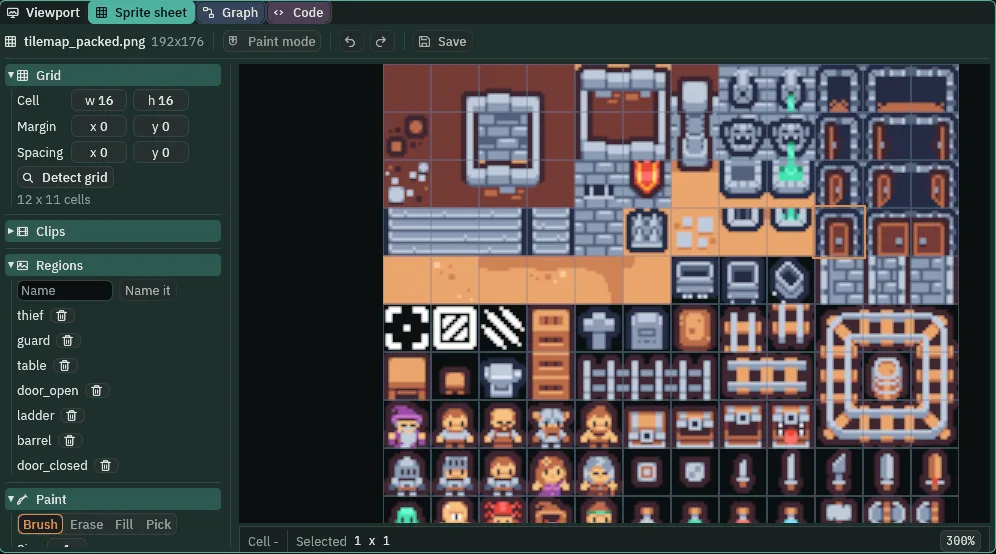
door_closed in the Regions list. The Clips band is folded here so that the whole list shows.- The Sprite sheet tab’s Cell
- The size of one cell of the tab’s grid, in the sheet’s pixels. The tab opens at
32by32; the keep’s tiles are16by16, so16puts one cell round each tile. - A region
- A rectangle of the sheet with a name, kept in the sheet’s
.metabeside it. A Sprite shows it by name in its Atlas Region.door_closedis144,48,16 × 16: its left, its top, its width and its height, in the sheet’s pixels. Naming it writes it at once; there is nothing to save.
The door itself gets three things: a box that can stop her, a flap the cat will use, and a script that shuts and opens both. The box comes first.
- Select
door_kitchenin the Hierarchy. Click Add component and choose ColliderComponent. - Set its Size to
16and16, clicking each box once, typing and pressing Enter: the doorway, one tile. Untick Solid: the door stands open. Layer stays as it comes,1.
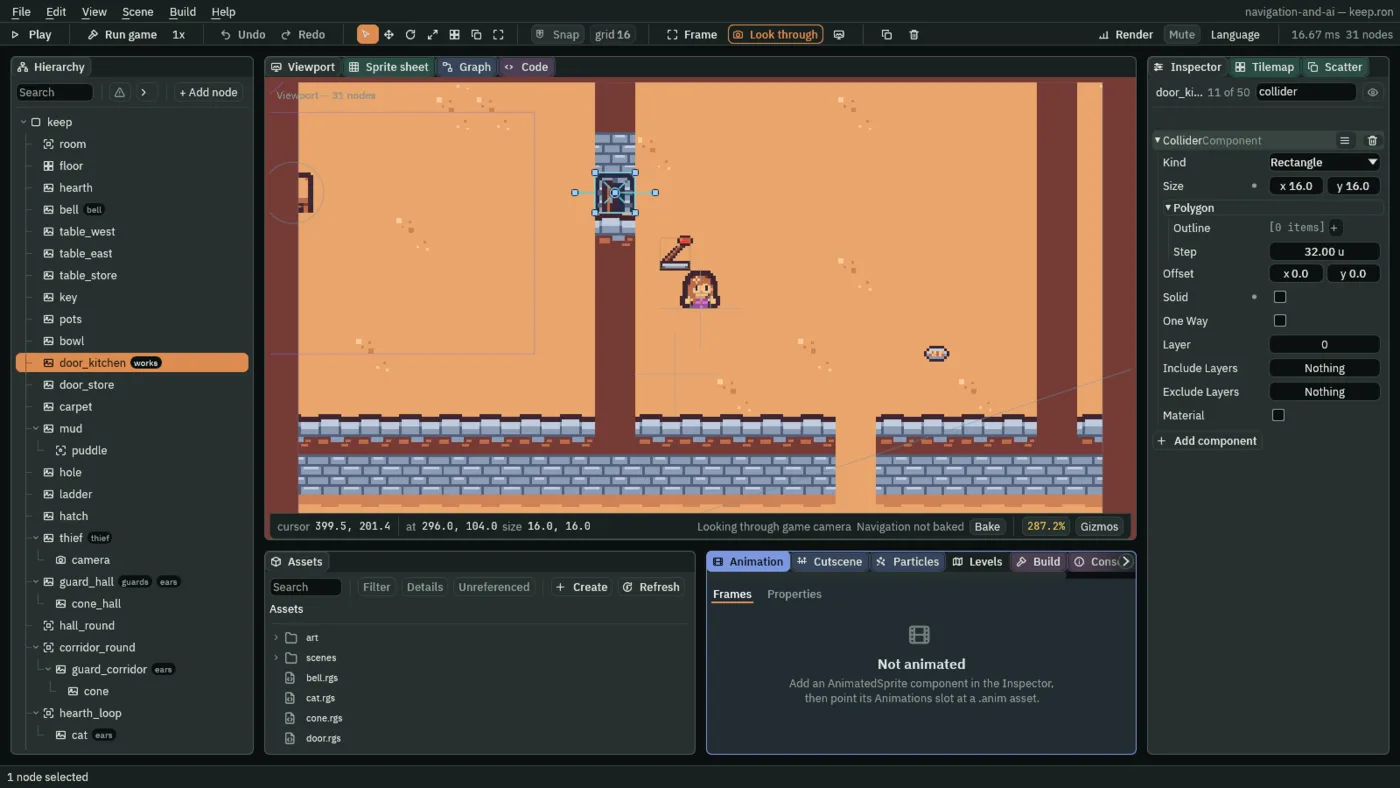
- Collider Size
- The Collider’s box, in world units, about its node:
16by16fills the doorway exactly. A new Collider’s is64by64. - Collider Solid
- Whether the box stops what walks into it. Unticked, the door is open: her body walks through it, his eyes see through it, and the map counts the doorway as floor. Ticked, it is a wall to all three. Its script ticks and unticks it; you leave it unticked, as the game starts with the door open.
- Collider Layer
- The collision layer the box is on:
1, the walls’ layer, so that the guards’ eyes, which look for walls on layer1, and the region’s Mask, which holds1, both take it for a wall. The row shows it as0: an unnamed layer’s box is labelled by its place from0, as the region’s Mask was in chapter 2.
The flap is a Nav Link across the door, from the hall’s side to the kitchen’s, which only the cat may use. The guards never take a link: their Use Links has been unticked since chapters 6 and 8. The cellar’s hatch stays shut, as chapter 4 left it: the flap is the link this chapter switches.
- With
door_kitchenstill selected, click Add component and choose NavLinkComponent. - Set From to
-16,0and To to16,0: a tile into the hall and a tile into the kitchen. Tick Both Ways. Untick Enabled: the flap is shut while the door is open. Set Cost to2. Teleport stays unticked.
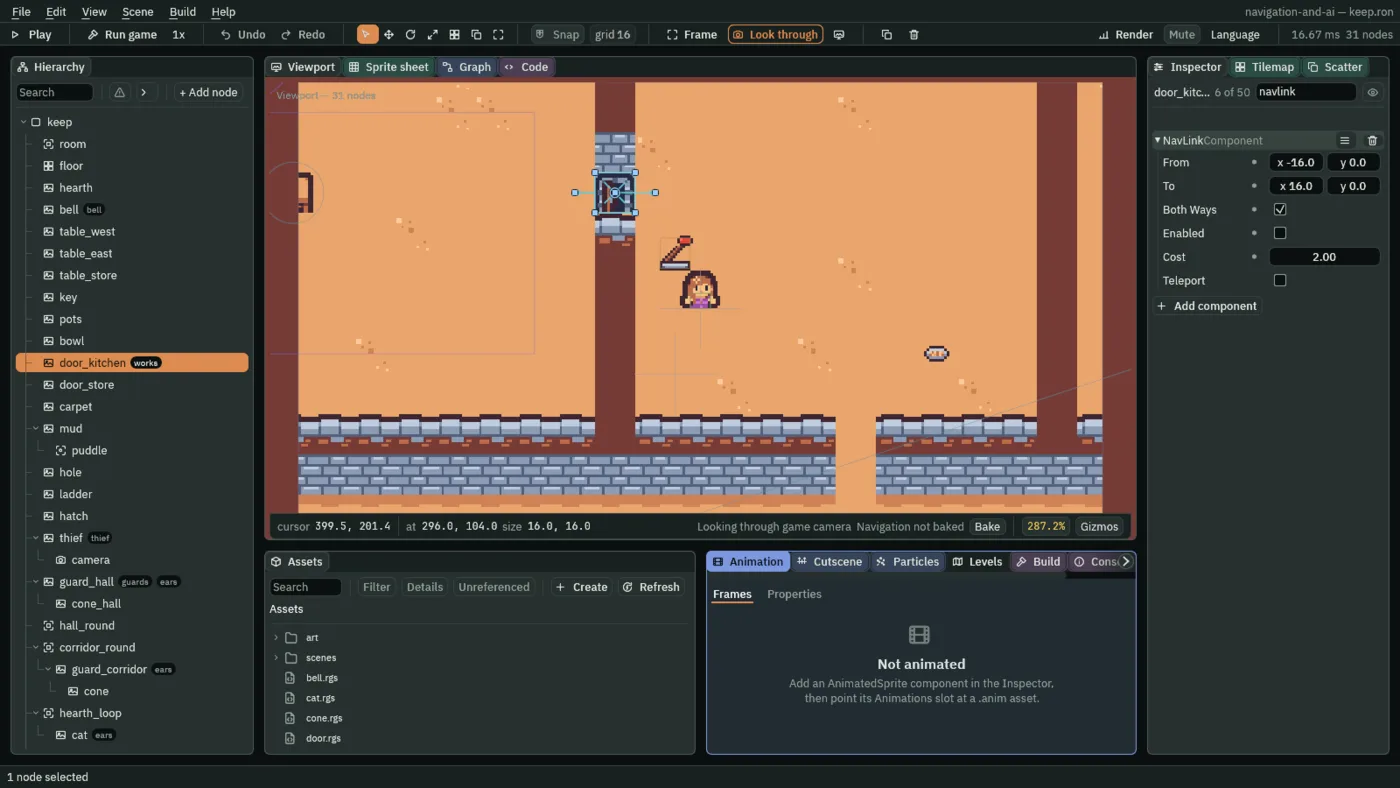
- The flap’s From and To
- The Nav Link’s From and To, from the door’s middle:
-16,0is the hall floor in front of it and16,0the kitchen floor behind it. The link joins the cells under its two ends. - The flap’s Both Ways
- The Nav Link’s Both Ways, ticked: the cat goes through from either side.
- The flap’s Enabled
- The Nav Link’s Enabled, unticked as the game starts: drawn dashed with an X, it is not on the map. The door’s script ticks it as the door shuts and unticks it as it opens, so the flap is a way only while the doorway is not.
- The flap’s Cost
- The Nav Link’s Cost,
2: the32units across cost what64of floor would. A way round by the corridor is far longer, so the flap is still the cat’s way. - The flap’s Teleport
- The Nav Link’s Teleport, left unticked: the cat walks across, which takes time, rather than appearing on the far side.
- With
door_kitchenstill selected, under Groups, typeworksinto Add group and press Enter: the group the lever will speak to. - In Assets, press Create, choose New script, type
door, and press Enter. In the Code tab, replace everything indoor.rgswith the script below, and press Ctrl+S. - Select
door_kitchen, click Add component and choose Door. Shut is greyed: its script sets it. - Press Ctrl+S.
/// The kitchen door. The lever shuts it, and opens it again. Shut, it is a
/// wall to the thief, to a guard's eyes and to every walker's map; only the
/// cat gets through, by its flap.
component Door {
    /// Whether it is shut.
    #[readonly]
    shut: bool = false,

    fn on_signal() {
        if heard("pulled") {
            shut = !shut;
            set_flag("ColliderComponent", "solid", shut);
            set_flag("NavLinkComponent", "enabled", shut);
            if shut {
                set_text("SpriteComponent", "region_name", "door_closed");
            } else {
                set_text("SpriteComponent", "region_name", "door_open");
            }
        }
    }
}
heard("pulled")- True on the step the signal
pulledreaches the door: the lever sends it to the groupworks, next section. shut = !shut!turns true into false and false into true. Each pull turns the door over: open to shut, shut to open. Shut shows which, greyed, in the Inspector.set_flag("ColliderComponent", "solid", shut)andset_flag("NavLinkComponent", "enabled", shut)- Chapter 9’s set_flag, on two more components of the same node: the Collider’s Solid and the flap’s Enabled take the door’s new state. Each lands from the next step on.
- set_text
- Writes text onto another component on this node.
set_text("SpriteComponent", "region_name", "door_closed")sets the Sprite’s Atlas Region, so the door shows the region you named above;door_openshows the open one again.
A lever you brush past
The lever stands on the kitchen floor beside the door. Its picture, lever.png, came with the starter, in art. Like the pots, it is an Area that notices her Area; brushing past it is enough to pull it.
- Select
keep, press + Add node, choose Sprite, and rename itlever. - Set its Position to
320,128. Dragart/lever.pngfrom Assets onto its Texture, set Size to16,16, and set Sort Layer to1, with the furniture. - Click Add component and choose AreaComponent. In its Shape, set Size to
12and12. - In Assets, press Create, choose New script, type
lever, and press Enter. In the Code tab, replace everything inlever.rgswith the script below, and press Ctrl+S. - Select
lever, click Add component and choose Lever. - Press Ctrl+S.
/// The kitchen's lever. The thief brushing past it pulls it, and everything
/// it works hears it was pulled.
component Lever : Area {
    /// Whether it is pulled down.
    #[readonly]
    down: bool = false,

    fn on_enter(other: NodeId) {
        if in_group(other, "thief") {
            down = !down;
            set_flag("SpriteComponent", "flip.x", down);
            emit_to("works", "pulled");
        }
    }
}
- The lever’s Area Shape Size
12by12, a little smaller than its picture: she pulls it by walking over it, not by passing near.set_flag("SpriteComponent", "flip.x", down)- Mirrors the lever’s picture left to right while it is down: it leans left, pulled, and right again, up.
flip.xreaches the X of the Sprite’s Flip. emit_to("works", "pulled")- Tells every node in the group
works, which is the door, that the lever moved. The door does not care which way: eachpulledturns it over. - Down
- The Lever’s one field, greyed: whether it is pulled down.
- Press F5. Walk the thief through the kitchen door and over the lever, on the floor just inside. The lever leans left and the door shuts behind her.
- Walk her back at the door: she stops against it. Walk her over the lever again, and the door opens. Press F5 again to stop.
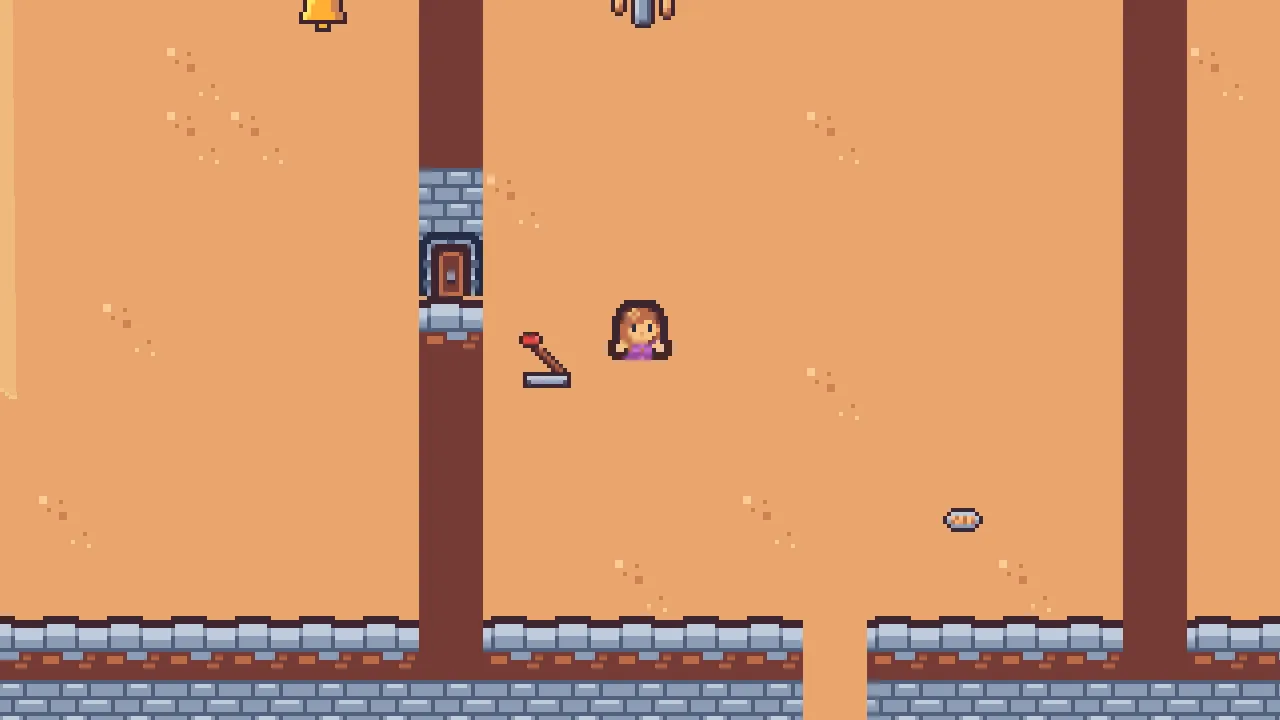
The door shuts on the third step after she touches the lever: on the first the lever hears her and sends pulled, on the second the door hears it and writes its Solid, and on the third that write has landed. Signals and the writes they cause each take a step.
A way that breaks mid-walk
A walker on its way through the kitchen door when it shuts must go round. Nothing in its script asks for that. The game’s map counts the shut door as a wall from the step Solid lands, bakes again the part of the map it touches, and every walker on that map plans its way again.
The game does not bake the whole keep again. It bakes only the squares of 8 by 8 cells that the change touches: for one door, a square or two of the keep’s 3520 cells, a few thousandths of a millisecond. So a door, a sitting cat or a fallen pan can change the map on any step without a pause you could feel.
- The Nav Link’s Enabled, switched while the game runs
- A link switched on is on the map from the step its Enabled lands, and every walker that may use links plans again; switched off, it is gone from the map, and a walker on its way across it plans another way. The flap is switched by
door.rgs. - The Nav Obstacle’s Enabled, switched while the game runs
- An obstacle switched on blocks its disc from the step it lands; switched off, the floor under it is open again. The cat’s is switched by
cat.rgs, below. - The Nav Cost’s Enabled, switched while the game runs
- A price switched on is on the map from the step it lands, and walkers plan their ways with it; switched off, the floor costs what it did before. The pans’ is switched by
pots.rgs, below.
To watch a way break, send the hall guard through the door by hand, in Play, and shut it in front of him.
- Press F5. Walk the thief through the kitchen door and straight on east, above the lever, to the kitchen’s far side. The door stays open.
- Select
guard_hall, typenavagentinto the Inspector’s search box and press Enter. Set his Target to400,104, in the kitchen. Leave Moving as it is: he is walking his round, so it is already ticked. Press Bake on the strip, and in its Gizmos menu leave Routes and Navigation ticked. His way runs through the kitchen door. - Before he reaches the door, walk the thief back west along the lever’s row, a little below the door, and over the lever. Watch his way.
- Press F5 again to stop. The Target you typed in Play is gone, as everything set in Play is.
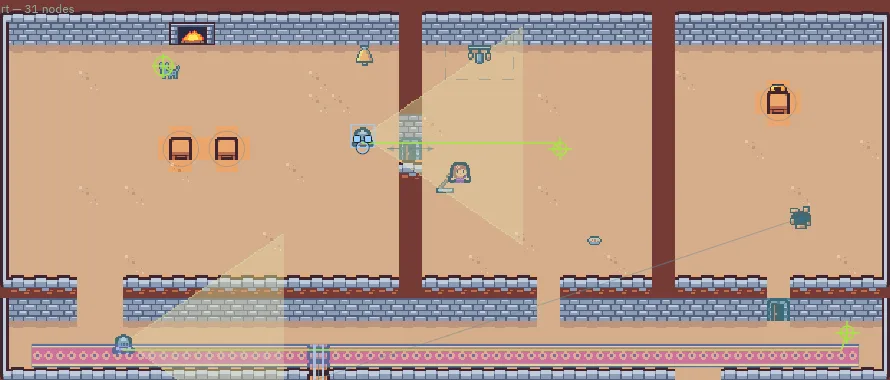
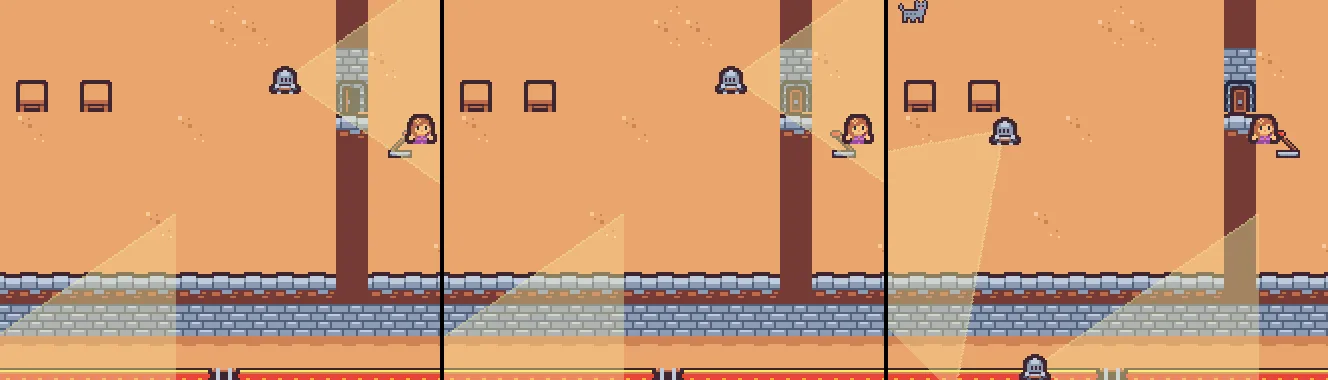
400, 104 from the start, as the step types it, and the thief walked west from the kitchen’s east side the whole run. The camera was pulled back for this picture.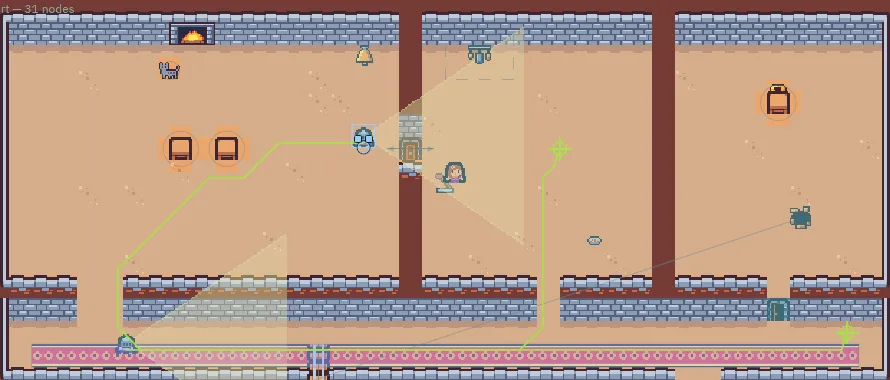
The same run in the game: before, as the door shuts, and on his way round.
The cat’s flap
The flap is on the map only while the door is shut, and only a walker whose Use Links is ticked may take it: the cat. Through a flap a cat goes slowly, so its script slows it while it crosses. And a cat that sits down in a doorway is in everyone’s way: the cat gets a Nav Obstacle, on while it sits.
- Select
cat. Click Add component and choose NavObstacleComponent. Set Radius to6. Enabled stays ticked: the cat starts sitting, and its script switches it after. - Click the Code tab, then
cat.rgsin its Scripts list. Replace everything in it with the script below, and press Ctrl+S. Its two new fields, Creep and Pace, show in the Cat at10.00 uand30.00 u, as the script declares them. - Press Ctrl+S.
/// The cat wanders: it picks a spot near by that it can reach without going
/// the long way round, walks there, sits a while, and picks again. A noise
/// stops it where it stands. Sitting, it is in the way, and a walker steps
/// round it. Through the kitchen door's flap it creeps.
component Cat {
    /// How far from where it sits it looks for a spot, each way.
    #[suffix("u")]
    reach: f32 = 80.0,
    /// The longest way round it will walk to reach a spot.
    #[suffix("u")]
    longest: f32 = 160.0,
    /// Steps left to sit before it picks again.
    #[readonly]
    sitting: i32 = 60,
    /// Whether it is on its way somewhere.
    #[hidden]
    walking: bool = false,
    /// How fast it creeps through the flap.
    #[suffix("u")]
    creep: f32 = 10.0,
    /// How fast it walks.
    #[suffix("u")]
    pace: f32 = 30.0,

    fn loop() {
        if walking {
            sitting = 0;
        } else if sitting > 0 {
            sitting -= 1;
        } else {
            let spot = position() + vec2(random(-reach, reach), random(-reach, reach));
            if can_reach(spot) && road_distance(spot) < longest {
                walk_to(spot);
                walking = true;
            }
        }
        set_flag("NavObstacleComponent", "enabled", !walking);
    }

    fn on_signal() {
        if heard("noise") && walking {
            stop_walking();
        }
        if heard("nav:no_way") {
            sitting = 30;
        }
        if heard("nav:arrived") {
            sitting = 120;
        }
        if heard("nav:ended") {
            walking = false;
            if sitting == 0 {
                sitting = 180;
            }
        }
        if heard("crossing:door_kitchen") {
            set_number("NavAgentComponent", "speed", creep);
        }
        if heard("crossed:door_kitchen") {
            set_number("NavAgentComponent", "speed", pace);
        }
    }
}
crossing:door_kitchen- The signal a walker’s node hears when it starts across a link, named by the link’s node: here the flap on
door_kitchen. It is heard on the step after the walker stepped onto the link. A link is crossed in a straight line, by position, so the shut door’s Collider does not hold the cat back. crossed:door_kitchen- The signal it hears when it reaches the link’s far end and walks on, on the step after.
- Creep and Pace
- The Cat’s two new fields, in world units a second. On
crossing:door_kitchenthe script writes Creep,10, onto its Nav Agent’s Speed withset_number, from chapter 8; oncrossed:door_kitchen, Pace,30, its old speed. - The cat’s Nav Obstacle Radius
- The Nav Obstacle’s Radius,
6: a disc about the size of the cat, which the region’s Clearance of3grows to9, as it grew the tables’. - The cat’s Nav Obstacle Enabled
- The Nav Obstacle’s Enabled, switched on every step by
set_flag("NavObstacleComponent", "enabled", !walking): on while the cat sits, off while it walks. A walking cat is not in the way, since it moves; under a sitting one, the cells of its disc are off the map.
- Press F5. Walk the thief into the kitchen and over the lever, so that the door shuts, and step off the lever.
- Select
cat, and typenavagentinto the Inspector’s search box. Wait for its wander to pick a spot beyond the door: its way runs through the flap, and its Speed reads10.00while it creeps through. It may take a while: the cat picks its spots by chance. Press F5 again to stop.
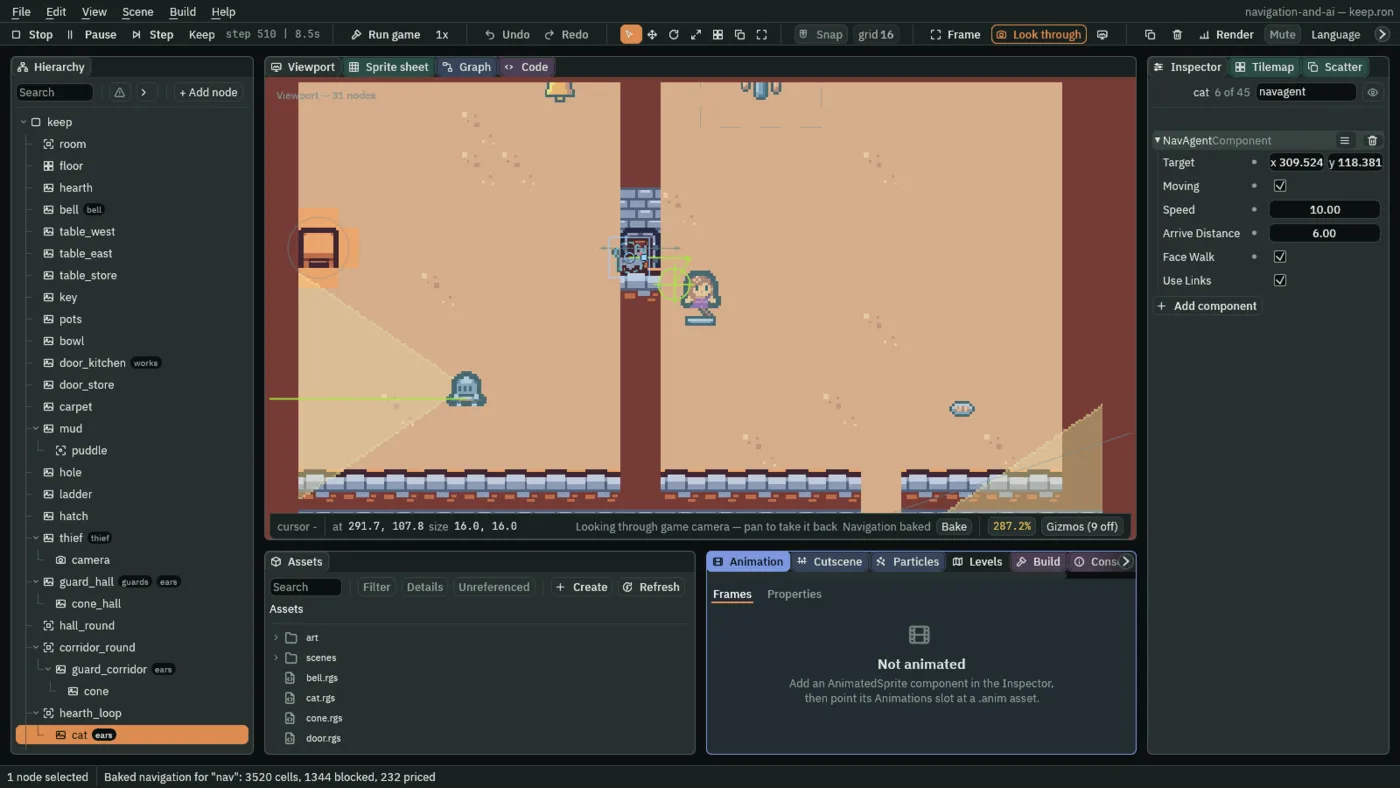
10.00. Your cat crosses at another time: random picks its spots. For this picture the thief stood on the lever from the start, so the door shut on the third step, and the cat started by the door in the hall.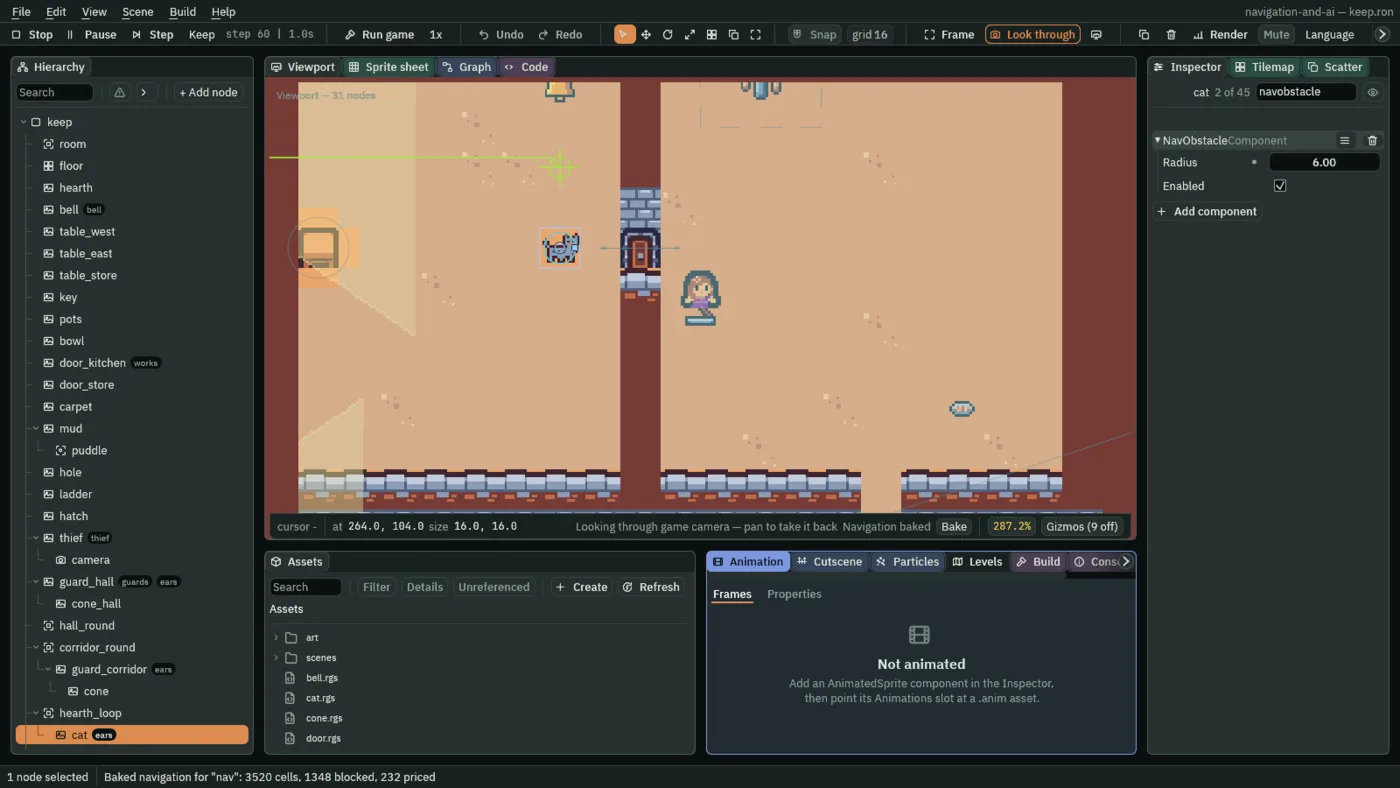
Pans that fall
The pots hang on the kitchen’s top wall. Knocked, they swing askew and drop their pans on the floor under them: floor a walker can cross, but at a price, as the courtyard’s mud. A Nav Cost saved off, and switched on by the knock, puts the price on the map.
- Select
pots. Click Add component and choose NavCostComponent. Set Size to48,32: three tiles by two, under the pots. Set Cost to4. Untick Enabled: the pans hang until she knocks them. - Click the Code tab, then
pots.rgsin its Scripts list. Replace everything in it with the script below, and press Ctrl+S. - Press Ctrl+S.
/// The kitchen's pots and pans. The thief knocking into them makes a noise
/// that everyone listening hears, and where it was is kept. The pans fall
/// and the pots hang askew: a walker steps round the floor the pans cover.
component Pots : Area {
    fn on_enter(other: NodeId) {
        if in_group(other, "thief") {
            keep_point("noise", position());
            emit_to("ears", "noise");
            set_flag("NavCostComponent", "enabled", true);
            anneal_rotation(0.4, 0.2, .OutQuad);
        }
    }
}
- The pans’ Nav Cost Size and Cost
- The Nav Cost’s Size,
48by32about the pots, is the floor the pans cover; its Cost,4, makes each unit of it cost four of open floor on the map, as the mud. - The pans’ Nav Cost Enabled
- The Nav Cost’s Enabled, saved unticked: the price is not on the map until
set_flag("NavCostComponent", "enabled", true)ticks it, from the step after she knocks the pots. Nothing unticks it again: the pans stay where they fell. anneal_rotation(0.4, 0.2, .OutQuad)- Chapter 7’s anneal_rotation, on the pots: they turn to
0.4of a radian, about 23 degrees, over0.2s, and hang there.
- Press F5. Walk the thief through the kitchen door and up into the pots. They swing askew.
- Select
pots, typenavcostinto the Inspector’s search box, and press Bake on the strip: Enabled is ticked, and the floor under the pots is washed as the mud is. Press F5 again to stop.
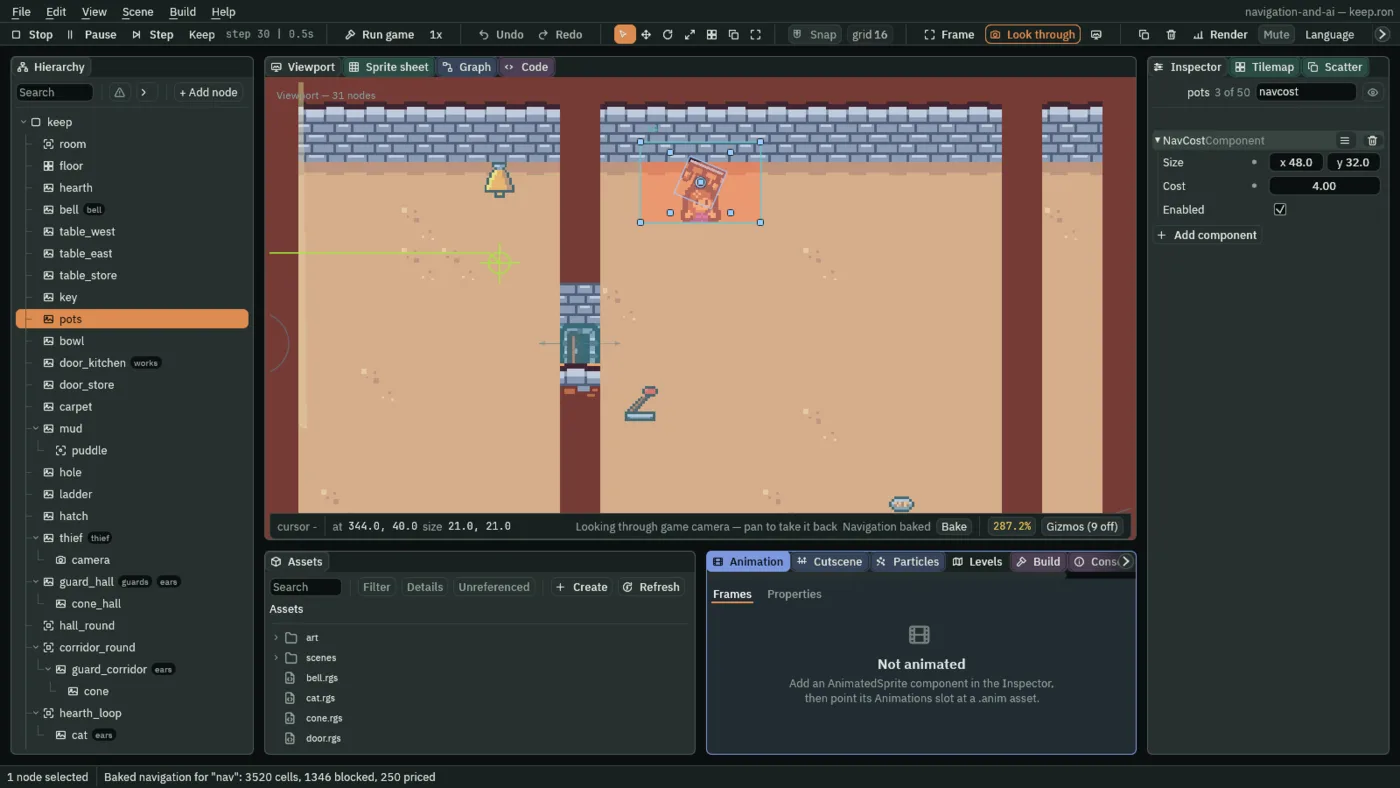
250 cells priced where there were 232. For this picture the thief was placed on the pots from the start.What the chapter set
| Node | Component | Field | Value |
|---|---|---|---|
tilemap_packed.png | region | door_closed | 144, 48, 16 × 16 |
door_kitchen | node | Groups | works |
| Collider | Size | 16, 16 | |
| Solid | unticked | ||
| Nav Link | From | -16, 0 | |
| To | 16, 0 | ||
| Both Ways | ticked | ||
| Enabled | unticked | ||
| Cost | 2 | ||
| Door | added |
| Node | Component | Field | Value |
|---|---|---|---|
lever, under keep | node | Position | 320, 128 |
| Sprite | Texture | lever.png | |
| Size | 16, 16 | ||
| Sort Layer | 1 | ||
| Area | Shape Size | 12, 12 | |
| Lever | added |
| Node | Component | Field | Value |
|---|---|---|---|
cat | Nav Obstacle | Radius | 6 |
| Cat | Creep, Pace | 10, 30, as the script declares them | |
pots | Nav Cost | Size | 48, 32 |
| Cost | 4 | ||
| Enabled | unticked |
Every other field is as it comes: the door’s Collider Layer 1, shown as 0, and its flap’s Teleport unticked; the cat’s Nav Obstacle Enabled ticked.