Tutorials · Navigation and AI · Chapter 4
Shortcuts
By the end
- A Nav Link on
holethat drops from the store room to the cellar, one way and at once, at half the price of walking as far - A Nav Link on
ladderbetween the corridor and the gallery, climbed both ways at three times the price - A Nav Link on
hatchfrom the cellar to the courtyard, switched off: drawn dashed and crossed
On this page
The cellar hole
Chapter 2 left the cellar and the gallery as islands: floor on the map, but no floor joining them to the rest. A wall stays a wall. What crosses it is a Nav Link: a line from one point to another that a walker may take where no floor joins them. The keep has three, each on the picture it stands for, which came with the starter: the hole in the store room’s floor, the ladder down from the corridor, and the hatch in the cellar.
The hole is a way down. A walker in the store room may drop through it and land in the cellar, at once, and there is no climbing back.
- Select
holein the Hierarchy: the dark hole near the store room’s south wall. Click Add component and choose NavLinkComponent. - From stays
0,0: the hole’s own middle. Set To: click its x box once, so that its number is selected, type-480and press Enter; then click its y box once, type160and press Enter. That is480to the left and160down from the hole: the middle of the cellar. - Set Cost to
0.5the same way, and tick Teleport. Both Ways stays unticked and Enabled stays ticked.
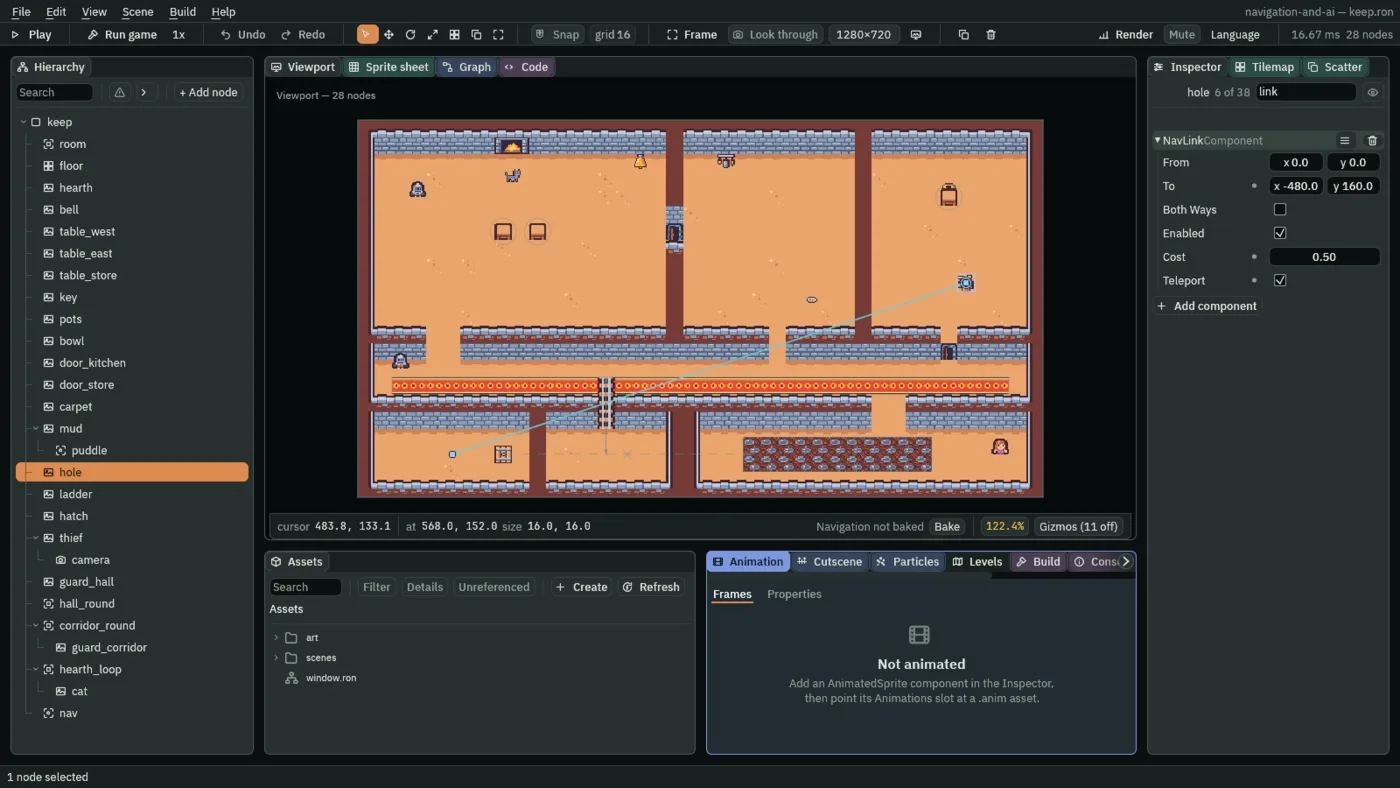
- From
- The Nav Link’s From: where it starts, in world units, measured from its node, so the link moves with the node. A new link’s is
0,0, the node itself, and the hole keeps it: a walker on the hole’s floor is at the start of the link. The map joins the floor cell under each end; an end that falls on a wall is joined to the nearest floor within two cells. - To
- The Nav Link’s To: where it ends, in world units from its node, as From is. A one-way link goes from From to To and never back. The hole’s
-480,160reaches from the store room to the cellar’s middle. A new link’s is0,-64, four tiles up. - Cost
- The Nav Link’s Cost: how many times dearer crossing it is than walking as far. Under
1it is a shortcut, over1a way taken only when the floor is dearer still. The hole’s0.5makes a drop of about 506 units cost what 253 units of floor cost. A new link’s is1; it cannot go under0. - Teleport
- The Nav Link’s Teleport: ticked, a walker that reaches From is put at To in one step, as a drop is; unticked, it is carried along the line from end to end at the walker’s own speed, as a climb is. A new link’s is unticked. The hole ticks it: a cat does not float down through the corridor.
The ladder
The ladder hangs from the corridor’s floor down into the gallery. Unlike the hole it goes both ways, and climbing it is slow: it costs three times what walking as far costs.
- Select
ladderin the Hierarchy. Click Add component and choose NavLinkComponent. - Set From to
0,-24, clicking each box once, typing and pressing Enter: the ladder’s top, on the corridor’s floor. Set To to0,48: past its foot, on the gallery’s floor. - Tick Both Ways, and set Cost to
3. Teleport stays unticked and Enabled stays ticked.
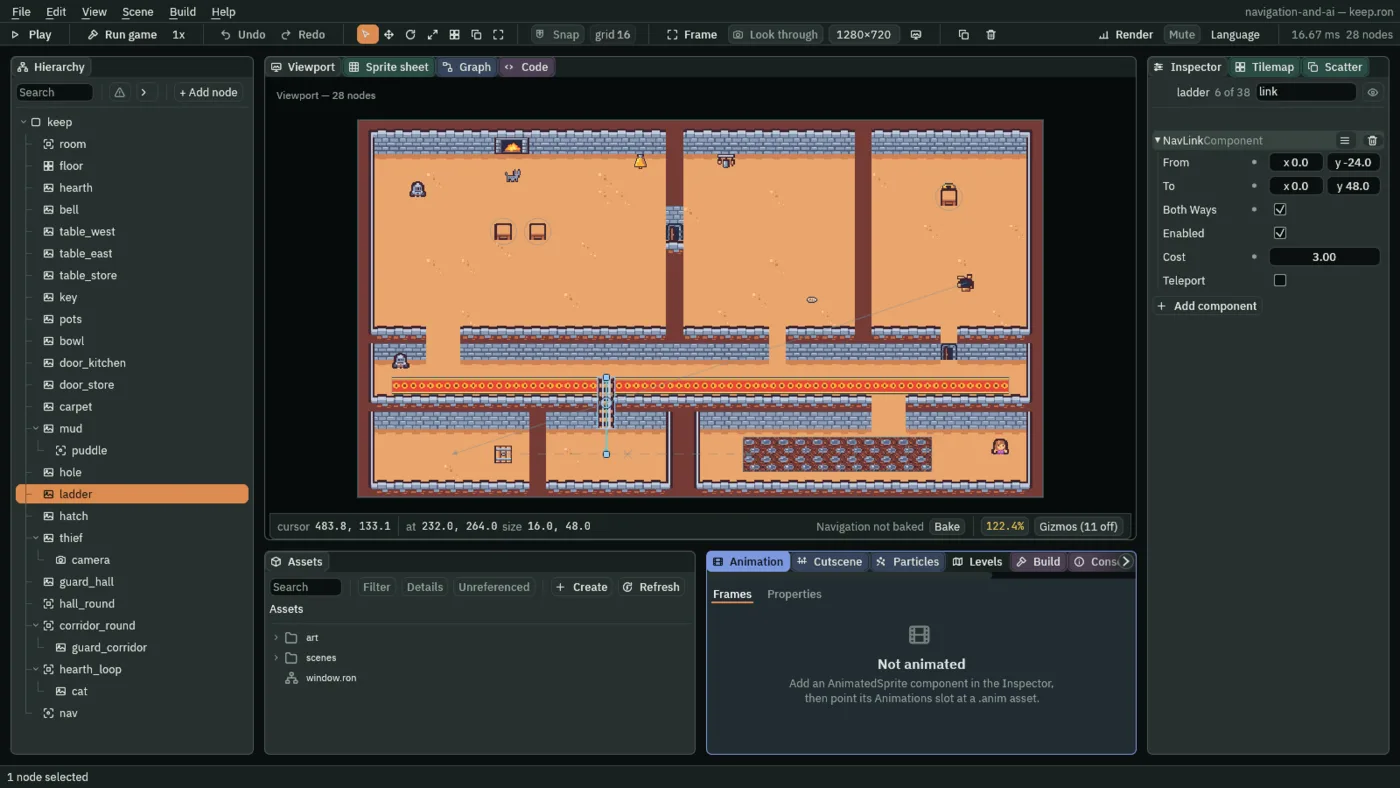
- Both Ways
- The Nav Link’s Both Ways: ticked, a walker may also cross it from To back to From, at the same price. The ladder ticks it, so the gallery can be left as it was reached. A new link’s is unticked: one way, as the hole is. Drawn unselected, a link has an arrowhead at each end it can be crossed to.
The shut hatch
The hatch in the cellar comes up in the courtyard. It is shut, and stays shut: a link switched off is still drawn, so you can see where it would go, but no way uses it.
- Select
hatchin the Hierarchy: the grate in the cellar. Click Add component and choose NavLinkComponent. - From stays
0,0. Set To to232,0: across to the courtyard’s west end. - Untick Enabled, and tick Teleport. Cost stays
1and Both Ways stays unticked. - Press Ctrl+S.
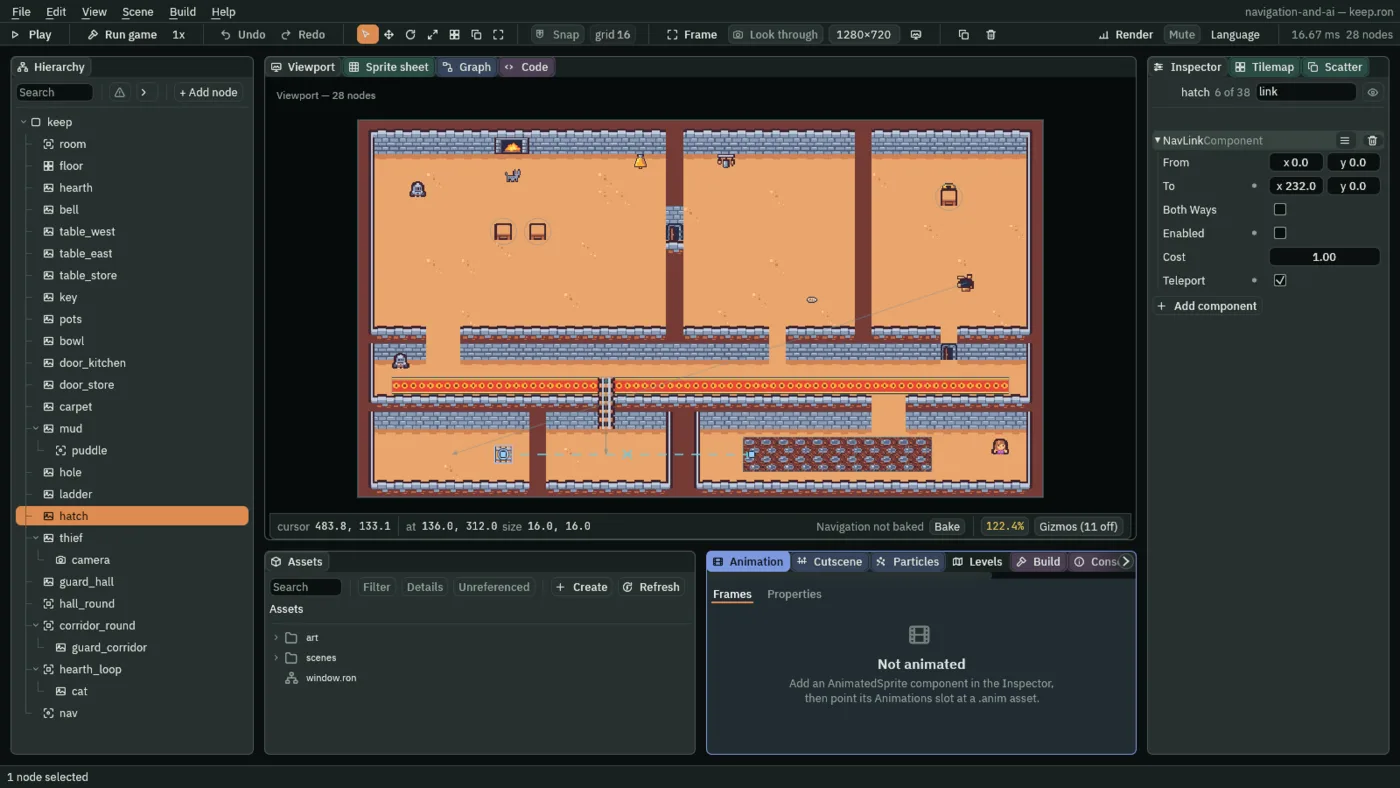
- Enabled
- The Nav Link’s Enabled: whether a way may use it right now. Unticked, the map leaves it out and the Viewport draws it dashed, with an X at its middle. A new link’s is ticked, and the hole and the ladder keep it so.
What the map offers now
Nothing walks yet, so what the links change is what the map offers. From the store room, the way to the cellar drops through the hole, at once. From the cellar there is no way out: the hole goes one way and the hatch is shut. The corridor and the gallery are joined by the ladder, down and up, as far each way. A walker that may not take links, as the corridor guard will be in chapter 6, finds no way to the gallery at all.
The first walker comes in Walking it: the cat, which you send down the hole in Play and watch its route cross to the cellar.
The three links
| Node | Component | Field | Value |
|---|---|---|---|
hole | Nav Link | To | -480, 160 |
| Cost | 0.5 | ||
| Teleport | ticked | ||
ladder | Nav Link | From | 0, -24 |
| To | 0, 48 | ||
| Both Ways | ticked | ||
| Cost | 3 | ||
hatch | Nav Link | To | 232, 0 |
| Enabled | unticked | ||
| Teleport | ticked |
Every other field is as it comes: the hole’s and the hatch’s From 0, 0, the hatch’s Cost 1.