Tutorials · Navigation and AI · Chapter 8
A brain
By the end
art/guard.pngandart/guard.anim: the guard’s three pictures on one sheet, cut into the clipsidle,walkandalertart/guard.asm: a graph that picks his clip from his speed and the switchalert, and nothing elseguard.rgs: his mind, five modes, on both guards, each with his own round’s corners- The hall guard walking by a Nav Agent, his Path Follow gone, with a cone of his own
thief.rgs: caught, she starts again where she came in
On this page
His clips
A guard is one picture cut from the keep’s sheet, the same whether he strolls or runs. From this chapter he has three poses: standing, a step, and alert, with a red mark over his head. They came with the starter, in art/: guard-idle.png, guard-step.png and guard-alert.png. Make Animation… packs them onto one sheet, and the Sprite sheet tab cuts the sheet into clips. Animation and Cutscenes’ Frames chapter teaches both tools at length; here they are used once.
- In Assets, open
art, right-clickguard-alert.png, and choose Make Animation…. The window opens withguard-alert.pngticked, Nameguard-alert, Frames a second12.0and Loop ticked. - Tick
guard-idle.pngandguard-step.pngtoo. They play in name order: alert, idle, step. - Set Frames a second to
6: click its box once, type and press Enter. Then click Name, deleteguard-alertand typeguard; Enter in that box is the same as Create. Leave Loop ticked, and press Create. It writesart/guard.png, a sheet64by32holding the three pictures side by side, andart/guard.anim, with one clip calledguardthat plays them,6a second, looping.
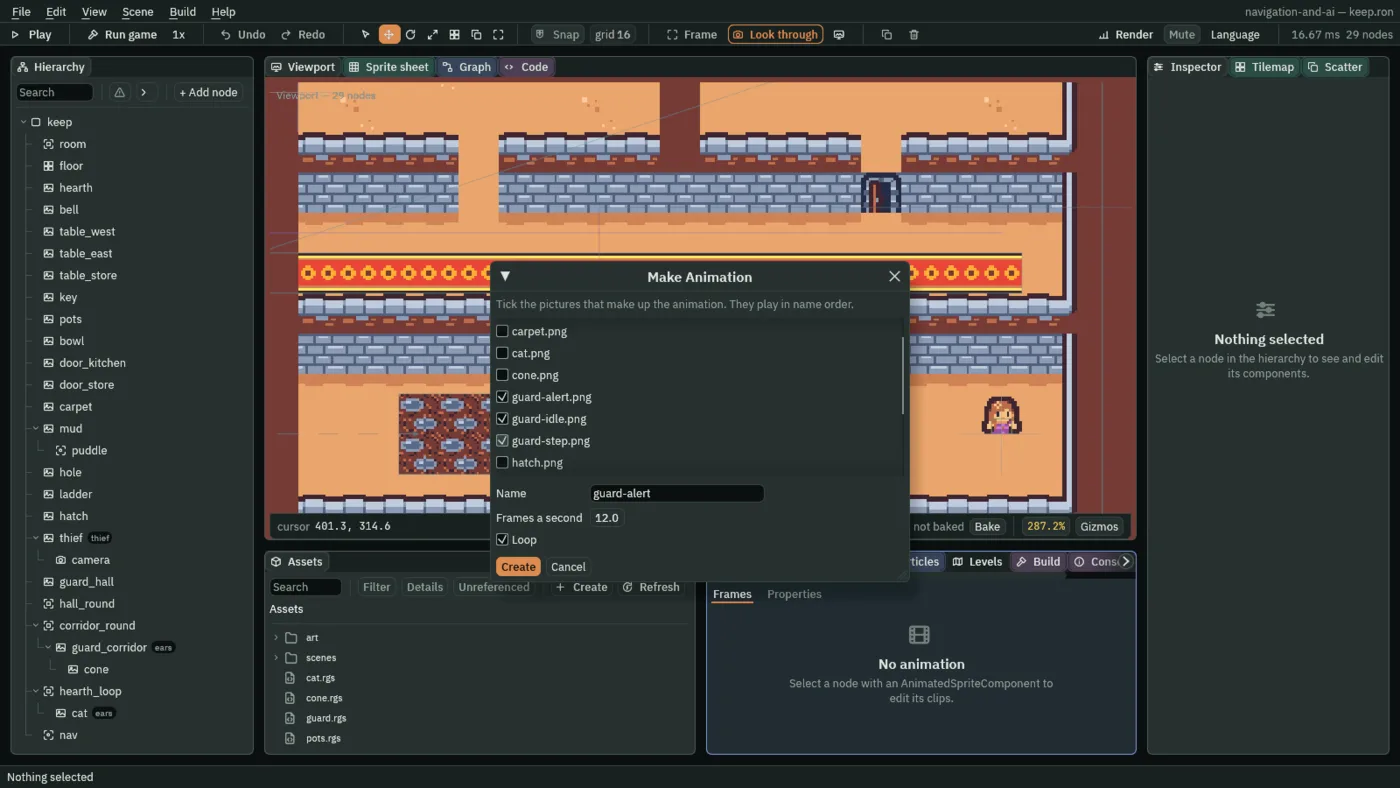
guard and 6.- Make Animation’s Name
- What the two files it writes are called, and the one clip in them:
guardgivesart/guard.png,art/guard.animand a clipguard. - Make Animation’s Frames a second
- How many of its pictures that clip shows a second: at
6, each one stays a sixth of a second. - Make Animation’s Loop
- Ticked, the clip starts again from its first picture when it ends; unticked, it stops on its last.
The guard clip is the three pictures as three whole frames. Nothing plays it; leave it where it is. Its frames say where each picture lies on the sheet, in the sheet’s own pixels, and the cuts below start from those corners.
| Picture | Frame of guard | Region x | Region y | Width | Height |
|---|---|---|---|---|---|
guard-alert | 0 | 0 | 0 | 16 | 24 |
guard-idle | 1 | 18 | 0 | 16 | 16 |
guard-step | 2 | 36 | 0 | 16 | 16 |
The corridor guard draws the sheet
- Select
guard_corridor. In his Sprite, dragart/guard.pngfrom Assets onto Texture, and clear Atlas Region, which saysguard: click its box, delete the word and press Enter. - Click Add component and choose AnimatedSpriteComponent. Drag
art/guard.animfrom Assets onto its Animations. Clip staysidle, as it comes. Tick Frame Size.
- Atlas Region
- The Sprite’s Atlas Region: a named part of its Texture to draw; empty, it draws the whole picture.
guardnamed the guard’s part of the keep’s sheet, andguard.pnghas no part of that name. Emptied, the Sprite holds the whole sheet, and the Animated Sprite draws one frame of it at a time. - Animations
- The Animated Sprite’s Animations: the
.animfile it plays, which holds the clips and names the sheet they are cut from:guard.anim. - Clip
- The Animated Sprite’s Clip: the clip it plays, by name. A new one says
idle, which is the guard’s standing clip once it is cut below. From the next section his graph chooses it. - Frame Size
- The Animated Sprite’s Frame Size: ticked, each frame is drawn at its own size and stood on its pivot. The alert picture is
24tall and the others16, so ticked, the alert one stands on his feet with the mark above his head, where unticked every frame would be squeezed into the Sprite’s Size.
Three clips
- With
guard_corridorstill selected, double-clickart/guard.pngin Assets. The Sprite sheet tab opens on it; scroll over the sheet to zoom in. - Idle. Under Grid, set Cell to
16and16, Margin to18and0, and Spacing to0and0. Click cell0, 0. Under Clips, press From selection, name the clipidle, set its rate to6fps and its loop to Loop, and press Generate 1. Press Clear. - Walk. Keep Cell and Margin, and set Spacing to
2and0: the gap the packing left between the idle and the step pictures. Drag from cell0, 0to cell1, 0. Press From selection, name itwalk,6fps, Loop, Generate 1, Clear. - Alert. Set Cell to
16and24, Margin to0and0, and Spacing to0and0. Click cell0, 0. Press From selection, name italert,6fps, Loop, Generate 1, Clear. - In the Animation tab, press Save. It writes the three clips into
art/guard.anim, after theguardclip.
| Clip | Cell | Margin | Spacing | Cells | Rate | Loop |
|---|---|---|---|---|---|---|
idle | 16, 16 | 18, 0 | 0, 0 | 0, 0 | 6 fps | Loop |
walk | 16, 16 | 18, 0 | 2, 0 | 0, 0 to 1, 0 | 6 fps | Loop |
alert | 16, 24 | 0, 0 | 0, 0 | 0, 0 | 6 fps | Loop |
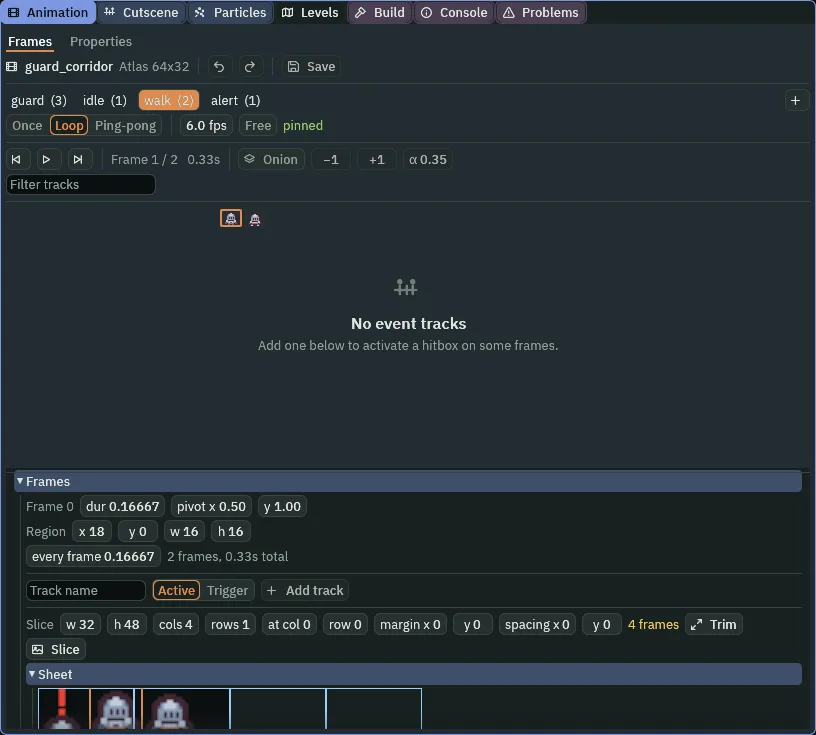
walk, two frames: the idle picture, then the step. Its first frame’s Region is the idle picture’s, 18, 0, 16 by 16.- Cell, Margin and Spacing
- The Sprite sheet tab’s grid. Cell is one frame’s size in the sheet’s pixels; Margin is where the grid starts from the sheet’s top left; Spacing is the gap between one cell and the next. The packing left
2pixels between the pictures, sowalk’s second cell starts at36, not34. - A frame’s pivot
- The point of the frame that stands on the node, from
0to1each way. A cut frame gets0.5,1: the middle of its bottom edge, his feet. The three pictures are all drawn standing on their bottom row, so every frame keeps it.
A graph picks his clip
Which clip he plays is the business of a State Machine and its graph. The graph has three states, each playing one clip, and it chooses between them from two things: how fast his body moves, and a switch called alert that his script turns on while he chases or searches. That is all it does. His mind, what he does next and why, is his script, in the next section; the graph only dresses him for it.
- With
guard_corridorselected, click Add component and choose StateMachineComponent. Its Graph is empty. Click the Graph tab, and press New state machine. It writesart/guard.asmbesideart/guard.anim, with one state,idle, playing the clipidle, and puts it in the State Machine’s Graph. - In the Parameters list, type
alertinto the name box, chooseswitchin the list of kinds beside it, and press Add. Its row readsalert,switch, unticked: it starts off. - In the row over the canvas, type
walkinto State andwalkinto Clip, and press Add state. Do the same withalertandalert. Drag the new boxes apart:walkto the right ofidle, andalertbelow the two, between them. - Click the Any State box, press Link and click
alert. In its row in the Transitions list, numbered0, click Is and typealertinto the box. Leave the box beside it ticked, as Is gives it, so it readstrue. - The new arrow runs from Any State, behind
idle, down toalert. Drag the Any State box down to the right ofalert, level with it, so the arrow runs clear ofidle. Its place is the tab’s, not the file’s: the next time the tab opens, the box is back aboveidle. - Click
alert, press Link and clickidle. In row1, click Is, typealert, and untick the box, so it readsfalse. - Click
idle, press Link and clickwalk. In row2, click >, typespeed, and set the number beside it to5: click it once, type, Enter. - Click
walk, press Link and clickidle. In row3, click <, typespeed, and set the number to5the same way. Set its Blend, the box with ansafter its number, to0.1. - Press Save in the Graph tab’s bar, and Ctrl+S.
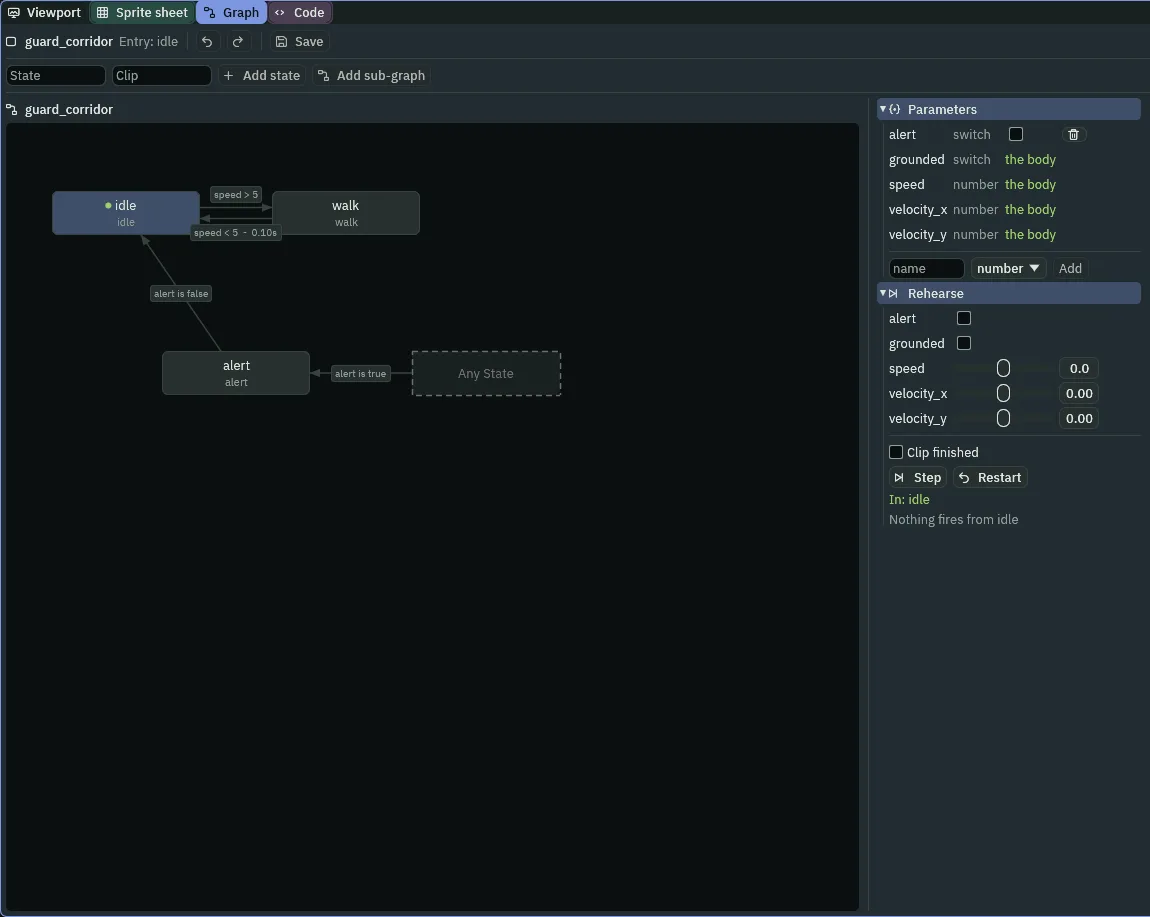
alert as the step above does.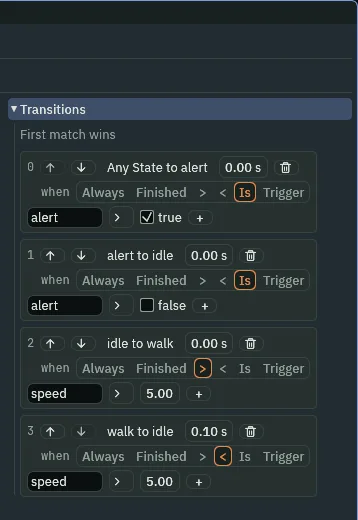
| Row | From | To | Condition | Blend |
|---|---|---|---|---|
0 | Any State | alert | alert Is true | 0 |
1 | alert | idle | alert Is false | 0 |
2 | idle | walk | speed > 5 | 0 |
3 | walk | idle | speed < 5 | 0.1 |
- Graph
- The State Machine’s Graph: the
.asmfile it runs,guard.asm. Each state plays a clip of the node’s Animated Sprite, and the arrows say when to go from one to another. The entry,idle, is where it starts. speed- A parameter the guard’s Character Body writes on every step: how fast he moves, in world units a second. He walks at
40and stands at0, so5tells walking from standing with room to spare. - A transition’s Blend
- How long, in seconds, the old clip fades into the new one when the arrow is taken.
0is a cut, and every new arrow starts there;0.1softens his stop from a walk. alert, a switch- A parameter you declared, on or off, and off as it starts. His script turns it on while he chases or searches, and off otherwise. Any State to
alerttakes him there from either other state the step it goes on, andalerttoidlebrings him back the step it goes off.
His mind, as a script
In chapter 7 the corridor guard had an errand: his round, a noise, or a look. From here he has a mode, one of five. He walks his round corner to corner (Patrol). A glimpse of her, or a noise near enough by road, makes him creep to where it was (Suspicious). Seen near enough to be sure, she is chased at a run (Chase), and caught she is sent back to where she came in. Lost, she is searched for about where he saw her last, for six seconds (Search), and then he goes back to his round (Return), and patrols again once he is on it.
One script does this for both guards. His round is no longer two ends of the corridor: it is up to four corners, so the hall guard’s rectangle fits it too.
- Click the Code tab, then
guard.rgsin its Scripts list. Replace everything in it with the script below, and press Ctrl+S.
/// A guard's mind. He walks his round, corner to corner. A glimpse of the
/// thief, or a noise near enough by road, makes him suspicious: he creeps to
/// where he glimpsed her or heard it. Seen near enough to be sure, she is
/// chased at a run, and caught she is sent back to where she came in. Lost,
/// she is searched for about where he saw her last, for a while, and then he
/// goes back to his round.
enum Mode { Patrol, Suspicious, Chase, Search, Return }

component Guard {
    /// His round's first corner.
    a: Vec2,
    /// Its second.
    b: Vec2,
    /// Its third; a round of two corners never comes here.
    c: Vec2,
    /// Its fourth.
    d: Vec2,
    /// How many corners his round has: 2 or 4.
    corners: i32 = 4,
    /// How far by road a noise can be and still be heard.
    #[suffix("u")]
    hearing: f32 = 320.0,
    /// How far he sees.
    #[suffix("u")]
    sight: f32 = 112.0,
    /// How far to either side of straight ahead he sees, in radians.
    cone: f32 = 0.6,
    /// The collision layers that hide what is behind them.
    walls: i32 = 1,
    /// How near he must see her to be sure it is her.
    #[suffix("u")]
    sure: f32 = 64.0,
    /// How fast he walks his round.
    walk: f32 = 40.0,
    /// How fast he creeps when suspicious.
    creep: f32 = 24.0,
    /// How fast he runs after her.
    run: f32 = 72.0,
    /// How long he searches, in steps.
    patience: i32 = 360,
    /// What is on his mind.
    #[readonly]
    mode: Mode = .Patrol,
    /// Whether the thief is in his cone, as this step began.
    #[readonly]
    sees: bool = false,
    /// Which way he faces: the way he last walked.
    #[hidden]
    facing: Vec2,
    /// Where he stood the step before.
    #[hidden]
    was: Vec2,
    /// Where he saw her last.
    #[hidden]
    last_seen: Vec2,
    /// The corner he is walking to, from 0.
    #[hidden]
    next: i32 = 0,
    /// Whether to set off for that corner this step.
    #[hidden]
    to_round: bool = true,
    /// Steps of searching left.
    #[hidden]
    searching: i32 = 0,

    fn on_create() {
        was = position();
        facing = vec2(0.0, 1.0);
    }

    fn loop() {
        let moved = position() - was;
        if moved.length() > 0.1 {
            facing = moved;
        }
        was = position();
        let thief = nearest("thief");
        let at = position_of(thief);
        let toward = at - position();
        // Returning, he has given up; he looks again on his round.
        sees = mode != .Return
            && thief != node(0)
            && toward.length() < sight
            && angle_between(facing, toward) < cone
            && can_see(at, walls);
        if sees {
            last_seen = at;
        }

        if mode == .Patrol || mode == .Return {
            if sees {
                mode = .Suspicious;
                set_number("NavAgentComponent", "speed", creep);
                walk_to(at);
            }
        } else if mode == .Suspicious {
            if sees && toward.length() < sure {
                mode = .Chase;
                set_number("NavAgentComponent", "speed", run);
            }
        } else if mode == .Chase {
            if !sees {
                mode = .Search;
                searching = patience;
                walk_to(last_seen);
            } else if toward.length() < 10.0 {
                emit_to("thief", "caught");
                mode = .Return;
                to_round = true;
            } else {
                walk_to(at);
            }
        } else if mode == .Search {
            searching -= 1;
            if sees {
                mode = .Chase;
                set_number("NavAgentComponent", "speed", run);
            } else if searching <= 0 {
                mode = .Return;
                to_round = true;
            }
        }

        if to_round {
            to_round = false;
            set_number("NavAgentComponent", "speed", walk);
            if next == 0 {
                walk_to(a);
            } else if next == 1 {
                walk_to(b);
            } else if next == 2 {
                walk_to(c);
            } else {
                walk_to(d);
            }
        }
        set_param_flag("alert", mode == .Chase || mode == .Search);
    }

    fn on_signal() {
        if heard("noise") && (mode == .Patrol || mode == .Return) {
            let noise = kept_point("noise", position());
            let way = road_distance(noise);
            if way >= 0.0 && way < hearing {
                mode = .Suspicious;
                set_number("NavAgentComponent", "speed", creep);
                walk_to(noise);
            }
        }
        if heard("nav:ended") {
            if mode == .Patrol || mode == .Return {
                if arrived() {
                    next += 1;
                    if next >= corners {
                        next = 0;
                    }
                }
                mode = .Patrol;
                to_round = true;
            } else if mode == .Suspicious {
                mode = .Return;
                to_round = true;
            } else if mode == .Search {
                let far = 40.0 * sqrt(random(0.0, 1.0));
                let turn = random(0.0, tau());
                let spot = last_seen + vec2(far * turn.cos(), far * turn.sin());
                if can_reach(spot) {
                    walk_to(spot);
                } else {
                    walk_to(last_seen);
                }
            }
        }
    }
}
Select guard_corridor and look at his Guard in the Inspector. The new fields are there, A to D, Corners, Sure and the rest, at the script’s values. But Post, Far and Errand are still there too, though the script no longer has them.
- With
guard_corridorselected, remove his Guard with the bin icon at the right of its header. Click Add component and choose Guard. - Set A to
40,232and B to600,232, the two ends of his round, each box clicked once, typed into and Enter. Set Corners to2. C and D stay0,0: a round of two corners never comes to them. Every other field stays as the script gives it. - Press Ctrl+S.
enum Mode { Patrol, Suspicious, Chase, Search, Return }- The five things on his mind, by name. Mode holds one of them, and the script compares and sets it as
.Patrol,.Chaseand so on. An enum is a closed list: a mode not on it cannot be written, or misspelled. - A, B, C, D and Corners
- His round, as corners in world units, in order, and how many of them he walks:
2or4. He walks from one to the next, and from the last back to A. The corridor guard’s two are the corridor’s ends; the hall guard’s four arehall_round’s corners. Corners default to0,0, and Corners to4. - Sure
- How near he must see her to be sure it is her and chase:
64world units, four tiles. Further away, still in his Sight of112, she is a glimpse, and he only creeps. - Walk, Creep and Run
- His three paces, in world units a second, which his script writes onto his Nav Agent’s Speed:
40on his round, as before;24, slow and wary, when suspicious;72in a chase. She runs at70, so he gains on her by two units a second. - Patience
- How long he searches, in steps:
360, six seconds at sixty steps a second. Chapter 9 hands this to a Timer. - Mode
- What is on his mind: read-only, greyed in the Inspector, and live while the game plays. Select a guard in Play and watch it change.
- set_number
- Writes a number onto another component on this node:
set_number("NavAgentComponent", "speed", run)sets his Nav Agent’s Speed to his Run, from the next step on. The script changes his pace this way whenever his mode changes. - set_param_flag
- Sets a switch his State Machine reads, from the next step. The last line of his
loopsetsalerton every step: on while he chases or searches, off otherwise. It is the one thing his script tells his graph.
What he sees, and when he looks
        // Returning, he has given up; he looks again on his round.
        sees = mode != .Return
            && thief != node(0)
            && toward.length() < sight
            && angle_between(facing, toward) < cone
            && can_see(at, walls);
        if sees {
            last_seen = at;
        }
His eyes are chapter 7’s, with one more condition first: while he is returning, he does not look. He has given up, and he looks again once he is back on his round and patrolling. Whenever he sees her, he keeps where: last_seen, which a search starts from.
Patrol and Return: a glimpse
        if mode == .Patrol || mode == .Return {
            if sees {
                mode = .Suspicious;
                set_number("NavAgentComponent", "speed", creep);
                walk_to(at);
            }
On his round, a glimpse makes him suspicious: he slows to Creep and walks to where she stood when he saw her, not after her. If she steps out of sight, he goes there all the same.
Suspicious: sure of her
        } else if mode == .Suspicious {
            if sees && toward.length() < sure {
                mode = .Chase;
                set_number("NavAgentComponent", "speed", run);
            }
Creeping, he chases the moment he sees her nearer than Sure, at Run. If he gets where he was going and has not, his walk ends, and the nav:ended part below sends him back to his round.
Chase: lost, caught, or after her
        } else if mode == .Chase {
            if !sees {
                mode = .Search;
                searching = patience;
                walk_to(last_seen);
            } else if toward.length() < 10.0 {
                emit_to("thief", "caught");
                mode = .Return;
                to_round = true;
            } else {
                walk_to(at);
            }
In a chase he walks to where she is on every step. The step he cannot see her, he searches, starting where he saw her last. Within 10 of her, she is caught: he tells her so with emit_to the group thief, and goes back to his round.
Search: found again, or given up
        } else if mode == .Search {
            searching -= 1;
            if sees {
                mode = .Chase;
                set_number("NavAgentComponent", "speed", run);
            } else if searching <= 0 {
                mode = .Return;
                to_round = true;
            }
Searching, he counts down Patience one step at a time. Seen again, she is chased again. When the count runs out, he returns.
Back to his round, and his clip
        if to_round {
            to_round = false;
            set_number("NavAgentComponent", "speed", walk);
            if next == 0 {
                walk_to(a);
            } else if next == 1 {
                walk_to(b);
            } else if next == 2 {
                walk_to(c);
            } else {
                walk_to(d);
            }
        }
        set_param_flag("alert", mode == .Chase || mode == .Search);
Every mode that ends in his round sets to_round, and this part sends him: at Walk, to the corner he was walking to before. Then the switch for his graph.
What he hears
    fn on_signal() {
        if heard("noise") && (mode == .Patrol || mode == .Return) {
            let noise = kept_point("noise", position());
            let way = road_distance(noise);
            if way >= 0.0 && way < hearing {
                mode = .Suspicious;
                set_number("NavAgentComponent", "speed", creep);
                walk_to(noise);
            }
        }
        if heard("nav:ended") {
            if mode == .Patrol || mode == .Return {
                if arrived() {
                    next += 1;
                    if next >= corners {
                        next = 0;
                    }
                }
                mode = .Patrol;
                to_round = true;
            } else if mode == .Suspicious {
                mode = .Return;
                to_round = true;
            } else if mode == .Search {
                let far = 40.0 * sqrt(random(0.0, 1.0));
                let turn = random(0.0, tau());
                let spot = last_seen + vec2(far * turn.cos(), far * turn.sin());
                if can_reach(spot) {
                    walk_to(spot);
                } else {
                    walk_to(last_seen);
                }
            }
        }
    }
A noise is chapter 6’s, heard only while he patrols or returns, and it makes him suspicious too. nav:ended is heard the step after any walk of his ends, arrived or not. On his round, an arrival moves him on to the next corner; returning, it makes him patrol again. Suspicious, the end of his walk is the end of the matter: he returns. Searching, it sends him to another spot: somewhere in a disc of 40 about where he saw her last, if he can reach it, or to that point itself.
- sqrt
- The square root of a number;
0for a negative one.40.0 * sqrt(random(0.0, 1.0))is a distance from0to40that falls as often near the rim of the disc as near its middle, so his spots spread over the whole disc instead of bunching at its centre. - tau
- One full turn, in radians: about
6.283.random(0.0, tau())is a direction, any way round. .cos()and.sin()- The cosine and sine of an angle in radians:
vec2(far * turn.cos(), far * turn.sin())is the pointfaraway in the directionturn. With0along+xand a quarter turn straight down, as chapter 7’s angles are.
His mind in Play
- Press F5. Select
guard_corridor, and in the Inspector typeguardinto the search box at its top and press Enter, so only his Guard shows. In Play, press Enter after typing in a box: while it has the cursor, W, A, S and D type into it as well as walking her. Wait: he walks east along the corridor into the view about eight seconds in, ModePatrol. - Walk the thief onto the carpet in front of him. Sees ticks, Mode reads
Suspiciousand he slows; nearer,Chase, the red mark over his head, and he runs. - Press F5 again to stop.
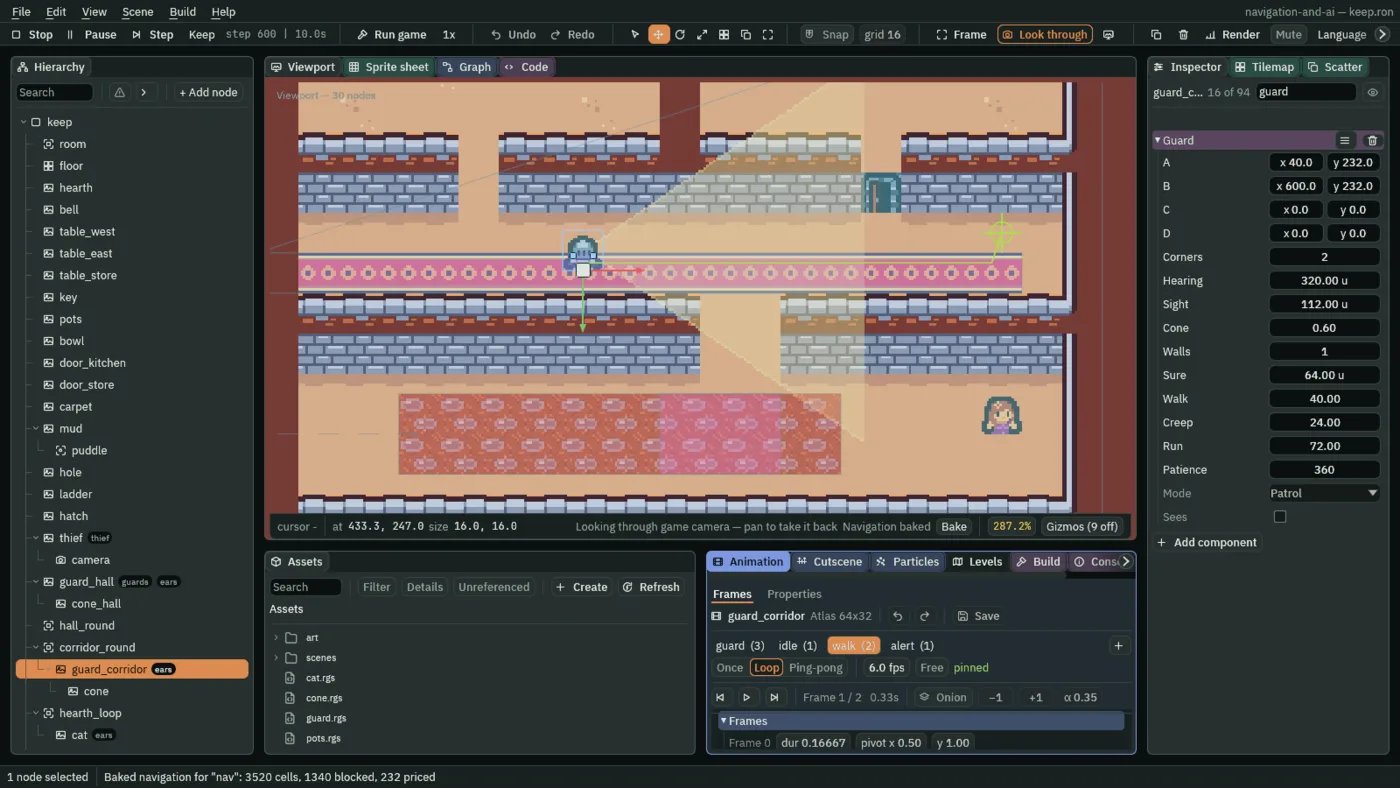
Patrol, walking to his second corner. The thief is where the game starts her, and Bake drew the map under his route.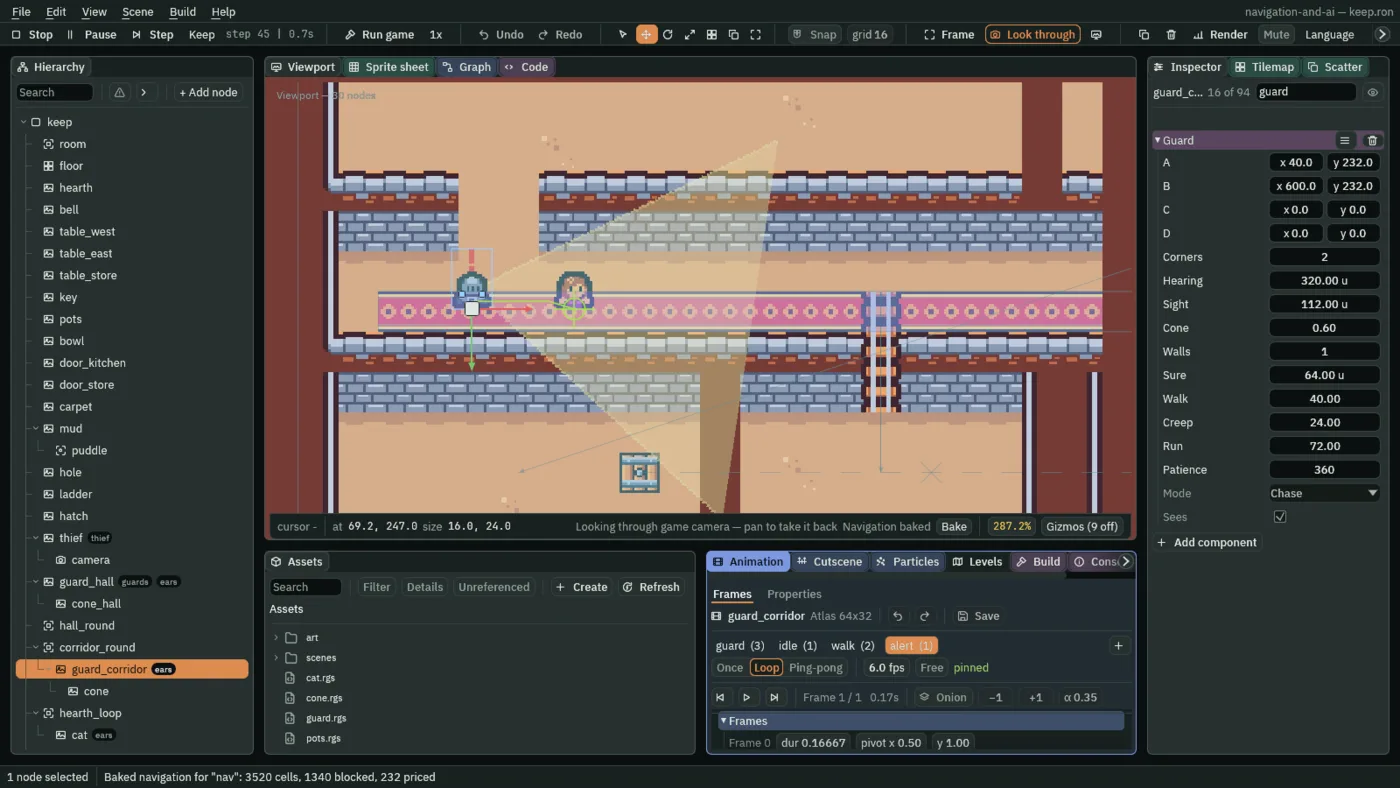
Chase, his alert clip, his way to her. For this picture the thief was placed on the carpet ahead of him from the start, where the step walks her, and Bake drew the map under his route.The hall guard too
The hall guard still goes round on the Path Follow chapter 1 gave him. He gets what the corridor guard got in chapters 6 to 8 at once: a body and a Nav Agent, his clips and his graph, the same script with his own corners, and a cone.
- Select
guard_hall. Click Add component and choose CharacterBodyComponent. Set its Size to8,6, Motion Mode to Floating, Driven By to Script, and Layer to2(untick the box labelled0, tick the one labelled1), as chapter 6 did for the corridor guard. - Click Add component and choose NavAgentComponent. Set Speed to
40, tick Face Walk and untick Use Links. Target, Moving and Arrive Distance stay as they come.
His row carries the warning triangle, and the status bar says 1 problem: two movers on one node, as the cat and the corridor guard had. Click the 1 problem.
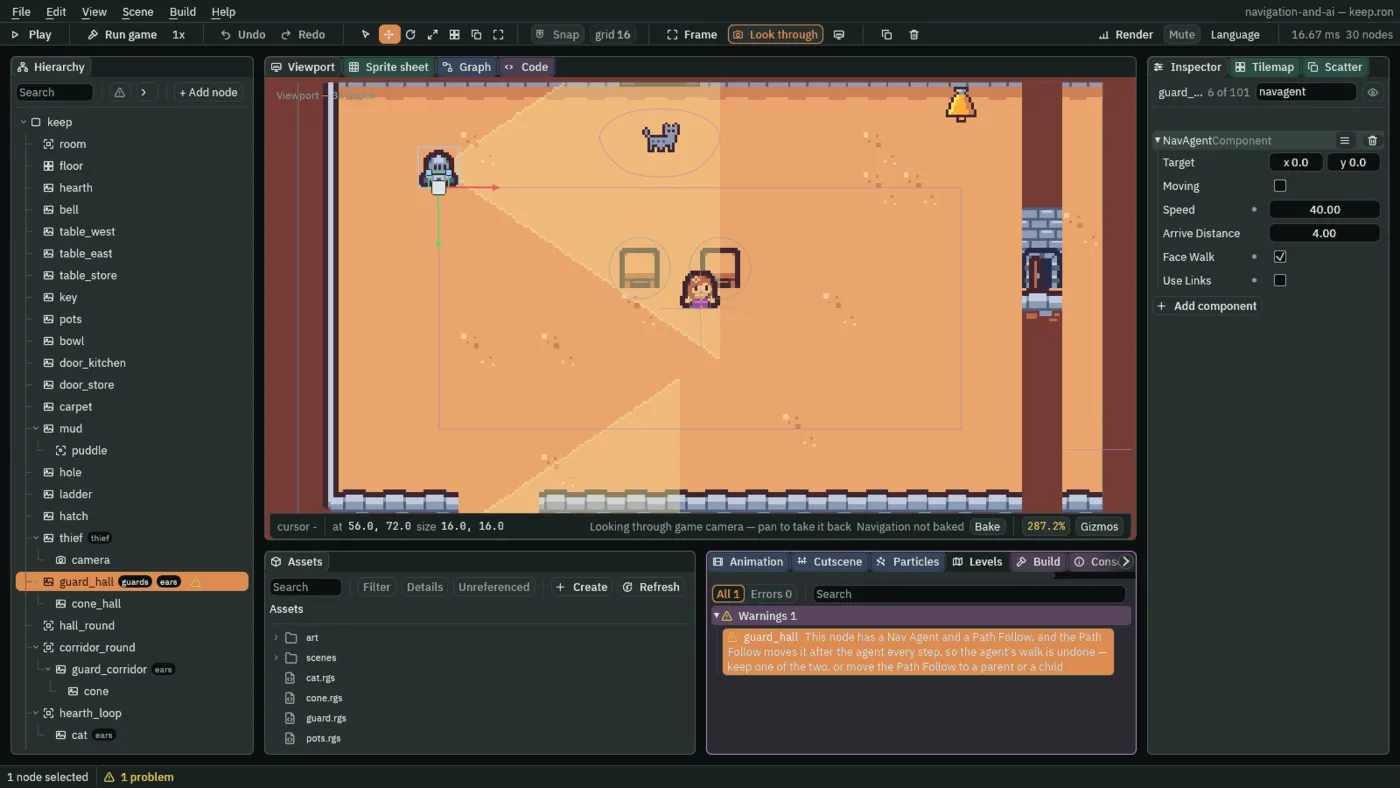
- With
guard_hallselected, remove his PathFollowComponent with the bin icon at the right of its header. The row leaves the Problems tab.hall_roundstays, the drawing of his round. - Under Groups, type
guardsinto Add group and press Enter; thenears, Enter. - In his Sprite, drag
art/guard.pngonto Texture and clear Atlas Region. - Click Add component and choose AnimatedSpriteComponent. Drag
art/guard.animonto Animations, and tick Frame Size. - Click Add component and choose StateMachineComponent. Drag
art/guard.asmfrom Assets onto its Graph: the one graph serves both guards. - Click Add component and choose Guard. Set A to
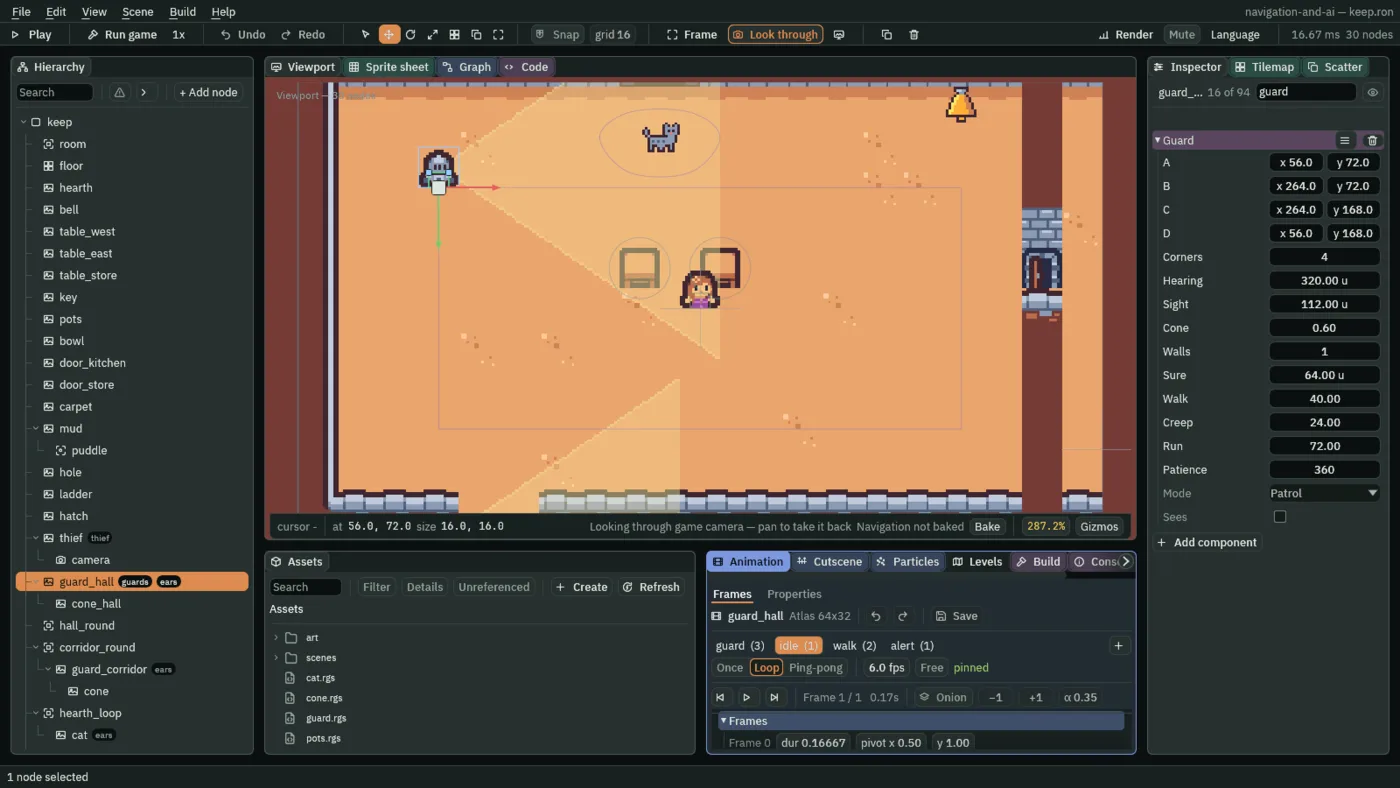
56,72, B to264,72, C to264,168and D to56,168:hall_round’s four corners, in its order. Corners stays4. - With
guard_hallselected, press + Add node, choose Sprite, and rename itcone_hall. Set its Position to0,-8; dragart/cone.pngonto Texture; set Size to112,154, Anchor to0,0.5and Sort Layer to1. Click Add component and choose Cone: the corridor guard’s cone, for him. - Select
guard_corridor, and under Groups addguards. He is inearsalready, since chapter 6. - Press Ctrl+S.
- Speed, Face Walk and Use Links
- The hall guard’s Nav Agent, as the corridor guard’s: Speed
40until his script changes it, Face Walk ticked so he faces his walk, Use Links unticked so the hole is not his way to the cellar. - Groups
guardsandears - Both guards are in both.
earsis the group the pots tell of a noise, from chapter 6;guardsis the one chapter 9’s bell calls.
Caught
A guard who catches the thief says caught to the group thief, which is her. Her script hears it and puts her back where she came in, at the courtyard gate.
- In Assets, press Create, choose New script, type
thief, and press Enter. In the Code tab, replace everything inthief.rgswith the script below, and press Ctrl+S. - Select
thief, click Add component and choose Thief. Its one field,start, is hidden. - Press Ctrl+S.
/// The thief. Caught by a guard, she is put back where she came in.
component Thief {
    /// Where she starts again when she is caught.
    #[hidden]
    start: Vec2,

    fn on_create() {
        start = position();
    }

    fn on_signal() {
        if heard("caught") {
            move_to(start);
        }
    }
}
start- Where she stood as the game began, kept by
on_create, which runs once, on her first step. Hidden: nothing to type. - move_to
- Puts this node at a point, in world units, at once: no walk, no wall in the way.
move_to(start)takes her from the guard’s hands to the gate in one step. caught- The signal a guard sends with
emit_to("thief", "caught")when he is within10of her. She hears it on the next step, so she is moved one step after he comes within10of her.
The guard who caught her goes back to his round without looking. If she runs straight back past him he does not see her until he has reached his round again.
What the chapter set
The clips are in the tables of the first section, and the graph’s four arrows in the second. Both guards, and the hall guard’s cone:
| Node | Component | Field | Value |
|---|---|---|---|
guard_hall | node | Groups | guards, ears |
| Sprite | Texture | guard.png | |
| Atlas Region | empty | ||
| Character Body | Size | 8, 6 | |
| Motion Mode | Floating | ||
| Driven By | Script | ||
| Layer | 2: the box labelled 1 | ||
| Nav Agent | Speed | 40 | |
| Face Walk | ticked | ||
| Use Links | unticked | ||
| Animated Sprite | Animations | guard.anim | |
| Frame Size | ticked | ||
| State Machine | Graph | guard.asm | |
| Guard | A | 56, 72 | |
| B | 264, 72 | ||
| C | 264, 168 | ||
| D | 56, 168 | ||
| Path Follow | removed | ||
cone_hall, under guard_hall | node | Position | 0, -8 |
| Sprite | Texture | cone.png | |
| Size | 112, 154 | ||
| Anchor | 0, 0.5 | ||
| Sort Layer | 1 | ||
| Cone | added | ||
guard_corridor | node | Groups | ears, guards |
| Sprite | Texture | guard.png | |
| Atlas Region | empty | ||
| Animated Sprite | Animations | guard.anim | |
| Frame Size | ticked | ||
| State Machine | Graph | guard.asm | |
| Guard | A | 40, 232 | |
| B | 600, 232 | ||
| Corners | 2 | ||
thief | Thief | added |
Every other field is as it comes, or as the script gives it: Hearing 320, Sight 112, Cone 0.6, Walls 1, Sure 64, Walk 40, Creep 24, Run 72, Patience 360, and the hall guard’s Corners 4.