Tutorials · Navigation and AI · Chapter 3
Prices and obstacles
By the end
- The carpet a road, a Nav Cost of
0.5; the mud dear,4; andpuddle, a Nav Cost of2inside the mud, where the two make8 - A Nav Obstacle of Radius
12on each of the three tables, which the map grows by its clearance - What a price and an obstacle do to a way, and why a table is an obstacle and not a wall
On this page
A road
Chapter 2’s map says only where a walker may go. A way over it is the cheapest one, and every cell of open floor costs the same, so the cheapest way is the shortest. A Nav Cost changes what some cells cost: a rectangle of the map priced dearer, or cheaper. The carpet is the corridor’s road, half the price of bare floor.
- Select
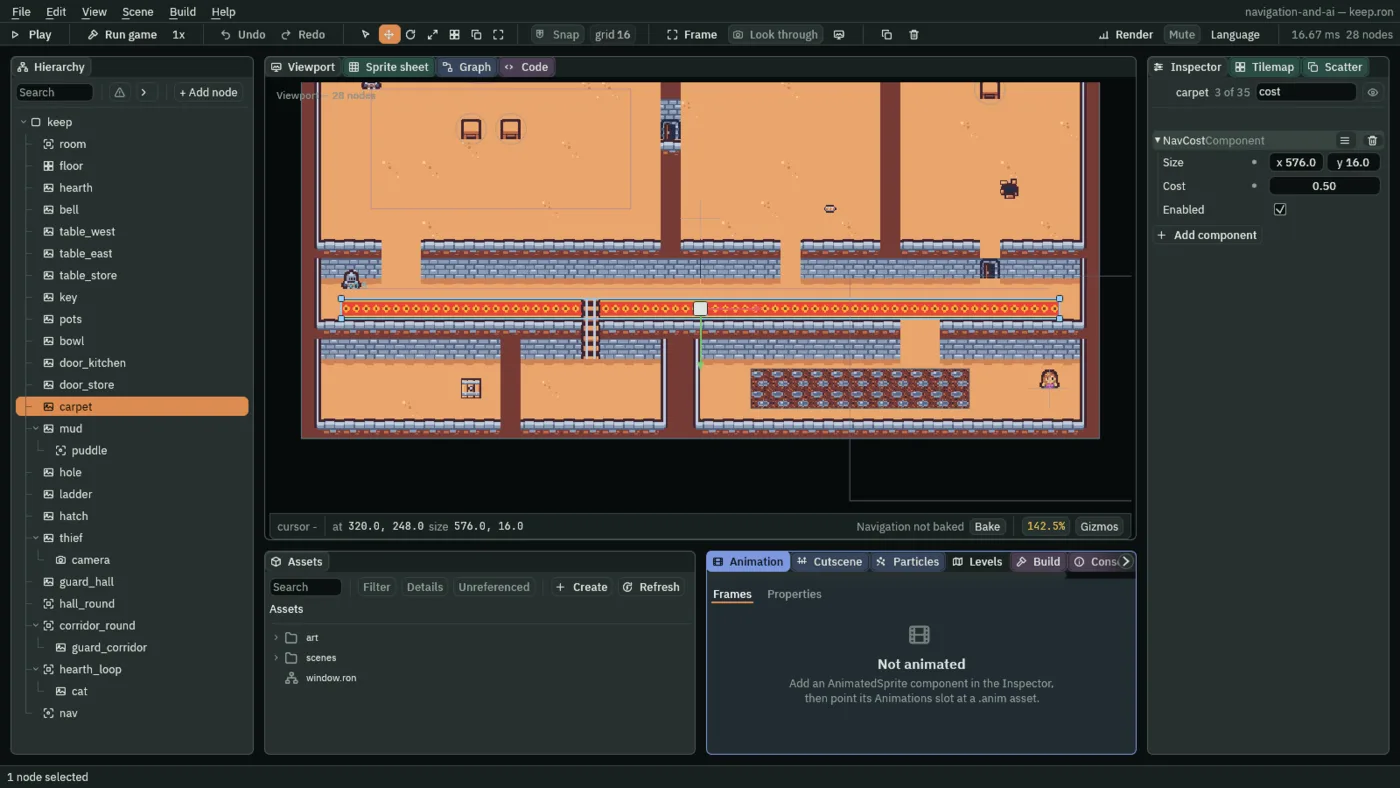
carpet, press Add component and choose NavCostComponent. - Set Size to
576,16, the carpet’s own size, and Cost to0.5. Leave Enabled ticked. - Press Ctrl+S.
- Size
- The Nav Cost’s Size: its rectangle’s width and height in world units, centred on its node. A cell whose middle lies inside it takes its price. The carpet’s
576,16is the carpet picture, the corridor’s lower row from end to end bar a tile at each end. - Cost
- How many times the price of open floor the Nav Cost’s cells cost a walker to cross.
1changes nothing. Over1is dear: the mud’s4makes a way through it four times as dear as the same way on floor. Under1is a road: the carpet’s0.5makes a step on it half the price, so a way goes out of its road to use it. It must be over0; a cost is never a wall. - Enabled
- Whether the Nav Cost prices the map. Unticked, its cells cost what the floor does, and its rectangle is drawn dashed. Leave it ticked: chapter 10 switches one from a script.
Mud and a puddle
The courtyard’s mud is dear, and in it is a puddle dearer still. The puddle is a Nav Cost on a node of its own, under the mud, so it moves with it.
- Select
mud, press Add component and choose NavCostComponent. Set Size to176,32and Cost to4. - With
mudstill selected, press + Add node and choose Nav Cost. Rename itpuddle: it goes undermud. - Set the puddle’s Position to
40,0, its Size to48,32and its Cost to2. - Press Ctrl+S.
- Select
navand press Bake on the strip. The status bar now counts232cells priced: the carpet’s and the mud’s. The overlay is drawn only whilenavis selected, as in chapter 2.
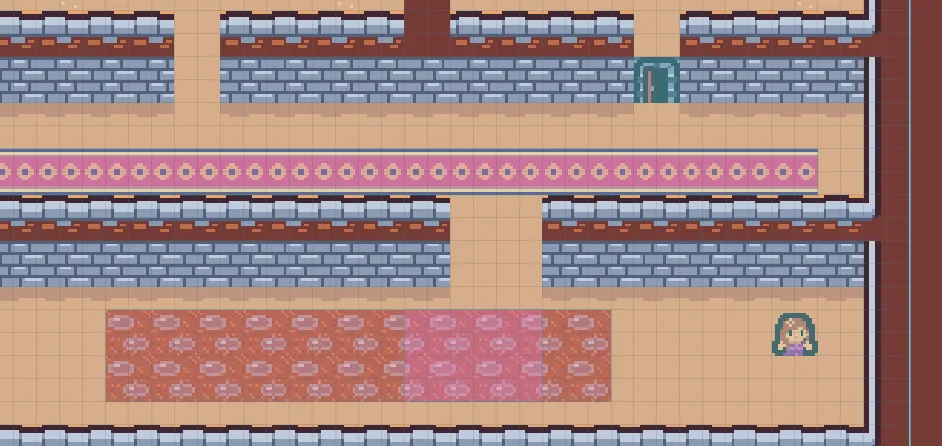
4, and the puddle, where the mud’s 4 and the puddle’s 2 make 8.The puddle is 40 right of the mud’s middle and as tall as the mud, so its cells are inside the mud’s too. Where two Nav Costs overlap their prices multiply: the puddle’s cells cost 4 times 2, 8.
- The price wash
- How the overlay draws a priced cell, while the Nav Region is selected and baked: in a colour of its own instead of the floor’s pale one, and heavier the further its price is from
1. A dear cell washes warm, a road cool. Here the carpet washes pink, the mud a brick red and the puddle a brighter pink.
In the way
The tables are pictures: nothing tells the map they are there, and in chapter 2 a way across the hall went straight over them. A Nav Obstacle is a disc the map takes off, round its node.
- Select
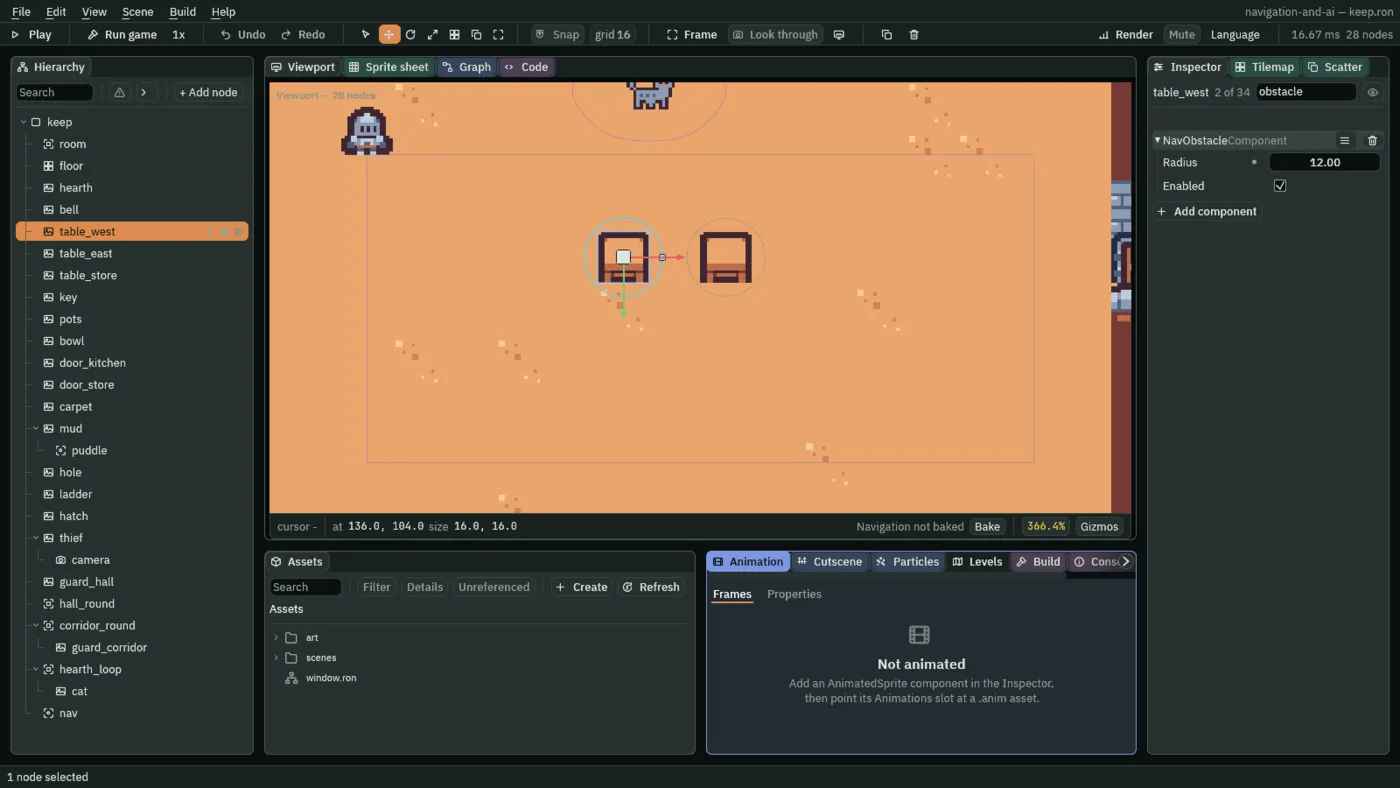
table_west, press Add component and choose NavObstacleComponent. Set Radius to12. Leave Enabled ticked. - Do the same on
table_eastandtable_store. - Press Ctrl+S. Select
navand press Bake:1340cells blocked now,36more than the walls’1304, twelve round each table.
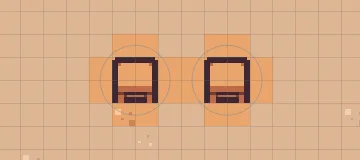
12, grown by the clearance to 15, takes the cells whose middles it covers.- Radius
- How far the Nav Obstacle reaches from its node’s middle, in world units: the cells whose middles fall inside the disc are off the map. A table is
16wide, so12covers it with a little room; the region’s Clearance adds its3, and no way comes within15of a table’s middle. - Enabled
- Whether the Nav Obstacle blocks the map. Unticked, its disc is drawn dashed and the map walks through it. Leave it ticked: chapter 10 switches obstacles from a script, and chapter 13 saves one unticked.
This is where chapter 2’s Clearance first does something. The walls sit on the tile grid, and 3 never reached a cell middle from one. A disc is round and anywhere, and 3 more of it reaches cells that 12 alone missed.
What a price does to a way
Nothing walks the map yet: the first walker is chapter 5’s cat. What the map now offers a walker is this. From one end of the corridor to the other, the cheapest way runs along the carpet, though both ends stand on the row above it. Across the courtyard, a way from the mud’s west side to its east side goes round the mud by a dry strip, and a way from mud to mud goes round the puddle. Across the hall, a way past the tables goes round them, never within 15 of a table’s middle.
You see these ways drawn once something walks them. Walking it shows the cat’s way through the kitchen door, drawn over this map in Play, and Orders the corridor guard’s round along the carpet and the cat’s way round the west table.
The prices and the obstacles
The three prices. carpet and mud are the starter’s pictures, each given a Nav Cost; puddle is a Nav Cost node under mud. Enabled is ticked on all three.
| Node | Parent | Position | Size | Cost |
|---|---|---|---|---|
carpet | keep | 320, 248, as the starter has it | 576, 16 | 0.5 |
mud | keep | 448, 312, as the starter has it | 176, 32 | 4 |
puddle | mud | 40, 0 | 48, 32 | 2 |
The three obstacles, each a Nav Obstacle on a table the starter has, Enabled ticked:
| Node | Position | Radius |
|---|---|---|
table_west | 136, 104 | 12 |
table_east | 168, 104 | 12 |
table_store | 552, 72 | 12 |