Tutorials · Sound and Music · Chapter 3
Footsteps
By the end
- Five takes of a step on stone, from Kenney’s Impact Sounds, heard in Details
- A Trigger track
stepon the knight’swalkclip, on its frames0and2, where a foot is planted - An Audio Source on the knight with no Clip of its own and one trigger,
step: five takes, two of them at half Weight, drawn RandomNoRepeat, each at a Pitch from0.9to1.1and a Volume from0.8to1.0 - What each Mode does with the takes, what Weight means under each, and when Max Voices acts
On this page
Five takes of a step
One recording of a footstep, played on every step, is heard at once for what it is: the same sound, over and over. Five recordings of a step on stone, drawn one at a time and never the same one twice running, each played a little higher or lower, a little louder or softer, are heard as feet. Kenney’s Impact Sounds has five.
- Download Impact Sounds from its page below. Copy the five files into your project’s
audiofolder, each from where the list says. Then press Refresh in the Assets panel. - In Assets, click each in
audioand press Play in Details. Each is about a tenth of a second: a heel on stone.001and002carry a gritty scrape;000,003and004are plain.
Leave their Stream on Auto. Each is far under three seconds, so Auto holds it whole, as Never would: a step must sound the moment it is asked for.
Where a foot comes down
His walk clip is four frames at 8 a second, 0.5 s a stride: a foot planted on frame 0, passing on 1, the other foot planted on 2, passing on 3. A Trigger track marks the two frames where a foot is planted. Each time the clip reaches one, it raises the track’s name once, and his Audio Source plays the trigger of that name.
- Select
knightand click the Animation tab, in the dock under the Viewport. In its Frames mode, click thewalktab. - Under Frames, below the frame’s details, type
stepinto Track name, choose Trigger and press Add track. A rowstepappears, with a cell for each of the four frames. - Click the first cell and the third. They light: frames
0and2. - Press Save in the Animation tab. It writes the track into
art/knight.anim.
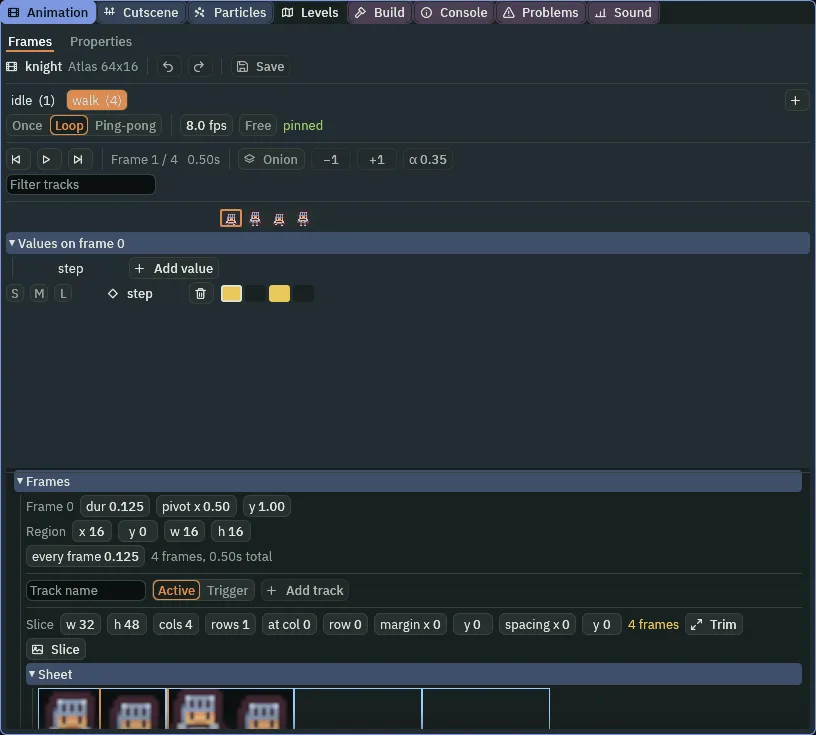
walk’s step track: frames 0 and 2, where a foot is planted.- A Trigger track
- A row of a clip’s cells, one a frame, named. When the clip arrives on a lit cell, the track’s name is raised once, for that step: here, the knight’s Audio Source plays its trigger of the same name.
walkreaches frame0and frame2once a stride each, so a step is asked for every quarter second while he walks, and none while he stands, sinceidlehas no track. - Track name, and Trigger or Active
- Under Frames: the new track’s name, and its kind, chosen before Add track adds its row. Trigger raises the name once as the clip arrives on a lit cell: a moment, such as a foot coming down, and the kind a sound is asked for by. Active is on for as long as the clip is on a lit cell: a state held across frames, such as a blade’s edge being down.
His Audio Source
The steps are the knight’s own sound, so his own node gets the Audio Source, beside his Animated Sprite and his Listener. It has no Clip of its own: nothing of his plays by itself. It has one trigger, named as the track is.
- With
knightselected, press Add component and choose AudioSourceComponent. Leave Clip empty, Bus on Sfx, Looping and Autoplay unticked, and Positional ticked. Set Volume to0.5and Max Voices to1. - Click the + beside Triggers. A row opens. Type
stepinto its Name, and set its Clip tofootstep_concrete_000.ogg. - Click the + beside its Clips four times, and open each row: set their Clips to
footstep_concrete_001.ogg,002,003and004, and their Weights to0.5,0.5,1and1. - Set Mode to RandomNoRepeat.
- Open its Pitch and set Min to
0.9and Max to1.1. Open its Volume and set Min to0.8; leave Max at1. - Press Ctrl+S.
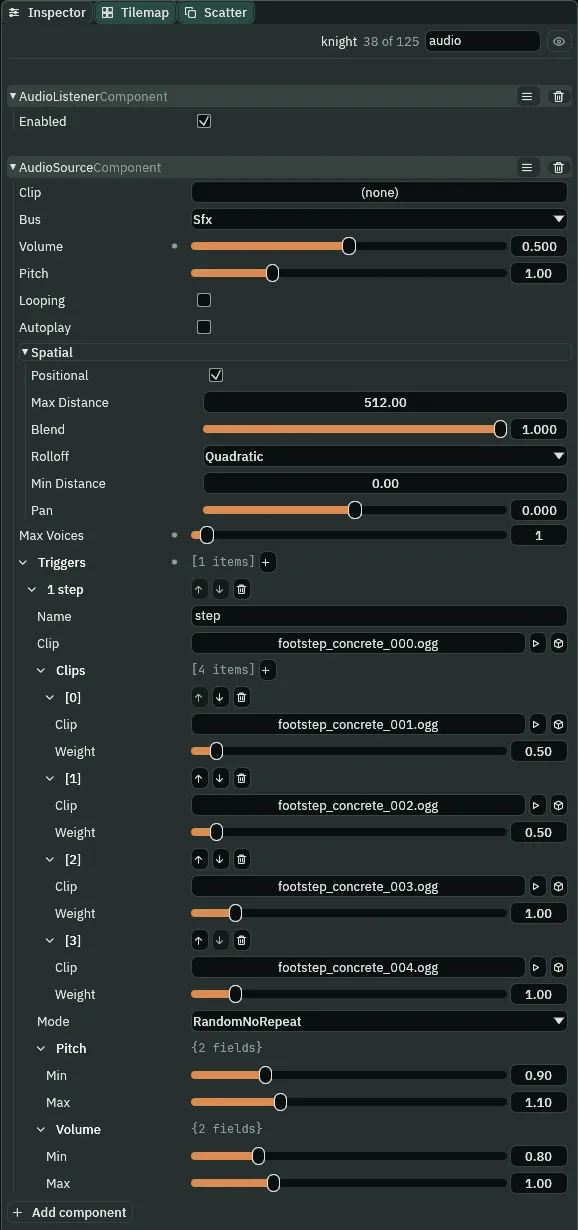
- Triggers
- The Audio Source’s list of named sounds: each row a Name and the takes it plays. A trigger plays when something asks for it by name: an animation’s Trigger track, as here, or a script, from chapter 4. A row is played on its node’s own Audio Source, from where the node is, on the source’s Bus, at its Volume and Pitch times the row’s ranges. What a Trigger track starts plays once, however Looping is set.
- The trigger’s Name
- What asks for it must spell it the same way: the track
stepplays the rowstep. A name with no row plays nothing. - The trigger’s Clip
- Its first take. It is drawn with the Clips as one more take, at a Weight of
1, first in their order, sofootstep_concrete_000.oggis not listed again under Clips: put in both, it would be two takes, and could play twice running. - Clips
- The trigger’s other takes of the same sound, played instead of repeating one. Five takes in all here: the Clip and these four.
- A take’s Clip
- The recording a row of Clips plays.
- Weight
- How often a take comes up against the others, under Random and RandomNoRepeat. Under Random a take at
1comes up twice as often as one at0.5; under RandomNoRepeat, the take just played sitting out each draw, a plain take here comes up about24steps in a hundred and a gritty one about14. The two gritty takes are at0.5, so the scrape comes now and then, not every other step. Shuffle and Sequential do not read it. In every Mode, a Weight of0mutes a take without deleting its row. - Mode
- The order the takes are drawn in. RandomNoRepeat: by Weight, leaving out the take just played, so no take plays twice running. Random: by Weight alone, fresh each time, so a take sometimes plays twice running. Shuffle, as a row comes: every take once in each round, in a shuffled order, whatever its Weight. Sequential: the takes in the list’s order, the Clip first, round and round. The draw is seeded by the trigger’s name and its node, so the same walk plays the same takes on every run, for every reader.
- The trigger’s Pitch
- A range the take’s speed is multiplied by, drawn fresh each time it plays, on top of the source’s Pitch.
0.9to1.1: each step a tenth either side of its take’s own pitch, so five takes sound like many.1to1, as a row comes, varies nothing. - The Pitch range’s Min
- The lowest it is drawn at, and it can be drawn:
0.9. - The Pitch range’s Max
- The highest it is drawn under:
1.1, which is never quite reached. - The trigger’s Volume
- A range the take’s loudness is multiplied by, drawn fresh each time, on top of the source’s Volume.
0.8to1: each step as loud as the source’s0.5, or up to a fifth softer, never louder. - The Volume range’s Min
- The softest it is drawn at:
0.8. - The Volume range’s Max
- The loudest it is drawn under: left at
1, as it comes, so a step is never louder than the source’s Volume. - Max Voices
- How many of this node’s sounds may play at once. Past it, a new one stops the oldest.
1: one pair of feet, one footfall at a time.0, as a source comes, sets no limit of its own.
Footsteps, heard
- Press F5 and click the Sound tab.
- Walk round the hall, and stop.
- Press F5 again to stop.
What it sounds like
Twenty-six quick heel steps on stone, evenly spaced, each a little different in pitch and grain, a few of them with a gritty scrape, over two soft wood-fire crackles; the steps stop, and only the crackles are left.
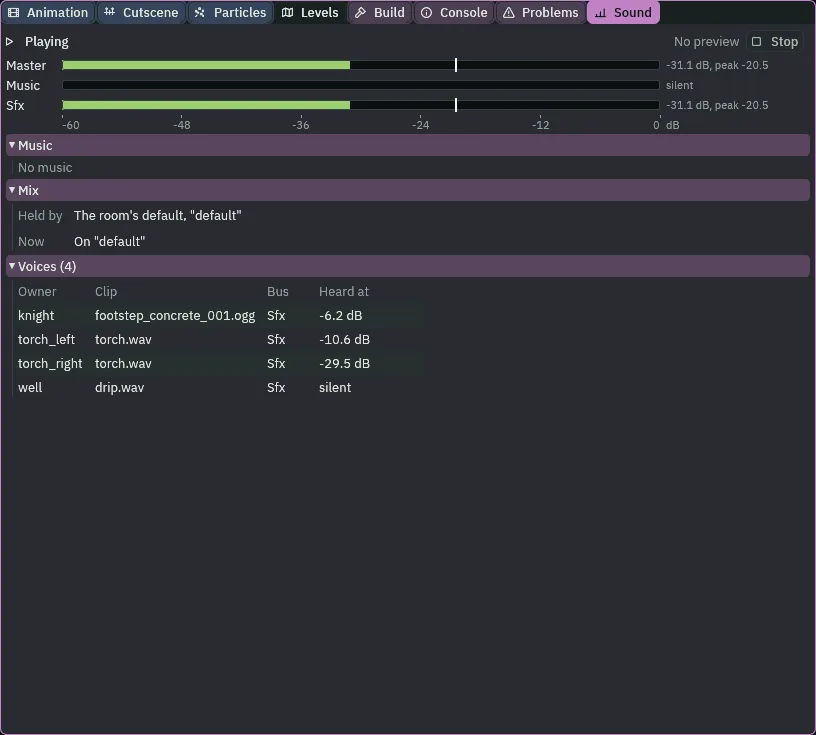
footstep_concrete_001.ogg, while it sounds.A step is a tenth of a second, so its row in the Voices list comes and goes as he walks. Its level moves too: the source’s 0.5 is -6.0 dB, and each step’s draw from the Volume range takes up to a fifth more off.
The other Modes, and Max Voices
Try each Mode on step and walk the same lap. Under Random the takes come by Weight as before, and now and then one plays twice running: a stutter of the same step. Under Shuffle every take plays once in each round of five, the gritty ones as often as the plain, whatever their Weight. Under Sequential they play 000, 001, 002, 003, 004 and round again, a pattern you soon hear. Set it back to RandomNoRepeat. Chapter 4 keeps Random for the bridge’s creaks and Sequential for a door’s two sounds; chapter 12’s gallery keeps Shuffle.
Max Voices at 1 is rarely heard working on a walk: a take is over in about a tenth of a second, and the next foot comes a quarter second later. What it guarantees is that he never makes two steps at once: a step asked for while the last is still sounding stops that one. At 0, the two would sound over each other. Leave it at 1.
The footsteps
| Node | Component | Field | Value |
|---|---|---|---|
art/knight.anim | walk | a Trigger track | step, on frames 0 and 2 |
knight | Audio Source | Clip | none |
| Bus, Volume | Sfx, 0.5 | ||
| Looping, Autoplay | unticked, unticked | ||
| Positional | ticked | ||
| Max Voices | 1 | ||
| its trigger | Name | step | |
| Clip | audio/footstep_concrete_000.ogg | ||
| Clips | 001 at 0.5, 002 at 0.5, 003 at 1, 004 at 1 | ||
| Mode | RandomNoRepeat | ||
| Pitch | Min 0.9, Max 1.1 | ||
| Volume | Min 0.8, Max 1 |
The rest of the source is as it comes: Pitch 1, Max Distance 512, Blend 1, Rolloff Quadratic, Min Distance 0, Pan 0.