Tutorials · Sound and Music · Chapter 10
Moods
By the end
- A music asset,
music/crypt.data: four Tracks,calmwith an Intro,danger,foundandcaught, the last two playing once - Six Rules: calm and danger crossfade into each other, the sting and the found phrase cut in at once, and each hands back to calm at its end; and a Default Transition
- The crypt’s level opening on the asset’s
calm, and why the room’s own track and the alcove’s go ghost.rgsasking fordangeras the ghost comes within Near of him and forcalmonce it is beyond Far, and for the sting as it touches him- The music box, found, falling silent and playing its found phrase, once
- Who plays the music now: the level and the scripts, by the asset’s track names, and the rules say how each change sounds
On this page
Four more pieces of music
Part 3 makes the music follow the game. Until now the crypt had one music, the calm, which a room’s track or a script started and stopped. Here it gets four more, made for the crypt and in the starter with the rest: crypt-danger.wav, the calm’s key and tempo made dark, a low pad throbbing under the tune in pieces, 24 seconds, as long as the calm; crypt-intro.wav, two bars, 6 seconds, that swell up into the calm’s first; found.wav, the music box found, 8.5 seconds with its ring; and caught.wav, the ghost’s catch, a falling run and a sagging chord, 1.5 seconds.
Leave all four on Auto, as they come: a music asset’s clips are held whole whatever Stream says.
A music asset
A music asset holds a level’s music as named tracks, and the rules for getting from one to another. The level plays it; a script asks for a track by its name, and the asset’s rule for the change says how it sounds: a cut, a crossfade, or a wait for the end of the playing track.
- In Assets, click Assets in the path bar, then choose Create → New folder, type
musicand press Enter: a folder at the project’s top. - Click the
musicfolder in the tree. Its row lights up and the path bar readsAssets / music: Create now writes into it. - Choose Create → New data asset → Music. In the field under the bar, which reads
music, the type’s name, typecryptover it and press Enter.music/crypt.datais written, and opens in the Inspector, which draws it in place of the selection:crypt.data, MusicGraph, with no tracks and no rules yet, and its own Revert and Save.
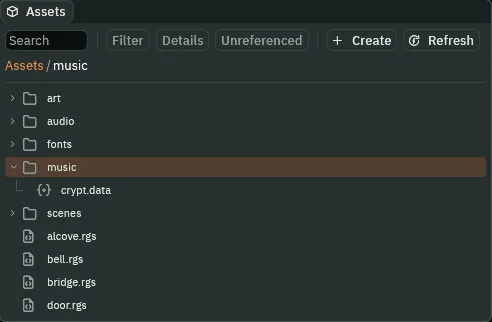
music clicked: the path bar reads Assets / music, and crypt.data is written in it.Where Create writes is the folder last clicked in the tree, or the folder of the file last clicked, and the path bar names it. A click on a folder that is open also folds it, and it is still the one Create writes into. Assets, at the start of the path bar, is the project’s top again.
Each + on one of its lists adds a row that is a copy of the row above it, so a row is edited rather than started from nothing; the first + on an empty list, with no row above, adds one as a row comes.
Four tracks
- Press + beside Tracks: a track,
1, with Looping ticked, as a track comes. Typecalmin its Name, dragcrypt-calm.wavfrom Assets onto its Clip, andcrypt-intro.wavonto its Intro. - Press + beside Tracks again:
2, a copy ofcalm. Name itdanger, dropcrypt-danger.wavon its Clip, and clear its Intro: click the slot and pick(none), under the search box of the list it opens. - Press + again:
3. Name itfound, dropfound.wavon its Clip, and untick Looping. - Press + again:
4, a copy offound. Name itcaughtand dropcaught.wavon its Clip. Press Save.
| Name | Clip | Intro | Looping | Why |
|---|---|---|---|---|
calm | crypt-calm.wav | crypt-intro.wav | ticked | the crypt opens on the intro, which runs into the loop; the name chapter 5’s alcove.rgs already asks for |
danger | crypt-danger.wav | none | ticked | the same length and key as calm |
found | found.wav | none | unticked | a phrase that resolves and stops: it plays once |
caught | caught.wav | none | unticked | the sting: it plays once |
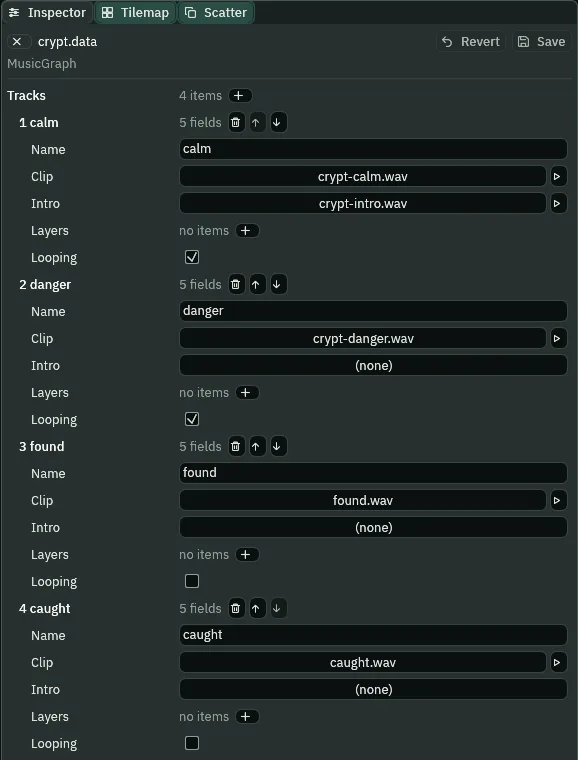
- The music asset’s Tracks
- The pieces of music the asset can play, a row each. One plays at a time; a level opens on one, and a script asks for another by its name. The Inspector reads each row by its place and its name,
1 calm. - A track’s Name
- What
play_music, a rule and a level’s Track call it by. - A track’s Clip
- The sound the track plays, and loops while Looping is ticked. The ▶ beside it plays it, as beside every clip slot.
- Intro
- A clip the track plays once before its Clip, running straight into it with no gap: the intro’s last sample, then the loop’s first. It plays every time the track starts, not only the first. Empty for none: click the slot and pick
(none)to empty it. - A track’s Looping
- Ticked, the track plays until another takes its place. Unticked, it plays once and stops, and the music is silent after it unless something waits for its end, as a rule’s AtEnd below does.
Six rules
A rule says how the music gets from one track to another. A rule has no name, so it reads by its place; its From and To are track names, and an empty From means any track.
- Press + beside Rules: rule
1, which comes as a rule does, readinganyto nothing, a CrossFade of1second. Typecalmin its From anddangerin its To, or pick each from the list beside it, and set its Seconds to1.5. - Press +: rule
2, a copy. Set From todanger, To tocalm, and Seconds to3. - Press +: rule
3. Clear From, which then readsany; set To tocaughtand How to Immediate. - Press +: rule
4. Set From tocaught, To tocalmand How to AtEnd. - Press +: rule
5. Clear From; set To tofoundand How to Immediate. - Press +: rule
6. Set From tofound, To tocalmand How to AtEnd. - Set the Default Transition’s Seconds to
2, and leave the Playlist empty. Press Save.
| From | To | How | Why |
|---|---|---|---|
calm | danger | CrossFade, 1.5 s | the threat arrives quickly; halfway, both are heard |
danger | calm | CrossFade, 3 s | it eases off, slower than it came |
| (any) | caught | Immediate | the sting cuts whatever plays |
caught | calm | AtEnd | calm comes back as the sting’s last sample ends |
| (any) | found | Immediate | the phrase starts whole; a crossfade would fade in its first note |
found | calm | AtEnd | calm comes back where the phrase ends |
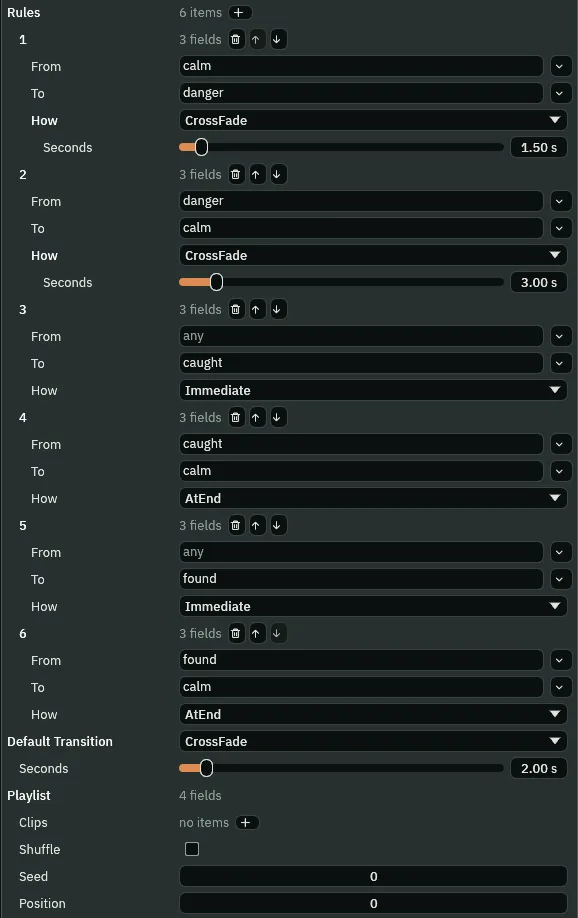
- The music asset’s Rules
- How the music changes from one track to another, a row each. When a track is asked for, the rule whose From is the playing track and whose To is the one asked for decides; a rule whose From is empty stands for any track. With no rule for the pair, the Default Transition does.
- A rule’s From
- The track being left, by its name. Empty, it reads
any, and the rule is for every track. The list beside it picks a name from the asset’s tracks. - A rule’s To
- The track being asked for, by its name.
- A rule’s How
- Immediate cuts: the playing track stops and the new one starts, on the step it is asked for. CrossFade fades the playing track out as the new one comes in, over its Seconds. AtEnd lets the playing track reach the end of its pass, its loop or its one play, and starts the new one there, with no gap; the new track waits until then, and a track asked for in the meantime calls it off.
- A CrossFade rule’s Seconds
- How long the two tracks overlap, one fading out as the other comes in, from
0to30. The fade is straight in gain: halfway, each track is at half its own level. - Default Transition
- The How for any change no rule names, with the same three choices. A new asset’s is a CrossFade of
1second. No change the crypt makes in this chapter falls to it: the opening and the alcove start calm from no music, which a crossfade starts at once. Chapter 11 gives it a case. - The Default Transition’s Seconds
- The overlap of the default crossfade:
2here, set from the1it comes with.
The crypt’s level
- Click the Levels tab and click The Crypt row.
- Drag
crypt.datafrommusicin Assets onto the row’s Music button. A Track list appears beside it: pickcalm. - Leave the Title row’s Music as it is: the castle’s loop.
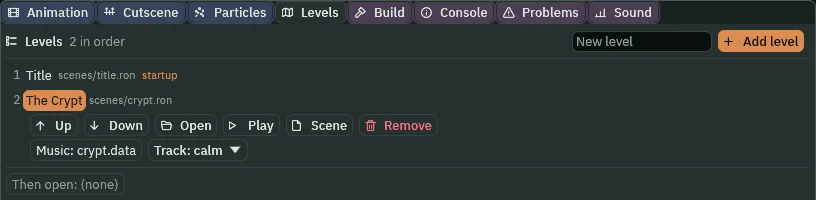
calm.- A level’s Track, in the Levels panel
- With a music asset as the level’s Music, the track the level opens on, picked from the asset’s tracks. A clip as the level’s Music has no Track.
What goes
The crypt’s music was the room’s own track, the looping Autoplay on Crypt, and the alcove played it again by its trigger calm. A level’s Music beats a room’s own track, and one music plays at a time, so with the level’s set neither would ever be heard. They go.
- Select
Crypt, and remove its AudioSourceComponent with the bin icon at the right of its header. - Select
alcove, and remove its AudioSourceComponent the same way, its triggercalmwith it. Its Alcove stays. - Select
mix. In Effects, Music, open slot1, the Gain, and set it from-4to-7dB. Press Ctrl+S.
The ghost’s moods
The ghost decides the mood. Each step it reads how far the knight is: once he is within Near of it, it asks for danger; once he is beyond Far, for calm. Its touch asks for the sting before it sends him back to the hall.
- In Assets, double-click
ghost.rgs. In the Code tab, replace everything in it with the script below, and press Ctrl+S. - Select
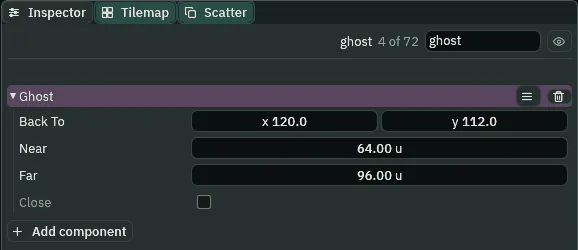
ghost: its Ghost now shows Near64, Far96and Close. Leave them.
/// The ghost, drifting its round through the flooded passage. Near the
/// knight it turns the crypt's music to danger, and once it is far from him
/// again, back to calm. A knight its Area touches is caught: the music cuts
/// to a sting, and he is sent back to where he started, in the entrance hall.
component Ghost : Area {
    /// Where a knight the ghost touches is sent back to: his start in the
    /// entrance hall.
    back_to: Vec2,
    /// How near the knight the ghost turns the music to danger.
    #[suffix("u")]
    near: f32 = 64.0,
    /// How far from him it turns the music back to calm. Farther than near,
    /// so a ghost drifting along the edge does not turn it back and forth.
    #[suffix("u")]
    far: f32 = 96.0,
    /// Whether it has turned the music to danger, or to the sting that waits
    /// for calm, so that it asks for each change once and not on every step.
    #[readonly]
    close: bool = false,

    fn loop() {
        let knight = nearest("knight");
        if knight != node(0) {
            let apart = position().distance(position_of(knight));
            // danger and calm are tracks of the crypt's music asset, the
            // level's Music: its rules say how one turns into the other.
            if !close && apart < near {
                play_music("danger");
                close = true;
            } else if close && apart > far {
                play_music("calm");
                close = false;
            }
        }
    }

    fn on_enter(other: NodeId) {
        if in_group(other, "knight") {
            // The sting cuts in at once, whatever is playing.
            play_music("caught");
            // Still close: once he is far from the ghost, it asks for calm,
            // which waits for the sting's end.
            close = true;
            move_node(other, back_to);
        }
    }
}
- play_music, by a track’s name
- With a music asset as the level’s Music, a name that is one of its tracks asks for that track, and the asset’s rule for the change says how it comes in. Asking for the track already playing leaves it playing. A name the asset does not have plays a trigger of that name on the script’s own node, as chapter 5’s did.
- nearest and position_of
nearest("knight")is the nearest other node in the groupknight, ornode(0), nobody, when there is none;position_ofis where a node stood as the step began. With the ghost’s ownposition(),.distance(...)is how far apart they are.- Near and Far, the ghost’s
- How near the knight turns the music to danger, and how far from him it turns back to calm, in world units,
u. Far is farther than Near, so a ghost drifting along the edge of Near does not turn the music back and forth. - Close, the ghost’s
- Whether it has asked for danger, or for the sting, so that it asks for each change once.
#[readonly]shows it and keeps it out of your hands: the script writes it.
alcove.rgs is the same code. Only its comments change, to say that calm is now the asset’s track, and that asked for while the found phrase plays, it waits for the phrase’s end. Replace it too:
/// The alcove at the end of the crypt, where the music box plays. As the
/// knight comes in, the crypt's music stops, and the box is heard alone. As he
/// leaves, the crypt's music comes back.
component Alcove : Area {
    fn on_enter(other: NodeId) {
        if in_group(other, "knight") {
            stop_music();
        }
    }

    fn on_exit(other: NodeId) {
        if in_group(other, "knight") {
            // calm is a track of the crypt's music asset, the level's Music.
            // Asked for while the box's found phrase plays, it waits for the
            // phrase's end.
            play_music("calm");
        }
    }
}
The box, found
When he reaches the music box, its tune falls silent and the music plays the found phrase, once.
- Select
music_box. Press Add component and choose AreaComponent. In its Shape, set Size to32,32and Offset to0,16: the floor in front of the box. - In Assets, click Assets in the path bar, so the script is written at the project’s top, then click Create, choose New script, type
music_boxand press Enter. Replace everything inmusic_box.rgswith the script below, and press Ctrl+S. - Select
music_box, press Add component and choose MusicBox. Press Ctrl+S.
/// The music box, at the end of the crypt. Its tune leads the knight to it.
/// Once he reaches it, it falls silent, and the crypt's music plays its found
/// phrase, once.
component MusicBox : Area {
    /// Whether he has reached it, so that it is found once.
    #[readonly]
    found: bool = false,

    fn on_enter(other: NodeId) {
        if in_group(other, "knight") && !found {
            // Its tune, its own Audio Source's Autoplay, stops.
            stop_sound();
            // A track of the crypt's music asset, whose Looping is unticked:
            // it plays once and stops.
            play_music("found");
            found = true;
        }
    }
}
Heard
Press Run game and Play, or F5 on the crypt with the Sound tab open. The crypt opens on calm, and calm on its intro.
What it sounds like
Out of silence a soft pad swells up over about two seconds, with a few music-box notes; at six seconds it runs on without a break into the crypt’s gentle music-box melody over the pad.
Then walk through the cave into the flooded passage, to the middle of the ghost’s round, where the route turns down to the bell chamber, and wait for the ghost.
What it sounds like
The soft intro and the gentle music-box melody, footsteps; the music turns muffled; then it changes over a second and a half into darker, louder music with a low throbbing pad and the tune in pieces, which plays on.
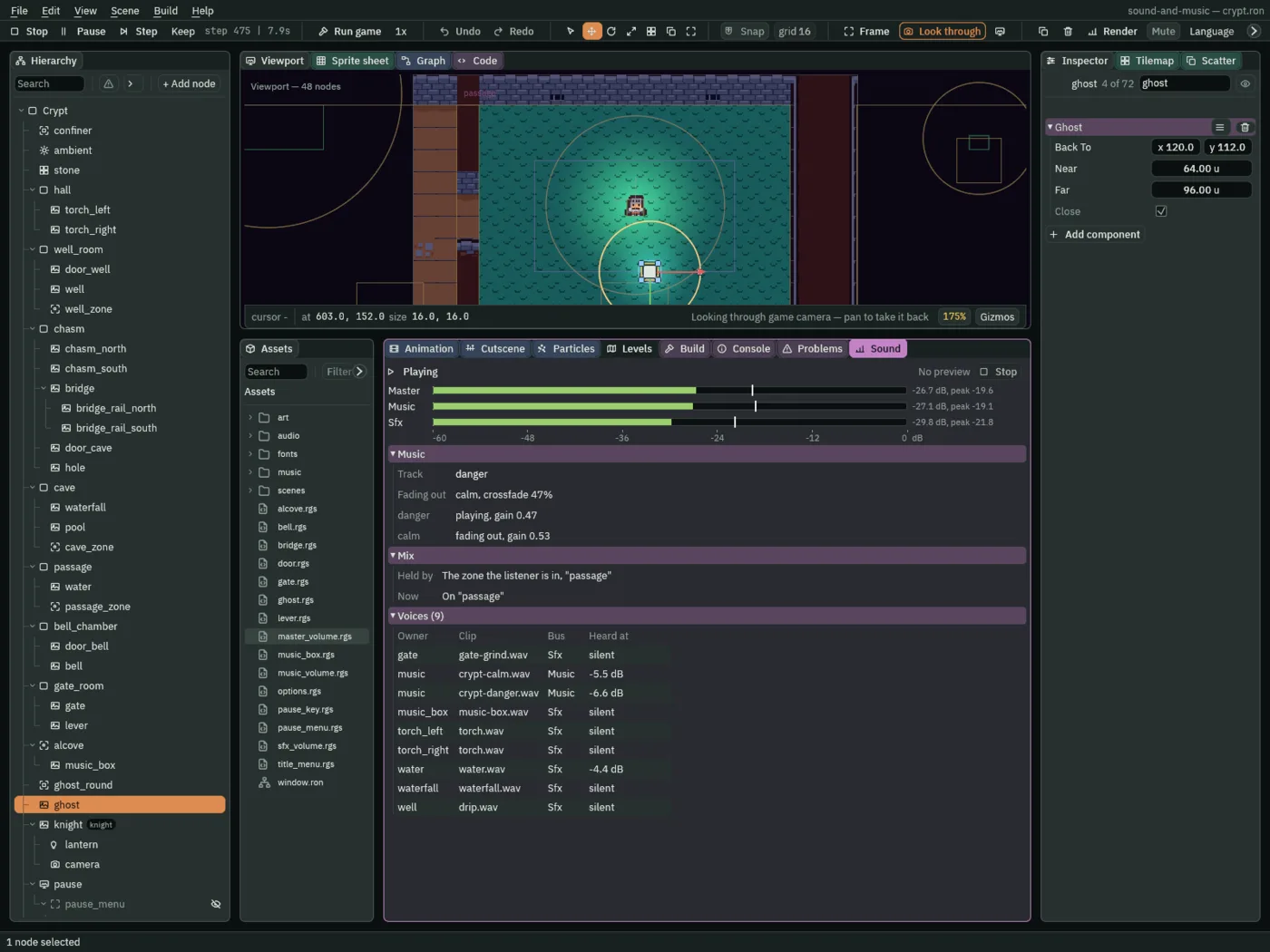
- The Sound tab’s Music band, with a music asset
- Track is the track playing, or coming in. Fading out names the track a crossfade takes out, and how far through the fade is. A row for each track sounding says where it is, playing, fading out, or waiting to take over at the end of the pass, and its gain. Next names a track waiting for the end of this pass, as an AtEnd does. In Voices, a music voice is Heard at its share of the crossfade, the gain above, and not at how loud its music is: part way in, as in the picture, calm’s row still reads over danger’s, while danger, the louder music, is heard over calm.
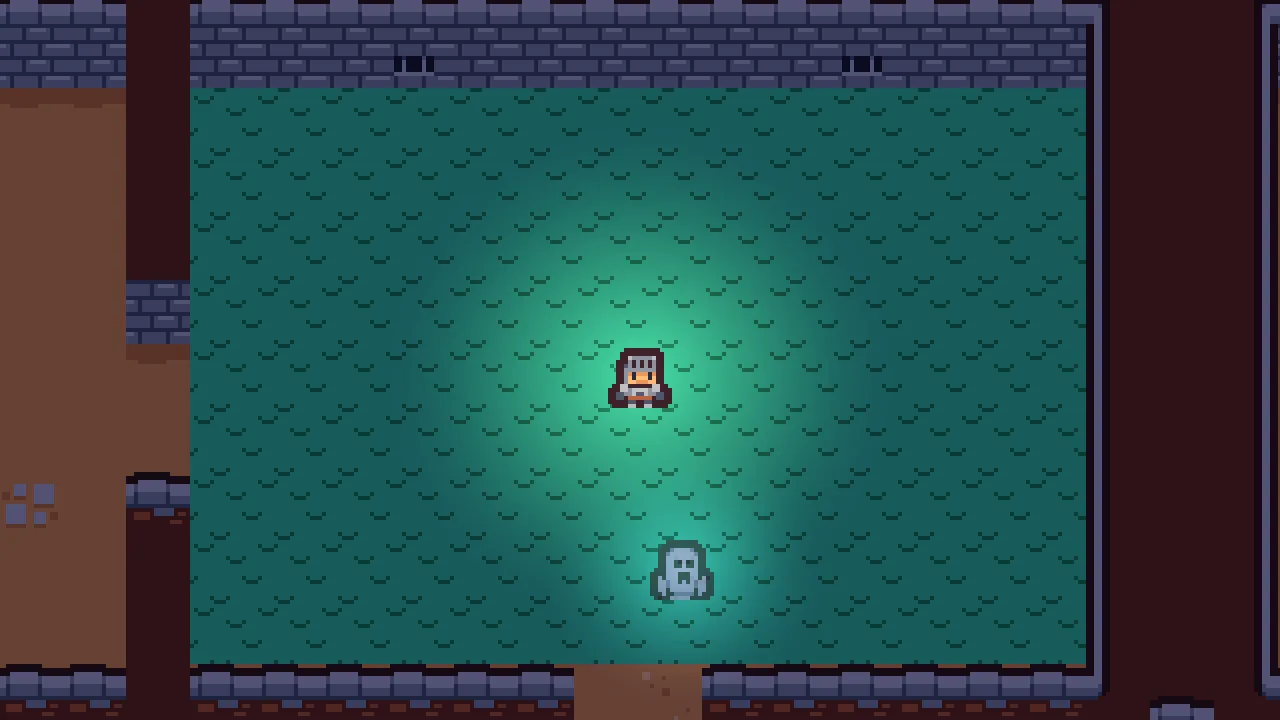
The ghost goes round him and never gets beyond Far of him there, so the music stays dark. Walk back west, away from it: once it is beyond Far, it asks for calm, and danger eases out over three seconds, calm coming in from its intro. Chapter 11’s first clip has the same ease back to calm, by then from calm’s tune rather than its intro.
What it sounds like
Water lapping, and a soft swell under it that turns into darker music with a throbbing pad; a falling run on a music box and a low chord that sags; a fire crackling, and out of silence the soft pad swells up again.
What it sounds like
The soft intro, a metal clank, a rising grind and a thud, steps; the music cuts off and a music-box tune is heard alone; then it stops, and a music box falls to a note and climbs a bright chord to a high note that rings and fades to silence.
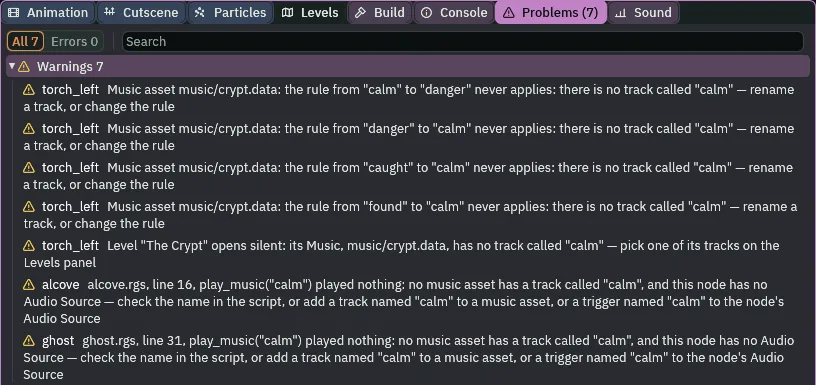
calm renamed: every rule, the level and both scripts that name it.A track’s name is what everything else calls it by, so the Problems tab follows every name. The asset’s rows and the level’s are the project’s, not a node’s, so each sits on the first node in the Hierarchy with sound of its own, torch_left; a script’s row sits on the node whose script asks. With no Problems row, every name a script asks for is a track of the asset, every rule’s From and To is one, and so is the level’s Track.
Who decides what you hear
The moods
| Node | Component | Field | Value |
|---|---|---|---|
music/crypt.data | Music | Tracks | calm (crypt-calm.wav, Intro crypt-intro.wav), danger (crypt-danger.wav), found (found.wav, Looping unticked), caught (caught.wav, Looping unticked) |
| Rules | calm → danger CrossFade 1.5; danger → calm CrossFade 3; any → caught Immediate; caught → calm AtEnd; any → found Immediate; found → calm AtEnd | ||
| Default Transition | CrossFade, 2 | ||
| The Crypt, in Levels | the level | Music, Track | music/crypt.data, calm |
Crypt | Audio Source | removed | |
alcove | Audio Source | removed | |
| Alcove | alcove.rgs, its comments | ||
mix | Audio Mix | Music slot 1, Gain | -7 dB |
ghost | Ghost | ghost.rgs, rewritten: Near 64, Far 96, Close | |
music_box | Area | Shape Size, Offset | 32, 32; 0, 16 |
| MusicBox | music_box.rgs |