Tutorials · Sound and Music · Chapter 4
Sounds from a script
By the end
- An
actionon E in the input map, and adoor_shutpicture cut from the sheet - Three doors, shut, that swing open with a creak as the knight comes and bang shut behind him: an Area, a Pan of
0.3and a Sequential trigger, played bydoor.rgs - A bridge that creaks under him as he steps on and every stride along, and nowhere else: an unplaced Audio Source and a Random trigger, played by
bridge.rgs - A lever whose latch clanks, and a gate whose grind, unheard since the crypt opened, is turned up and wound to twice its pitch as the bars slide aside, then stopped by a thud:
lever.rgsandgate.rgs, withplay_sound,set_number,anneal_numberandstop_sound - What Clip and Looping mean to a script, and what a node’s sounds do when it is removed
On this page
The sounds
Six sounds from Kenney’s RPG Audio: three creaks of wood for the bridge, a door opening and one closing, and a metal latch for the lever. One more from Impact Sounds: a heavy metal impact, the gate landing. The gate’s grind, gate-grind.wav, a loop of 1.6 seconds, came with the starter.
- Download RPG Audio from its page below, and use the Impact Sounds you downloaded in chapter 3. Copy these seven files into your project’s
audiofolder, each from where the list says. Then press Refresh in the Assets panel. - Hear each in Details. Leave their Stream on Auto: each is under three seconds, so it is held whole and plays the moment it is asked for.
A key for the lever, and a shut door
The lever is pulled with E, which a script reads by an action’s name; and the doors, which stand open in the starter, need a picture of themselves shut.
- Choose View → Input map…. Type
actioninto New action and press Add. Withactionselected, press Record a control and press E. Press Save, and close the window. - In Assets, double-click
art/tilemap_packed.png. The Sprite sheet tab opens on it. In its Grid band, set Cell to32by16. - Click the shut double door, the cell in the sixth column and the fourth row: its top left is
160,48on the sheet. It outlines orange. - In the Regions band, type
door_shutinto Name and press Name it.
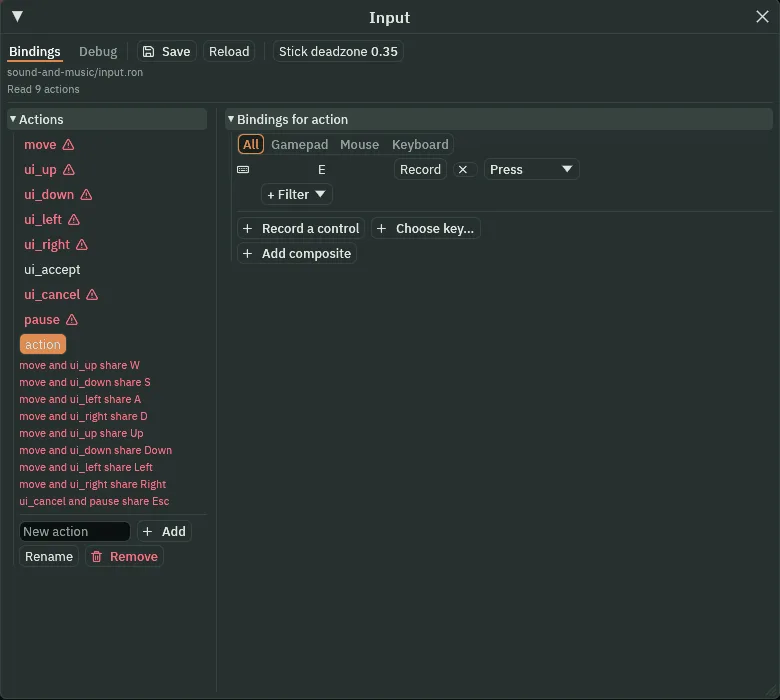
action, on E.- The input map’s New action and Record a control
- The box a new action’s name is typed into, which Add adds to the Actions list; and the button that makes the next key you press one of the selected action’s controls. A script asks for an action by its name, never by its key, so the key can change without the script.
- The Sprite sheet tab’s Cell, and Name it
- In the Grid band, the size of one cell of the tab’s grid, in the sheet’s pixels:
32by16, a double door’s width and one row. In the Regions band, Name it saves the outlined cell as a region of the sheet under the name in Name, which a Sprite then draws by that name.
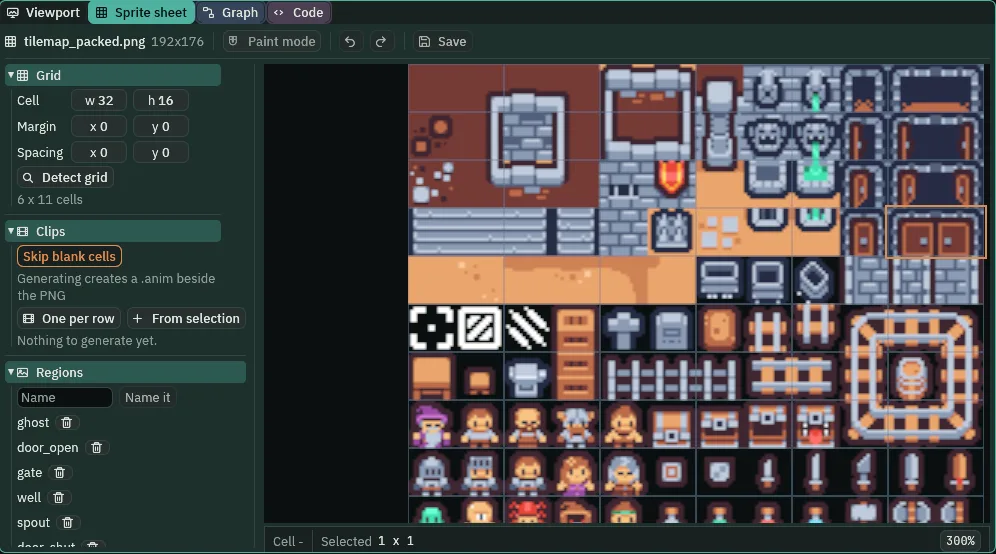
door_shut named.The input map’s red marks say that two actions share a key: move and ui_up both on W, and so on. The starter means them to: the title’s menu is worked with the same keys that walk the knight. action shares nothing.
Doors that creak
Each of the three doors, door_well, door_cave and door_bell, becomes a shut door that swings open as the knight comes up to it, creaking, and bangs shut once he has gone through, or turned back. A Collider stops him while it is shut; an Area, a little bigger than the doorway, notices him coming; an Audio Source holds its two sounds as one trigger; and a script does the rest.
- Select
door_cave, inchasm. In its Sprite, set Atlas Region todoor_shut. - Press Add component and choose ColliderComponent. Set its Size to
32,32and its Offset to0,-8: the doorway’s two rows of cells. - Press Add component and choose AreaComponent. In its Shape, set Size to
48,64and Offset to0,-8. Leave its Layer and Mask as they come: each reads0, the first layer, the knight’s. - Press Add component and choose AudioSourceComponent. Leave Clip empty. Set Volume to
0.5and, in Spatial, Pan to0.3. - Click the + beside Triggers. Name the row
swingand set its Clip todoorOpen_1.ogg. Click the + beside its Clips once: set the new row’s Clip todoorClose_2.ogg, its Weight at1. Set Mode to Sequential. - In Assets, click Assets at the start of the path bar over the tree. Create writes into the folder last clicked in the tree, or the folder of the file last clicked, and the path bar names it:
Assets / artsince you opened the sheet. Assets alone is the project’s top, where its scripts are. Click Create, choose New script, typedoorand press Enter. In the Code tab, replace everything indoor.rgswith the script below, and press Ctrl+S. - Select
door_caveagain, press Add component and choose Door. - Do the same for
door_well, inwell_room, anddoor_bell, inbell_chamber. Press Ctrl+S.
/// A door between two rooms. Shut, it stops the knight. As he comes up to it
/// it swings open with a creak, and once he has gone through, or turned back,
/// it swings shut behind him. Its one sound, swing, plays its two takes in
/// turn: the creak open, then the bang shut.
component Door : Area {
    fn on_enter(other: NodeId) {
        if in_group(other, "knight") {
            play_sound("swing");
            set_text("SpriteComponent", "region_name", "door_open");
            set_flag("ColliderComponent", "solid", false);
        }
    }

    fn on_exit(other: NodeId) {
        if in_group(other, "knight") {
            play_sound("swing");
            set_text("SpriteComponent", "region_name", "door_shut");
            set_flag("ColliderComponent", "solid", true);
        }
    }
}
- play_sound
- Plays the trigger of that name on the script’s own node’s Audio Source:
play_sound("swing")plays the rowswing, its next take by its Mode. It plays once, from where the node is, on the source’s Bus. A name with no row plays nothing. - on_enter and on_exit
- A
component Door : Arearuns these when something comes into its Area and when it leaves, withother, the node that did. in_group asks whether it is the knight, who is in the groupknight, so nothing else opens a door. - set_text and set_flag
- Write a field of another component on the same node: the Sprite’s
region_name, which picture it shows, and the Collider’ssolid, whether it stops him. - Sprite Atlas Region
- Which region of the Sprite’s sheet it draws, by name:
door_shut, the cell you named, and laterdoor_open, the starter’s, when the script swaps it. - Collider Size and Offset
- The box that stops him, in world units: its width and height, and how far its middle sits from the node’s.
32by32,8up: the doorway’s two rows of cells. - The Area’s Shape Size and Offset, and its Layer and Mask
- The box that notices what comes into it, measured as the Collider’s:
48by64, so he is noticed a step before he reaches the door, on either side. Layer and Mask say which layers it sits on and notices: left as they come, each reads0, the first layer, the knight’s.
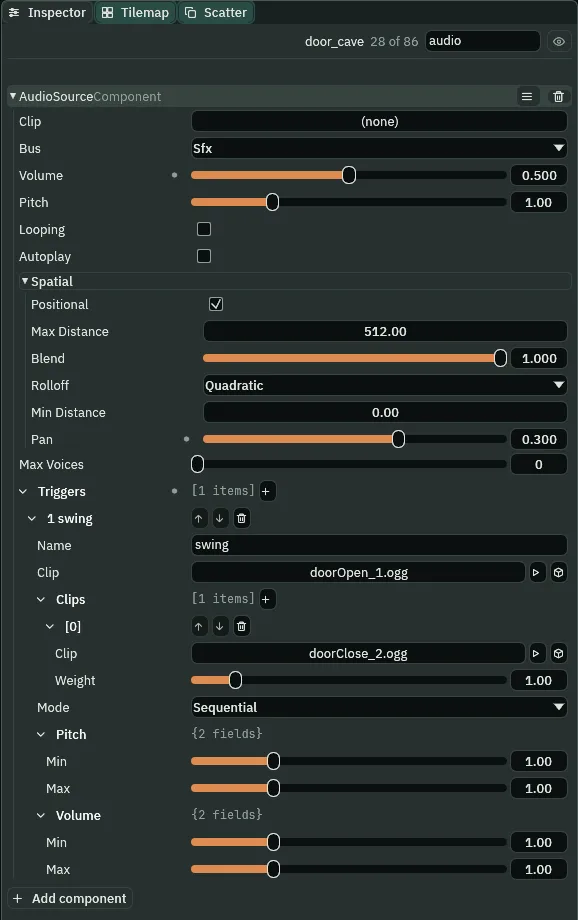
door_cave’s Audio Source: Pan 0.3, and swing, its two takes in turn.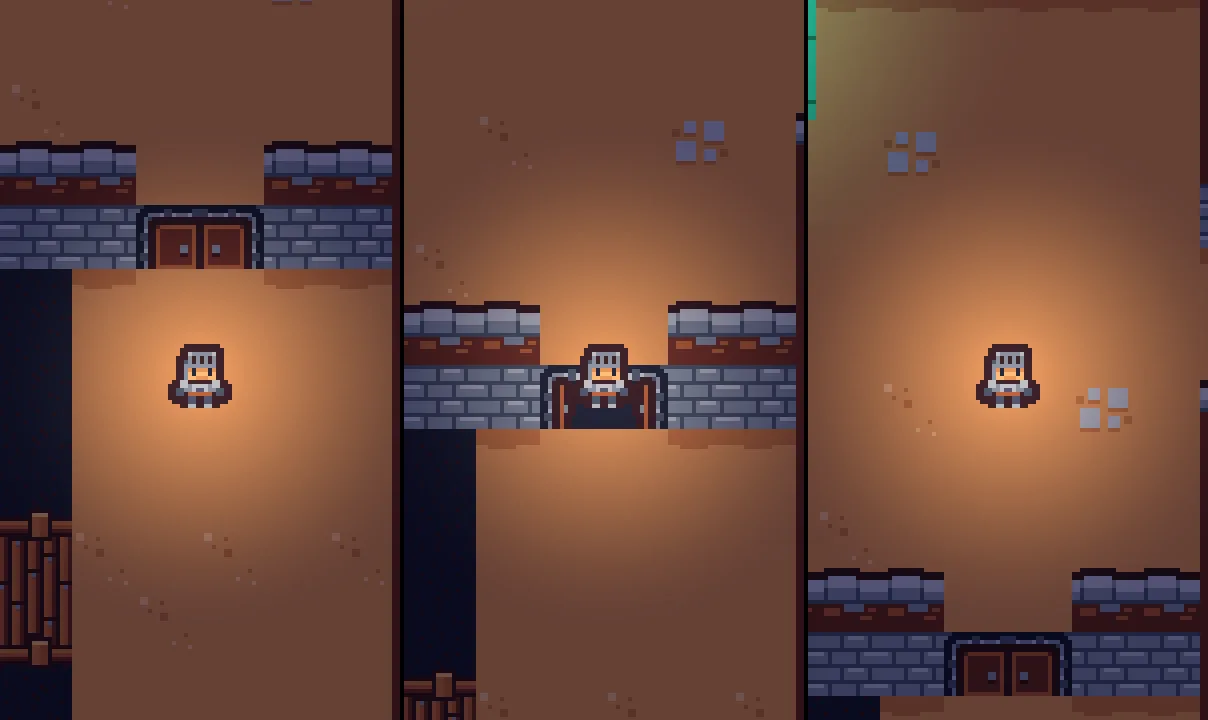
400, 430 and 480 (6.67, 7.17 and 8.00 s) of a walk up to the cave: shut, open as he comes, shut behind him.A bridge that creaks under him
The bridge creaks under the knight, and only under him: as he steps onto it, and each time he has walked a stride along it. Standing still on it, it is quiet. Its Area covers the deck; its script measures how far he has walked.
- Select
bridge, inchasm. Press Add component and choose AreaComponent. In its Shape, set Size to112,32: the deck. - Press Add component and choose AudioSourceComponent. Leave Clip empty. Set Volume to
0.4and, in Spatial, untick Positional. - Add a trigger
creak: its Clipcreak1.ogg; two Clips,creak2.oggat Weight1andcreak3.oggat0.5; Mode Random. - Make a script
bridgeas you madedoor, with the script below, and add Bridge tobridge. Its Stride reads48. Press Ctrl+S.
/// The wooden bridge over the chasm. Its boards creak under the knight: as he
/// steps onto it, and again each time he has walked a stride along it.
/// Standing still on it, he makes no creak.
component Bridge : Area {
    /// How far he walks along the boards from one creak to the next.
    stride: f32 = 48.0,
    /// How far he has walked since the last creak.
    #[hidden]
    walked: f32 = 0.0,
    /// Where he stood on the step before.
    #[hidden]
    last: Vec2,

    fn on_enter(other: NodeId) {
        if in_group(other, "knight") {
            play_sound("creak");
            walked = 0.0;
            last = position_of(other);
        }
    }

    // Every step something stays on the boards. Written in full it is
    // while_in(other: NodeId, dt: f32). Written with no parameters, as here,
    // both are still there by those names; this uses only other, what is on
    // the boards.
    fn while_in() {
        if in_group(other, "knight") {
            let now = position_of(other);
            let moved = now - last;
            walked += sqrt(moved.x * moved.x + moved.y * moved.y);
            last = now;
            if walked >= stride {
                play_sound("creak");
                walked -= stride;
            }
        }
    }
}
- while_in
- Runs on every step something is in the Area, with
other. Here it is how far the knight moved since the step before, from position_of, where a node stood as the step began, added up until a stride is walked. stride- How far he walks along the boards between creaks, in world units:
48, three cells. A field of the script’s, so the Inspector shows it under Bridge and you can change it there. #[hidden]- Keeps the field under it out of the Inspector:
walkedandlastare the script’s own reckoning, nothing to set by hand. - sqrt
- The square root of a number.
sqrt(moved.x * moved.x + moved.y * moved.y)is how far he moved on that step, whichever way he went.
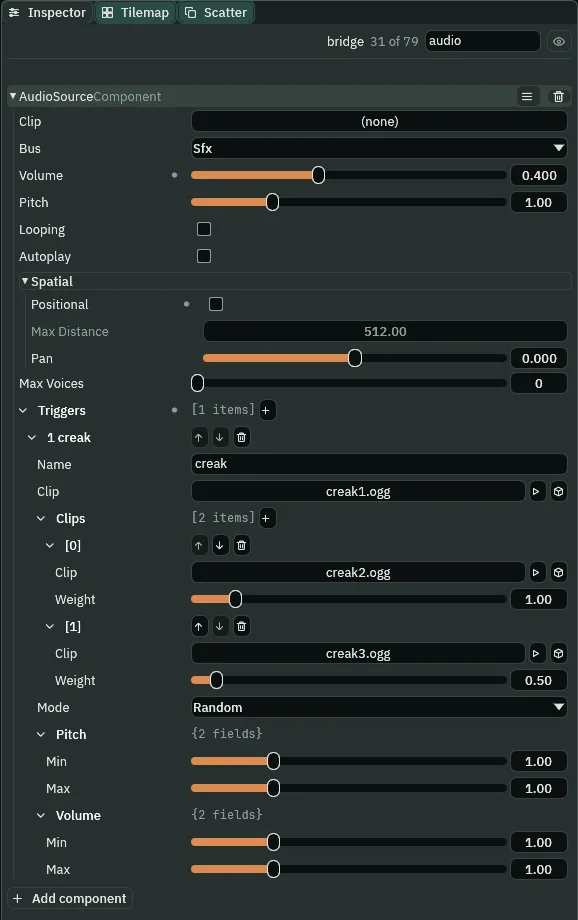
creak drawn at Random.The lever
The lever by the gate pulls once, on E, while the knight stands in front of it: its latch clanks, it leans the other way, and it tells the gate.
- Select
lever, ingate_room. Press Add component and choose AreaComponent. In its Shape, set Size to40,32and Offset to0,12: the floor in front of it. - Press Add component and choose AudioSourceComponent. Leave Clip empty and set Volume to
0.25. Add a triggerpullwith its ClipmetalLatch.ogg, and leave its Mode as it comes. - Press Add component and choose SignalComponent. Click the + beside Connections, open
[0], typepulledinto Signal, and set To togate: click it and choosegate, or draggatefrom the Hierarchy onto it. - Make a script
leveras you madedoor, with the script below, and add Lever tolever. Press Ctrl+S.
/// The old lever beside the gate, which works the gate's winch. It pulls
/// once: its latch clanks, it leans the other way, and the gate is told.
component Lever : Area {
    /// How many knights stand by it.
    #[readonly]
    near: i32 = 0,
    /// Whether it has been pulled.
    #[readonly]
    pulled: bool = false,

    fn on_enter(other: NodeId) {
        if in_group(other, "knight") {
            near += 1;
        }
    }

    fn on_exit(other: NodeId) {
        if in_group(other, "knight") {
            near -= 1;
        }
    }

    fn loop() {
        // E, which the input map calls action, pressed while he stands by it.
        if near > 0 && !pulled && pressed("action") {
            pulled = true;
            play_sound("pull");
            set_flag("SpriteComponent", "flip.x", true);
            emit("pulled");
        }
    }
}
- loop and pressed
- Every step, the lever asks whether
actionwent down on that step, while a knight stands in its Area,near, and it is not yetpulled. A hold of E counts once. - emit
- Tells whoever the node’s Signal wires the name to:
pulled, to the gate. The gate hears it on the next step. - The Signal’s Connections, Signal and To
- Its rows, one a wire: Signal, the name the node emits, and To, the node that hears it. One row here,
pulledtogate. #[readonly]- Draws the field under it greyed in the Inspector, so you can watch
nearandpulledchange in Play but not type into them.
The gate that grinds
The gate grinds as its winch takes it up, and the grind winds higher as the bars slide into the wall; then the winch stops and the bars land with a thud. The grind is a loop that has to be heard, changed while it plays, and stopped. play_sound never starts a loop (chapter 5’s play_music loops, but as the game’s music, unplaced, on Music), so the grind is the gate’s own Clip, started by its own Autoplay as the crypt opens, at a Volume of 0: it turns from the first moment, unheard. The script turns it up, winds it, and stops it.
- Select
gate, ingate_room. Press Add component and choose AudioSourceComponent. Set Clip togate-grind.wav, Volume to0, and tick Looping and Autoplay. - Add a trigger
stopwith its ClipimpactMetal_heavy_000.ogg. - Make a script
gateas you madedoor, with the script below, and add Gate togate. In it, set Aside to48,0; Grinding reads0.3, Wound2and Slide2.5. Press Ctrl+S.
/// The gate up to the alcove. Its grind has turned since the crypt opened, at
/// no Volume, unheard. When the lever is pulled the winch takes it up: the
/// grind is heard, and winds up as the bars slide aside into the wall. There
/// the grind stops, the bars come to rest with a thud, and the gate is gone
/// from the room.
component Gate {
    /// The grind's Volume while the bars move.
    grinding: f32 = 0.3,
    /// The Pitch it winds up to as they go.
    wound: f32 = 2.0,
    /// How long the bars take to slide aside, in seconds.
    slide: f32 = 2.5,
    /// How far they slide: the gate's own width, into the wall.
    aside: Vec2,

    fn on_signal() {
        if heard("pulled") {
            set_number("AudioSourceComponent", "volume", grinding);
            // Its Pitch rises with the bars, by the same curve: slow away,
            // fast across, slow into the wall.
            anneal_number("AudioSourceComponent", "pitch", wound, slide, .InOutSine);
            await anneal_by(aside, slide, .InOutSine);
            // In the wall: the winch stops, and the bars land with a thud,
            // which the same Audio Source plays, back at its own Pitch.
            stop_sound();
            set_number("AudioSourceComponent", "pitch", 1.0);
            play_sound("stop");
            // The bars are inside the wall now, and the gate leaves the room.
            // Its thud plays on where it stood.
            destroy_self();
        }
    }
}
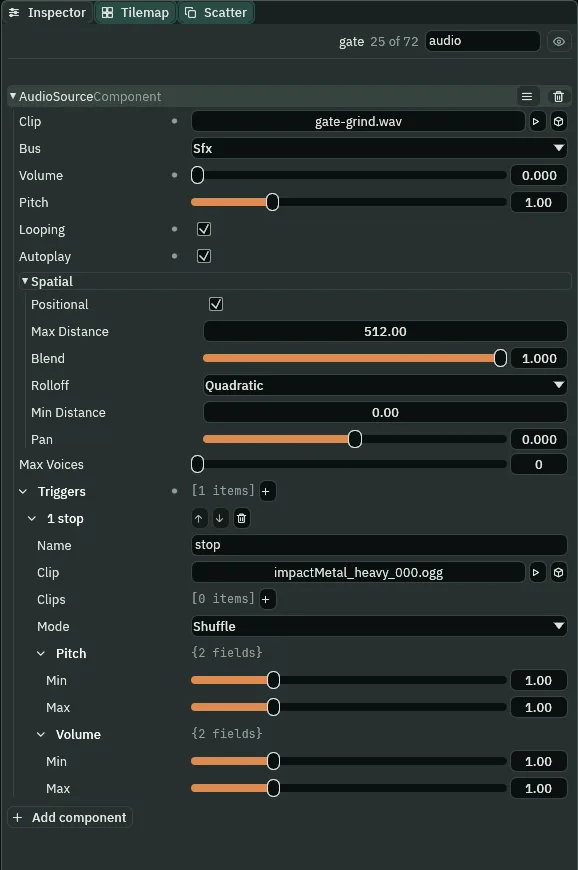
0, and stop, its thud.- on_signal and heard
- Runs on a step a signal reaches the node;
heard("pulled")is true on that step. - set_number
- Writes a number field of a component on the same node, at once: here the Audio Source’s
volume, from0togrinding,0.3, so the grind already turning is heard from that step; and later itspitch, back to1. - anneal_number
- Moves a number field toward a value over a time, on a curve, while the script goes on. Here the grind’s
pitchrises towound,2, overslide,2.5s, on.InOutSine: slow at first, fast across the middle, slow at the end. A sound’s Pitch changed while it plays is heard at once: the grind winds up an octave as it goes. - anneal_by
- Moves the node itself by
aside,48,0, over the same time and on the same curve, so the bars and the grind’s pitch move together. It is awaited: the hook waits here until the bars are in the wall. - stop_sound
- Stops every sound the script’s own node is playing: here the grind’s loop.
- destroy_self
- Removes the node the script is on. The gate leaves the room, and the way up to the alcove is open.

60, 140 and 240 (1.00, 2.33 and 4.00 s), E pressed on step 60: the lever pulled, the bars sliding aside, the way open.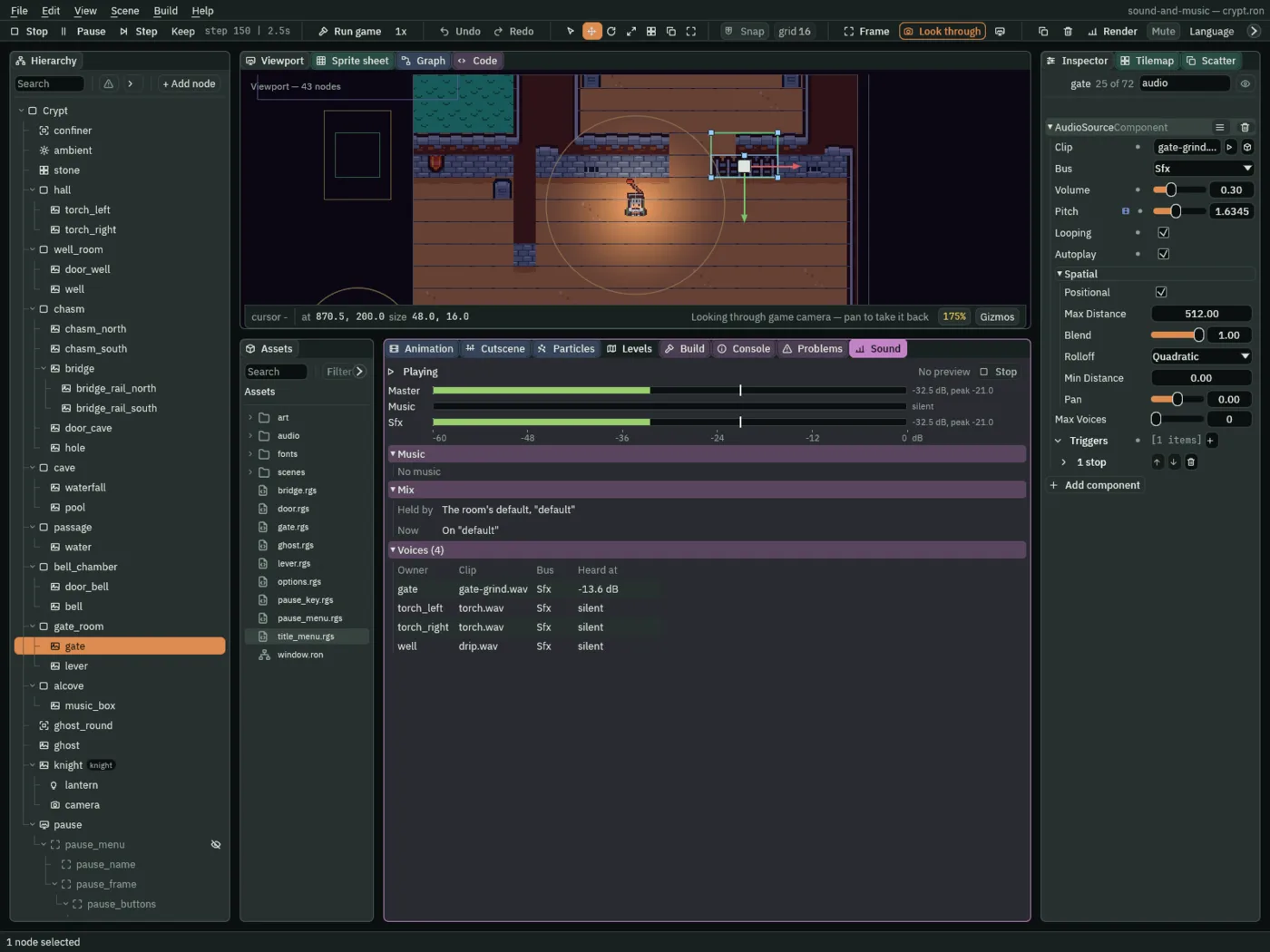
-13.6 dB, its Volume turned up to 0.30 and its Pitch at 1.63, on its way to 2.Hearing them
- Press F5. Walk down through the well room’s door, east over the bridge, and up through the cave’s door.
- Go on to the gate room, the way chapter 1’s table runs: through the flooded passage, keeping clear of the ghost, down through the bell chamber’s door and east. Stand in front of the lever and press E.
- Press F5 again to stop.
What it sounds like
Steps on stone and two soft crackles; a creaking door swings open, then bangs shut; a few seconds of steps; three creaks of wood under him, a stride apart, the boards groaning; steps again; another door creaks open and bangs shut; then silence in the cave.
What it sounds like
A metal clank; a low grinding loop that rises steadily in pitch for two and a half seconds; a heavy metal thud, and silence.
The doors, the bridge, the lever and the gate
| Node | Component | Field | Value |
|---|---|---|---|
input.ron | an action | action | E |
tilemap_packed.png | a region | door_shut | 160, 48, 32 × 16 |
| each door | Sprite | Atlas Region | door_shut |
| Collider | Size, Offset | 32, 32; 0, -8 | |
| Area | Shape Size, Offset | 48, 64; 0, -8 | |
| Audio Source | Clip | none | |
| Volume, Pan | 0.5, 0.3 | ||
trigger swing | Clip doorOpen_1.ogg; Clips doorClose_2.ogg at 1; Sequential | ||
| Door | door.rgs | ||
bridge | Area | Shape Size | 112, 32 |
| Audio Source | Clip | none | |
| Volume, Positional | 0.4, unticked | ||
trigger creak | Clip creak1.ogg; Clips creak2.ogg at 1, creak3.ogg at 0.5; Random | ||
| Bridge | stride | 48 | |
lever | Area | Shape Size, Offset | 40, 32; 0, 12 |
| Audio Source | Clip, Volume | none, 0.25 | |
trigger pull | Clip metalLatch.ogg | ||
| Signal | Connections | pulled to gate | |
| Lever | lever.rgs | ||
gate | Audio Source | Clip | audio/gate-grind.wav |
| Volume | 0 | ||
| Looping, Autoplay | ticked, ticked | ||
trigger stop | Clip impactMetal_heavy_000.ogg | ||
| Gate | grinding, wound, slide, aside | 0.3, 2, 2.5, 48, 0 |
Every source is on Sfx, at Pitch 1, and every trigger’s Pitch and Volume ranges are 1 to 1. The doors, the lever and the gate keep Positional ticked, Max Distance 512 and Rolloff Quadratic, and Max Voices is 0 on all six.