Tutorials · Sound and Music · Chapter 5
Music
By the end
- The title’s music, set on its row in the Levels panel, streamed
- The crypt’s own track: an Audio Source on the crypt’s root playing
crypt-calm.wavon the Music bus, which takes the title’s music’s place as the crypt opens - The music box’s tune, a placed sound on Sfx heard only inside its alcove, louder as he nears it
alcove.rgs:stop_music()as he comes into the alcove andplay_music("calm")as he leaves, the calm a trigger on the alcove’s own Audio Source- Who plays each music, and why the box is not music
On this page
Three pieces of music
The title gets StarNinjas’ Abandoned Castle Music, a loop of 31.26 seconds. The crypt gets its own music, crypt-calm.wav: a music box over a soft pad, eight bars in 24 seconds, made to loop. And the music box plays its tune, music-box.wav: the same melody alone, 24 seconds too. The two made ones came with the starter.
- Download Abandoned Castle Music from its page below: the download is the one file. Copy it into your project’s
audiofolder, and press Refresh in the Assets panel. - Click it in
audio, set its Stream to Always in Details, and press Save. - Leave
crypt-calm.wavandmusic-box.wavon Auto.
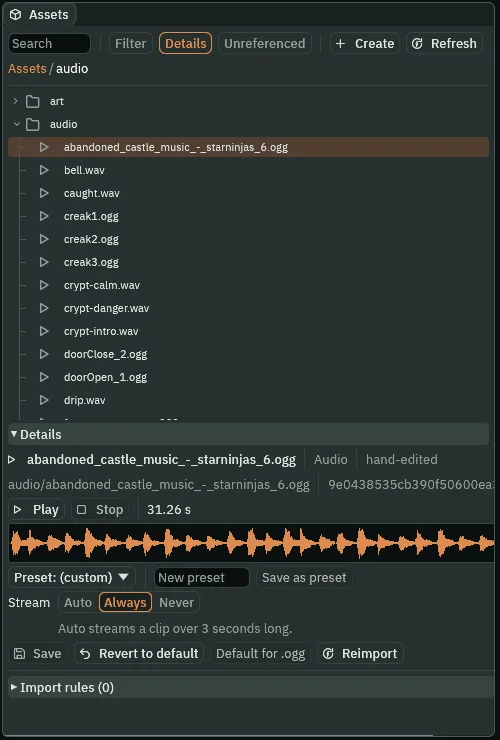
31.26 s, Stream on Always.All three are over three seconds, so Auto streams them anyway, the title’s music included. Always on the title’s music says what is meant: a long track that streams whatever it is trimmed to. Auto would hold it whole the day it were cut under three seconds; Always streams even a clip of a second and a half.
The title’s music
A level can name a music that plays as its scene opens. The title is a level, the first in the Levels panel’s list.
- Click the Levels tab, in the dock under the Viewport, and click the Title row.
- Drag
abandoned_castle_music_-_starninjas_6.oggfrom Assets onto the row’s Music button. The button reads its name; the ▶ beside it plays it. - Leave The Crypt row’s Music empty.
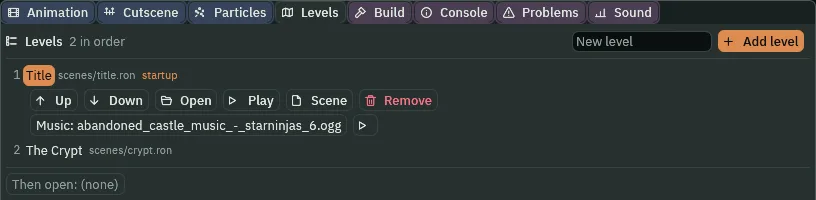
- A level’s Music, in the Levels panel
- A sound that plays as the level’s scene opens, in the editor’s Play and in an exported game, as the game’s music: on the Music bus, from nowhere, looping. There is one music at a time: the level’s replaces what was playing, and a level that names the music already playing leaves it playing. Click the button to clear it.
The crypt’s own track
The crypt has a music of its own, and it belongs to the crypt’s scene: a looping Autoplay on the Music bus is the room’s own track. It is the game’s music from the moment the room opens, and it takes the title’s music’s place.
- Select
Crypt, the root of the crypt’s scene. Press Add component and choose AudioSourceComponent. - Set Clip to
crypt-calm.wav, Bus to Music and Volume to0.7. Tick Looping and Autoplay. In Spatial, untick Positional. - Press Ctrl+S.
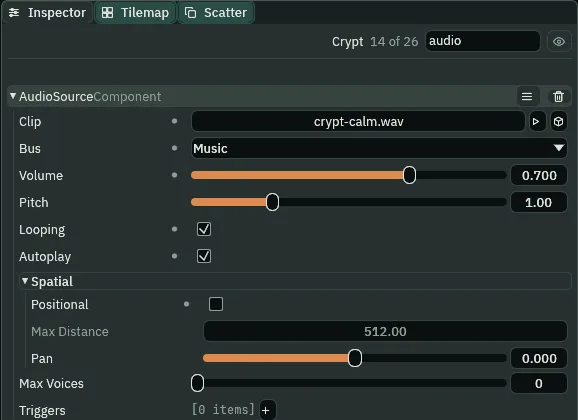
Crypt’s own track: crypt-calm.wav on Music.Press Run game, which starts at the title, and listen, then press Play on the title.
What it sounds like
The title’s music, the Abandoned Castle loop; it stops, and the crypt’s own music, a gentle music-box melody over a soft pad, plays in its place, with a fire crackling quietly under it.
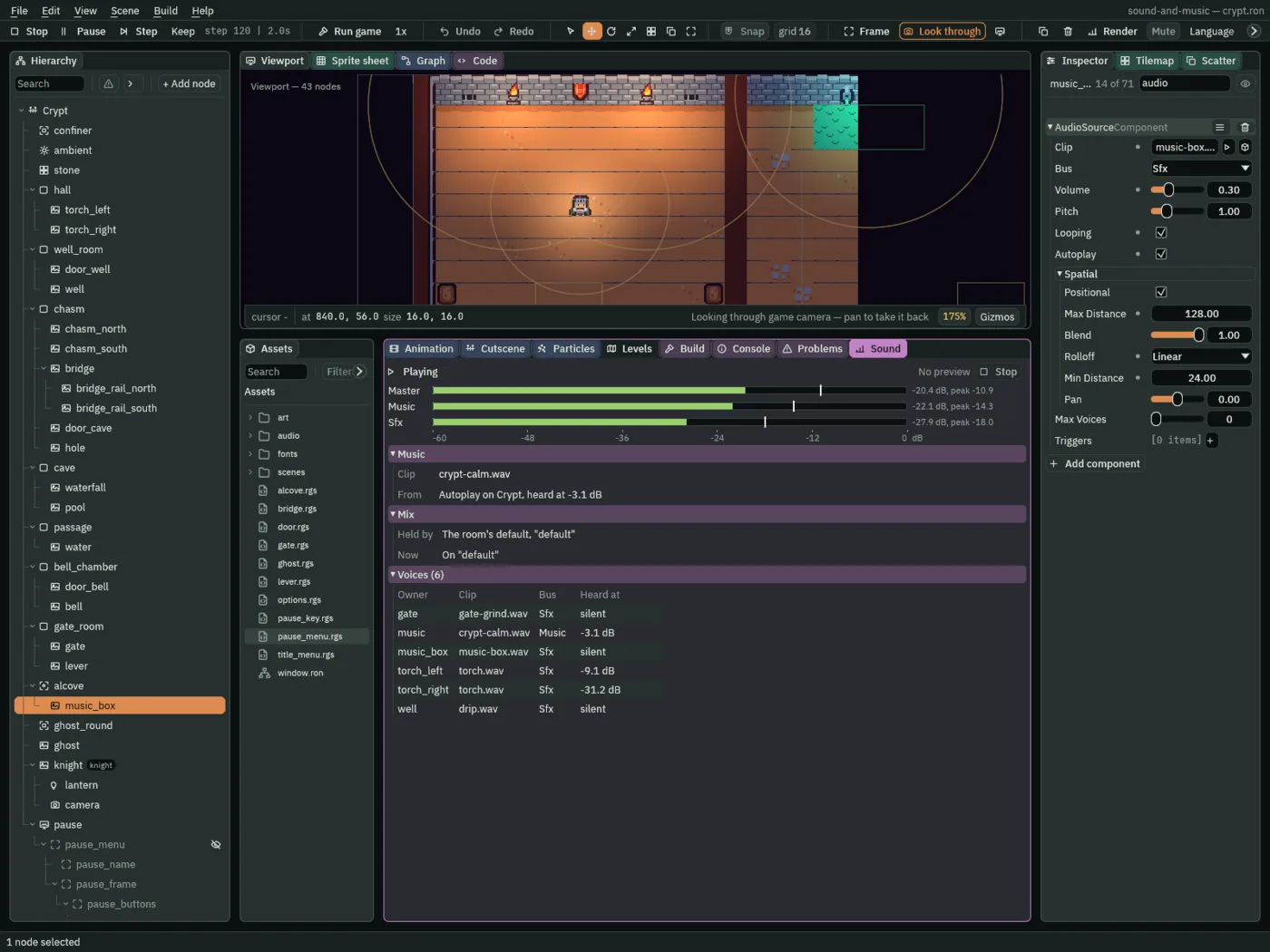
crypt-calm.wav, from Autoplay on Crypt, heard at -3.1 dB, its 0.7.The Sound tab’s Music band says what the music is and who asked for it: here, Autoplay on Crypt, the room’s own track. On the title it would say the level’s Music. Its voice is listed as music, on Music: the game’s music, no node’s.
The music box
At the far end of the crypt, in the alcove up through the gate, a music box plays a tune. The knight finds it by ear. It is a thing in the room, not the game’s music: a placed sound on Sfx, heard only near it.
- Select
music_box, inalcove. Press Add component and choose AudioSourceComponent. - Set Clip to
music-box.wavand Volume to0.3. Leave Bus on Sfx and Positional ticked. Tick Looping and Autoplay. - Set Max Distance to
128, Rolloff to Linear and Min Distance to24. - Press Ctrl+S.
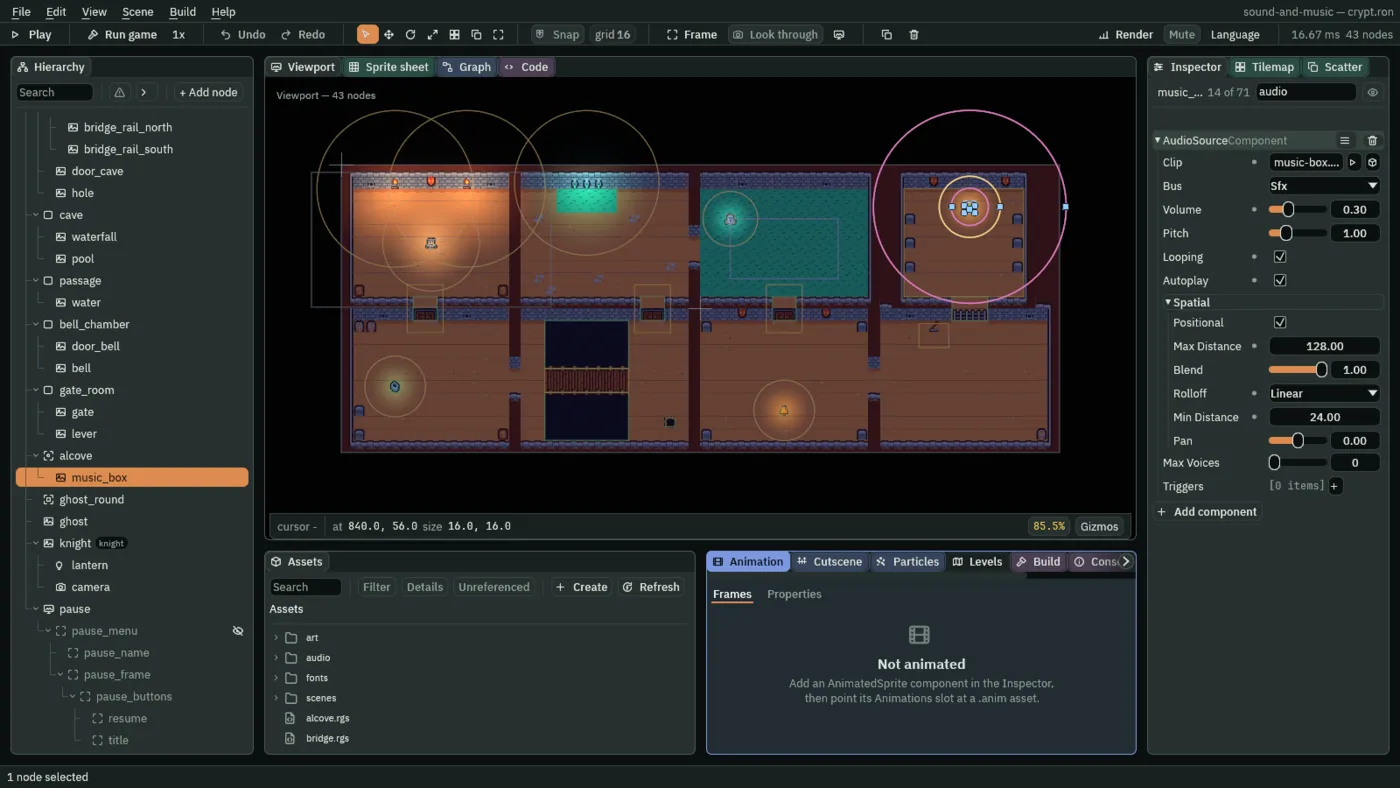
128, the alcove and the rock round it, short of the passage and the gate room.
The alcove
The calm and the box’s tune are the same melody, and both play from the moment the crypt opens. In the alcove the calm would cover the box, so the alcove stops the music as the knight comes in, and plays it again as he leaves. It needs an Area to notice him, and the music to play again: a trigger on its own Audio Source.
- Select
alcove. Press Add component and choose AreaComponent. In its Shape, set Size to160,144: the alcove’s floor. - Press Add component and choose AudioSourceComponent. Leave Clip empty. Set Bus to Music and Volume to
0.7, the root’s, so the calm comes back as loud as it went. In Spatial, untick Positional. - Add a trigger
calm, its Clipcrypt-calm.wav. - In Assets, click Assets in the path bar, so the script is written at the project’s top, then click Create, choose New script, type
alcoveand press Enter. In the Code tab, replace everything inalcove.rgswith the script below, and press Ctrl+S. - Select
alcove, press Add component and choose Alcove. Press Ctrl+S.
/// The alcove at the end of the crypt, where the music box plays. As the
/// knight comes in, the crypt's music stops, and the box is heard alone. As he
/// leaves, the crypt's music comes back, from its first bar.
component Alcove : Area {
    fn on_enter(other: NodeId) {
        if in_group(other, "knight") {
            stop_music();
        }
    }

    fn on_exit(other: NodeId) {
        if in_group(other, "knight") {
            // calm is the trigger on the alcove's own Audio Source: the
            // crypt's track, played as the music, which loops.
            play_music("calm");
        }
    }
}
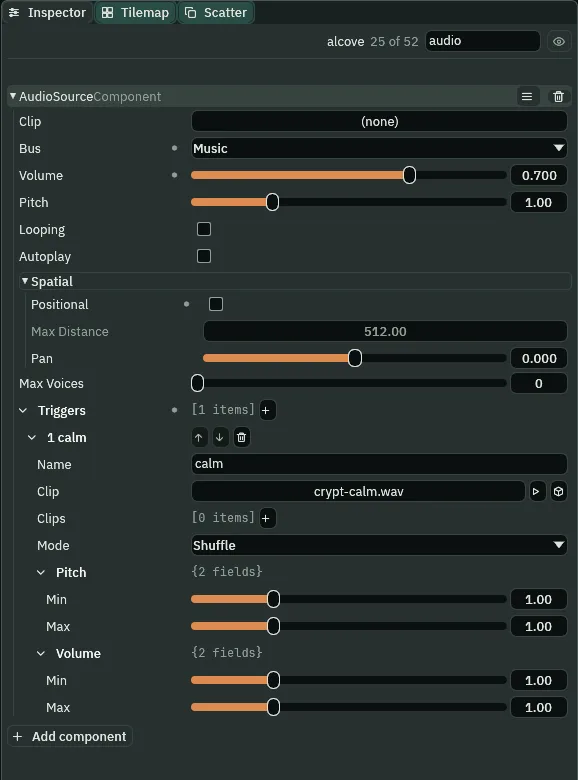
calm.- The alcove’s Area Shape Size
- The box that notices him, in world units, round the node’s middle:
160by144, the alcove’s floor, wall to wall, soon_enterruns as he comes in through the gate’s doorway andon_exitas he goes back out. - stop_music
- Stops the game’s music, whoever asked for it: here the crypt’s own track. Sounds in the room, on Sfx, play on.
- play_music
- Starts a music by name. A name that is a trigger on the script’s own node’s Audio Source plays that row’s take as the game’s music: on the Music bus whatever the row says, from nowhere, looping whatever Looping says, and in place of whatever music was playing. Asking for the music already playing leaves it playing. Chapter 10 gives the crypt a music asset, whose tracks it names the same way.
Found by ear
- Press F5 and click the Sound tab.
- Go to the gate room, pull the lever, and walk up through the gate into the alcove, to the box. Then walk back out.
- Press F5 again to stop.
What it sounds like
A gentle music-box melody over a soft pad, a metal clank, a rising grind and a thud, steps; the music cuts off and a quieter music-box tune alone grows closer; steps away, and the tune stops as the melody over the pad starts again.
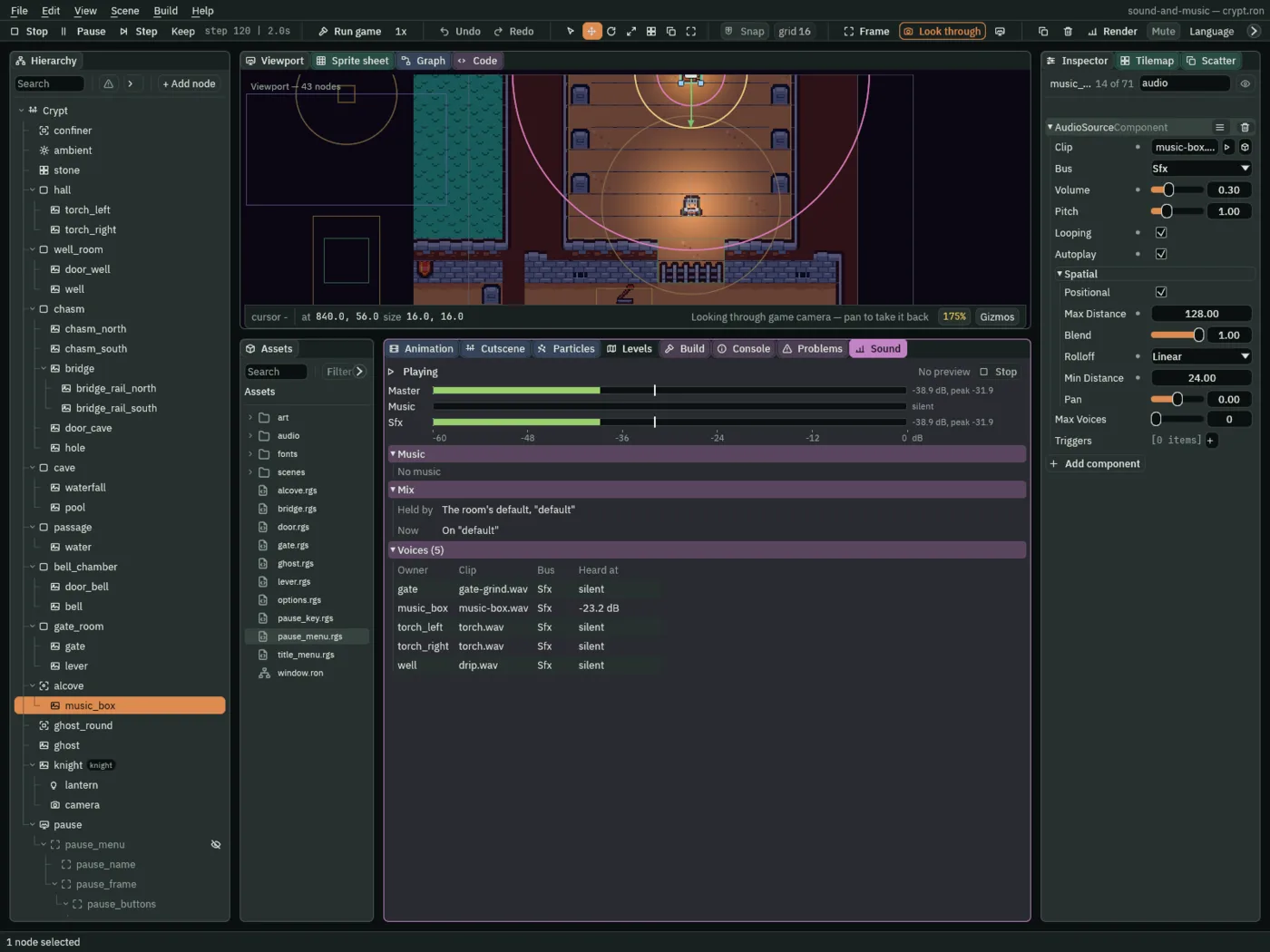
-23.2 dB.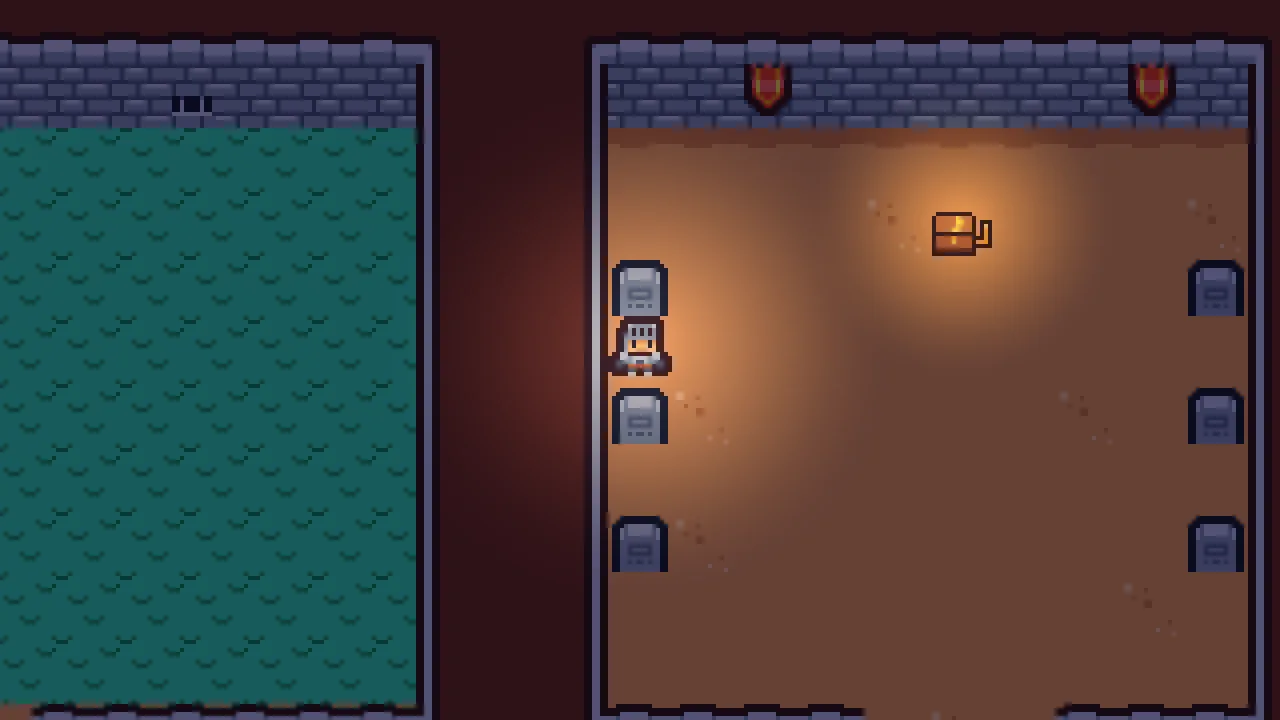
The box played all the while, from the moment the crypt opened: from the gate room it reached him at nothing. Walk across in front of it and it moves from one ear to the other: a sound in the room, heard from where it stands. Leaving starts the calm again; by then he is out of the box’s earshot, so the two are never heard together.
The music
| Node | Component | Field | Value |
|---|---|---|---|
audio/abandoned_castle_music_-_starninjas_6.ogg | its Details | Stream | Always |
| Title, in Levels | the level | Music | abandoned_castle_music_-_starninjas_6.ogg |
| The Crypt, in Levels | the level | Music | none |
Crypt | Audio Source | Clip, Bus | audio/crypt-calm.wav, Music |
| Volume | 0.7 | ||
| Looping, Autoplay | ticked, ticked | ||
| Positional | unticked | ||
music_box | Audio Source | Clip, Bus | audio/music-box.wav, Sfx |
| Volume | 0.3 | ||
| Looping, Autoplay, Positional | ticked, ticked, ticked | ||
| Max Distance, Rolloff, Min Distance | 128, Linear, 24 | ||
alcove | Area | Shape Size | 160, 144 |
| Audio Source | Clip, Bus | none, Music | |
| Volume, Positional | 0.7, unticked | ||
trigger calm | Clip crypt-calm.wav | ||
| Alcove | alcove.rgs |
Part 1 ends here: a crypt full of sounds placed, moving and played by scripts, with its music. Part 2 mixes them.