Tutorials · Sound and Music · Chapter 9
Pause
By the end
- The pause menu’s own sounds, as it opens and closes, heard through the pause
- A dim behind the menu
- A LowPass on Music and a HighPass on Sfx, unticked, and every snapshot given a switch for each
- A snapshot
paused, whichpause_menu.rgsasks for withset_mixas the menu opens and lets go withclear_mixas it closes - What the game’s pause holds and what plays on: the music, the menu, and the waterfall, set to run while paused
On this page
Two more interface sounds
Escape in the crypt pauses the game: the starter’s pause_key.rgs, on the crypt’s root, calls pause(), and the pause menu, which runs only while the game is paused, shows itself. So far it is silent: the room’s sounds stop with the game, but the music plays on behind the menu, as loud and as bright as before. It gets two sounds from Interface Sounds, an open and a close.
- Copy
open_002.oggandclose_002.oggfrom Interface Sounds, which chapter 6 downloaded, into your project’saudiofolder, and press Refresh in Assets. - Leave their Stream on Auto: each is a third of a second, and Auto holds it whole.
/// Escape, which the input map calls pause, pauses the game: everything that
/// runs with the game stops where it is, and the pause menu, which runs only
/// while the game is paused, takes over. It sits on the crypt itself, which
/// runs with the game.
component PauseKey {
    fn loop() {
        // Escape presses pause on the step it goes down.
        if pressed("pause") {
            pause();
        }
    }
}
- pause and resume
pause()pauses the game at the end of the step: every node whose Process Mode lets it runs on, and the rest stop where they are.resume()lets the game go on at the end of the step.- Process Mode, in a node’s Advanced fold
- Whether the node runs while the game is paused: Inherit, as its parent does, the default; Pausable, stopping with the game; WhenPaused, only while paused, as the pause menu’s canvas does; or Always. Every node of the crypt inherits, so all of them stop with it, but the pause canvas, which the starter set to WhenPaused.
The menu, heard
- Select
pause_menu, underpause. Press Add component and choose AudioSourceComponent. Leave Clip empty and Bus on Sfx; set Volume to0.4, and untick Positional. - Add a trigger
open, its Clipopen_002.ogg, and a triggerclose, its Clipclose_002.ogg. - Replace everything in
pause_menu.rgswith the script below, and press Ctrl+S.
/// The pause menu, over the crypt. Its canvas runs only while the game is
/// paused, so it shows itself on the first step of each pause, and hides
/// itself on the step Resume lets the game go on: once the game runs again
/// its hooks stop, and a menu left showing would sit over the crypt.
///
/// It is heard too. As it opens it plays its open sound and asks for the
/// paused mix, the music muffled behind the menu; as it closes it plays its
/// close sound and hands the mix back to the room: to the zone he stands in,
/// or to the room's own.
component PauseMenu {
    /// Whether it is showing, so it shows itself once a pause, not on every
    /// step.
    #[hidden]
    open: bool = false,
    /// How long the mix takes to become the paused one as the menu opens, in
    /// seconds.
    into_pause: f32 = 0.25,
    /// How long the mix takes to go back to the room's as the menu closes, in
    /// seconds.
    out_of_pause: f32 = 0.5,

    fn loop() {
        if !open {
            show();
            open = true;
            play_sound("open");
            set_mix("paused", into_pause);
        }
        // A click on Resume, Enter or Space while it holds the focus, or
        // Escape through its Shortcut, presses resume on the game's next step.
        if pressed("resume") {
            hide();
            open = false;
            play_sound("close");
            clear_mix(out_of_pause);
            resume();
        }
        // A click on Title, or Enter or Space while it holds the focus. A
        // change of scene ends the pause, and lets the paused mix go: the
        // title opens on its own.
        if pressed("title") {
            play_sound("close");
            change_scene("title");
        }
    }
}
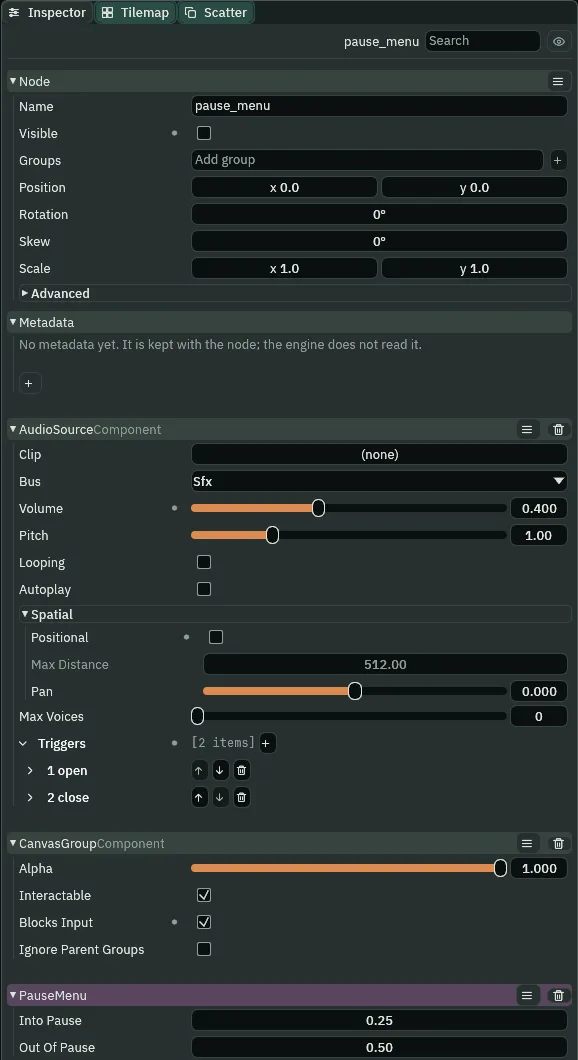
0.4, open and close, and the script’s two fields.- set_mix
- Slides the mix to the snapshot of that name over the seconds given, and holds it there: no zone moves the mix until the script lets go. Here
set_mix("paused", into_pause), a quarter of a second. - clear_mix
- Lets go of the mix
set_mixholds, sliding over the seconds given to the snapshot of the zone the listener stands in, or else to the room’s default. Hereclear_mix(out_of_pause), half a second.
into_pause and out_of_pause are the script’s fields, so the Inspector shows them, Into Pause 0.25 and Out Of Pause 0.50, to change without the code. The menu asks for paused on its own first step, so the open sound is the menu’s, a node that runs while paused, and the pause never holds it. Title asks for no clear_mix: a change of scene lets a script’s mix go, and the title opens on its own, unmuffled.
A dim behind it
- Select
pause_menu, press + Add node and choose Panel. Rename itpause_dim. Its Rect stays as it comes, so it fills the menu, which fills the canvas. - Set its Panel Color to
63,38,49, the dark brown of the art’s outlines, at half alpha,128. - Press Add component and choose ThemeRoleComponent. Set Role to Custom, so the canvas’s Theme leaves its colour alone.
- In the Hierarchy, drag
pause_dimto the top ofpause_menu’s children, abovepause_name: the first child is drawn first, under the rest. Press Ctrl+S.
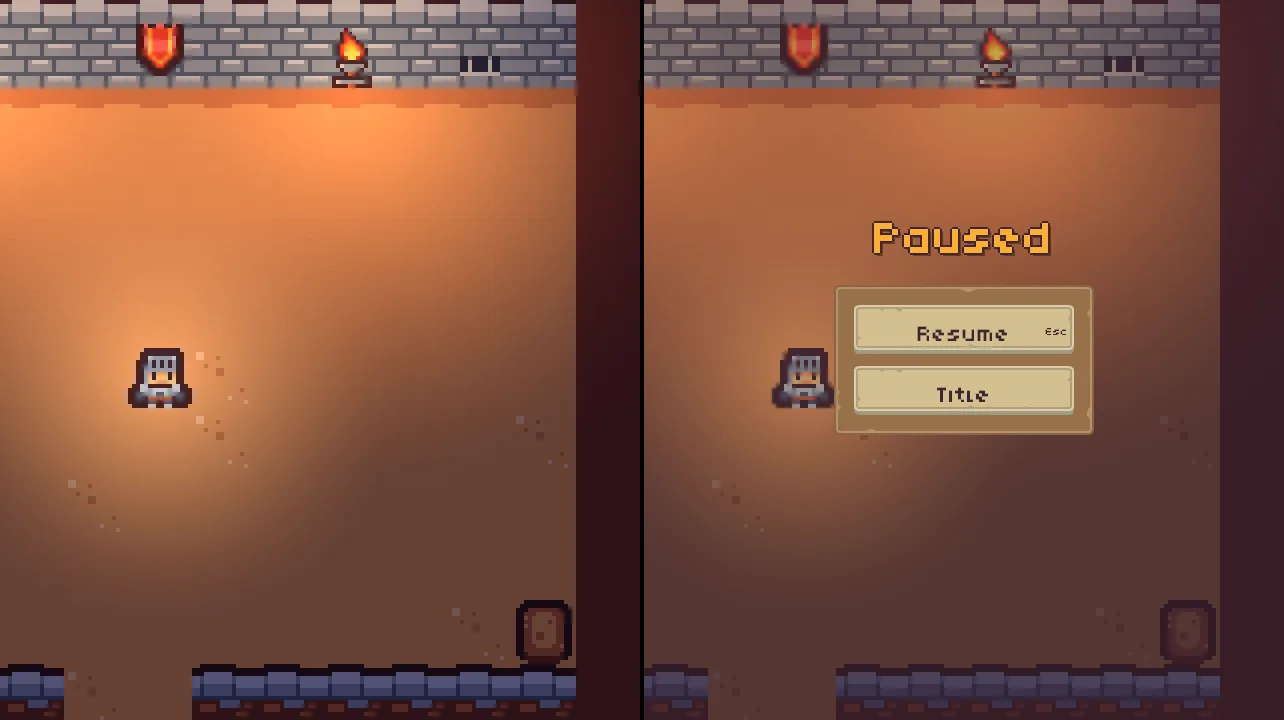
0.83 s, before Escape on step 60, and at 2 s, paused: the room darker behind the menu.- The Panel’s Color
- The colour the panel is filled with, red, green and blue from
0to255, and its alpha, how much of what is under it it covers:128, about half, so the room shows through, darker. - The Theme Role’s Role
- Which of the canvas’s Theme colours the node takes. Custom takes none, so the Panel keeps the Color you gave it.
Two slots for the pause
The pause muffles the music behind the menu, with a LowPass on Music, and thins what plays on Sfx through the pause, with a HighPass. Each goes at its chain’s end, unticked: the pause’s snapshot switches them on.
- Select
mix. On Music, press + beside Slots: a second slot. Make it a LowPass, Cutoff500, Resonance0.707, and untick its Enabled. - On Sfx, press + beside Slots: a fifth slot, after the Delay. Make it a HighPass, Cutoff
400, Resonance0.707, and untick its Enabled. - Open each of the snapshots
cave,passageandwell, and press + once beside its Music Effects and once beside its Sfx Effects: six presses. Each adds the new slot’s switch as the slot itself is, unticked. - Press Ctrl+S.
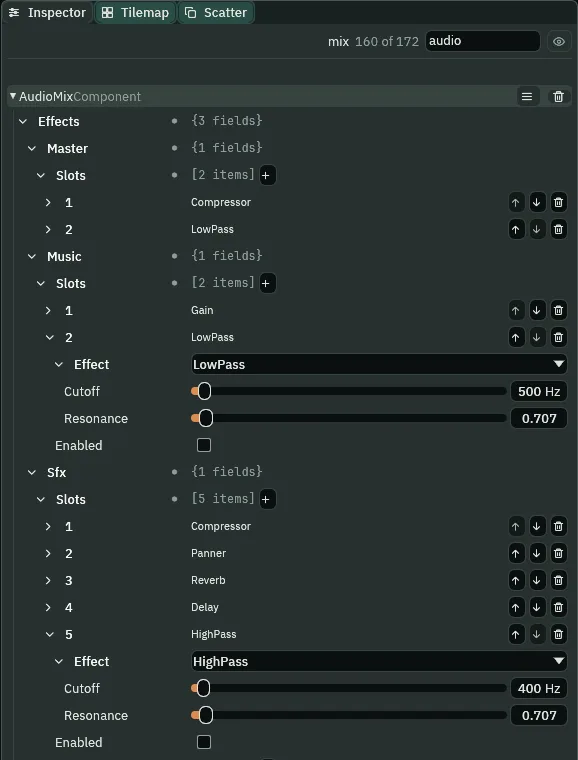
- The HighPass’s Cutoff
- Below this, in hertz, the sound is rolled away; above it, it passes: the LowPass turned over. At
400, a rumble goes and a hiss stays: what makes a sound come through a wall, or out of a radio. From20to20000. - The HighPass’s Resonance
- As the LowPass’s:
0.707is flat, rolling away smoothly; higher lifts a peak at the Cutoff. - Music’s LowPass at
500 - Lower than the passage’s
800, and on Music alone: the music is heard from behind the menu, its melody dull and far, and the room’s sounds are left as they are.
The paused mix
- Press + beside Snapshots: a fourth snapshot, empty as the first was. Name it
paused. - Give it the presses the others have now: + beside Master’s Effects twice, beside Music’s twice and beside Sfx’s five times, each press a switch as its slot is; and once beside its Send Amounts, an amount at the row’s own
0. Then tick Music’s second, LowPass, and Sfx’s fifth, HighPass. Its switches now read: Master Compressor on, LowPass off; Music Gain and LowPass on; Sfx Compressor on, Panner, Reverb and Delay off, HighPass on. Leave every Volume at1, as a snapshot comes. - Press Ctrl+S.
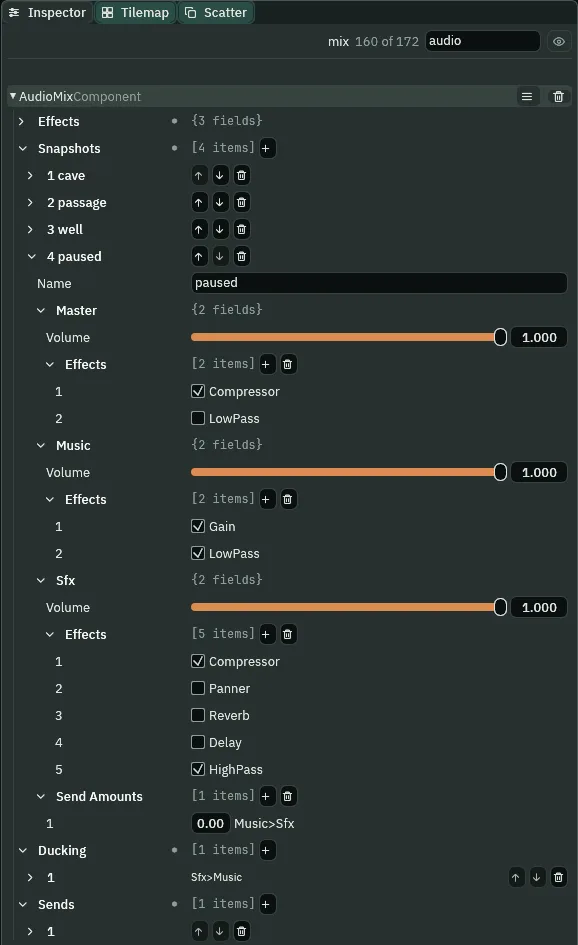
paused: every bus at 1, the pause’s two slots on and no room’s.A snapshot is the whole mix, not a change to the room’s. paused ticks no room’s effect, so paused in the cave the Reverb goes off, paused in the passage Master’s LowPass does, and by the well the music is back at full: wherever he pauses, the menu sounds the same, the music muffled behind it.
A slide’s switches are on for the whole slide: a slot ticked at either end of a slide is ticked from its first step to its last. So the muffle comes on the moment the menu asks for paused, and the quarter second is only the volumes going, the room’s own effect staying in until it is up; and clear_mix(0.5) keeps the LowPass in for the whole half second, then takes it out at once: the muffle lifts as the clear’s seconds are up.
The waterfall roars on
The pause holds a sound by its node, by Process Mode, not by what kind of sound it is. Every sound whose node the pause holds stops where it stands and plays on from there at Resume: the torches, the drip, the water, the box, the gate’s grind. The music is no node’s, so it plays on, muffled. And a node that runs while paused plays on: the menu, and, from now, the waterfall.
- Select
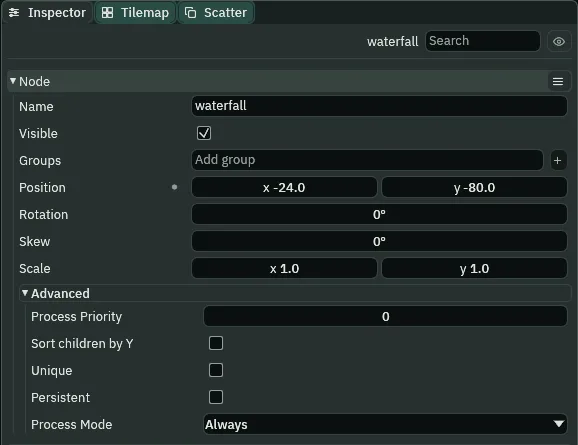
waterfall. In its Node section, open Advanced and set Process Mode to Always. Press Ctrl+S.
What it sounds like
The music and the waterfall’s heavy roar; a soft click; the roar goes on, thinner, a rushing hiss without its depth, and the music sounds muffled and far.
Paused by the pool, under 200 Hz the crypt is some nine decibels under what it is with the HighPass left unticked: the waterfall’s rumble is thinned, and the bottom of the paused crypt is the muffled music’s. Its rush over 1 kHz is the same with the HighPass and without: the menu’s clicks, nearly all over its Cutoff, pass as they are.
The pause, heard
- Press Run game, and Play. In the hall, press Escape; wait; press Escape again, the Resume button’s Shortcut.
- Walk to the bell chamber, and do the same.
What it sounds like
Two fires crackling, a little to the left, and calm music; a click, and the crackling stops dead while the music plays on, muffled; another click, and the crackling starts again where it left off and the music brightens.
What it sounds like
Calm music; a soft click, and the music turns dull and far, as if behind a door, still playing; another click, and after a moment the music is bright again.
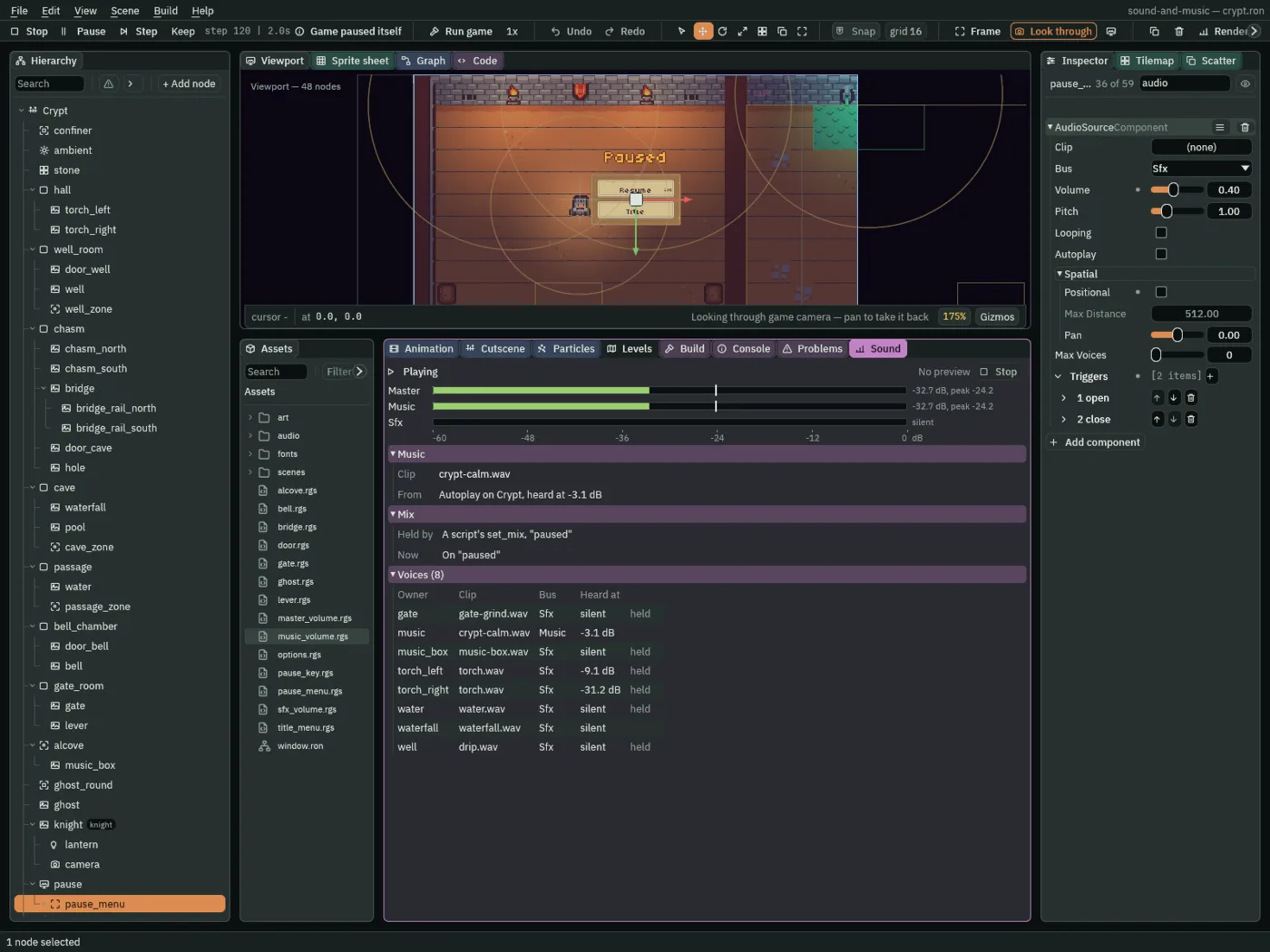
"paused", and every voice of the room is held but the waterfall’s.- held, in the Sound tab’s Voices
- A voice the pause is holding where it stood, to play on from there at Resume.
Who decides what you hear
The pause
| Node | Component | Field | Value |
|---|---|---|---|
pause_menu | Audio Source | Clip, Bus, Volume | none, Sfx, 0.4 |
| Positional | unticked | ||
triggers open, close | open_002.ogg, close_002.ogg | ||
| PauseMenu | pause_menu.rgs, rewritten: Into Pause 0.25, Out Of Pause 0.5 | ||
pause_dim, first under pause_menu | Panel | Color | 63, 38, 49, alpha 128 |
| Theme Role | Role | Custom | |
mix | Audio Mix | Music slot 2 | LowPass: 500 Hz, 0.707; unticked |
| Sfx slot 5 | HighPass: 400 Hz, 0.707; unticked | ||
cave, passage, well | a switch more on Music and on Sfx, each unticked | ||
snapshot paused | every Volume 1; Master on, off; Music on, on; Sfx on, off, off, off, on; Send Amounts 0 | ||
waterfall | Node | Process Mode | Always |