Tutorials · Animation and Cutscenes · Chapter 8
A marionette
By the end
marionette, a node in the right wing at1140,288with a control cross, three strings and a body of fourteen bones: a torso, a head, two arms of three and two legs of three- Every bone as long as its limb, with a Length, and its picture lying along it
scenes/marionette.propanimwith a looping clip,dance: eight rotation tracks of five keys, the arms on Linear (angle) and the legs on Cubic (angle), and aRESETpose
On this page
The pieces
The theatre is about to get a third player. In the right wing, under the lantern, a marionette will hang from the puppeteer’s control cross. This part of the tutorial builds it. This chapter gives it a body of bones and a dance. Chapter 9 makes it dance, wave and breathe at once, chapter 10 reaches an arm for the lantern, and chapter 11 lets it fall when the knight cuts its strings.
A bone is a node with a length. Its picture is a Sprite, and the bone’s own turn is the picture’s: turn the upper arm and the arm turns, and the forearm, which is the upper arm’s child, goes with it. A rig moves a whole limb by turning one node.
The starter already holds the marionette’s ten pictures in art. None of them is on a node yet, so nothing is drawn:
| Picture | Size | It is |
|---|---|---|
puppet-bar.png | 40, 24 | the control cross: a crossbar over an upright |
puppet-string.png | 1, 8 | a length of string, stretched to any length |
puppet-torso.png | 22, 16 | the body: a blue tunic on a wooden frame |
puppet-head.png | 14, 14 | the head, with painted eyes and cheeks |
puppet-upper-arm.png | 14, 6 | the arm from shoulder to elbow |
puppet-lower-arm.png | 12, 5 | the forearm |
puppet-hand.png | 6, 6 | the hand |
puppet-upper-leg.png | 16, 7 | the thigh, blue shorts at its top |
puppet-lower-leg.png | 14, 6 | the shin |
puppet-foot.png | 6, 10 | the foot; its sole is its right edge |
Building the rig
The rig is built in the Hierarchy, parent above child, because a bone moves with its parent. It is a long list of nodes with the same few settings, so the steps below build one arm and one leg and duplicate them for the other side.
- Select
theatre, click + Add node and choose Node. Rename itmarionette: press F2, type the name and press Enter. Set its Position to1140,288. That is the right wing, with its soles on the boards. - Select
marionette, click + Add node and choose Sprite. Rename itbarand set its Position to0,-105.3. Dragart/puppet-bar.pngfrom Assets onto its Texture, and set Size to40,24, Anchor to0.5,1and Sort Layer to9. - Select
bar, click + Add node and choose Node. Rename itstrings. It holds the three strings and moves nothing itself. - Select
strings, click + Add node and choose Sprite. Rename itstring_head. Dragart/puppet-string.pngonto its Texture and set Size to1,36, Anchor to0.5,0and Sort Layer to8. - With
string_headselected press Ctrl+D, and rename the copystring_left. Set its Position to-18.5,-9, its Rotation to-10.87and its Size to1,63.6416. Press Ctrl+D onstring_left, rename the copystring_right, and set its Position to18.5,-9and its Rotation to10.87.
The strings hang from the cross’s two ends and its foot down to the marionette’s shoulders and the crown of its head. Now the body, bone by bone, starting with the torso, which every other bone hangs from.
- Select
marionette, click + Add node and choose Sprite. Rename ittorso. Set its Position to0,-55.3and its Rotation to90, so that its bone points down from the neck. Dragart/puppet-torso.pngonto its Texture and set Size to22,16, Anchor to0,0.5and Sort Layer to6. - With
torsoselected click Add component and choose BoneComponent. Set its Length to21.5. - Select
torso, click + Add node and choose Sprite. Rename ithead, set its Rotation to180, so that its bone points up, and give itart/puppet-head.png, Size14,14, Anchor0,0.5and Sort Layer7. Add a BoneComponent and set its Length to14. - Build the left arm the same way, each bone a Sprite and a BoneComponent, each under the one before.
upper_arm_leftgoes undertorsoat3.5,6.5,lower_arm_leftunder it at13,0andhand_leftunder that at11,0. The pictures, sizes and lengths are in the table below, and every arm bone takes Anchor0,0.5and Sort Layer7. - Select
upper_arm_leftand press Ctrl+D. The copy brings its two children with it, still calledlower_arm_leftandhand_left. Rename the threeupper_arm_right,lower_arm_rightandhand_right, and set the copy’s Position to3.5,-6.5, the right shoulder. - Build the left leg:
upper_leg_leftundertorsoat21.5,3.5, Rotation6.88;lower_leg_leftunder it at15,0, Rotation-13.75;foot_leftunder that at13,0, Rotation6.88. Each leg bone takes Anchor0,0.5and Sort Layer5. The turns bend the knee a little outward, so the legs stand rather than hang. - Select
upper_leg_left, press Ctrl+D, and rename the three copiesupper_leg_right,lower_leg_rightandfoot_right. Set the copy’s Position to21.5,-3.5, and turn the three the other way: Rotation-6.88,13.75and-6.88. - Select
marionetteand press F. The Viewport frames the whole rig: a node that draws nothing is framed by what its children draw.
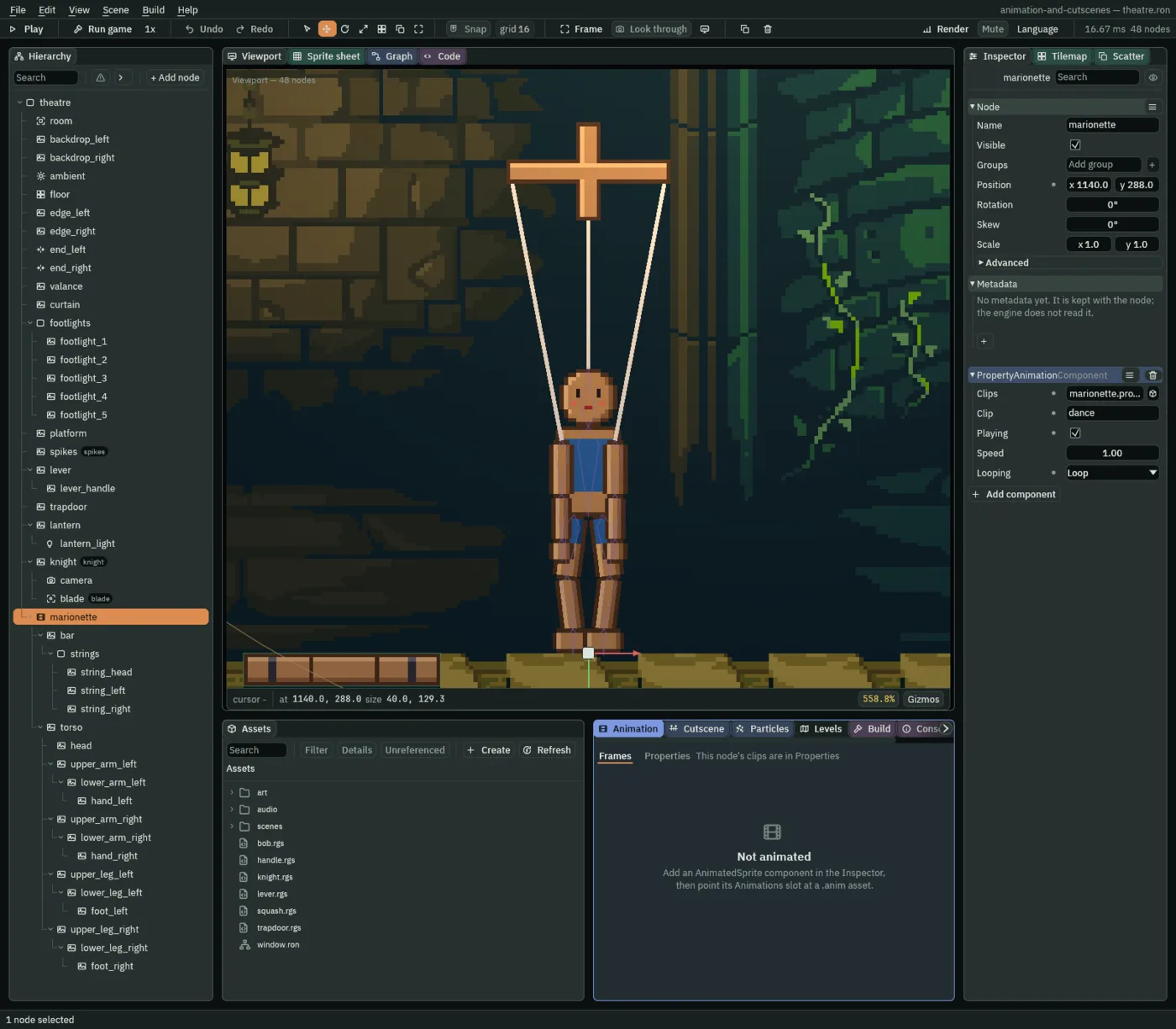
The rig as built, bone by bone. Every picture is art/puppet-<name>.png; every bone is a Sprite with Anchor 0, 0.5 and a BoneComponent.
The bones
| Bone | Under | Position | Rotation | Picture | Size | Sort Layer | Length |
|---|---|---|---|---|---|---|---|
torso | marionette | 0, -55.3 | 90 | puppet-torso.png | 22, 16 | 6 | 21.5 |
head | torso | 0, 0 | 180 | puppet-head.png | 14, 14 | 7 | 14 |
upper_arm_left | torso | 3.5, 6.5 | 0 | puppet-upper-arm.png | 14, 6 | 7 | 13 |
lower_arm_left | upper_arm_left | 13, 0 | 0 | puppet-lower-arm.png | 12, 5 | 7 | 11 |
hand_left | lower_arm_left | 11, 0 | 0 | puppet-hand.png | 6, 6 | 7 | 5 |
upper_arm_right | torso | 3.5, -6.5 | 0 | puppet-upper-arm.png | 14, 6 | 7 | 13 |
lower_arm_right | upper_arm_right | 13, 0 | 0 | puppet-lower-arm.png | 12, 5 | 7 | 11 |
hand_right | lower_arm_right | 11, 0 | 0 | puppet-hand.png | 6, 6 | 7 | 5 |
upper_leg_left | torso | 21.5, 3.5 | 6.88 | puppet-upper-leg.png | 16, 7 | 5 | 15 |
lower_leg_left | upper_leg_left | 15, 0 | -13.75 | puppet-lower-leg.png | 14, 6 | 5 | 13 |
foot_left | lower_leg_left | 13, 0 | 6.88 | puppet-foot.png | 6, 10 | 5 | 6 |
upper_leg_right | torso | 21.5, -3.5 | -6.88 | puppet-upper-leg.png | 16, 7 | 5 | 15 |
lower_leg_right | upper_leg_right | 15, 0 | 13.75 | puppet-lower-leg.png | 14, 6 | 5 | 13 |
foot_right | lower_leg_right | 13, 0 | -6.88 | puppet-foot.png | 6, 10 | 5 | 6 |
The bar, its strings and the marionette
| Node | Under | Field | Value |
|---|---|---|---|
marionette | theatre | Position | 1140, 288 |
bar | marionette | Position | 0, -105.3 |
| Texture | puppet-bar.png | ||
| Size | 40, 24 | ||
| Anchor | 0.5, 1 | ||
| Sort Layer | 9 | ||
strings | bar | every field | as it comes |
string_head | strings | Texture | puppet-string.png |
| Size | 1, 36 | ||
| Anchor | 0.5, 0 | ||
| Sort Layer | 8 | ||
string_left | strings | Position | -18.5, -9 |
| Rotation | -10.87 | ||
| Size | 1, 63.6416 | ||
string_right | strings | Position | 18.5, -9 |
| Rotation | 10.87 | ||
| Size | 1, 63.6416 |
The two side strings take the same Texture, Anchor and Sort Layer as string_head, from the copy. Every other field of every node is as it comes.
The Bone
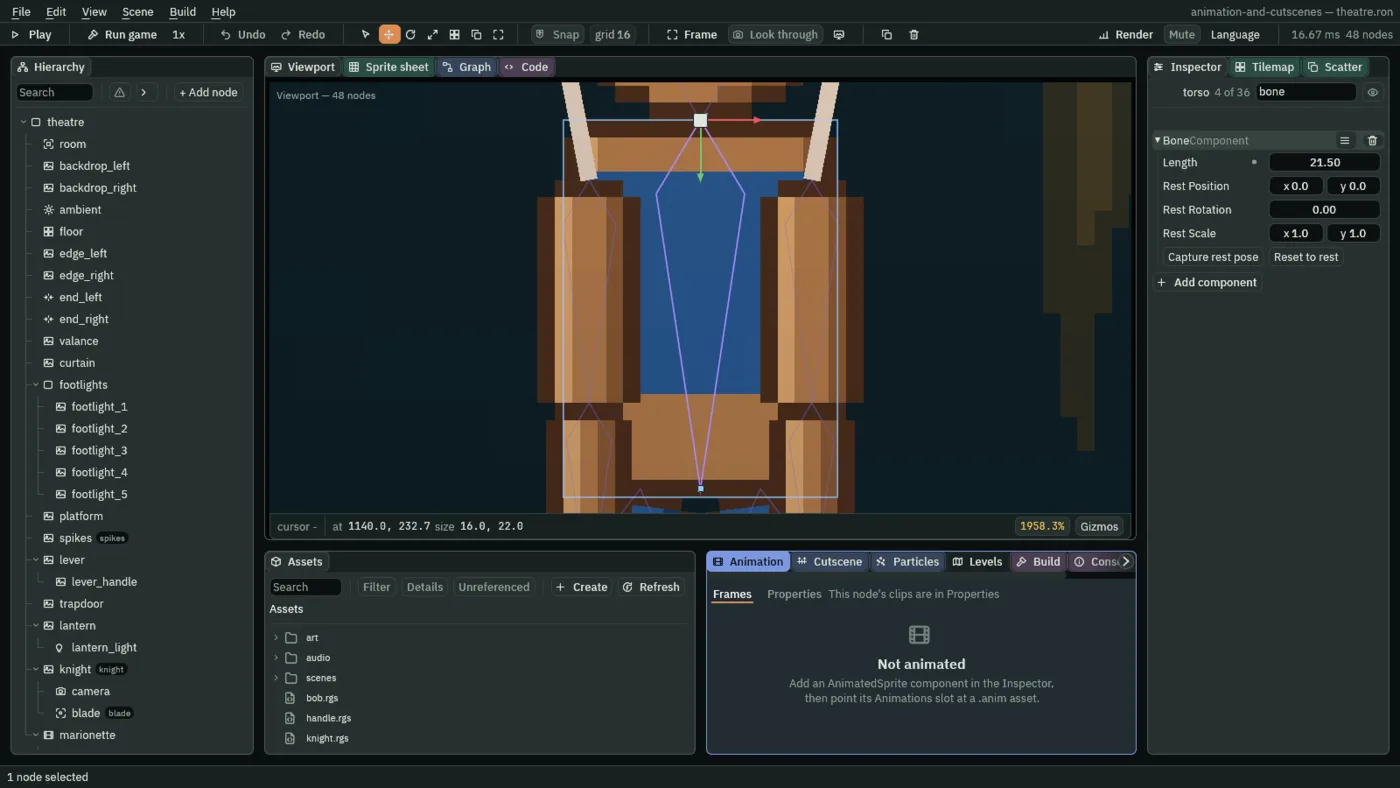
- Length
- The Bone’s Length: how long the bone is, in local units, measured along its own
xfrom its node to its tip. It is drawn in the Viewport as the kite in the picture above. The marionette’s are each the distance from its joint to the next one down the limb, a little shorter than its picture, since the pictures overlap at the joints (the foot’s is its picture’s whole width):21.5for the torso,13,11and5down an arm and15,13and6down a leg. Here nothing reads them yet. Chapter 10’s IK measures a limb’s reach by them, and a Bone added with no length set is32. - Rest Position
- The Bone’s Rest Position: where the bone sits when nothing is holding it out of place, in the units of its parent. It starts at
0,0, and stays there in this chapter. Capture rest pose fills it in from where the bone stands, in chapter 11, and Reset to rest puts the bone back there. - Rest Rotation
- The Bone’s Rest Rotation: the turn it returns to, in radians,
0as it starts. It shows radians where the node’s own Rotation above it shows degrees: a quarter turn is1.5708here and90there. Many of a component’s own angles, like this one, are in radians; a few show degrees as the Transform does, such as a framing’s Rotation on the camera rig of chapter 12. Chapter 11 captures it. - Rest Scale
- The Bone’s Rest Scale: the size it returns to,
1,1as it starts, which no bone of this marionette changes. Chapter 11 captures it with the rest.
The four rest rows are the pose a bone returns to once something lets go of it. Nothing does yet, so they stay as they came until chapter 11, where the marionette falls and has to stand up again.
A dance on its bones
The dance is a property clip, as the curtain’s rise was in chapter 3, with one difference: its tracks are not on the node that plays it. The Property Animation goes on marionette, and the Properties mode is marionette’s, since a bone has no clip of its own. The clip keys the Rotation of eight of the bones under it, by name, and every row reads the bone’s name before the property. The arms swing and the legs kick: the arms swing out in turn, half a second apart, and the knees kick in turn, a second apart.
- Select
marionette, click Add component and choose PropertyAnimationComponent. - In the Animation tab at the bottom, open the Properties mode, and press New property clips. It writes
scenes/marionette.propanimand points Clips at it. - Press the + beside the clip tabs, type
danceand press Enter. - In the Property Animation set Clip to
dance, tick Playing and set Looping to Loop. Leave Speed at1. - Turn Record on: the toggle in the row with the Play button, beside Capture RESET.
- Take the table below a bone and a time at a time. Type the time into the time box,
0.00 s, beside the Play and Stop buttons, and press Enter. Select the bone in the Hierarchy. In the Inspector, under Node, type its Rotation for that time, in degrees, and press Enter. The tab goes on showing the marionette’s clips while a bone is selected, and the edit lands in the open clip as a key at the playhead. - A bone’s first key makes its row, and the row begins on Linear. On each arm’s row open the interpolation menu and choose Linear (angle). On each leg’s row choose Cubic (angle).
- Press Capture RESET. It writes a clip called
RESETwith one key, at0, on each of the eight rotations: the arms hanging at0and the legs at the stance you built them in. It writes the values the bones were built with, wherever the playhead stands, and not the pose the dance gives them there. - Turn Record off, press Save in the bar, which writes
marionette.propanim, and press Ctrl+S.
The clip is 2 seconds long, because its last key is at 2: the Properties mode cannot make a clip longer than its last key. The turns, in degrees as the Inspector takes them:
| Bone | Mode | 0 | 0.5 | 1 | 1.5 | 2 |
|---|---|---|---|---|---|---|
upper_arm_left | Linear (angle) | 11.46 | 80.21 | 11.46 | 80.21 | 11.46 |
lower_arm_left | Linear (angle) | 0 | 34.38 | 0 | 34.38 | 0 |
upper_arm_right | Linear (angle) | -80.21 | -11.46 | -80.21 | -11.46 | -80.21 |
lower_arm_right | Linear (angle) | -34.38 | 0 | -34.38 | 0 | -34.38 |
upper_leg_left | Cubic (angle) | 6.88 | 26.93 | 6.88 | 6.88 | 6.88 |
lower_leg_left | Cubic (angle) | -13.75 | -42.4 | -13.75 | -13.75 | -13.75 |
upper_leg_right | Cubic (angle) | -6.88 | -6.88 | -6.88 | -26.93 | -6.88 |
lower_leg_right | Cubic (angle) | 13.75 | 13.75 | 13.75 | 42.4 | 13.75 |
The left arm is out at 0.5 and 1.5, the right at 0 and 1; the left knee kicks at 0.5 and the right at 1.5. The hands, the feet and the head have no track, so they hold the pose their parents give them. The legs’ keys start from their stance, not from 0: a kick is a turn away from standing, and back.
While Record is on, a value you type in an Inspector row of marionette or of any bone under it is not an edit of that node. It is a key, in the open clip, at the playhead. The bone keeps the turn it was built with, and the Inspector and the Viewport show the clip’s pose with the new key in it. The edit makes the row if the clip has none, amber until Capture RESET has put it in the neutral pose, and replaces the key if there is one at that time. A rotation is typed in degrees, and the file keeps radians.
Some rules of the road. A key whose value is the one the bone already shows is an edit that changes nothing, and nothing is keyed: the first key of lower_arm_left is 0, which is what it shows, and the legs’ keys that repeat their stance are the same. Type another number first and then the one you want. The second edit replaces the first, at the same time. (Chapter 3’s double-click on a lane keys what the bone shows now, which here is the dance’s pose, so it does not help.) A button, a drag in the Viewport and a change in the Hierarchy are never keyed. The tab’s own Undo takes back one key, and Ctrl+Z is the scene’s and leaves the clip alone. And while Record is on, a value typed into any row of the marionette or its bones is keyed, while this mode is on screen, so turn it off when the keys are in.
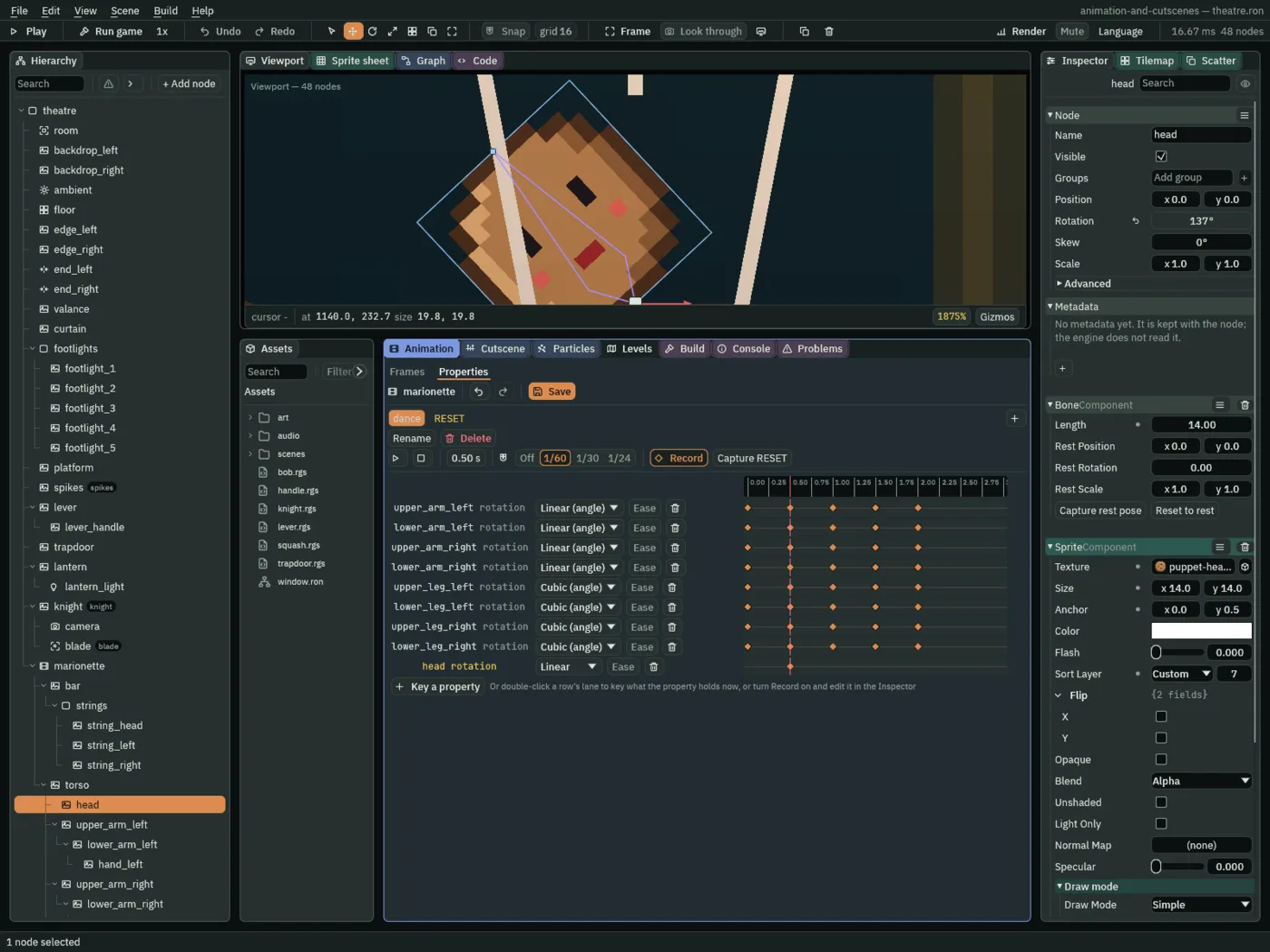
head selected and the playhead at 0.5, a Rotation set in the Inspector made a ninth row, head rotation, with one key. The dance does not keep it.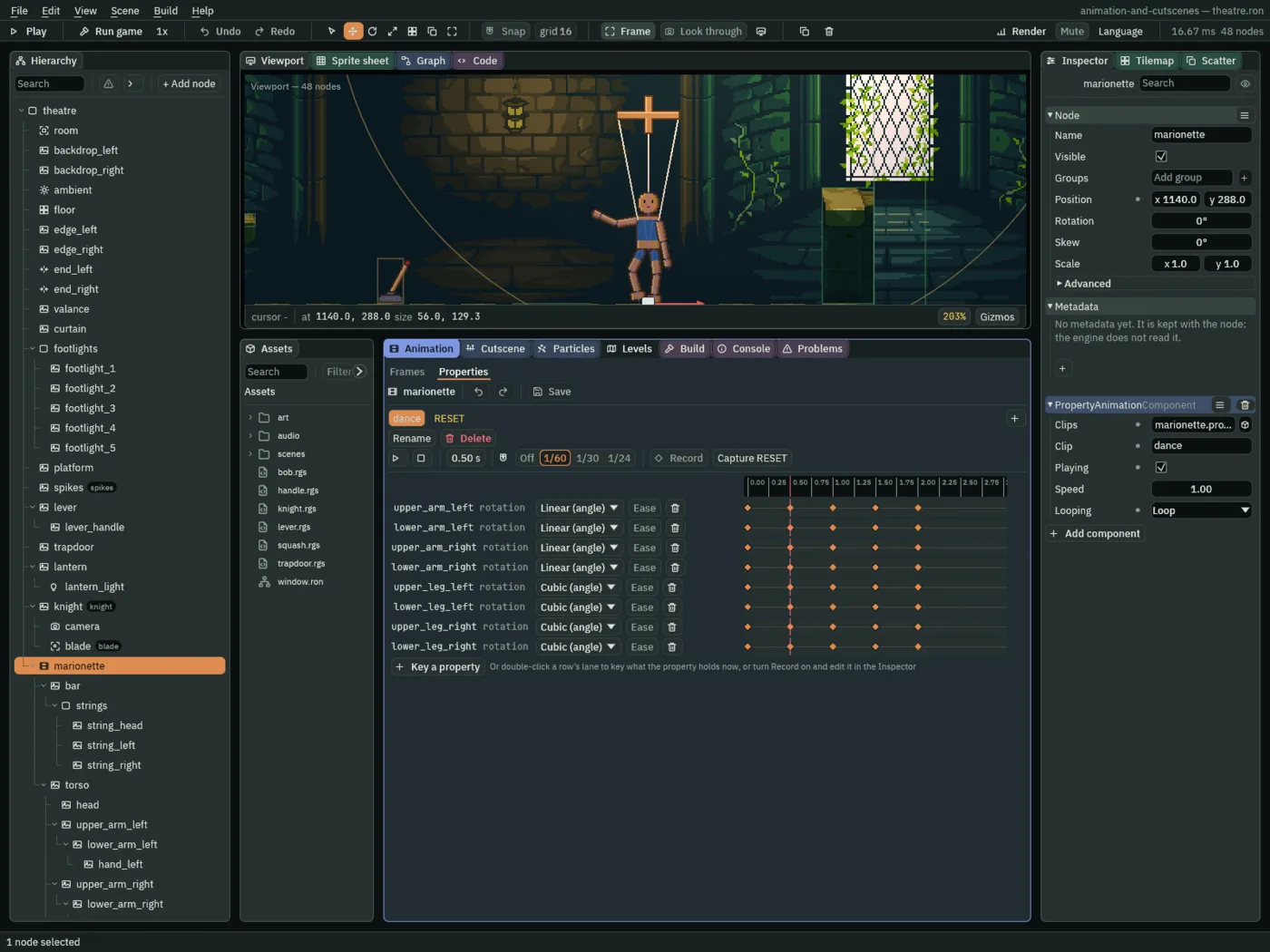
marionette: each row is one bone’s Rotation, named by the bone, and the Viewport shows the clip at its playhead, 0.5.The dance as built
| Node | Component | Field | Value |
|---|---|---|---|
marionette | Property Animation | Clips | marionette.propanim |
| Clip | dance | ||
| Playing | ticked | ||
| Looping | Loop | ||
marionette.propanim | clip dance | length | 2 s |
| tracks | the eight rotations in the table above | ||
clip RESET | length | 0 s | |
| tracks | the eight rotations, the arms at 0, the legs at 6.88, -13.75, -6.88 and 13.75 |
Every other field is as it comes.
Check it works
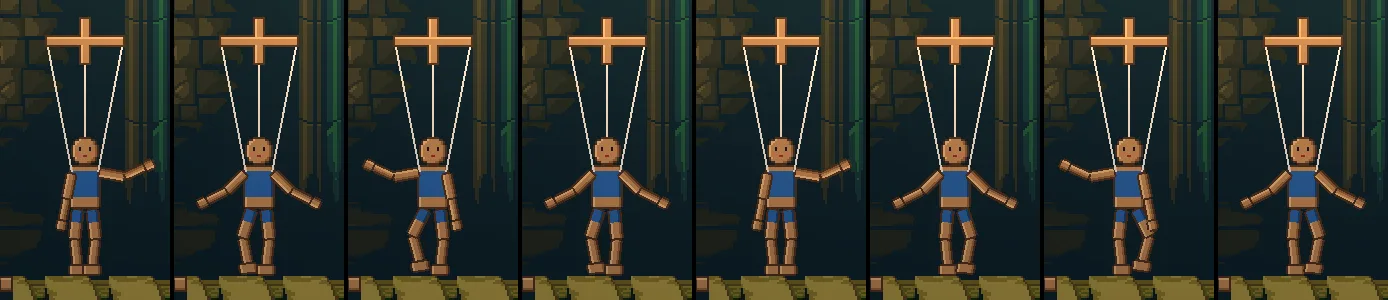
15 steps, a quarter of a second, apart: steps 360 to 465 of the run, 6 to 7.75 seconds in, which are the clip’s own 0 to 1.75. The clip repeats every 2.