Tutorials · Animation and Cutscenes · Chapter 4
Frame events
By the end
- An Audio Source on the knight that answers three names:
step, with five takes, never the same one twice running,swishandthud - Event tracks on his clips:
stepon frames0and6ofrun,thudonland,swishon frame2ofslash, andhitboxon its frames2and3 - A child node,
blade, an Area that is live only whilehitboxis - A number,
220, carried byrecoilon the second frame ofhurt
On this page
Footsteps you hear
A clip can say that something happens on one of its frames, with an event track. A track has a name, and when the clip reaches a frame the track marks, the node hears the name. A Trigger on step is not a sound by itself: the knight’s Audio Source is what turns the name into one. It holds a list of Triggers, each a name and the sound that name plays.
- Copy the footsteps, the thud and the knife below into the project’s
audiofolder. - Select
knight, click Add component and choose AudioSourceComponent. Leave Clip empty, Bus on Sfx and Autoplay unticked: this source plays nothing on its own. - Press the + at the right of Triggers three times. Three rows,
[0],[1]and[2], appear, folded. Open[0]: set Name tostep, and the row reads1 step, its place and its name. Dragfootstep_wood_000.oggonto its Clip. - In
1 step, press the + beside Clips four times, open each of the four rows, and dragfootstep_wood_001.oggtofootstep_wood_004.oggonto their Clip. Leave each Weight at1. - Set
1 step’s Mode to RandomNoRepeat, Pitch Min to0.9and Max to1.1, and Volume Min to0.8. Volume Max stays1. - Open
[1]: Nameswish, ClipknifeSlice.ogg; it reads2 swish. Open[2]: Namethud, ClipimpactSoft_heavy_000.ogg; it reads3 thud.
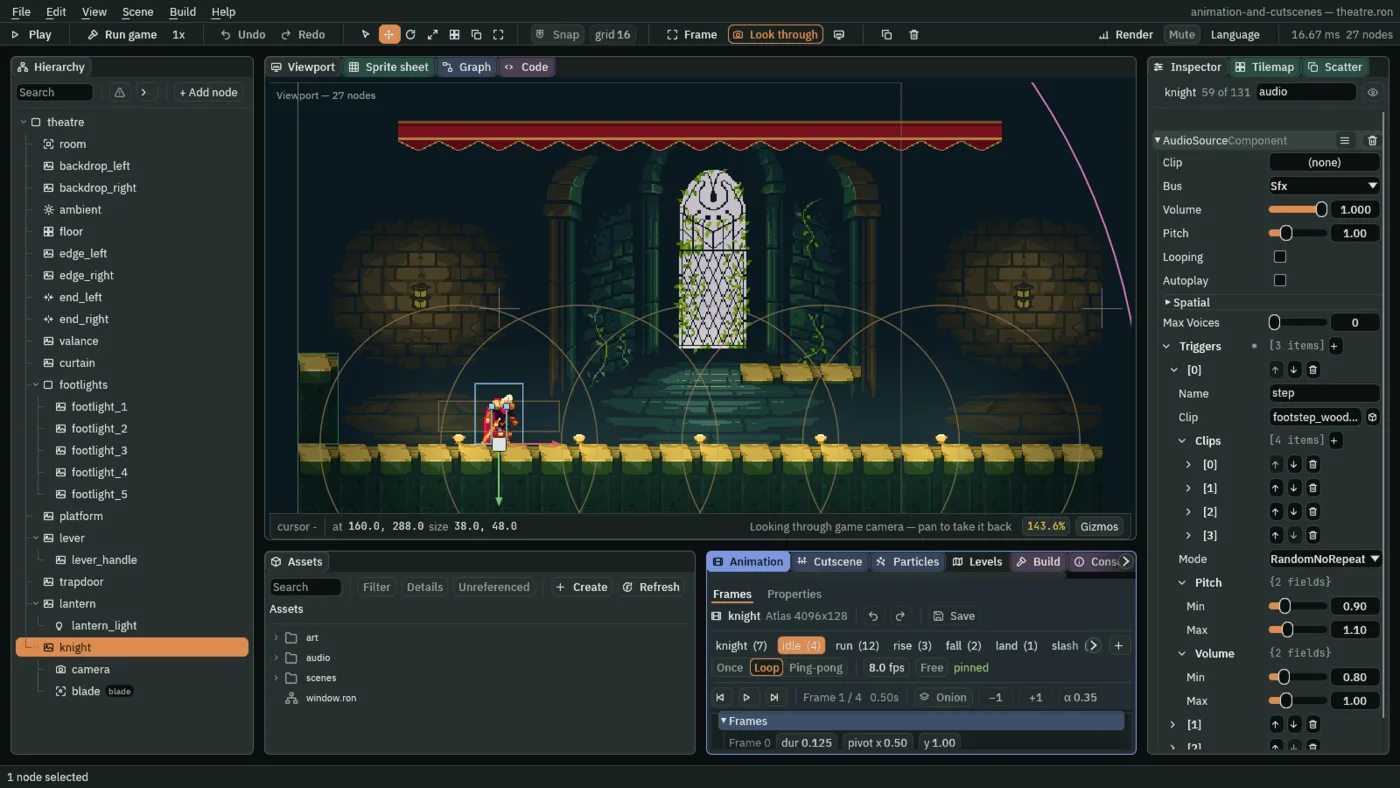
step, open.- Triggers
- The Audio Source’s list of names it answers. Each row holds a Name, which a clip’s event track spells the same way, and the sound that name plays. A name no row has makes no sound.
- Name and Clip
- A trigger’s Name is the name the event track raises,
step. Its Clip is the sound it plays. With Clips empty, it plays that one every time. - Clips and Weight
- More recordings of the same sound, played instead of the Clip alone, so that a footstep is not the same take over and over. Each row has its own Clip and a Weight: how often it comes up against the others under Random and RandomNoRepeat,
1for all of them here. Shuffle and Sequential pass over it, and in every Mode0mutes a take.stephas five takes in all, the Clip and the four rows. - Mode
- The order the takes are drawn in. Random picks any, by weight. Shuffle, which a new trigger has, goes through all the takes in a random order before it repeats one. Sequential goes down the list. RandomNoRepeat picks at random, by weight, but never the take it just played, which is what a footstep wants.
- Pitch and Volume
- A range each, Min to Max, from which every play draws its own multiplier:
0.9to1.1shifts the pitch a tenth either way, and0.8to1takes up to a fifth off the volume. A new trigger has1to1, which is no change. A little spread is what stops five takes sounding like one. - Bus
- The mix the source plays through: Master, Music or Sfx. Sounds of the show’s own, like these, go on Sfx, which is what a new Audio Source has.
Trigger tracks
The knight puts a foot down twice in a stride: on the first frame of run, and on its seventh. A Trigger track marks those frames. Each time the clip reaches one, it raises the track’s name once.
- In the Animation tab, in the Frames mode, click the
runtab. Under Frames, below the frame’s details, typestepinto Track name, choose Trigger and press Add track. A rowstepappears, with a cell for each of the twelve frames. - Click the first cell and the seventh. They light: frames
0and6. Each cell is a frame, counted from0. - Click the
landtab. Add a Trigger trackthudand click its one cell. - Click the
slashtab. Add a Trigger trackswish, and click its third cell: frame2, where the blade sweeps.
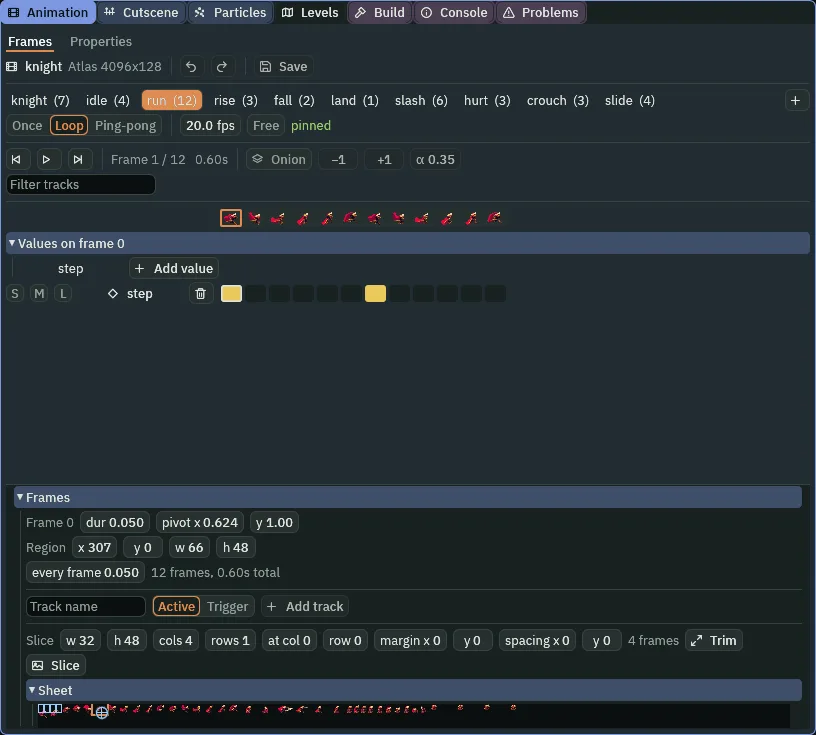
run’s step track: the first and the seventh frames.- Trigger
- A kind of event track: an edge, fired once. When the clip arrives on a marked frame, the track’s name is raised for that step, and the node’s Audio Source, and in later chapters its scripts, hear it. A cell is a frame, and only the frames you light fire. The first frame of a clip fires on the first step after the clip starts.
- Active
- The other kind: a state, held across a span of frames. It is on for as long as the clip’s frame is inside the lit run, and off outside it. It is for something that is live for a while, as the next section’s blade is.
- Track name and Add track
- The name a track raises, and which kind it is. The name is what a Trigger binding, an Area’s Track or a script spells the same way; one clip cannot have two tracks of one name. A bin on the row removes the track, and the three small switches before it, S, M and L, solo, mute and lock it, for a clip with many.
A slash that hits
A slash that cannot hit anything is a wave. The blade is a node with an Area, a box that notices what overlaps it, and the Area has a Track: the name of an event track that switches it on. While the knight’s clip is on a frame the track covers, the Area is live. On every other frame it is not.
- In the
slashclip, add an Active track calledhitbox. Drag across its third and fourth cells, frames2and3: the two frames where the blade is out. The cells light as one span. - Press Save in the Animation tab.
- Select
knight, click + Add node and choose Area. Rename the nodeblade. - In its Area, set Shape Size to
96and24, Offset to0and-22, and Track tohitbox. Leave Solid unticked. - Type
bladeinto the Groups box and press +, so the node is in a group of that name. Press Ctrl+S.
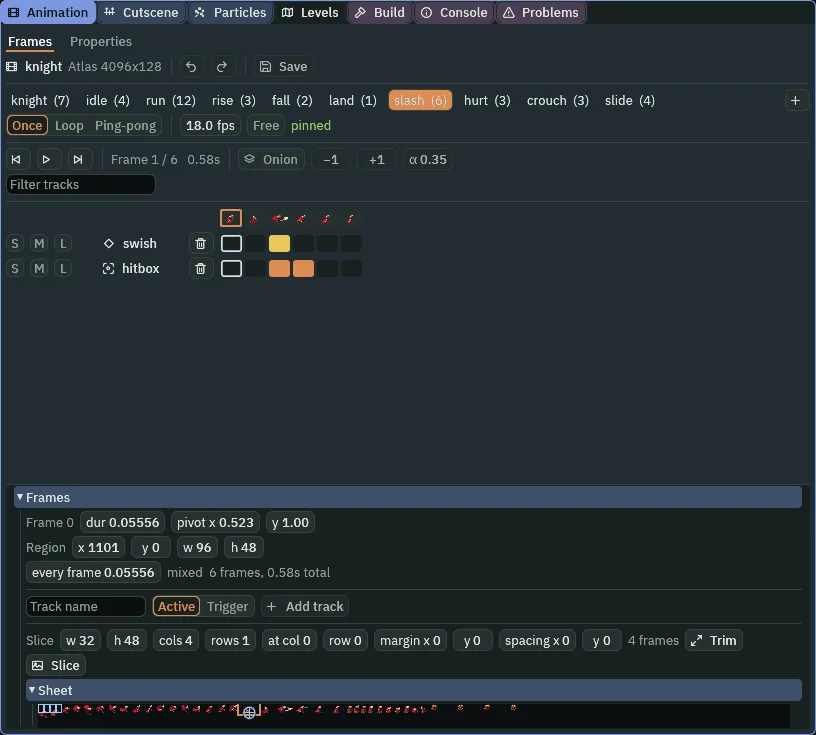
slash’s two tracks: swish on frame 2, hitbox on frames 2 and 3.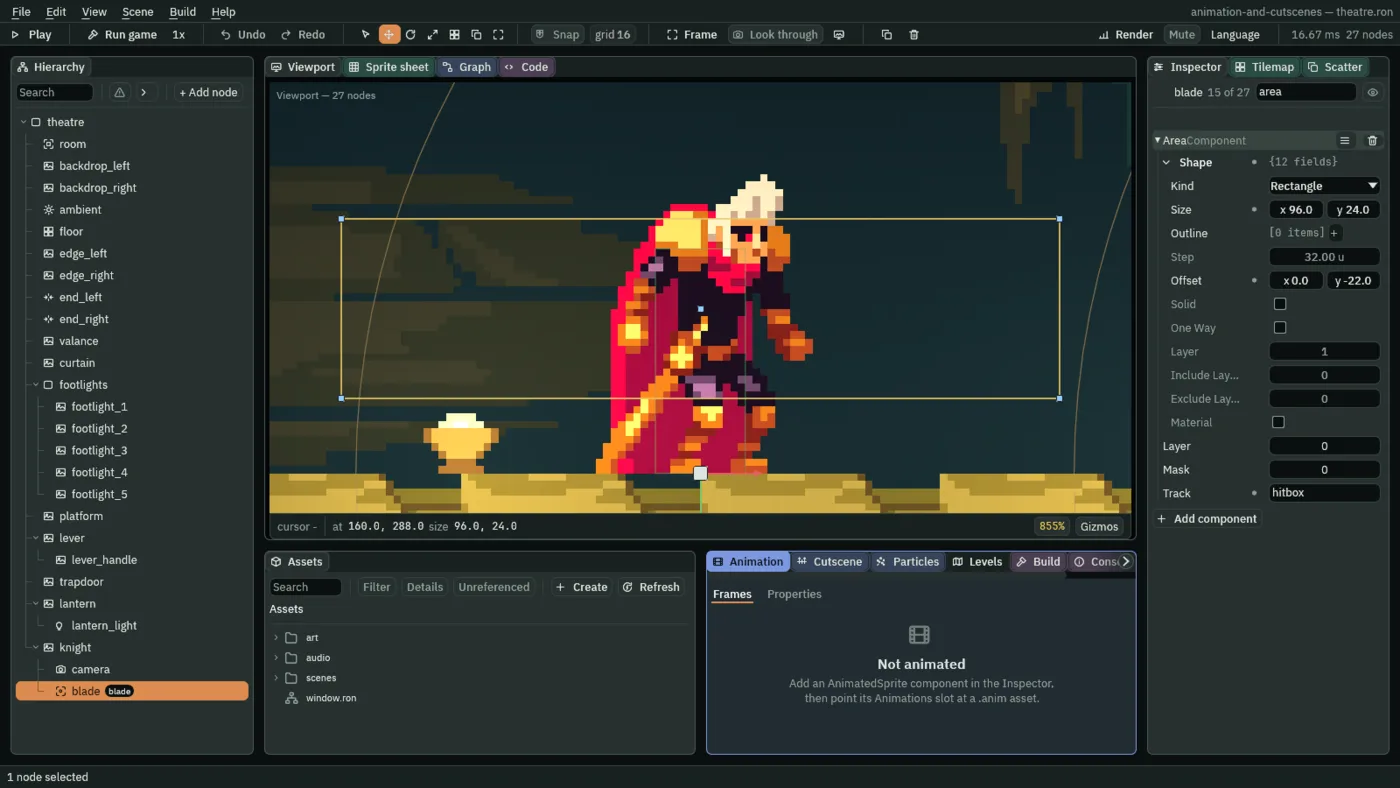
96 by 24 box, up at the knight’s chest, switched by hitbox.- The Area’s Track
- The name of an event track on the clip the knight is playing. While that track covers the clip’s frame, the Area is live, and notices what overlaps it; on every other frame the Area is as if it were not there. Empty, an Area is live all the time, which is what a pickup wants.
- The Area’s Shape: Size and Offset
- The box the Area covers: its Size in world units, and its Offset from the node’s place, which is the knight’s feet. A Size of
96by24is as wide as a slash frame, and not much taller than a sword, and an Offset of-22lifts it so that it sits across his chest. Solid stays unticked: an Area notices, it never blocks.
The blade is centred on the knight, so it reaches both sides of him: a slash behind him would reach what is behind him too. The blade is in the group blade already. Chapter 5 puts the knight in a group of his own, so that a script can tell the two apart.
A number on a frame
A Trigger can carry a number, or a word, along with its name. The knight’s hurt clip raises recoil on its second frame, and carries 220, how hard to throw him back, for a script to read in chapter 5.
- In the
hurtclip, add a Trigger trackrecoiland click its second cell: frame1. - Click the second frame in the strip of frames at the top, to put the playhead on it. A band, Values on frame 1, opens over the tracks, with a row for
recoiland an Add value button. - Press Add value, choose Float, and set it to
220. - Press Save in the Animation tab, and Ctrl+S.
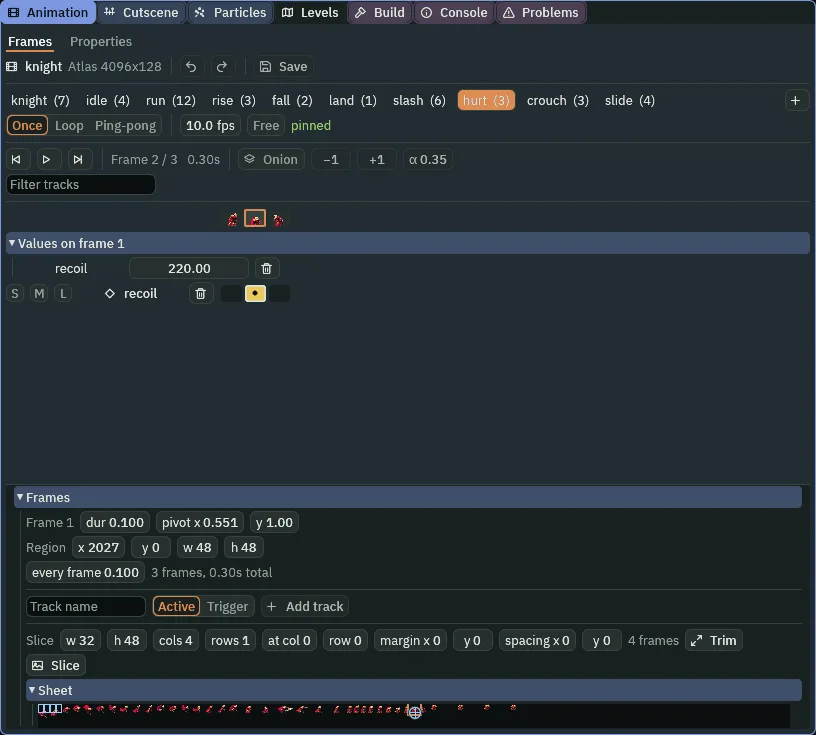
hurt’s recoil: the dot in the cell says the frame carries a number, and the band says which.- Values on frame and Add value
- The band that opens when the playhead is on a frame a track covers. Its row for a track is where that frame’s payload is set: a Text, an Int, a Float or a Bool. The engine reads none of them for you: what
220means is what the script that hearsrecoilmakes of it. A dot in the cell says the frame has one, and the bin clears it.
Seeing the slash
The knight has no way to slash yet: nothing tells his graph. Chapter 5 does. What you can do now is play the slash by name, as chapter 1 did, and watch what it raises.
- Press F5. Select
knight, and set the Animated Sprite’s Clip toslash. He slashes, once. The knife is heard on the third frame. - Click Render on the toolbar and tick Debug draw. Set Speed to
0.25, Clip toidle, then toslashagain. A box is drawn across his chest for two frames, the blade’s, and is gone. Set Speed back to1. - Set Clip to
hurt. Nothing is heard: no script listens forrecoilyet. Press F5 to stop.

1, 4, 7, 10, 14 and 20, 0.02 s to 0.33 s, which are the clip’s frames 0 to 5: the arc is frame 2, where swish and hitbox begin. Taken as typing slash into Clip in Play shows it.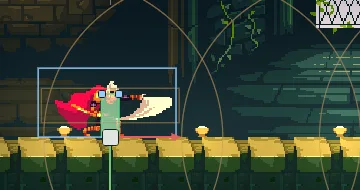
9, the slash’s third frame: the blade’s box is drawn, the faint amber rectangle across him.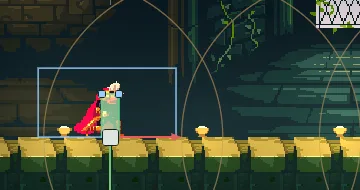
14, the fifth frame: the track no longer covers it, and the box is gone.The events, as this chapter leaves them
The event tracks
| Clip | Track | Kind | Frames | Payload |
|---|---|---|---|---|
run | step | Trigger | 0, 6 | |
land | thud | Trigger | 0 | |
slash | swish | Trigger | 2 | |
hitbox | Active | 2 to 3 | ||
hurt | recoil | Trigger | 1 | Float 220 |
The knight’s Audio Source
| Trigger | Field | Value |
|---|---|---|
1 step | Name | step |
| Clip | footstep_wood_000.ogg | |
| Clips | footstep_wood_001.ogg, footstep_wood_002.ogg, footstep_wood_003.ogg, footstep_wood_004.ogg, each Weight 1 | |
| Mode | RandomNoRepeat | |
| Pitch | Min 0.9, Max 1.1 | |
| Volume | Min 0.8, Max 1 | |
2 swish | Name, Clip | swish, knifeSlice.ogg |
3 thud | Name, Clip | thud, impactSoft_heavy_000.ogg |
The blade
| Node | Component | Field | Value |
|---|---|---|---|
blade, a child of knight | Area | Shape Size | 96, 24 |
| Shape Offset | 0, -22 | ||
| Track | hitbox | ||
| group | blade |
Every other field of every node is as it comes.