Tutorials · Animation and Cutscenes · Chapter 6
Tweens
By the end
squash.rgs: the knight lands flattened by how fast he fell, and springs backhandle.rgs: the lever’s handle snaps over, past its mark and back, with a creak, when the lever is pulledbob.rgs: the platform rises and falls for good, until the lever is pulled and stops it where it stands- The curves a tween can follow, and which of them these three use
On this page
Squash on landing
In chapter 3 you keyed a number on a clip: where it should be, and when. A script can move a number without a clip, by asking for a tween: from where it is to where you say, over so many seconds, along a curve. The engine calls the ask an anneal, and a script makes one with a single call, which then runs on its own: you do not tick it. This chapter has three, each on a node that already exists, and none of them touches a clip.
The first is a landing. The knight’s land clip is a crouch, but a landing wants more weight than one pose gives it. So on landing a script flattens his whole node, wider and shorter, in a twentieth of a second, and springs it back over a quarter of one. The faster he fell, the harder the squash.
- In Assets, press Create, choose New script, type
squash, and press Enter. In the Code tab, replace everything insquash.rgswith the script below, and press Ctrl+S.
/// Squashes the knight as he lands, the harder the faster he fell, then
/// springs him back.
component Squash : Body {
    /// How fast he was falling the step before he landed.
    #[hidden]
    falling: f32 = 0.0,

    fn on_land() {
        let amount = ease(.OutQuad, clamp(falling / 900.0, 0.0, 1.0));
        await anneal_scale(vec2(1.0 + 0.3 * amount, 1.0 - 0.3 * amount), 0.05, .OutQuad);
        anneal_scale(vec2(1.0, 1.0), 0.25, .OutBack);
    }

    fn loop() {
        if !grounded() {
            falling = velocity().y;
        }
    }
}
- Select
knight, press Add component and choose Squash. Its one field,falling, is hidden: the script keeps it, and it starts0.
component Squash : Body- A script with a Body base: it goes on a node that has a Character Body, which the knight has, and it hears the body’s events.
- on_land
- A Body hook. It runs on the step the body touches the ground after being in the air: once for each landing.
- grounded and velocity
grounded()is whether the body stood on something as the step began.velocity()is how fast it was moving then, in world units a second, and down is positive.loopkeepsvelocity().yinfallingon every step he is in the air.- clamp
clamp(falling / 900.0, 0.0, 1.0)is the fall speed as a share of the body’s terminal speed,900, kept between0and1: a standing fall is0, the fastest fall1.- ease
- Runs a number from
0to1through a curve and gives back where it lands, at once, with no waiting.ease(.OutQuad, …)bends the share so that a middling fall already counts for most of it: a jump lands at about620, a share of0.69, which comes out as0.9. - vec2
- Builds a
Vec2, a pair of numbers, from two: here a scale, insquash.rgs, and an offset, inbob.rgs.vec2(1.0, 1.0)is his own size: no squash at all. - anneal_scale
- Scales this node to the
Vec2it is given, over the seconds it is given, along a curve. The knight’s node stands on his feet, so he is flattened onto the boards, not into them.vec2(1.0 + 0.3 * amount, 1.0 - 0.3 * amount)is wider by up to three tenths and shorter by the same. await- In front of an anneal it stops the hook until the anneal has finished, and then carries on. The squash is awaited, so the spring back starts only when it is done. The spring back is not: the hook ends there, and the anneal runs on by itself.
.OutQuadand.OutBack- Curves, written with a leading point.
.OutQuadends slow: the squash gets to its depth quickly and eases into it..OutBackovershoots and settles: the knight springs past his height by a little and comes back to it.

10 to 45: steps 49, 51, 53, 56, 59 and 66, 0.82 to 1.1 seconds in. The third picture is about the deepest squash, 0.27.A lever that snaps
The lever of chapter 5 clicks and drops the trapdoor, but its handle has stood still. Now the handle is thrown over when the lever is pulled, with a creak. It is a node of its own, the lever’s child, lever_handle, so it has its own script, and the lever tells it with a second Signal row.
- Copy
creak1.oggabove intoaudio, and press Refresh in Assets. - Select
lever. In its SignalComponent, press the + beside Connections twice more. Open the second row and set Signal topulledand To tolever_handle. Open the third, set Signal topulledand To toplatform: the third is for the last section. - Select
lever_handle, press Add component and choose AudioSourceComponent. Leave Bus on Sfx. Press the + beside Triggers, open the new row, set Name tocreakand Clip tocreak1.ogg. - In Assets, press Create, choose New script, type
handle, and press Enter. In the Code tab, replace everything inhandle.rgswith the script below, and press Ctrl+S. Then selectlever_handle, press Add component and choose Handle.
/// The lever's handle: thrown over when the lever is pulled, past its mark
/// and back, with a creak.
component Handle {
    fn on_signal() {
        if heard("pulled") {
            play_sound("creak");
            anneal_turn(-1.0, 0.4, .OutBack);
        }
    }
}
- anneal_turn
- Turns this node by an amount in radians, over the seconds it is given, along a curve.
-1.0is one radian, about57degrees, anticlockwise: the handle starts tilted28.65degrees to the right, and ends up as far to the left..OutBacktakes it past that, and back. heard("pulled")- The same signal the trapdoor heard in chapter 5: all three nodes the lever’s Signal names get it, on the same step, and each script reacts in its own way. play_sound plays the
creaktrigger.
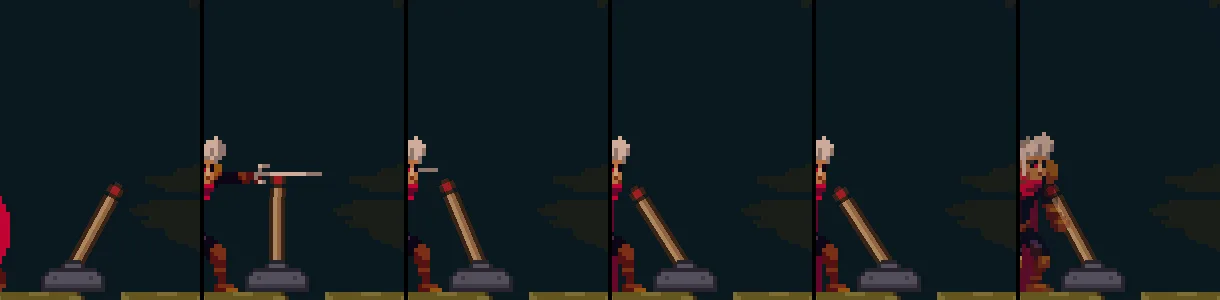
226, 232, 236, 240, 246 and 258, 3.77 to 4.3 seconds in. It is upright in the second picture, swings past its mark in the fourth and fifth, and has come back to it, 28.65 degrees to the left, in the last.A platform that bobs
The stone platform in the middle of the hall, at 872, 232, between the spikes and the lever, is solid, and a jump reaches it. It should not be still. A pulse is an anneal that turns round at the end and does it again, for good; it never finishes, and nothing can await it. The script starts one when the platform is made, and stops it when the lever is pulled.
- In Assets, press Create, choose New script, type
bob, and press Enter. In the Code tab, replace everything inbob.rgswith the script below, and press Ctrl+S. Then selectplatform, press Add component and choose Bob, and press Ctrl+S.
/// The platform bobs up and down for good, until the lever is pulled: then
/// it stops where it stands.
component Bob {
    fn on_create() {
        pulse_by(vec2(0.0, -24.0), 1.5, .InOutSine);
    }

    fn on_signal() {
        if heard("pulled") {
            quench();
        }
    }
}
- on_create
- Runs once, on the first step the node exists: for a node in the room, the first step after you press Play.
- pulse_by
- Moves this node by a
Vec2and back, forever, taking the seconds it is given each way.vec2(0.0, -24.0)is24units up, since y grows downward, and1.5seconds each way makes a cycle of3..InOutSineis soft at both ends, so the platform slows as it turns. - quench
- Stops every anneal and pulse on this node, wherever each stands. The platform stays wherever it was when the signal arrived, anywhere between its lowest and its top, and does not return.

180, 210, 240, 270, 300 and 330, 3 to 5.5 seconds in. A cycle is 3 seconds: it is at the bottom at 180, at the top at 270, and on its way down, a quarter of its height above the bottom, at 330.The curves
Every anneal, every pulse and the ease call take a curve, written with a point: .OutQuad. The set is Easing, with a picture of each. A name is a family and a form. The families are these:
| Family | Its shape |
|---|---|
Linear | No shaping. Constant speed. It has no forms. |
Sine | The gentlest. .InOutSine is the softest S-curve, the bob’s. |
Quad | The workhorse. .OutQuad ends slow, the squash’s. |
Cubic, Quart, Quint | The same shape, each steeper than the one before. |
Expo | Holds near one end, then leaps. |
Circ | Along a quarter of a circle, not a power. |
Back | Pulls back before it moves, or overshoots and settles. .OutBack is the spring-back’s and the handle’s. |
Elastic | Springs past the end and rings down, like a plucked string. |
Bounce | Settles with decaying bounces. .OutBounce is the trapdoor’s, in chapter 5. |
Spring | Overshoots and settles with a wobble. |
Each family but Linear comes in four forms, by where the curve is slow. In starts slow. Out ends slow. InOut is slow at both ends, and quickest in the middle. OutIn is quick at both ends, with a pause in the middle. So .InQuad, .OutQuad, .InOutQuad and .OutInQuad are the Quad family. Chapters 3 and 5 gave keys three of these names as their ease: InOutCubic, InOutSine and OutBounce.
The scene, as the chapter leaves it
| Node | Component | Field | Value |
|---|---|---|---|
knight | Squash | falling | hidden, starts 0 |
lever | SignalComponent | Connections, second row: Signal, To | pulled, lever_handle |
| Connections, third row: Signal, To | pulled, platform | ||
lever_handle | AudioSourceComponent | Triggers: Name, Clip | creak, creak1.ogg |
| Handle | every field | as it comes | |
platform | Bob | every field | as it comes |
The first row of the lever’s Connections, pulled to trapdoor, is chapter 5’s.