Tutorials · Animation and Cutscenes · Chapter 7
Root motion
By the end
- A
crouchaction on S and Down, acrouchswitch and aslidetrigger in the graph, and three states,crouch,slideandcrouched, with their edges: eighteen in all knight.rgs: S crouches him, J slides him from a crouch, and slashes him otherwise- The slide’s four pivots, which set how far each frame carries him, and
crouched, a one-frame clip that holds the pose the slide ends in - A Root Motion on the knight that carries him
48units along the slide, and stops at a wall
On this page
Crouch and slide
Two more orders. S or Down crouches the knight for as long as it is held, and J while he is crouched slides him instead of slashing. The graph chooses all of it, so the work is three states, a switch, a trigger and their edges, and a few lines in the knight’s script.
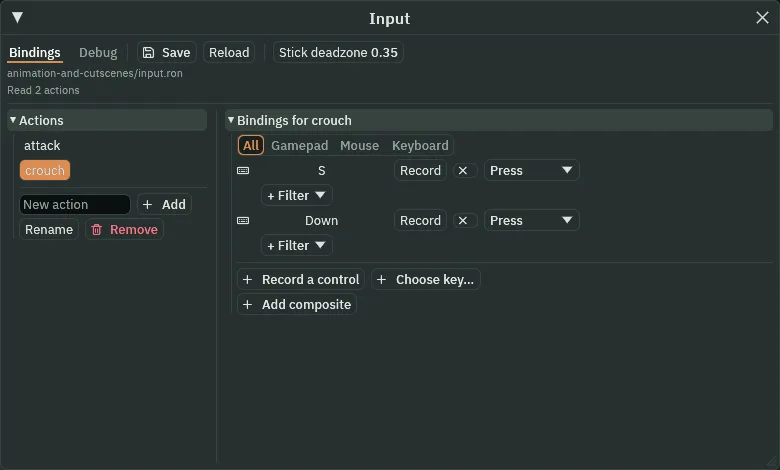
- Choose View → Input map…. Type
crouchinto New action and press Add. Withcrouchselected, press Record a control and press S. Press Record a control again and press Down. Press Save, and close the window. - Select
knightand click the Graph tab. In the Parameters list, typecrouchinto the name box, chooseswitchin the list of kinds and press Add. Typeslide, choosetriggerand press Add. Thecrouchrow has a tick box, and it starts unticked. - In the row over the canvas, add three states, each with the State and Clip boxes filled in as
crouchandcrouch,slideandslide, andcrouchedandcrouched, with Add state. Drag them to a row of their own under the others. Thecrouchedclip is made in the next section; its name is all the state needs now. - Click
idle, press Link and clickcrouch. In the new row,idle to crouch, choose Is and typecrouchin the name box, and leave its box ticked: true. Press the + at the end of the row: a second test, which must hold as well. Choose Is, typegroundedand leave it ticked. Press the row’s up arrow until its number reads2: it then comes just after the two Any State arrows. (Whileidleis selected the list shows only its own arrows; the number is the arrow’s place in the whole list.) - Do the same for
runtocrouch: the same two tests, and its up arrow until its number reads3. - Click
crouch, press Link and clickidle. Choose Is, typecrouchand untick the box: false. Clickcrouch, press Link and clickslide: choose Trigger and typeslide. - Click
slide, press Link and clickcrouched: choose Finished. Clickcrouched, press Link and clickidle: choose Is, typecrouchand untick the box. Clickcrouchedagain, press Link and clickslide: choose Trigger and typeslide. Every blend stays0. - Press Save.
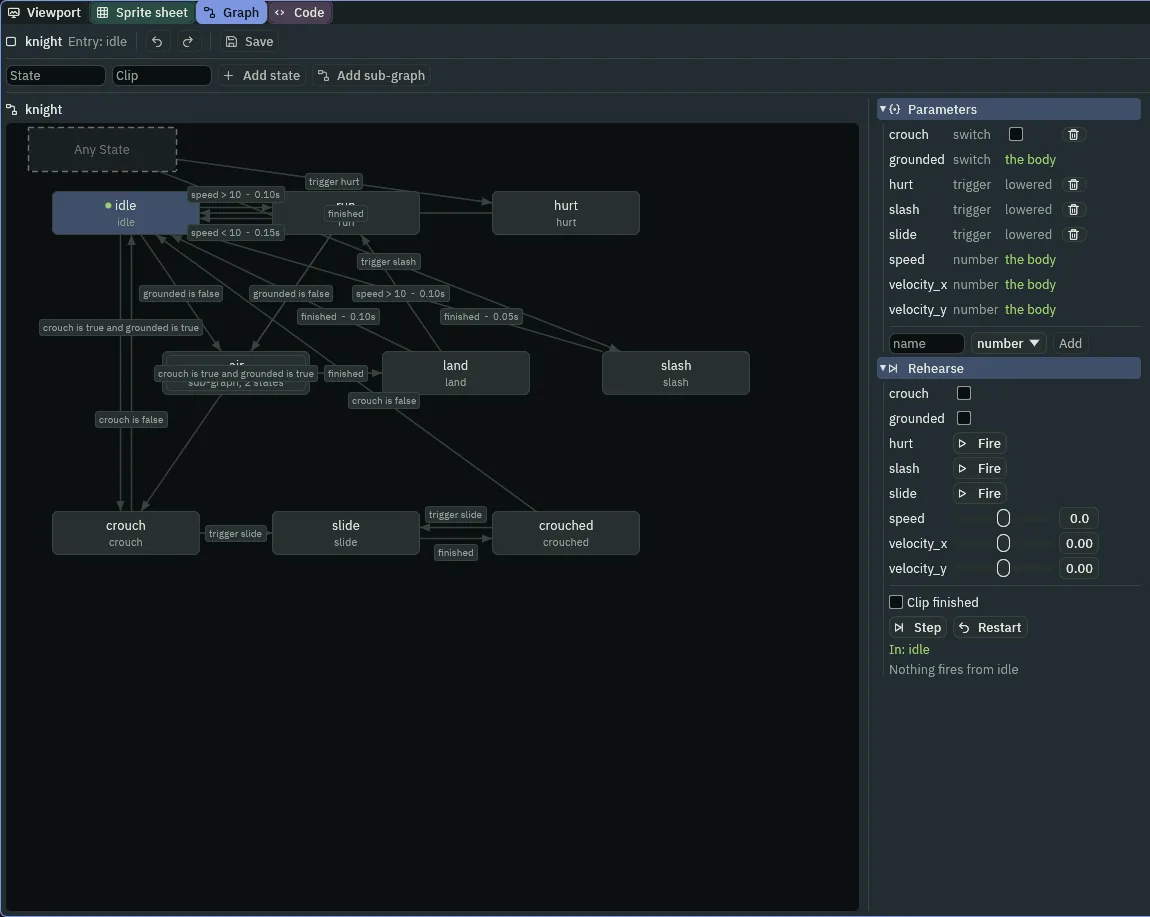
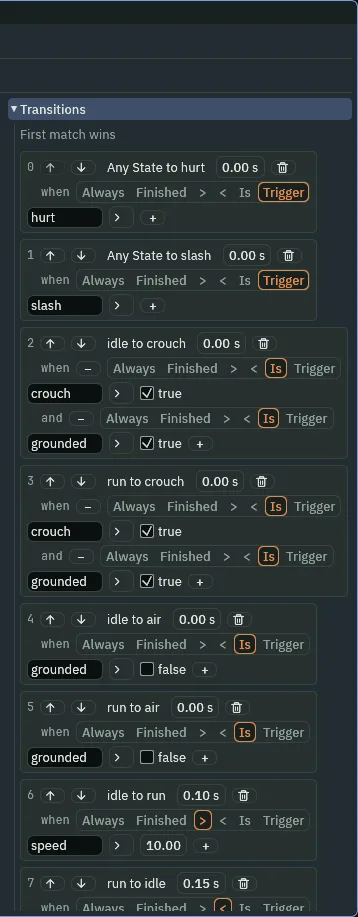
2 and 3, each with two tests.- Switch
- A kind of parameter: a tick box. It is on or off and stays as it was set, which is what a trigger is not.
crouchstarts off. A script sets it with set_param_flag, and a condition reads it with Is. - and
- A row can hold several tests, one under another, which the + at the row’s end adds, joined by and: the edge fires only when every one holds.
crouch is true and grounded is trueis a crouch on the ground, so a crouch in mid-air is not one.
The two ways into the crouch are rows 2 and 3, ahead of the walking edges, for a reason. The keys drive his body, and the graph only chooses the clip, so S and D can be down on one step. From idle, idle → run holds, since his speed is above 10, and so does idle → crouch. The first in the list wins, and a crouch has to. Crouched, A and D still walk him, and the graph keeps him in the crouch clip while they do.
- Select
knight. In the Code tab, replace everything inknight.rgswith the script below, and press Ctrl+S.
/// The knight's orders: J or X slashes, unless he is hurt; crouched (S or
/// down), J slides instead. The spikes hurt him, and not again until his
/// hurt clip has played out; its recoil frame lifts him by the number it
/// carries.
component Knight : Area {
    /// Whether his hurt clip is still playing.
    #[hidden]
    hurting: bool = false,

    fn while_in() {
        if in_group(other, "spikes") && !hurting {
            hurting = true;
            trigger("hurt");
        }
    }

    fn on_signal() {
        if heard("frame:recoil") {
            set_number("CharacterBodyComponent", "velocity.y", -heard_value("frame:recoil"));
        }
        if heard("finished:hurt") {
            hurting = false;
        }
    }

    fn loop() {
        set_param_flag("crouch", held("crouch"));
        if pressed("attack") {
            if state() == "crouch" || state() == "crouched" {
                trigger("slide");
            } else if state() != "hurt" && state() != "slide" {
                trigger("slash");
            }
        }
    }
}
- held
- Whether the player is holding the action down, on every step.
pressedis true for the one step the key goes down;heldis true for as long as it stays down.held("crouch")istruewhile S or Down is. - set_param_flag
- Sets the switch of that name that this node’s graph reads, from the next step. The script writes it on every step, so the switch always follows the key: down, it is on; let go, it is off, and the edges
crouch → idleandcrouched → idlestand him up. - state and
trigger("slide") - The state the graph was in as the step began. In
crouchorcrouched, J raisesslideand the graph takes it. Anywhere else, J raisesslash, unless he is inhurtor already inslide.crouch → slideandcrouched → slideare the two edges that read it.
Why the slide snaps back
The slide is a made picture of four frames, each 128 wide and 32 tall. All four draw the same kneeling figure, but each draws it 16 further on in its cell than the one before: the body is on the cell’s left in the first frame, and 48 units to the right in the last. Chapter 1 cut it with every pivot at 0.5, 1, the middle of its frame’s bottom edge, as the Sprite sheet does. The knight’s node never moves, so the picture runs ahead of him by 16 a frame, and when the slide ends he is drawn back where the node is.

256, 260, 264, 268, 272 and 280 of the same run as the strip below, 4.27 to 4.67 seconds in. The picture steps back, runs ahead and snaps back.The Frames mode shows the same fault in one picture. Its Onion draws the frames either side of the one you are on as faint ghosts, each at its own size and from its own pivot, so a ghost stands where its frame would be drawn. With every pivot in the middle, the ghost of the next frame stands 16 units ahead of the live one.
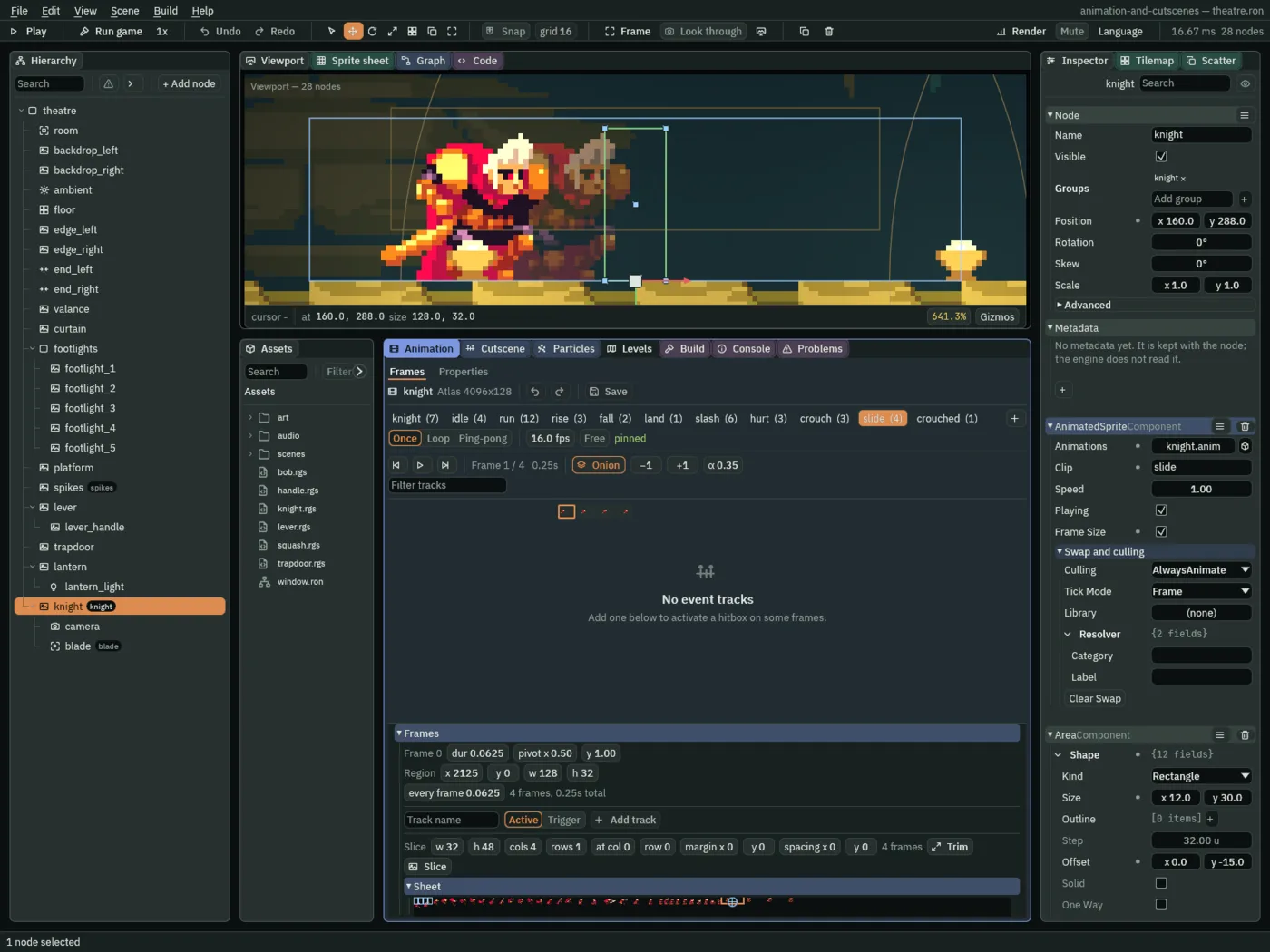
slide, so that the live frame is the slide’s: Onion lit on the first of the four frames. The ghost of the second stands 16 units ahead of it.Pivots as drift
The fix is to move the pivot with the body. A frame’s pivot is the point of it that sits on the knight’s node. If each frame’s pivot sits under the body that frame draws, the body stays on the node and the picture no longer runs ahead. And the pivot has moved, 16 units a frame along the picture. That movement is the drift: how far the art has stepped from one frame to the next. Root motion hands it to the node, which moves by it, so the knight is carried as far as the pivots say, in the world.
- Select
knight, and in the Animation tab open theslideclip. In its Frames, click the first frame and set its pivot x to0.25, y stays1. Click the second and set0.375. The third is already0.5. Click the fourth and set0.625. - Double-click
art/knight.pngin Assets. In the Sprite sheet tab, set Cell to48and48and Margin to1929and0: the crouch strip’s third and last frame. Drag across the one cell,0, 0: Selected 1 x 1. Press From selection; name itcrouched,12 fps, Loop; press Generate 1 and Clear. - In the Animation tab, open
crouchedand set its one frame’s pivot x to0.625, the slide’s last. Press Save.
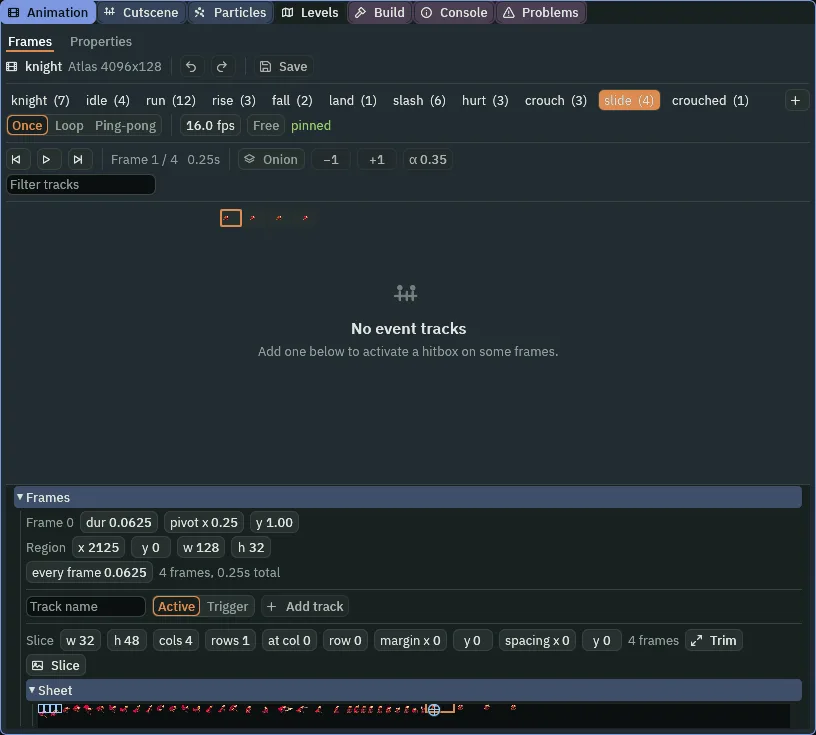
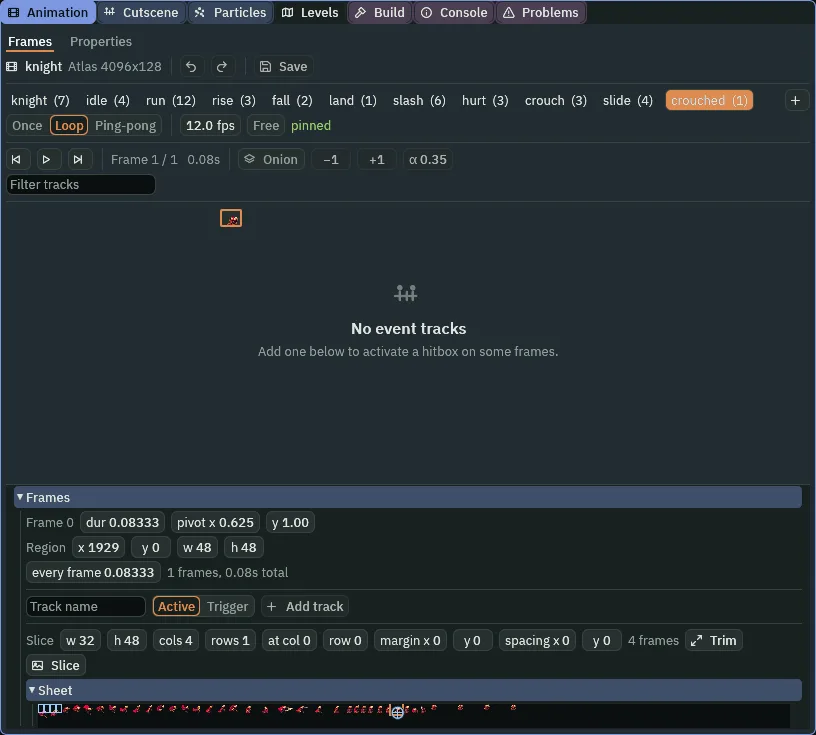
Taken again with the pivots set here, that picture has nothing standing out: each ghost lies exactly under the live frame, since the body does not move on the node. That is what the pivots are for.
Drift is the change of the frame’s pivot, times the frame’s drawn size, times the Root Motion’s Scale. The slide’s frames are 128 wide, and the pivot goes up by 0.125 a frame: 16 units, 48 in all, from 0.25 to 0.625. A held crouch with the same 0.625 leaves him where the slide did.
| File | Clip | Frame | Pivot | Drift |
|---|---|---|---|---|
knight.anim | slide | 0 | 0.25, 1 | — |
1 | 0.375, 1 | 16 units | ||
2 | 0.5, 1 | 16 units | ||
3 | 0.625, 1 | 16 units | ||
crouched | 0 | 0.625, 1 | — |
crouched is cut 48 wide, 1 frame, from 1929, 0, at 12 fps, Loop, so that it never finishes: a held pose.
Root Motion
- Select
knight, press Add component and choose RootMotionComponent. Leave its fields as they come: Scale1,0and Enabled ticked. Press Ctrl+S.
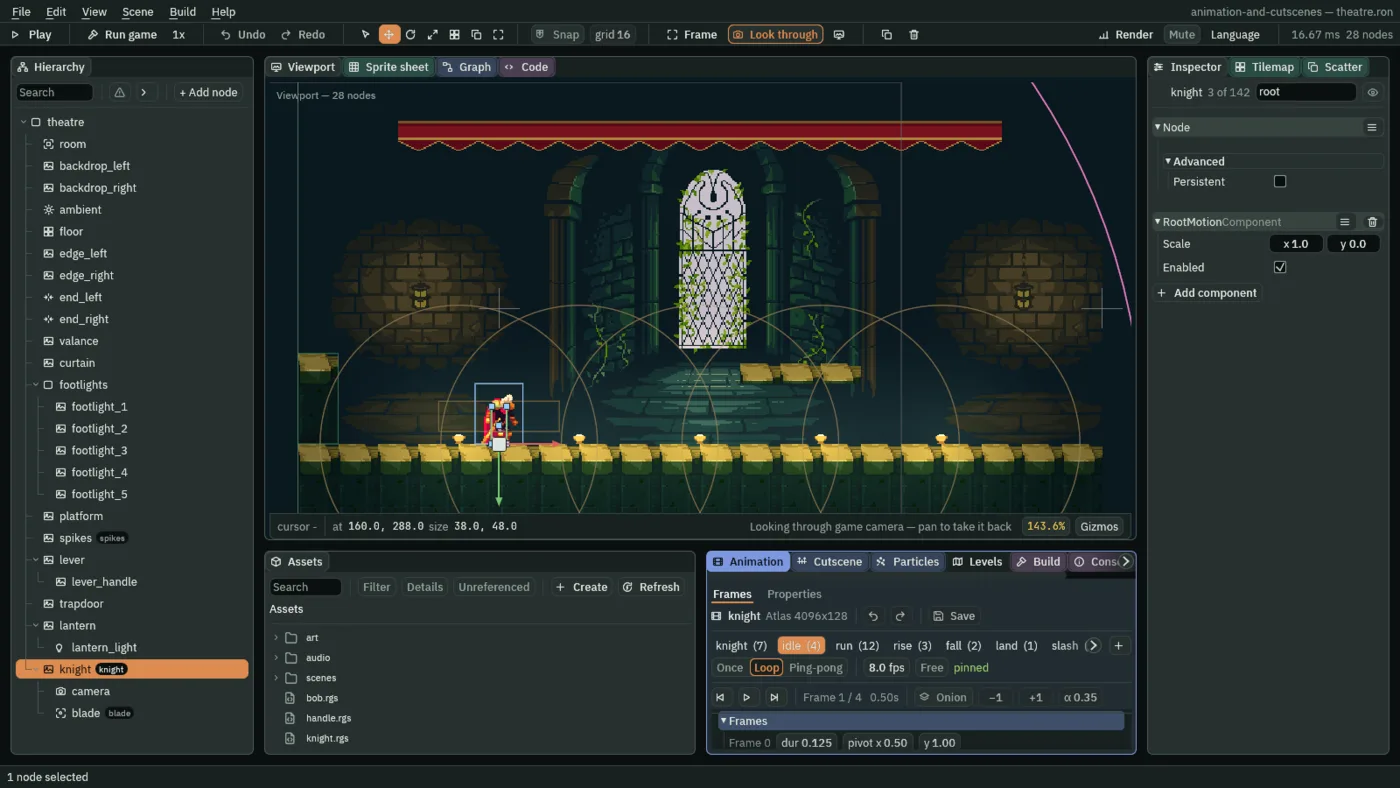
- Scale
- The Root Motion’s Scale: how much of the drift is applied, along each axis.
1,0applies all of the sideways drift and none of the vertical. The knight’s jump and fall frames change their pivots’ y, to keep his feet down, and that must not lift him, so y stays0. A new Root Motion has1,0. - Enabled
- The Root Motion’s Enabled: whether it applies right now. Ticked, the drift of the frame he is on is added to his move each step. Unticked, the frames still play and nothing carries him. It starts ticked.
The drift is handed to his Character Body as a move that sweeps, as walking is: it stops at what is in the way. A wall in the slide’s path ends the slide there.
- Press F5. Hold S, press J and watch the slide carry him. In the Inspector, untick Enabled, and slide again: the frames play, and he does not move. Tick it again, and press F5 to stop.

256 to 280, as in the others. The frames play, and the node stays.That is the whole of Root Motion. What else the chapter changed is in these tables.
The graph, as the chapter leaves it
| Kind | Name | Value |
|---|---|---|
| Parameter | crouch | switch, starts off |
| Parameter | slide | trigger |
| State | crouch | clip crouch |
| State | slide | clip slide |
| State | crouched | clip crouched |
| Row | From | To | Condition | Blend |
|---|---|---|---|---|
0 | Any State | hurt | trigger hurt | 0 |
1 | Any State | slash | trigger slash | 0 |
2 | idle | crouch | crouch is true and grounded is true | 0 |
3 | run | crouch | crouch is true and grounded is true | 0 |
4 | idle | air | grounded is false | 0 |
5 | run | air | grounded is false | 0 |
6 | idle | run | speed > 10 | 0.1 |
7 | run | idle | speed < 10 | 0.15 |
8 | air | land | finished | 0 |
9 | land | run | speed > 10 | 0.1 |
10 | land | idle | finished | 0.1 |
11 | slash | idle | finished | 0.05 |
12 | hurt | idle | finished | 0 |
13 | crouch | idle | crouch is false | 0 |
14 | crouch | slide | trigger slide | 0 |
15 | slide | crouched | finished | 0 |
16 | crouched | idle | crouch is false | 0 |
17 | crouched | slide | trigger slide | 0 |
| Node | Component | Field | Value |
|---|---|---|---|
knight | RootMotionComponent | Scale | 1, 0 |
| Enabled | ticked |
| File | Action | Keys |
|---|---|---|
input.ron | crouch | KeyS, ArrowDown |
Check it works

240, J at 256; steps 256, 260, 264, 268, 272 and 280, 4.27 to 4.67 seconds in. The lever, at 980, does not move: he is carried 48 units.