Tutorials · Cameras and Framing · Chapter 11
The lens
By the end
- A town square built inside the castle, east of every room, and a lens on the lens room’s back wall that is the only way to see it
- WhenVisible: a view that draws only while something on the screen shows it
- A portrait of the watchman, a Subtree view that is Once: painted as the scene opens, and kept
- An easel whose script unticks the view’s Drawn, so the portrait is painted again; Never on a copy; and what a view costs
On this page
A square out of sight
A view sees only its own scene, so a lens on the town has to look at a town inside the castle: a set of its square, built far east of every room, where no camera of his and no map ever looks. Every node in this chapter goes in the castle, in this order.
- With
castle.ronopen, selectcastle, press + Add node and choose Node. Rename itsquareand set its Position to3200,0: east of the beacon room’s far wall, at x1984, and past all the map can see. - Select
square, add a Tilemap and rename itsquare-street, at0,0. In its Tilemap, dragart/street.tilemaponto Tilemap: the town’s own street. Set Sort Layer to Ground, and leave Tile Size at16,16and Collision ticked. - Select
square, add a Sprite and rename itsquare-houses, at1280,24. Dragart/night-town-background-town.pngonto Texture, and set Size to512,99, Anchor to0.5,1and Sort Layer to Town. - Select
square, add a Sprite and rename itsquare-sky, at1280,-120. Dragart/night-town-background-sky.pngonto Texture, set Draw Mode to Tiled, Tile Size to96,224, Size to288,224and Sort Layer to Sky, and leave Anchor at0.5,0.5. - Press Ctrl+S. Open
scenes/town.ron, right-clickfogand choose Copy. Openscenes/castle.ronagain, right-clicksquareand choose Paste as child. Rename itsquare-fogand set its Position to1280,-8. Remove its ParallaxComponent with the bin at the right of its header. In its Particles, set the Shape’s box to256by48and Rate to3.
- The Sprite’s Draw Mode Tiled, Tile Size
- Tiled repeats the picture across the Sprite’s Size, a copy every Tile Size:
288wide at every96is three whole copies of the sky. Simple, as it comes, stretches one copy over the Size.
The street is the town’s own art/street.tilemap, so the castle carries a second copy of its stone, solid too, where nobody walks. The street’s cap hides the houses’ last 24 rows, so they stand on it. The sky is tiled because the square has no plane to repeat it: none of the four has a Parallax. The town’s fog spreads 6 puffs a second over 1800 units; over 256, as many would be about 0.85 a second, a faint wash once the lens draws the square at a quarter of its size, so 3 a second makes a mist round the houses’ feet.
The lens
- Select
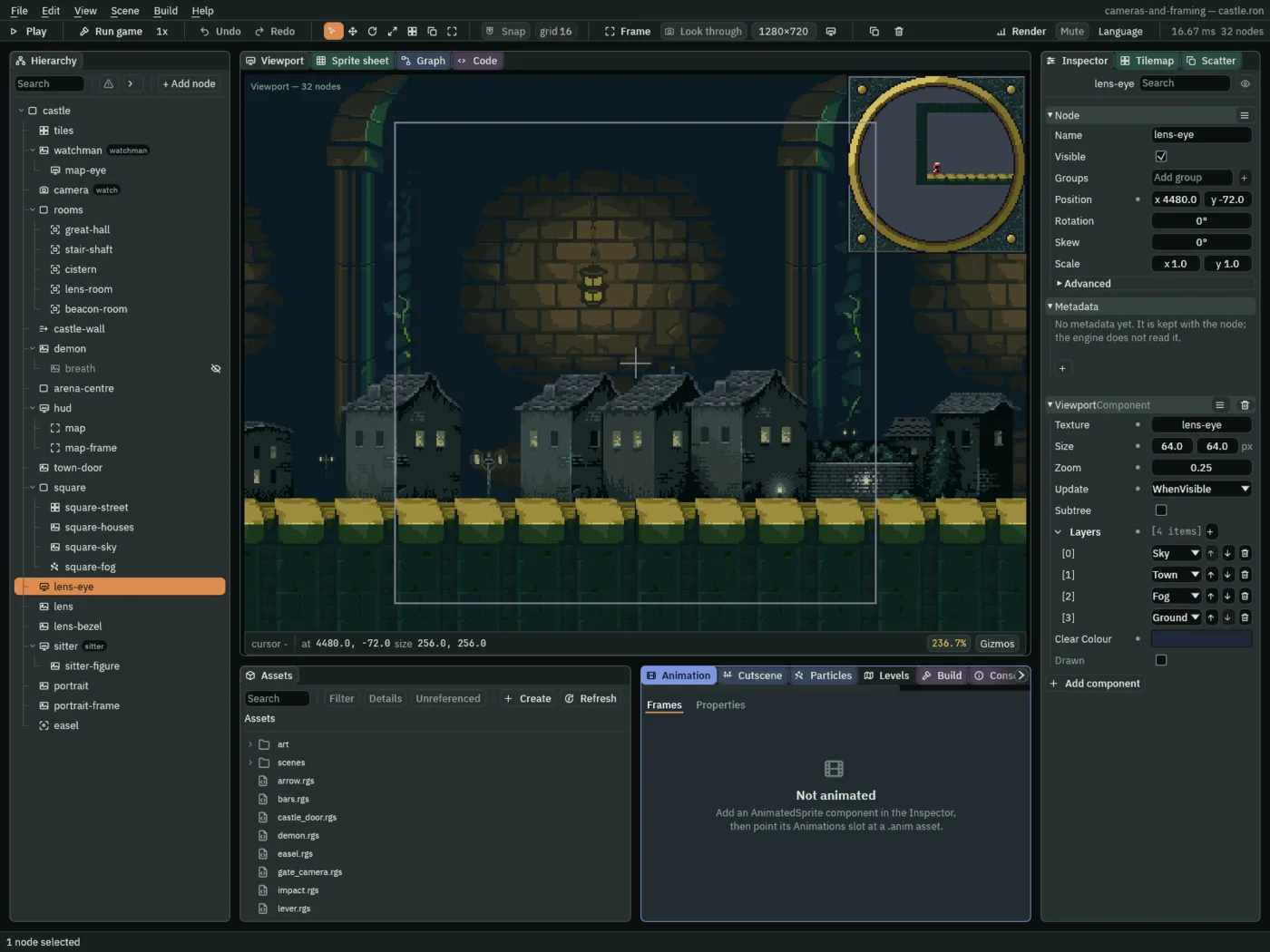
castle, press + Add node and choose Viewport. Rename itlens-eyeand set its Position to4480,-72: the middle of the square,72above its street. - In its Viewport, choose New render target for Texture. Set Size to
64,64, Zoom to0.25and Update to WhenVisible. Add four Layers: Sky, Town, Fog and Ground. Set Clear Colour to0.012,0.020,0.040, alpha1, the camera’s Background. - Select
castle, add a Sprite and rename itlens, at1400,-536, on the lens room’s back wall. Click Texture and chooselens-eye. Set Size to64,64and Sort Layer to Fixtures, and leave Anchor at0.5,0.5. - Add another Sprite under
castle,lens-bezel, at the same1400,-536. Dragart/lens-bezel.png, which came with the starter, onto Texture, and set Size to80,80and Sort Layer to Props: a brass ring round a clear window64across. - Press Ctrl+S.
256 by 256.- WhenVisible
- Draws in every frame in which something on the screen shows the view’s texture, and in no other: here, while the lens is in the picture.
lens-eye sees 256 by 256 round its own place, x 4352 to 4608 and y -200 to 56: the square’s sky, houses, fog and street, drawn into a 64-pixel texture and shown by lens under its bezel. Its Layers leave out Buildings, so the castle’s wall, which the editor draws behind the square, is not in it.
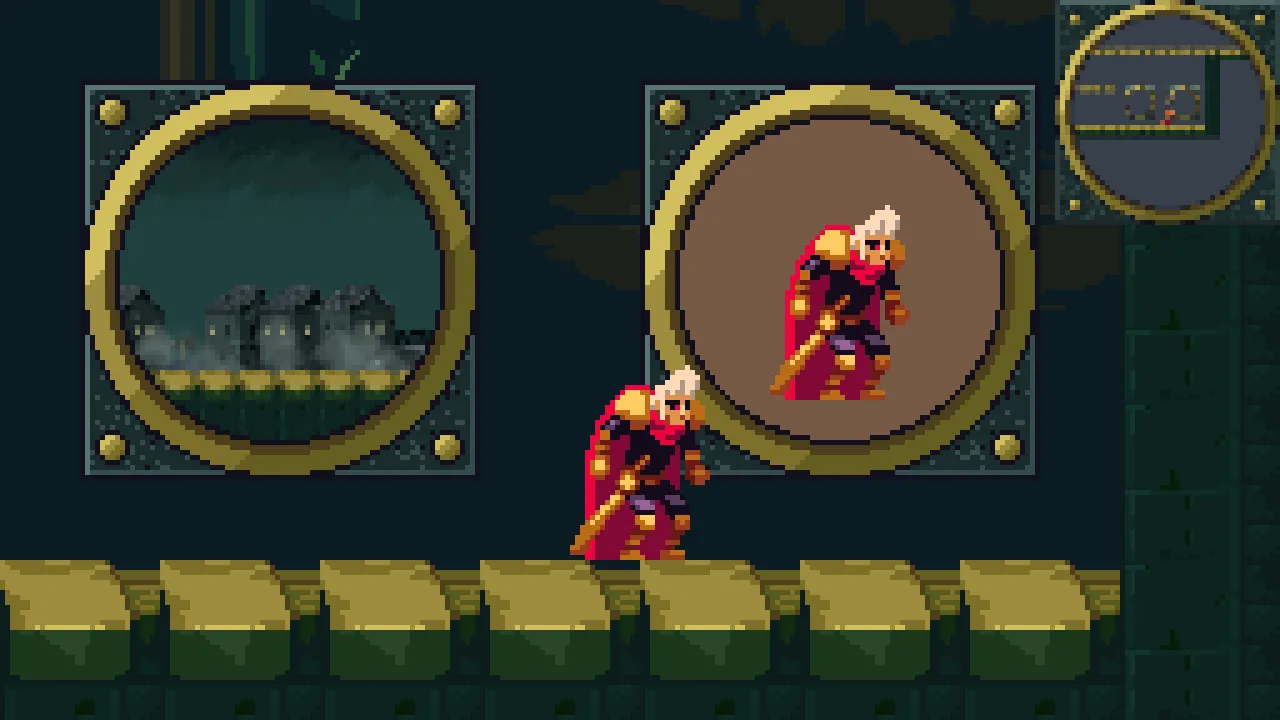

The square is built where no camera of his and no map ever shows it, and the lens is the only way to see it. In the great hall only the map draws; in the lens room the lens draws too, a second pass; back in the hall, one again. The lens’s texture is kept after he leaves: the view stops drawing, and the texture is let go only when the scene changes.
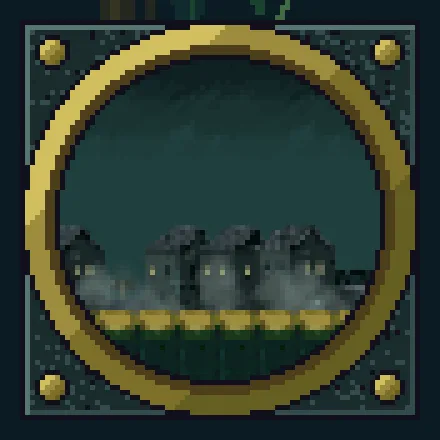
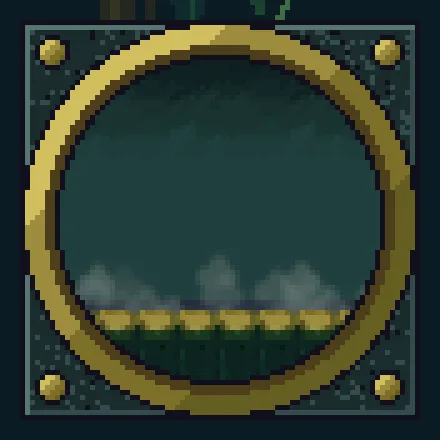
The lens draws only the layers it is given. Here it is as made, and on a copy whose square-houses is on Props, a layer its Layers leave out:
A portrait, painted once
Beside the lens hangs a portrait of the watchman. It is a view too, of a figure of him standing far out of sight, but of the figure alone, and painted a single time.
- Select
castle, add a Viewport and rename itsitter, at2600,-800. In its Node fold, typesitterinto the Groups box and press Enter. - In its Viewport, choose New render target for Texture, set Size to
64,64, leave Zoom at1, set Update to Once, tick Subtree, and leave Layers empty. Set Clear Colour to0.18,0.10,0.06, alpha1: a brown ground. - Select
sitter, press + Add node and choose Animated Sprite. Rename itsitter-figure, at0,24. In its Sprite, dragart/watchman.pngonto Texture, and set Size to38,48, Anchor to0.5,1and Sort Layer to Figures. In its Animated Sprite, dragart/watchman.animonto Animations, set Clip toidleand tick Frame Size. - Select
castle, add a Sprite,portrait, at1512,-536: Texturesitter, Size64,64, Sort Layer Fixtures. Add another,portrait-frame, at the same place: Textureart/lens-bezel.png, Size80,80, Sort Layer Props. - Press Ctrl+S.
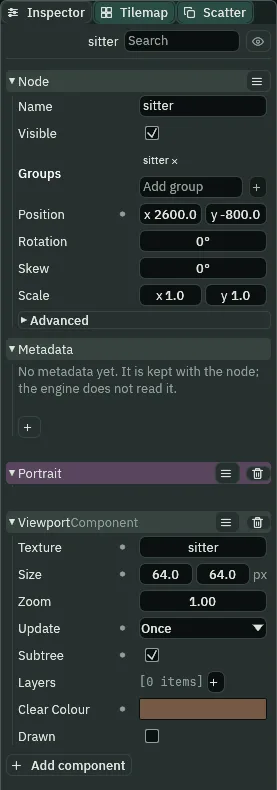
- Once
- Draws when its Drawn is unticked, once, and ticks it. Saved unticked, as it comes, it draws on the first frame of its scene and keeps that picture.
With Subtree ticked, the view draws only the nodes under sitter: the figure, on its brown ground, and nothing of the room round it. The first frame of the castle paints the portrait, so it is painted the moment the scene opens, in the great hall too, and its texture is kept from then on. Far away, the figure goes on through its idle clip, and the portrait does not change.
The map keeps the two frames, which are on Props, and leaves out what they frame, on Fixtures: on the map they are two rings with empty windows.
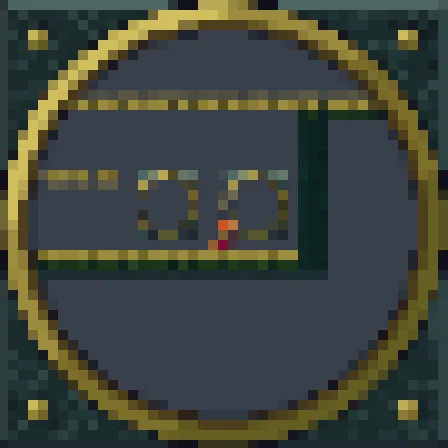
Sitting again
To paint the portrait again, the view must be told it has not drawn: its Drawn, which a script can untick. The easel on the floor at the portrait’s lower right is where he stands to ask.
- Select
castle, press + Add node and choose Area. Rename iteaseland set its Position to1556,-480. In its Area’s Shape, set Size to48,48and Offset to0,-24: x1532to1580, on the floor.
/// The easel before the portrait. The watchman stepping up to it tells the
/// sitter, which is in the group `sitter`, to sit again.
component Easel : Area {
    fn on_enter(other: NodeId) {
        if in_group(other, "watchman") {
            emit_to("sitter", "sit");
        }
    }
}/// The painter of the portrait, on the view that draws it. The view is Once:
/// it draws one time and keeps what it drew. When the easel says `sit`, this
/// unticks the view's Drawn, so the view counts as not yet drawn and paints
/// the sitter again, as he is now.
component Portrait {
fn on_signal() {
if heard("sit") {
set_flag("ViewportComponent", "drawn", false);
}
}
}- Make
easel.rgsandportrait.rgsas in chapter 7: in Assets, click Assets in the path bar, then Create, New script, the name and Enter, and the script above in the Code tab, then Ctrl+S. - Select
easel, press Add component and choose Easel. Selectsitter, press Add component and choose Portrait. Press Ctrl+S.
set_flag(component, field, value)set_flag("ViewportComponent", "drawn", false)unticks the Drawn of the view on this node, as a click in the Inspector would. A Once view whose Drawn is unticked draws on the next frame.
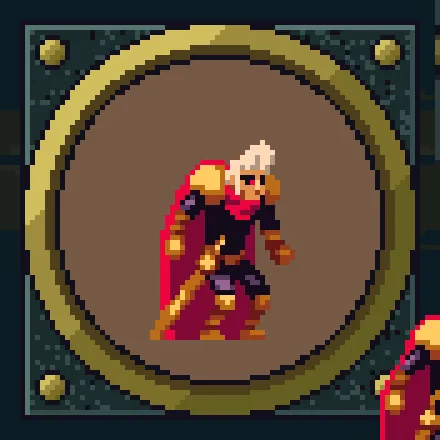
His body enters the easel’s reach at x 1526, and at its middle, x 1556, he stands beside the portrait’s lower right, the whole figure clear in its window. The easel tells the group sitter, the sitter unticks Drawn, and the view paints the figure again, on whatever picture of its clip it has reached, and keeps that. The camera is held against the room’s east wall there, so neither frame moves on the screen.
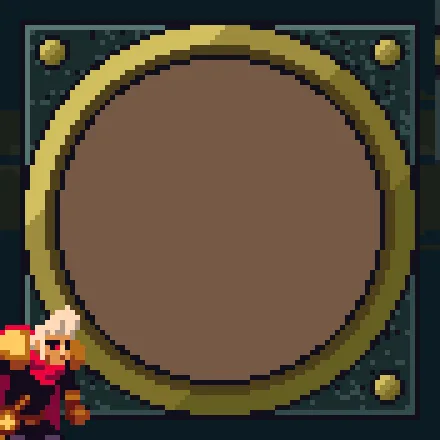
Never is for a view that waits to be asked; its real case is chapter 13’s security monitor. Here it is on a copy whose sitter is Never, its Drawn ticked: the portrait shows only its brown Clear Colour, until he steps up to the easel and the script unticks Drawn.
- Never
- Draws only when its Drawn is unticked, once, and ticks it. Saved with Drawn ticked, it draws nothing and shows its Clear Colour until a script unticks it. Saved unticked, it draws on its scene’s first frame, as Once does.
What a view costs
Each view that draws is a pass of its own: the scene walked again for the view’s camera, and drawn into its texture. In the great hall the map’s is the one view pass a frame; in the lens room the lens’s makes two; back in the hall there is one again. A copy with the lens at Always draws it in the hall too: two. Each texture is held at 8 bytes a pixel: in the hall, the map’s 96 square and the portrait’s 64 square, 106,496 bytes; from the lens room on, 139,264, with the lens’s kept.
Who moves the camera
Nothing new. A view’s camera is its own node: lens-eye and sitter stand where they were put, and nothing moves them, so the lens always shows the same stretch of the square. In the lens room the castle’s camera is held against the room’s east wall, with both frames in the picture.
The square, the lens and the portrait
Node, under castle unless it says | Component | Field | Value |
|---|---|---|---|
square | Node | Position | 3200, 0 |
square-street, under square | Tilemap | Tilemap, Sort Layer | art/street.tilemap; Ground |
square-houses, under square | Node | Position | 1280, 24 |
| Sprite | Texture, Size, Anchor, Sort Layer | art/night-town-background-town.png; 512, 99; 0.5, 1; Town | |
square-sky, under square | Node | Position | 1280, -120 |
| Sprite | Texture, Draw Mode, Tile Size | art/night-town-background-sky.png; Tiled; 96, 224 | |
| Size, Sort Layer | 288, 224; Sky | ||
square-fog, under square | Node | Position | 1280, -8 |
| Particles | Shape, Rate | Box 256 by 48; 3; the rest the town’s fog’s, no Parallax | |
lens-eye | Node | Position | 4480, -72 |
| Viewport | Texture, Size, Zoom | New render target; 64, 64; 0.25 | |
| Update, Layers | WhenVisible; Sky, Town, Fog, Ground | ||
| Clear Colour | 0.012, 0.020, 0.040, 1 | ||
lens | Node | Position | 1400, -536 |
| Sprite | Texture, Size, Sort Layer | lens-eye; 64, 64; Fixtures | |
lens-bezel | Node | Position | 1400, -536 |
| Sprite | Texture, Size, Sort Layer | art/lens-bezel.png; 80, 80; Props | |
sitter | Node | Position, Groups | 2600, -800; sitter |
| Viewport | Texture, Size, Zoom | New render target; 64, 64; 1 | |
| Update, Subtree, Layers | Once; ticked; none | ||
| Clear Colour | 0.18, 0.10, 0.06, 1 | ||
| Portrait | the script | ||
sitter-figure, under sitter | Node | Position | 0, 24 |
| Sprite | Texture, Size, Anchor, Sort Layer | art/watchman.png; 38, 48; 0.5, 1; Figures | |
| Animated Sprite | Animations, Clip, Frame Size | art/watchman.anim, idle, ticked | |
portrait | Node | Position | 1512, -536 |
| Sprite | Texture, Size, Sort Layer | sitter; 64, 64; Fixtures | |
portrait-frame | Node | Position | 1512, -536 |
| Sprite | Texture, Size, Sort Layer | art/lens-bezel.png; 80, 80; Props | |
easel | Node | Position | 1556, -480 |
| Area | Size, Offset | 48, 48; 0, -24 | |
| Easel | the script |