Tutorials · Cameras and Framing · Chapter 4
Following
By the end
- The camera made the watchman’s child, and why a camera that follows to the pixel is not what a game wants
- A Camera Rig on the camera with one framing,
follow, whose Subject is the watchman: a Dead Zone of24by16, a Soft Zone of96by64, an Offset of0,24, Damping of0.35and0.5, and a lead of Time0.6, Smoothing0.6and Limit80 - The rig’s gizmo and handles in the Viewport, and its rows in the Camera tab
- Who moves the camera now, and the Problems row for a Zoom typed where the rig sets it
On this page
A camera that is his child
A camera is a node, and a node goes where its parent goes. So the plainest way to follow the watchman is to make the camera his child. Try it, and do not keep it.
- In the Hierarchy, drag
cameraontowatchman. It becomes his child. - Set its Position to
0and-40: a child’s Position is from its parent, here his feet. With the Camera’s Offset of16, the picture is drawn from24above his feet. - Press F5. Walk east with D and leap with Space on the way. Press F5 again to stop.

He never moves in the picture: the world does, all of it, at once. Every leap throws the street down and back up. A camera operator does not film that way: they let the subject move a little before they follow, ease after him, and keep the room ahead of him in the shot. That is a Camera Rig.
- Drag
cameraback ontotown. It lands under it, last, as it was.
A Camera Rig
A rig holds one or more framings, each a shot with a subject and its own settings, and moves the camera’s node to where its live framing wants it, every step. The town needs one framing, on the watchman.
- Select
camera. Set its Position to64and-24, and the Camera’s Offset back to0and0. - Press Add component and choose CameraRigComponent. It goes on the camera’s own node, after the Pixel Perfect: it moves that node.
- Next to Framings, press +. A framing appears; open it with its arrow.
- Set Name to
follow: its row then reads1 follow. Click Subject and choosewatchmanfrom the list, or dragwatchmanfrom the Hierarchy onto it. - Leave Active ticked, Priority
0, Zoom1, Rotation0°, Duration0.50 sand Ease EaseInOut, as they come. - Set Dead Zone to
24and16, Soft Zone to96and64, Offset to0and24, and Damping to0.35and0.5. - Under them, set Time to
0.6, Smoothing to0.6and Limit to80. - Press Ctrl+S.
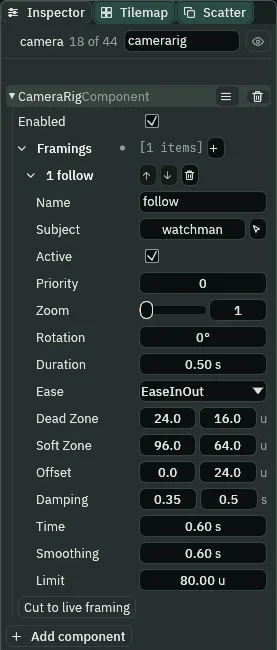
follow, with camerarig typed into the Inspector’s search box.The framing’s Offset is where in the picture he sits, from its middle. The rig aims the camera at his place, less the Offset; y grows downward, so 0, 24 puts him 24 below the middle, and the picture’s middle 24 above his feet. That is enough that the lit furnace by the gate is whole in the picture when he stands beside it. The node is put at his framed point, his place 64, 0 less the Offset, so the rig starts on him and the first frame has nothing to catch up: a view of 320 by 180 round 64, -24, from x -96 to 224. The west wall is at x -32 to 0, so 64 units of Background show west of it, until chapter 5 stops the view at the wall.
- The rig’s Enabled
- Whether the rig drives the camera. Ticked, as it comes. Unticked, the camera rests where its node stands, as it did in chapters 1 to 3.
- Framings
- The rig’s shots, each a row:
+adds one, the arrows reorder them and the bin removes one. The highest Priority among the active ones is live, wherever it sits; their order matters only between two of equal Priority, and then the one higher in the list is live. The Cut to live framing button under them is chapter 7’s. - The framing’s Name
- What it is called, here
follow: the Camera tab names the live shot by it, and a script switches framings by it in chapter 7. - Subject
- The node the framing follows: the watchman, picked from the list or dragged from the Hierarchy. A framing with no subject holds a fixed point.
- The framing’s Active
- Whether this framing is in the running for the camera. Ticked, as it comes.
- Priority
- Which active framing is live: the highest.
0, as it comes; with one framing it never matters. Chapter 7 adds a second. - The framing’s Zoom and Rotation
- The Camera’s Zoom and Rotation while this framing is live: the rig writes them onto the Camera every step, so the Camera’s own are
1and0°and stay so.1and0°, as they come. Rotation is in degrees in the Inspector. Chapter 7’s vista zooms out this way. - Duration and Ease
- The Blend into this framing from whatever was live: how many seconds it takes,
0.50 sas it comes, and the shape of the move, EaseInOut as it comes. With one framing there is nothing to blend from, so they never run. Chapter 7 sets them. - Dead Zone
- How far, across and down, he may move from where he is supposed to sit, the middle of the picture moved by the framing’s Offset, before the camera follows:
24by16, in world units. The box tests his point plus the lead, which is not drawn: with this framing’s lead the camera first moves when he has walked16units into its24, on the sixth step of a walk, the lead making up the rest. A step is a sixtieth of a second, the game’s own tick. - Soft Zone
- How far he can ever get from where he is supposed to sit, across and down:
96by64. However fast he goes, even a dash of300in one step, the camera is pulled along to keep him inside it.0, as it comes, is no limit: only the Damping decides how far the camera lags. - The framing’s Offset
- Where in the picture he sits, from its middle:
0,24,24below it. His feet are his place, so his feet are24below the middle, with the street’s sky above him. - Damping
- The seconds the camera takes to close nine tenths of the gap to where it wants to be, across and down:
0.35across and0.5down, so after a leap the view settles more slowly than it follows a walk. - Time
- The lead: seconds of his motion the camera aims ahead by.
0.6at his160a second asks for96units ahead of him.0, as it comes, is no lead. - Smoothing
- Seconds over which the lead itself eases in and out, so the camera does not swing the moment he starts, stops or leaps. His leap starts at
680units a second upward, nearly all of the lead for a moment;0.6keeps that from throwing the camera up and down faster than the leap. After a leap the view rests28to29above his feet. - Limit
- The largest lead, in world units:
80. Time’s96is cut to80, so it is the Limit that holds the lead on a run.0, as it comes, is no limit.
The rig in the Viewport
- With
cameraselected, press Look through.
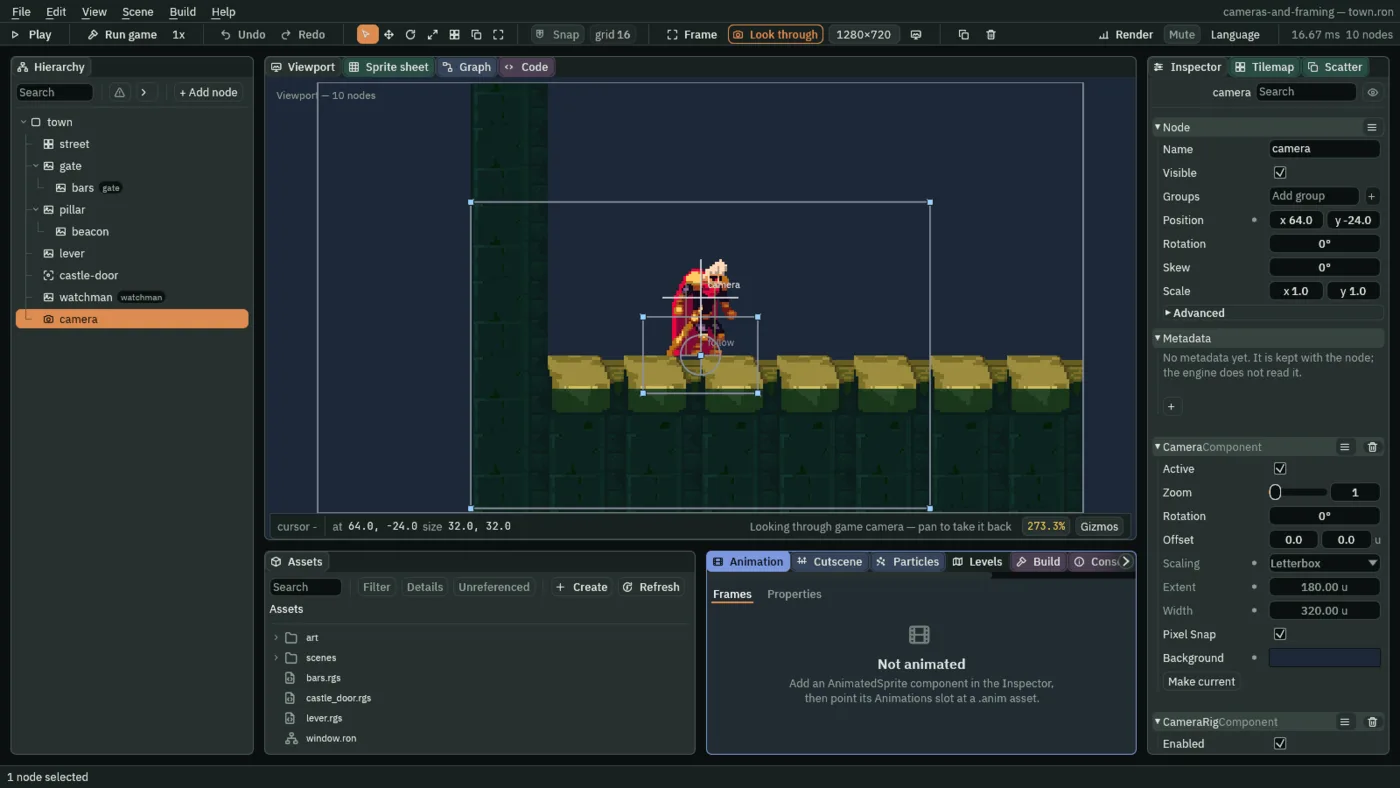
Selected, a rig draws its live framing where he is supposed to sit: a circle labelled with the framing’s name, the middle of the picture moved down by the Offset, here on his feet; the Dead Zone as a box round it, 48 by 32; and the Soft Zone as a larger box, 192 by 128. They are drawn on the camera, and move with it, not with him. Each corner is a handle: drag it to change the zone. The square in the circle is the Offset’s: drag it to move where he sits.
- Press F5, hold D for a second, and press F6 to pause. Press F5 again to stop.
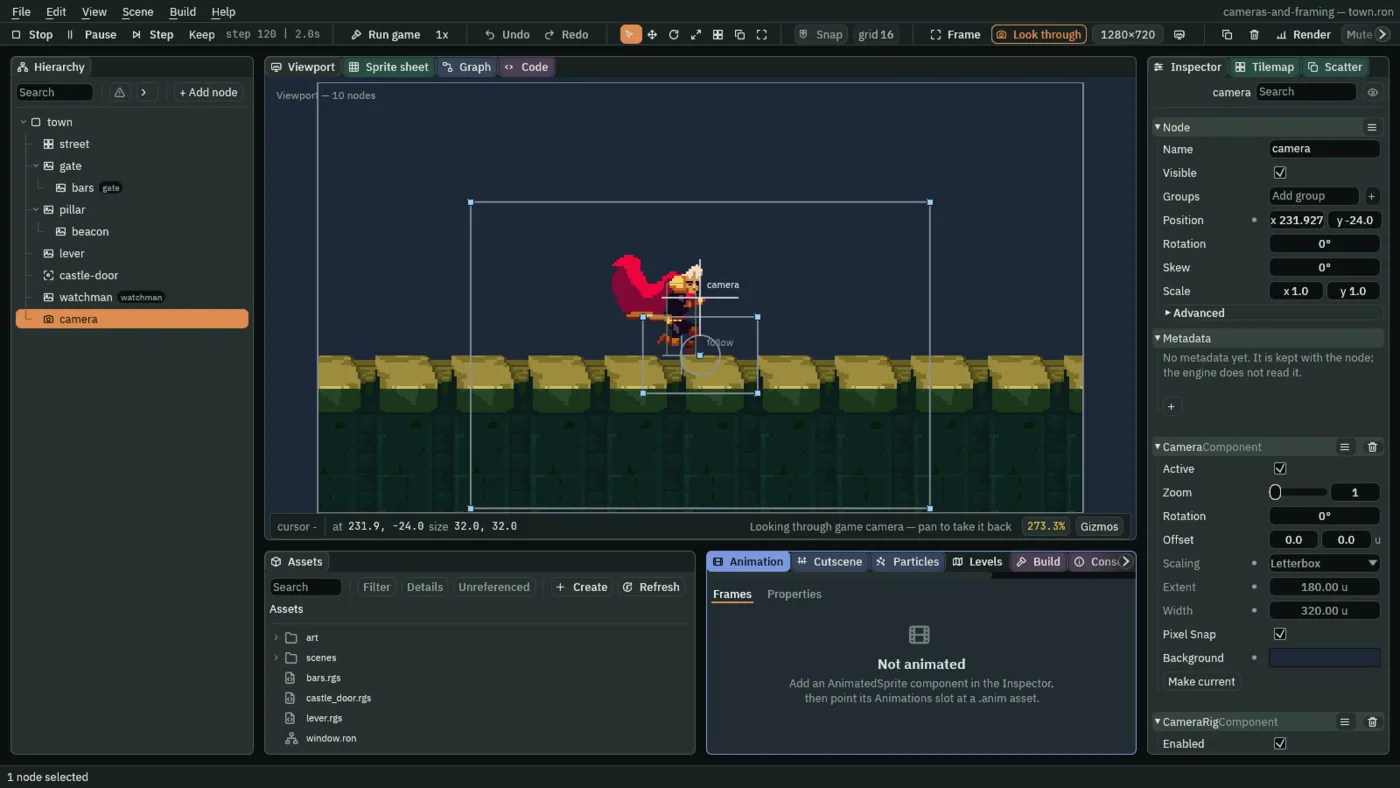
While he runs, the camera is ahead of him, so he is drawn left of the circle, with more street ahead of him in the picture than behind. His feet can be inside the Dead Zone’s box while the camera moves, since the box tests his point plus the lead, and the lead, up to 80 units, is not drawn. The Camera tab’s Rig rows name the live shot:
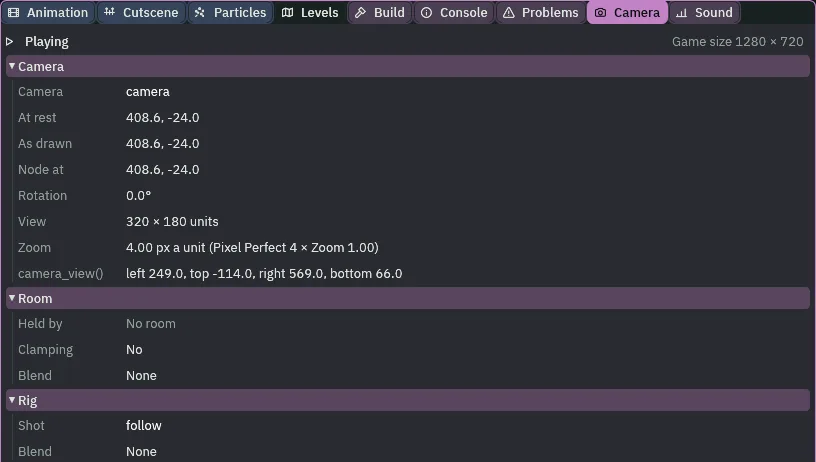
follow, and the camera at rest where the rig has moved its node.- The Camera tab’s Rig rows
- Shot, the framing that is live, by its Name, or No rig; Blend, how far a blend into it has come, or None. Before Play the shot is the one Play opens on.
Watching it follow
Each of these is the game itself, played and recorded, at half its window’s size. Play your own with F5 or Run game.

Five steps are 13 units, and his lead after them about 10: together still inside the box’s 24, and once he stops, the lead runs down. The camera does not move a pixel. On the sixth step of a walk, the camera starts to follow.

After two seconds of running east, the camera rests 24.6 units ahead of his framed point. With no lead, a Time of 0, the same run leaves it 51.5 behind him: the Dead Zone’s 24 and the Damping’s lag. The lead brings it from behind him to ahead of him, by nearly all of the Limit.

1.2 seconds after the turn, and gets ahead of him again, now to the west.Through a run, a leap and a turn he is never further than 96 by 64 from where he is supposed to sit: the Soft Zone holds him in the picture, the turn included.
Who moves the camera
The rig, every step. It moves the camera’s node to where the framing wants it, and writes the Camera’s Zoom and Rotation from the live framing. The Camera’s own Zoom and Rotation are the rig’s now, and stay 1 and 0°. A Zoom typed on the Camera stands while you edit, which looks as if it works, and Play overwrites it on the first step. Problems says so:

2 typed on the Camera, under the rig: one row in Problems.The way to zoom with a rig is the framing’s own Zoom, which chapter 7 uses. If you tried it, set the Camera’s Zoom back to 1, and the row goes.
The rig
| Node | Component | Field | Value |
|---|---|---|---|
camera | Node | Position | 64, -24, his framed point |
| Camera | Offset | 0, 0 | |
| Camera Rig, after the Pixel Perfect | Enabled | ticked, as it comes | |
its framing follow | Subject | watchman | |
| Active, Priority, Zoom, Rotation | ticked, 0, 1, 0°, as they come | ||
| Duration, Ease | 0.50 s, EaseInOut, as they come | ||
| Dead Zone | 24, 16 | ||
| Soft Zone | 96, 64 | ||
| Offset | 0, 24 | ||
| Damping | 0.35, 0.5 | ||
| Time, Smoothing, Limit | 0.6, 0.6, 80 |
The Camera keeps chapter 2’s Letterbox and chapter 3’s Pixel Perfect. The castle still has no camera.