Tutorials · Cameras and Framing · Chapter 8
Impact
By the end
- The demon and its breath of fire, their clips cut from the download’s strips, and its reach, an Area over the beacon room’s east half
- A framing on the castle’s camera,
demon, that cuts to a shot tilted by-2.01°, and a script that lifts the picture by the Camera’s Offset - At each stomp,
shake(), and a punch: the framing’s Zoom and Rotation annealed in and settled back - Who moves the camera when four things do, and the Problems row for a Zoom typed on a Camera the rig owns
On this page
The demon
The beacon room is the castle’s last, and it is empty. It gets a demon from the download: a strip of it hovering, and a strip of fire it breathes.
- Copy the two pictures above into
art, and press Refresh in Assets. - Double-click
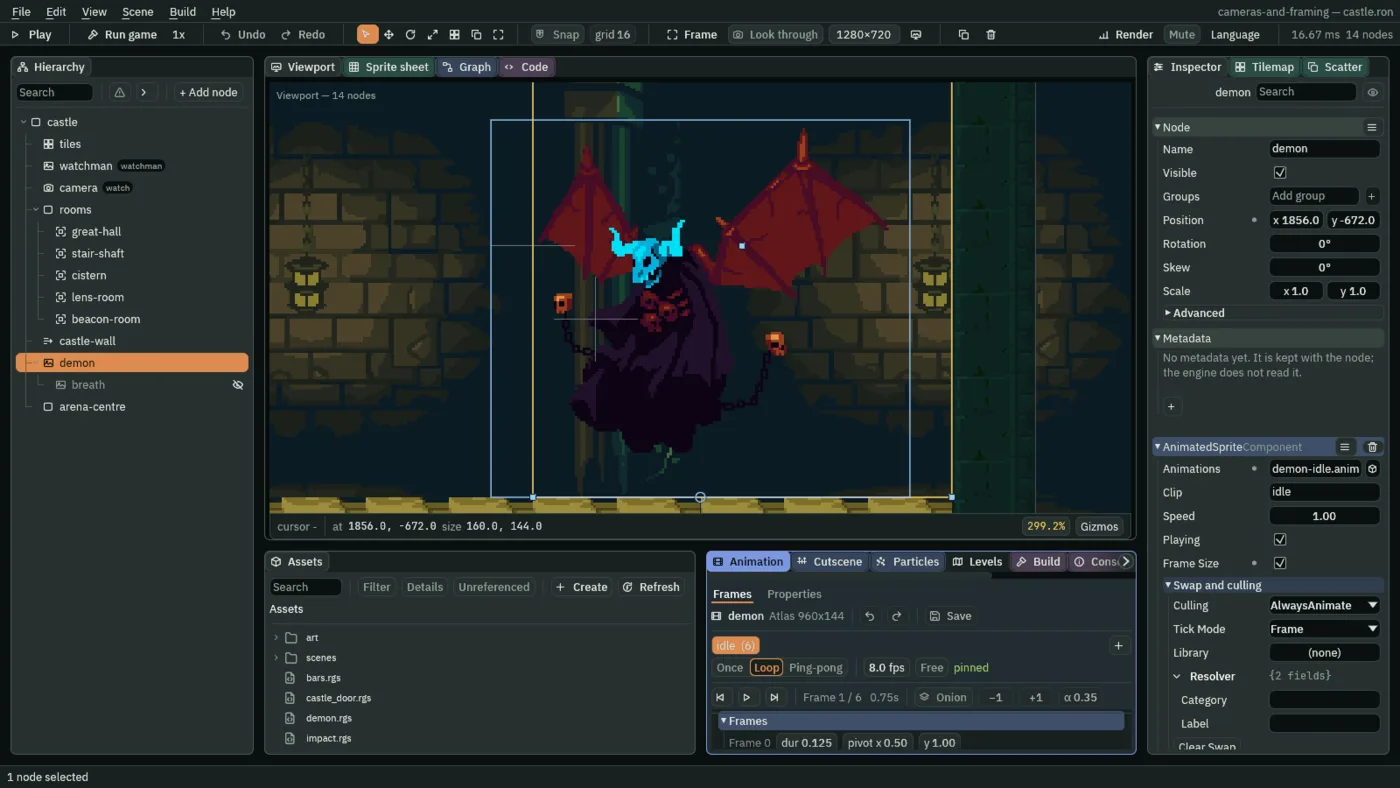
art/demon-idle.png. The Sprite sheet tab opens on it. Under Grid, set Cell to160and144, and drag from cell0, 0to cell5, 0: Selected 6 x 1. Under Clips, press From selection; name itidle,8 fps, Loop; and press Generate 1. A file,art/demon-idle.anim, appears beside the picture. - Double-click
art/breath-fire.png. Set Cell to160and96, and drag from cell0, 0to cell4, 0: Selected 5 x 1. From selection; name itbreath,12 fps, Once; Generate 1.art/breath-fire.animappears beside it.
- With
castle.ronopen, selectcastle, press + Add node and choose Animated Sprite. Rename itdemonand set its Position to1856,-672: the bottom middle of its frame, on the beacon room’s floor. - In its Sprite, drag
art/demon-idle.pngonto Texture, set Size to160,144, Anchor to0.5,1and Sort Layer to3. - In its Animated Sprite, drag
art/demon-idle.animonto Animations, set Clip toidle, and tick Frame Size. Leave Culling at AlwaysAnimate. - Press Add component and choose AreaComponent. In its Shape, set Size to
160,192and Offset to16,-96: from x1792to1952, the room’s east half, floor to ceiling. - Select
demon, press + Add node and choose Animated Sprite. Rename itbreathand set its Position to-80,10: in front of the demon, toward the door. Untick its Visible. - In its Sprite, drag
art/breath-fire.pngonto Texture, set Size to160,96, Anchor to0.5,1and Sort Layer to4. In its Animated Sprite, dragart/breath-fire.animonto Animations, set Clip tobreath, tick Frame Size and set Culling to ResetWhenOffscreen. - Select
castle, press + Add node and choose Node. Rename itarena-centreand set its Position to1816,-740: what the demon’s shot looks at.
- The Animated Sprite’s Culling
- What the clip does while the node is not seen. AlwaysAnimate, as it comes, plays on regardless. ResetWhenOffscreen starts the clip over each time the node comes back into sight, and a hidden node is not seen: so each time the breath is shown, its fire starts from its first frame.
The Area is the demon’s reach, the room’s east half and not the whole room. The beacon room’s Blend, from chapter 5, is 1 second: its slide starts when the camera’s node crosses x 1600, and at his walk it has ended, or is ending, when his body touches the reach at x 1792. So the cut to the demon’s shot lands on a view the room is no longer sliding.
The demon’s shot
- Select the castle’s
camera. In its Node fold, typewatchinto the Groups box and press Enter. - Next to its rig’s Framings, press +, and open the new framing,
2. - Set its Name to
demon. Click Subject and choosearena-centre. - Untick its Active. Set Priority to
20, Zoom to0.8, Rotation to-2.01, Duration to0.25and Ease to Cut. Leave the rest as it comes. - Leave the Camera’s own Zoom, Rotation and Offset at
1,0°and0,0. - Press Ctrl+S.
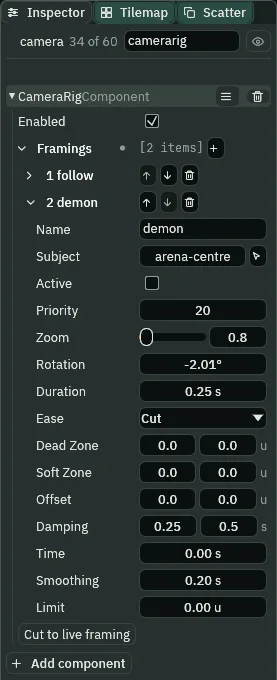
20, Zoom 0.8, Rotation -2.01°, Ease Cut.The Inspector shows an angle in degrees, to two decimals, and you type it in degrees: -2.01 is a slight tilt. Cut jumps to the shot with no blend at all, so the Duration never runs. At Zoom 0.8 under the castle’s Pixel Perfect 5, the screen’s zoom is 4: the shot at rest shows x 1656 to 1976, arena-centre’s x as far east as the room lets a tilted view rest, the demon whole and him beside it.
The stomp
The demon’s script wakes it when he walks into its reach and tells the camera, which is now in the group watch. While it is awake it stomps: it breathes fire, shakes the screen and tells the camera again.
/// The demon in the beacon room. This Area is its reach, the east half of the
/// room: the watchman walking into it wakes the demon, which tells the camera,
/// which is in the group `watch`, that the fight has begun (`arena`); walking
/// out of it lets the demon sleep, and tells the camera to come back
/// (`follow`). While it is awake it stomps on a beat: it breathes fire, shakes
/// the screen and tells the camera again (`stomp`). The breath is its child,
/// hidden between stomps; it is shown for each stomp, and its clip starts over
/// every time it is.
component Demon : Area {
    /// The node of its breath, a child of this one.
    #[node_path]
    breath: i32 = 0,
    /// Seconds the breath burns after a stomp, before it goes out.
    #[suffix("s")]
    burn: f32 = 0.5,
    /// Seconds from the breath going out to the next stomp: with `burn`, 2.5 s
    /// from one stomp to the next.
    #[suffix("s")]
    quiet: f32 = 2.0,
    /// Whether the watchman is in its reach.
    #[hidden]
    awake: bool = false,

    fn on_enter(other: NodeId) {
        // The watchman walks into its reach: it wakes, and the camera is told.
        if in_group(other, "watchman") {
            awake = true;
            emit_to("watch", "arena");
        }
    }

    fn on_exit(other: NodeId) {
        // He walks out of its reach, whichever way: it sleeps, its breath goes
        // out, and the camera is told to come back.
        if in_group(other, "watchman") {
            awake = false;
            set_visible(node(breath), false);
            emit_to("watch", "follow");
        }
    }

    fn loop() {
        if awake {
            // The breath of the stomp before burns a while, then goes out.
            await wait(burn);
            set_visible(node(breath), false);
            // The room is quiet, then the demon stomps, if he is still there.
            await wait(quiet);
            if awake {
                set_visible(node(breath), true);
                shake(5.0, 0.4);
                emit_to("watch", "stomp");
            }
        }
    }
}
The camera’s script answers. arena switches the demon’s shot on, which outranks follow with a Cut, and lifts the picture 6 units with the Camera’s own Offset. stomp starts a punch: the framing’s Zoom in to 0.85 and its Rotation further over, then both back. follow switches the shot off and lets the picture down.
/// The castle camera's answer to the demon. The camera is in the group
/// `watch`, so the demon can speak to it; this script is what it does when it
/// hears. The demon's shot is a framing of the Camera Rig on this node, off
/// until the demon says `arena`.
component Impact {
    /// Whether a stomp has been heard, so the shot is to be punched.
    #[hidden]
    punch: bool = false,

    fn on_signal() {
        // The watchman walked into the demon's reach: its shot is switched on.
        // It outranks `follow` and its Ease is Cut, so the camera cuts to it.
        // The Camera's own Offset, which a rig leaves alone, lifts the picture
        // six units over a second.
        if heard("arena") {
            set_flag("CameraRigComponent", "framings.demon.active", true);
            anneal_point("CameraComponent", "offset", vec2(0.0, -6.0), 1.0, .InOutSine);
        }
        // He walked out of its reach: the shot is switched off, so `follow` is
        // the live framing again and glides back to him over its own Duration,
        // and the Offset eases back to nothing.
        if heard("follow") {
            set_flag("CameraRigComponent", "framings.demon.active", false);
            anneal_point("CameraComponent", "offset", vec2(0.0, 0.0), 1.0, .InOutSine);
        }
        // The demon stomped: the punch is started below. It waits, and a hook
        // that waits would miss a `follow` said in the meantime.
        if heard("stomp") {
            punch = true;
        }
    }

    fn loop() {
        if punch {
            punch = false;
            // The shot punches in and tilts. The rig owns the Camera's Zoom and
            // Rotation, so it is the framing's own that are annealed.
            anneal_number("CameraRigComponent", "framings.demon.zoom", 0.85, 0.08, .OutQuad);
            anneal_number("CameraRigComponent", "framings.demon.rotation", -0.1, 0.1, .OutQuad);
            await wait(0.1);
            // Then both settle back.
            anneal_number("CameraRigComponent", "framings.demon.zoom", 0.8, 0.4, .InOutSine);
            anneal_number("CameraRigComponent", "framings.demon.rotation", -0.035, 0.6, .InOutSine);
        }
    }
}- Make
demon.rgsandimpact.rgsas in chapter 7: in Assets, click Assets in the path bar, then Create, New script, the name and Enter, and the script above in the Code tab, then Ctrl+S. - Select
demon, press Add component and choose Demon. Click its Breath and choosebreath; leave Burn at0.50 sand Quiet at2.00 s: with them, a stomp every two and a half seconds. - Select the castle’s
camera, press Add component and choose Impact. - Press Ctrl+S.
A script takes angles in radians, not the Inspector’s degrees. impact.rgs anneals the framing’s Rotation to -0.1 radians, -5.73°, and back to -0.035, the -2.01° the framing rests at.
shake(strength, seconds)- Shakes the camera the game is seen through, by up to
strengthworld units forseconds:5, for0.4seconds. A weaker shake during a stronger one changes nothing. The picture moves, not the camera: the shake is drawn on top of the Camera’s Offset and never written into it, and where the camera rests, which a room andcamera_view()read, stays put. It needs no Camera Rig. anneal_numberandanneal_point- Move a number field, or a point field, of a component on this node to a value over some seconds, along an ease: the rig’s
framings.demon.zoom, by the framing’s Name, or the Camera’soffset. - The Camera’s Offset
- Moves the picture without moving the camera. The rig never writes it, so a script can lift the picture under a shot the rig is framing:
0,-6draws the view6higher, which puts the floor lower in the picture.
Watching it

Two steps after he touches the reach, the demon’s shot is live: the demon says arena, the camera hears it the step after, and the rig sees the switch the step after that. The first stomp is about two and a half seconds after he comes in, and each one about two and a half after the last. The Camera tab in a stomp:
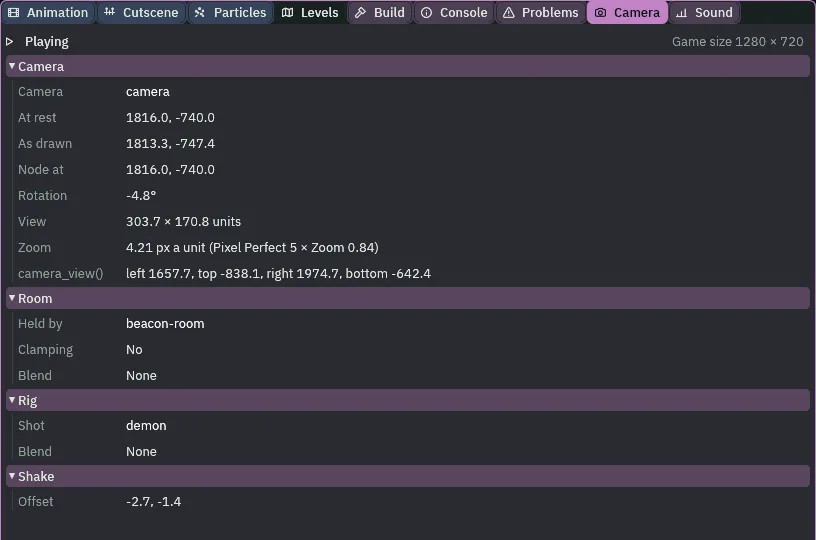
At rest is arena-centre, where the rig holds the camera. As drawn is moved from it by the Offset’s -6 and the shake’s own Offset, here -2.7, -1.4: the shake moves the picture, not the camera, and camera_view() and the room read where the camera rests. Pause the game in a shake and the shake holds where it is.
- The Camera tab’s Shake row
- Offset: how far a shake moves the picture at this step, or None.
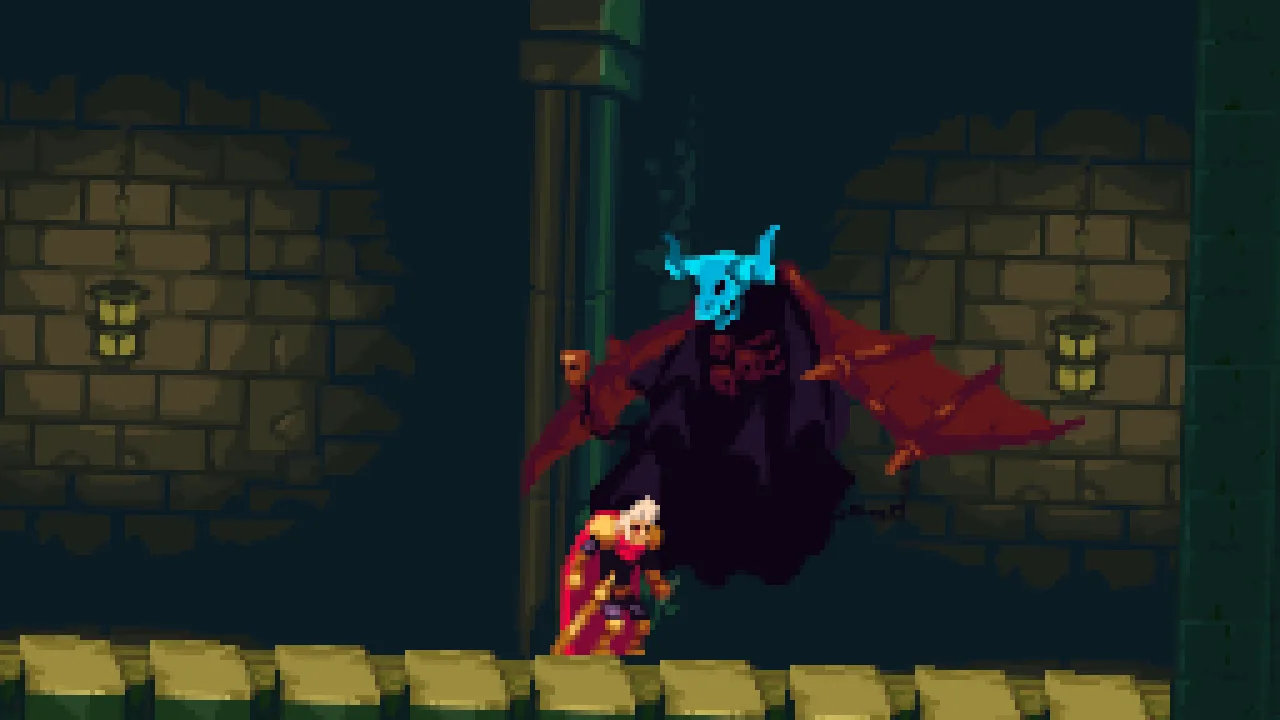
-2.01°, lifted 6, at the screen’s zoom of 4.Two numbers keep his feet on the floor. With the picture lifted 6, its bottom edge is 16 under his feet at rest, and still 10.7 under them at the punch’s peak of 0.85. A shake takes a little of that, and the roll lifts the picture’s bottom edge a tenth of his distance east of the middle: beside the demon he keeps a floor under his boots through the whole punch. Only at the east wall, behind the demon, can his feet be cut, for an instant.

Walking out of the reach, the demon sleeps and says follow, and two steps later follow is live. There is no cut() here, as there is in chapter 7: the shot is the room’s middle, and he is walking away toward where follow goes, so it glides back over follow’s own 0.5 seconds, the zoom from 4 to 5, with him in the picture at every step. The Offset eases back to 0 over a second.
Who moves the camera
Four things now, each on its own control. The rig moves the camera’s node to its live framing, and writes the Camera’s Zoom and Rotation from it. The room holds where it rests. A script anneals the framing’s Zoom and Rotation, which the rig then writes, and the Camera’s Offset, which the rig never touches. And a shake writes nothing at all: it is drawn on top of the Offset, so the script’s lift is exactly what the script wrote all through it. No two of them write the same thing. A Zoom typed on the Camera itself would: the rig overwrites it every step, and Problems says so. Try it on the scene, then put it back.
- Select the castle’s
cameraand set its Camera’s Zoom to1.5. Open the Problems tab. - Press Undo in the toolbar: the Zoom is
1again, and the row goes.

1.5 typed on the castle’s Camera, under its rig, is one row in Problems. The game shows the rig’s zoom, as if it had not been typed.The demon and its shot
| Node | Component | Field | Value |
|---|---|---|---|
demon, last under castle | Node | Position | 1856, -672 |
| Sprite | Texture, Size, Anchor, Sort Layer | art/demon-idle.png; 160, 144; 0.5, 1; 3 | |
| Animated Sprite | Animations, Clip, Frame Size | art/demon-idle.anim, idle, ticked | |
| Area | Size, Offset | 160, 192; 16, -96 | |
| Demon | Breath, Burn, Quiet | breath, 0.50 s, 2.00 s | |
breath, under demon | Node | Position, Visible | -80, 10; unticked |
| Sprite | Texture, Size, Anchor, Sort Layer | art/breath-fire.png; 160, 96; 0.5, 1; 4 | |
| Animated Sprite | Animations, Clip, Frame Size, Culling | art/breath-fire.anim, breath, ticked, ResetWhenOffscreen | |
arena-centre, last under castle | Node | Position | 1816, -740 |
camera | Node | Groups | watch |
| Impact | the script | ||
Camera Rig, framing demon | Subject, Active, Priority | arena-centre, unticked, 20 | |
| Zoom, Rotation | 0.8, -2.01 | ||
| Duration, Ease | 0.25, Cut |