Tutorials · Cameras and Framing · Chapter 9
What the camera sees
By the end
- An arrow that reads
camera_view()andcamera_fit()to sit at the edge of the screen nearest the beacon, turned toward it, and hides once the whole beacon is in view - A second Camera,
gate-camera, before the gate: off, FixedVertical, tilted-2.98°, in the groupgatethe lever speaks to make_current(): the lever’sopenswitches the game to the gate camera, and three seconds later the town’s camera takes it back, each switch a cut- What the game does with two active cameras, and the Problems row for it
On this page
An arrow to the beacon
The beacon burns on its pillar at the street’s east end, far out of the picture from where he starts, and nothing on the screen says so. An arrow at the screen’s edge can: it sits on the edge nearest the beacon and points at it, and once the whole beacon is in the picture there is nothing to point at, and it goes. For that, a script has to ask the camera what it shows.
- With
town.ronopen, selecttown, press + Add node and choose Sprite. Rename itarrowand set its Position to276,-80: where its script puts it at the start. - In its Sprite, drag
art/arrow.pngonto Texture. Set Size to12,12and Sort Layer to10, over the watchman’s5, and leave Anchor at0.5,0.5: the arrow turns about its middle.
/// An arrow at the edge of the screen that points at the beacon while the
/// beacon is out of sight. Once all of the beacon is in view there is nothing
/// to point at, and the arrow hides. It reads the camera the game is seen
/// through, whichever that is.
component Arrow {
    /// The node the arrow points at: the beacon on its pillar.
    #[node_path]
    beacon: i32 = 0,
    /// How big the beacon's picture is: the box that has to be in view.
    size: Vec2 = vec2(32.0, 64.0),
    /// How far in from the edge of the view the arrow sits.
    #[suffix("u")]
    margin: f32 = 12.0,

    fn loop() {
        // The beacon's picture stands on its node, so its middle is half its
        // height above the node.
        let middle = position_of(node(beacon)) - vec2(0.0, size.y * 0.5);
        if camera_fit(middle, size) == .Whole {
            // All of it is on screen.
            hide();
        } else {
            show();
            // The arrow goes where the beacon is, held inside the view's edges
            // by the margin: at the edge nearest the beacon.
            let view = camera_view();
            let spot = vec2(
                clamp(middle.x, view.x + margin, view.z - margin),
                clamp(middle.y, view.y + margin, view.w - margin),
            );
            move_to(spot);
            // And it turns to face the beacon from there.
            anneal_rotation(angle_of(middle - spot), 0.1, .OutQuad);
        }
    }
}- Make
arrow.rgswith the script above, as in chapter 7: in Assets, click Assets in the path bar, then Create, New script,arrowand Enter, the script in the Code tab, and Ctrl+S. - Select
arrow, press Add component and choose Arrow. Click its Beacon and choosebeacon, the furnace on the pillar. Leave Size at32,64and Margin at12. - Press Ctrl+S.
camera_view()- What the camera the game is seen through shows, in world units: left, top, right and bottom, as
x,y,zandw. It is where the camera rests, after the room has held it: a shake does not move it. camera_fit(point, size)- How much of a box of
size, centred onpoint, that camera shows:.Whole,.Partialor.Outside. The beacon’s picture stands on its node, so its middle is half its height,32, above it. anneal_rotation(angle, seconds, ease)andangle_of(direction)angle_ofis the angle a direction points at, in radians:0to the right, and a quarter turn straight down.anneal_rotationturns this node to face an angle, the short way, over some seconds: a tenth of a second here, so the arrow swings rather than snaps.
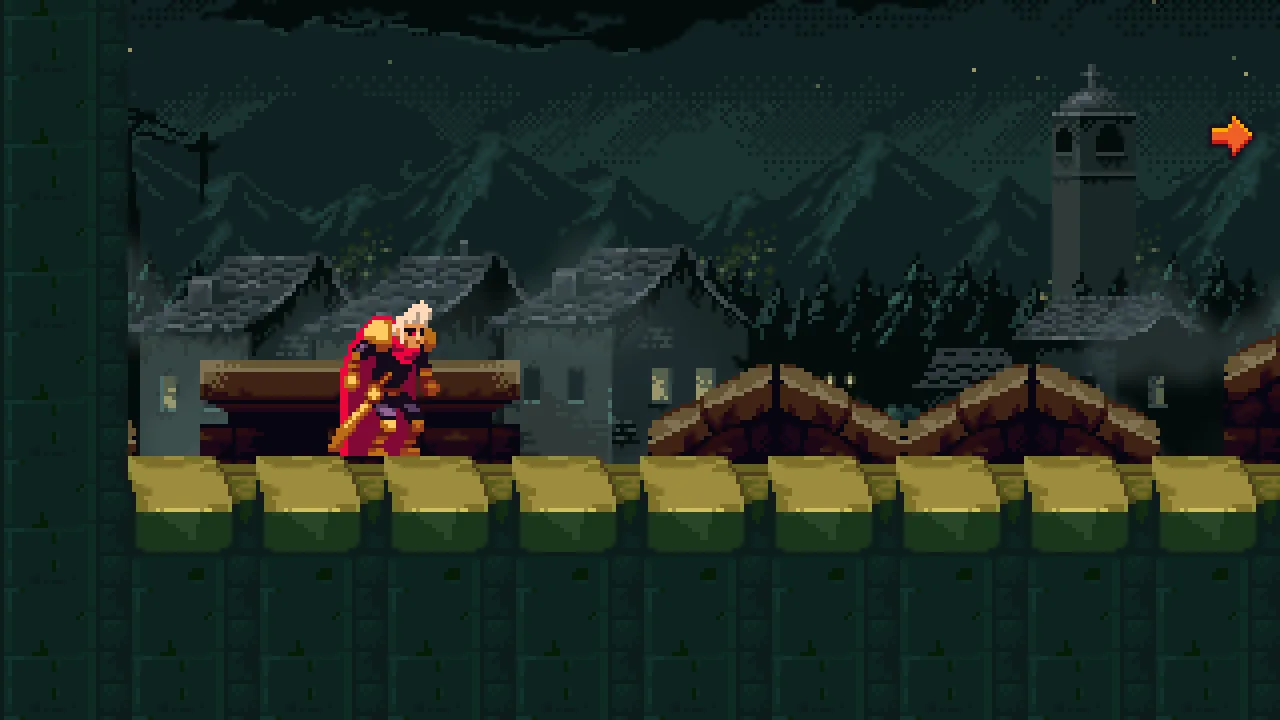
12 in from the right edge, level with the beacon’s middle, pointing at it.
Along the street the beacon is always east, and level with the arrow, so the arrow points straight right. Where the beacon is up and away, it turns to face it. Here is a copy whose pillar stands 600 units higher: the arrow is at the view’s top right corner, 12 in each way, turned up toward the beacon.
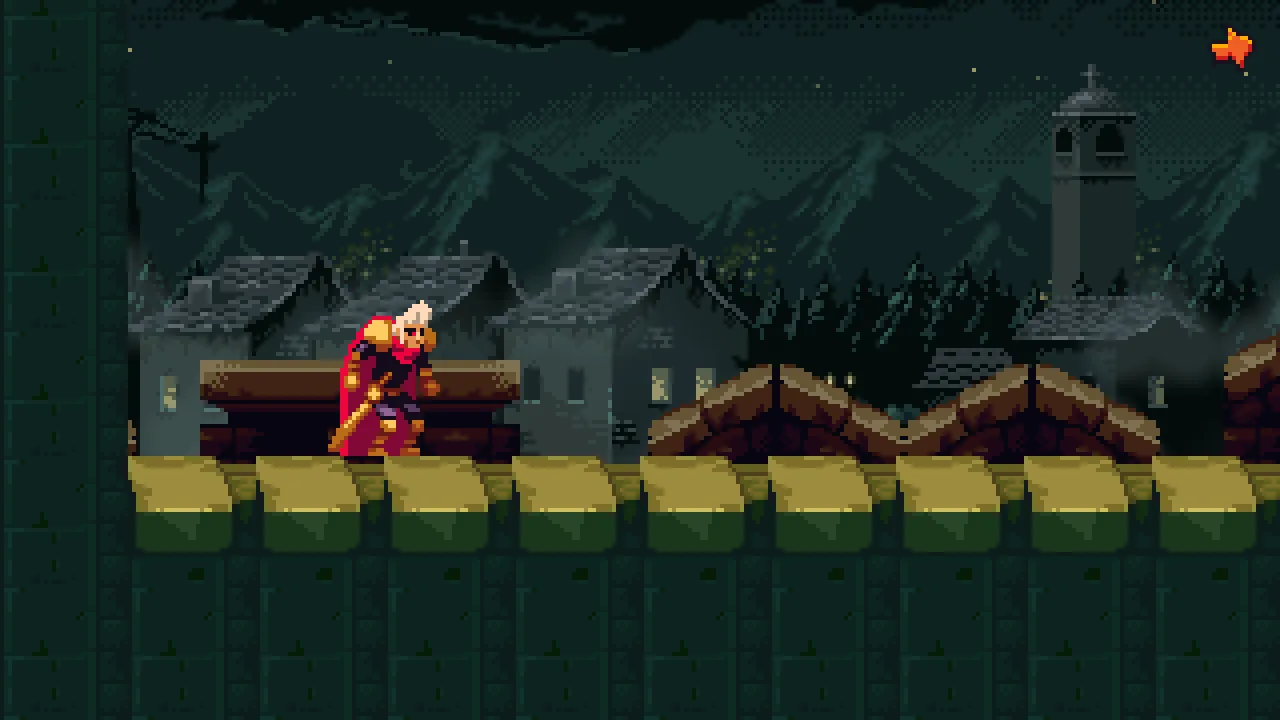
600 higher: the arrow in the corner, turned toward it.A second camera
Throwing the lever raises the bars at the far end of the street, out of sight. A second camera, standing before the gate, can show it happening: the game is seen through it for three seconds, then through the town’s camera again. A camera with its Active off draws nothing until a script switches the game to it.
- Select
town, press + Add node and choose Camera. Rename itgate-cameraand set its Position to2425,-30: in the arch’s opening, a little above the bars’ middle. Its place amongtown’s children does not matter; the checkpoint lists it beforearrow. - In its Node fold, type
gateinto the Groups box and press Enter: the group the lever speaks to, the bars’ group. - In its Camera, untick Active. Set Rotation to
-2.98, Scaling to FixedVertical and Extent to180, and untick Pixel Snap. Leave Zoom at1, Offset at0,0and Width as it comes: under FixedVertical it is not read. - Click Background and, with the picker reading F, set it to
0.012,0.020,0.040, alpha1: the town camera’s.
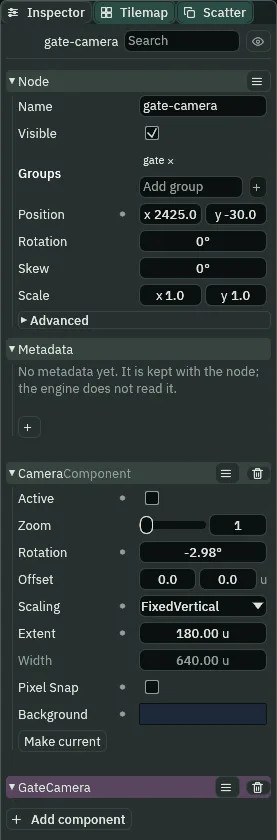
180, Rotation -2.98°.- The Camera’s Active
- Whether this is the camera the game is seen through. A scene has one active camera at a time: the gate camera is made with it off, and a script switches it.
- The Camera’s Rotation
- Tilts the view, the picture turning with it. The Inspector shows it in degrees and you type it in degrees:
-2.98is a slight tilt. A script takes radians. Unlike the town’s camera, which a rig turns, this one has no rig, so its own Rotation is the one that counts.
It has no Camera Rig, no Pixel Perfect and no Confiner of its own. At FixedVertical 180 it shows 320 across at 1280 by 720, and tilted, the box round its view, which camera_view() returns, is 329 by 196.4: x 2260.5 to 2589.5, y -128.2 to 68.2. It holds the arch, the bars, the pillar and the whole beacon, the passage beyond and a strip of the east wall, and it lies inside the town’s walls, so the room never moves it. It is a child of the town’s root, not of the node gate: the group gate is what the lever’s open reaches.
The switch
The gate camera’s script hears the lever, makes itself the camera the game is seen through, waits three seconds, and tells the group watch:
/// The camera that looks at the castle gate. It is in the group `gate`, so the
/// lever's `open` reaches it as it reaches the bars. It is off until then.
/// When the gate is told to open, the game is seen through it for three
/// seconds, and then the town's camera, which is in the group `watch`, is told
/// to take the game back.
component GateCamera {
    fn on_signal() {
        // The lever said `open`: this camera becomes the one the game is seen
        // through, and every other camera in the scene goes off, in the same
        // step.
        if heard("open") {
            make_current();
            // Three seconds of the bars rising and the gate standing open.
            await wait(3.0);
            // Then the town's camera is told to take the game back.
            emit_to("watch", "back");
        }
    }
}
The town’s camera, in watch, hears back in shots.rgs, which gains a branch at its end:
/// The camera's shots. The camera is in the group `watch`, so the vista spot
/// and the gate camera can speak to it; this script is what it does when it
/// hears. The two shots are framings of the Camera Rig on this node, switched
/// by name.
component Shots {
    fn on_signal() {
        // The spot said `vista`, as the watchman walked into it: the vista
        // framing is switched on. It outranks `follow`, so the camera blends
        // to it over the vista's own Duration.
        if heard("vista") {
            set_flag("CameraRigComponent", "framings.vista.active", true);
        }
        // The spot said `follow`, as he walked out of it: the vista is
        // switched off, and the camera cuts to him instead of gliding there.
        if heard("follow") {
            set_flag("CameraRigComponent", "framings.vista.active", false);
            cut();
        }
        // The gate camera said `back`, three seconds after the lever: the game
        // is seen through this camera again. Its rig was on him the whole
        // time, so the game comes back to him at once.
        if heard("back") {
            make_current();
        }
    }
}- Make
gate_camera.rgswith the first script above. Selectgate-camera, press Add component and choose GateCamera. - Double-click
shots.rgsin Assets to open it in the Code tab, and make it the second script above: the new lines are thebackbranch at its end and the words of its first lines. - Press Ctrl+S.
make_current()- Makes the Camera on this node the one the game is seen through, and switches every other camera in the scene off, in the same step: there is never a step with two cameras on, nor one with none. It is a cut: the new camera’s room is taken at once, with no slide.
Watching the switch
Walk him to the lever and press E:

The gate camera hears open the step after E, and the game is seen through it from then. The town’s camera is the game’s again 182 steps later: the three seconds, a step for the await and one for the town’s camera to hear back. Each switch is a cut, and the room is taken afresh. The town’s rig went on framing him the whole time, so the game comes back on him at once. Through the gate camera the beacon is whole, so the arrow, which asks whichever camera the game is seen through, hides; it is back at the edge as the game returns.
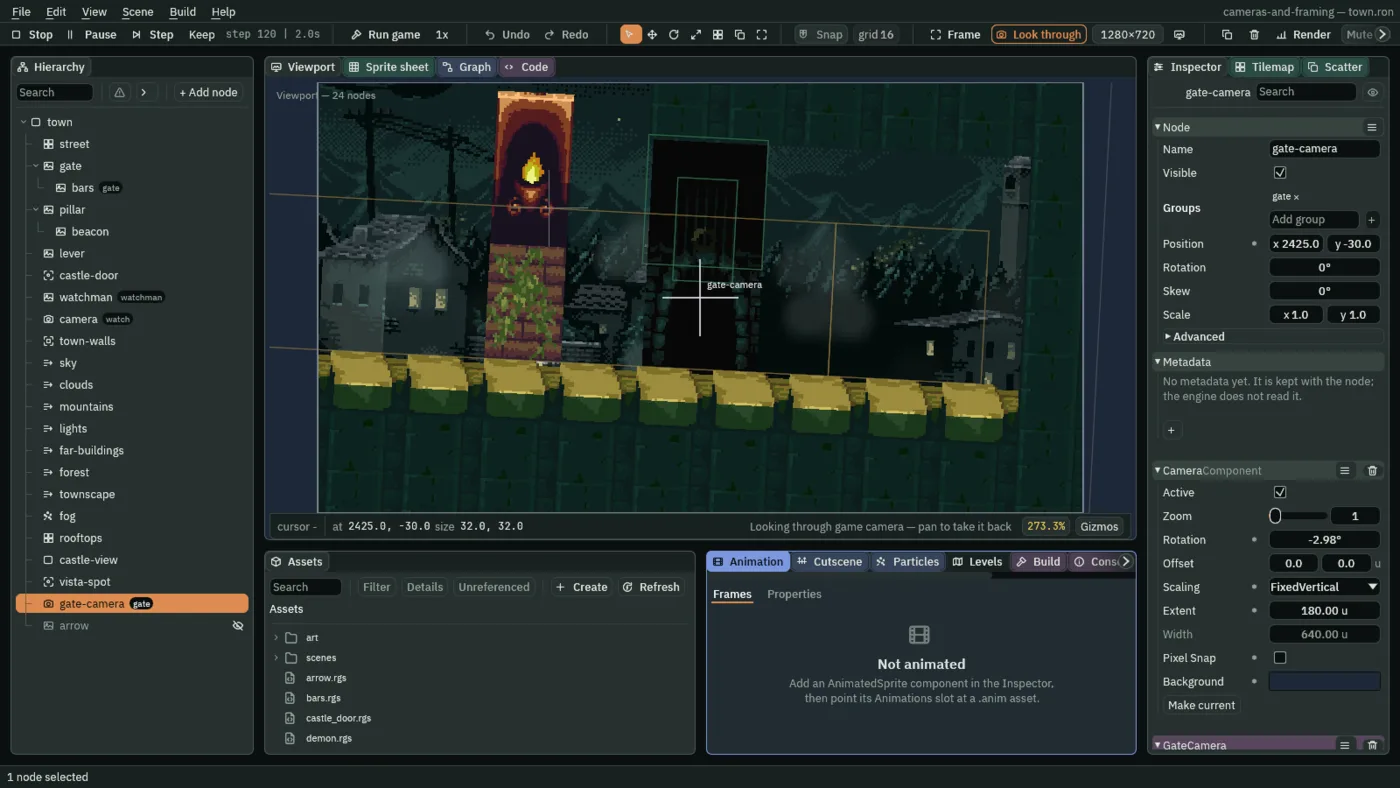
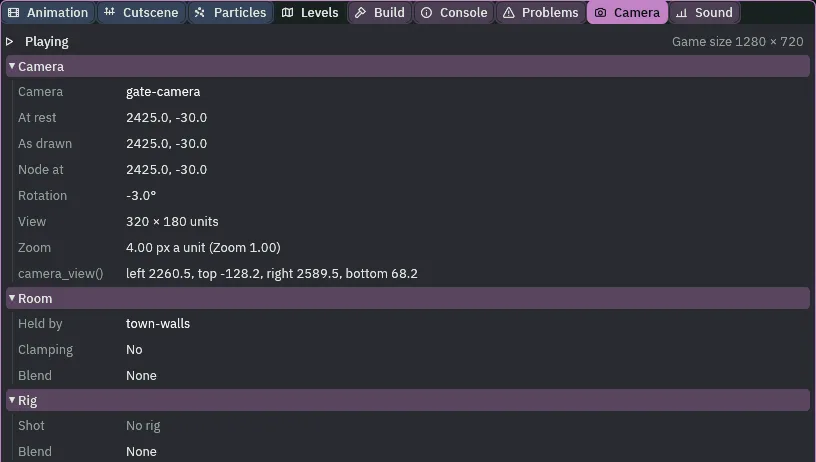
gate-camera, its camera_view() the box round its tilted view, and No rig.Two active cameras
Leave the gate camera’s Active ticked and the town has two active cameras. The game does not fail: it looks through the first in the Hierarchy, the town’s camera, made first, and the second is never seen. Problems names it. Try it on the scene, then put it back.
- Select
gate-camera, tick its Camera’s Active, and open the Problems tab. - Press Undo in the toolbar: the gate camera is off again, and the row goes.

That is why the switch is make_current(): it sets every camera’s Active in one go. A script that ticked Active on one camera and off on the other by hand would leave two on for a step.
Who moves the camera
Which camera is a question of its own now. The game is seen through the active one, and make_current() decides which that is. The town’s camera is still framed by its rig, every step, even while it is off; the gate camera is moved by nothing, and its view lies inside the town’s walls, so they never move it. The arrow moves no camera: it asks the one the game is seen through, every step.
The arrow and the gate camera
Node, last under town | Component | Field | Value |
|---|---|---|---|
gate-camera | Node | Position, Groups | 2425, -30; gate |
| Camera | Active, Zoom, Rotation | unticked, 1, -2.98 | |
| Scaling, Extent, Width | FixedVertical, 180, as it comes | ||
| Pixel Snap, Background | unticked; 0.012, 0.020, 0.040, 1 | ||
| GateCamera | the script | ||
arrow | Node | Position | 276, -80 |
| Sprite | Texture, Size, Anchor, Sort Layer | art/arrow.png; 12, 12; 0.5, 0.5; 10 | |
| Arrow | Beacon, Size, Margin | beacon; 32, 64; 12 | |
camera | Shots | the back branch |