Tutorials · Cameras and Framing · Chapter 6
Depth
By the end
- Seven Parallax planes behind the street, from the sky, which never moves on the screen, to the town’s houses, which go by at half the street’s pace
- A fog of particles and a row of rooftops painted on a tilemap, each carried by a plane of its own
- The castle’s wall, one plane that repeats up the stair shaft as well as along it
- The plane’s gizmo in the Viewport, what Problems notes about a plane inside a plane, and what the planes cost a phone
On this page
Behind the street
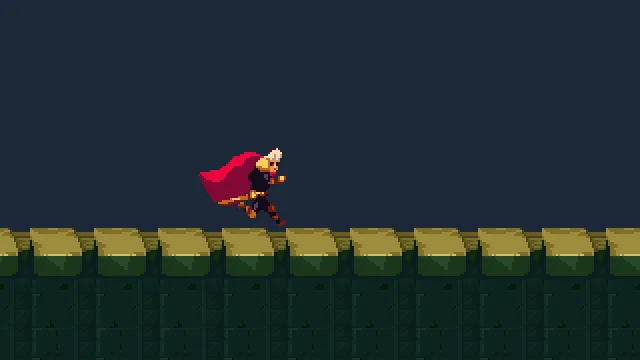
Until now nothing has stood behind the street but the camera’s Background:
Night Town, from the same download as the castle, is a backdrop in seven pictures: a sky, its clouds, the mountains, a lit copy of the mountains, far buildings, a forest and a town. Each is a layer, and each layer is a plane: a node with a Parallax that moves everything drawn under it by a share of the camera’s motion. The further back a layer is, the less it seems to move, and that is what reads as depth.
- Copy the eight pictures above into
art, and press Refresh in Assets. The last is for the castle’s wall, at the end of this chapter.
Seven planes
+ Add node → Parallax makes a node with a Parallax and a Sprite on it: a plane with one picture. The planes go under the town’s root, from the furthest to the nearest, each on a Sort Layer in front of the one before. The sky is first.
- Select
town. Press + Add node and choose Parallax. It lands undertown, last. Rename itsky, and leave its Position at0,0. - In its Sprite, drag
art/night-town-background-sky.pngfrom Assets onto Texture. Set Size to96,224and Sort Layer to-70, and leave Anchor at0.5,0.5, the picture’s middle. - In its Parallax, set Factor to
1,1, Offset to0,-8and Repeat Period to96,0.
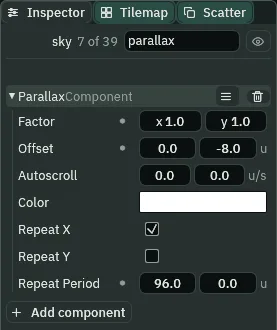
parallax typed into the Inspector’s search box.- Factor
- How much of the camera’s motion the plane is carried along by, across and down, from
0to1. On the screen it moves by the rest: one less the Factor, times the camera’s motion, the other way. A Factor of1is carried the whole way and never moves on the screen: the sky, which is very far off. A Factor of0is not carried at all and goes by as the street does.0.5,0.5, as it comes. - The plane’s Offset
- A shift, in world units, on top of where the Factor carries it: the sky’s
0,-8lifts it8.0,0, as it comes. - Autoscroll
- World units a second the plane drifts on its own, whatever the camera does: the clouds’
-6,0sends them west.0,0, as it comes. - The plane’s Color
- A tint on everything drawn under the plane; its alpha fades it. White, as it comes, changes nothing. A light under a plane keeps its own colour.
- Repeat X
- Copies the plane’s sprites and tilemaps side by side, so the layer never runs out however far the camera goes. Anything else under it, such as particles, is drawn once. Ticked, as it comes.
- Repeat Y
- The same up and down, for a shaft or a well. Unticked, as it comes.
- Repeat Period
- How far apart the copies sit, across and down.
0, as it comes, copies each sprite by its own size and each tilemap by the cells painted on it. The sky’s picture is96wide, so96is its own size, written down; the far buildings’480leaves a gap of160between copies of a picture320wide.
Make the other six the same way, each under town, last, in this order. Each colour here is typed with the picker reading F, as in chapter 1. A field the table does not name stays as it comes. Every picture is in art, named night-town-background- and the layer.
| Node | Picture | Size, Anchor | Position | Factor | Other fields | Sort Layer |
|---|---|---|---|---|---|---|
sky | …-sky.png | 96, 224; 0.5, 0.5 | 0, 0 | 1, 1 | Offset 0, -8; Repeat Period 96, 0 | -70 |
clouds | …-clouds.png | 288, 224; 0.5, 0.5 | 0, 0 | 0.95, 1 | Autoscroll -6, 0 | -65 |
mountains | …-mountains.png | 96, 224; 0.5, 0.5 | 0, 0 | 0.9, 1 | Offset 0, -30; Repeat Period 96, 0 | -60 |
lights | …-mountains-lights.png | 96, 224; 0.5, 0.5 | 0, 0 | 0.9, 1 | Offset 0, -30; Color 1, 1, 1, 0.8 | -59 |
far-buildings | …-far-buildings.png | 320, 80; 0.5, 1 | 0, -8 | 0.8, 1 | Repeat Period 480, 0 | -50 |
forest | …-forest.png | 64, 96; 0.5, 1 | 0, 64 | 0.7, 1 | -40 | |
townscape | …-town.png | 512, 99; 0.5, 1 | 0, 64 | 0.5, 1 | -30 |
The town’s layer is called townscape because the scene’s root is already town, and two nodes of one scene cannot share a name. lights is the mountains again with their windows lit, laid over them at the same Factor and Offset, so each of its copies is exactly on one of theirs; its Color’s alpha of 0.8 lets a fifth of the plain mountains show through.
Every Factor’s y is 1: up and down, every plane goes with the camera, so a plane’s y is its place in the view and not in the world. The view’s middle rests 24 above his feet, and the view reaches 90 above and below it. The tall pictures are centred on the middle. The forest and the town hang from 64 below it, 40 below the street’s top, so their feet are hidden behind the street. The far buildings hang from 8 above it, so their poles and the church tower stand clear of the forest. The sky is lifted 8 because chapter 7’s view is 240 tall, and the picture 224: without the lift, a strip of Background would show along the top.
A fog
A plane carries whatever is drawn under it, particles too. The fog is an emitter with a Parallax on the same node.
- Select
town, press + Add node and choose Particles. Rename itfogand set its Position to750,0. - In its emitter, drag
art/fog.pngonto Texture, and set Shape to Box,1800by48; Rate6, Lifetime10, Capacity64, Prewarm10; Speed4, Direction1,0, Spread0.6, Gravity0; Start Size40, End Size56; Start Color1,1,1,0.5and End Color1,1,1,0(the picker reading F); Sort Layer-25. Leave the rest as it comes. - Press Add component and choose ParallaxComponent. Set its Factor to
0.4,1and its Color to0.8,0.9,0.95,0.6.
The puffs start at half their colour’s strength and fade out, under a plane whose own alpha is 0.6: faint, slow and long-lived. A plane copies only sprites and tilemaps, so the fog is drawn once, wherever the plane carries the emitter. The plane carries it 0.4 of the camera’s way while the view goes the whole street, so the box is 1800 wide, as wide as the stretch of town the view looks through it at.
Rooftops on a tilemap
The nearest plane is a row of roofs, painted from Gothic Horror’s tiles, which the starter holds. Paint them before the plane is added: until it is, the tiles are drawn where you paint them. They go behind the street, so hide the street while you paint.
- Select
town, press + Add node and choose Tilemap. Rename itrooftopsand set its Position to-100,64. - With
rooftopsselected, open the Tilemap tab beside the Inspector. Dragart/gothic-horror-tiles.pngfrom Assets onto New tilemap…: tiles16by16,66columns, no Margin. In Assets, rename the new filerooftops.tilemap. - Select
streetand untick its Visible. Selectrooftopsagain. - Under Tools, click Brush. Choosing a tool turns on Paint mode at the top of the tab: a click in the Viewport now paints, and selects nothing.
backis already the highlighted layer in Layers; leave the solidgroundlayer empty. - Hover the tiles in the picker at the tab’s foot until the tooltip reads their numbers, and click one: the Tile line over the picker shows it. The picker shows only a few of the sheet’s columns at a time; raise or lower Zoom beside it, and scroll, to find them. The tiles you want are the flat roof’s plank,
#69to#73; the walls’ plain brick,#333and#335, with#334the dark opening for a window; and the gable, in two halves that sit apart in the sheet with an empty column between them:#81,#82over#147,#148for the left half, and#84,#85over#150,#151for the right. Paint a gable’s two halves side by side, without the empty column, or it paints a hole in the roof. - Paint the houses’ bottom row on the row of cells just above the node, and go right from it: a run of houses
77cells wide, with gables, flat roofs and brick walls, none to three empty cells between houses and some built on to the next. The Tilemaps guide has the whole panel. - Press the tab’s Save, which writes the tilemap.
- Select
streetand tick its Visible again, then selectrooftopsagain. - In its Tilemap, untick Collision and set Sort Layer to
-20. - Press Add component and choose ParallaxComponent. Set its Factor to
0.3,1, untick Repeat X, and, with the picker reading F, set its Color to0.22,0.32,0.4,1. - Press Ctrl+S.
The tint darkens the roofs to a dull brown, so they sit behind the street and not on it. The run is 77 cells, 1232 units, and with Repeat X off it comes once: with him past about x 1850 it is behind the view for good. Tick Repeat X and it comes round again, copied by the width of the cells you painted.
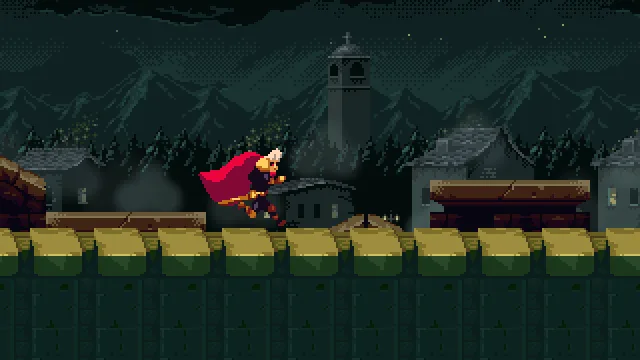
Watching the planes
The game itself, played and recorded at half its window’s size. Play your own with F5.

On the screen a plane moves by one less its Factor, times the camera’s motion. A second into a walk the camera has moved about 104 units (the dead zone and the damping take that long to catch him up, so not his 160): the forest moves about 31 of the screen’s 104, the townscape 52, the rooftops about 73, and the sky none. The clouds drift 6 a second west on top of their share. The fog’s plane carries the emitter, and its puffs with it.
A leap is different: every Factor’s y is 1, so up and down every plane goes with the camera, and stays where it is on the screen. Only the street, which no plane carries, drops away under him.
The castle’s wall
The castle gets one plane: a brick wall behind its rooms, which repeats up the stair shaft as well as along it. Its picture, old-dark-castle-interior-background.png, is four bays side by side, 240 by 304 each: two with ivy and two without, each pair a bay of lantern-lit brick and a bay with an arched window, whose white lattice would draw the eye from him. The plane draws the first bay, a region of the picture.
- In Assets, open
scenesand double-clickcastle.ron. - In
art, double-clickold-dark-castle-interior-background.png. The Sprite sheet tab opens on it. In its Grid band, set Cell to240by304and Margin to0by0, and click the first cell, at the top left: Selected 1 x 1. - In the Regions band, click the Name box, type
bayand press Name it. - Select
castle, press + Add node and choose Parallax. Rename itcastle-walland set its Position to320,-96. - In its Sprite, drag the picture onto Texture, click Atlas Region, type
bayand press Enter. Set Size to240,304and Sort Layer to-50, and leave Anchor at0.5,0.5. - In its Parallax, leave Factor at
0.5,0.5, tick Repeat Y, and, with the picker reading F, set Color to0.7,0.7,0.8,1. - Press Ctrl+S.
- Sprite Atlas Region
- The region of its Texture the Sprite draws, by name; empty, the whole picture.
bayis0,0,240by304: its left, its top, its width and its height, in the picture’s pixels.
Selected, a plane draws its home: the box its art fills where it would be with the camera at the world’s origin, its Offset added. On an axis it repeats along, a ruler runs along the home’s far edge, its bottom for Repeat X and its right for Repeat Y, with a tick where each copy starts:
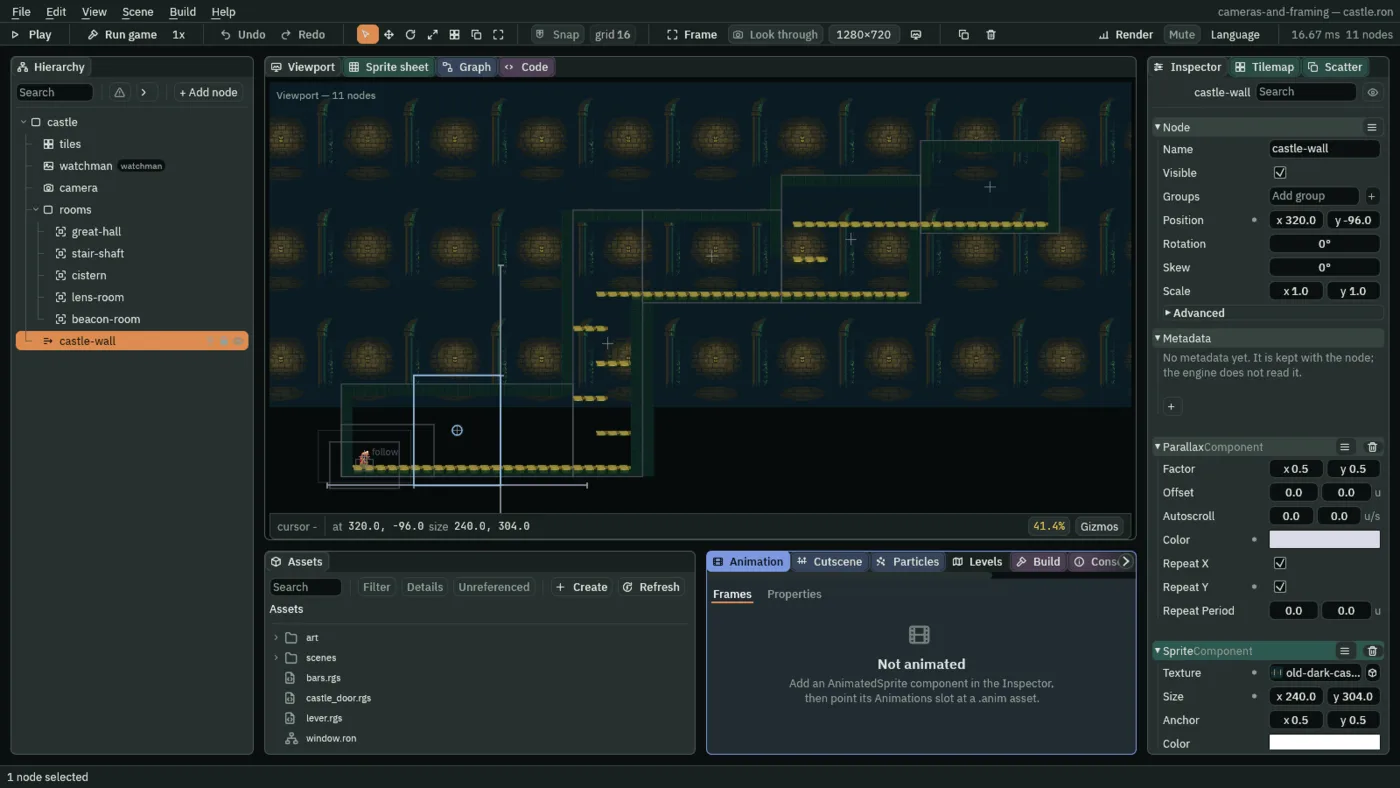
castle-wall selected: its home, and a ruler along each axis it repeats on.The home is where the clock starts: a plane is drawn shifted from it by its Factor times where the camera rests. The ticks are every 240 along and every 304 up, the region’s own size, since its Repeat Period is 0. A plane whose art is particles, text or lights alone, as the fog’s is, draws no home: the editor measures only sprites, tiles and shapes. In the town, the camera rests at y -24, so a plane with a Factor y of 1 is drawn in the game 24 higher than its home.

A plane inside a plane
Planes do not stack. A plane under another plane is carried by its own Factor alone: the nearest plane above a node is the one that moves it, and the outer plane’s Factor is not applied inside. Try it, and put it back.
- In Assets, double-click
scenes/town.ron. In the town’s Hierarchy, draglightsontomountains. It becomes its child, and as its Position is0,0it stays where it was. - Open the Problems tab and its Notes fold.

lights dragged under mountains: a note in Problems, not a warning.It is a note and not a warning, since nothing is wrong with it: here both Factors are 0.9, and nothing moves differently. A nested plane is for a part of a layer that moves at a pace of its own. Press Undo in the toolbar, and lights is back under town where it was, and the note goes.
What the planes cost
At 1280 by 720, chapter 5 draws a frame in 2 draw calls: the street, and him. Chapter 6 takes 11, one for each plane and its picture, and 231 sprites against 122, in the same 2 passes, with 0.85 MB more of pictures in memory. On a desktop, that is nothing.
The project’s Quality settings decide how many planes a frame draws. In File → Project settings…, on its Quality tab, each level has a Layers choice, and the game draws as many planes as the level its Desktop default names allows. Full draws every plane. Reduced keeps the six nearest: here it drops lights, clouds and sky. Minimal keeps the three nearest, townscape, fog and rooftops. The nearest are the planes whose Factor is furthest from 1; of two that tie, as mountains and lights do, the first in the Hierarchy stays.
Who moves the camera
Nothing new: the rig, every step, and the room holding it. The planes move no camera. Each reads where the camera rests, after the room has held it, and is drawn shifted from its home by its Factor of that. Every plane and everything else in the picture is drawn from the same camera, so a shake, in chapter 8, shakes them together.
The planes
| Scene | Node, under the root, in order | Component | Field | Value |
|---|---|---|---|---|
| town | sky to townscape | Parallax, Sprite | every field | the table of seven planes |
fog | Node | Position | 750, 0 | |
| Particles | Texture, Shape | art/fog.png, Box 1800 by 48 | ||
| Rate, Lifetime, Capacity, Prewarm | 6, 10, 64, 10 | |||
| Speed, Direction, Spread, Gravity | 4, 1, 0, 0.6, 0 | |||
| Start Size, End Size | 40, 56 | |||
| Start Color, End Color | 1, 1, 1, 0.5; 1, 1, 1, 0 | |||
| Sort Layer | -25 | |||
| Parallax | Factor, Color | 0.4, 1; 0.8, 0.9, 0.95, 0.6 | ||
rooftops | Node | Position | -100, 64 | |
| Tilemap | Tilemap, Collision, Sort Layer | art/rooftops.tilemap, unticked, -20 | ||
| Parallax | Factor, Repeat X, Color | 0.3, 1; unticked; 0.22, 0.32, 0.4, 1 | ||
| castle | castle-wall | Node | Position | 320, -96 |
| Sprite | Texture, Atlas Region | art/old-dark-castle-interior-background.png, bay | ||
| Size, Sort Layer | 240, 304; -50 | |||
| Parallax | Factor, Repeat Y, Color | 0.5, 0.5, as it comes; ticked; 0.7, 0.7, 0.8, 1 |