Tutorials · Cameras and Framing · Chapter 7
Shots
By the end
- A second framing,
vista, on an empty node above the gate: off until it is called, Priority10, Zoom0.75, a Duration of1.5seconds and an Ease of Overshoot - An Area on the street before the gate,
vista-spot, whose script tells the camera, by its group, to take the vista and to come back - The camera’s own script, which switches the framing with
set_flagand cuts back to him withcut() - How a blend runs, and the rig’s Cut to live framing
On this page
Where the shot looks, and where it is called
As he comes up to the gate, the camera’s 320 units of street show the beacon on its pillar at their very edge, if at all, and never the gatehouse passage past the bars, where he goes through into the castle. A second framing on the rig can show them: a shot from further back, taken when he reaches the gate. It needs something to look at, and somewhere on the street that calls it.
- Select
town. Press + Add node and choose Node. Rename itcastle-viewand set its Position to2360,-64. It is an empty node, the point the shot looks at. - Select
townagain, press + Add node and choose Area. Rename itvista-spotand set its Position to2340,0. - In its Area’s Shape, set Size to
280,64and Offset to0,-32: the box stands on the street, from x2200to2480.
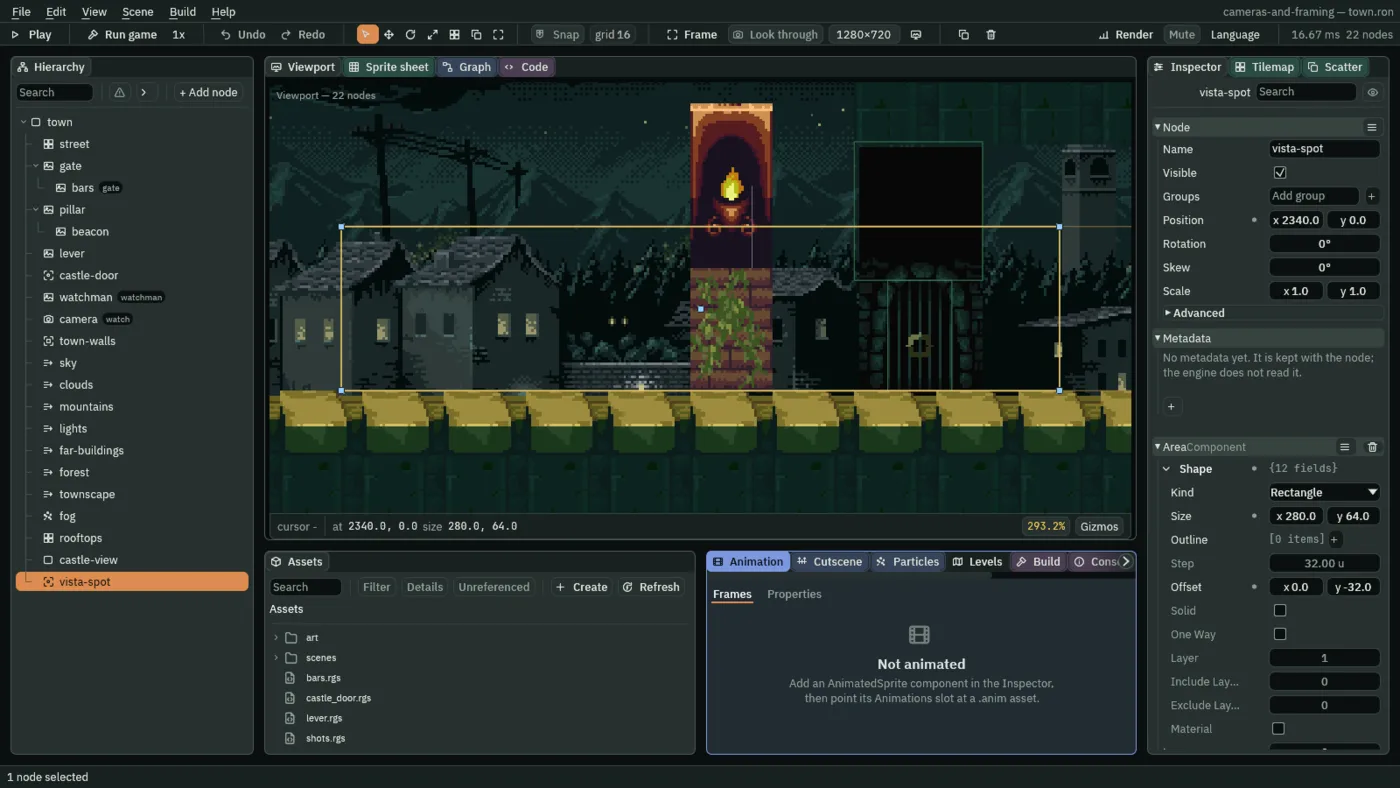
vista-spot: its box on the street before the gate, and on through it.castle-view is a little west of the arch’s middle, x 2425, and not over it. The vista’s view is 427 wide, and the town’s walls let a view that wide rest no further east than x 2378.7: from over the arch, the camera would rest against that edge with no room for the overshoot below. At y -64, the view runs from y -184 to 56, and the backdrop’s low layers stand on the street’s top. The spot starts where the vista holds him whole (touching it, he is 47 units in from the view’s west edge) and ends at the gatehouse passage past the bars (the castle-door Area, which takes him into the castle), so he is still in it standing against the bars, and on through the opened gate.
A second framing
- Select
camera. In its Node fold, typewatchinto the Groups box, where it reads Add group, and press Enter. - In its rig’s framing
follow, set Duration to0.8and Ease to Linear. - Next to Framings, press +. A second framing appears,
2; open it with its arrow. - Set its Name to
vista. Click Subject and choosecastle-view. - Untick its Active. Set Priority to
10, Zoom to0.75, Duration to1.5and Ease to Overshoot. Leave the rest as it comes: Rotation0°, no zones and no Offset, Damping0.25and0.5, Time0, Smoothing0.2, Limit0. - Press Ctrl+S.
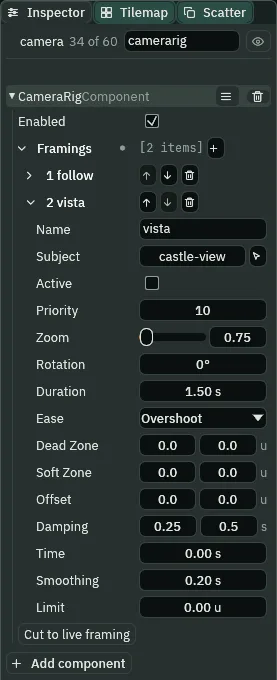
vista, off until a script switches it on.- The framing’s Priority
- Of the framings that are Active, the one with the highest Priority is live.
vista’s10outranksfollow’s0, so switchingvistaon takes the camera, and switching it off gives the camera back tofollow.followstays active the whole time underneath. - The framing’s Zoom
- What the rig writes onto the Camera’s Zoom while this framing is live:
0.75shows a third more each way thanfollow’s1. Under Pixel Perfect’s4, the screen’s zoom is3: a view of426.67by240. - Duration and Ease
- The blend into this framing: how many seconds it takes, and the shape of the move. Going to
vistatakesvista’s; going back takesfollow’s. - The Ease’s four choices
- Cut jumps, with no blend at all: chapter 8’s. Linear moves at one pace from start to end. EaseInOut starts slowly and ends slowly, as it comes. Overshoot goes a little past the mark and settles back.
- Cut to live framing
- The rig’s button. In Play, it puts the camera at once on the framing that is live, and drops any blend under way: what a script’s
cut()does. It is for trying Priorities while the game runs: change one, press it, and see the shot it gives without waiting for the blend.
The spot speaks, the camera listens
The spot does not move the camera itself. It says a word to a group, and the camera, which is in the group watch, answers in its own script. The spot says vista as he walks in and follow as he walks out:
/// The stretch of street before the castle gate, where the view opens onto
/// the castle. It speaks to the camera, which is in the group `watch`: it says
/// `vista` as the watchman walks in, and `follow` as he walks out.
component VistaSpot : Area {
    fn on_enter(other: NodeId) {
        // He walks in: the camera is told to take the vista.
        if in_group(other, "watchman") {
            emit_to("watch", "vista");
        }
    }

    fn on_exit(other: NodeId) {
        // He walks out, whichever way: the camera is told to come back.
        if in_group(other, "watchman") {
            emit_to("watch", "follow");
        }
    }
}
The camera hears it and switches the framing:
/// The camera's shots. The camera is in the group `watch`, so the vista spot
/// can speak to it; this script is what it does when it hears. The two shots
/// are framings of the Camera Rig on this node, switched by name.
component Shots {
    fn on_signal() {
        // The spot said `vista`, as the watchman walked into it: the vista
        // framing is switched on. It outranks `follow`, so the camera blends
        // to it over the vista's own Duration.
        if heard("vista") {
            set_flag("CameraRigComponent", "framings.vista.active", true);
        }
        // The spot said `follow`, as he walked out of it: the vista is
        // switched off, and the camera cuts to him instead of gliding there.
        if heard("follow") {
            set_flag("CameraRigComponent", "framings.vista.active", false);
            cut();
        }
    }
}- In Assets, click Assets in the path bar, so the script is written at the project’s top, then click Create, choose New script, type
vista_spotand press Enter. In the Code tab, replace everything invista_spot.rgswith the first script above, and press Ctrl+S. Makeshots.rgsthe same way, with the second. - Select
vista-spot, press Add component and choose VistaSpot. - Select
camera, press Add component and choose Shots. - Press Ctrl+S.
emit_to(group, signal)- Says
signalto every node in the group. They hear it on the next step, in theiron_signal, whereheard(signal)is true for that step. set_flag(component, field, value)- Writes a true or false onto a component on this node.
framings.vista.activereaches into the rig’s list by the framing’s Name: thevistaframing’s Active. cut()- Puts the camera of the game straight onto its live framing, with no blend. It needs a Camera Rig on the camera the game is seen through.
Taking the vista, and coming back

He touches the spot, and two steps later the vista is live: the spot says vista the step he touches it, the camera hears it the step after and switches the framing on, and the rig, which runs before the scripts, sees the switch the step after that. Then the blend, 1.5 seconds. It goes from where the camera was to where the vista wants it, and the Overshoot carries it 6.17 units past on x and 1.59 on y, 4 percent of the move, four fifths of the way through, while the zoom dips to 0.7415 and comes back.
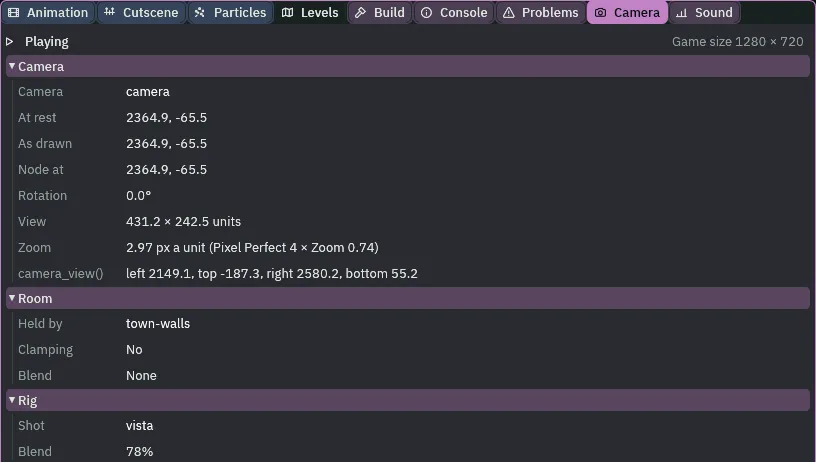
78%: the camera past castle-view’s 2360, and the zoom below 0.75. The overshoot.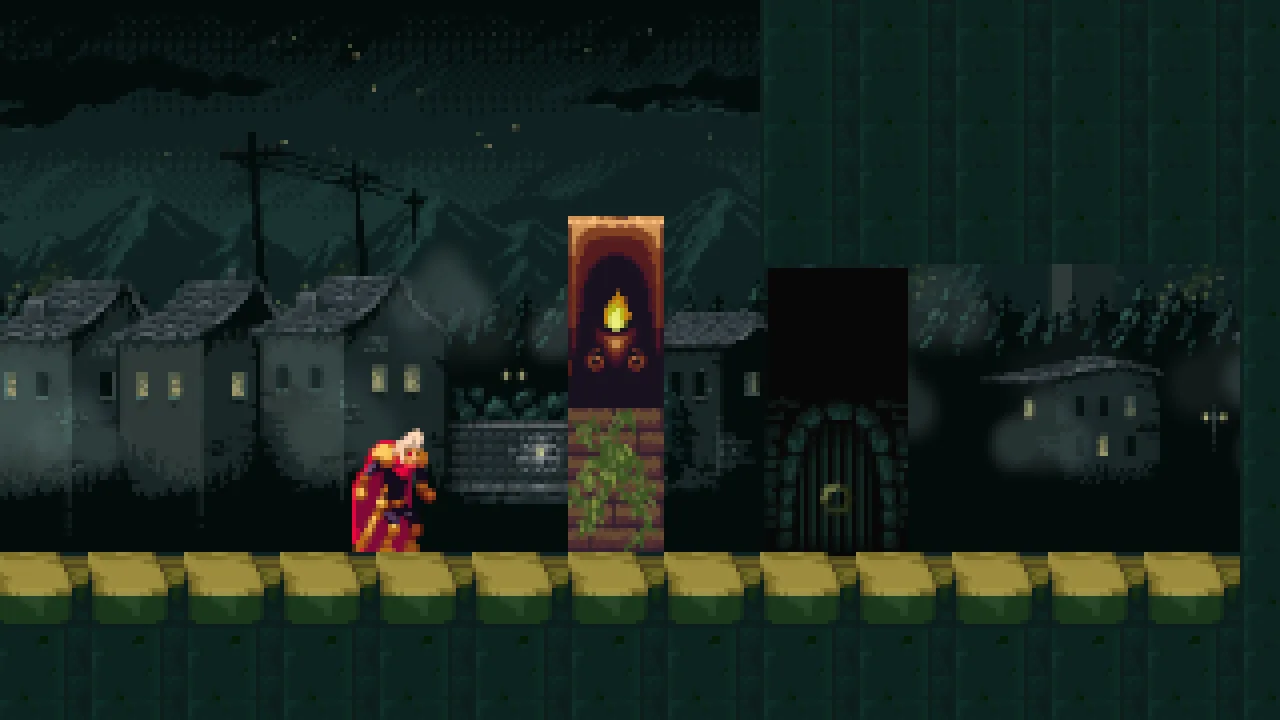
The view is 426.67 by 240, from x 2146.67 to 2573.33 and y -184 to 56. It holds the beacon, the arch and its bars, the gatehouse passage past the bars (the castle-door Area) and his whole sprite. In Play, with the camera selected, its node is on castle-view, and the Inspector shows the Camera’s Zoom at 0.75: the rig writes it, every step.
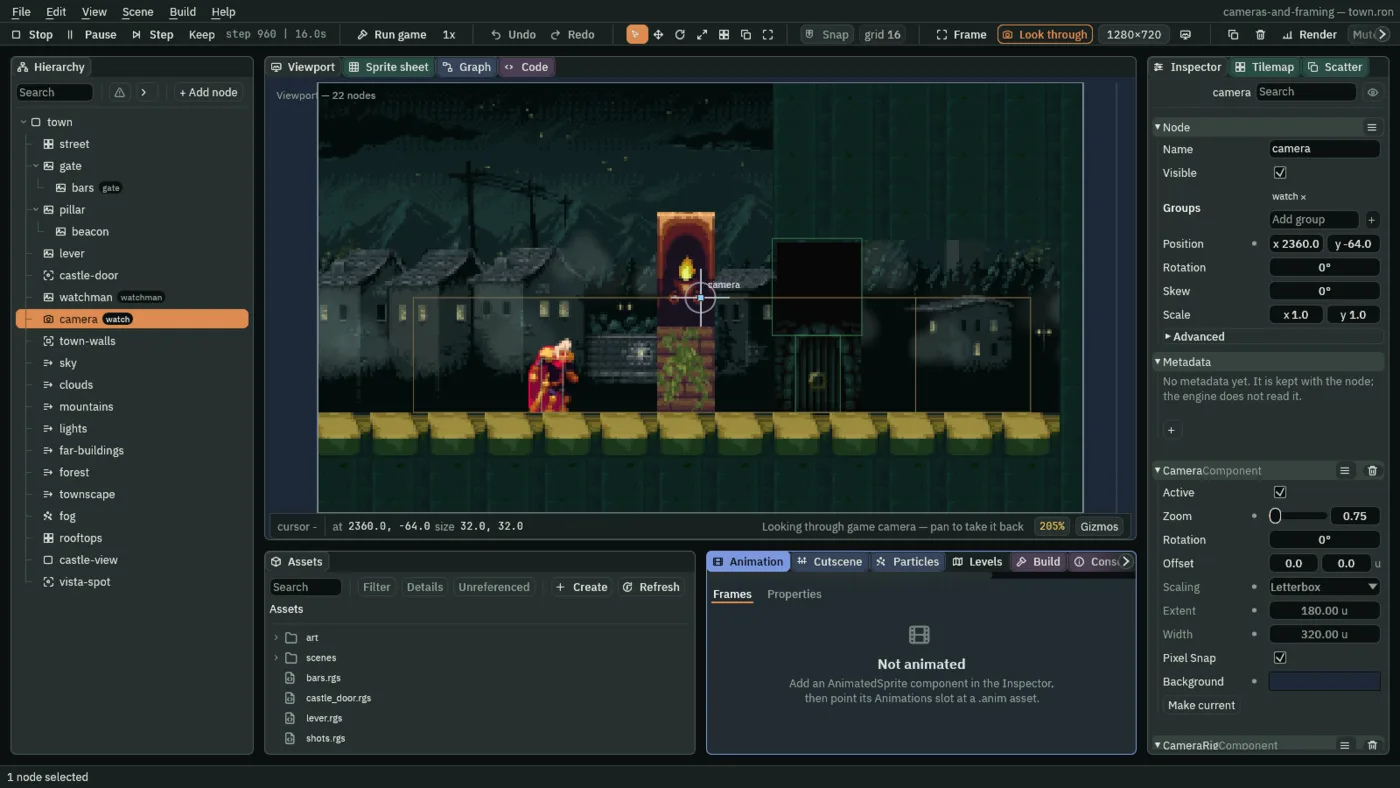
castle-view, and its Zoom the vista’s.
Two steps after he leaves the spot, follow is live again, and the cut() puts the camera on him with no blend. It lands on a camera already with him: every framing’s spring runs the whole time, live or not, so follow has followed him all through the vista. Without cut(), the camera would glide back over follow’s own 0.8 seconds, Linear: a long slide across the street just as he turns away.
Walk back in and the vista comes again, as often as he does. Throw the lever and walk through the opened gate: the spot reaches the gatehouse passage past the bars (the castle-door Area, which changes the scene), so the vista holds until the scene changes, and there is one cut, not two.
Who moves the camera
The rig, every step, as before, but now through two framings: follow on him and vista on castle-view. A script decides which is live, by switching the vista’s Active, and the rig blends or cuts between them. The rig owns the Camera’s Zoom and Rotation: to zoom out for a shot, set the framing’s Zoom, never the Camera’s. The town’s walls still hold the picture inside them, the vista’s view too.
The vista
| Node | Component | Field | Value |
|---|---|---|---|
castle-view, a Node under town | Node | Position | 2360, -64 |
vista-spot, an Area under town | Node | Position | 2340, 0 |
| Area | Size, Offset | 280, 64; 0, -32 | |
| VistaSpot | the script | ||
camera | Node | Groups | watch |
| Shots | the script | ||
Camera Rig, framing follow | Duration, Ease | 0.8, Linear | |
framing vista | Subject | castle-view | |
| Active, Priority | unticked, 10 | ||
| Zoom, Rotation | 0.75, 0° | ||
| Duration, Ease | 1.5, Overshoot | ||
| Damping; Time, Smoothing, Limit | 0.25, 0.5; 0, 0.2, 0, as they come |