Tutorials · Cameras and Framing · Chapter 12
Through the glass
By the end
- Three shaders written in the editor, two of which share a ripple through
//! include - A Screen Copy under the Glass layer, and water over the cistern’s floor that wobbles what lies beneath it
- Hot air over the beacon room’s fire, its strength set by name from a script: the beacon blazes while the demon is awake
- What Problems says with the copy off, what the copy costs a phone, and the game exported with its shaders
On this page
Three shaders
A shader decides the colour of every pixel a sprite covers. The two in this chapter read what has already been drawn behind their sprite and draw it again, a little moved: water that wobbles what lies under it, and hot air that shimmers. Both move it by the same ripple, written once in a file of its own. Shaders are written in WGSL, the language graphics cards read, in .wgsl files, and the editor compiles them as it loads them, as an exported game does: there is nothing to install. Light and Shadow’s chapter 12 writes one for a light.
- In Assets, click Assets in the path bar, so the shader is written beside
project.rengy, then press Create, choose New shader, typerippleand press Enter. The editor writesripple.wgsl, a small shader to start from, and gives it a.meta. - Double-click
ripple.wgslto open it in the Code tab, replace everything in it with the first text below, and press Ctrl+S. - Make
wobble.wgslandshimmer.wgslthe same way, with the second and the third.
// The ripple the cistern's water and the beacon's hot air both use. It is not
// a shader of its own: it has no `shade`, and no node names it. A shader that
// wants it starts with the line `//! include ripple`, which pastes this file
// in ahead of the shader's own text.
//
// Given a place `p` on the screen, in pixels, and a time `t`, in seconds, it
// answers how far to move what is seen at that place, in pixels each way,
// from -1 to 1: two waves that cross, rolling on as the time goes on.
fn ripple(p: vec2<f32>, t: f32) -> vec2<f32> {
    // Across: each row of pixels slides left and right, the rows in turn.
    let across = sin(p.y * 0.8 + t * 4.0);
    // Up and down: each column a little, by half as much.
    let up = sin(p.x * 0.5 + t * 3.0) * 0.5;
    return vec2<f32>(across, up);
}
// The ripple, from ripple.wgsl, which the beacon's hot air uses too.
//! include ripple
// How far the ripple moves what is behind the water, in pixels at the most.
//! param strength: float = 2.0 range 0 8
// How fast the ripple rolls.
//! param speed: float = 1.2 range 0 4

// The water in the cistern. It draws again what is behind it, read from the
// Screen Copy a little this way and that by the ripple, and lays the water's
// own picture over that, so what lies beneath the water wobbles.
fn shade(frag: Fragment) -> vec4<f32> {
    // Where this pixel is on the screen, in pixels.
    let here = frag.screen_uv * resolution();
    // How far to move what is seen here, in pixels.
    let shift = ripple(here, time() * speed()) * strength();
    // What is behind, that far off: `screen` reads the Screen Copy, and
    // `texel_size` is one pixel of it.
    let behind = screen(frag.screen_uv + shift * texel_size());
    // The water's own picture, tinted by the sprite's Color, laid over what
    // is behind by its alpha. Both colours have their alpha multiplied in, as
    // a shader's colours do, so laying one over the other is this sum.
    let water = texel(frag.uv) * frag.color;
    return vec4<f32>(water.rgb + behind.rgb * (1.0 - water.a), 1.0);
}
// The ripple, from ripple.wgsl, which the cistern's water uses too.
//! include ripple
// How hard the air shimmers: about how far the ripple moves what is behind
// it, in pixels, where the puff is thickest. The haze's script sets it.
//! param strength: float = 1.0 range 0 4

// The hot air over the beacon's fire. It draws again what is behind it, read
// from the Screen Copy through a ripple that rises, as hot air does. The puff
// of fog it is drawn with gives the air its shape: the ripple is strongest
// where the puff is thickest and nothing where the puff is clear, so the
// shimmer has no edge.
fn shade(frag: Fragment) -> vec4<f32> {
    // How thick the puff is here: its picture's alpha, from 0 at its edge to
    // about a half in its middle.
    let thick = texel(frag.uv).a;
    // Where this pixel is on the screen, in pixels, with the waves rising: the
    // place the ripple is read at slides down the screen as the time goes on.
    let here = frag.screen_uv * resolution() + vec2<f32>(0.0, time() * 20.0);
    // How far to move what is seen here, in pixels.
    let shift = ripple(here, time()) * strength() * thick * 4.0;
    // What is behind, that far off, drawn whole.
    return vec4<f32>(screen(frag.screen_uv + shift * texel_size()).rgb, 1.0);
}
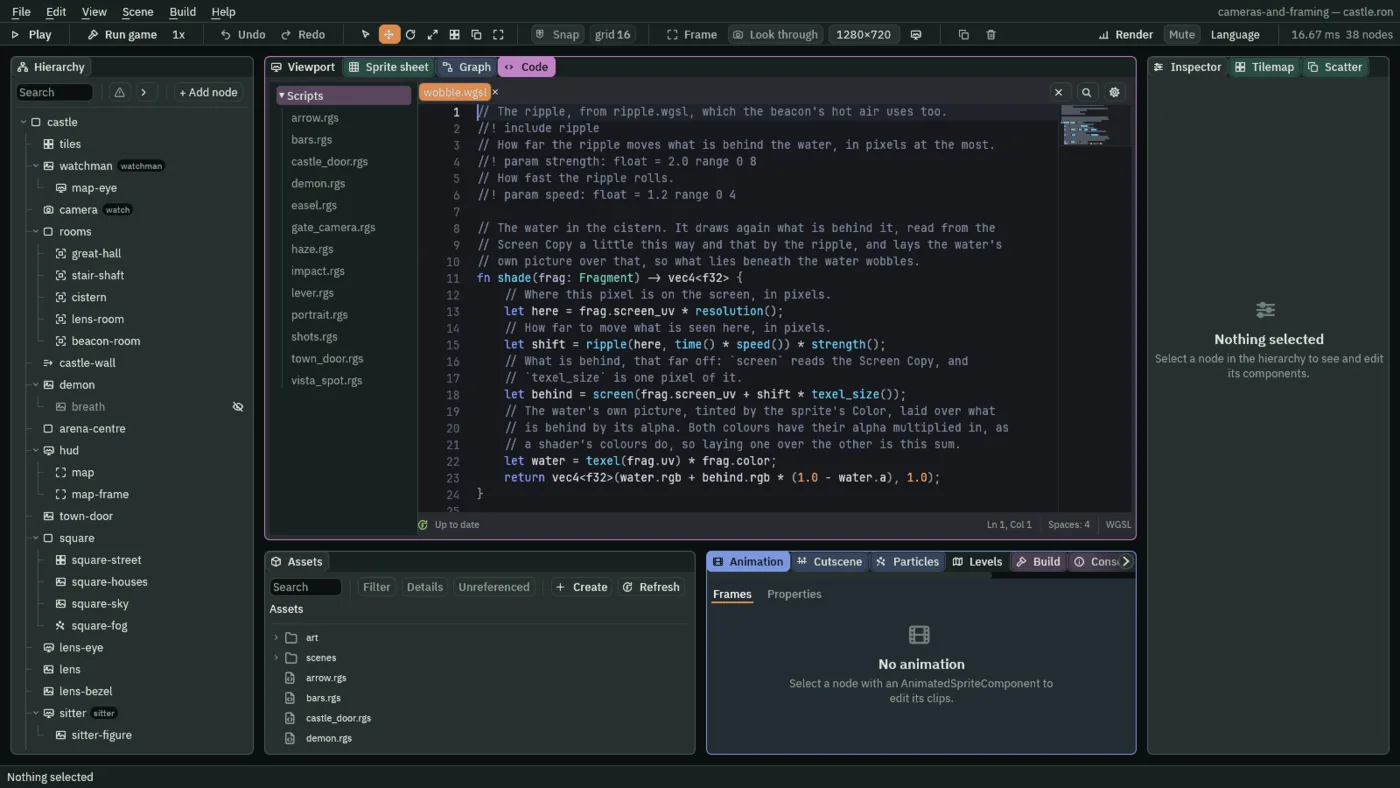
wobble.wgsl in the Code tab.//! include ripple- Pastes
ripple.wgslin ahead of this file’s own text: the file’s name without.wgsl. A file that is only included needs noshade, and no node names it. //! param strength: float = 2.0 range 0 8- A value the Inspector shows as a slider from
0to8, starting at2.0. The shader reads it asstrength(). fn shade(frag: Fragment) -> vec4<f32>- The colour of one pixel of the sprite.
frag.uvis where it is in the sprite’s picture,frag.screen_uvwhere it is on the screen, from0to1each way, andfrag.coloris the Sprite’s Color. screen(uv)- What the scene’s Screen Copy holds at that place on the screen: what was drawn behind. With no copy, plain white.
texel(uv)- The sprite’s own picture at that place. The shimmer reads only its alpha, for the puff’s shape.
resolution(),texel_size()- How many pixels the scene is drawn at, and one of those pixels as a share of the screen. The castle is drawn at Pixel Perfect’s
256by144, so a pixel here is an art pixel: the water moves what is behind it by at most2of them across. time()- Seconds since the game started.
The ripple is two waves that cross: each row of pixels slides left and right in turn, and each column a little up and down, rolling on with the time. The water reads what is behind it that far off, times its strength, and lays its own picture over that by its alpha. The hot air reads the ripple at a place that slides down the screen, so its waves rise, and moves what is behind by the ripple times its strength, times how thick the puff of fog it is drawn with is there: nothing at the puff’s clear edge, so the shimmer has no edge either.
Water
A shader that reads the screen needs a Screen Copy: a node that copies everything drawn below a layer, for the shaders above it to read. Its layer is Glass, which chapter 10 kept empty for this.
- With
castle.ronopen, selectcastle, press + Add node and choose Screen Copy. Rename itglass-copy; where it stands changes nothing. Leave Enabled ticked, and set Below Layer to Glass. - Select
castle, press + Add node and choose Shader Material: a Sprite with a Shader Material beside it. Rename itwaterand set its Position to1024,-480. - In its Sprite, drag
art/water.png, which came with the starter, onto Texture, set Draw Mode to Tiled, Tile Size to16,16, Size to320,32and Sort Layer to Glass, and leave Anchor at0.5,0.5. - In its Shader Material, click Shader and choose
wobble.wgsl, or drag the file onto it. Under it is a row for each param, strength and speed, bothunset. Press Set the 2 missing parameter(s): the material now holds both, at the file’s own2.0and1.20. Then press the bin at the end of the speed row, so the material holds strength alone and speed follows the file. Typing2into strength would hold nothing: the box takes only a change. - Select
castle, add a Sprite and rename itwaterline, at1024,-496. Dragart/water-surface.png, which came with the starter too, onto Texture, set Draw Mode to Tiled, Tile Size to16,8, Size to320,8and Sort Layer to Glass. - Press Ctrl+S.
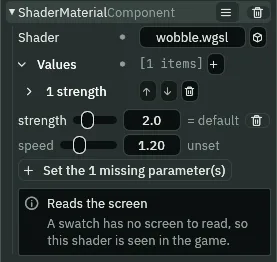
- The Screen Copy’s Enabled
- Whether the copy is taken. Ticked, as it comes. A scene uses one Screen Copy: the first in the Hierarchy that is enabled and visible.
- Below Layer
- Everything drawn on a lower layer goes into the copy; this layer and those above it do not. At Glass, the water, its line and the hot air read the picture without themselves in it.
- Shader
- The shader the node’s Sprite is drawn through. Empty, the Sprite is drawn as it always was.
- Values
- The values the scene holds for the shader’s params, one item each. A param with none reads
unset, and the file’s own default applies; one whose value equals the default reads= default. Set the 2 missing parameter(s) holds every unset one at its default, and the bin at the end of a row lets one go again. The water holds one,strength. - A value’s Name and Value
- Each item’s two parts. Name is the param it sets, as the shader declares it,
strength; the Inspector fills it in, so you do not type it. Value is four numbers whatever the param’s kind: afloatreads the first. - The notice in place of a swatch
- A Shader Material shows a small picture of its shader. A shader that reads the screen shows Reads the screen instead: a swatch has nothing behind it to read, so the water is seen in the game.
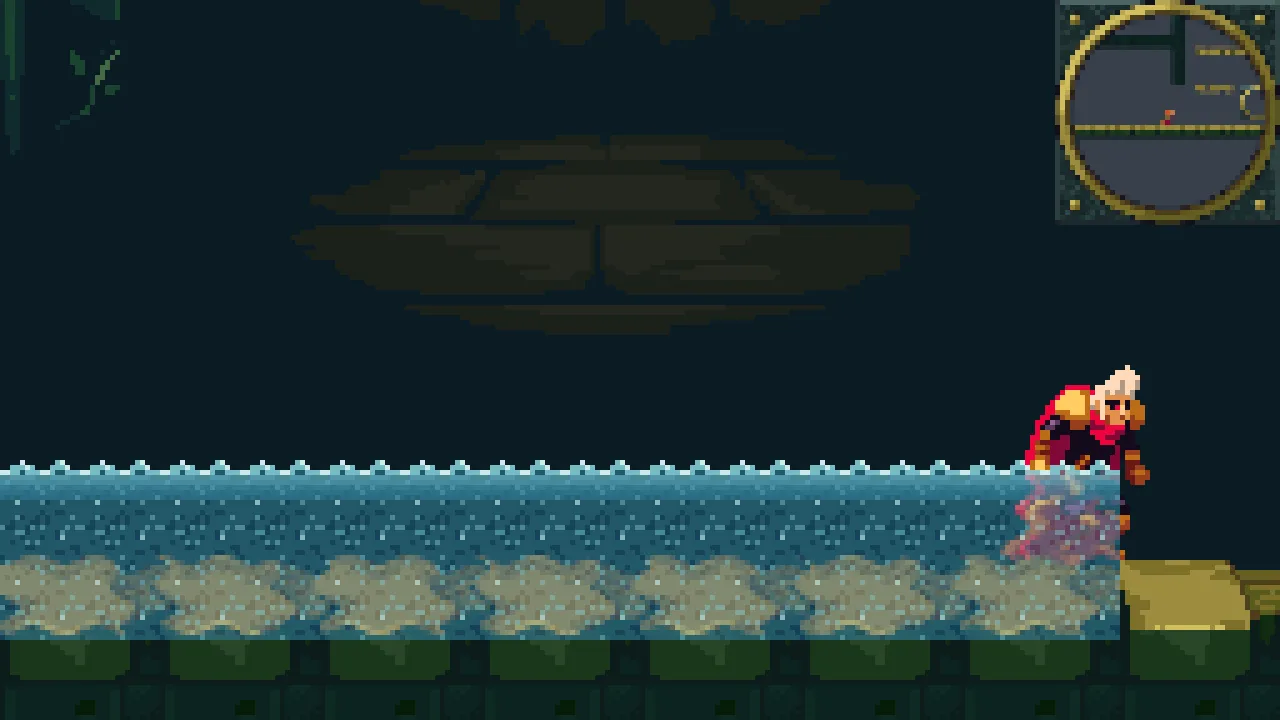

The water lies over the cistern’s floor from x 864 to the door at 1184, its top 16 above the floor and its bottom 16 over the floor’s mossy cap; its ends are the sprite’s own square edges. A ripple moves what is behind it only where that has detail: under the water is the cap, whose edges wave, and above the cap the wall’s plain dark band, which a ripple moves onto itself, so over the band the water wobbles nothing but him. He wades to his shins. waterline is the water’s top edge, a plain Sprite, with no material.
The water and its line share Glass, and overlap by 4 units. On one layer two pictures are drawn in the order of their ids, chapter 10’s rule, and the line’s sorts after the water’s, so the line draws over it: the one place this project leaves the order to the ids.
Hot air
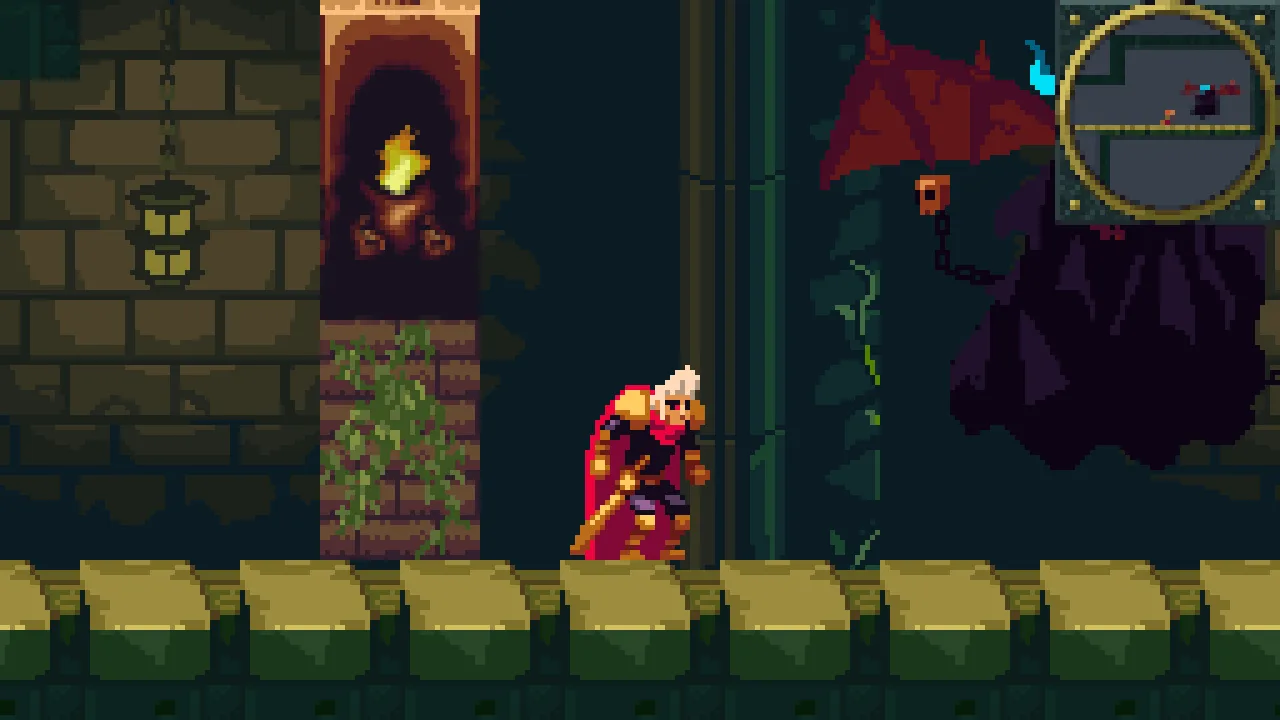
The beacon room gets a beacon of its own: the town’s two regions, its pillar and its lit furnace, on the floor at x 1696, west of the demon’s reach. Over its fire, hot air.
- Select
castle, add a Sprite and rename itcastle-pillar, at1696,-672. Dragart/gothic-horror-tiles.pngonto Texture, click Atlas Region, typepillarand press Enter. Set Size to32,48, Anchor to0.5,1and Sort Layer to Fixtures. - Select
castle-pillar, add a Sprite and rename itcastle-beacon, at0,-48, the pillar’s top. Drag the same picture onto Texture, and set Atlas Region tobeacon, Size to32,64, Anchor to0.5,1and Sort Layer to Fixtures. - Select
castle, press + Add node and choose Shader Material. Rename ithazeand set its Position to1696,-752: on the flame. In its Node fold, typewatchinto the Groups box and press Enter. - In its Sprite, drag
art/fog.pngonto Texture, and set Size to40,96and Sort Layer to Glass. In its Shader Material, chooseshimmer.wgslfor Shader, and type0.6into strength’s box: it is a change from the file’s1.0, so the material holds it.
/// The hot air over the castle's beacon. It is in the group `watch` with the
/// camera, so it hears what the demon tells the camera: while the demon is
/// awake the beacon blazes, and the air over it shimmers harder.
component Haze {
    fn on_signal() {
        // The watchman walked into the demon's reach and woke it: the
        // shimmer's strength, a value of this node's Shader Material, set by
        // its name, goes up.
        if heard("arena") {
            set_number("ShaderMaterialComponent", "values.strength.value", 1.0);
        }
        // He walked out of it, and the demon sleeps: the shimmer goes back to
        // what it was.
        if heard("follow") {
            set_number("ShaderMaterialComponent", "values.strength.value", 0.6);
        }
    }
}- Make
haze.rgswith the script above, as in chapter 7. Selecthaze, press Add component and choose Haze. Press Ctrl+S.
set_number(component, field, value)- Sets one number of a component on this node by the path to it.
set_number("ShaderMaterialComponent", "values.strength.value", 1.0)sets the Value of the Shader Material’s item namedstrength, the one typed in above, to1.0.
The haze is in the group watch with the camera, so it hears what the demon tells the camera: on arena its shimmer’s strength goes to 1.0, and on follow back to 0.6. It hears arena the step after the demon says it: the beacon blazes while the demon is awake. From the floor the castle’s view is 144 tall, y -784 to -640, so the haze’s top 16 units are above the picture. The shimmer draws its whole rectangle from the copy, so outside the puff, where the ripple moves nothing, it is the copy itself, and unseen.

With the copy off
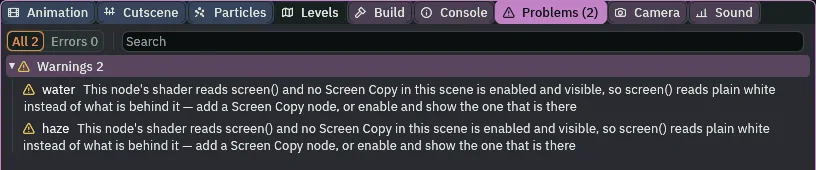
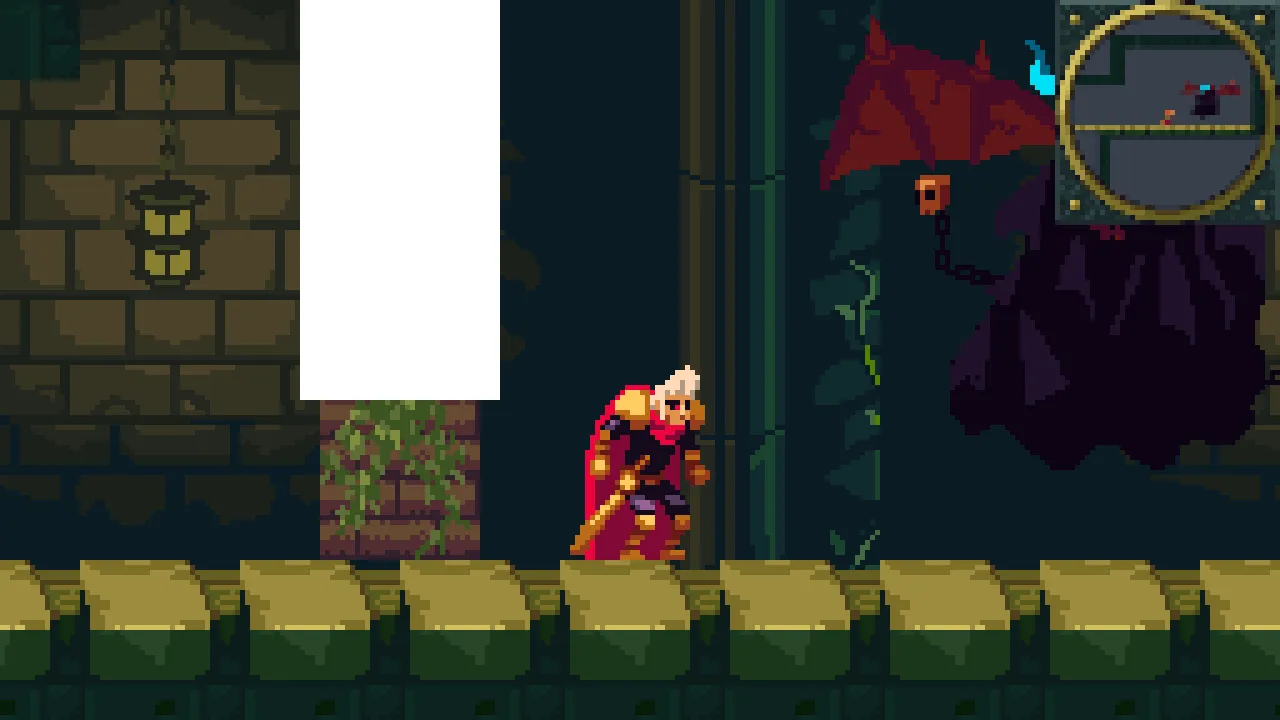
Untick the Screen Copy’s Enabled and the glass has nothing to read: where no Screen Copy is enabled and visible, screen() reads plain white. The hot air becomes a white slab, 40 by 96, over the furnace, and Problems says why, once for each glass node. Try it, and put it back.
- Select
glass-copyand untick Enabled. Open the Problems tab. - Press Undo in the toolbar: Enabled is ticked again, and the rows go.
The castle, exported
The castle now draws through two shaders, and an exported game carries them: it reads both from its own files and compiles them as it loads them, with nothing to install, and takes every picture from its own files too.
- Save with File → Save all: Export copies the files as they are on disk.
- Click the Build tab, in the dock under the Viewport.
- In its Export section, the line under Export says where the game will be written,
cameras-and-framing/dist/cameras-and-framing/cameras-and-framing: your project’s folder, thendist, then a folder and a file both named after it. - Press Export. When it is done, the editor opens the new folder in your file manager.
- Double-click
cameras-and-framing, orcameras-and-framing.exeon Windows. On Linux, if double-clicking does not start it, run./cameras-and-framingin a terminal in that folder.

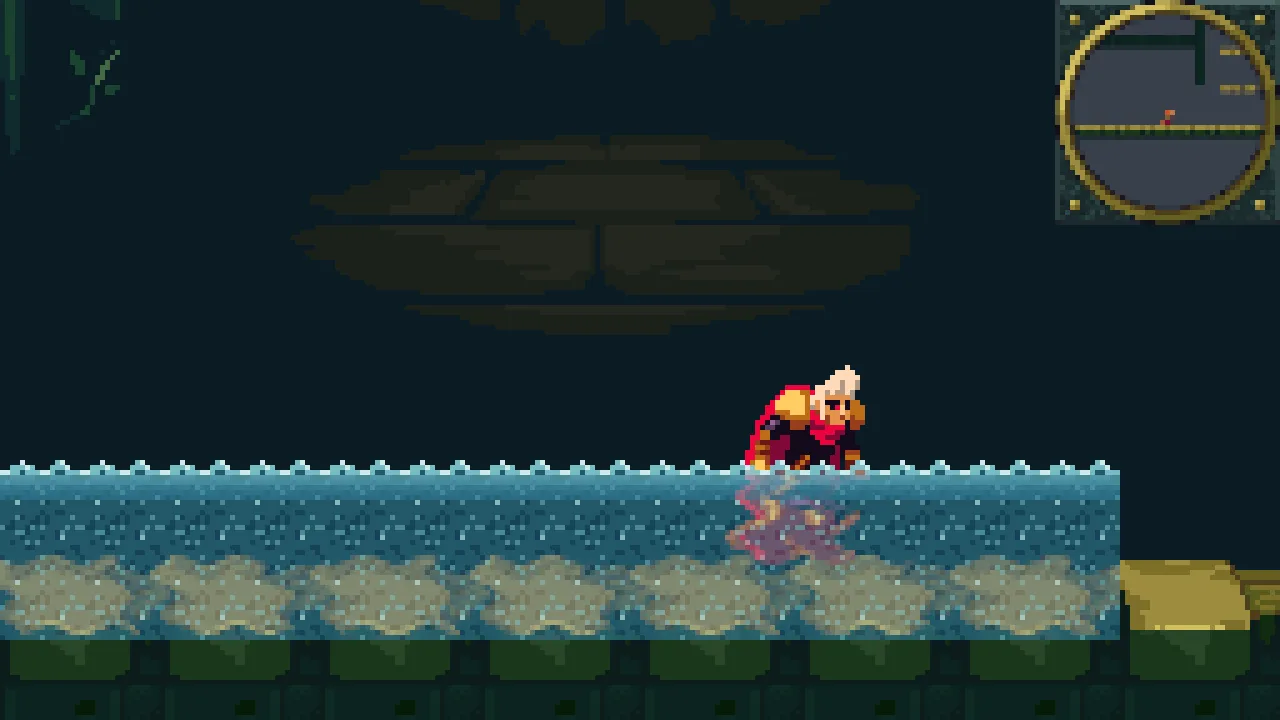
Walked from the great hall up the shaft into the cistern, by the same keys for the same steps, the exported game draws the cistern pixel for pixel as the project does from its own folder, the water wobbling the same at the same moment.
Who moves the camera
Nothing new. The glass moves no camera: it reads what the camera has drawn. The haze listens to the demon as the camera does, and sets one value of its own material, the step before the rig cuts to the demon’s shot.
The glass
Node, last under castle unless it says | Component | Field | Value |
|---|---|---|---|
| project | shaders | ripple.wgsl, wobble.wgsl, shimmer.wgsl beside project.rengy | |
glass-copy | Screen Copy | Enabled, Below Layer | ticked; Glass |
water | Node | Position | 1024, -480 |
| Sprite | Texture, Draw Mode, Tile Size | art/water.png; Tiled; 16, 16 | |
| Size, Sort Layer | 320, 32; Glass | ||
| Shader Material | Shader, Values | wobble.wgsl; strength 2 | |
waterline | Node | Position | 1024, -496 |
| Sprite | Texture, Draw Mode, Tile Size | art/water-surface.png; Tiled; 16, 8 | |
| Size, Sort Layer | 320, 8; Glass | ||
castle-pillar | Node | Position | 1696, -672 |
| Sprite | Texture, Atlas Region | art/gothic-horror-tiles.png, pillar | |
| Size, Anchor, Sort Layer | 32, 48; 0.5, 1; Fixtures | ||
castle-beacon, under castle-pillar | Node | Position | 0, -48 |
| Sprite | Texture, Atlas Region | art/gothic-horror-tiles.png, beacon | |
| Size, Anchor, Sort Layer | 32, 64; 0.5, 1; Fixtures | ||
haze | Node | Position, Groups | 1696, -752; watch |
| Sprite | Texture, Size, Sort Layer | art/fog.png; 40, 96; Glass | |
| Shader Material | Shader, Values | shimmer.wgsl; strength 0.6 | |
| Haze | the script |