Tutorials · Physics and Mechanisms · Chapter 5
Crates
By the end
- Four collision layers named in Project settings, World, Knight, Crate and Grate, and one pair of them unticked in the collision matrix: Knight and Grate
- The knight’s Character Body on Knight, beside his Area: what he collides as, and what plates notice, two fields
- Three crates, each a Character Body that nothing drives but a shove, Pushable, with a solid Collider and an Area on Crate
- A grate a crate stops at and the knight walks through, its rail he stands on by Include Layers, and a chute he stands on and crates fall through by Exclude Layers
- The storeroom’s way up by keys: a crate on the plate holds the portcullis up, and two crates stacked lift him to the pillar under the way up
On this page
Four layers
Until now every Collider and body has been on layer 0, and everything has met everything. This chapter puts the crates on a layer of their own and a grate on another, which the knight passes through and a crate does not. A project names its collision layers once, for every scene, in Project settings.
- Choose File → Project settings… and open its Physics tab. Under Layer names it says that no layer has a name yet. Click Show all layers.
- Type
Worldinto the box of layer0,Knightinto1,Crateinto2andGrateinto3, pressing Enter after each. - Under Collision matrix, find the row Grate and, in it, the column Knight. Untick that box; every other box stays ticked. Close the window.
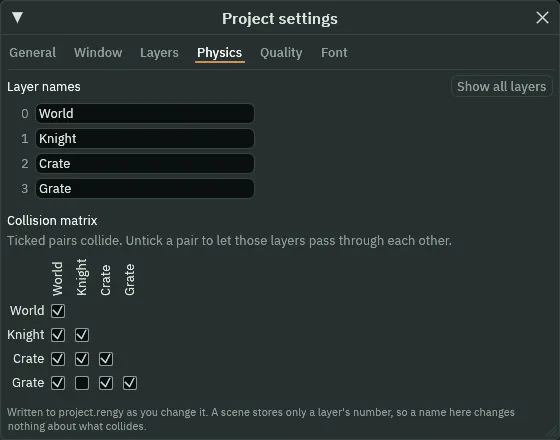
- Layer names
- The Physics tab’s Layer names: a name for each collision layer the project uses, by its number. Every layer row in the Inspector shows these names from now on, and a layer joins the matrix below once it has one. A name is only a name: a scene keeps which layers are ticked, not the words, so renaming a layer changes nothing that collides.
- Collision matrix
- The Physics tab’s Collision matrix: one box for each pair of named layers. Ticked, a body on one of the two meets a Collider on the other; unticked, they pass through each other. Every box comes ticked. Knight with Grate unticked: the knight walks through the grate, and a crate, on Crate, whose box with Grate is ticked, does not. Areas look through it too: the plate, on World, notices the knight and the crates because World’s boxes with Knight and with Crate are ticked.
The knight’s Area went on layer 1 in chapter 4, which is now Knight. His body is still on World.
- Select
knight. At the foot of his Character Body’s rows, click the button beside Layer, which reads World. Untick World and tick Knight, and click away from the list.
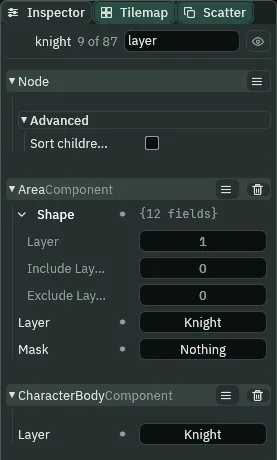
- Layer
- The Character Body’s Layer, at the foot of its rows: the layers the body is on, what it collides as. Moving, it meets each Collider whose layer has a ticked box with one of its own in the matrix, unless that Collider’s Include or Exclude Layers say otherwise. The knight’s is Knight; a new body’s is World. His Area’s Layer is another field, what a plate looks for; he needs both on Knight, and each is set on its own.
Three crates
A crate is a body the knight shoves: a Character Body ticked Pushable, with nothing to drive it. Walked into, it goes along at a share of his walk; let go, it stops; off an edge, it falls; on another crate, it rides it. It never turns, never tips, and is never pulled. It needs a solid Collider of its own to be walked into, and an Area so that the plate can notice it.
- Select
storeroom, click + Add node and choose Sprite. Rename itcrate_1and set its Position to460,1568, between the plate and the scaffolding. - In its Sprite, drag
art/crate.pngfrom Assets onto Texture, and set Size to24,24, Anchor to0.5,1and Sort Layer to2: hung from its feet, on the floor. - Click Add component and choose CharacterBodyComponent. Set its Size to
24,24and Driven By to Script. In its Pushing fold, tick Pushable and set Push Speed to0.75. At the foot of its rows, click the button beside Layer, untick World and tick Crate. - Click Add component and choose ColliderComponent. Set its Size to
24,24and Offset to0,-12: the crate’s box, standing on its feet. Solid stays ticked. Click the button beside its Layer, untick World and tick Crate. - Click Add component and choose AreaComponent. Open its Shape and set Size to
24,24and Offset to0,-12. Click the button beside the Area’s own Layer, untick World and tick Crate. Click the one beside Mask and untick World, so that it reads Nothing. - In the Hierarchy, right-click
crate_1and choose Duplicate. Rename the copycrate_2and set its Position to157,1568, on the floor west of the doorway. Duplicate it again:crate_3, at224,1448. It hangs in the air until the shelf is built under it, below.
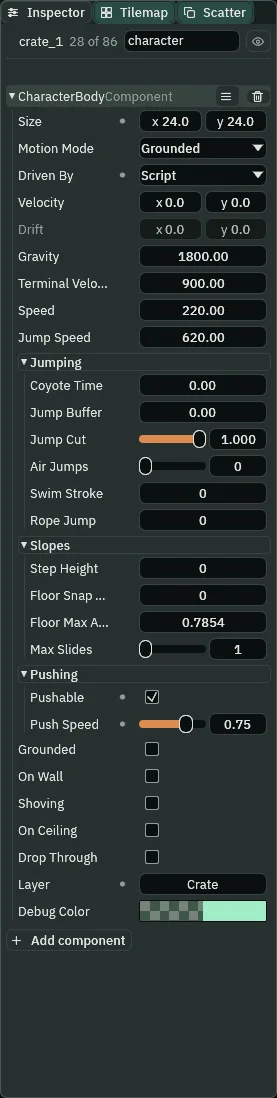
0.75; on Crate.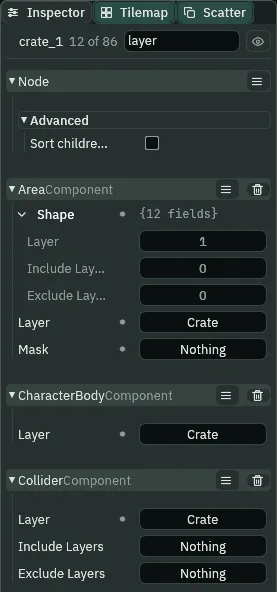
- Driven By
- The Character Body’s Driven By: who sets the body’s own velocity. Keys, as the knight’s, walks it with A and D and jumps it with Space; Script leaves it to a script. A crate is Script with no script, so nothing ever walks it: the keys never do, and only a shove, gravity and what the shove leaves it move it. Left at Keys, it would walk beside him. A new body’s is Keys.
- Pushable
- The Character Body’s Pushable, in its Pushing fold: ticked, a body that walks into this one shoves it along, instead of stopping. It needs a solid Collider of its own to be walked into, as each crate has. A new body’s is unticked: the knight is not pushable.
- Push Speed
- The Character Body’s Push Speed: how much of the pusher’s walk a shove gives this body, from
0to1. At1it keeps pace with him; at0.5, as a new body comes, it goes at half his speed, and he with it. The crates’0.75takes his walk of160a second to120while he shoves: he is slowed as by a weight, not stopped. - Layer
- The Collider’s Layer: the layers it is on, what it is to everything that meets it, looks for it or casts at it. A crate’s Collider is on Crate, as its body is: its body is what moves it and what it collides as, its Collider what the knight walks into and what another crate lands on. A new Collider is on World, as the tower’s stone is.
Every other field of a crate’s body is left as it comes. Nothing drives a crate, so its Speed and Jump Speed are never used; its Gravity, 1800, still pulls it down.
A grate he walks through
At the doorway’s west mouth, a grate stops crates, so none is shoved under the portcullis, and lets the knight through. It is a Collider on Grate: a crate, on Crate, meets it, and the knight, on Knight, whose box with Grate is the one unticked, passes. Its top rail is his step up to the shelf, so the rail must hold him, though it is a part of the grate.
- Select
storeroomand add a Sprite namedgrate: Position248,1568; Texturegrate.png, Size16,40, Anchor0.5,1, Sort Layer1. - Click Add component and choose ColliderComponent: Size
16,40, Offset0,-20. Click the button beside its Layer, untick World and tick Grate. - Select
grate, click + Add node and choose Node. Rename itgrate_railand set its Position to0,-40. - Click Add component and choose ColliderComponent: Size
16,3, Offset0,1.5. Click the button beside its Layer, untick World and tick Grate, like the grate. Click the button beside Include Layers and tick Knight.
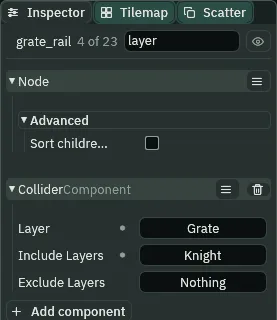
A child’s Position is from its parent: grate_rail at 0, -40 is at the top of the grate, 40 over the floor, and its box, 3 tall, lies over the picture’s top rail.
- Include Layers
- The Collider’s Include Layers: layers that meet this Collider whatever the matrix says. A body on one of them stands on it and is stopped by it. It does not put the Collider on them: the rail stays on Grate, a part of the grate to everything else. So the knight, whom the matrix passes through Grate, stands on the rail and still walks under it, through the bars. A new Collider’s is Nothing.
A shelf, a chute and a pillar
West of the grate is the way up: a shelf over the floor with crate_3 on it, a chute beside the shelf that a crate falls through, and a pillar under the opening in the ceiling to the ice hall.
- Select
storeroomand add a Sprite namedshelf: Position232,1452; Texturescaffold-plank.png, Size48,8, Draw Mode Tiled and Tile Size48,8. Add a ColliderComponent: Size48,8, and tick One Way. - Add another Sprite under
storeroom, namedchute: Position192,1452; Texturescaffold-plank.png, Size32,8, Draw Mode Tiled and Tile Size48,8. Add a ColliderComponent: Size32,8. Its Layer stays World. Click the button beside Exclude Layers and tick Crate. - Add a third,
storeroom_pillar: Position32,1572; Textureold-dark-castle-interior-tileset.pngwith Atlas Regionpillar, Size32,144, Anchor0.5,1, Sort Layer-1, Draw Mode Tiled and Tile Size32,72: the tileset’s pillar twice, one on the other. Add a ColliderComponent: Size32,144, Offset0,-72.
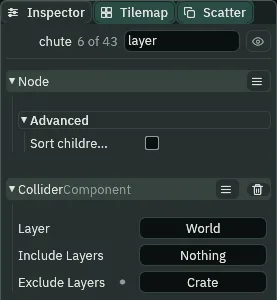
The shelf’s top is 120 over the floor: out of his reach from the floor, where his held jump lifts him 110, and in it from the rail, 40 up. The chute is a plank at the same height, so he stands on it, and a crate falls through it. The pillar stands 140 over the floor, its foot 4 into it behind the moss caps: two crates, 48, and his held jump clear its top by 18, and one crate leaves him 6 short. From its top he jumps up through the opening onto the ice hall’s floor.
- Exclude Layers
- The Collider’s Exclude Layers: layers that pass through this Collider whatever the matrix says. It does not take the Collider off its own Layer: the chute stays on World, so the knight stands on it, and a crate, on Crate, falls through it. Include and Exclude Layers count from either of two Colliders that meet, and where one includes a layer and the other excludes it, the exclude wins: they pass. A new Collider’s is Nothing.
The plate looks for crates
- Select
plate. Click the button beside its Area’s Mask, which reads Knight, and tick Crate as well: it reads Knight, Crate. Press Ctrl+S.
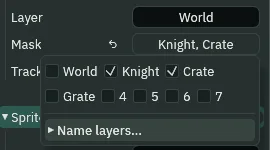
plate.rgs does not change: it counts whatever its Area notices, a crate as well as the knight. The storeroom is built.
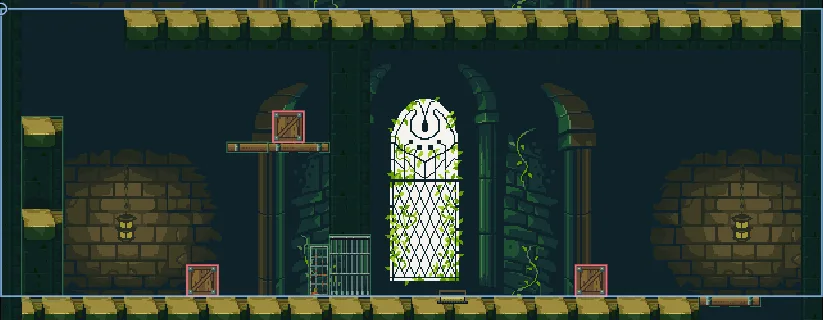
crate_2, the shelf with crate_3, the chute, the grate and its rail, the portcullis, the plate and crate_1.Shoving
- If you take chapter 4’s skip: with the game stopped, select
knightand set his Position to560,1568, on the scaffolding’s top plank. - Select
knight, so that the Inspector shows his Character Body while the game runs, and press F5. - Walk him up the scaffolding into the storeroom, and hold A: he walks into
crate_1and shoves it west, slower than he walks. In the Inspector, Shoving is ticked on every step he shoves. - Let go of A as the crate reaches the plate. The portcullis rises, and stays up with him off the plate.

55, 74 and 75 (0.92, 1.23 and 1.25 s), the editor in Play at 200%, framed on the plate, with the Collision, Triggers and Bodies gizmos, A held from step 0 to 74: he meets the crate on step 31. On step 74 the plate counts the crate, and on 75 the portcullis is up. The orange arrow under the crate is its Drift, the shove. For this picture he was stood on the scaffolding’s top plank from the start, at the skip’s 560, 1568.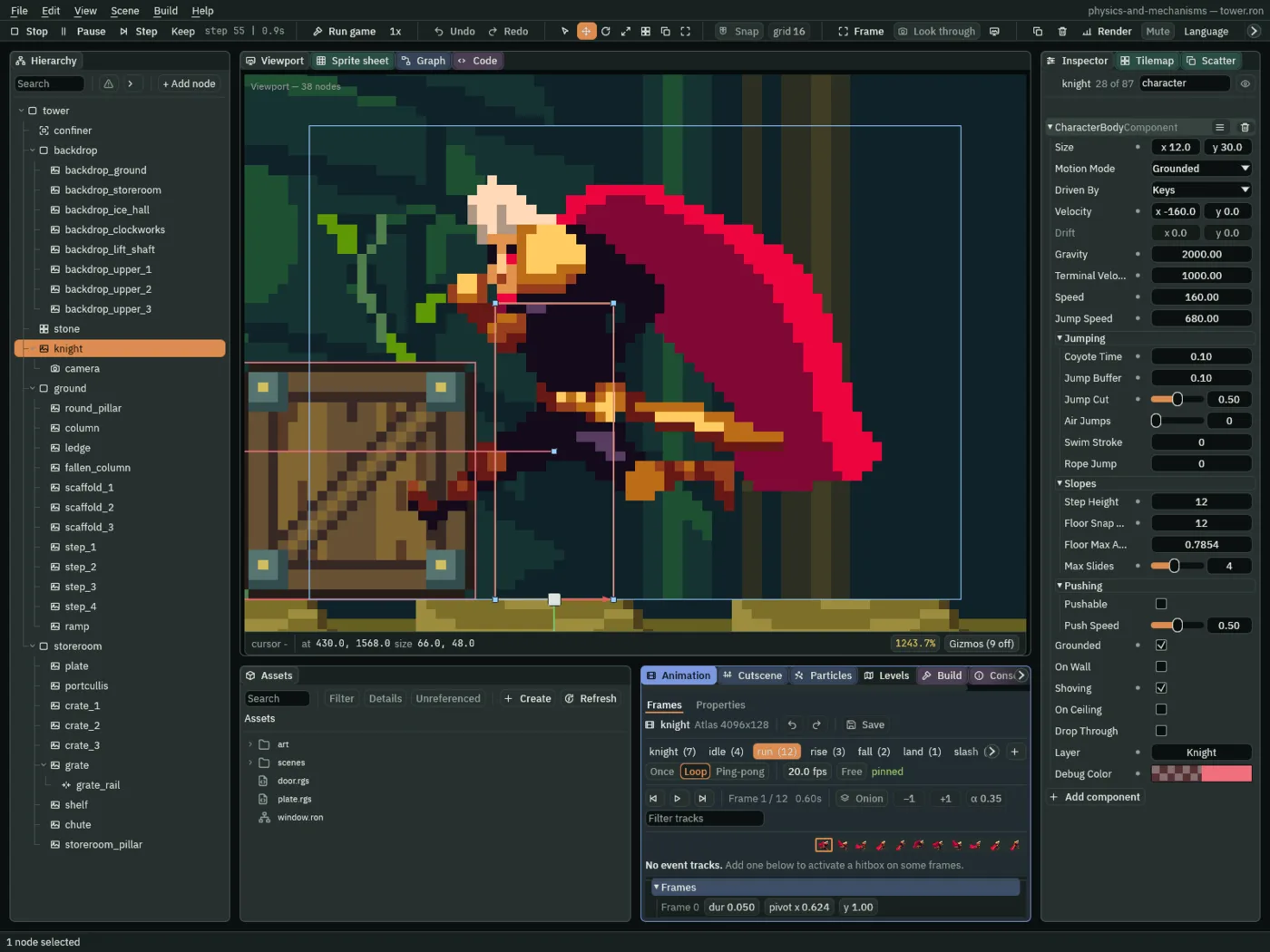
55 of the same run (0.92 s): Shoving ticked, live. His Velocity reads -160, his walk; the crate holds him to its 120.- Shoving
- The Character Body’s Shoving, read live in Play: ticked on a step this body shoved a Pushable body along. It is off when he walks free, and off when what he walks into will not give way: then he is On Wall instead. The body writes it every step, so there is nothing to type.
- On Wall
- The Character Body’s On Wall, read live, as in chapter 2: ticked on a step his walk was stopped sideways. A crate that cannot move, against the grate or the pillar, stops him as a wall does, and he is On Wall, not Shoving.

74, 78, 84 and 92 of the same run (1.23, 1.30, 1.40 and 1.53 s), framed on the plate as the strip above: A is let go of on step 74, as the plate counts the crate. The crate goes on from x 372 to 367, 364.2 and 363.2, and rests at 363 by step 94; the orange Drift arrow under its feet shortens as it goes. He stands where he let go, at 392.
90, 98, 104 and 112 of a run with A held from the start (1.50, 1.63, 1.73 and 1.87 s), framed on the plate: both on the plate, the portcullis up; the crate off its far side, him still on it; both off it, and the portcullis down on step 104; from step 110 the crate against it, at x 300, and he behind it. For this picture he was stood on the scaffolding’s top plank from the start, at the skip’s 560, 1568.The way up
- With the crate on the plate, hop over it: tap Space with A held. Walk on west, under the raised portcullis and through the grate.
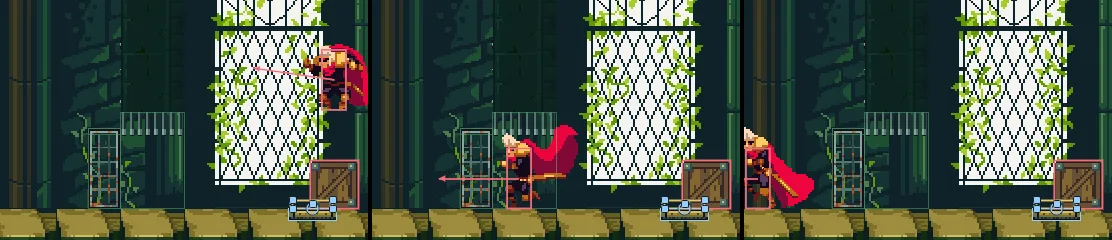
105, 140 and 165 (1.75, 2.33 and 2.75 s). A from step 94 with Space from 94 to 97, a short hop; the portcullis stays up on every step, the crate holding the plate down.A crate does not get through. Here crate_2 is shoved east, into the grate: it stops at the grate’s west face, and the knight behind it is stopped too.

0, 20, 39 and 50 (0.00, 0.33, 0.65 and 0.83 s), the editor in Play at 200%, framed on the grate: D held from step 0 to 60. On step 39 the crate meets the grate. For this picture he was stood west of crate_2 from the start.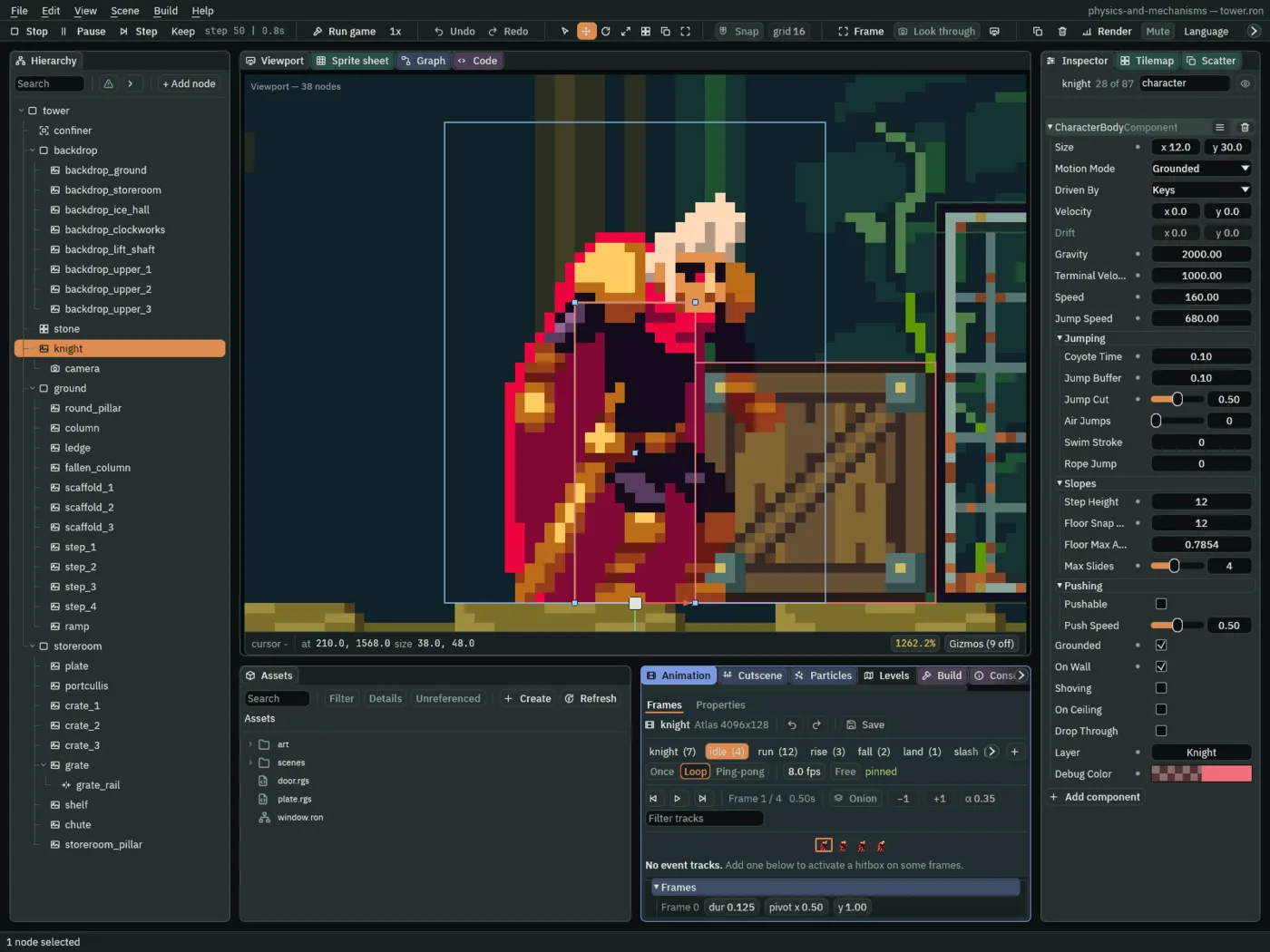
50 of the same run (0.83 s): On Wall, not Shoving. The crate will not give way, so to him it is a wall.You need not do that yourself: crate_2 has to stay where it is, under the chute. If you do, press Stop and Play and climb back.
- From the floor just west of the grate, jump back east onto its rail: hold D, press Space, and let go of D as he comes over it. From the rail, jump up through the shelf onto it.
- On the shelf, walk west into
crate_3, and keep walking: it goes off the shelf’s west end, falls through the chute ontocrate_2, and stands on it. Walk on onto the chute and stop there.
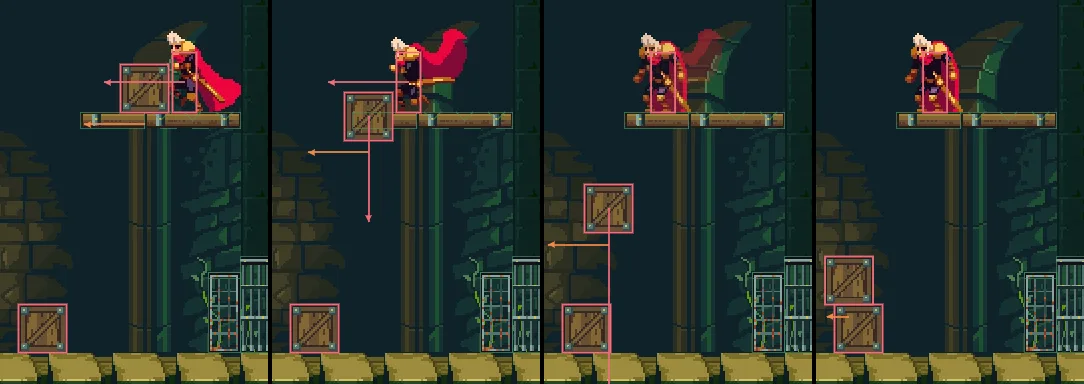
10, 22, 30 and 40 (0.17, 0.37, 0.50 and 0.67 s), the editor in Play at 200%, framed on the pillar: A held from step 0 to 23. The crate leaves the shelf on step 16 and lands on crate_2 on step 35. For this picture he was stood on the shelf, east of crate_3, from the start.- Walk back east onto the shelf and drop through it: S with Space. He lands on the floor east of the stack.
- Hold A: he shoves the stack west, the top crate riding the bottom one, until the pillar stops it.
- Jump onto the stack. From it, jump onto the pillar, holding A. From the pillar, jump with D held, up through the opening onto the ice hall’s floor.
- Press F5 to stop. If you took the skip, select
knightand set his Position back to48,1792, his start.
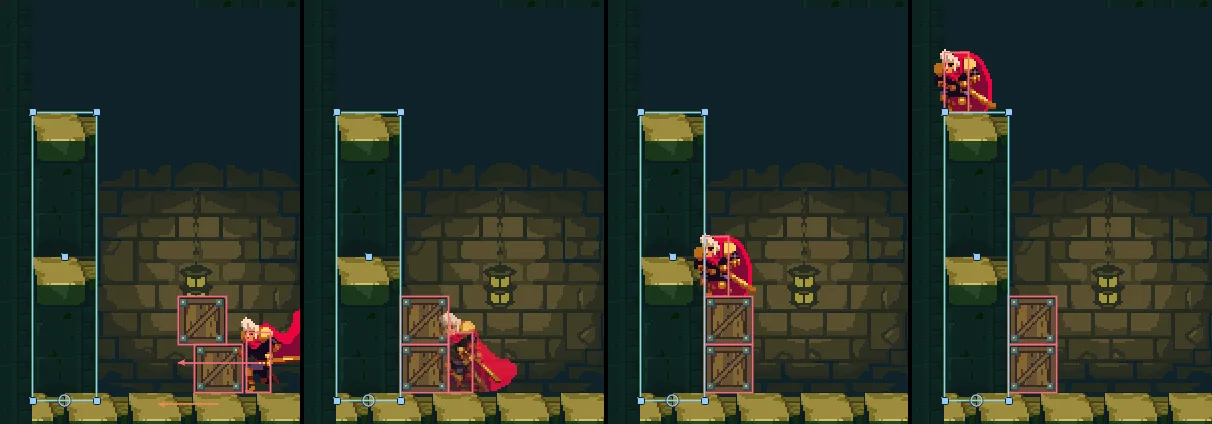
130, 157, 200 and 235 (2.17, 2.62, 3.33 and 3.92 s). D from step 53 to 62 and S with Space on 62 drop him through the shelf; A from 90 to 161 shoves the stack, which the pillar stops on 155; A with Space from 165 to 200, and from 203 to 236, jump him onto the stack and the pillar.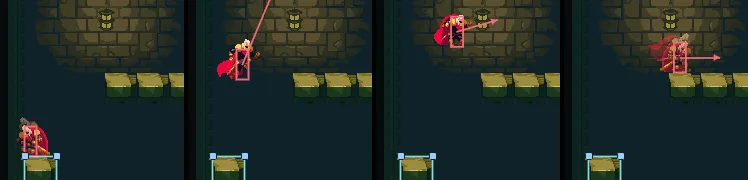
239, 248, 258 and 271 (3.98, 4.13, 4.30 and 4.52 s), D with Space from 239 to 271. Framed on the pillar at 100%: at 200% the opening is above the view.The chute is no way round the stack: under the ice hall’s slab, a jump from it rises 42 at most before his head meets the slab, and it comes down short of the pillar.
The layers, the crates and the grate
| Where | Field | Value |
|---|---|---|
| Project settings, Physics | Layer names | 0 World, 1 Knight, 2 Crate, 3 Grate |
| Collision matrix | every box ticked but Knight with Grate |
| Node | Component | Field | Value |
|---|---|---|---|
knight | Character Body | Layer | Knight |
plate | Area | Mask | Knight, Crate |
crate_1, crate_2, crate_3 | Position | 460, 1568; 157, 1568; 224, 1448 | |
| Sprite | Texture, Size | crate.png, 24, 24 | |
| Anchor, Sort Layer | 0.5, 1; 2 | ||
| Character Body | Size | 24, 24 | |
| Driven By | Script | ||
| Pushable, Push Speed | ticked, 0.75 | ||
| Layer | Crate | ||
| Collider | Size, Offset | 24, 24; 0, -12 | |
| Layer | Crate | ||
| Area | Shape › Size, Offset | 24, 24; 0, -12 | |
| Layer | Crate | ||
| Mask | Nothing |
| Node | Component | Field | Value |
|---|---|---|---|
grate | Position | 248, 1568 | |
| Sprite | Texture, Size | grate.png, 16, 40 | |
| Anchor, Sort Layer | 0.5, 1; 1 | ||
| Collider | Size, Offset | 16, 40; 0, -20 | |
| Layer | Grate | ||
grate_rail, under grate | Position | 0, -40 | |
| Collider | Size, Offset | 16, 3; 0, 1.5 | |
| Layer | Grate | ||
| Include Layers | Knight | ||
shelf | Position | 232, 1452 | |
| Sprite | Texture, Size | scaffold-plank.png, 48, 8 | |
| Draw Mode, Tile Size | Tiled, 48, 8 | ||
| Collider | Size | 48, 8 | |
| One Way | ticked | ||
chute | Position | 192, 1452 | |
| Sprite | Texture, Size | scaffold-plank.png, 32, 8 | |
| Draw Mode, Tile Size | Tiled, 48, 8 | ||
| Collider | Size | 32, 8 | |
| Layer | World | ||
| Exclude Layers | Crate | ||
storeroom_pillar | Position | 32, 1572 | |
| Sprite | Texture, Atlas Region | the tileset, pillar | |
| Size, Anchor | 32, 144; 0.5, 1 | ||
| Sort Layer | -1 | ||
| Draw Mode, Tile Size | Tiled, 32, 72 | ||
| Collider | Size, Offset | 32, 144; 0, -72 |
Every other field is as it comes. Every node here is under storeroom but the rail, which is under grate.