Tutorials · Physics and Mechanisms · Chapter 12
The flooded cellar
By the end
- A cellar painted under the ground floor with the tilemap’s Pick, Stamp and Erase: its walls, its base, a pier, and H0 cut through the ground floor’s slab
- A hatch over H0, a One Way plank he walks over and drops through with S and Space
- Water: an Effector of the Buoyancy kind, its Waterline the water’s top, its Density the lift that floats him and a crate two-thirds under, its Drag what stops his plunge
- His Swim Stroke, the one way up out of water: through H0 onto the hatch, or onto the pier, where the water is shallow enough to wade
- A crate shoved off the pier that glides, slows and floats at the line its density sets
On this page
Under the ground floor
Under the ground floor is a cellar, flooded. It is off the climb, so there is no floor to skip to: its hatch is a few steps east of the knight’s start, and every run on this page starts there. The tower grows down to make room for it. Since y grows downward, nothing above moves, and his start stays 48, 1792.
- Select
tower, click + Add node and choose Node. Rename itcellar. The hatch, the water and the crate in this chapter go under it; the cellar’s backdrop goes underbackdrop, with the others. - Keep Collision, Triggers, Forces and Bodies ticked in the Gizmos menu under the Viewport, as chapter 9 left them. The pictures on this page have all four on.
The cellar, painted
The tower’s tilemap ends at row 113, the ground floor’s slab. The cellar is rows 114 to 127 under it: a room 192 tall, from y 1824, the slab’s underside, to y 2016, its base’s top. Its walls, its base and a pier standing on its floor are all copies of cells the tower already has, lifted with Pick and put down with Stamp, as chapter 10 laid the loft’s floor. Then Erase cuts H0, a hole through the ground floor’s slab, a few steps east of his start. Copy the floor before you cut the hole, or the copies carry it.
- Select
stonein the Hierarchy and open the Tilemap tab beside the Inspector. Under Layers, clickstone. - Click Pick, or press I over the Viewport, and drag over the west wall’s two cells just over the ground floor: column
0of rows110and111, x0, y1760to1792. - Click Stamp, or press S, and click column
0of row114, x0, y1824. Click again at rows116,118,120,122,124and126, y1856,1888,1920,1952,1984and2016: the west wall, down to y2048. - With Pick, drag over the east wall’s two cells the same way: column
39of rows110and111, x624. - With Stamp, click column
39of row114, x624, y1824, and again at rows116,118,120,122,124and126. - With Pick, drag over the ground floor’s floor, both its rows,
112and113, from column1to column38: x16to624, y1792to1824. - With Stamp, click column
1of row126, x16, y2016: the cellar’s base, its top224under the ground floor’s. - With Pick, drag over columns
18to25of the same floor, both rows: x288to416. - With Stamp, click column
18of row117, x288, y1872: the pier’s moss-capped top. - With Pick, drag over the storeroom’s inner wall, the one over the doorway its portcullis shuts: columns
16and17of rows87to93, x256to288, y1392to1504. - With Stamp, click row
119, y1904, at columns18,20,22and24, x288,320,352and384: the pier’s stone, from under its top down to the cellar’s floor. - Click Erase, or press E, and drag over columns
6to9of rows112and113: x96to160, y1792to1824. That is H0. - Click Save at the top of the Tilemap panel.
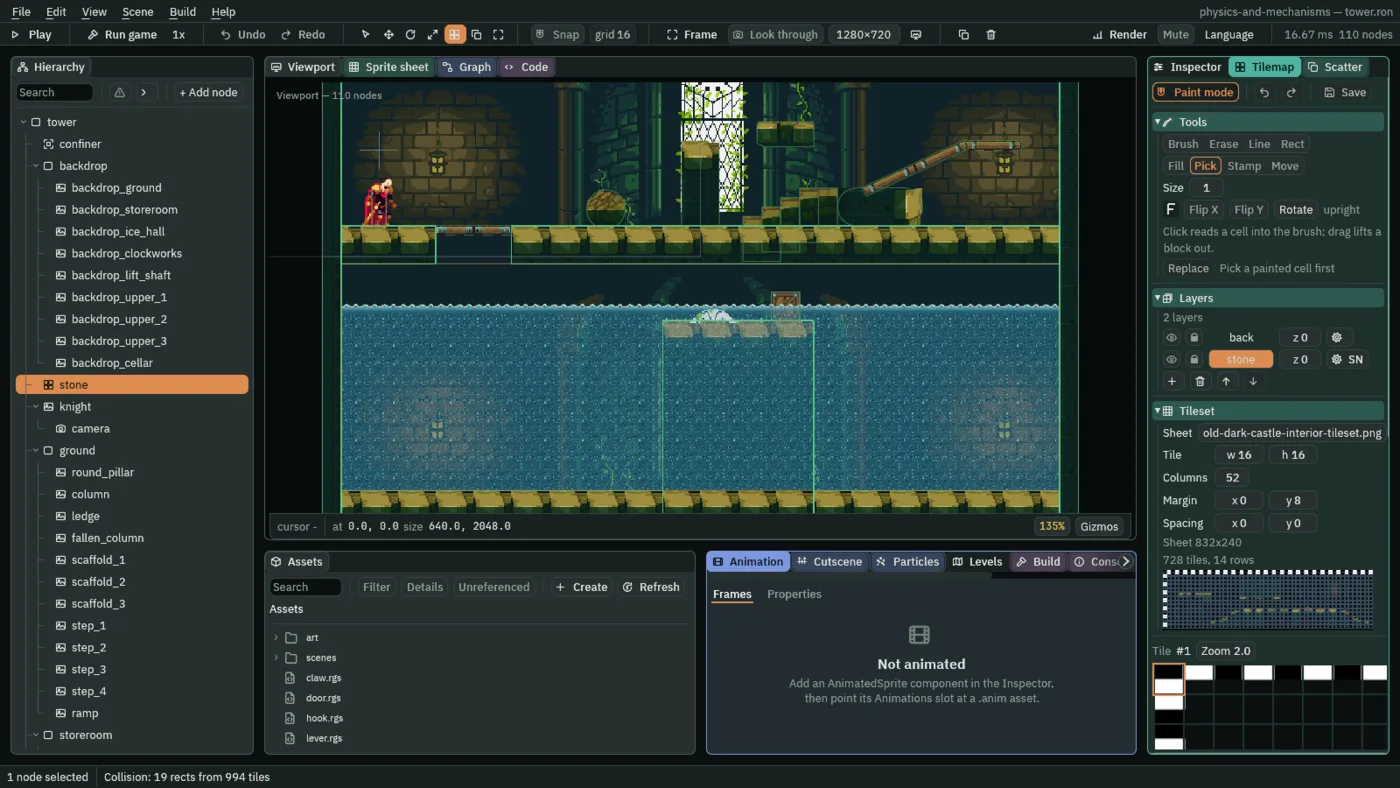
stone the layer: the green boxes are the tilemap’s collision, drawn while the Tilemap tab is open. H0 is the gap in the slab’s box.- Erase
- The tilemap painter’s Erase, E: clears every cell the drag passes over, on the chosen layer. A cleared cell of a solid layer stops nothing, so H0 is a hole through the slab’s stone.
The pier stands on the cellar’s floor from x 288 to 416, its top at y 1872. Save writes the tilemap, its own file in art; Ctrl+S saves it with the scene.
The camera and the backdrop
The camera follows him, but the Confiner keeps its view inside the tower as it was, down to the ground floor. Grown over the cellar, it lets the view follow him down. Behind the cellar goes the castle’s hall, as behind every floor.
- Select
confinerand set its Position to320,1024and its Bounds to640,2048: the whole tower as it now is, from y0to2048. - Select
backdrop, click + Add node and choose Sprite. Rename itbackdrop_cellarand set its Position to0,1792. Dragart/old-dark-castle-interior-background.pngonto Texture, set Size to640,224, Anchor to0,0and Sort Layer to-10, and in its Draw mode fold set Draw Mode to Tiled and Tile Size to960,304, as the eight backdrops above it.
- The Confiner’s Bounds
- The Confiner’s Bounds: the rectangle the camera’s view is kept inside, its width and height in world units, centred on the Confiner’s Position.
640by2048at320,1024runs from the tower’s top to the cellar’s bottom.
A hatch over H0
A hole a few steps from his start would drop him the moment he walked east. A hatch over it is a plank he walks over, as over the floor, and drops through when he means to: chapter 3’s One Way scaffolding, laid flush with the floor. Two leaves, one picture flipped, meet over H0’s middle, x 128.
- Select
cellar, click + Add node and choose Sprite. Rename ithatchand set its Position to128,1796. Dragart/hatch.pngonto Texture, and set Size to32,8, Anchor to1,0.5and Sort Layer to1: the west leaf, from x96to128. - Click Add component and choose ColliderComponent. Set its Size to
64,8and tick One Way: one plank over the whole of H0, its top at y1792, flush with the floor. - Select
hatch, click + Add node and choose Sprite. Rename ithatch_east; its Position stays0,0. Dragart/hatch.pngonto Texture, set Size to32,8, Anchor to0,0.5and Sort Layer to1, and tick Flip › X: the east leaf, from x128to160, hinged at H0’s east face.
Standing on it, S with Space drops him through, as through chapter 3’s planks; with one foot on the stone beside it, the same keys jump. So stand him wholly on the hatch first: from his start, about half a second of D.
The water
The water is an Effector, as chapter 10’s updraft is, of another kind: Buoyancy. Its Area is where it acts, the whole cellar room; its Waterline is where its top is. A body in the Area is lifted by how much of it is under the line, and its fall is slowed by the same share.
- Select
cellar, click + Add node and choose Effector. Rename itwaterand set its Position to320,1858. - In its Area, open Shape and set Size to
608,192and Offset to0,62: the cellar room, x16to624, y1824to2016. Click the button beside Mask, untick World, and tick Knight and Crate, as every effector’s in the tower. - In its Effector, set Kind to Buoyancy, Waterline to
2, Density to1.5and Drag to5. Leave Priority at0and Enabled ticked. - Click Add component and choose SpriteComponent. Drag
art/water-surface.pngonto Texture, set Size to608,8, Anchor to0.5,0and Sort Layer to6, and in Draw mode choose Tiled with a Tile Size of16,8: the foam along the water’s top. - Select
water, click + Add node and choose Sprite. Rename itwater_depthand set its Position to0,8. Dragart/water.pngonto Texture, set Size to608,150, Anchor to0.5,0and Sort Layer to6, and choose Tiled with a Tile Size of16,16: the water, down to the floor.
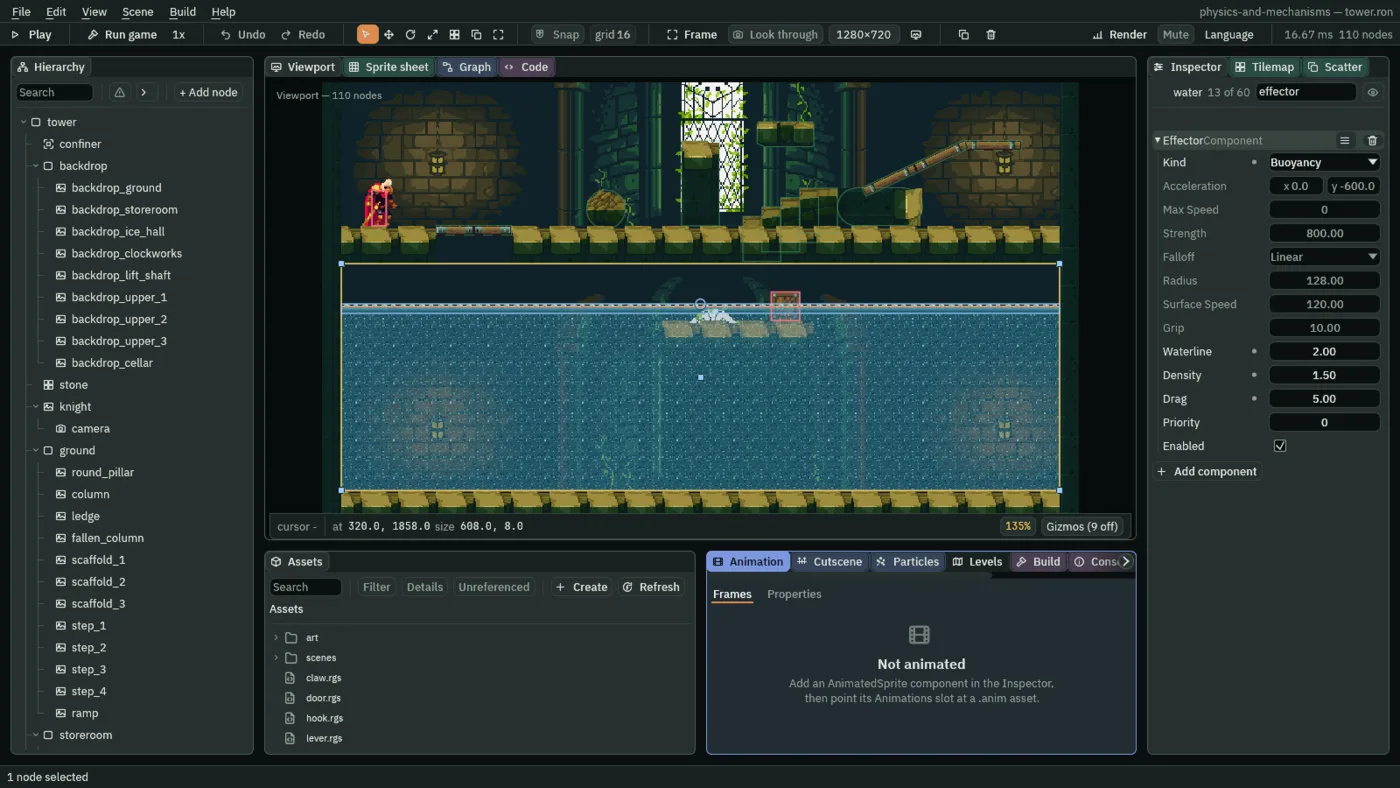
2 under the node, drawn by the Forces gizmo along the foam.- Kind › Buoyancy
- The Effector’s Kind for water. Every step it lifts each body in its Area by its Density times the body’s own Gravity times the share of the body under its Waterline, and slows the body’s fall or rise by its Drag times the same share. A body in the Area wholly over the line is neither lifted nor slowed. It reads Waterline, Density and Drag, and dims the rows of the other kinds. Unity’s Buoyancy Effector 2D is the same idea, its Surface Level this Waterline; Godot has no water of its own.
- Waterline
- The Effector’s Waterline: where the water’s top is, in world units under the node’s own Position, not the Area’s. The node is at y
1858, so2puts the top at y1860,36under the cellar’s ceiling. The Forces gizmo draws it as a line across the Area. The pictures do not follow it: they hang from the node. A new Effector’s is0. - Density
- The Effector’s Density: the lift on a body wholly under, as a multiple of that body’s own Gravity; a body partly under gets that share of it. A body floats still where the lift is its weight, with one part in Density of it under: at
1.5, two-thirds. A crate,24tall, floats with16under; the knight,30tall, with20. Since it counts against each body’s own Gravity, his2000and a crate’s1800float alike. A new Effector’s is1.2. - Drag
- The Effector’s Drag: how much of a body’s motion the water takes away each second, times the share of it under; at
5, a body all under loses a twelfth of it each step. It takes the share of the motion the world gave: the body’s fall and rise, and its Drift, such as a shove’s glide. It never takes what the body’s own keys or script drive, so in the water he walks, and floats along, at his full Speed. Drag is what stops his plunge short of the floor and stills his bob. A new Effector’s is4.
A crate on the pier
- Right-click
crate_5in the Hierarchy and choose Duplicate. Drag the copy ontocellar, rename itcrate_11, and set its Position to392,1872: on the pier’s east end.
Over the pier the water is 12 deep. A crate needs 16 under to float and the knight 20, more than the water there is, so neither floats on the pier: the crate rests on it, and he stands. The pier is the cellar’s shallows.
Down the hatch
- Select
water, so its waterline is drawn bright, and press F5. - Hold D for about half a second, until he stands on the hatch, and let go. He stands on it as on the floor.
- Press S and Space together. He drops through the hatch, through H0, and the camera follows him down into the water.
- Move the pointer over the Viewport and press F: the Viewport frames
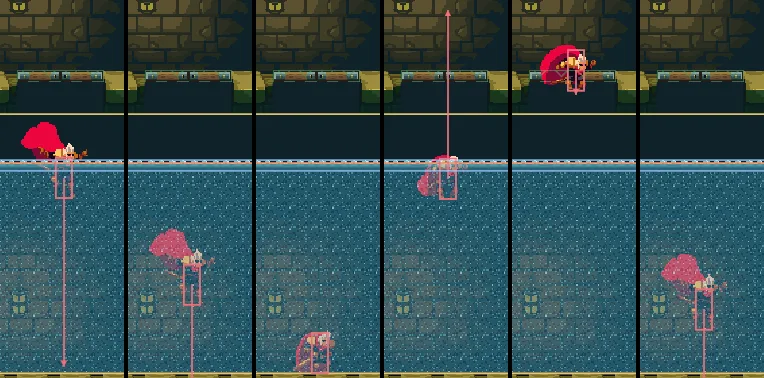
water, the whole cellar, as in the pictures. Watch him plunge, bob back up past where he comes to rest, and settle. The plunge is over in a second: to see it step by step, press Pause or F6 as he drops, then Step or F7, and watch the Play bar’s step counter. Press F5 to stop.
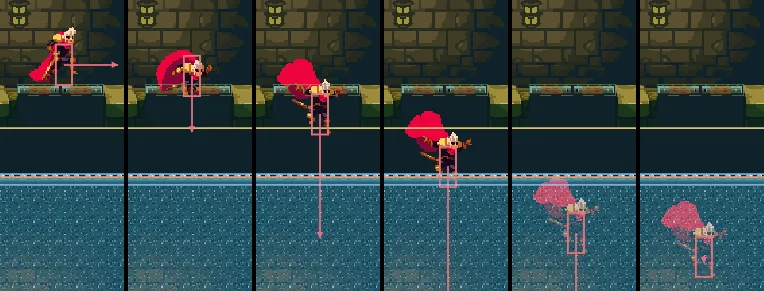
31, 37, 43, 48, 55 and 64 (0.52, 0.62, 0.72, 0.80, 0.92 and 1.07 s), the editor in Play at 135%, water selected and framed: D held from step 0 to 31 walks him from his start onto the hatch, and S with Space from 32 to 33 drops him through it. He falls 68 to the water’s top, and the water stops him on step 64, his feet 54 under where he will float and 82 over the cellar’s floor.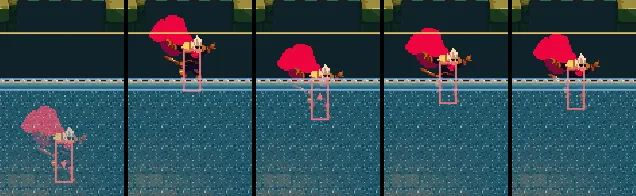
64, 100, 120, 140 and 400 (1.07, 1.67, 2.00, 2.33 and 6.67 s). On step 100 his feet are 13 over his line, on step 120 7 under it, each bob smaller; by step 400 he floats still, his feet 20 under the water’s top.Afloat, his Grounded is never ticked: he stands on nothing. So his jump is no jump, and his State Machine, which picks his clips from what his body says, plays his fall clip the whole time he floats, bobbing up or down.
A stroke
Floating, he cannot jump, and nothing else lifts him: the hatch is over his head, out of reach of the water’s lift. A Swim Stroke is his way out. It is a field of his Character Body, in the Jumping fold beside Air Jumps, which chapter 3 left at 0.
- Press F5 to stop if the game is running. Select
knight, and in his Character Body’s Jumping fold set Swim Stroke to680, the same as his Jump Speed.
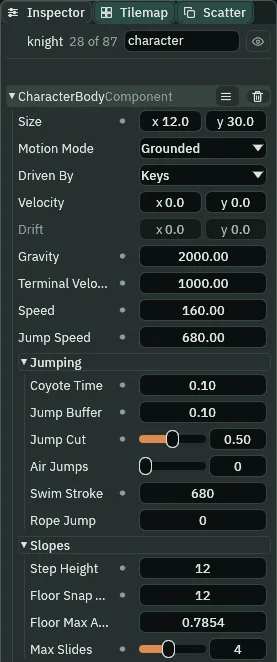
680, in the Jumping fold.- Swim Stroke
- The Character Body’s Swim Stroke, in its Jumping fold, in world units a second: the upward speed a press of jump sets while the middle of his box is under a Buoyancy waterline and he is neither on the ground nor within his Coyote Time. Once a press: held, it strokes once; let go and pressed again, it strokes again. Letting go does not cut it short, as it cuts a jump, and it spends no air jump. On the ground a press is a jump, as ever. With his middle out of the water, at the top of a stroke’s rise, a press is nothing. His
680, his Jump Speed, lifts him from his line out through H0.0, as it comes, cannot swim.
- Select
waterand press F5. Walk him onto the hatch with D, drop through with S and Space, and press F over the Viewport. - Wait until he floats still under the hatch, about six seconds after the drop. Press Space once. He rises out of the water, up through H0 and past the hatch, which lets him through from below, and lands on it, where he went down. Press F5 to stop.
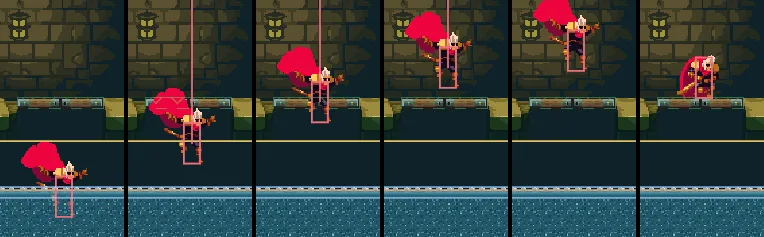
400 to 401: steps 400, 404, 408, 413, 420 and 430 (6.67, 6.73, 6.80, 6.88, 7.00 and 7.17 s). His feet top out on step 420, 20 over the hatch’s top, and he lands on it on step 430.Taken while he still plunges or bobs, a stroke works too, as long as his middle is under. Two strokes from the bottom of his plunge, the second pressed after the first is let go of, bring his middle up over the water’s top in under half the time the water alone takes.
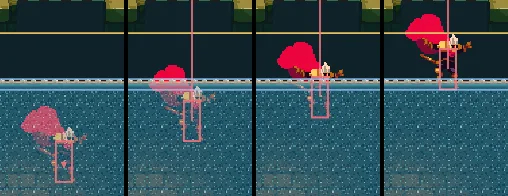
64 to 68, held from the bottom of his plunge, and again from 69 to 70: steps 64, 67, 69 and 71 (1.07, 1.12, 1.15 and 1.18 s). The strokes go down on steps 65 and 70, and his middle is over the water’s top on step 71. With no stroke the water alone takes him there on step 94: the bob strip above has him still deep on step 64 and bobbed up by step 100.Try it: no stroke
- Select
knightand set Swim Stroke to0, what he had before this chapter. - Select
water, press F5, walk onto the hatch and drop through. Press Space as often as you like, in his plunge and once he floats: nothing lifts him, and he floats under the hatch for good. Press F5 to stop. - Set Swim Stroke back to
680.
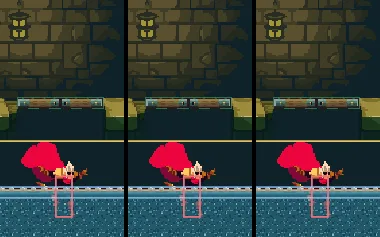
0, and Space from step 400 to 401 as above: steps 400, 410 and 420 (6.67, 6.83 and 7.00 s). He stays at his line.The pier and the crate
- Select
waterand press F5. Walk onto the hatch, drop through, press F over the Viewport, and wait until he floats still. - Hold D. He floats east at his walk until the pier’s face stops him, its top
8over his feet. - Keep D held and press Space: a stroke lifts him over the pier’s top, and he lands on it, the water to his knees.
- Keep D held. He wades east at his full walk, meets the crate and shoves it off the pier’s east end. Let go of D once the crate is off, before he follows it. The crate glides on through the deep water, slows, bobs and floats still. Press F5 to stop.

400 to 514 and Space from 460 to 461: steps 445, 458, 465, 475 and 490 (7.42, 7.63, 7.75, 7.92 and 8.17 s). The pier’s face stops him on step 458; he lands on its top on step 475 and wades on at his walk, 2.67 a step, as on dry stone.
494, 514, 530, 560 and 800 (8.23, 8.57, 8.83, 9.33 and 13.33 s). He meets the crate on step 494; D is let go of on step 514, with the crate off the pier’s end. Its glide, the orange Drift arrow, is bled by the Drag times its share under, and it comes to rest at x 463.5, floating at y 1876, its bottom 16 under the water’s top.- Step Height, afloat
- The Character Body’s Step Height, in its Slopes fold, which chapter 3 set to
12: the highest step he walks up as he walks, from the ground (or on the step he lands). Afloat he is neither, so it climbs nothing, however small the step.
Try the water’s fields
Try it: no drag
- Select
waterand set Drag to0. - Press F5, walk onto the hatch, drop through and press F over the Viewport. Nothing slows his plunge: he goes down to the cellar’s floor, the water throws him back up out of it into H0, and down he goes again, deep into the water. Press F5 to stop.
- Set Drag back to
5.
0: steps 50, 60, 70, 100, 120 and 150 (0.83, 1.00, 1.17, 1.67, 2.00 and 2.50 s), the keys as in the drop strip. He reaches the floor on step 70, is thrown up out of the water by step 120, and by step 150 is deep in it again, falling.Try it: a lower waterline
- Select
waterand set Waterline to40. The gizmo’s line drops38; the foam does not move, since the pictures hang from the node. - Press F5, walk onto the hatch, drop through and press F over the Viewport. He floats
38lower, at the new line. Once he floats still, press Space: the stroke lifts him into H0, but from there his feet stay short of the hatch’s top, and he falls back into the water. Press F5 to stop. - Set Waterline back to
2.
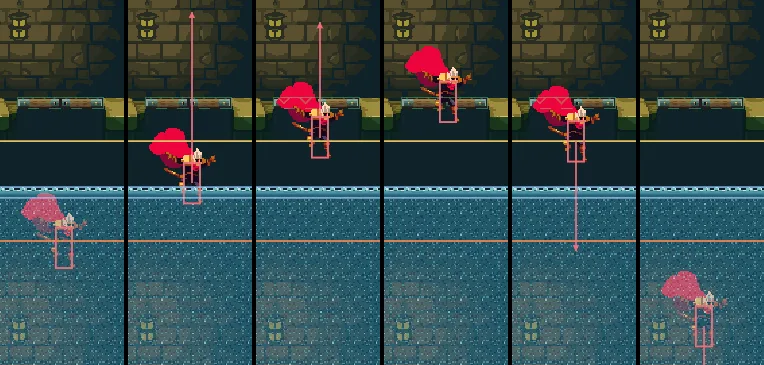
40, and Space from step 400 to 401: steps 400, 405, 410, 420, 430 and 450 (6.67, 6.75, 6.83, 7.00, 7.17 and 7.50 s). His feet top out on step 420, 18 under the hatch’s top.Try it: denser water
- Select
waterand set Density to2.5. - Press F5, walk onto the hatch, drop through and press F over the Viewport. He floats higher, with two-fifths of him under, his middle over the water. Press Space: nothing, for a stroke asks for his middle under. Press F5 to stop.
- Set Density back to
1.5.
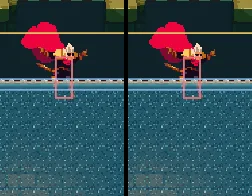
2.5, and Space from step 400 to 401: steps 400 and 420 (6.67 and 7.00 s). His feet are 12 under the water’s top, and the press changed nothing.The way back up
Without a stroke he would never leave the cellar: nowhere else in it leads out, and afloat he climbs onto nothing. With one, the way back up is the way he came: from rest under H0, Space lifts him through it, clear of its sides, and up past the hatch, his feet 15 or more over its top, and he lands on it where he went down.
The cellar is off the climb. The whole climb still goes from his start up to the belfry’s floor, walking over the hatch on the way, and every jump on it clears what it reaches by 15 or more.
The cellar
| Where | What | Cells | Value |
|---|---|---|---|
stone, layer stone | west wall | column 0, rows 114 to 127 | the wall’s two cells over the ground floor, stamped at rows 114, 116 … 126 |
| east wall | column 39, rows 114 to 127 | the same, column 39 | |
| base | columns 1 to 38, rows 126, 127 | the ground floor’s floor, stamped at column 1 of row 126 | |
| pier’s top | columns 18 to 25, rows 117, 118 | the ground floor’s floor, stamped at column 18 of row 117 | |
| pier’s stone | columns 18 to 25, rows 119 to 125 | the storeroom’s inner wall, stamped at columns 18, 20, 22, 24 of row 119 | |
| H0 | columns 6 to 9, rows 112, 113 | erased |
| Node | Component | Field | Value |
|---|---|---|---|
confiner | Position | 320, 1024 | |
| Confiner | Bounds | 640, 2048 | |
backdrop_cellar | Position | 0, 1792, under backdrop | |
| Sprite | Texture, Size | old-dark-castle-interior-background.png, 640, 224 | |
| Anchor, Sort Layer | 0, 0; -10 | ||
| Draw Mode, Tile Size | Tiled, 960, 304 | ||
cellar | (a Node) | under tower | |
hatch | Position | 128, 1796 | |
| Sprite | Texture, Size | hatch.png, 32, 8 | |
| Anchor, Sort Layer | 1, 0.5; 1 | ||
| Collider | Size, One Way | 64, 8; ticked | |
hatch_east | Position | 0, 0, under hatch | |
| Sprite | Texture, Size | hatch.png, 32, 8 | |
| Anchor, Sort Layer | 0, 0.5; 1 | ||
| Flip › X | ticked |
| Node | Component | Field | Value |
|---|---|---|---|
water | Position | 320, 1858 | |
| Area | Shape › Size, Offset | 608, 192; 0, 62 | |
| Mask | Knight, Crate | ||
| Effector | Kind | Buoyancy | |
| Waterline, Density, Drag | 2; 1.5; 5 | ||
| Sprite | Texture, Size | water-surface.png, 608, 8 | |
| Anchor, Sort Layer | 0.5, 0; 6 | ||
| Draw Mode, Tile Size | Tiled, 16, 8 | ||
water_depth | Position | 0, 8, under water | |
| Sprite | Texture, Size | water.png, 608, 150 | |
| Anchor, Sort Layer | 0.5, 0; 6 | ||
| Draw Mode, Tile Size | Tiled, 16, 16 | ||
crate_11 | Position | 392, 1872, a copy of crate_5 | |
knight | Character Body | Swim Stroke | 680 |
Every new node but backdrop_cellar is under cellar, and every other field is as it comes.