Tutorials · Physics and Mechanisms · Chapter 10
The updraft
By the end
- The loft’s floor painted over the upper hall with the tilemap’s Pick and Stamp, with H6 left open at the west wall
- An Effector over the vent: Directional, its Acceleration up, a Max Speed it blows him no faster than, saved switched off
- A crosswind over the shaft’s head whose higher Priority takes over where the two winds meet, and blows him east onto the loft
- A lever that switches the vent on and off with E, by two short scripts and a Signal, from anywhere in its reach
- His Drift, the world’s share of his motion, read live, and a crate that rides the draft as he does
On this page
Start on this floor
Chapter 9’s lift leaves the knight on the upper hall’s floor, just west of H5. The upper hall is three floors tall, with nothing in it to climb. This chapter lays the first floor across it, the loft, and a shaft up to it at the west wall, H6, with a wind that blows up the shaft once a lever is thrown.
- Select
knightand set his Position to489,672. Press F5: he stands on the upper hall’s floor, west of H5, and the hall rises empty over him. Press F5 to stop. - Set his Position back to
48,1792, or press Ctrl+Z until it reads so. - Select
tower, click + Add node and choose Node. Rename itupper_hall. Every node in this chapter goes under it, butcrosswind_streaks, which goes undercrosswind.
The loft’s floor
The floors are cells of the tilemap stone, two rows each: the moss caps, and the stone under them. The loft’s floor is two such rows, 224 over the upper hall’s floor, painted as copies of that floor’s own cells. The tilemap painter’s Pick lifts a block of cells; its Stamp puts the block down again, as many times as you like.
- Select
stonein the Hierarchy and open the Tilemap tab beside the Inspector. Under Layers, clickstone. - Click Pick, or press I over the Viewport. Drag over the upper hall’s floor, both its rows, from x
96, column6, to x544, column33, the last cell before H5. The bar along the bottom of the window says “Lifted 28x2”. - Click Stamp, or press S. The block’s outline follows the pointer, its top left corner at the cell under it; the cursor readout under the Viewport says where that is. Click at x
96, y448: column6of row28. - With Pick again, drag over the same floor from column
6to column10, five cells, both rows. - With Stamp, click on row
28at the first empty cell east of the slab you just stamped, so the slab runs on over H5 to the east wall at x624. - Click Save at the top of the Tilemap panel.
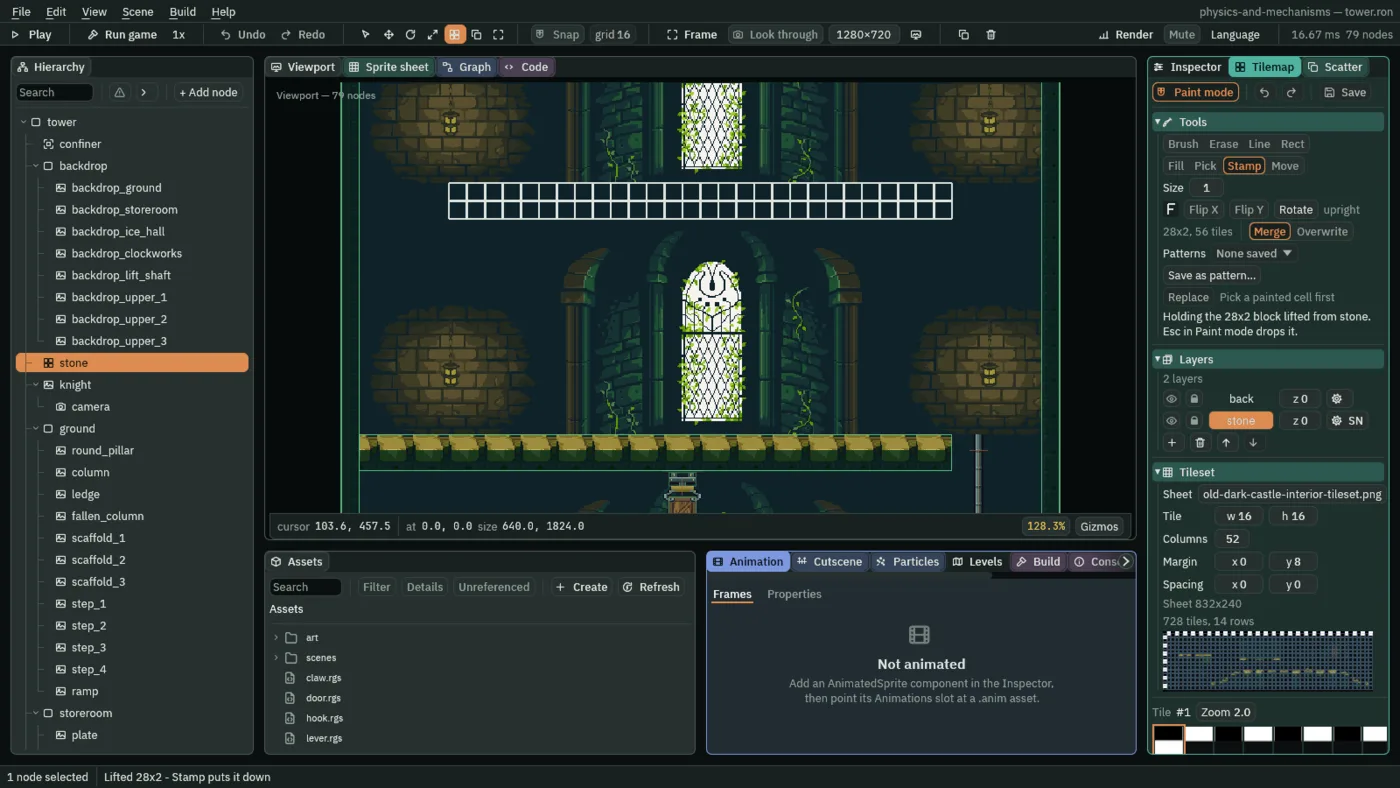
28 cells by 2, and Stamp showing where it will land, its corner at the cursor, x 96, y 448.The first stamp is the floor from x 96 to 544; the second carries it over H5, five cells more, to the east wall. Columns 1 to 5, x 16 to 96, stay open at the west wall: that is H6. The slab’s top, at y 448, is the loft’s floor, and the slab is solid as the rest of stone is: a tile layer stops what moves with no Collider of its own. Save writes the tilemap, which is a file of its own in art, not part of the scene.
- Pick
- The tilemap painter’s Pick, I: a click reads one painted cell into the brush; a drag lifts every cell in its rectangle, on the chosen layer, as a block. It changes no cell.
- Stamp
- The painter’s Stamp, S: puts the lifted block down, its top left corner at the cell clicked, as often as you click. Merge, as it comes, leaves a cell alone where the block has none; Overwrite clears it.
The vent and its updraft
Under H6, set into the upper hall’s floor, is the vent: only a picture. What blows is an Effector, a push that acts on every body inside an Area. The Area says where and on whom; the Effector says how hard and which way. + Add node has an Effector node, which comes with both.
- Select
upper_hall, click + Add node and choose Sprite. Rename itventand set its Position to56,672: on the floor, under H6. Dragart/vent.pngonto Texture, and set Size to64,10, Anchor to0.5,0and Sort Layer to1. In the Draw mode fold, set Draw Mode to Tiled and Tile Size to32,10: the grating twice, hung from its top edge into the floor’s moss caps. - Select
upper_hall, click + Add node and choose Effector. Rename itupdraftand set its Position to56,672, the vent’s middle, on the floor. - In its Area, open Shape and set Size to
64,320and Offset to0,-160. Click the button beside Mask, untick World, and tick Knight and Crate. Leave the Area’s Layer as it comes. - In its Effector, leave Kind at Directional. Set Acceleration to
0,-3200and Max Speed to400. Leave Priority at0, and untick Enabled. - Click Add component and choose SpriteComponent. Drag
art/draft.pngonto Texture, set Size to64,320, Anchor to0.5,1and Sort Layer to1, and in Draw mode choose Tiled with a Tile Size of16,32: the draft’s streaks, up the column. - Click its Color. If the button at the top left of the picker reads U8, press it so it reads F. Leave red, green and blue at
1and set alpha to0: the streaks hidden, as the vent is shut. - In the Gizmos menu, Forces and Triggers are ticked, as chapter 9 left them: Forces draws each effector’s arrow, Triggers each Area’s outline. With
updraftselected, move the pointer over the Viewport and press F to frame it.
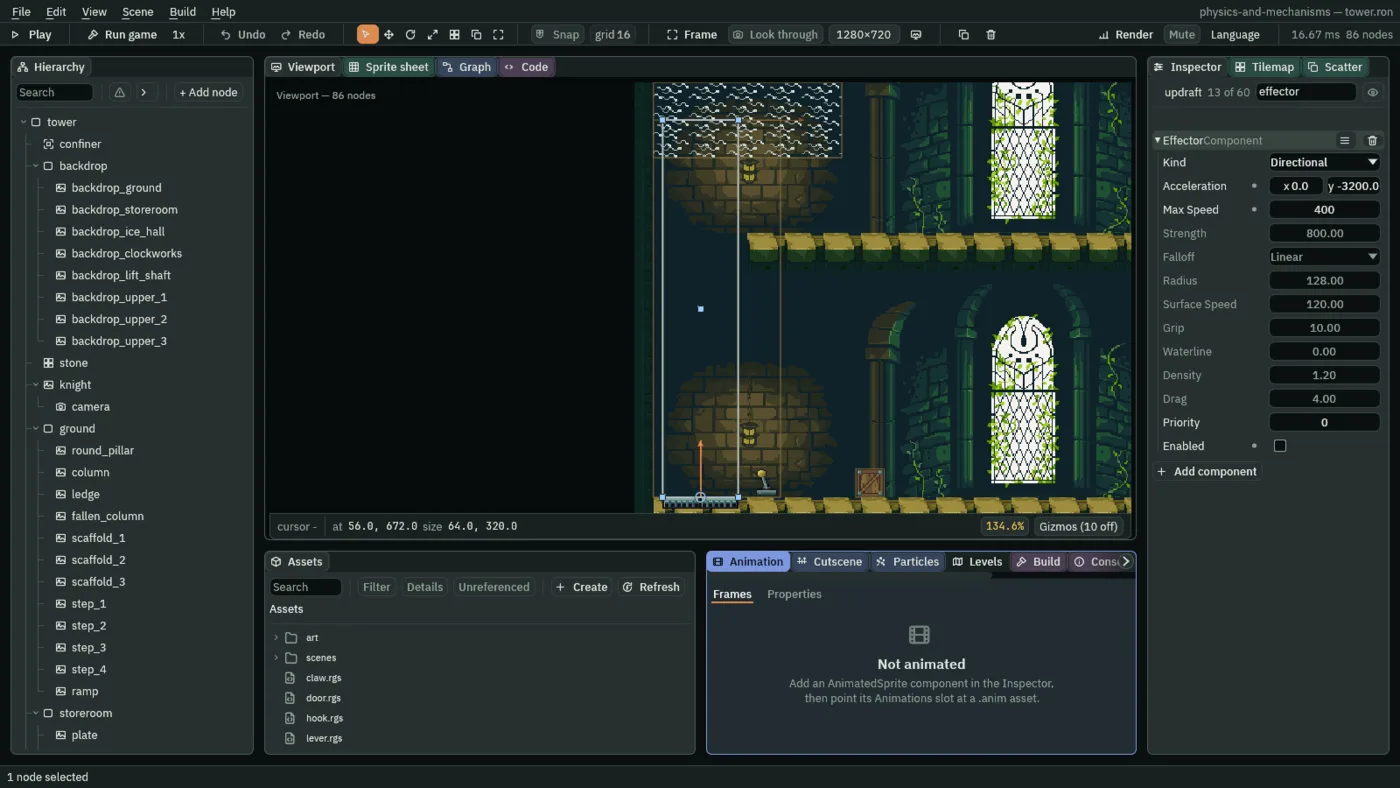
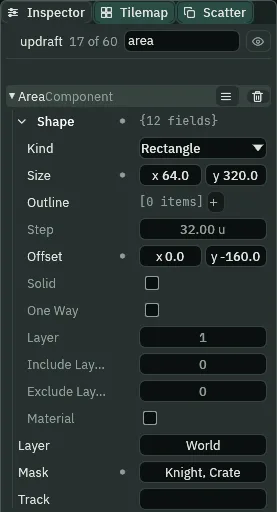
64 by 320, its middle 160 up from the node, looking for Knight and Crate.The column runs from x 24 to 88, the vent’s width, and from the floor up through H6 to 96 over the loft’s floor. The rows a Directional effector does not read are dimmed, and hovering one says which kind reads it: chapter 11 sets the Point and Surface rows, chapter 12 the Buoyancy ones.
- The Effector’s Kind
- The Effector’s Kind: which push it gives. Directional, as it comes, is one push, the same everywhere in its Area, along its Acceleration: a wind. Chapter 11’s belts are Surface and its magnets Point, chapter 12’s water Buoyancy. Each kind reads its own rows, and the others dim.
- The Effector’s Acceleration
- The Effector’s Acceleration, for a Directional wind: how hard it pushes and which way, across and down, in world units a second squared, added to every body in its Area each step. Down counts as positive, as a Gravity does, so up is negative. The updraft’s
0,-3200is up, stronger than his Gravity of2000and a crate’s1800, so it lifts both; it takes him up20faster each step, its3200less his2000at sixty steps a second. A new Effector’s is0,-600. - The Effector’s Max Speed
- The Effector’s Max Speed, for a Directional wind: the fastest it blows a body along its Acceleration, in world units a second. It adds only what brings a body’s motion that way up to the limit, and nothing to one already that fast; it never slows one.
0, as it comes, is no limit. The updraft’s is400, the crosswind’s200. The limit is on the body’s whole motion that way, its Velocity and its Drift together, not on what the wind gave: walking against a wind in the air, his walk is part of the sum the limit is measured on, and against the wind it leaves more room, so the wind banks him more Drift, and let go of the keys, that Drift carries him on the wind’s way faster than the limit for a while. - The Effector’s Priority
- The Effector’s Priority: which wind blows where two overlap. Of every effector a body is in, only those at the highest Priority push it; those that tie add. A whole number,
0as it comes. The updraft keeps0; the crosswind, next, has1. - The Effector’s Enabled
- The Effector’s Enabled: whether it pushes right now. It comes ticked. The updraft is saved unticked, the vent shut, and
vent.rgsticks it when the lever saysonand unticks it onoff. The crosswind keeps it ticked. - The Area’s Shape › Size and Offset, on an effector
- Where an Effector pushes: only inside the Area on its own node. The Area’s Size is the box’s width and height in world units and its Offset where the box’s middle sits from the node, as on the plate in chapter 4. The updraft’s
64by320,160up, is the shaft from the vent to over the loft. An Effector with no Area beside it pushes nothing, and the Problems tab says so. - The Area’s Mask, on an effector
- Whom an Effector pushes: every body whose Character Body’s Layer the Area’s Mask ticks. The Area’s own Layer is not read for it, nor anyone’s Area. Every effector in the tower ticks Knight and Crate, chapter 5’s layers for his body and the crates’, so it pushes him and the crates. A new Area’s Mask ticks World.
- The Sprite’s Color
- The Sprite’s Color: a tint over the picture, red, green, blue and alpha, each
0to1in the picker’s F mode. White,1,1,1, alpha1, as it comes, draws the picture as it is. The streaks’ alpha0draws them fully see-through: hidden, though the sprite is there, untilvent.rgssets alpha1.
The crosswind
A second wind blows east across the shaft’s head and out over the loft, and carries him off the top of the shaft. Where the two Areas overlap, its Priority says it alone blows.
- Select
upper_hall, click + Add node and choose Effector. Rename itcrosswindand set its Position to96,352. - In its Area, open Shape and set Size to
160,64; leave Offset at0,0. Set Mask to Knight and Crate, as the updraft’s. - In its Effector, leave Kind at Directional, set Acceleration to
2400,0, Max Speed to200and Priority to1. Leave Enabled ticked. - Select
crosswind, click + Add node and choose Sprite. Rename itcrosswind_streaksand set its Rotation to90. Dragart/draft.pngonto Texture, set Size to64,160and Sort Layer to1, and choose Tiled with a Tile Size of16,32. Its Anchor stays0.5,0.5.
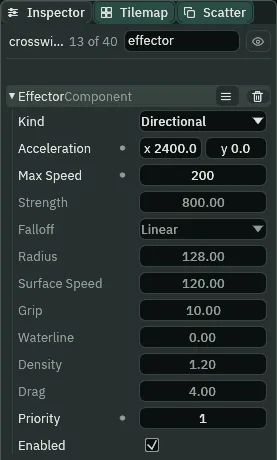
2400, no faster than 200, at Priority 1, over the updraft’s 0.Its box runs from x 16 to 176 and y 320 to 384: over the top 32 of the updraft’s column, and east over the loft, its foot 64 over the loft’s floor, out of reach of a knight standing there. The streaks, turned a quarter, blow east. Where the boxes overlap, the crosswind’s 1 beats the updraft’s 0: the updraft lets him go there, and his rise slows by a step of his Gravity each step, as in still air, while the crosswind pushes him east.
The lever and two scripts
A script writes only its own node’s components. So the lever cannot switch the updraft’s Effector: it throws its own handle and says on or off, and its Signal carries the word to updraft, whose own script switches its own Effector and shows or hides its streaks. Chapter 4’s plate tells its door the same way.
- Select
upper_hall, click + Add node and choose Sprite. Rename itleverand set its Position to112,672: on the floor, east of the vent. Dragart/lever.pngonto Texture, and set Size to20,24, Anchor to0.5,1and Sort Layer to1. Its handle leans west. - Click Add component and choose AreaComponent. Open its Shape and set Size to
108,320and Offset to-42,-160. Set its Mask to Knight alone. Its Layer stays World. - In Assets, click Create, choose New script, type
vent_leverand press Enter. In the Code tab, replace everything invent_lever.rgswith the first script below, and press Ctrl+S. Makevent.rgsthe same way, with the second. - Select
lever, click Add component and choose VentLever. Selectupdraft, click Add component and choose Vent. - Select
lever, click Add component and choose SignalComponent. Click the + beside Connections twice. Open[0]: typeoninto Signal, and pickupdraftfor its To. Open[1]: Signaloff, Toupdraft. Press Ctrl+S.
The lever’s reach runs from x 16 to 124 and from y 352 to the floor: the lever, the whole shaft over the vent, and the loft’s west end, x 96 to 124, above the slab. He can throw it standing by it, standing on the vent, riding the draft, or standing on the loft at the top of the shaft.
/// The vent's lever. Its Area reaches the lever and the shaft over the vent,
/// so the knight can throw it standing by it, on the vent, or riding the
/// draft. The `action` key (E) throws it over: it turns its handle and says
/// `on` or `off` to whoever its Signal wires them to.
component VentLever : Area {
    /// How many things its Area notices: one while the knight is in its
    /// reach, none while he is not.
    #[readonly]
    near: i32 = 0,
    /// Whether it is thrown on.
    #[readonly]
    on: bool = false,

    fn on_enter() {
        near += 1;
    }

    fn on_exit() {
        near -= 1;
    }

    fn loop() {
        if near > 0 && pressed("action") {
            on = !on;
            set_flag("SpriteComponent", "flip.x", on);
            if on {
                emit("on");
            } else {
                emit("off");
            }
        }
    }
}
/// The vent. The Effector on this node blows up the shaft while it is
/// switched on. The lever's `on` switches it on and shows the draft's
/// streaks; its `off` switches it off and hides them. A step that hears
/// both ends shut.
component Vent {
    fn on_signal() {
        if heard("on") {
            set_flag("EffectorComponent", "enabled", true);
            set_colour("SpriteComponent", "color", vec4(1.0, 1.0, 1.0, 1.0));
        }
        if heard("off") {
            set_flag("EffectorComponent", "enabled", false);
            set_colour("SpriteComponent", "color", vec4(1.0, 1.0, 1.0, 0.0));
        }
    }
}
component VentLever : Area- A script with an Area base, like chapter 8’s ring pull: it goes on a node with an Area and hears what comes into its reach and leaves it. Near counts the Areas in its reach, his; On says whether it is thrown on. Both are
#[readonly]: the script sets them, and you never type them. - loop and pressed
loopruns every step.pressed("action")is true on the one step E or Enter goes down, the project’saction, so one press throws the lever once, however long it is held.- set_flag
- Writes true or false onto another component on this node. In the lever,
"flip.x"is the Sprite’s Flip › X, which draws the handle mirrored, leaning east while it is on. In the vent,"enabled"is the Effector’s Enabled. - emit
- Says
onoroffto whoever the lever’s Signal wires them to,updraft, which hears it on the next step. component Vent- A script with no base, like chapter 4’s door: it hears signals. on_signal runs on a step a signal reaches the node, and heard says which:
onswitches the Effector on and shows the streaks,offthe reverse. A step that hears both ends shut, as the secondifruns last. - set_colour and vec4
set_colourwrites a colour onto another component on this node, andvec4(1.0, 1.0, 1.0, 1.0)makes one: red, green, blue, alpha. On the Sprite’s Color, alpha1shows the streaks and0hides them.
A crate in the way
- In the Hierarchy, right-click
crate_1and choose Duplicate. Drag the copy ontoupper_hall, rename itcrate_7and set its Position to200,672: on the floor between the lever and where he comes up. Press Ctrl+S.
It is chapter 5’s crate: pushable, on Crate, with its Area on Crate too. On the way to the vent he jumps it; later he shoves it onto the vent.
Up the shaft
- In the Gizmos menu, keep Collision, Bodies, Forces and Triggers ticked, as chapter 9 left them, for this chapter and the next. As on chapters 8 and 9’s pages, the pictures here leave Collision off: the Colliders’ green outlines are on your screen and not in them.
- Select
knightand set his Position to489,672. Then selectupdraft, so its arrow is drawn at full strength, as in the pictures, and press F5. - Hold A: he walks west. As he nears the crate, press Space and hold it until he lands beyond it. Keep A held until he stands on the vent, and let go. Nothing lifts him: the vent is shut.
- Press E. The handle swings east, the streaks show up the shaft, and the draft lifts him. Hold nothing: it takes him up through H6, and at the top the crosswind blows him east onto the loft, where he slides to a stop.
- Press F5 to stop, and set his Position back to
48,1792.
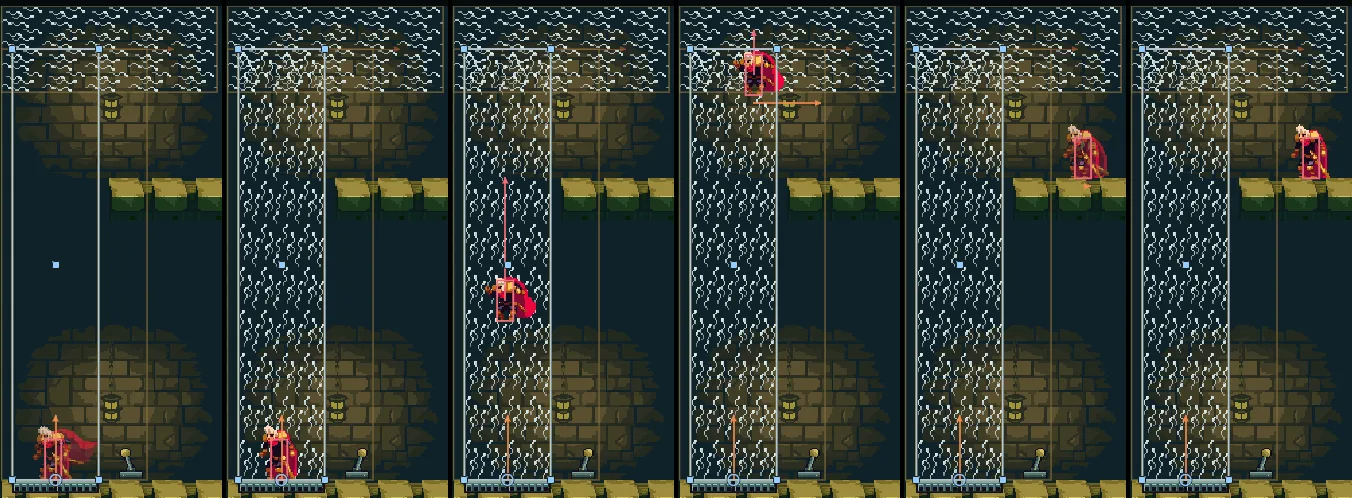
168, 172, 200, 230, 260 and 290 (2.80, 2.87, 3.33, 3.83, 4.33 and 4.83 s), the editor in Play at 134.6%, updraft selected and framed, with the Forces, Bodies and Triggers gizmos. From the skip, A is held to step 163, Space from 86 to 128 over the crate, and E goes down on step 171. On 168 he stands on the shut vent, the handle west; on 172 the vent blows, the streaks show and the handle is over; on 200 he is half-way up, rising; on 230, in both winds at the head, his Drift points east; on 260 he is on the loft, his Drift fading; on 290 he has stopped, at x 149.4.The lever says on on the step E goes down, the vent hears it on the next and blows, and he leaves the vent the step after that. The draft takes him up 20 faster every step until he rises at its limit; then, all the way up the shaft, he rises 366.7 a second, 6.11 a step: the long rose arrow is his own Velocity, which the updraft’s push, along gravity, goes into.
Drift, read live
The crosswind’s push is sideways, so it does not go into his own Velocity, which the keys set every step. It goes into his Drift: the world’s share of his motion, which the Character Body keeps apart, and which the Bodies gizmo draws as the orange arrow.
- Select
knightbefore you play, so the Inspector shows his Character Body while the game runs. Set his Position to489,672. - Press F5, ride up as before, and watch his Drift, under his Velocity. To catch each step of it, press Pause or F6 as he reaches the top of the shaft, then Step or F7, with the Play bar’s step counter.
- Press F5 to stop, and set his Position back to
48,1792.
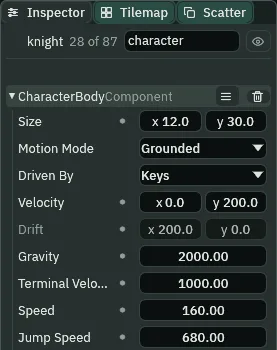
240 (4.00 s) of the same run, knight selected: east of the shaft’s head, falling, his Velocity 0, 200, his Drift 200, 0, the crosswind’s Max Speed.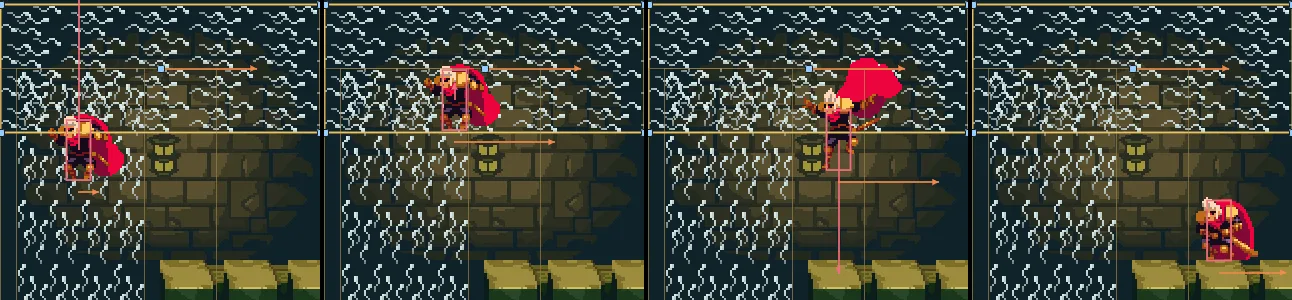
224, 233, 242 and 251 (3.73, 3.88, 4.03 and 4.18 s) of the same run, crosswind selected and framed at 200%, with the Forces, Bodies and Triggers gizmos. In both winds his rise slows a step of his Gravity each step while his Drift grows 40 a step, to 200 by step 228; the top of his rise is on step 233, his feet at 382.8; out of the updraft his Drift stays at 200, and he lands on the loft on step 249, at x 134.3.Out of both winds, in the air, his Drift lasts: he sails on east over the loft with no key held. On the loft’s floor it fades a little every step, by the floor’s grip, as a crate’s does after a shove in chapter 5, and he stops at x 149.4. That is where chapter 11 starts him.
The orange arrow under chapter 7’s swinging bob, in its swing strip, is the same field. Select bob before you press F5: its Drift reads the sideways part of its swing, which its joint gives it, while the up and down of it is in its Velocity, along gravity, as the updraft’s push is in his.
- The Character Body’s Drift
- The Character Body’s Drift: what the world adds to the body’s own Velocity, in world units a second: a wind, a magnet, a belt, water, a shove, a swing. The body moves by the two together. For a body whose Motion Mode is Grounded, as his is, it is sideways only: a push along gravity, as the updraft’s, goes into his Velocity, as gravity does. It is read only, so its row is dim: nothing types it, the world writes it. The keys set Velocity every step and never overwrite Drift, so letting go of a key does not stop a wind’s push, and a wind’s push does not stop his walk; on chapter 13’s rope, the one place the keys reach his Drift, they push it. In the air it lasts; on the ground it fades by the floor’s grip. Here the crosswind grows it
40a step, its2400at sixty steps a second, up to its Max Speed,200.
Try it: Priority
- Select
crosswindand set its Effector’s Priority to0, the updraft’s. - Set the knight’s Position to
489,672, press F5 and ride up as before. Where the two boxes overlap, both winds now blow: the updraft keeps him rising at its limit into the crosswind’s box, so he goes higher before the crosswind has him, and lands further east. - Press F5 to stop. Set Priority back to
1and the knight’s Position back to48,1792.
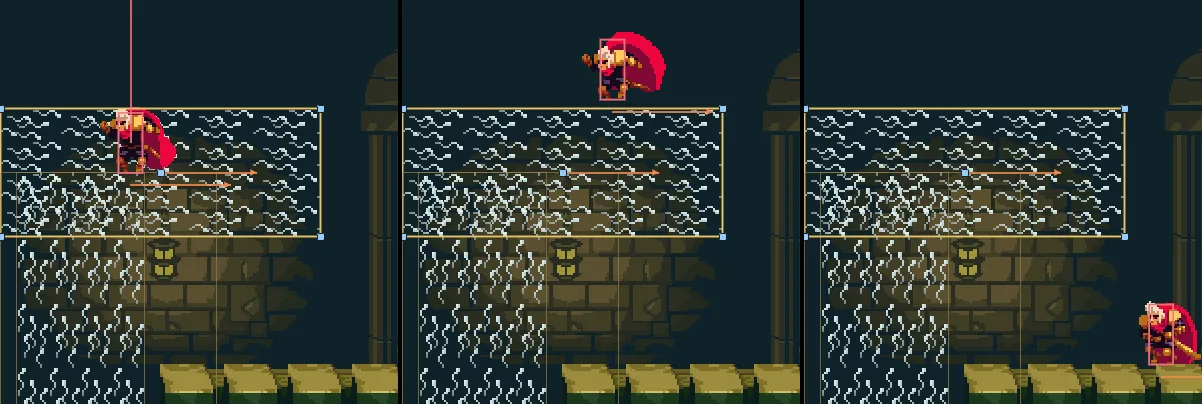
0: steps 233, 245 and 267 (3.88, 4.08 and 4.45 s), framed as the strip above. On step 233 he is still rising; the top of his rise is on step 245, his feet at 315.6, 67.2 over the top he reached at Priority 1; he lands on step 267 at x 194.3, 60 further east.Shut it on the way up
The lever’s reach covers the whole shaft, so he can shut the vent while it carries him.
- Set the knight’s Position to
489,672, then selectupdraft, as for the ride, and press F5. Walk onto the vent and press E. - Half-way up the shaft, press E again: the handle swings back, the streaks hide, and nothing holds him up. He rises a little further as his Gravity slows him, falls, and lands on the vent.
- Press E from the vent: it opens, and up he goes again. Press F5 to stop, and set his Position back to
48,1792.
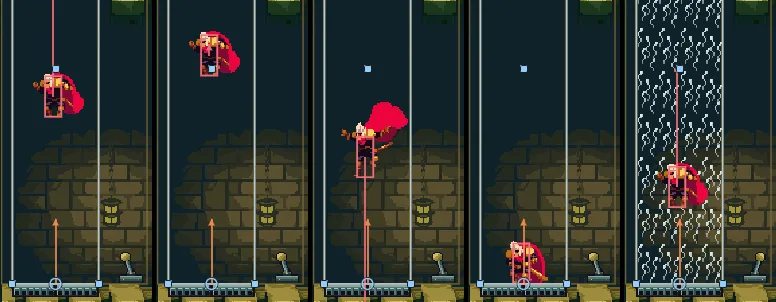
201, 211, 228, 240 and 270 (3.35, 3.52, 3.80, 4.00 and 4.50 s), framed and selected as the ride: its run, and E again on step 200, at y 553.9, then on step 251 from the vent. Shut on 201, he rises on to his top, y 517.2, on 211; every step after it his fall gains a step of his Gravity, and he lands on the vent on step 236, 0.60 s after the E; on 270 the draft has him again.A crate rides it too
The updraft’s Mask ticks Crate as well as Knight, so a crate on the open vent goes up the shaft as he does.
- Set the knight’s Position to
489,672, then selectupdraftand press F5. The game camera follows him, and the crate will go far above him: press F over the Viewport, so the whole shaft is in view, as in the ride’s pictures. - Hold A: he walks to the crate and shoves it west onto the shut vent. Let go as it reaches the vent’s middle.
- Hold D for a moment to step him back east, just past the vent’s east end and short of the lever: out of the draft’s column, still in the lever’s reach.
- Press E. The crate goes up the shaft alone, and at the top the crosswind blows it east onto the loft. Press F5 to stop, and set his Position back to
48,1792.
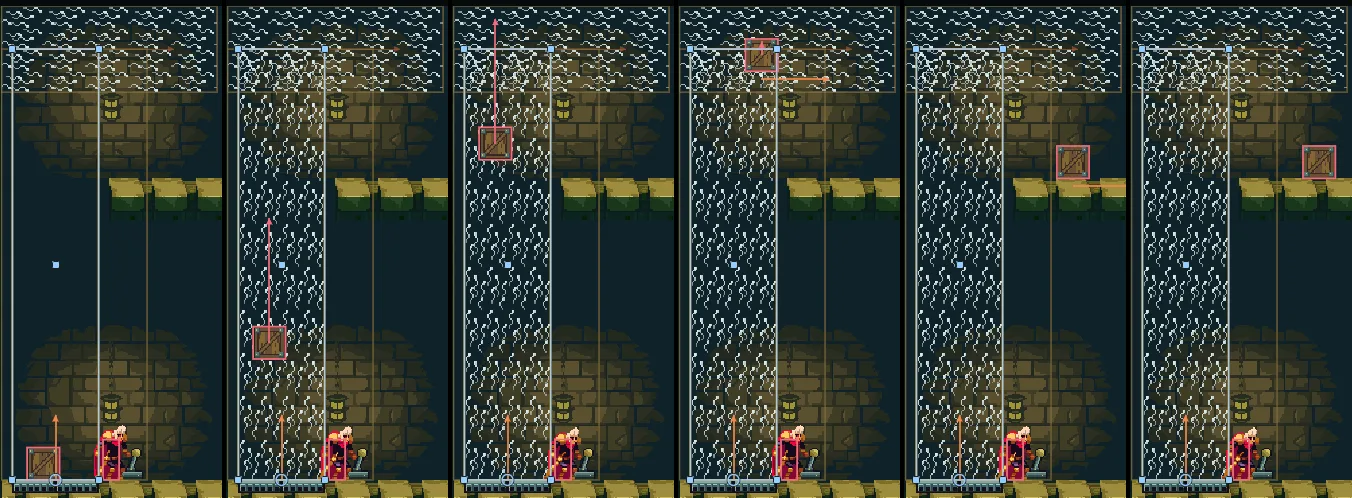
221, 244, 268, 284, 303 and 330 (3.68, 4.07, 4.47, 4.73, 5.05 and 5.50 s), framed and selected as the ride. From the skip, A held to step 173 shoves the crate onto the vent, where it stops at x 47.0; D from step 203 to 211 steps him back to x 97.3; E goes down on step 221. The crate rises at 370 a second, its Drift east in the crosswind, and lands on the loft at x 140.3 on step 303; its Drift carries it on to x 155.3 and fades, by step 330. He stays on the floor.The way up
The updraft is this floor’s way up, by the keys alone, from where chapter 9 leaves him to where chapter 11 starts.
- Set the knight’s Position to
489,672and press F5. - Hold A, jump the crate with Space held, and walk on onto the vent. Let go.
- Press E. The draft takes him up through H6, and the crosswind sets him down on the loft. No key is needed at the top: his Drift lasts in the air.
- Press F5 to stop, and set his Position back to
48,1792.
Going up through H6 his box stays 15 or more inside its faces, and crossing the loft’s edge his feet are 15 or more over its floor. Every jump on the climb from the tower’s foot to the loft clears what it reaches by 15 or more, and every floor’s way up starts where the last one left him.
The upper hall
| Node | Component | Field | Value |
|---|---|---|---|
upper_hall | (a Node) | under tower | |
vent | Position | 56, 672 | |
| Sprite | Texture, Size | vent.png; 64, 10 | |
| Anchor, Sort Layer | 0.5, 0; 1 | ||
| Draw Mode, Tile Size | Tiled; 32, 10 | ||
updraft | (an Effector node) | Position | 56, 672 |
| Area | Shape › Size, Offset | 64, 320; 0, -160 | |
| Mask | Knight, Crate | ||
| Effector | Kind | Directional, as it comes | |
| Acceleration, Max Speed | 0, -3200; 400 | ||
| Priority; Enabled | 0, as it comes; unticked | ||
| Sprite | Texture, Size | draft.png; 64, 320 | |
| Anchor, Sort Layer | 0.5, 1; 1 | ||
| Draw Mode, Tile Size | Tiled; 16, 32 | ||
| Color | 1, 1, 1, alpha 0 | ||
| Vent | vent.rgs | ||
crosswind | (an Effector node) | Position | 96, 352 |
| Area | Shape › Size | 160, 64 | |
| Mask | Knight, Crate | ||
| Effector | Acceleration, Max Speed | 2400, 0; 200 | |
| Priority | 1 | ||
crosswind_streaks | (under crosswind) | Rotation | 90 |
| Sprite | Texture, Size | draft.png; 64, 160 | |
| Sort Layer | 1 | ||
| Draw Mode, Tile Size | Tiled; 16, 32 | ||
lever | Position | 112, 672 | |
| Sprite | Texture, Size | lever.png; 20, 24 | |
| Anchor, Sort Layer | 0.5, 1; 1 | ||
| Area | Shape › Size, Offset | 108, 320; -42, -160 | |
| Mask | Knight | ||
| VentLever | vent_lever.rgs | ||
| Signal | Connections | on to updraft, off to updraft | |
crate_7 | Position | 200, 672, a copy of crate_1 |
Every node is under upper_hall but crosswind_streaks, under crosswind, and every other field is as it comes. The tilemap stone gains the loft’s slab: rows 28 and 29, x 96 to the east wall, copies of the upper hall’s floor.