Tutorials · Physics and Mechanisms · Chapter 2
The knight
By the end
- A Character Body on
knight: his box12by30, his walk160a second, his jump, his gravity and his fastest fall, driven by the keys - His clips following his body with no script: he runs, rises, falls and lands
- His body’s live fields read in Play: Velocity, Grounded, On Wall and On Ceiling
- A long fall that reaches his Terminal Velocity, and a jump against the column that slides over its corner
- The way up to the storeroom, walked and jumped with the keys alone
On this page
A body for the knight
A Character Body walks, jumps and falls its node, and stops it against everything solid: the stone tiles and every Collider. It comes driven by the keys, so the knight needs no script. The starter left it off; he gets it now.
- Select
knight. Press Add component and choose CharacterBodyComponent. Its Motion Mode is Grounded and its Driven By is Keys, as it comes; leave them. - Set its Size to
12,30, Speed to160, Jump Speed to680, Gravity to2000and Terminal Velocity to1000. In its Slopes fold, set Max Slides to4. - Click Debug Color. If the button at the top left of the picker reads U8, press it so it reads F. Set it to
0.87,0.16,0.21, alpha0.35: a see-through rose. - In the Viewport strip’s Gizmos menu, tick Bodies, which comes unticked: it draws a body’s box in its Debug Color. Leave Collision ticked, as chapter 1 left it.
- Press Ctrl+S.
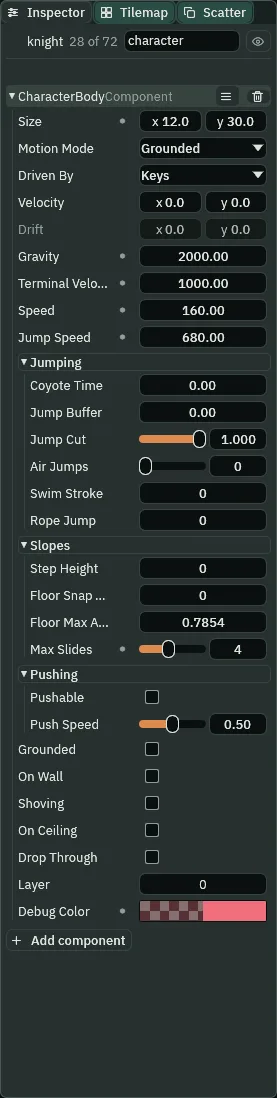
character.- Size
- The Character Body’s Size: its box, width and height in world units, standing on the node: the node is at the box’s feet.
12by30is his body inside his38by48picture, so he meets walls with his body, not with his cape. A new body’s is32by48. - Motion Mode
- The Character Body’s Motion Mode: Grounded, as it comes, is pulled down by its Gravity and stands on floors; Floating has no gravity, walks all four ways and meets every surface as a wall, for a room seen from above. The knight is Grounded; chapter 14’s crate puzzle floats.
- Driven By
- The Character Body’s Driven By: Keys, as it comes, walks it on A and D or the arrow keys, turning its picture to face its walk, and jumps it on Space, W or Up when it stands. They are the project’s controls, its
left,rightandjumpactions ininput.ron, which the starter binds to those keys: bind others in View → Input map… (chapter 13 opens it) and he follows. Script leaves its walk and its jumps to a script; chapter 5’s crates are driven by a script that has nothing to say, so only a shove moves them. - Speed
- The Character Body’s Speed: how fast the keys walk it, in world units a second.
160is a knight in armour, slower than a new body’s220: half a second of D takes him80. - Jump Speed
- The Character Body’s Jump Speed: how fast a jump starts it upward, in world units a second. With his Gravity,
680lifts his feet about110on a jump held to its top, enough for the column’s72and each scaffold plank. A new body’s is620. - Gravity
- The Character Body’s Gravity: how fast it gathers speed downward, in world units a second, each second; down counts as positive.
2000adds about33.3to his fall each step, at sixty steps a second, and makes his jump quick:0.68seconds in the air. A new body’s is1800. - Terminal Velocity
- The Character Body’s Terminal Velocity: the fastest it falls, in world units a second. Gravity stops adding at
1000, which he reaches half a second into a fall, so only a long fall meets it. A new body’s is900; it cannot go under1. - Max Slides
- The Character Body’s Max Slides, in its Slopes fold: how many times a step’s move that something blocked is tried again, the blocked part along what stopped it. With
4, a jump up against the column rises along its side and goes over its corner in the very step his feet clear its top. A new body’s is1; it goes from1to8. - Debug Color
- The Character Body’s Debug Color: the colour its box is drawn in the editor, by the Bodies gizmo.
0.87,0.16,0.21, alpha0.35is the rose the editor marks bodies with, as see-through as a new body’s green, so his box stands apart from the Colliders’ green. It is not drawn in the game.
The rest of the body stays as it comes for now. Its Jumping and Slopes folds are chapter 3’s; its Pushing fold, its Layer and its dimmed Drift are chapters 5 and 10’s.
The Inspector cuts a label too long for its column: Terminal Velo… is Terminal Velocity, and chapter 3’s Floor Snap … and Floor Max A… are Floor Snap Length and Floor Max Angle. These pages give every label whole. Hold the pointer over a cut label to read it, or drag the edge between the Viewport and the Inspector to widen the column.
He walks
- Select
knightin the Hierarchy, so that the Inspector shows his body while the game runs, and press F5. - Hold D: he walks east, his
runclip playing. Let go: he stops at once and stands. Hold A: he walks back west, facing west. Watch his body’s Velocity as you do. - Press F5 to stop.
While the game runs, the Viewport looks through his camera: the Look through button on the toolbar is lit. A pan, a zoom or F gives the view back. His Velocity reads 160 across while you hold D, -160 while you hold A, and 0 the step after you let go: his Speed, east or west.

0, 48 and 96 of Play (0.00, 0.80 and 1.60 s), from his start: D held for the first 48 steps and A for the next 48. He is at x 48, then 176, then 48 again: 128 in 0.80 s each way, 160 a second.The strips on these pages are taken in the editor in Play, with the Bodies gizmo you ticked above on and nothing selected: it draws a body’s box in its Debug Color, and its velocity as an arrow from the box. Each strip’s caption gives the step of Play each picture is at, and its seconds, a step being a sixtieth of a second. To watch a run the same way, press Pause (F6) while it plays, then Step (F7) to run exactly one more step; the toolbar beside them counts the steps and the seconds, as step 30 | 0.5s. Paused, a key you press waits for the next step. Resume, where Pause was, lets the run go on.
- Velocity
- The Character Body’s Velocity: how fast it is moving this step, across and down, in world units a second. Driven by the keys, its first number is his Speed while A or D is held and
0the step after you let go; its second gathers his Gravity while he is in the air and is0while he stands. It is the body’s own: the body sets it every step, and a number typed into it lasts a step.
He jumps, and his clips follow
His State Machine has picked his clip since the starter, from his graph, knight.asm, but with no body there was nothing for it to read, so it stayed in idle. Now it reads his body: how fast he walks, whether he stands, and whether he is going up or down. It runs while he walks, and rises, falls and lands when he jumps.
- Press F5. Press Space and hold it: he jumps, and comes down where he left.
- Walk east to the round pillar: it stops him. Hold D and press Space: he jumps it, and lands beyond it.
- Press F5 to stop.
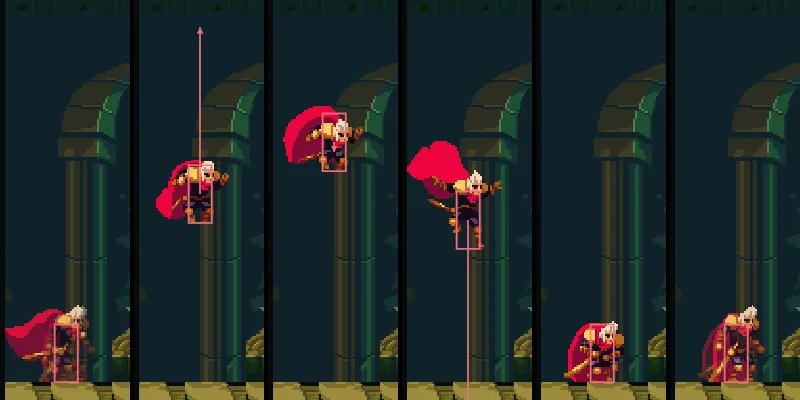
59, 70, 81, 92, 102 and 112 of Play (0.98, 1.17, 1.35, 1.53, 1.70 and 1.87 s): D held for 57 steps from his start walks him to x 200, and Space is held from step 60. His feet rise 110, to the top at step 81, and he is down at step 102, 0.68 s after he jumped. His clips go rise, fall, land and idle.A jump held to its top lifts his feet about 110. His Jump Speed, 680, starts him up, and his Gravity takes 33.3 off it each step until he is going down, then adds it until he lands. Chapter 3 makes a short press of Space jump less high, and gives his jump the rest of its feel.
What his body reads
Three of his body’s fields say what it met on the last step. You do not set them: the body does, every step, and you watch them in Play.
- Select
knightin the Hierarchy and press F5. Walk him east over the round pillar, and on with D held until the column stops him. Keep D held. - Jump the column, holding D, and walk on under the stone ledge. Let go, and press Space under the ledge: his head stops at its underside.
- Press F5 to stop.
Against the column, with D held, Grounded and On Wall are ticked and his Velocity is 0, 0: the column took his walk. Under the ledge, On Ceiling flickers on: it is ticked, and Grounded is not, for the one step his head meets the ledge, a sixtieth of a second. The second picture below was taken on that step. To catch it yourself, press F6 as he stands under the ledge, then Space, then F7 until On Ceiling ticks, a few steps on.
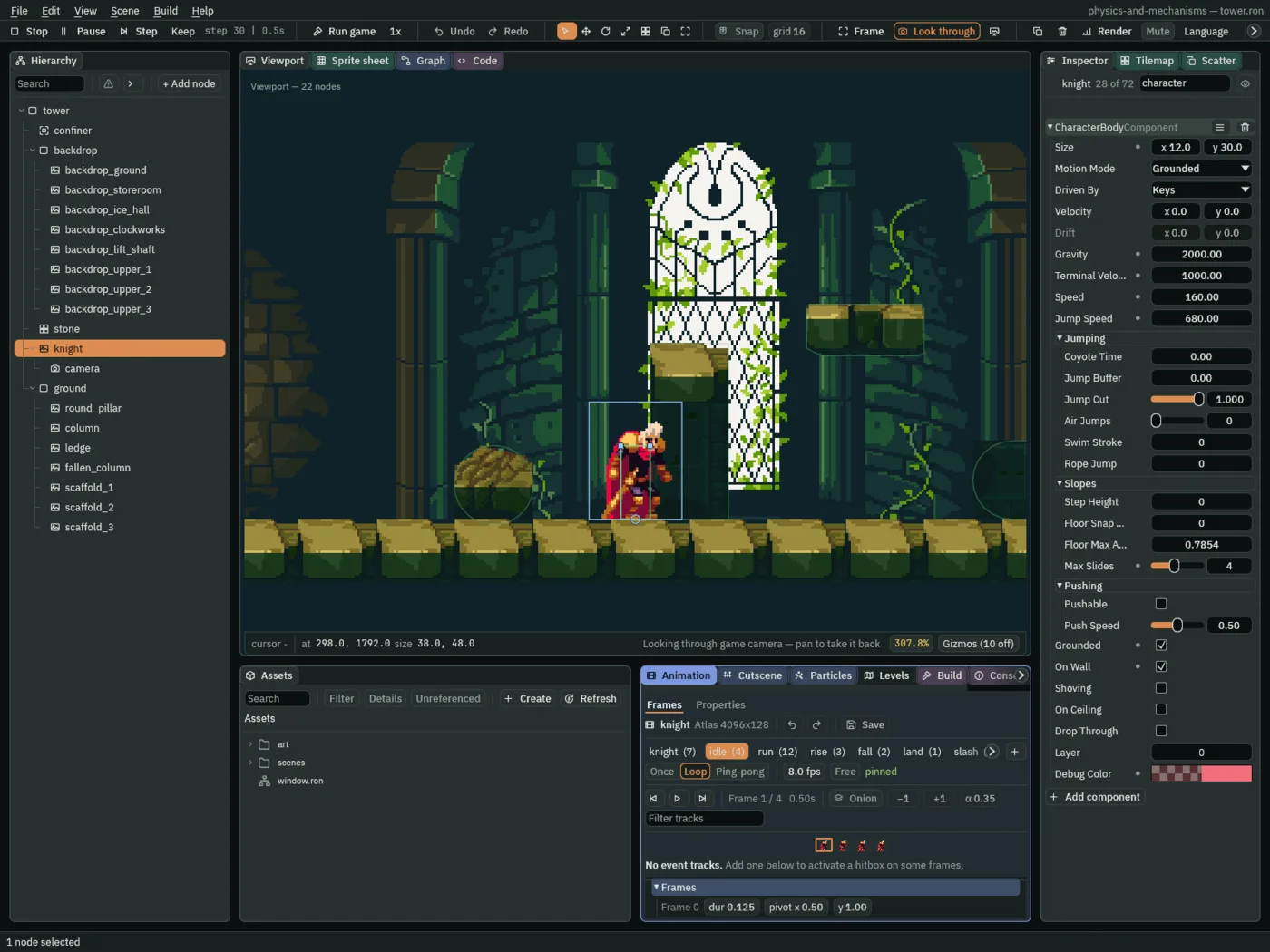
30 of Play (0.50 s), with D held. For this picture he was placed at 272, 1792, between the stump and the column, and walked into it from there.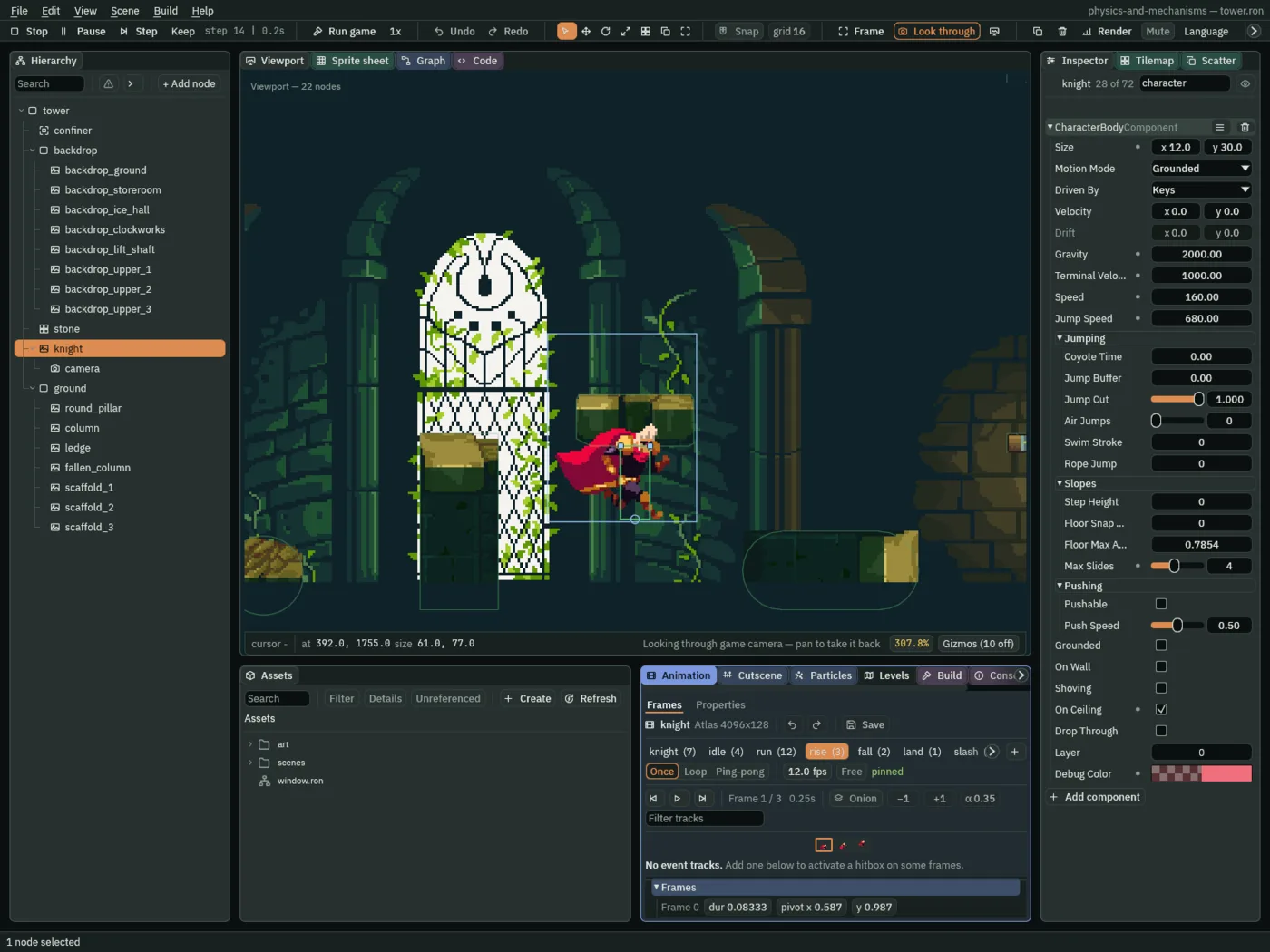
14 of Play (0.23 s), Space pressed from step 10. For this picture he was placed under the ledge at 392, 1792.- Grounded
- The Character Body’s Grounded: ticked while something solid is right under its feet. The body sets it every step. Only a grounded body jumps on Space, and his graph runs or stands while he is grounded and rises or falls while he is not.
- On Wall
- The Character Body’s On Wall: ticked when the last step’s walk was stopped by something at its side. The column’s west face stops his box
6from his middle, half his12, and he stays there, On Wall, while D is held; let go, it unticks the next step. - On Ceiling
- The Character Body’s On Ceiling: ticked when the last step’s rise was stopped by something above. His head meets the ledge’s underside
30over his feet, his height; the ledge takes the rest of his rise, so his Velocity going up is0, and he falls back to the floor.
A long fall
No fall on the ground floor is long enough to reach his Terminal Velocity. The tower’s top is: the open hall over the lift shaft, three floors tall.
- With the game stopped, select
knightand set his Position to320,100: high in the open hall, under its roof. - With
knightstill selected, press F5, and watch his Velocity as he falls to the open hall’s floor. Press F5 to stop. - Put him back at his start: press Ctrl+Z, or set his Position to
48,1792again.
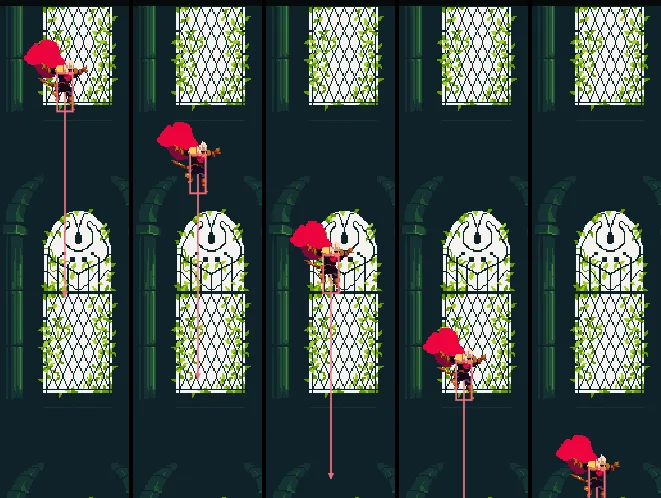
20, 25, 30, 35 and 40 of Play (0.33, 0.42, 0.50, 0.58 and 0.67 s), after his Position was set to 320, 100. He falls at 666.7, 833.3, then 1000 a second from step 30 on: 83.3 every five steps from then. He lands on the open hall’s floor at step 50.His Velocity’s second number climbs by about 33.3 a step, his Gravity, until it reaches 1000 and holds there until he lands. By step 30, half a second in, he has fallen 258 and is falling at 1000, his Terminal Velocity; from then on he falls no faster, 16.7 a step, however long the fall.
Over the column’s corner
His Max Slides shows when he jumps up against the column with D held. Each step his walk east is stopped by the column’s side and his rise is not; the stopped walk is tried again after the rise, so in the step his feet clear the column’s top he goes on over its corner.
- Press F5, walk him over the round pillar and into the column, and keep D held. Press Space and hold it: he rises along the column’s side and goes on over it.
- Press F5 to stop.
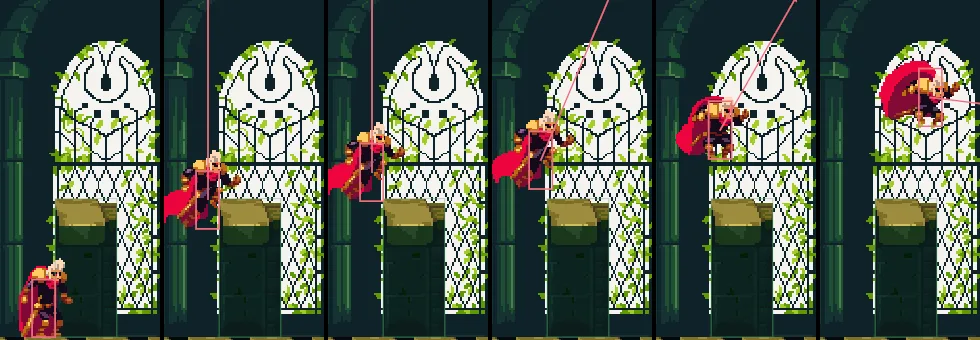
20, 26, 28, 29, 32 and 41 of Play (0.33, 0.43, 0.47, 0.48, 0.53 and 0.68 s), D held throughout and Space from step 20. At step 28 his feet are still under the column’s top, at x 298; at step 29 they are over it, and he has gone 2.67 east, a whole step’s walk. For this picture he was placed at 272, 1792, before the column.The way up
With his body, the ground floor is a climb. From his start he jumps the round pillar and the column, walks under the stone ledge, jumps the fallen column and walks on under the scaffolding. Where its three planks overlap, at the east end, he jumps straight up through each and lands on it, and from the top plank he walks west onto the storeroom’s floor.
The knight’s Character Body
| Node | Component | Field | Value |
|---|---|---|---|
knight | Character Body | Size | 12, 30 |
| Motion Mode | Grounded, as it comes | ||
| Driven By | Keys, as it comes | ||
| Speed | 160 | ||
| Jump Speed | 680 | ||
| Gravity | 2000 | ||
| Terminal Velocity | 1000 | ||
| Max Slides | 4 | ||
| Debug Color | 0.87, 0.16, 0.21, alpha 0.35 |
Every other field is as it comes. His Position is his start, 48, 1792, as the starter left it.