Tutorials · Physics and Mechanisms · Chapter 13
The grapple
By the end
- A
grappleaction on F, made in the Input window - Two iron rings in the group
ringsunder the belfry’s roof, a one-way beam that hides one of them from below, and the bell’s ledge, out of reach of any jump - A rope on the knight: a Target joint with Use Limits, its Max the rope’s length, switched on and off by a script, and a Line that draws it
grapple.rgs, which throws the rope at the nearest ring he can see withnearest_seen, and lets go when he jumps, lands or lets go of F- His Rope Jump: Space on the rope jumps him off it, onto the bell’s ledge, the climb’s end
- The tower exported as a game that runs without the editor
On this page
The belfry
Chapter 11’s climb leaves the knight on the belfry’s floor, west of H7: the last room, y 32 to 224 under the roof. On its west wall this chapter puts the bell’s ledge, the climb’s end, its top 128 over the floor. A held jump lifts his feet 110: short, standing or running. The way up is a rope, thrown at an iron ring under the roof, and a jump off it.
A swing alone does not lift him over his own jump: the rope does no work, so a swing comes back up about to where it began, and on the rope the keys only nudge it, far too gently to pump it that high. What the swing gives is speed west. The jump off the rope, his Rope Jump, gives the height.
- Select
knightand set his Position to392,224: the belfry’s floor, where chapter 11’s climb leaves him. Press F5 to play from there, and F5 again to stop. Afterwards press Ctrl+Z until it reads48,1792again, or type48,1792back. - Select
tower, click + Add node and choose Node. Rename itbelfry. The rings, the beam, the clock, the ledge and the bell go under it. - Keep Collision, Triggers, Forces and Bodies ticked in the Gizmos menu under the Viewport, as chapter 9 left them. The pictures on this page have all four on.
The grapple key
The grapple is a script, and a script asks for a key by its action’s name. The tower’s controls have six actions; this adds a seventh. F, because E is the levers’ action.
- Choose View → Input map…. The Input window opens on its Bindings tab, with the six actions the tower has had since the starter.
- Type
grappleinto the New action box and press Add. - With
grappleselected, press Record a control and press F. - Press Save, and close the window.
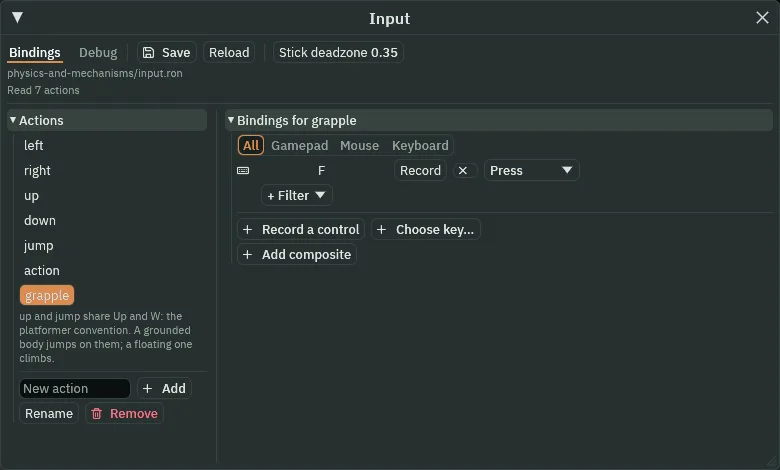
grapple action, bound to F.The grey note under the list was there before this chapter: the six actions the starter came with share W and Up between up and jump. That is meant. The knight is Grounded, so he jumps on them; a Floating body climbs on them instead. Save writes input.ron, beside project.rengy, with grapple after the six; an exported game reads it too.
Rings, a beam and a ledge
Two iron rings hang from the roof. The grapple finds a ring by its group and by where it is, never by its name, so both go in the group rings. The second ring hangs over a beam, a one-way plank high under the roof: from below, the beam hides it.
- Select
belfry, click + Add node and choose Sprite. Rename itring_1and set its Position to160,47. Dragart/iron-ring.pngonto Texture, and set Size to20,26, Anchor to0.5,0.615and Sort Layer to1: the node on the ring’s middle, where a rope ties on, its plate against the roof. - In its Node fold, type
ringsinto the Groups box, where it reads Add group, and press Enter. - Right-click
ring_1and choose Duplicate. Rename the copyring_2and set its Position to224,47. It keeps the grouprings. - Select
belfryand add a Sprite,beam, at Position224,60. Dragart/scaffold-plank.pngonto Texture and set Size to48,8. Add a ColliderComponent with Size48,8, and tick One Way: a plank from x200to248, its top at y56, underring_2. - Select
belfryand add a Sprite,belfry_clock, at Position152,128. Dragart/clock-face.pngonto Texture, chapter 7’s clock, and set Size to128,128and Sort Layer to-2: on the back wall, under the rings. - Select
belfry_clockand add a Sprite,belfry_clock_hand; its Position stays0,0. Dragart/clock-hand.pngonto Texture, and set Size to8,64, Anchor to0.5,0.75and Sort Layer to-1: the hand, straight up. - Select
belfryand add a Sprite,bell_ledge, at Position16,96. Dragart/bell-ledge.pngonto Texture, and set Size to64,16, Anchor to0,0and Sort Layer to1. Add a ColliderComponent with Size64,12and Offset32,6: its cap and face, x16to80on the west wall, its top at y96,128over the floor. - Select
belfryand add a Sprite,bell, at Position64,32. Dragart/bell.pngonto Texture, and set Size to32,34, Anchor to0.5,0and Sort Layer to-1: hung from the roof over the ledge’s east half, x48to80. It has no Collider.
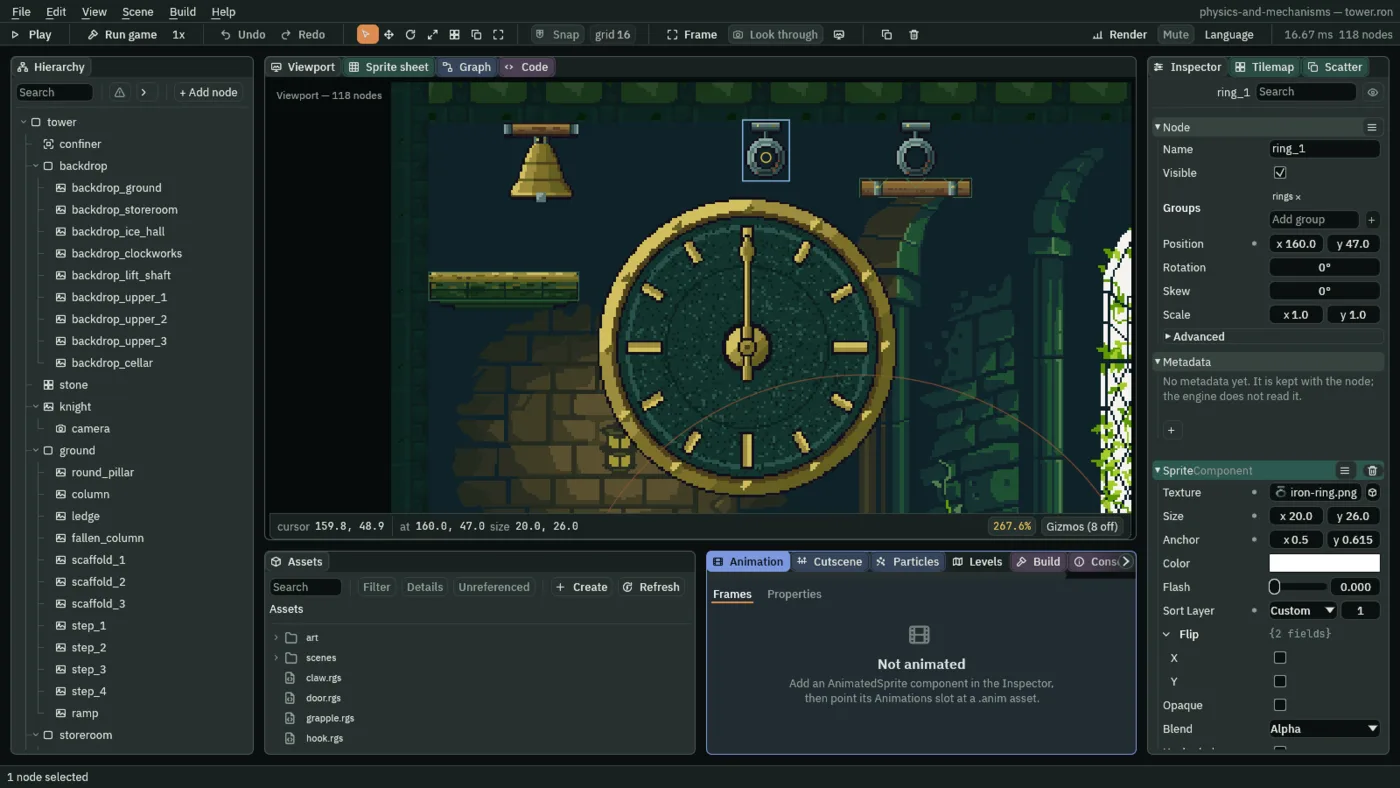
ring_1 selected: in the group rings, its node on the ring’s middle.The ledge is 64 under the roof: too little room for the bell over his head, so it hangs over the ledge’s east half, and he lands and stands west of it.
The rope: a joint and a line
The rope is two components on the knight. A Target joint, as chapter 9’s claw has, with its limits on: switched on with its Target Point where a ring hangs, it keeps his hand within the rope’s length of the ring and lets it come nearer, so he swings. And a Line, which draws it. Both are switched and moved by the script, later.
- Select
knight, click Add component and choose JointComponent. Set Kind to Target, Anchor to0,-20, his hand, Stiffness to1and Damping to0, and untick Enabled. - In its Limits fold, tick Use Limits; leave Min at
0and set Max to100.
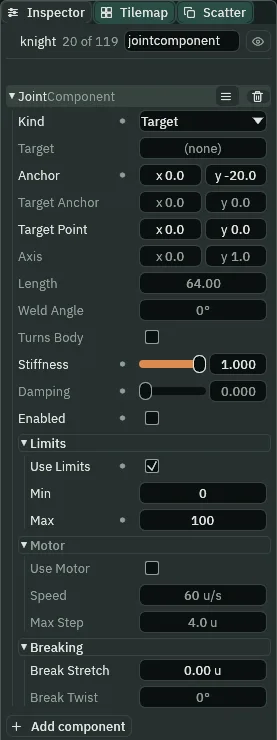
100, at full Stiffness, saved with Enabled unticked.- Kind › Target, as a rope
- The Joint’s Kind that ties a body to a point in the world, its Target Point. Chapter 9’s claw pulls its body to the point; with Use Limits ticked a Target is a rope instead: it holds the Anchor within Max of the point, lets it anywhere nearer, and holds nothing back while slack. Taut, it turns his motion along his swing and takes away only the part heading out. Unity’s Distance Joint 2D with Max Distance Only ticked and no connected body is the same rope.
- Anchor
- The Joint’s Anchor: where on him the rope ties, in his own units from his feet.
0,-20is his hand,20up. The Line’s first point and the script’s Hand are the same place. - Target Point
- The Joint’s Target Point: the ring the rope is on, in world units. Saved
0,0, and not read while the joint is off;grapple.rgssets it to where the ring hangs as it switches the joint on. The claw’s was walked by its script; the rope’s is set once a throw. - Stiffness
- The Joint’s Stiffness, on the rope:
1, the whole way back each pass, so the rope never stretches past its Max. The claw’s0.3let it trail its point. - Damping
- The Joint’s Damping, on the rope:
0, and dim, since a Target with Use Limits ticked is a rope, and a rope does not damp while slack, nor a body it alone swings. Hover it and the Inspector says so. The swing keeps its speed. - Enabled, saved off
- The Joint’s Enabled: unticked, the rope holds nothing, coiled.
grapple.rgsticks it when F hooks a ring, and unticks it when he lets go. - Use Limits, Min and Max
- The Joint’s limits, on a Target: how far its Anchor may be from its Target Point. Min
0, as near as it likes; Max100, the rope’s length. Without Use Limits a Target pulls its Anchor onto its point, as chapter 9’s claw is pulled.
A Joint draws nothing in the game. The rope is drawn by a Line, a stroke through a list of points, in front of his picture. A Line does not follow a joint: the script moves its second point to the ring every step he hangs.
- With
knightselected, click Add component and choose LineComponent. - Click the + beside Points twice. Set
[0]and[1]both to0,-20, his hand. - Set Width to
2. Click Color; if the button at the top left of the picker reads U8, press it so it reads F, and set red0.55, green0.42, blue0.25and alpha1: hemp. - Set Joint to RoundCaps, leave Closed unticked, and set Sort Layer to
6. Press Ctrl+S.
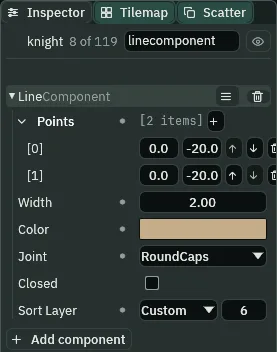
2 wide, hemp, round-capped, over his picture.- Points
- The Line’s Points: the list it draws through, in order, in the node’s own units. The rope’s two are both
0,-20, his hand: a Line whose points are one draws nothing, the rope coiled. The script moves the second to the ring every step it is hooked, and back to his hand when it lets go. Godot’s Line2D is the same idea. - Width
- The Line’s Width: how thick the stroke is, in world units on an unscaled node.
2for a rope; a new Line’s is4. - Color
- The Line’s Color: its tint, red, green, blue and alpha, each
0to1in the picker’s F mode. The rope’s0.55,0.42,0.25, alpha1is hemp; a new Line’s is white. - Joint
- The Line’s Joint: how its corners and ends are finished, a choice of the stroke’s and nothing to do with the Joint component. RoundCaps rounds its ends and corners, a rope’s. Flat, as it comes, is chapter 14’s lamp rail’s, and Round its crate puzzle’s fence’s.
- Closed
- The Line’s Closed: whether its last point joins back to its first. A rope is open, unticked as it comes; chapter 14’s fence is closed.
- Sort Layer
- The Line’s Sort Layer: where it draws among the pictures, lower first.
6is over his picture’s5, so the rope runs over his hand, not behind him. A new Line’s is0.
His Rope Jump
- With
knightselected, in his Character Body’s Jumping fold, set Rope Jump to680, his Jump Speed.
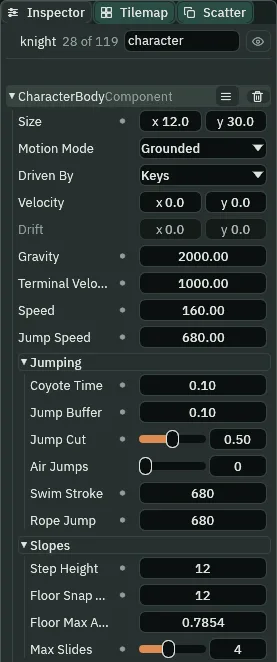
680, under chapter 12’s Swim Stroke.- Rope Jump
- The Character Body’s Rope Jump, in its Jumping fold, in world units a second: the upward speed a press of jump sets while he hangs on a rope, held by an enabled joint, off the ground and outside his Coyote Time. It is a jump: let go of Space early and his Jump Cut cuts it, and it spends no air jump. It does not let go of the rope; the script holding it does. Only a press made while he hangs counts: one pressed before F does not carry onto the rope.
0, as it comes: a press on a rope is nothing to his body.
The grapple
The script is on the knight and writes only his own components: two writes to his Joint, its Target Point and Enabled, and one to his Line’s second point. F pressed throws the rope at the nearest ring he can see, if it is in reach of his hand; held, the rope holds. It lets go when F is let go of, when Space is pressed, and when he lands.
- In Assets, click Create, choose New script, type
grappleand press Enter. In the Code tab, replace everything ingrapple.rgswith the script below, and press Ctrl+S. - Select
knight, click Add component and choose Grapple. Its Rope reads100, the joint’s Max, and its Hand0,-20, the joint’s Anchor. Press Ctrl+S.
/// The knight's grapple. The `grapple` key (F) throws the rope at the
/// nearest iron ring he can see, if it is within the rope's reach of his
/// hand. Held, the rope holds and he swings on it. It comes off when the key
/// is let go of, when he jumps off it, and when he lands.
///
/// The rope is two components on this node. A Target joint, switched off,
/// with Use Limits from 0 to the rope's length, at full Stiffness and no
/// Damping, anchored at his hand: switched on with its Target Point where
/// the ring is, it keeps his hand within the rope's length of the ring, and
/// he swings on it. And a Line, whose first point is his hand and whose
/// second this script draws to the ring every step it is hooked.
///
/// A ring is found by where it is and by its group, never by its name.
component Grapple {
    /// How long the rope is: the joint's Max. A ring further than this from
    /// his hand is out of reach.
    rope: f32 = 100.0,
    /// Where the rope is tied on, from his feet: the joint's Anchor and the
    /// Line's first point.
    hand: Vec2 = vec2(0.0, -20.0),
    /// Whether the rope is on a ring.
    #[readonly]
    hooked: bool = false,
    /// Where the ring it is on hangs.
    #[readonly]
    hook: Vec2 = vec2(0.0, 0.0),

    fn loop() {
        if hooked {
            if held("grapple") && !pressed("jump") && !grounded() {
                let far_end = hook - position();
                set_point("LineComponent", "points.1", far_end);
            } else {
                hooked = false;
                set_flag("JointComponent", "enabled", false);
                set_point("LineComponent", "points.1", hand);
            }
        } else if pressed("grapple") {
            let ring = nearest_seen("rings", -1);
            let at = position_of(ring);
            if ring != node(0) && at.distance(position() + hand) <= rope {
                hooked = true;
                hook = at;
                let far_end = at - position();
                set_point("JointComponent", "target_point", at);
                set_flag("JointComponent", "enabled", true);
                set_point("LineComponent", "points.1", far_end);
            }
        }
    }
}
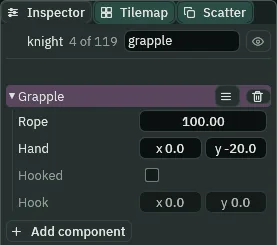
- Rope and Hand
- The Grapple’s two fields to type: the rope’s reach,
100, the joint’s Max, so the rope only hooks a ring already within its length of his hand; and where it ties on,0,-20, the joint’s Anchor. Hooked and Hook are#[readonly](attributes): the script sets them, and the Inspector shows them dim. - loop, pressed and held
loopruns every step.pressed("grapple")is true on the one step F goes down;held("grapple")every step it stays down.pressed("jump")is Space’s, the project’sjump.- nearest_seen
- The nearest node in the group
ringswith no wall between this node and it, as the step began;-1asks about walls on every collision layer. Nobody,node(0), when none can be seen. nearest is the same without the walls. - position_of, position and node
position_of(ring)is where the ring hangs, in the world;position()is where the knight’s feet are.node(0)is nobody, whatnearest_seenanswers when it finds no ring.at.distance(…)and vec2- How far apart two points are, a method of every Vec2.
position() + handis his hand in the world: a ring further from it than Rope is out of reach, and F throws nothing. - set_point and set_flag
- Write a point, or true or false, onto another component of this node.
"target_point"and"enabled"are the Joint’s;"points.1"is the Line’s second point, from his feet, sohook - position()draws it to the ring wherever he is that step. - grounded
- Whether his Character Body stood on something as the step began. Standing, the rope lets go: a rope holds a man off the ground, and on the ground it has nothing to do.
The swing
- Set the knight’s Position to
392,224. Withknightselected, so his rope is drawn bright, press F5. - Hold A, and keep it held to the end. He walks west. On the rope it pushes his swing west, and off it, it is his walk west onto the ledge. A stride before he comes under the beam, press and hold Space: a jump.
- At the top of the jump, press and hold F and let go of Space. The rope goes to
ring_1, slack at first, and draws taut east of the ring. - He swings west under the ring, faster than he walks. As he passes under it and starts up, press and hold Space. He jumps off the rope, the rope coils back into his hand, and he flies up and west over the ledge’s edge, lands on it, and walks to the wall, west of the bell. Press F5 to stop, and Ctrl+Z back to
48,1792.
The timing has room. F pressed anywhere from 8 steps before the top of the jump to 11 after it, from an eighth of a second early to a sixth late, and Space anywhere from 5 steps before he first swings under the ring to 12 after it, from a twelfth of a second early to a fifth late, land him on the ledge with his feet 15 or more over its edge. Each window is measured with the other key at its usual moment: F’s with Space as he first swings under the ring, Space’s with F at the jump’s top. To see the steps, press Pause or F6 as he jumps, then Step or F7, and watch the Play bar’s step counter.
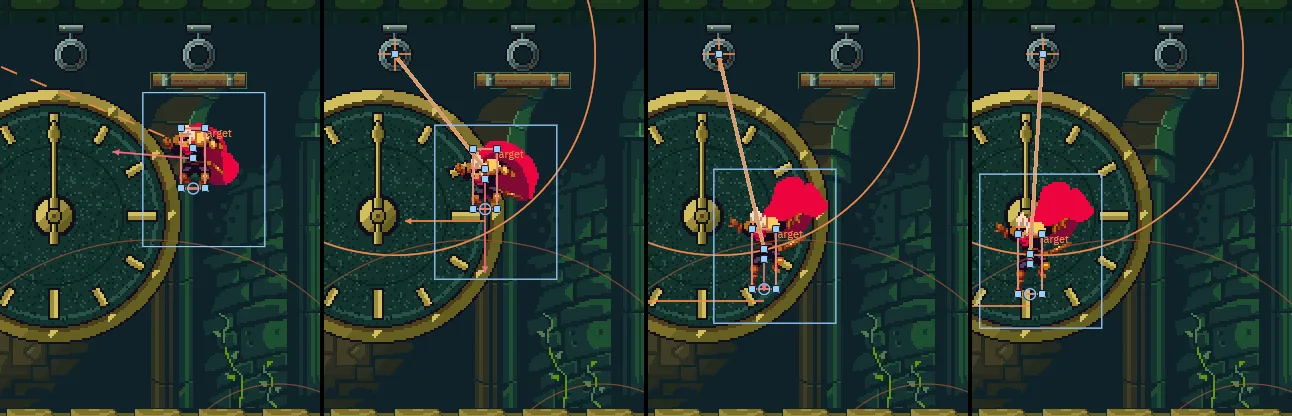
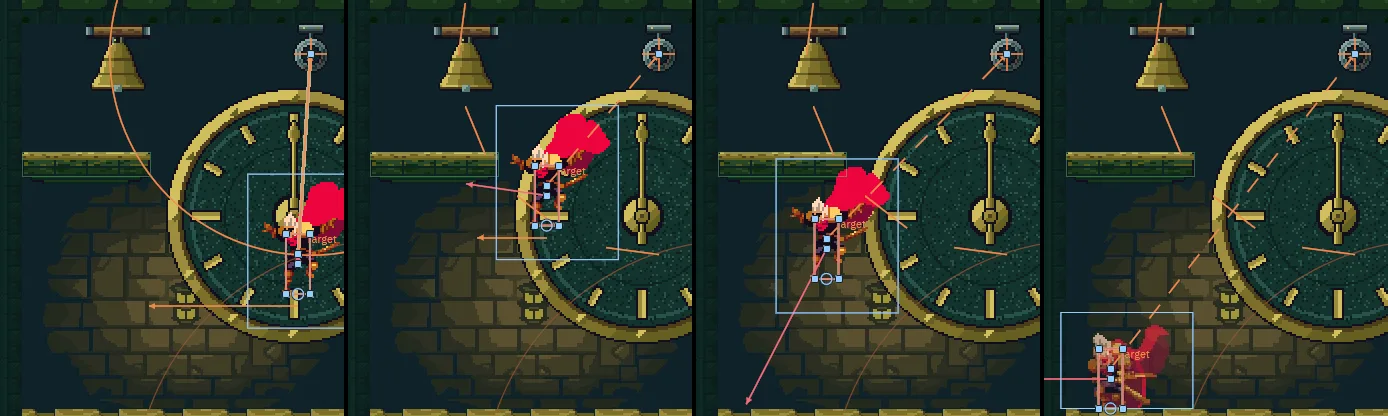
64, 70, 78 and 84 (1.07, 1.17, 1.30 and 1.40 s), the editor in Play at 200%, framed on belfry, knight selected: A from step 0 to 130; Space from 44 to 65, a held jump with his feet at x 274.67; F from 65, at the jump’s top, where ring_2 is the nearer ring, behind the beam. The rope draws taut on step 78, east of the ring; on step 83 he swings under it. The orange circle is the rope’s Max.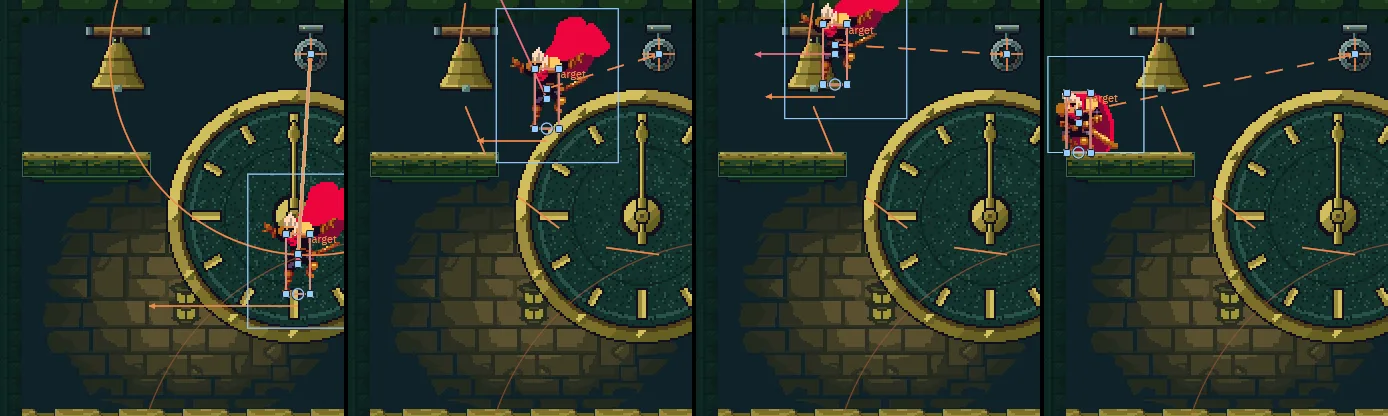
84 to 104 and F let go of on 104: steps 84, 94, 100 and 112 (1.40, 1.57, 1.67 and 1.87 s). On step 85 his upward speed is set to his Rope Jump, 680, and the grapple lets go: the joint, off, is drawn dashed. On step 100 he bumps the roof over the ledge; he lands against the wall on step 112.Taken anywhere from x 260 to 290, the jump that starts it lands him on the ledge the same way. Space tapped on the rope instead of held, his Jump Cut cuts the jump off it short, as it cuts any: he meets the ledge’s face, short of its top, and comes down on the floor under it.
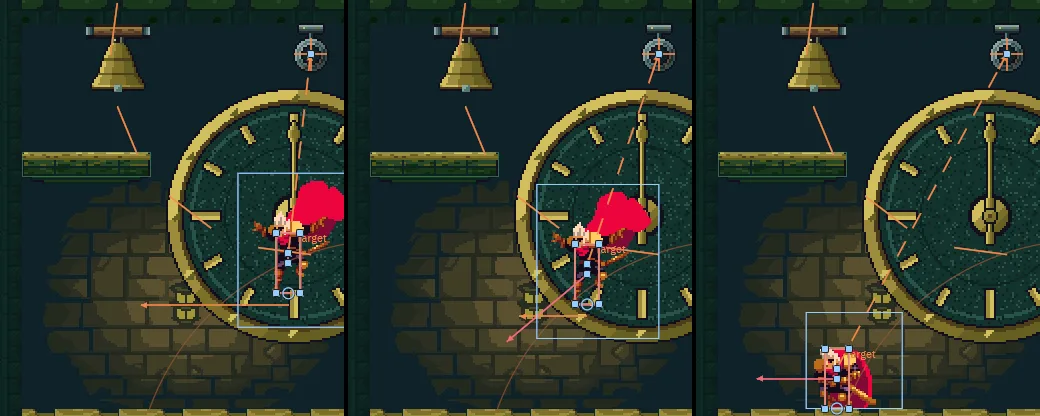
84 to 85, the other keys as above: steps 84, 94, 104 and 116 (1.40, 1.57, 1.73 and 1.93 s). Pressed on step 85 and let go of on the next, the jump is cut: his rise tops out on step 94, his feet at 132.5, 36.5 under the ledge’s top; he meets its east face on step 98 and lands on the floor under it on step 113.Let go of F instead of pressing Space, and he flies on west off the rope and comes down on the floor; Space in the air after that is nothing.
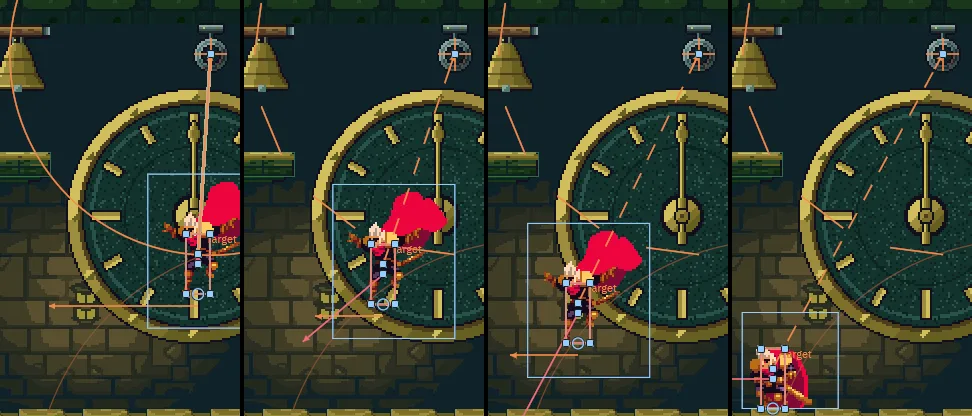
65 to 84 only, instead of Space under the ring, and Space from 89 to 90, in the air, the other keys as above: steps 85, 90 and 100 (1.42, 1.50 and 1.67 s). The rope lets him go on step 85, the step F comes up, and he flies on west, falling; the press on step 90 changes nothing, and he lands on the floor on step 100, under the ledge’s east end.On the ledge’s east end ring_1 is in reach: F hooks it, and the step after, seeing him stand, the grapple lets it go.
Try the rope
Try it: no Rope Jump
- Select
knightand set Rope Jump to0, what he had before this chapter. Set his Position to392,224. - Press F5 and swing as above. Space on the rope only lets go of it, as letting go of F does, and he drops to the floor. Held on the rope with A held, the swing alone never lifts his feet to the ledge’s top. Press F5 to stop.
- Set Rope Jump back to
680and the knight’s Position back to48,1792.
0, the keys as above: steps 84, 90, 95 and 100 (1.40, 1.50, 1.58 and 1.67 s). Space, down on step 85, lets go of the rope, and he is on the floor by step 100.Try it: nearest and can_see
- In
grapple.rgs, writenearest("rings")fornearest_seen("rings", -1)and press Ctrl+S. Set the knight’s Position to392,224, and withknightselected press F5. Jump and press F as above, and keep F held: the rope goes toring_2, through the beam, and he hangs under it, far east of the ledge. Press F5 to stop. - With
neareststill in, writecan_see(at, -1) &&afterring != node(0) &&, and press Ctrl+S. Press F5 and jump as above: F at the top of the jump throws nothing now, and he comes down on the floor. Press F5 to stop. - Put
nearest_seen("rings", -1)back, takecan_see(at, -1) &&out, press Ctrl+S, and set the knight’s Position back to48,1792.
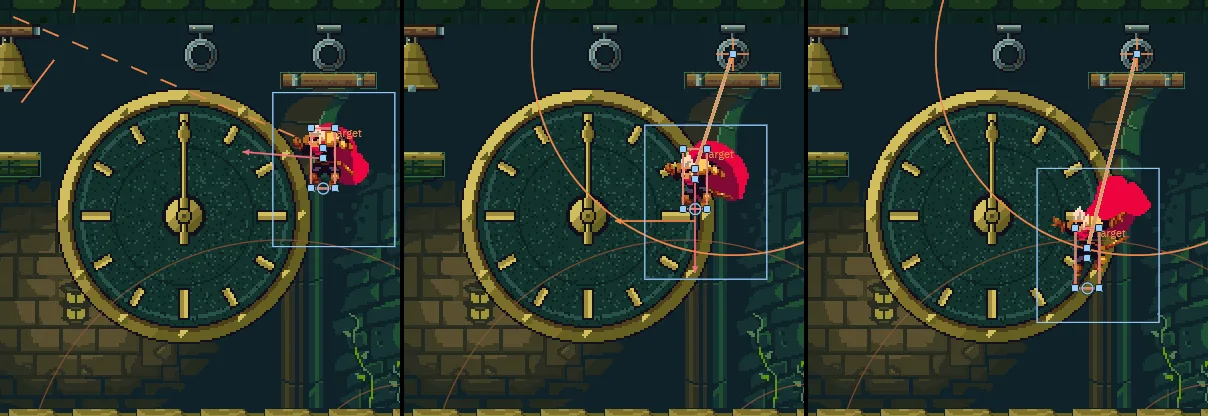
nearest("rings") written for nearest_seen("rings", -1) in grapple.rgs: A from step 0 to 130, Space from 44 to 65, and F from 65 on, held. Steps 64, 70 and 110 (1.07, 1.17 and 1.83 s): thrown at the jump’s top, the rope goes to ring_2, the nearer, through the beam, and he hangs under it, a little west of it with A held, far east of the ledge.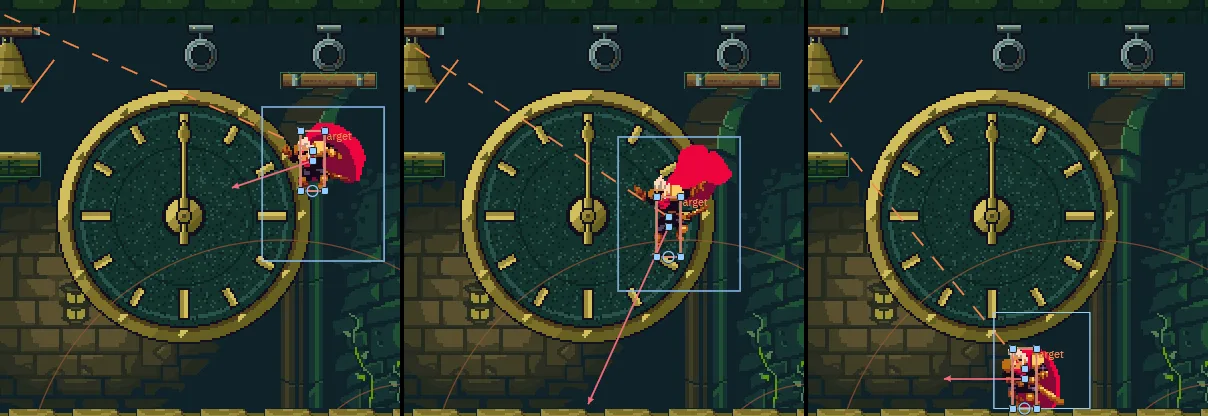
can_see(at, -1) && written in as well, the same keys: steps 66, 75 and 84 (1.10, 1.25 and 1.40 s). F goes down on step 66 and throws nothing: nearest answers ring_2, and can_see refuses it. The rope’s joint, never switched on, is drawn dashed toward its saved Target Point, 0, 0; he lands on the floor on step 84.From where he presses F, can_see of where ring_2 hangs is false, the beam between, and of where ring_1 hangs true. can_see asks it of one point; nearest_seen asks it of each ring in the group and takes the nearest that passes. nearest asks nothing of walls, so it takes ring_2, and can_see then refuses it.
Try it: a longer rope
- Select
knight. Set his Joint’s Max to140and his Grapple’s Rope to140, and his Position to392,224. - Press F5 and swing as above, pressing Space as he passes under the ring. The swing hangs him
40lower, and the jump off it no longer reaches the ledge: he meets its face and comes down on the floor under it. Press F5 to stop. - Set Max and Rope back to
100, and the knight’s Position back to48,1792.
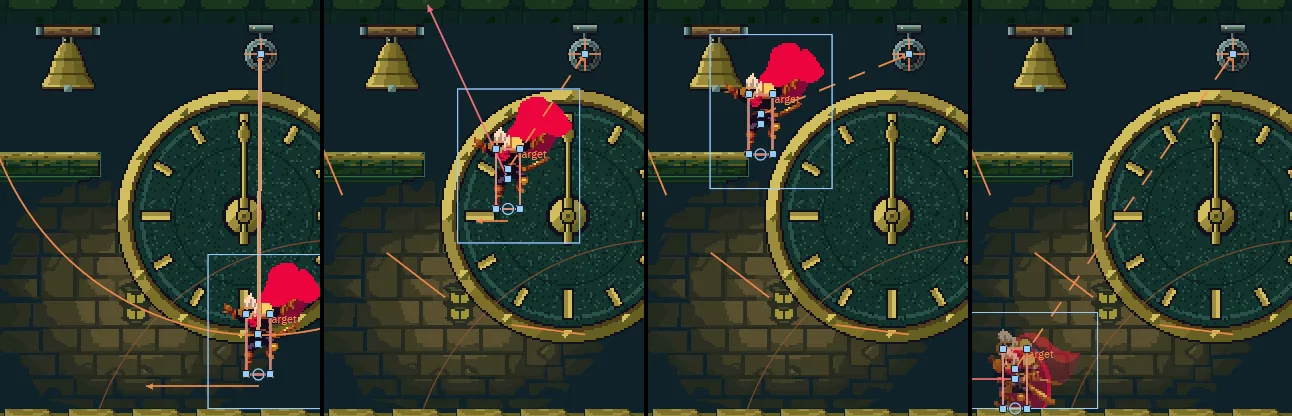
140: A from step 0 to 140, Space from 44 to 65, F from 65 to 106 and Space from 86 to 106, as he first swings under the ring. Steps 86, 96, 106 and 130 (1.43, 1.60, 1.77 and 2.17 s): his feet top out on step 105, under the ledge’s top, and he slides down its face to the floor.The climb’s end
The grapple is the belfry’s way up, and the last. From where chapter 11 leaves him: A held throughout, a held jump a stride before the beam, F at its top, Space as the swing takes him up past under the ring, and he lands on the bell’s ledge, the climb’s end. No held jump from the floor reaches it.
The whole climb is now every floor’s way up, from his start at 48, 1792 to the bell’s ledge, by the keys alone; every jump on the way clears what it reaches by 15 or more. It takes 2755 steps, 45.92 s at sixty steps a second, the same on the exported tower, below. The clockworks’ way up waits on the pendulum, so a run started a little later may take a step or two more or less.
The tower, exported
The tower is finished, and a finished game is one you can hand to someone who does not have the editor. Export writes it to a folder of its own: your project, with its pictures prepared for the game to load, and a copy of the player that came with Rengy, named after your project’s folder. Nothing is compiled: the scripts run as they are. Exporting has the whole of it.
- Save with File → Save all: Export copies the files as they are on disk, the tilemap and
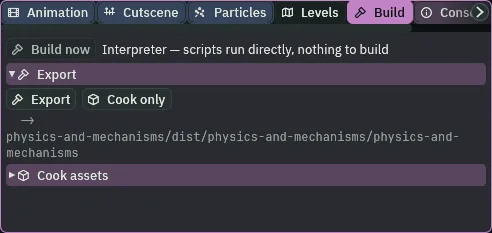
input.ronwith the scene. - Click the Build tab, or choose View → Panels → Build if it is not there.
- In its Export section, the line under Export says where the game will be written, ending in
physics-and-mechanisms/dist/physics-and-mechanisms/physics-and-mechanisms: your project’s folder, thendist, then a folder and a file both named after it. - Press Export. When it is done, the editor opens the new folder in your file manager.
- Double-click
physics-and-mechanisms, orphysics-and-mechanisms.exeon Windows. On Linux, if double-clicking does not start it, run./physics-and-mechanismsin a terminal in that folder.
The export is the same player running the same files: the tower, its pictures, its scripts and its seven actions, F’s grapple among them. It climbs as F5 does, step for step, to the bell’s ledge. Nothing about a body, a joint, an effector or a rope needs the editor.
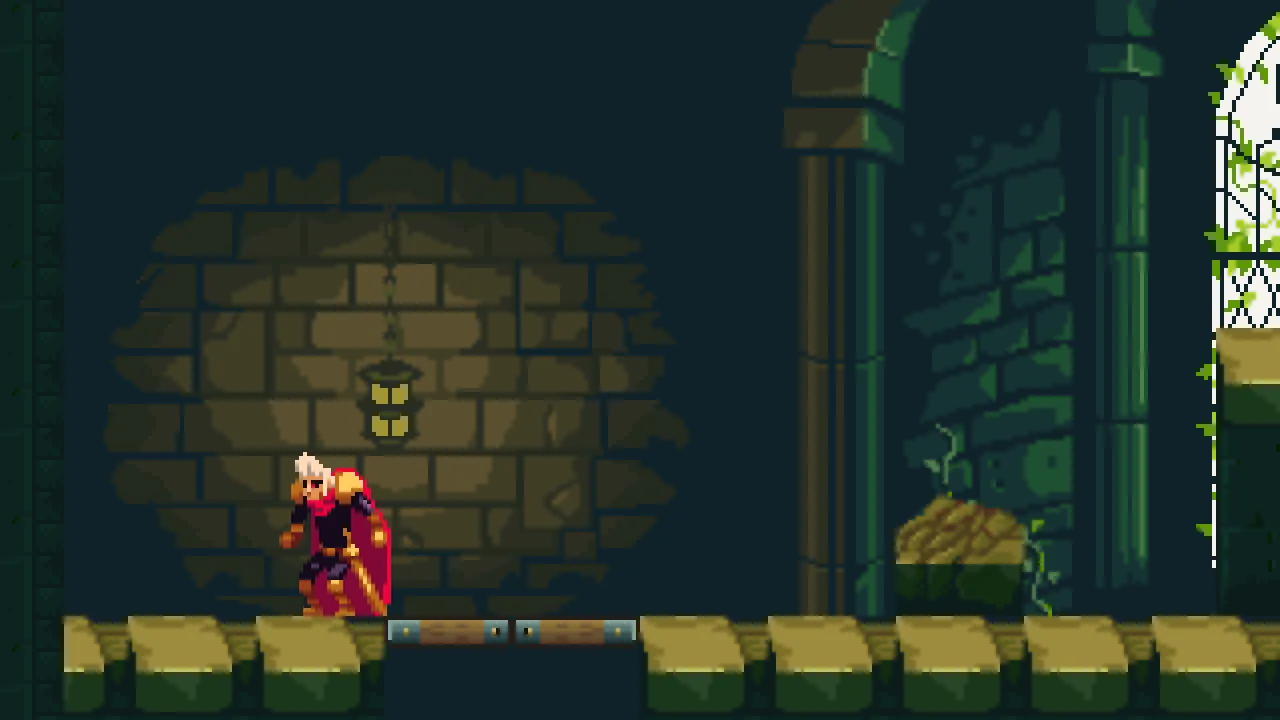
180 steps, 3.00 s, in the player the export runs: from his start, D east over the hatch, a jump, F with no ring in reach, A back west and a short jump. The exported game draws this picture, pixel for pixel, after the same keys.The belfry and the rope
| Node | Component | Field | Value |
|---|---|---|---|
belfry | (a Node) | under tower | |
ring_1, ring_2 | Position | 160, 47; 224, 47 | |
| Groups | rings | ||
| Sprite | Texture, Size | iron-ring.png, 20, 26 | |
| Anchor, Sort Layer | 0.5, 0.615; 1 | ||
beam | Position | 224, 60 | |
| Sprite | Texture, Size | scaffold-plank.png, 48, 8 | |
| Collider | Size, One Way | 48, 8; ticked | |
belfry_clock | Position | 152, 128 | |
| Sprite | Texture, Size | clock-face.png, 128, 128 | |
| Sort Layer | -2 | ||
belfry_clock_hand | Position | 0, 0, under belfry_clock | |
| Sprite | Texture, Size | clock-hand.png, 8, 64 | |
| Anchor, Sort Layer | 0.5, 0.75; -1 | ||
bell_ledge | Position | 16, 96 | |
| Sprite | Texture, Size | bell-ledge.png, 64, 16 | |
| Anchor, Sort Layer | 0, 0; 1 | ||
| Collider | Size, Offset | 64, 12; 32, 6 | |
bell | Position | 64, 32 | |
| Sprite | Texture, Size | bell.png, 32, 34 | |
| Anchor, Sort Layer | 0.5, 0; -1 |
| Node | Component | Field | Value |
|---|---|---|---|
knight | Character Body | Rope Jump | 680 |
| Joint | Kind, Anchor | Target, 0, -20 | |
| Stiffness, Damping | 1; 0 | ||
| Enabled | unticked | ||
| Use Limits, Min, Max | ticked, 0, 100 | ||
| Line | Points | 0, -20 and 0, -20 | |
| Width, Color | 2; 0.55, 0.42, 0.25, alpha 1 | ||
| Joint, Closed | RoundCaps; unticked | ||
| Sort Layer | 6 | ||
| Grapple | Rope, Hand | 100; 0, -20 (grapple.rgs) | |
input.ron | grapple | F |
Every new node is under belfry, and every other field is as it comes.