Tutorials · Ship Evader · Chapter 14
Game over
By the end
- A game-over screen, which the game moves to 1.5 s after the last life
- The music stopped, and a jingle that says how the game went
- The best saved where the game ends, and shown from the screen’s first picture
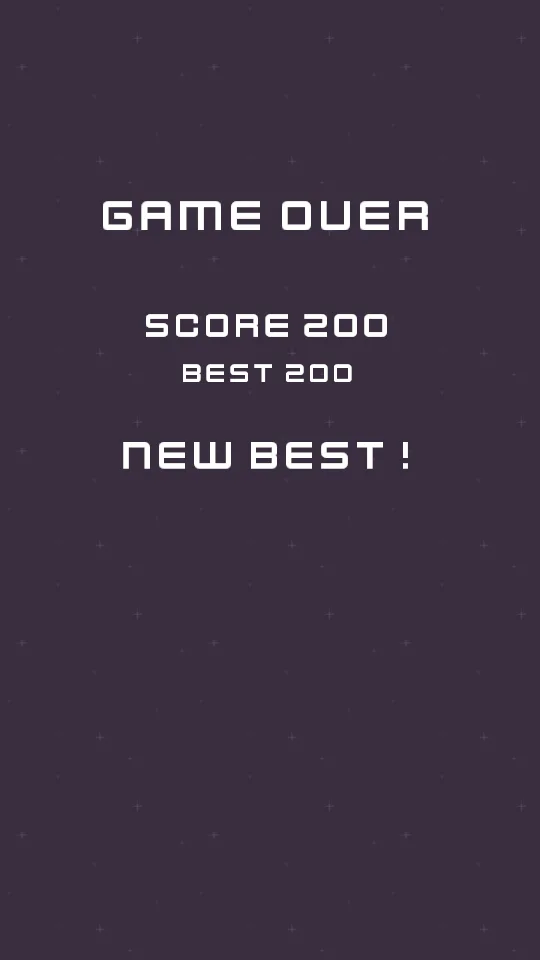
- NEW BEST! pulsing when the best was beaten
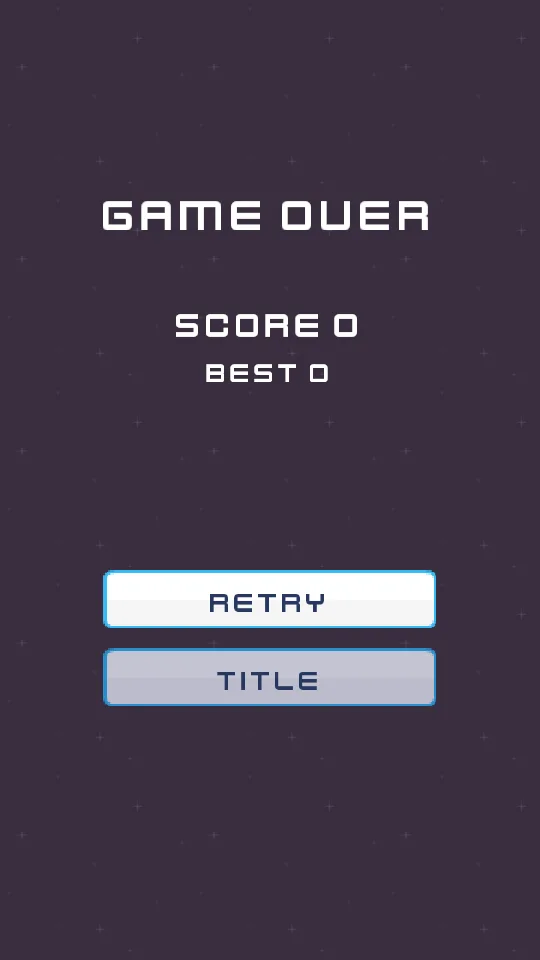
- RETRY and TITLE, coming up a second late so a Space meant for the lasers presses nothing
On this page
The end of a game
The game-over screen’s root stops the game’s music, saves a beaten best, and plays a jingle: rising for a new best, falling otherwise. Make a script called game_over:
- In Assets, press Create, choose New script, type
game_over, and press Enter. The editor writesgame_over.rgsinto the project folder. - Click the Code tab, then
game_over.rgsin its Scripts list, replace everything in it with the script below, and press Ctrl+S.
/// The end of a game, on the game-over screen's root: the game's music stops,
/// and a jingle says how the game went, rising for a new best and falling
/// otherwise. A score that beats the best is saved as the new best, here,
/// where the game ends.
component GameOver {
    fn on_create() {
        // The music plays on through a change of scene, on its one channel,
        // so it is stopped here, and the jingle is heard alone.
        stop_music();
        // Both as this step began: the score the game kept, and the best saved
        // before it.
        let score = kept_number("score", 0.0);
        let best = saved_number("best", 0.0);
        if score > best {
            save_number("best", score);
            // This node's Audio Source is on the music bus, so the jingles are
            // too.
            play_sound("new best");
        } else {
            play_sound("game over");
        }
    }
}
The music plays on through a change of scene, on its one channel, so stop_music stops it here. The jingle is a sound played on a source on the Music bus, not music: it plays once, and the next change of scene cuts it, as it does every sound on the Music bus that is not the music. Both reads are as the step began, so the score and the best are the game’s, before this step’s save.
The score, the best, and NEW BEST!
The score label reuses the HUD’s Score. The best needs one of its own: the screen saves the new best on its first step, and a save lands as the step ends, so the HUD’s Best would show the old best for a moment. Make final_best, which shows the greater of the two from the first picture:
- In Assets, press Create, choose New script, type
final_best, and press Enter. The editor writesfinal_best.rgsinto the project folder. - Click the Code tab, then
final_best.rgsin its Scripts list, replace everything in it with the script below, and press Ctrl+S.
/// The best score, on the game-over screen: the best saved before this game,
/// or this game's score where it beat it. That is the best the screen saves
/// as it opens, shown from its first picture.
component FinalBest {
    fn on_create() {
        let best = max(saved_number("best", 0.0), kept_number("score", 0.0));
        set_text("TextComponent", "text", "BEST " + text(best));
    }
}
NEW BEST! shows only when the best was beaten, and pulses. Make new_best:
- In Assets, press Create, choose New script, type
new_best, and press Enter. The editor writesnew_best.rgsinto the project folder. - Click the Code tab, then
new_best.rgsin its Scripts list, replace everything in it with the script below, and press Ctrl+S.
/// The NEW BEST! label, on the game-over screen: hidden, unless the game that
/// just ended beat the best, and then shown, pulsing.
component NewBest {
    /// How much bigger the label grows at the top of a pulse.
    grow_to: f32 = 1.2,
    /// How long a pulse takes to grow, and the same again to shrink.
    #[suffix("s")]
    pulse_time: f32 = 0.4,

    fn on_create() {
        // As this step began: the best saved before this game, which the
        // screen replaces at the end of this step.
        if kept_number("score", 0.0) > saved_number("best", 0.0) {
            show();
            // Its Text's size, not the node's: a label on a canvas is placed
            // by its Rect, and its node's scale is never read.
            pulse_number("TextComponent", "scale", grow_to, pulse_time, .InOutSine);
        }
    }
}
pulse_number moves a number to a value and back, over and over: the Text’s Scale, from 1 to 1.2 and back, 0.4 s each way, along .InOutSine. It pulses the Text’s size and not the node’s, because a label on a canvas is placed by its Rect, and its node’s scale is never read.
Buttons a second late
A player still holding Space to fire as the game ends would press the first button the moment it appeared. So the buttons come up a second after the screen. Make game_over_menu:
- In Assets, press Create, choose New script, type
game_over_menu, and press Enter. The editor writesgame_over_menu.rgsinto the project folder. - Click the Code tab, then
game_over_menu.rgsin its Scripts list, replace everything in it with the script below, and press Ctrl+S.
/// The game-over screen's buttons. They come up a moment after the screen
/// does, so a press of Space meant for the ship's lasers, just as the game
/// ends, starts nothing. Retry is the NewGame beside this; Title goes back to
/// the title.
component GameOverMenu {
    /// How long the buttons wait before they come up.
    #[suffix("s")]
    delay: f32 = 1.0,
    /// Whether they have come up.
    #[hidden]
    shown: bool = false,

    fn on_create() {
        // Hidden until now: a hidden button can be neither focused nor
        // pressed.
        await wait(delay);
        show();
        shown = true;
    }

    fn loop() {
        if shown && (pressed("ui_up") || pressed("ui_down")) {
            play_sound("move");
        }
        if pressed("title") {
            // A sound asked for on the step that changes scene plays on after
            // it.
            play_sound("press");
            change_scene("title");
        }
    }
}
A hidden button can be neither lit nor pressed, and a menu reads a key as it goes down, so a Space held through the end of the game never presses RETRY, and one tapped in that second presses nothing. RETRY is the same NewGame as the title’s PLAY, with the action retry; TITLE goes back to the title.
The game-over scene
- Click the Viewport tab, and choose File → New scene: the scene must exist before
game.rgsnames it, below. - Add a Node root called
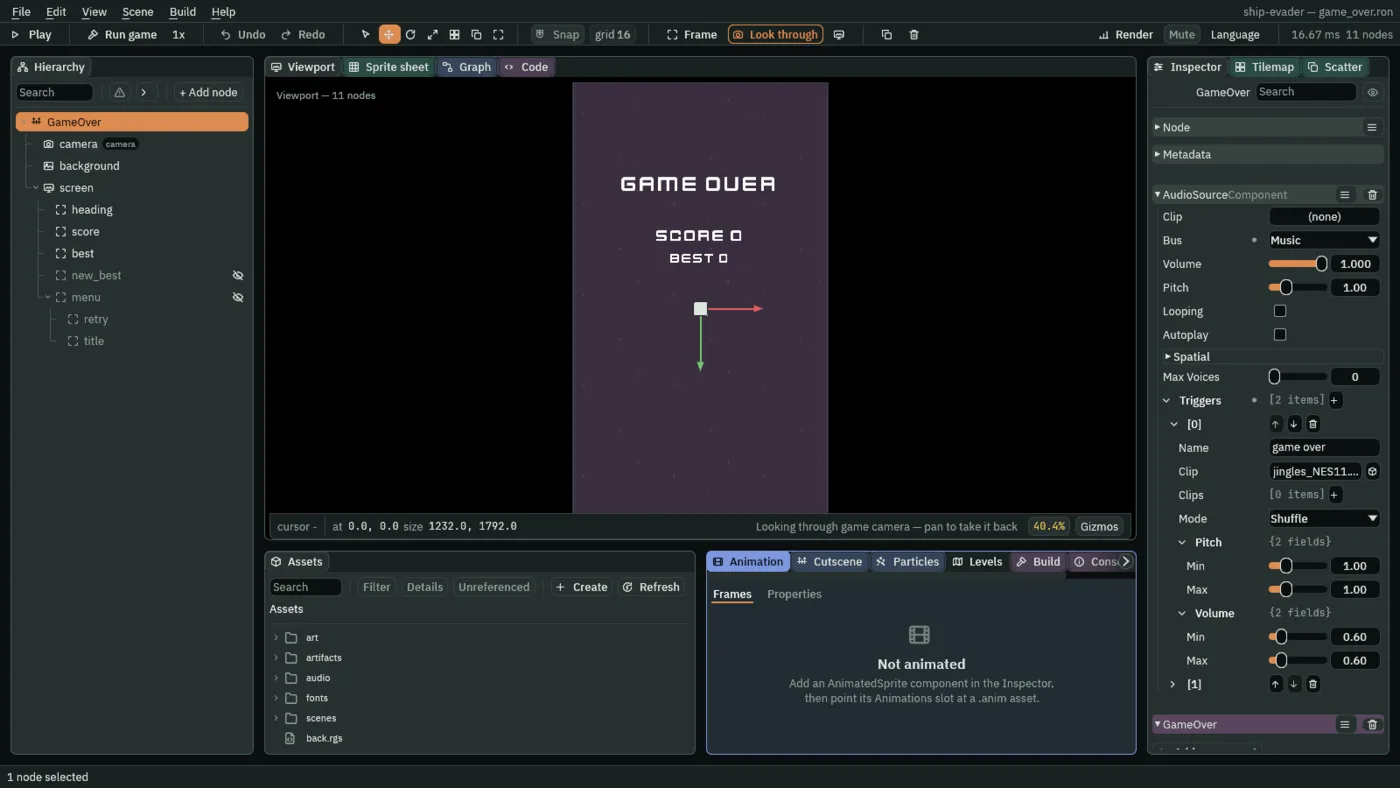
GameOver, with an AudioSourceComponent on the Music bus, Volume1, Clip empty, Looping and Autoplay unticked, Positional unticked, and two triggers:game over, Clipaudio/jingles_NES11.ogg, Volume Min and Max0.6; andnew best, Clipaudio/jingles_NES12.ogg,0.6. - Add GameOver.
- Press Ctrl+S, and save the scene in the
scenesfolder asgame_over.ron. The editor saves no scene without a node in it, which is why this comes afterGameOver. - Copy
cameraandbackgroundfromscenes/game.ronand paste them as children ofGameOver. - Remove the camera’s Shake.
- Select
GameOver, and add ascreenNode with a CanvasComponent as the title’s. - Under
screen, add Labels from the top centre, centred:heading, Offset Min-350and240, Offset Max350and320,GAME OVERat1.3;score,-350,400to350,456,SCORE 0at1.0, with Score; andbest,-350,470to350,516,BEST 0at0.8, with FinalBest. - Add a Label
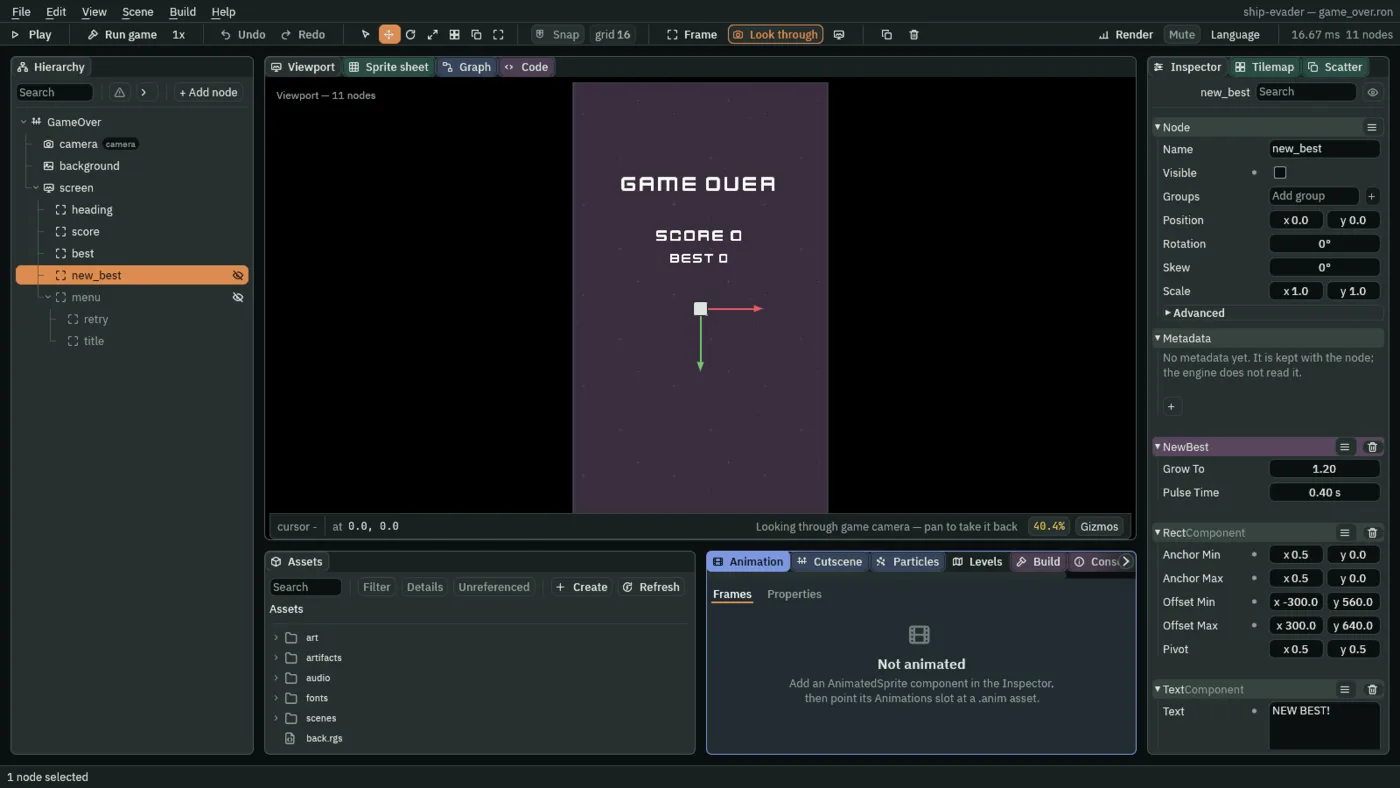
new_bestunderscreentoo, its Visible unticked:-300,560to300,640,NEW BEST!at1.0, with NewBest, keeping Grow To1.2and Pulse Time0.4. - Add a
menuNode underscreen, its Visible unticked, with a RectComponent, an AudioSourceComponent on Sfx with Positional unticked and two triggers,move(audio/select_001.ogg,0.4) andpress(audio/confirmation_001.ogg,0.6), GameOverMenu (Delay1), and NewGame with its Action set toretry. - The two buttons next take colours: the first time you click one, look at the top left of the picker that opens, and if it reads U8, press it, so it reads F. The picker then shows each value from 0 to 1, as this tutorial gives every colour, until you close the editor.
- Under
menu, add two buttons as the title’s:retry,-222,760to222,838,RETRY, Actionretry; andtitle,-222,864to222,942,TITLE, Actiontitle. - Give both a FocusComponent, then set
retry’s Up totitleandtitle’s Down toretry. The list a Focus link opens offers only nodes that have a FocusComponent of their own, so both get theirs first. - Save it.
The game only ends
The game no longer starts itself again: the game-over screen saves the best, and its RETRY sets up the next game, so game.rgs no longer saves or keeps anything. Its field keeps its name, restart_delay, though it now leads to the game-over screen: a renamed field leaves the old one stored in your scene, since the editor never removes a stored value.
- Click the Code tab, then
game.rgsin its Scripts list, replace everything in it with the script below, and press Ctrl+S.
/// The game itself, on the scene's root node: it starts the game's music, and
/// when the ship has lost its last life, it waits 1.5 s and moves the game on
/// to the game-over screen.
///
/// The root, because it stays in the scene from the first step to the last.
/// The ship cannot do this itself: it is gone on its last life, and a node
/// that is gone runs no hooks. So the ship sends "game over" to the group
/// "game", which this node is in.
component Game {
    /// Seconds from the last life to the game-over screen.
    #[suffix("s")]
    restart_delay: f32 = 1.5,

    fn on_create() {
        // The track this node's Audio Source names "music", on the channel
        // music plays on. A new game asks for it as it starts: it replaces the
        // title's loop, or starts again from the top after the game-over
        // screen stopped the music.
        play_music("music");
    }

    fn loop() {
        await signal("game over");
        await wait(restart_delay);
        // The game-over screen saves a beaten best, and its Retry starts a new
        // game with its kept values set. Here the game only ends.
        change_scene("game_over");
    }
}
- Click the Viewport tab, so the game runs in front of you when you press F5.
Played straight from game_over.ron with F5, the screen has no game before it: it shows SCORE 0, the saved best and no NEW BEST!, and plays the falling jingle.
The comments that changed
Five scripts’ comments now say where the best is saved and where a new game starts. The game plays the same without them. To bring yours up to date, make each read as below, and press Ctrl+S in each file, then click the Viewport tab. In best.rgs, in loop:
        // The saved best, not the score: a score passing it during the game
        // is not a best until the game ends and the game-over screen saves it.
In director.rgs, in loop:
        // Once the last stage has begun, there is nothing left to count to. And
        // once the last life is lost the game is over: no stage begins while it
        // waits to move on to the game-over screen. A game played straight from
        // its own scene has kept no lives yet, and has 3.
In new_game.rgs and score.rgs, at the top:
/// A new game, from the button whose action this names: its press's sound,
/// the game's kept values as a new game starts with them, and the game's
/// scene. The button is Play on the title, and Retry on the game-over screen.
/// The score, on the HUD and on the game-over screen: the points the game
/// keeps under the name "score", written onto this node's Text as SCORE and
/// the number, whenever it changes.
And in ship.rgs, at the top of on_enter and in its last branch:
        // The lives are kept rather than held in a field of the ship's, so
        // that any script can read them, as the HUD does. NewGame keeps 3
        // before each new game, as the title's Play or the game-over screen's
        // Retry is pressed. A game played straight from its own scene has kept
        // none, and has 3.
            // The last life: a bigger shake, a big explosion where the ship
            // was, and the ship is gone. A node that is gone runs no hooks, so
            // the ship cannot wait to move the game on to the game-over
            // screen: the game's own node, which stays, does that when it
            // hears "game over".