Tutorials · Ship Evader · Chapter 8
Lives
By the end
- A ship that loses a life on each hit, flashes white and blinks, and cannot be hit while it blinks
- A camera that shakes the picture while the field stays put
- Signals sent to a group, and a script that waits for one
- The game’s root node, which starts the game again 1.5 s after the last life
- A background big enough that no shake shows its edge
On this page
What a hit does
The ship’s Area already notices enemies, their shots and rocks. Now each of them costs a life: the ship flashes white, the picture shakes, and the ship blinks for 2 s, during which nothing can hit it. On the last life the ship is gone. Click the Code tab, then ship.rgs in its Scripts list, replace everything in it with this, and press Ctrl+S:
/// The player's ship: it flies where `move` points, never leaves the field,
/// fires lasers while `fire` is held, and keeps its position for whatever aims
/// at it. Whatever its Area meets costs it a life: it flashes white, then
/// blinks, and nothing can hit it while it does. On its last life it is gone.
component Ship : Area {
    /// How fast the ship flies.
    #[suffix("u/s")]
    speed: f32 = 420.0,
    /// How close the ship's centre may come to an edge of the field.
    #[suffix("u")]
    margin: f32 = 50.0,
    /// Seconds between two lasers while fire is held.
    #[suffix("s")]
    fire_interval: f32 = 0.16,
    /// Seconds until the ship can fire again.
    #[hidden]
    cooldown: f32 = 0.0,
    /// How long the white flash of a hit takes to fade.
    #[suffix("s")]
    flash_time: f32 = 0.12,
    /// How long the ship blinks after a hit, while nothing can hit it.
    #[suffix("s")]
    blink_time: f32 = 2.0,
    /// How long a blink takes to fade out, and the same again to come back.
    #[suffix("s")]
    blink_fade: f32 = 0.1,

    fn loop(dt: f32) {
        // Kept under the name "ship" for the rest of the game, every step: a
        // gunner's shot reads it to aim at the ship.
        keep_point("ship", position());

        let view = camera_view();
        let next = position() + direction("move").normalized() * (speed * dt);
        move_to(vec2(
            clamp(next.x, view.x + margin, view.z - margin),
            clamp(next.y, view.y + margin, view.w - margin),
        ));

        if cooldown > 0.0 {
            cooldown -= dt;
        }
        if held("fire") && cooldown <= 0.0 {
            // 50 units above the ship's centre: up is toward negative y.
            spawn("laser", position() + vec2(0.0, -50.0));
            cooldown = fire_interval;
        }
    }

    /// When its Area meets another that it notices: an enemy's, an enemy
    /// shot's or a meteor's. Each of them is a hit.
    fn on_enter() {
        // The lives are kept rather than held in a field of the ship's, so
        // that any script can read them, as the HUD will. The first game has
        // kept none yet, and has 3; the game keeps 3 again before each new one.
        let lives = kept_number("lives", 3.0) - 1.0;
        keep_number("lives", lives);
        if lives > 0.0 {
            // The camera's node is in the group "camera", and hears this on
            // the next step.
            emit_to("camera", "shake");

            // A hit washes the ship white at once, and the white fades back
            // to its own colours over flash_time.
            set_number("SpriteComponent", "flash", 1.0);
            await anneal_number("SpriteComponent", "flash", 0.0, flash_time, .Linear);

            // The blink: its alpha down to 0.25 and back up, blink_fade each
            // way, over and over. Not hide(): a hidden Area overlaps nothing,
            // and an enemy that meets the blinking ship must still go. Plain
            // white, its colour at rest, shows the picture as it is.
            let faint = vec4(1.0, 1.0, 1.0, 0.25);
            let rest = vec4(1.0, 1.0, 1.0, 1.0);
            pulse_colour("SpriteComponent", "color", faint, blink_fade, .Linear);
            // A hook that is waiting ignores every call until it finishes.
            // While this one waits, through the flash and the blink, each hit
            // calls it again and nothing happens: nothing can hit the ship
            // while it blinks.
            await wait(blink_time);
            // Setting the colour ends the pulse, wherever it is.
            set_colour("SpriteComponent", "color", rest);
        } else {
            // The last life: a bigger shake, and the ship is gone. A node that
            // is gone runs no hooks, so it cannot wait to start the game
            // again: the game's own node, which stays, does that when it hears
            // "game over".
            emit_to("camera", "big shake");
            emit_to("game", "game over");
            destroy_self();
        }
    }
}
component Ship : Area- The ship’s script now takes the Area’s hook,
on_enter, as the laser’s does. The ship has had its Area since the last chapter. - keep_number and kept_number
- The lives are kept for the whole game, as the ship’s position is, so any script can read them: the HUD shows them in the next chapter. Until a game has kept a count, it has 3.
- emit_to
- Sends a signal to every node in a group:
shaketo the camera,game overto the game. It is heard on the next step. - pulse_colour and set_colour
- The blink: the Sprite’s colour down to an alpha of 0.25 and back, over and over, until setting the colour ends it.
The blink is not hide: a hidden node’s Area overlaps nothing, and an enemy that meets the blinking ship must still go. And nothing can hit the ship while it blinks because a hook that is waiting ignores every call until it finishes: each hit during the flash and the blink calls on_enter again, and nothing happens. A rock still overlapping the ship when the blink ends does not hit it either.
The camera shakes
A hit shakes the picture for 0.3 s by up to 12 units, and the last life for 0.5 s by up to 24. The camera does it, from a script of its own.
- In Assets, press Create, choose New script, type
shake, and press Enter. - In the Code tab’s Scripts list, click
shake.rgs, replace everything in it with the script below, and press Ctrl+S.
/// The camera's shake. "shake", sent to the group "camera" that this node is
/// in, jolts the picture about for a moment; "big shake" jolts it further, for
/// longer. Then it settles back to rest.
///
/// It moves the camera's offset, not the camera. The offset moves only the
/// picture: camera_view() still answers where the camera rests, so the ship,
/// held inside the field, stays put while the picture shakes.
component Shake {
    /// How long a shake jolts the picture about.
    #[suffix("s")]
    shake_time: f32 = 0.3,
    /// How far from rest a shake may move the picture.
    #[suffix("u")]
    shake_reach: f32 = 12.0,
    /// How long a big shake jolts the picture about.
    #[suffix("s")]
    big_shake_time: f32 = 0.5,
    /// How far from rest a big shake may move the picture.
    #[suffix("u")]
    big_shake_reach: f32 = 24.0,
    /// Seconds from one jolt to the next.
    #[suffix("s")]
    jolt_time: f32 = 0.05,
    /// Seconds of shaking left.
    #[hidden]
    shaking: f32 = 0.0,
    /// How far from rest the shake under way may move the picture.
    #[hidden]
    reach: f32 = 0.0,
    /// Seconds until the next jolt.
    #[hidden]
    next_jolt: f32 = 0.0,

    fn loop(dt: f32) {
        // A signal is heard on the step after it was sent, and only on that
        // step, so the loop asks on every one.
        if heard("big shake") {
            shaking = big_shake_time;
            reach = big_shake_reach;
            next_jolt = 0.0;
        } else if heard("shake") {
            shaking = shake_time;
            reach = shake_reach;
            next_jolt = 0.0;
        }

        if shaking > 0.0 {
            shaking -= dt;
            next_jolt -= dt;
            if shaking <= 0.0 {
                // Over: back to rest, where the picture is the camera's own.
                anneal_point("CameraComponent", "offset", vec2(0.0, 0.0), jolt_time, .OutQuad);
            } else if next_jolt <= 0.0 {
                // A jolt, toward a point as far as `reach` from rest, in any
                // direction: tau() is a whole turn.
                let turn = random(0.0, tau());
                let far = random(0.0, reach);
                let to = vec2(far * turn.cos(), far * turn.sin());
                anneal_point("CameraComponent", "offset", to, jolt_time, .Linear);
                next_jolt = jolt_time;
            }
        }
    }
}
It moves the Camera’s Offset, never the camera. The offset moves only the picture: camera_view still answers where the camera rests, so the ship, held inside the field, stays put while the picture jolts. heard answers whether a signal arrived on this step, and anneal_point moves a point field toward a value over a time.
- Click the Viewport tab, select
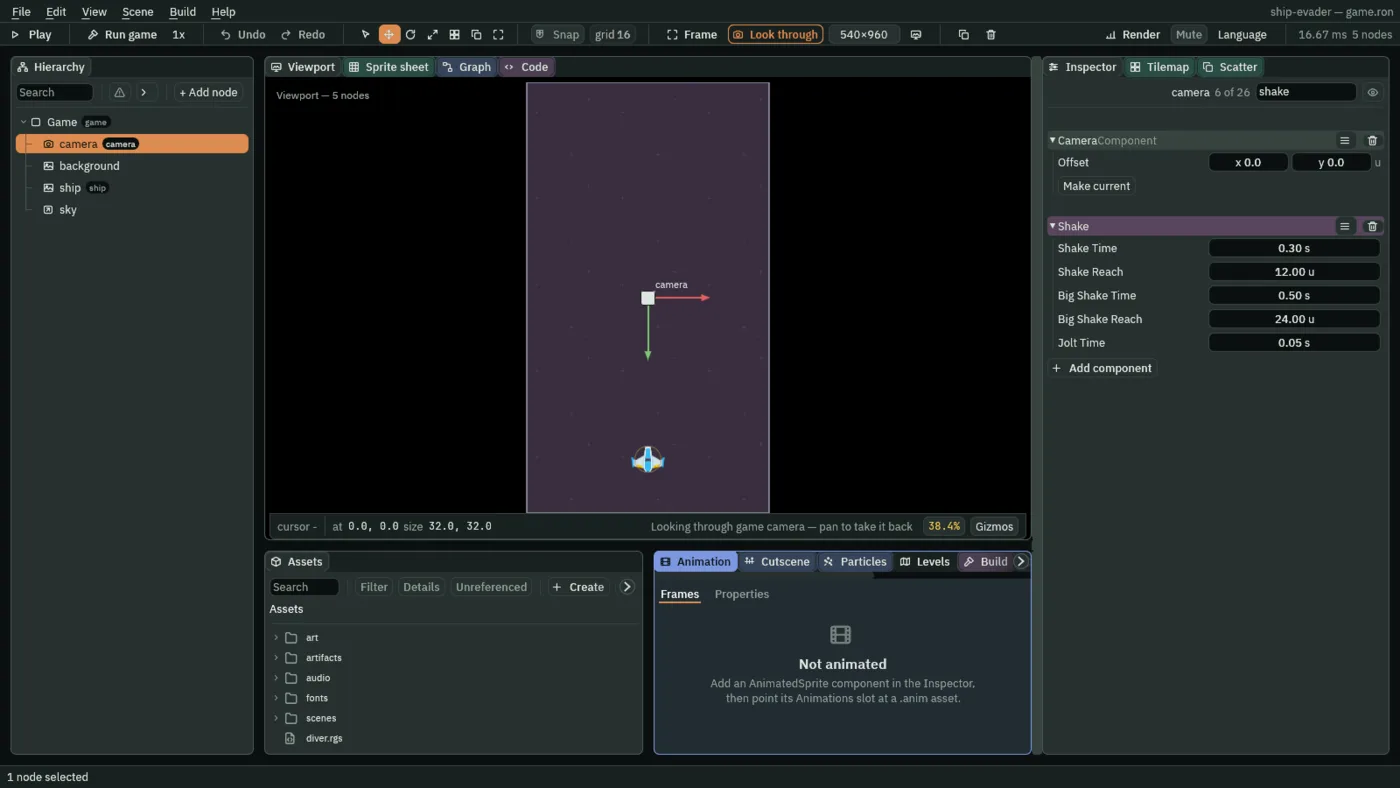
camera, give it the groupcamera, and press Enter. - Press Add component and choose Shake, keeping its five numbers: Shake Time
0.3, Shake Reach12, Big Shake Time0.5, Big Shake Reach24and Jolt Time0.05. - Select
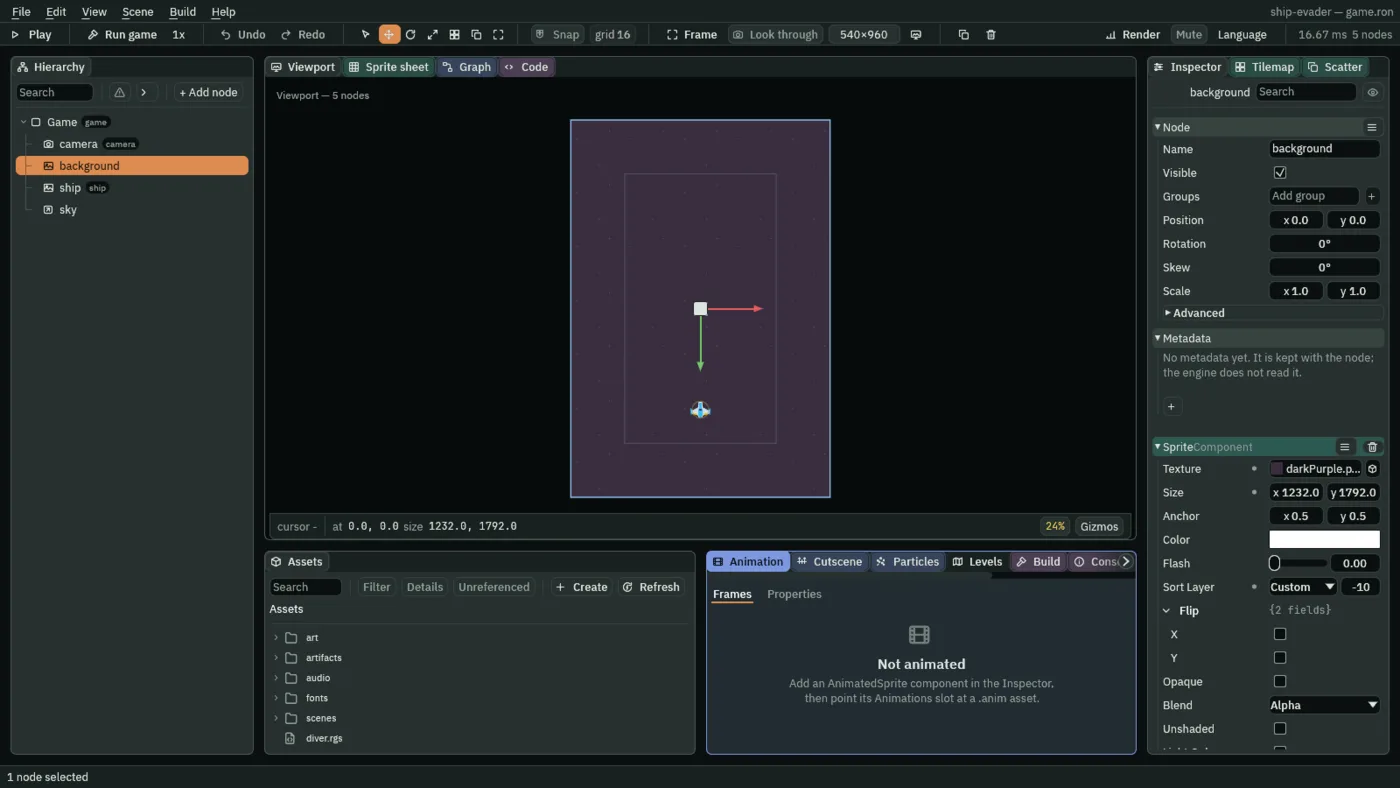
backgroundand set its Sprite’s Size to1232and1792: one 256-unit tile past the field on every side, further than the biggest shake moves the picture, so a shake never shows its edge.
The game starts again
On its last life the ship is gone, and a node that is gone runs no hooks, so it cannot wait to start the game again. The game’s root node, which stays from the first step to the last, does that when it hears game over.
- In Assets, press Create, choose New script, type
game, and press Enter. - In the Code tab’s Scripts list, click
game.rgs, replace everything in it with the script below, and press Ctrl+S.
/// The game itself, on the scene's root node: when the ship has lost its last
/// life, it waits 1.5 s and starts the game again.
///
/// The root, because it stays in the scene from the first step to the last.
/// The ship cannot do this itself: it is gone on its last life, and a node
/// that is gone runs no hooks. So the ship sends "game over" to the group
/// "game", which this node is in.
component Game {
    /// Seconds from the last life to the new game.
    #[suffix("s")]
    restart_delay: f32 = 1.5,

    fn loop() {
        await signal("game over");
        await wait(restart_delay);
        // Kept values outlast the scene, so the new game's are set here,
        // before the scene changes, and not by the new scene as it starts: it
        // begins with them already in place. The best score so far is saved
        // for the next launch too.
        save_number("best", max(saved_number("best", 0.0), kept_number("score", 0.0)));
        keep_number("lives", 3.0);
        keep_number("score", 0.0);
        change_scene("game");
    }
}
await signal("game over")andawait wait(restart_delay)- The loop waits for the signal, then for 1.5 s, before it goes on. Waiting, in place has more.
- change_scene
- Swaps the running scene for a fresh copy of the scene file of that name,
scenes/game.ron, once the step ends: a new game. Kept values outlast the change, so the new game’s lives and score are kept here, before it. - save_number
- Saves the better of the best so far and this game’s score, for the next launch. Nothing counts a score yet: the next chapter does, and shows both.
- Click the Viewport tab, select
Game, give it the groupgame, and press Enter. - Press Add component and choose Game. Its Restart Delay is
1.5. - Select
ship, and press Ctrl+S: the scene stores the Ship’s three new fields, Flash Time, Blink Time and Blink Fade. The editor gives a node its script’s new fields when you select it.
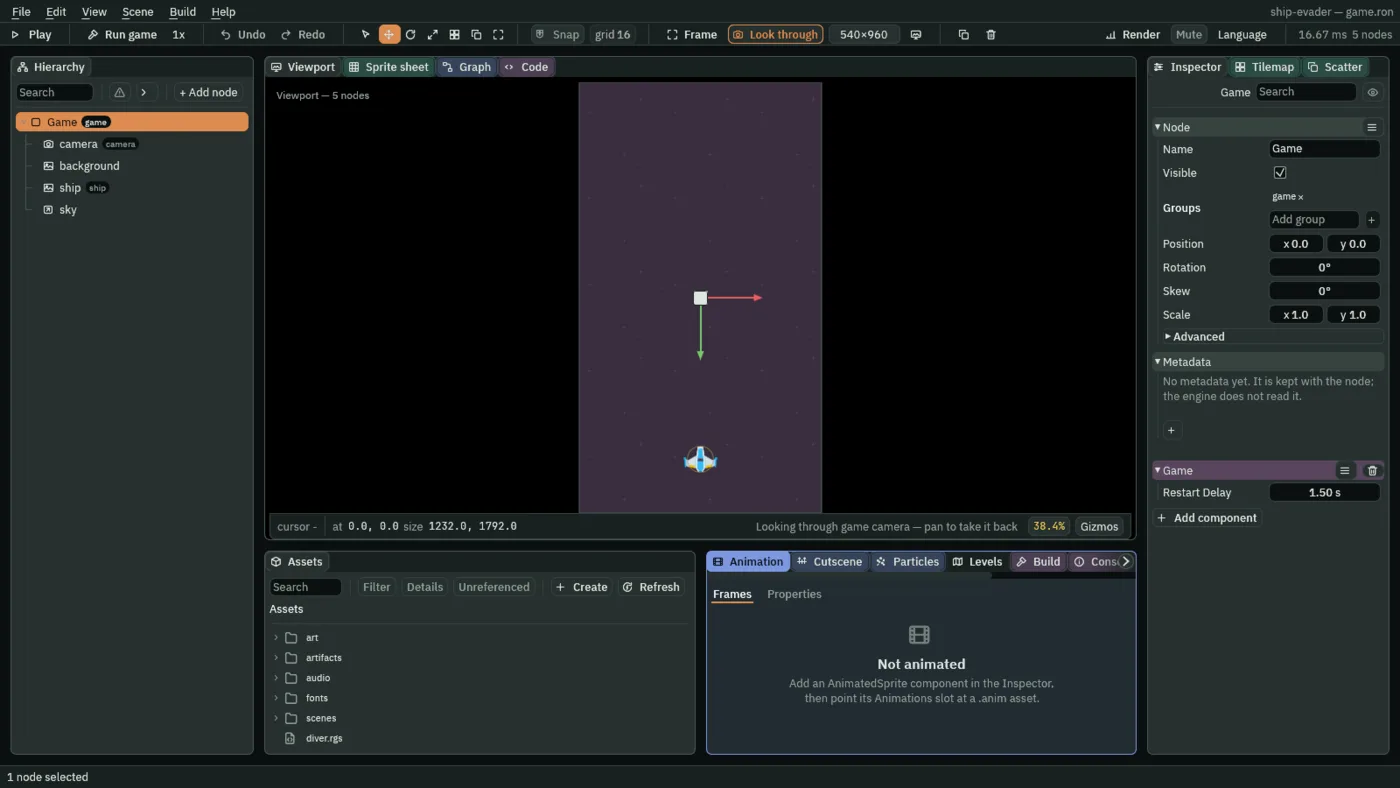
A signal sent to a group reaches the nodes in it and not their children, which is why the group goes on Game and on camera themselves.