Tutorials · Worlds and Levels · Chapter 5
Hills
By the end
- Two hills,
hills-westandhills-east, each a closed, smoothed Sprite Shape typed point by point, in place of the vale’s two grey ground Blocks - Turf laid along every face within
60°of up, and earth tiled under it at its own size - Collision from the same outline, its top on the walking line, with the Collider beside it giving its rules
- The ravine’s lips,
lip-westandlip-east, in place of its two grey walls: a slab along the top, the slab’s end on the shoulder, darker earth at twice its size
On this page
When to reach for a Sprite Shape
The vale is still walked on grey: ground-block-west and ground-block-east, and the ravine’s walls, ravine-block-west and ravine-block-east. This chapter replaces all four with Sprite Shapes: hills that roll, and the lips either side of the ravine.
Reach for a Sprite Shape for ground that follows a line no grid does: a slope, a crest, a hill’s rounded end. Its outline is one list of points, and the edge art, the fill and the collision all come from it, so they cannot drift apart when a point moves. Chapter 2’s tiles stay the tool for anything built on a grid, and chapter 6’s Polygon for a filled outline with no edge art of its own.
What collides, what draws, what sorts: with Collide ticked and a Collider on its node, a Sprite Shape collides as a row of boxes along its outline, and the Collider gives only their rules; it draws bands of edge art along its faces, corner pieces at its sharp turns, and its fill inside; and it sorts as one node on its Sort Layer. On Ground, tiles draw over it, and a shape added later draws over one added before.
The preset
- Double-click
scenes/vale.ronin Assets. Selectground-block-west, press Delete, and press Delete in the box that asks; do the same forravine-block-west,ravine-block-eastandground-block-east. - Select
vale, press + Add node and choose Sprite Shape: the menu lists it after Line.
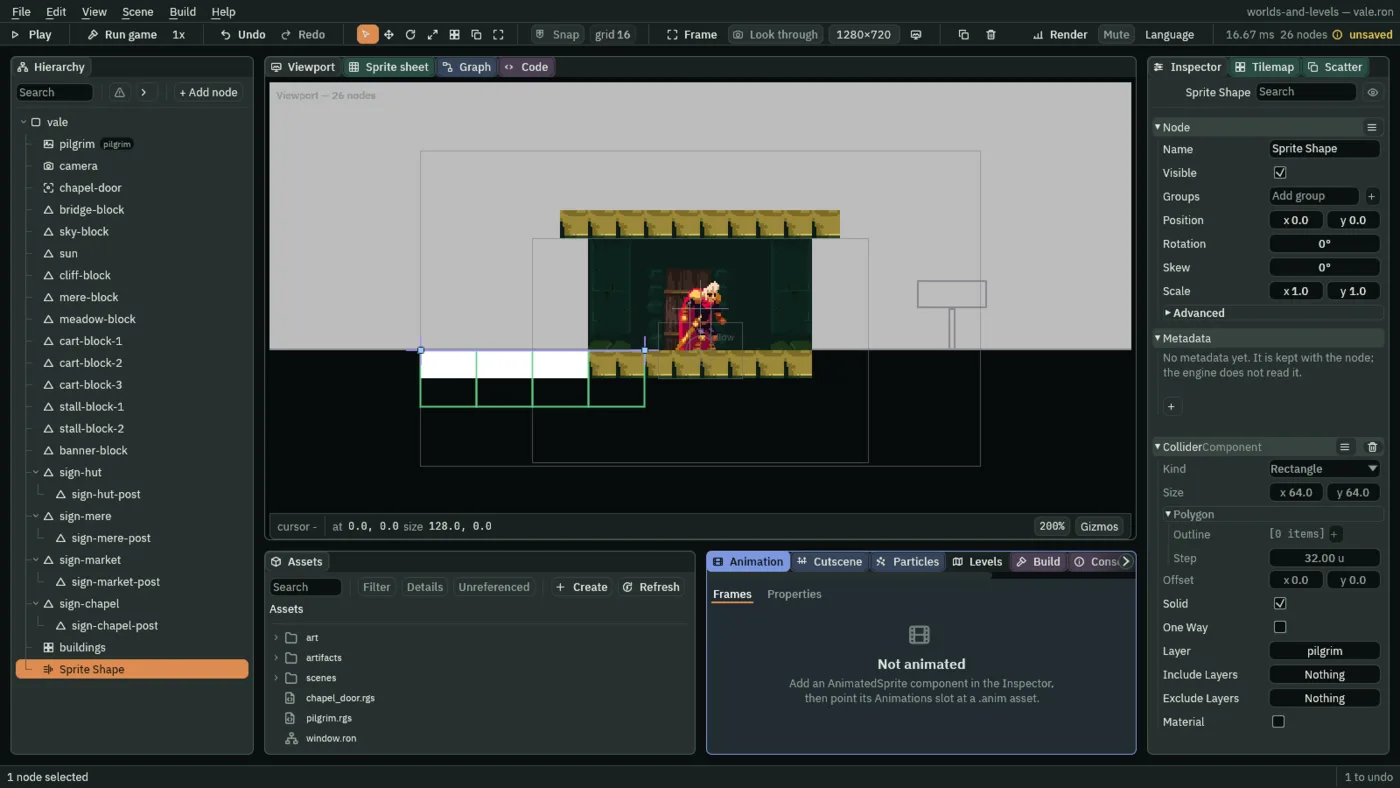
The preset is a ledge 128 wide, from -64 to 64 on the walking line, at the origin: two points, one band of edge art with no picture, so flat white, 32 along and 16 deep, on every face, From 0° To 360°, and Collide ticked. Beside it, a Collider with all it comes with. A node Add node puts here stands at 0, 0, so each of its points is a place in the world. It is on Sort Layer 0, Sky, so the hut’s step, on Ground, draws over it.
The Collider beside it is not decoration. Without one, the shape draws as ground and nothing collides with it, and Problems says: “This Sprite Shape has Collide on and no Collider on its node, so nothing collides with it — add a Collider here: it gives the Layer, One Way and Material, and the shape gives the boxes”. With one, the Collider’s own shape is not read: its Kind, Size, Polygon and Offset rows are dimmed, and their hover says why.
Drawing the outline
An outline is drawn in the Viewport, point by point, and every point is also a row of the Inspector’s Points list, numbered from [0], where it can be typed exactly.
- Dragging a point
- Each point of the selected shape is a square handle: drag it. A drag snaps to the grid while Snap is on; the hills are drawn with Snap off.
- Inserting a point
- Hover an edge: it lights, and a ring shows where a point would go. Double-click, and a point goes there, between the two it joins, in the list’s order too. It is put exactly on the edge, not snapped; drag it afterwards.
- Deleting a point
- Hover a point and press Delete or Backspace: that point goes, not the node. A shape keeps the points it needs to draw: at that many, the status line says “This outline keeps at least 2 points — move off its points to delete the node”.
- The first points
- An outline with fewer points than it needs to draw, two for a Sprite Shape, has no edge to double-click. While one is selected, a plain click in the Viewport puts its next point where the click lands, rather than picking a node in front of it, each click one step to undo. To stop drawing, select another node in the Hierarchy.
- The Sprite Shape’s Points
- The outline’s control points, in order, each a place in the node:
[0],[1]and on, each row anxand ayto type, with arrows to move it and a bin; + beside Points adds one. - Closed
- Joins the last point back to the first: a shape with an inside, which a fill and a body of collision need. Unticked, it is a line, a ledge drawn left to right with its art on top.
- Smooth
- Rounds the outline into a curve through its points; unticked, it runs straight from point to point. A curve is straight wherever four points in a row are in line.
- Reverse
- Turns the points’ order round. On an open line it moves the art to the other side, a ledge into a ceiling. A closed shape is read round the same way whichever way it was drawn, so Reverse changes nothing it draws.
The hills
hills-west runs from x -92 to 1916 and hills-east from 2084 to 2908. Each lies at y 2 wherever something stands on the walking line: his start and the hut, the signs, the mere, the market, and where it meets a lip or the chapel’s floor. Between them hills-west rolls: west of the mere a crest, its top point 544, -30, and a dip, its bottom point 736, 14; east of the mere a crest, its top point 1632, -24. hills-east is flat, since the market leaves it nowhere wide enough to roll. Each end turns down under what stands beside it, and each hill is 320 deep below the walking line, as the Blocks were.
- Rename the new node
hills-west. Leave its Position at0,0. - With Snap off, drag the preset’s two points onto
[0]and[55]of the table below, then double-click the edge between them and drag each new point to its place, in the table’s order, until it holds56. - In the Inspector, type each point’s
xandyfrom the table, so every point is exactly where the table puts it. - Tick Closed and Smooth.
| Points | +0 | +1 | +2 | +3 | +4 | +5 | +6 | +7 |
|---|---|---|---|---|---|---|---|---|
| [0] to [7] | -92, 28 | -89, 15 | -79, 5 | -66, 2 | -40, 2 | 0, 2 | 64, 2 | 160, 2 |
| [8] to [15] | 256, 2 | 352, 2 | 416, 0 | 480, -16 | 544, -30 | 608, -22 | 672, 0 | 736, 14 |
| [16] to [23] | 800, 5 | 864, 2 | 928, 2 | 1056, 2 | 1184, 2 | 1312, 2 | 1376, 2 | 1440, 2 |
| [24] to [31] | 1504, 0 | 1568, -14 | 1632, -24 | 1696, -16 | 1760, 0 | 1824, 2 | 1864, 2 | 1890, 2 |
| [32] to [39] | 1903, 5 | 1913, 15 | 1916, 28 | 1916, 64 | 1916, 128 | 1912, 192 | 1888, 256 | 1840, 304 |
| [40] to [47] | 1760, 320 | 1568, 320 | 1376, 320 | 1184, 320 | 992, 320 | 800, 320 | 608, 320 | 416, 320 |
| [48] to [55] | 224, 320 | 32, 320 | -40, 320 | -80, 288 | -92, 224 | -92, 160 | -92, 96 | -92, 52 |
hills-west’s points, eight to a row: point [13] is in the row [8] to [15], under +5. The outline goes up its west end, east along its top, down its east end and back west along its foot.
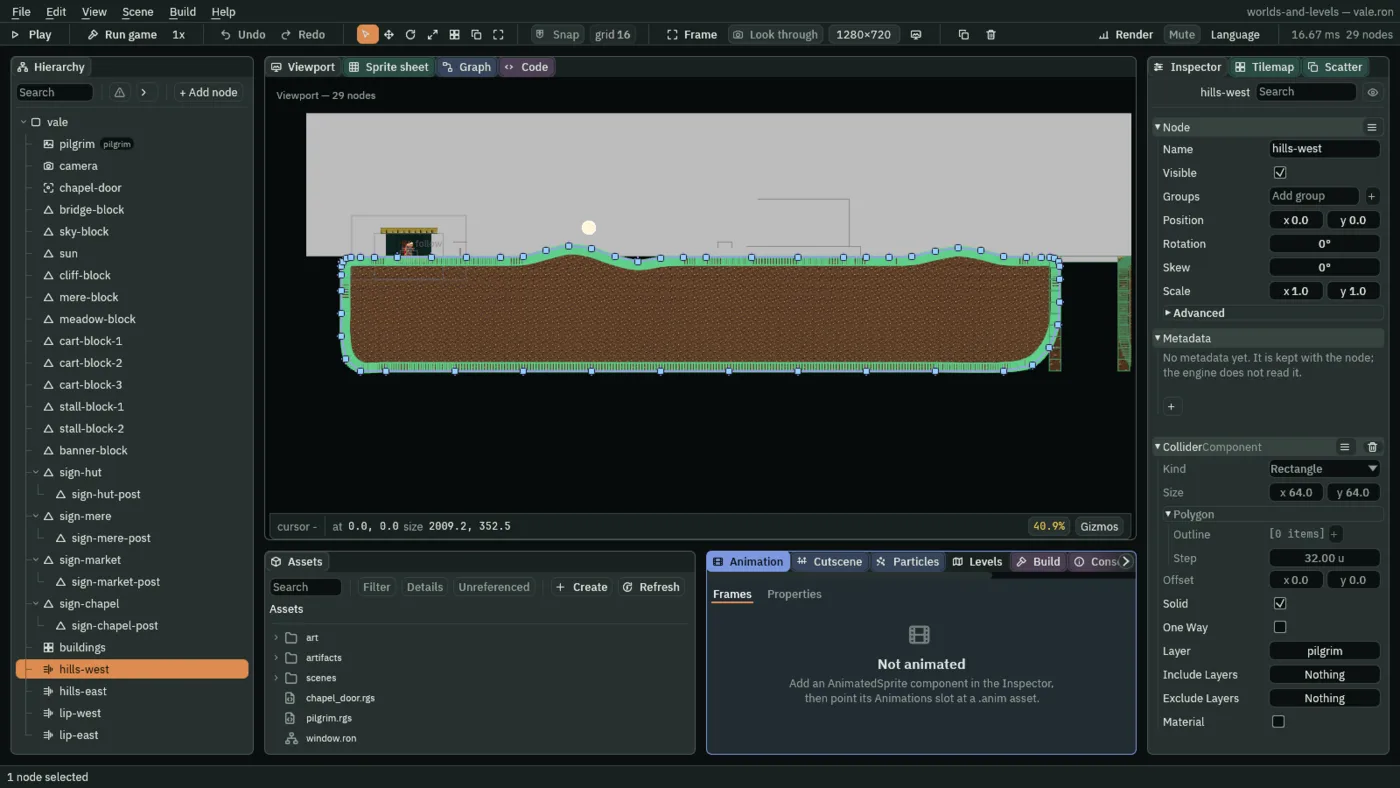
hills-west, the chapter’s end: a handle on each of its 56 points.- Do the same for
hills-east: selectvalefirst, so the new shape is its child and nothills-west’s, then + Add node, Sprite Shape, renamedhills-east, its31points from the table below, Closed and Smooth ticked.
| Points | +0 | +1 | +2 | +3 | +4 | +5 | +6 | +7 |
|---|---|---|---|---|---|---|---|---|
| [0] to [7] | 2084, 28 | 2087, 15 | 2097, 5 | 2110, 2 | 2136, 2 | 2176, 2 | 2240, 2 | 2368, 2 |
| [8] to [15] | 2496, 2 | 2624, 2 | 2752, 2 | 2816, 2 | 2856, 2 | 2882, 2 | 2895, 5 | 2905, 15 |
| [16] to [23] | 2908, 28 | 2908, 64 | 2908, 128 | 2904, 192 | 2880, 256 | 2832, 304 | 2752, 320 | 2560, 320 |
| [24] to [30] | 2368, 320 | 2176, 320 | 2120, 304 | 2092, 256 | 2084, 192 | 2084, 128 | 2084, 64 |
Each flat runs over four or more points at y 2, so the curve is straight there. Each crest and dip is at least 160 wide, and the hills are never steeper than 0.39 up for each across. Each end turns down on a radius of 26, wide enough for the turf, 12 deep, to bend through it.
Turf along the top
A shape’s edge art is a list of bands, each laid along the faces that point its way. The preset’s one band is on every face; the hills’ is turf, on their tops and slopes and nowhere else. art/turf.png, art/earth.png, art/slab.png, art/slab-end.png and art/slab-start.png came with the starter.
- Select
hills-west. In its Edges, open[0], the preset’s band. - Drag
art/turf.pngonto its Texture. Set From30°and To150°, Size32,12, Offset2, and Color0.92,1.0,0.88, alpha1. - Set the Sprite Shape’s Sort Layer to Ground.
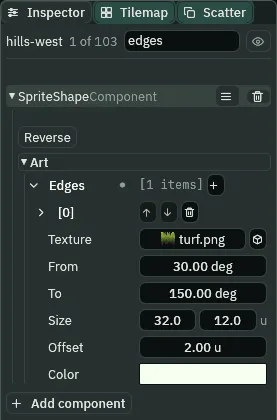
hills-west’s band of turf, the search box narrowing the Inspector to edges.- Edges
- The bands of edge art, each for the faces whose outward direction lies in its range. A face takes the first band in the list whose range holds it, and a face no band covers draws no edge art: a gap shows where the ranges leave one. The art runs along the outline as one strip through every bend, mitred at its joints, its picture repeated a whole number of times along each run.
- The edge’s Texture
- The band’s picture, repeated along it; none draws flat white.
- The edge’s From and To
- The range of directions, in degrees, a face points out of the shape for this band to cover, as the Inspector shows them:
0°points right and90°up,180°left and270°down. The turf’s30°to150°is every face within60°of up: the hills’ tops and slopes, and not their ends or their foot. - The edge’s Size
- One repeat of the picture: its length along the edge, by its depth into the shape. The turf is
32along and12deep. - The edge’s Offset
- Moves the band out from the outline, away from the shape. The turf’s
2puts its top2above the spline, where the collision’s top is. - The edge’s Color
- A tint over the band’s picture, alpha included: the turf’s is a faint green.
- The Sprite Shape’s Sort Layer
- The sorting layer the whole shape draws on, its edges, corners and fill together. All four shapes here are on Ground, under the figures and the props.
Earth under it
- In the Fill fold, tick Fill. Drag
art/earth.pngonto its Texture, and set Fit to Tile. - Leave Tile Scale at
1, and set Color to0.80,0.72,0.62, alpha1. Leave Opaque unticked.
- Fill
- Fills the inside of the outline. A closed shape’s inside is what its points enclose.
- The fill’s Texture
- The fill’s picture, laid as Fit says; none fills with flat Color.
- The fill’s Fit: Stretch and Tile
- Stretch, as it comes, spreads the picture once across the shape’s whole extent: on a hill
2008wide, a smear. Tile repeats it at its own size times Tile Scale, counted from the node’s origin, so two shapes at the origin tile alike and their earth lines up. - The fill’s Tile Scale
- World units each pixel of the picture covers under Tile:
1draws it at its own size,32units a repeat for the32-pixel earth;2at twice that,64. - The fill’s Color
- A tint over the fill, alpha included: the hills’ earth is darkened a little.
- The fill’s Opaque
- Draws the fill without blending, for ground nothing should show through: its see-through parts, and a see-through Color, come out dark instead of showing what is behind. Unticked here; chapter 13 ticks it.
What collides
- Leave Collide ticked. Set Step to
8, Thickness to24and Surface Offset to2. - Do the same for
hills-east: its band, Sort Layer, fill and collision ashills-west’s.
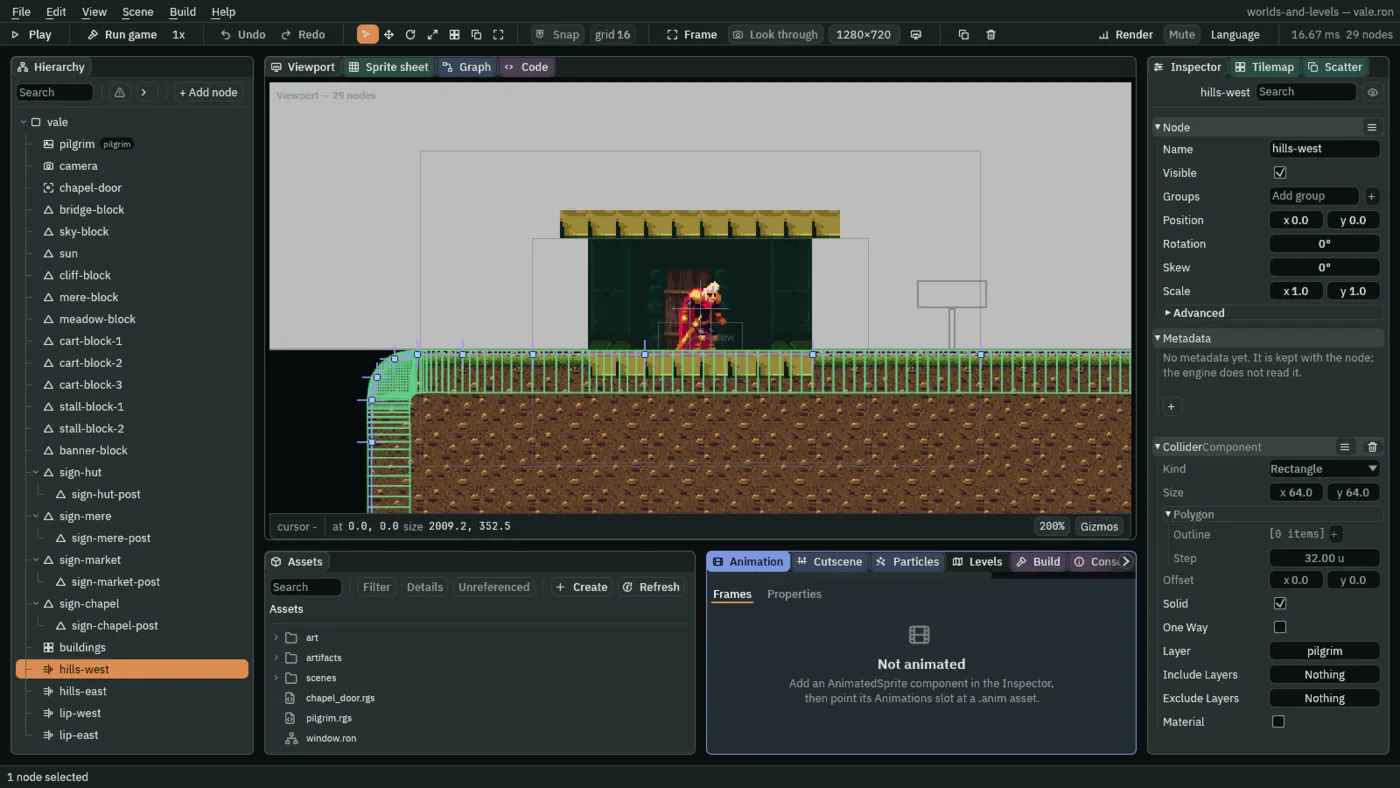
hills-west’s collision, at the chapter’s end: boxes 8 long along its top, the Collider’s own shape dimmed.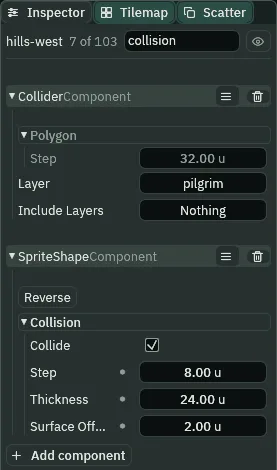
collision: the Collider’s rules, and the shape’s boxes.- Collide
- Makes the outline the collision, ticked as the preset comes, beside a Collider on the same node, which gives the boxes their Layer, One Way and Material. Without a Collider nothing collides, and Problems says so. Unticked, the Collider is an ordinary box again, its own shape read.
- Step
- How long each collision box is along the outline. Short boxes follow a curve closely: at the hills’
8, a box rises at most3.1on their steepest slope, under his Step Height, so he walks up them without catching. - Thickness
- How far each box reaches into the shape, from its surface:
24under the hills’ top. - Surface Offset
- Pushes the collision surface out from the outline. The hills’
2puts it on y0wherever the spline lies at2, where everything already stands, and the turf’s top with it; so the walking surface over the hills runs from y-32to12.
The ravine’s lips
The ravine’s walls become two narrow shapes, sharp-cornered, capped with slab. They are added after the hills, so on Ground they draw over the hills’ ends, which turn down under them.
- Select
vale, press + Add node and choose Sprite Shape; rename itlip-west. Give it four points:1888,0;1920,0;1920,320;1888,320. They all sit on the16grid, so with Snap on, drag the preset’s two points onto the first and the last, then double-click the edge between them and drag the new point onto the second, and once more for the third; or type all four in the Inspector. Tick Closed; leave Smooth unticked. - In its edge band, drag
art/slab.pngonto Texture and set From45°and To135°; leave Size32,16, Offset0and Color white as they come. - Press + beside Corners, and open
[0]. Dragart/slab-end.pngonto its Texture; set From20°, To70°, Size16,16and Offset-8,8, and leave its Color white. Set Corner Threshold to40and Sort Layer to Ground. - Tick Fill, drag
art/earth.pngonto its Texture, set Fit to Tile, Tile Scale to2and Color to0.55,0.48,0.42, alpha1. Leave the collision as it comes. - Select
valeagain and addlip-eastthe same way, with its points2080,0;2112,0;2112,320;2080,320, and its cornerart/slab-start.png, From110°, To160°, Offset8,8. All four shapes are now children ofvale. Press Ctrl+S.
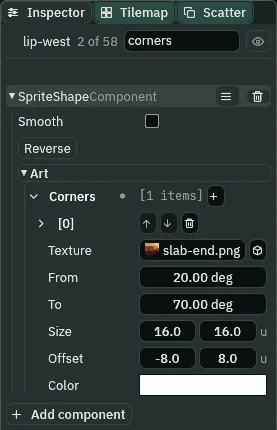
lip-west’s one corner piece, the slab’s right end.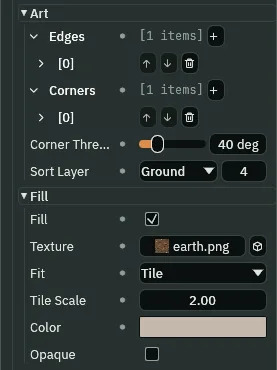
lip-west’s earth: Tile, at Tile Scale 2.- Corners
- Corner pieces, each for the turns whose direction lies in its range. A corner is a turn sharper than Corner Threshold, and its direction is halfway between the two faces’ outward directions: the top-right corner of a block points up and right,
45°. The piece is drawn unturned, centred on the turn and moved by its Offset. A smoothed shape has no corners, so the hills take none. - The corner’s Texture
- The piece’s picture, drawn once at each corner it covers.
- The corner’s From and To
- The range of directions, in degrees, a turn points for this piece to go on it:
0°points right and90°up.lip-west’s20°to70°holds its top-east turn,45°, the shoulder into the ravine, and none of its other three;lip-east’s110°to160°holds its top-west turn,135°. - The corner’s Size
- The piece’s size: the slab’s end is
16by16. - The corner’s Offset
- Moves the piece from the turn, across and down:
-8,8putslip-west’s half its size in, under the top and off the ravine’s wall, so it ends the slab flush;lip-east’s8,8does the same the other way. - The corner’s Color
- A tint over the piece: white, as it comes, leaves the slab’s end as drawn.
- Corner Threshold
- How sharp a turn has to be, in degrees, to take a corner piece rather than the band bent round it. The lips’ turns are all
90°, sharper than their40; the hills, smoothed, take none at any threshold.
Why two pictures for one slab’s end: slab-end.png is the strip’s right end, which suits lip-west’s top-east turn and faces the wrong way on lip-east’s top-west one, and a corner piece cannot be flipped. So lip-east takes slab-start.png, the strip’s left end, cut beside it.
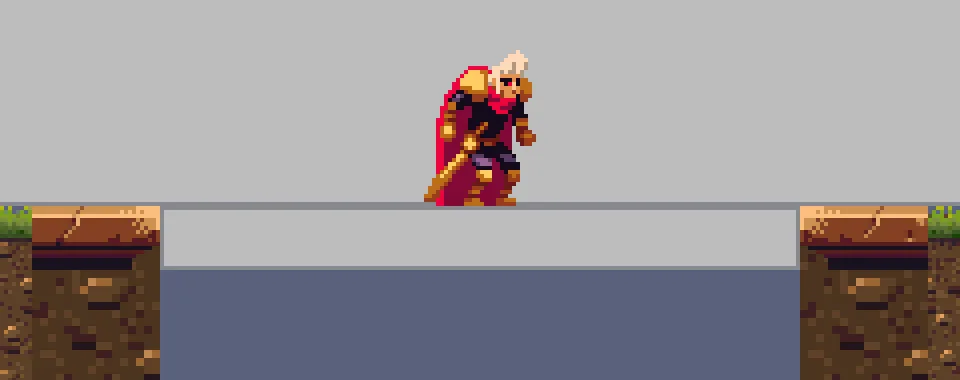
slab-end west, slab-start east.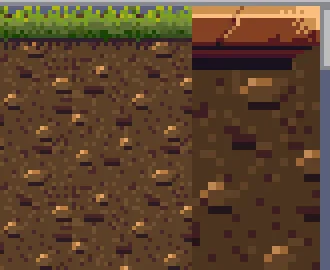
1, the lip’s at 2.Each fill tiles its earth from the node’s origin: one repeat every 32 units on the hills and every 64 on the lips. Each lip draws its one corner piece, once, on its shoulder.
Walking the hills
Press Run game and hold D. The turf runs unbroken along the hills, and its band bends through every crest, dip and end without folding back on itself.
Two grey stand-ins still show over the hills. sky-block ends at y 0, so where the dip sinks below the walking line, the slate Background shows between them, until chapter 7 puts the sky in its place; and meadow-block crosses the east crest, until chapter 8’s meadow replaces it.

544, -30, and down into the dip.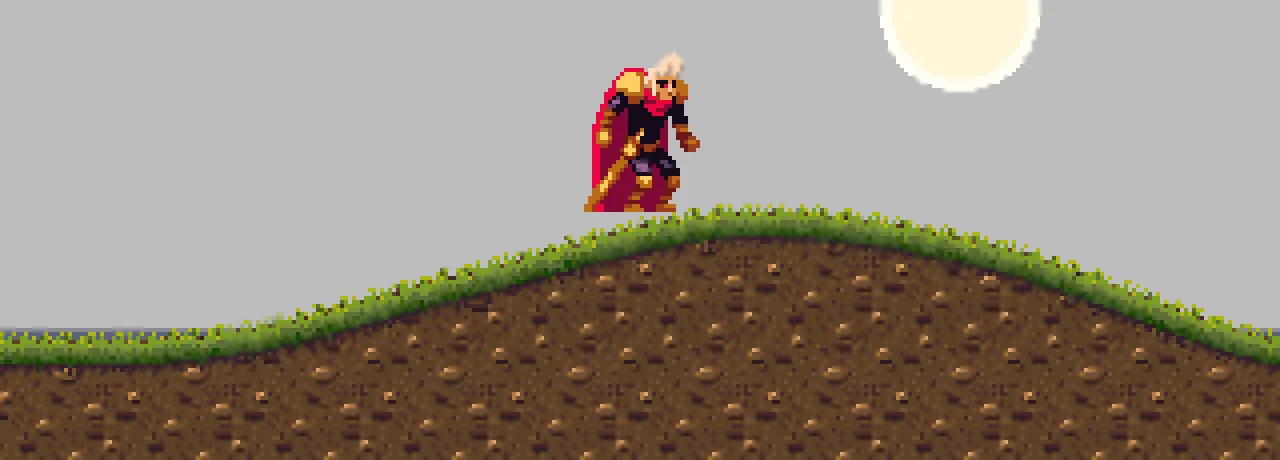
Dropped onto the hills from 48 above, at seven places from the hut to the market, he lands within a second on the top of their collision and stays there a second later, neither sinking nor sliding. Held, D takes him from the hut into the crypt within 25 seconds, over the crests and the dip, across the lips and the bridge: his feet never lower than y 16.5, and he never goes back west, so no box of the hills and no join with a lip or the chapel’s floor catches him.
And the try: on a copy, untick hills-west’s Collide and drop him onto its west crest’s flank, at x 600.

With Collide off, nothing under him holds him: the Collider beside the hill is its own box again, 64 square about the origin, far from x 600.
The four shapes
| Field | hills-west, hills-east | lip-west | lip-east |
|---|---|---|---|
| Closed, Smooth | ticked, ticked | ticked, unticked | ticked, unticked |
| Edge Texture | turf.png | slab.png | slab.png |
| Edge From, To | 30°, 150° | 45°, 135° | 45°, 135° |
| Edge Size, Offset | 32, 12; 2 | 32, 16; 0 | 32, 16; 0 |
| Edge Color | 0.92, 1.0, 0.88, 1 | white | white |
| Corner | none | slab-end.png, 20° to 70°, 16 by 16, -8, 8 | slab-start.png, 110° to 160°, 16 by 16, 8, 8 |
| Corner Threshold | 30, as it comes | 40 | 40 |
| Sort Layer | Ground | Ground | Ground |
| Fill | earth.png, Tile, 1 | earth.png, Tile, 2 | earth.png, Tile, 2 |
| Fill Color | 0.80, 0.72, 0.62, 1 | 0.55, 0.48, 0.42, 1 | 0.55, 0.48, 0.42, 1 |
| Collide, Step, Thickness, Surface Offset | ticked, 8, 24, 2 | ticked, 32, 32, 0 | ticked, 32, 32, 0 |
Each with the preset’s Collider beside it, at 0, 0. The four Blocks ground-block-west, ravine-block-west, ravine-block-east and ground-block-east are gone.