Tutorials · Worlds and Levels · Chapter 9
Stacked and grouped
By the end
- Three carts,
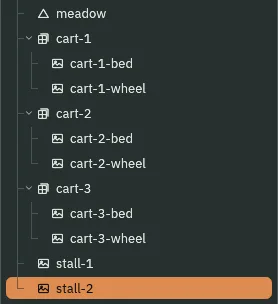
cart-1tocart-3, in place of the grey carts: each a Sorting Group on Props holding its bed,cart.png, and its near wheel,wheel.png, the wheel drawn over its own bed - Two stalls,
stall-1andstall-2, in place of the grey stalls: each one Sprite ofstall.png, with no group - Pictures dropped from Assets into the Viewport, and dragged into a group in the Hierarchy
On this page
When to reach for a Sorting Group
The market still stands in grey: three carts, cart-block-1 to cart-block-3, and two stalls, stall-block-1 and stall-block-2. This chapter replaces them with pictures.
Reach for a Sorting Group when one thing is drawn as several pictures on different Sort Layers: a cart and its wheel, a figure and its limbs, a stack of crates. The group draws them as one unit, so nothing else can be drawn between them. A thing that is one picture needs no group: the stalls have none.
What collides, what draws, what sorts: a Sorting Group draws nothing of its own and collides with nothing. It sorts the pictures under it: against the rest of the room as one unit, on its own Sort Layer at its Depth, and among themselves each by its own Sort Layer. The carts and stalls have no Collider, so nothing stops him, and on Figures he draws in front of them.
Groups do not nest. A cart added while another cart is selected lands inside it, and Problems says so: “This Sorting Group sits inside "cart-1"’s, and groups do not nest: the nearest one wins, so this one sorts against the room as a unit of its own, not inside "cart-1" — take one of the two groups off”. So each cart is added with vale selected.
- What a group covers
- The sprites, shapes, lines, sprite shapes, polygons, meshes and words anywhere under its node. Not a tilemap’s tiles, and not particles: under a group, those still sort for themselves.
Three carts
Each cart is a group with two pictures under it: its bed, art/cart.png, 48 by 24, and its near wheel, art/wheel.png, 16 by 16. Both came with the starter, as did art/stall.png, a stall 64 by 56.
- With
scenes/vale.ronopen, selectcart-block-1and press Frame: the Viewport shows the market. Press Delete, and press Delete in the box that asks. Deletecart-block-2,cart-block-3,stall-block-1andstall-block-2the same way. - Select
vale, press + Add node and choose Sorting Group: the menu lists it after Sprite Mask. Rename itcart-1, and type its Position2300,0, where the first grey cart stood. - In its SortingGroupComponent, set Sort Layer to Props. Leave Depth at
0and Enabled ticked, as they come.
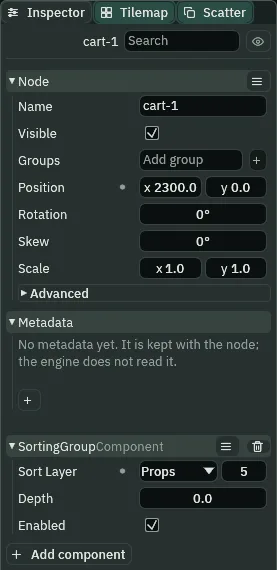
cart-1’s group: on Props, at Depth 0.The group is a node with nothing to draw. The cart’s two pictures go under it, the bed first.
- With
cart-1selected and Snap off, dragart/cart.pngfrom Assets into the Viewport, and let go on the walking line at x2300: the cursor row at the Viewport’s foot says where the pointer is. A node,cart, appears there, a Sprite of the picture at its own size, and is selected. It isvale’s child, besidecart-1. - Rename it
cart-1-bed. In the Hierarchy, drag it ontocart-1. It becomescart-1’s child, and jumps away east, out of view. - To find it, press Frame, and pick
400%from the zoom menu at the Viewport’s foot.
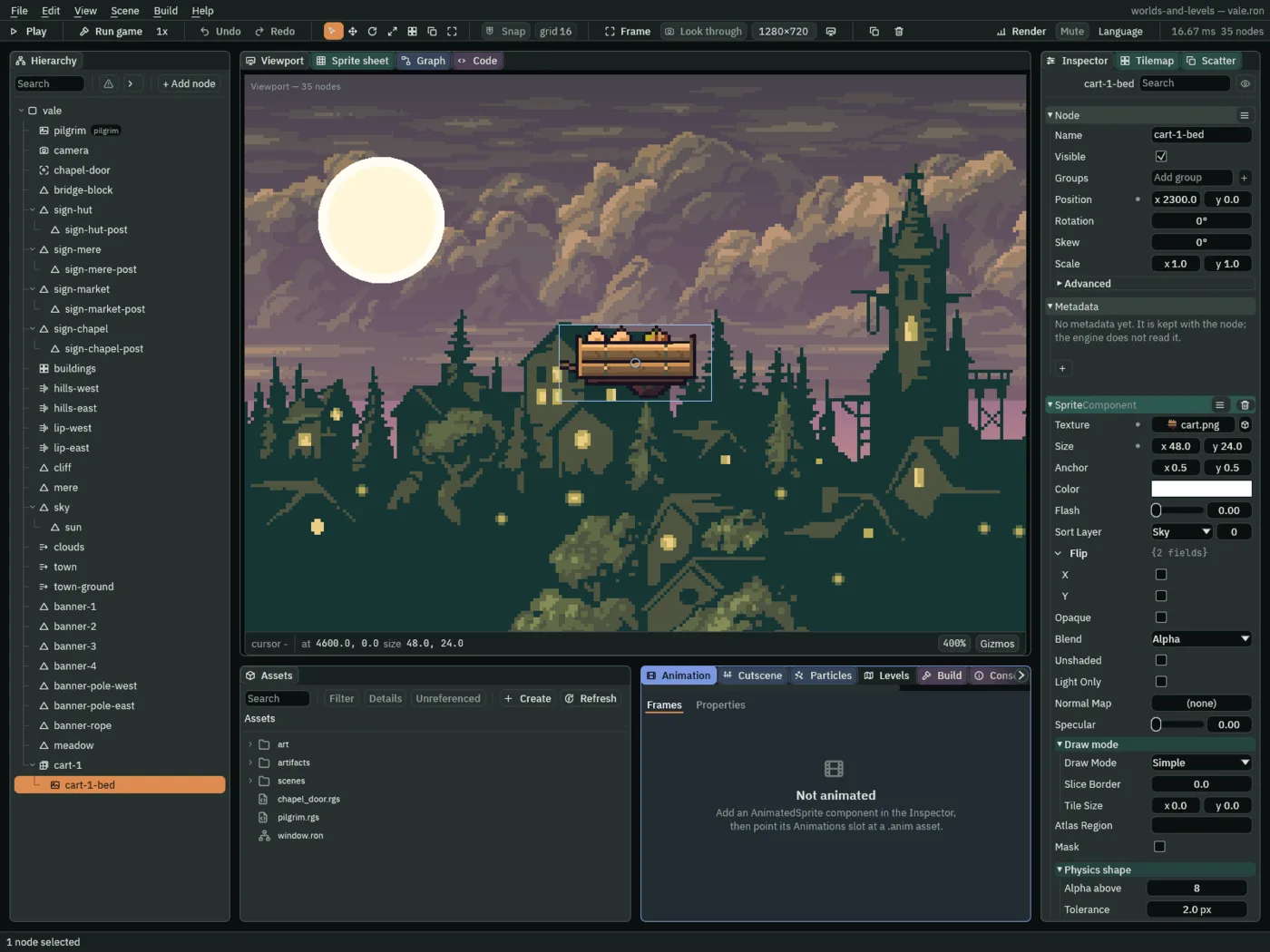
cart-1: its Position still 2300, 0, now counted from cart-1, so it is drawn at x 4600.- Type its Position
0,0: the bed goes back tocart-1’s place, out of this view. Type its Anchor0.5,1, so it stands on its foot, and set its Sort Layer to Props. - With
cart-1-bedstill selected, press Frame: the view comes back to the bed, on the walking line at x2300. - With the bed still selected, drag
art/wheel.pngfrom Assets onto its near axle, low on its front, and let go. It lands undercart-1, beside the bed. Rename itcart-1-wheel, type its Position0,-8so it is exact, and set its Sort Layer to Figures. Leave its Anchor at0.5,0.5.
- A drop lands beside the selected node
- A picture dropped into the Viewport makes a node where it lands: a Sprite of the picture at its own size, its Anchor
0.5,0.5and its Sort Layer Sky. The node goes into the same parent as the node that is selected: beside it, never under it. Withcart-1selected, the bed lands invale; with the bed selected, the wheel lands incart-1. - A drag into a new parent keeps the node’s own Position
- A node’s Position is counted from its parent. Dragged onto a new parent in the Hierarchy, a node keeps its numbers, so it moves by wherever the new parent stands: the bed’s
2300,0, counted fromcart-1at2300, is drawn at4600. Type its Position again after the drag. Or drop the picture with a node of the new parent selected, as the wheel is dropped with the bed selected, and nothing needs dragging. - The Sorting Group’s Sort Layer
- Where the whole group sorts against the room: on this layer, at its Depth, whatever the layers of the pictures under it. The carts are on Props, under him on Figures. Sky,
0, as it comes. - The Sorting Group’s Depth
- Where the group sorts among the things on its layer: higher draws later, in front.
0as it comes. The three carts are0,1and2from west to east, so they draw in that order. - The Sorting Group’s Enabled
- Whether the group is grouping. Unticked, every picture under it sorts for itself again, as if there were no group. Ticked as it comes; untick it to see what a group was fixing, as the try below does on a copy.
- Select
valeand makecart-2andcart-3the same way, each from + Add node withvaleselected. Their Position and Depth are in the table below. For each, drop its bed anywhere in the view with the new group selected, drag it into the group, press Frame to find it, and type it back to0,0; then, the bed still selected, press Frame again, and drop its wheel on the near axle and type it to0,-8, as undercart-1.
| Group | Position | Depth |
|---|---|---|
cart-1 | 2300, 0 | 0 |
cart-2 | 2316, 0 | 1 |
cart-3 | 2420, 0 | 2 |
cart-2 stands at 2316, 24 west of where its grey cart stood, so that its bed covers cart-1’s near wheel: the case a group is for.
Two stalls
A stall is one picture, so it needs no group: nothing of its own can slip between its parts.
- Select
cart-3, so the next drop lands invalebeside it, not in a cart. Press Frame, and pick100%from the zoom menu at the Viewport’s foot: the view widens to the whole market, with room east of the carts for the stalls. - Drag
art/stall.pngfrom Assets into the Viewport and let go on the walking line at x2560. Rename itstall-1, type its Position2560,0and its Anchor0.5,1, and set its Sort Layer to Props. - With
stall-1selected, the next drop lands beside it: makestall-2the same way, at Position2650,0. Press Ctrl+S.
Why a group
Inside a group, its pictures sort by their own Sort Layers: each wheel, on Figures, draws over its bed, on Props. Outside, the whole group is one unit on the group’s layer, Props, at its Depth: the three carts draw whole, one after another, cart-1 first, all of them under him on Figures. So cart-2’s bed hides cart-1’s near wheel.

cart-2 drawn whole in front of cart-1.Without the groups, every picture sorts for itself: every bed on Props draws before every wheel on Figures, so cart-1’s near wheel draws over cart-2’s bed, as if it went through it.

Through the market
Press Run game and hold D through the market. He walks in front of every cart and stall: the groups and the stalls are on Props, under him on Figures, though the wheels inside the groups are on Figures too.
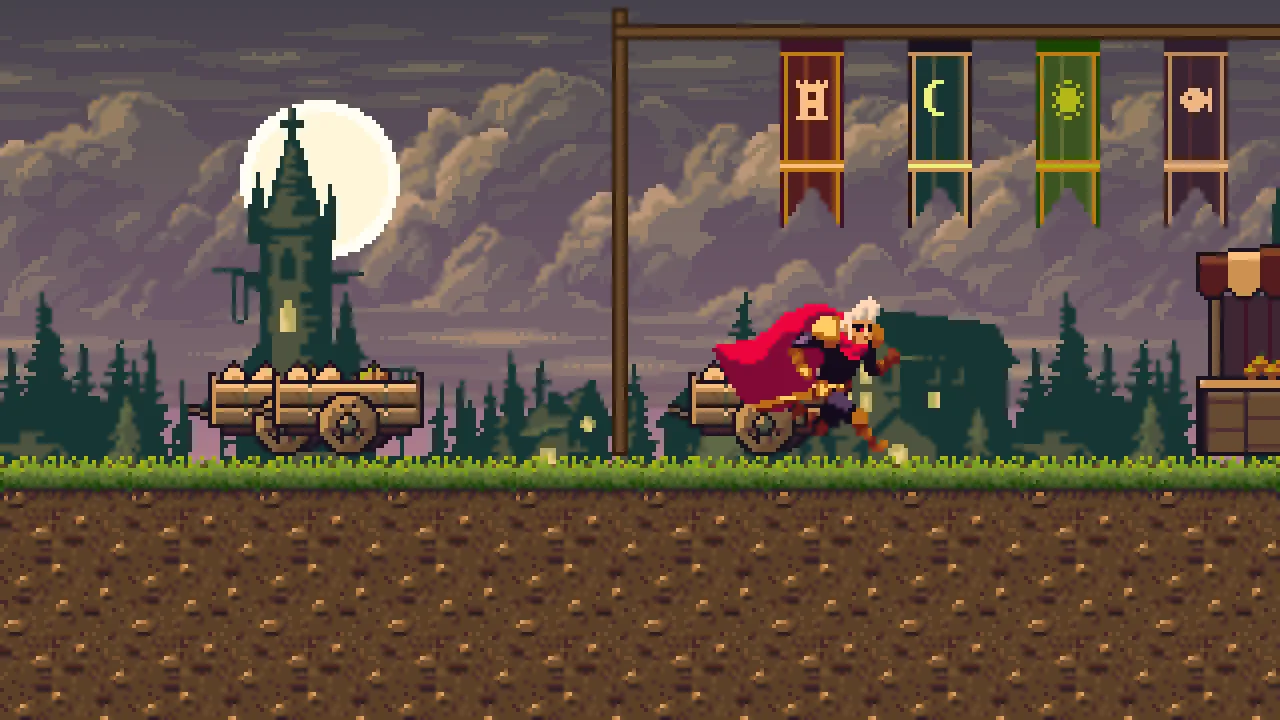
From the market’s west end, D takes him past the second stall’s east edge, x 2682, with every cart part and stall drawn before him on every frame. Nothing stops him, since none of them has a Collider. And every foot is on the walking line, y 0, where hills-east lies flat: under every cart and stall, the turf’s top and the top of the hill’s collision are there too.
The market
| Group | Position | Sort Layer | Depth |
|---|---|---|---|
cart-1 | 2300, 0 | Props | 0 |
cart-2 | 2316, 0 | Props | 1 |
cart-3 | 2420, 0 | Props | 2 |
| Sprite | Position | Picture | Sort Layer | Anchor |
|---|---|---|---|---|
cart-N-bed, in its cart | 0, 0 | cart.png, 48 by 24 | Props | 0.5, 1 |
cart-N-wheel, in its cart | 0, -8 | wheel.png, 16 by 16 | Figures | 0.5, 0.5 |
stall-1 | 2560, 0 | stall.png, 64 by 56 | Props | 0.5, 1 |
stall-2 | 2650, 0 | stall.png, 64 by 56 | Props | 0.5, 1 |
The five grey stand-ins are gone. Every group is Enabled.