Tutorials · Worlds and Levels · Chapter 3
Painting faster
By the end
- A terrain,
stone, made from the blob set in one press, and the halls east of the first hall painted with it, every edge the tile its neighbours call for - Their plain stone varied from a seed: cracked, mossy and worn stone at their Weights,
0.15,0.10and0.05 - A pattern,
pillar, lifted with Pick, saved, and stamped along the halls on a layer of its own, the last one flipped - The halls’ back wall turned to wet stone with Replace inside a lift, the first hall’s left as it was
On this page
Faster than by hand
Chapter 2 painted the first hall’s stone cell by cell, reading each edge off the picker. The halls east of it are 960 units of floor, ceiling and wall with a pool and a pit dug in them: by hand, an afternoon. This chapter paints them with the Tilemap tab’s faster tools. No grey stand-in goes here, since the crypt had none; everything is on the crypt’s map, art/crypt.tilemap, and nothing else changes.
Which of them to reach for: a terrain for a mass of stone whose edges and corners should follow its shape; the Variety band for a fill that should not be one tile repeated; and a pattern for a piece placed again and again, such as a pillar.
A terrain
A terrain is a named set of tiles, each filed with the neighbours its art joins onto. Painting with it, the editor lays in each cell the tile whose neighbours match the cell’s, and lays them again round a stroke as it changes them. crypt-stone.png was drawn as a blob set: the 47 tiles a square wall needs for every edge and corner, in the order the editor knows, so one press files them all.
- Open
scenes/crypt.ron, selecthalls, and click the Tilemap tab. - In the Terrains band, type
stonein the box, and press Add. - Click the
stonerow: it lights, armed, and the band reads Painting stone. - Under the held tile’s rows, 47-tile blob from reads
#1, the lone block. Press Add blob.
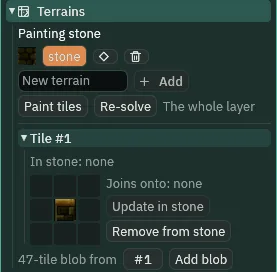
stone armed: tile #1, the lone block, joins onto nothing.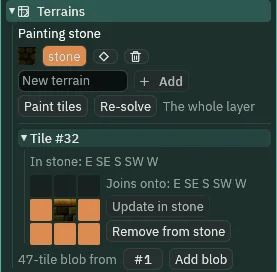
#32, the floor’s top: stone west, east and below it, and nothing above.Each of the 47 is filed with the neighbours its place in the set means: #47 with all eight, stone all round. The fill’s variety, cracked, mossy and worn stone, #49, #50 and #51, is filed by hand as full stone.
- Click tile
#49in the picker. In the Tile band under it, set Weight to0.15. - Click the
stonerow again: clicking the picker let go of the terrain. Click all eight squares round the tile, and press Add to stone. - Do the same for
#50, Weight0.10, and#51, Weight0.05.#47keeps the1every tile comes with.
They are full tiles of the terrain, so they count as stone round their neighbours; a stroke never lays them, since where two tiles fit, the heavier, #47, wins.
- A terrain
- A named set of tiles in the map’s
.tilemap, each filed with the eight neighbours its art joins onto. Armed, it is the brush: each cell a stroke touches, and each of their neighbours, gets the tile that fits. Square grids only: on another Grid the band is greyed and says why. - Arming a terrain
- A click on its row in the Terrains band: the band reads Painting stone, and every tool lays the terrain. Paint tiles, or a click in the picker, goes back to the picked tile.
- Add blob
- Files
47tiles into the armed terrain at once, from the tile 47-tile blob from names, the lone block, each with the neighbours its place in the blob set means. - The held tile’s eight squares, and Add to stone
- Round the held tile, its eight neighbours: click one to say the tile’s art joins onto it, and Add to stone files the tile so; Update in stone and Remove from stone once it is filed.
- Re-solve
- Gives walls painted by hand their edges and corners: every cell of the terrain on the lit layer is laid again with the tile its neighbours call for, over the whole layer, or over a block lifted with Pick, as the line beside it says. One step to undo.
The halls
With stone armed, on ground, the tools of chapter 2 lay stone that joins itself. The halls run east of the first hall, x 640 to 1600, its floor down to the first hall’s depth and its ceiling 64 thick.
- Click
ground’s row. In the Tools band, set Size to2: a wide brush paints a square of cells,2by2, at each step of the drag. - With Erase, drag down the first hall’s east wall, columns
40and41, from the ceiling to the floor: it opens, and the floor and the ceiling it leaves are laid again with their edges. - Paint the rest from the table, each with the tool it names, at the Size it names.
| Piece | Cells (column; row) | World (x; y) | How |
|---|---|---|---|
| the first hall’s east wall, opened | 40 and 41; -12 to -1 | 640 to 672; -192 to 0 | Erase, Size 2 |
| the halls’ floor | 40 to 99; 0 to 6 | 640 to 1600; 0 to 112 | Rect |
| the halls’ ceiling | 40 to 99; -16 to -13 | 640 to 1600; -256 to -192 | Rect |
| the east wall | 100 and 101; -16 to 6 | 1600 to 1632; -256 to 112 | Rect |
| the pool, dug | 50 to 63; 0 to 2 | 800 to 1024; 0 to 48 | Erase, Size 3 |
| the pit, dug | 74 to 79; 0 and 1 | 1184 to 1280; 0 to 32 | Erase, Size 2 |
The pool is sunk 48, the floor under it, 64 deep, its bed; the pit is sunk 32, its bed 80 deep. Every stone cell is now the tile of the set its eight neighbours call for: a cell with a gap beside it is that edge’s tile, and one with stone all round is #47.
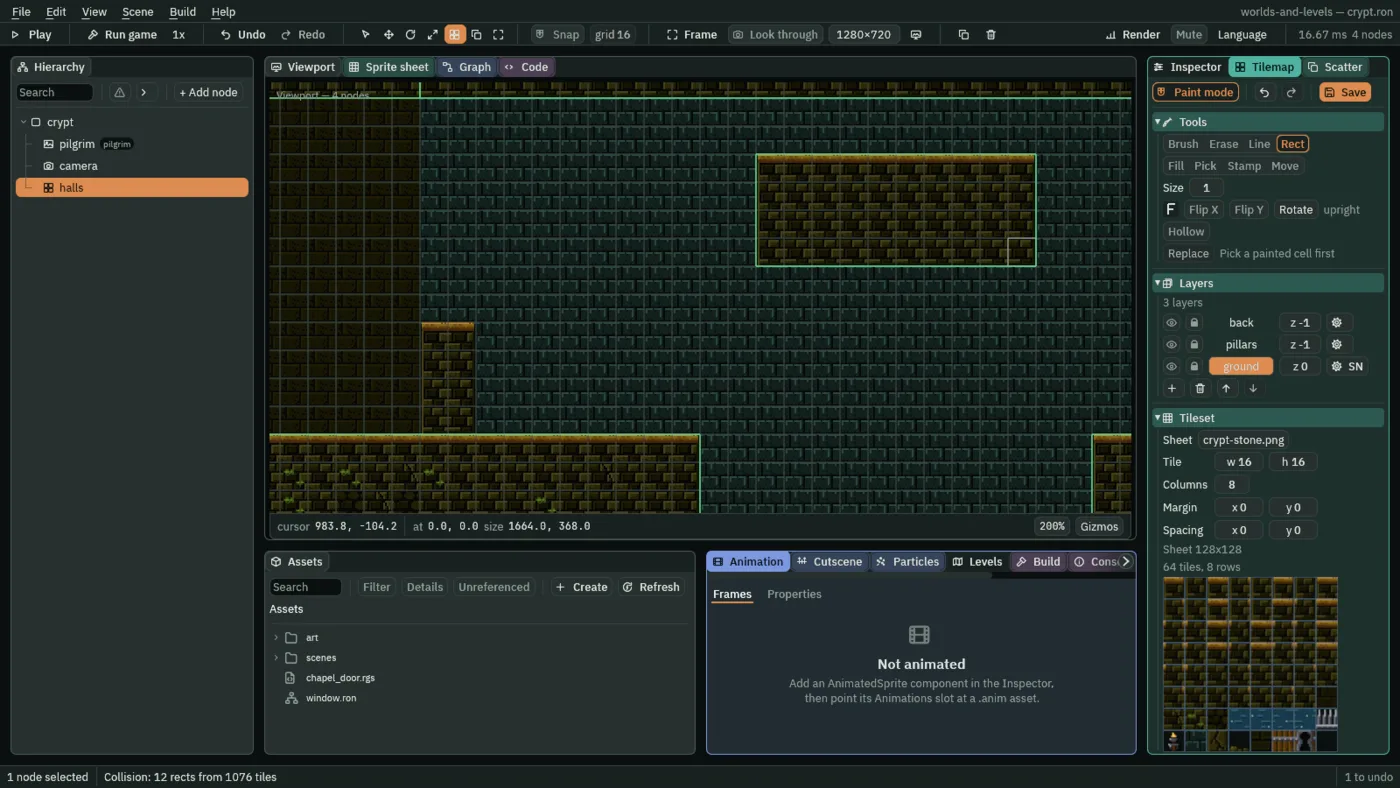
stone armed, on a copy: the block’s top, its sides and its corners each the tile that fits.- The Tools band’s Size, a wide brush
- The brush’s width in cells,
1as it comes; [ and ] step it while painting. A wide brush paints a square of cells at each step, Size by Size, and so does the eraser.
A fill that varies
Plain stone, #47 in every cell, reads as wallpaper. The Variety band paints from a set of tiles instead, one per cell, chosen by weight. It comes after every terrain stroke on ground: a later stroke would lay a varied neighbour back to #47.
- Click
#47in the picker, and press Set in the Variety band. - Click
#49, press Set again, then Add #49. Picking a tile lets go of the set, so each Add comes after a Set: do the same for#50and#51. - Type
7in Seed. - With Fill, click the halls’ ceiling, then their floor.
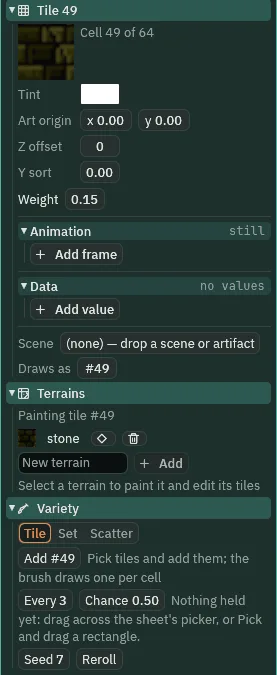
#49 held: its Weight, 0.15, in the Tile band, and the Variety band under it, Seed 7.The floor runs on under the pool and the pit and west under the first hall’s floor, now as deep, so the Fill rolls that too, and the stone of the stair and the west wall it runs into: 572 cells rolled, 361 of the halls, 205 of the first hall’s floor and 6 on the stair and the west wall, of which 116 vary. #47 is the most of them, and #49, the heaviest of the three, comes up more often than #51.
- A tile’s Weight
- In the Tile band: how often the tile comes up in a set, against the others’ weights;
1as a tile comes,0never. It is saved in the map, and it is the weight the tile joins a set with. - The Variety band’s Set
- The brush paints one tile of the set per cell, by weight. Its rows list each tile, its weight, which can be changed there, and its share. Picking a tile in the picker goes back to Tile, the picked tile in every cell.
- The Variety band’s Add
- Add #49 puts the picked tile in the set, at its own weight. It shows while the picked tile is not in the set.
- The Variety band’s Seed
- Every random brush rolls from it and the cell, so the same seed and the same strokes make the same room, and a redo gives back the room that was undone.
- The Variety band’s Reroll
- A new seed: a different room from the same strokes.
- The Variety band’s Scatter
- The third brush: a block held from the picker or lifted with Pick, laid on a lattice Every so many cells, some of the time, Chance. Like a wide brush’s, its footprint is a square of cells. Hollowmere does not use it.
Pillars from a pattern
Pillars stand along the halls, on a layer of their own behind the rest. One is painted with the terrain, then saved as a pattern and stamped.
- Click
back’s row, and press + under the rows: an empty layer goes in overback, second in the file, and the painter moves onto it. Double-click its name, rename itpillars, and set its z to-1. It is not Solid, as a new layer comes. - Click the
stonerow in the Terrains band to arm it again: the Variety steps’ clicks in the picker let it go. - Set Size in the Tools band back to
1. - With Rect, a pillar two cells by four at cells
40and41, rows-4to-1: x640to672, y-64to0, where the first hall’s east wall stood. - With Pick, drag over the pillar: it is lifted. In the Tools band, press Save as pattern…, type
pillar, and press Enter. - Press Tile in the Variety band, which lets go of the terrain: an armed terrain would lay a stamp’s cells again, and set a flipped one upright.
- With Stamp and Merge, click with the pattern’s top-left on cell
70,-4, x1120, then on80,-4, x1280, on the pit’s east lip. - Press Flip X, and stamp it on
90,-4, x1440.
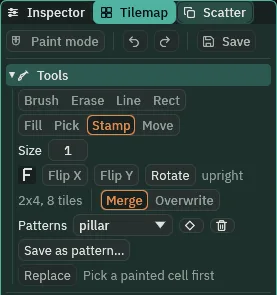
pillar, chosen: two cells by four, eight tiles, Stamp and Merge.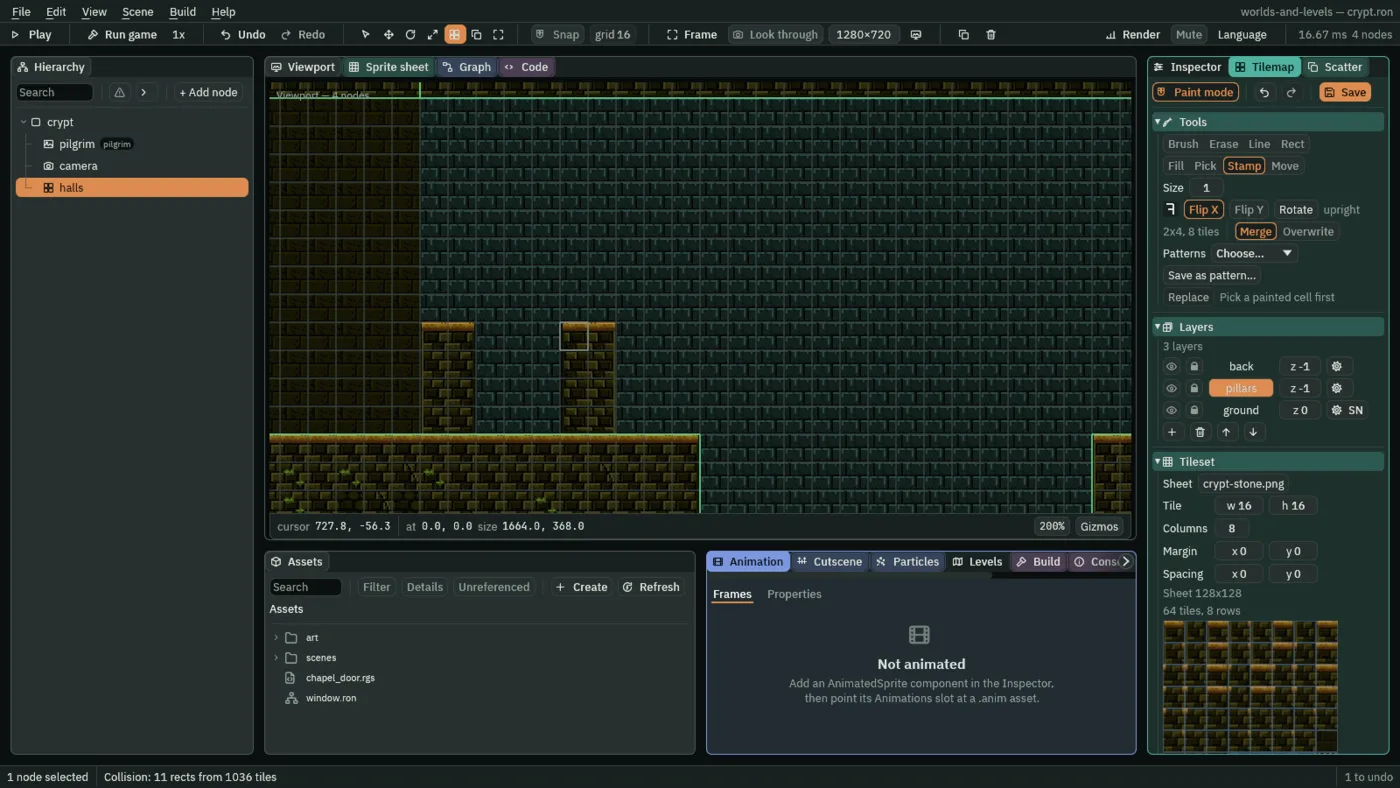
1440.| Pillar | Top-left cell | World (x; y) |
|---|---|---|
| painted | 40, -4 | 640 to 672; -64 to 0 |
| stamped | 70, -4 | 1120 to 1152; -64 to 0 |
| stamped | 80, -4 | 1280 to 1312; -64 to 0, on the pit’s east lip |
| stamped, Flip X | 90, -4 | 1440 to 1472; -64 to 0 |
Every pillar stands on the floor, and none over the pool, where chapter 4’s ledges run. A block need not come off the map: drag across the picker, and the tiles you drag over are held as a block, as Pick holds a lifted one.
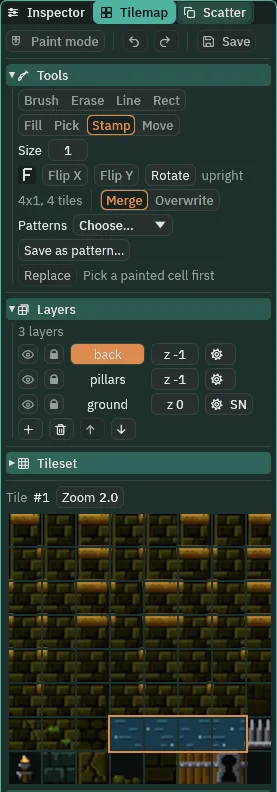
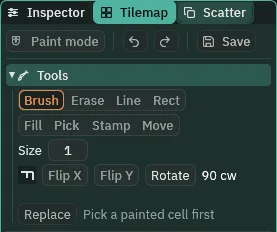
The readout beside the buttons counts Rotate’s presses alone: upright, 90 cw, 180, 270 cw. The F at the row’s start shows how the tile will land with the flips as well, and its hover says so in words. Press Flip Y alone and the readout still says upright, since Rotate was not pressed, while the F stands on its head, its bar to the right, and the hover says 180 mirrored: a flip top to bottom is a half turn and a mirror together.
- The picker’s block
- A drag across the picker holds the tiles it covers as a block, and arms Stamp, as Pick holds a block lifted off the map. A click on one tile holds that tile for the brush.
- Save as pattern…, and a pattern
- Files the held block on the sheet under a name, typed into the field that opens: a pattern, saved in the
.tilemap. The Patterns list beside Stamp holds the sheet’s patterns; choosing one holds it, with Stamp armed. Its diamond button renames the chosen pattern, and its bin deletes it, which Ctrl+Z brings back. - Stamp: Merge and Overwrite
- Puts the held block down, its top-left on the cell clicked. S. Merge leaves what is under the block’s empty cells, a shelf hung on a wall; Overwrite clears them too, for a piece whose own empty space is part of it.
- Move
- Slides a lifted block somewhere else: it leaves its cells and lands where the drag ends. M.
- Flip X and Flip Y
- Mirror the tile as it is laid, left to right or top to bottom, and the held block with it, which mirrors where its cells stand as well as their art.
- Rotate
- A quarter turn clockwise, the tile and the held block, at each press; R in Paint mode. Four presses come back upright.
The wet back wall
The halls’ back wall is wet stone, #58, where the first hall’s is dry, #48. It is laid as the first hall’s, then swapped inside a lift, so the first hall’s stays as it was.
- Click
back’s row. With Pick, click the first hall’s back wall: the picker holds#48. - With Rect, lay it behind the halls, columns
40to99, rows-12to-1, and one Rect down into each hollow, the pool’s and the pit’s. - With Pick, drag over the halls’ back wall, the hollows with it: it is lifted, and the Tools band names it under Replace.
- With Pick, click a cell of
#48, which is what to swap from. Click#58in the picker, the wet stone. Press Replace. Press Ctrl+S.
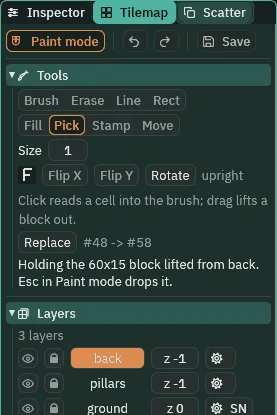
back, sixty cells by fifteen: Replace will swap #48 for #58 inside it.The halls’ 774 cells become the wet stone, and the first hall’s back wall stays #48, every cell. The status line says which cells a Replace took: the lifted ones, or the whole layer.
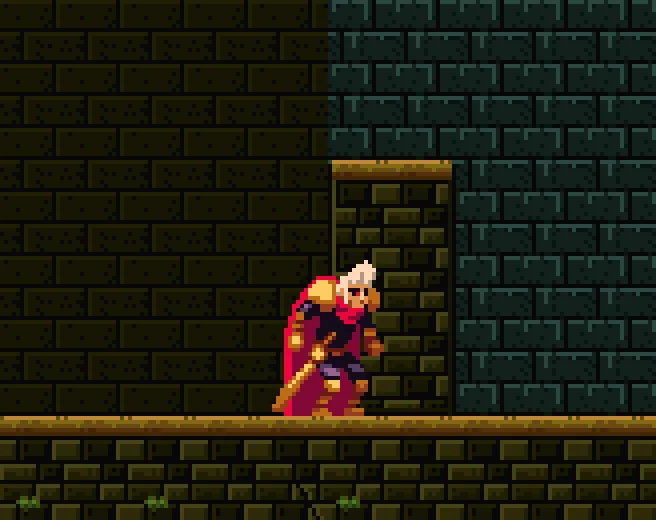
#48 and #58.- Replace
- Swaps every cell of the tile Pick last read for the tile the picker holds, in one step: inside the block lifted from the lit layer, or over the whole layer when nothing was lifted from it. The line beside it reads #48 -> #58; before a Pick it reads Pick a painted cell first.
- A lift, and Esc
- A block lifted with a Pick drag stays held, and the Tools band names it under Replace, Holding the 60x15 block lifted from back. It narrows Replace and Re-solve on its own layer only: a block lifted from
pillarsleaves a Replace onbackthe whole layer. Esc, in Paint mode, lets go of it.
The halls, painted
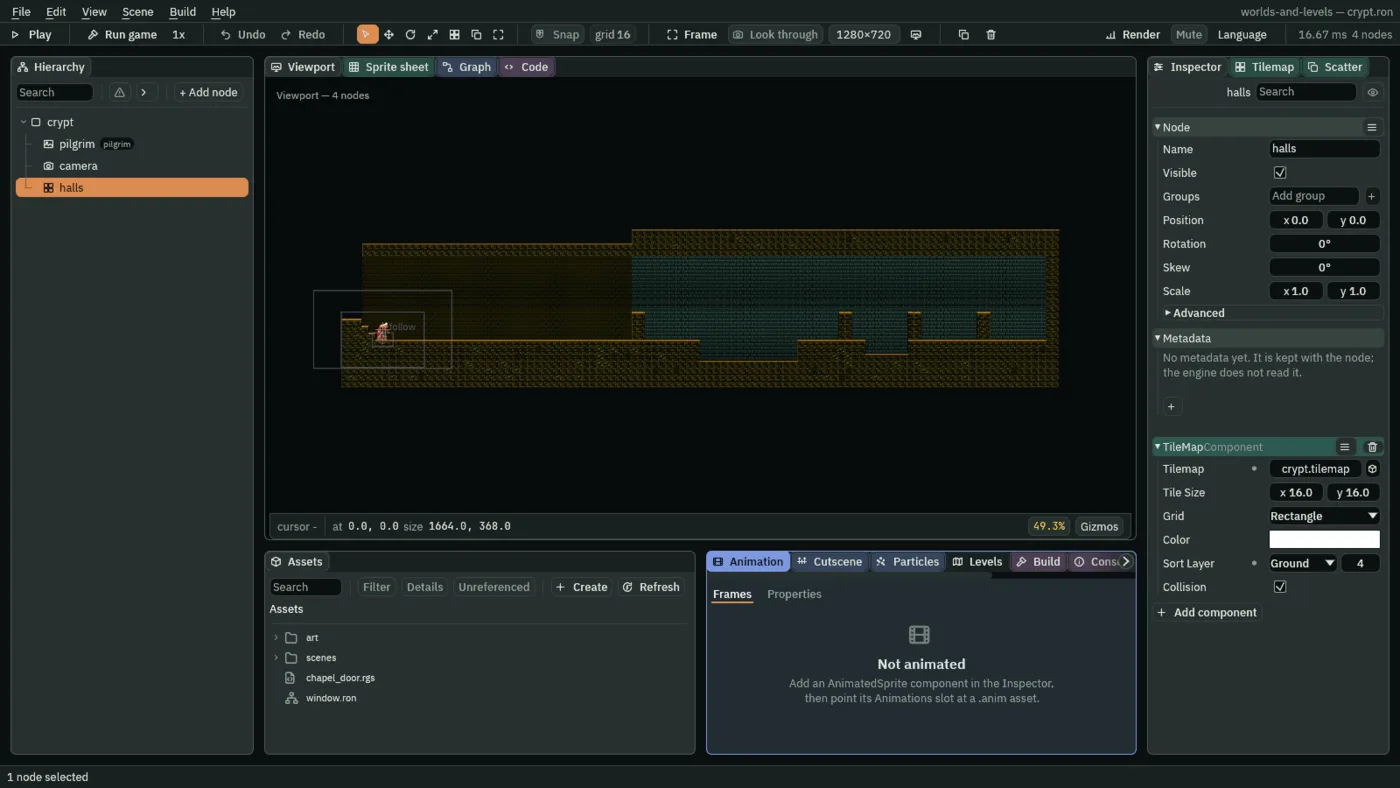
1632: the first hall and the halls, painted.Every edge of the halls is the tile its neighbours call for, and every cell with stone all round is #47 or one of the three. He can walk them end to end: from where he comes in, D held and Space tapped each second take him through where the first hall’s east wall stood, down into the pool and out of it, over the pit, and past x 1560, by the halls’ east wall, within twelve seconds, never lower than the pool’s floor, y 48.
The crypt’s map
| What | Where | Value |
|---|---|---|
terrain stone | Terrains band | the blob set from #1, and #49, #50 and #51 with all eight neighbours |
| Weight | Tile band | #49 0.15, #50 0.10, #51 0.05; #47 1 |
| the fill | Variety band | Set of #47, #49, #50, #51; Seed 7 |
pillars | Layers band | second in the file, z -1, not Solid |
pattern pillar | Tools band | two cells by four, from the painted pillar |
back | the halls | #58, 774 cells; the first hall’s #48 |