Crypt Knight
A castle platformer in an installed Rengy, in sixteen chapters: three levels, a knight with a double jump and a sword, enemies to evade, a boss with three moves and a fury, effects and sound, a title, a pause menu and a victory screen, and the export.
On this page
The game
Crypt Knight is a platformer in the mood of Hollow Knight: a hooded knight in a ruined castle, in pixel art, run from the keyboard. A and D, or the arrow keys, run him, and Space jumps: hold it for a high jump, tap it for a short one.
The whole game is three levels. The Gate teaches the controls on stone tablets that fade in as you walk up to them, and ends at a gap that only a double jump crosses. The Crypt is a place of enemies to evade, with a sword at its end, and the Beast’s Hall is a boss fight: a horse of smoke with three moves and a fury. The knight has five hearts, a jump he can make a second time in the air, and a sword he finds on the way. Around the levels are a title, a pause menu and a victory screen, with music and sounds.
You build it in the editor you installed, from scenes and Rengy Script, and finish by exporting it as a game a friend can run without Rengy. Nothing is compiled, and nothing is needed but the editor and the downloads below. The tutorial is sixteen chapters, from an empty folder to the exported game.
What you need
- Rengy, installed, on Windows or Linux. Getting started installs it and shows you round the editor. This tutorial assumes you have made a game before, though not in Rengy.
- Seven free downloads, for the knight, the castle, the creatures, the music and the sounds. All seven are CC0: you may use them in anything, and nobody has to be credited.
| Download | By | What the game takes from it | Needed from | Licence |
|---|---|---|---|---|
| Gothicvania Patreon’s Collection | ansimuz | The knight, the castle’s tiles, the night town and the hall’s backdrop, the hounds, the wolf, the fire skull and the Nightmare. The game uses ten of its thirteen sub-packs | Chapter 3 | CC0 |
| Abandoned Castle Music (Loop) | StarNinjas | The music on the title and the levels | Chapter 10 | CC0 |
| Heavy Boss Battle 1 | MintoDog | The music of the boss fight | Chapter 14 | CC0 |
| RPG Audio | Kenney | The jump, the slash, the pickup and the fireball | Chapter 14 | CC0 |
| Impact Sounds | Kenney | The landing, the hits, the hurt, the slam and the beast’s roar | Chapter 14 | CC0 |
| Interface Sounds | Kenney | The menus’ focus and press | Chapter 15 | CC0 |
| Music Jingles | Kenney | The victory jingle | Chapter 15 | CC0 |
Download them all from their pages, and unzip the zips somewhere outside your projects. Chapter 1 walks through it, and each chapter from chapter 3 on says which files it copies into your project, and from where. The “Needed from” column is the first chapter that asks for a file of a download.
How long it takes
The sixteen chapters take about eleven hours at the keyboard, in sittings of between ten minutes and an hour and a half. Every chapter ends at a place you can stop, with a Check it works box that says what you should see, and from chapter 2 on, with the game working.
Chapters 2 to 4 make a wide window, bring the art in and paint the Gate. Chapters 5 to 8 bring the knight, a camera, the knight’s animation and the signs. Chapters 9 to 11 add hearts and hazards, the levels and the double jump, and the Crypt; chapters 12 and 13 the sword and the beast. Chapters 14 to 16 give the game its effects and sound, its screens and its export.
The chapters
- 1 What you’ll build A castle platformer in an installed Rengy: three levels, a knight with a double jump and a sword, a boss, and the sixteen chapters that build it. 10 min
- 2 A wide window A new project, a 1280 × 720 window, and a camera that shows 320 × 180 of the world, every art pixel four across. 15 min
- 3 Bringing the art in Copy the knight, the castle’s tiles and the night town’s four backdrops into the project. 15 min
- 4 The Gate’s ground Paint the first level’s floors, steps and walls from the castle’s tile sheet, and put the night town behind them. 30 min
- 5 The knight Name the controls, put a body in the room, and run and jump it with a first script: coyote time, a buffered jump, a short hop and a drop through a ledge. 30 min
- 6 The camera A camera that follows the knight, leads it a little, hardly rises when it jumps, and stops at the level’s edges. 20 min
- 7 Animating the knight Give the knight his art: one sheet, four clips, a pivot for every frame that floats, and a script that picks the clip and the way he faces. 40 min
- 8 Signs Five stone tablets along the Gate that teach the controls: each one’s panel and words fade in when the knight comes near, and out when he leaves. 40 min
- 9 Hearts and hazards Give the Gate teeth: spikes and a bottomless gap that cost a heart and put the knight back on safe ground, a blink and a shake when he is hurt, and five hearts on a HUD. 45 min
- 10 Levels List the Gate as a level with its music, put a relic on an altar that lets the knight jump once more in the air, and an exit that wins the level. 40 min
- 11 The Crypt Build the second level from the first: a new floor plan, two hounds that patrol, a skull that bobs over a pit, a wolf that dashes along a trench, hearts to pick up, and the sword on its altar. 60 min
- 12 The sword Pack the knight’s sheet again with an attack and a hurt, make the slash a clip whose track switches the sword’s reach on for two frames, and let the creatures be struck. 60 min
- 13 The beast Build the Beast’s Hall: a gate that drops behind the knight, a camera that pulls back, a boss bar, and the Nightmare, a boss that charges, leaps and breathes fire at random, and goes into a fury when it is hurt. 90 min
- 14 Effects and sound Dust at the knight’s feet, a sparkle where a heart was, a white flash where a blow lands, a burst when the beast dies, every sound the game makes, and the boss loop. 75 min
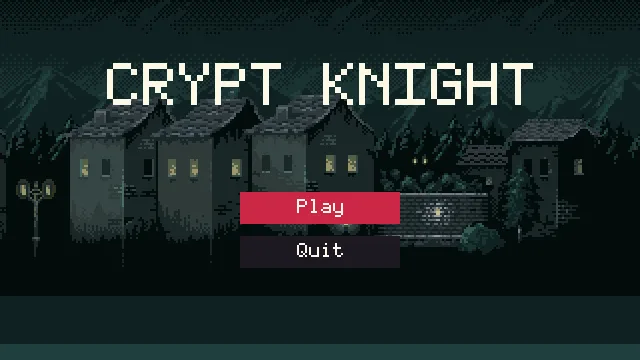
- 15 Screens A title with Play and Quit, a pause menu in every level, and a victory screen: the screens a game has, kept small, with their keys and their sounds. 75 min
- 16 Export Turn the project into a folder a friend can run, and play the finished game from its title to its victory. 20 min