Tutorials · Crypt Knight · Chapter 13
The beast
By the end
- The Beast’s Hall, the Crypt’s scene made again with a new floor plan, one backdrop and one heart
- An arena: an Area the knight walks into once, a portcullis that drops behind him, and a camera that pulls back and holds still
- A boss bar in the HUD that shows the beast’s health
- The Nightmare, with three moves, picked at random and never the same one three times in a row
- A fury below half its health, a fireball that becomes three, and a death that wins the level
On this page
A fight in a room
The third level is one room and one fight. The knight walks in from the left, past a heart floating over a ledge, and into an arena. As he enters, a gate drops behind him, the camera pulls back and holds still, a health bar shows at the bottom of the screen, and the Nightmare, a horse of black smoke and blue fire, wakes. It has 20 health, and each slash that lands takes one.
The Nightmare rests, and then makes one of three moves, at random, never the same one three times in a row: it charges at where the knight was, to the wall; it leaps to where he was and lands with a shake; or it breathes a fireball at him. Each is announced by a red glow, a wind-up, long enough to see. Below half its health it is in a fury: it rests and winds up 40% shorter, charges faster and breathes three fireballs at once. When it is slain, it flashes and fades, and a moment later the level is won.
Everything here is chapters you have done again, and one new idea, which is how a number of nodes can be told to start together: a signal sent to a group. The arena sends one, "begin", to the group arena, and the gate, the bar, the camera and the beast, each a node in that group, each answer it in their own way.
The Hall’s room
The Hall is the Crypt’s scene, made again as the Crypt was the Gate’s: it keeps the camera, the knight, the HUD and the room’s bounds, and everything else is replaced.
- In Assets, open
scenes, right-clickcrypt.ron, choose Duplicate, then right-click the copy, choose Rename, typehall.ronand press Enter. Inart, do the same tocrypt.tilemap, renaming its copy tohall.tilemap. - Double-click
hall.ron. Rename its rootCrypttoHall. - In the Hierarchy, select
hound_1, then Ctrl-clickhound_2,skull,wolf,heart_pickup_2,sword,sign_sword,exit,pit,safe_1,safe_2,safe_3,safe_4andsafe_5, and press Delete. Keep the camera,ground,knightand itsslash,bounds,hudandheart_pickup_1. - Rename
heart_pickup_1toheart_pickup, and set its Position to288and100.
The Hall’s ground is a new, smaller floor plan on its own tilemap: 58 cells across and 15 tall, a single long floor between two walls, with one ledge. The heart floats over the ledge, 48 units above the floor, which only a double jump reaches.
- Select
ground, and dragart/hall.tilemaponto the Tilemap slot of its TileMapComponent. Open the Tilemap tab and turn on Paint mode. It still holds the Crypt. - Choose Erase, set Size to
16, and, with the whole of the room in view, drag from cell (0, 6) to cell (101, 6) on each of the layersback,groundandledges, clicking the layer’s name first. The room is empty. - Choose the Rect tool and the picker’s
#66, and ongrounddrag one rectangle for each row of the first table below. Pick#45and drag the cap of the floor. Clickledges, keep#45, and drag the ledge. - Press Save at the top of the Tilemap panel, and Ctrl+S.
| Layer and tile | Stretch | From cell | To cell |
|---|---|---|---|
ground, #66 | The left wall | (0, 0) | (1, 14) |
ground, #66 | The floor’s body | (2, 11) | (55, 14) |
ground, #66 | The right wall | (56, 0) | (57, 14) |
ground, #45 | The floor’s cap | (2, 10) | (55, 10) |
ledges, #45 | The ledge | (16, 7) | (19, 7) |
The room is now 928 wide and 240 tall, a row taller than the Gate’s and the Crypt’s, so that the camera, pulled back, fits it from floor to ceiling. The Confiner and the Hall’s own backdrop change to fit.
- Copy the picture above into
art, and press Refresh in Assets. - Select
bounds. Set its Position to464and120, and its Bounds to928and240. - Select
Hall, press + Add node, and choose Parallax. Rename itbackdrop. Dragart/old-dark-castle-interior-background.pngonto its Sprite’s Texture, and set Size to960and304, and Sort Layer to-40. - In its Parallax, set Factor to
0.6and1, Offset to0and-40, and Repeat Period to960and0. Leave Repeat X ticked and Repeat Y unticked. - Press Ctrl+S.
One opaque backdrop, not four: a castle interior, a lantern, a window, behind the whole fight. Its picture is as tall as the room and a little more, so its offset lifts it 40 units to fit, and the Hall costs the machine one layer.
- Click the Levels tab. Type
The Beast’s Hallinto the box in the panel’s bar and press Add level. With its row selected, press Scene and choosehall.ron. - Drag
abandoned_castle_music_-_starninjas_6.oggonto the Music button of its row.
The arena and its gate
The arena is an Area the knight walks into, at the room’s middle. It sends its signal the first time he does, and never again. Everything that starts with the fight listens for it.
- In Assets, press Create, choose New script, type
arena, and press Enter. - In the Code tab’s Scripts list, click
arena.rgs, replace everything in it with the script below, and press Ctrl+S.
/// The arena's threshold: the first time the knight walks in, it sends
/// "begin" to the group "arena", which drops the portcullis behind the knight,
/// turns the camera onto the arena, shows the boss bar and wakes the beast.
component Arena : Area {
    /// Whether the fight has begun, so it begins once.
    #[hidden]
    begun: bool = false,

    fn on_enter(other: NodeId) {
        if in_group(other, "knight") && !begun {
            begun = true;
            emit_to("arena", "begin");
        }
    }
}
- Click the Viewport tab. Select
Hall, press + Add node, choose Area, and rename itarena. Set its Position to688and120. - In its Area, set the Shape’s Size to
368and80. Leave its Layer and Mask: it is on layer0and looks for layer0, where the knight is. - Press Add component and choose Arena.
- Press Ctrl+S.
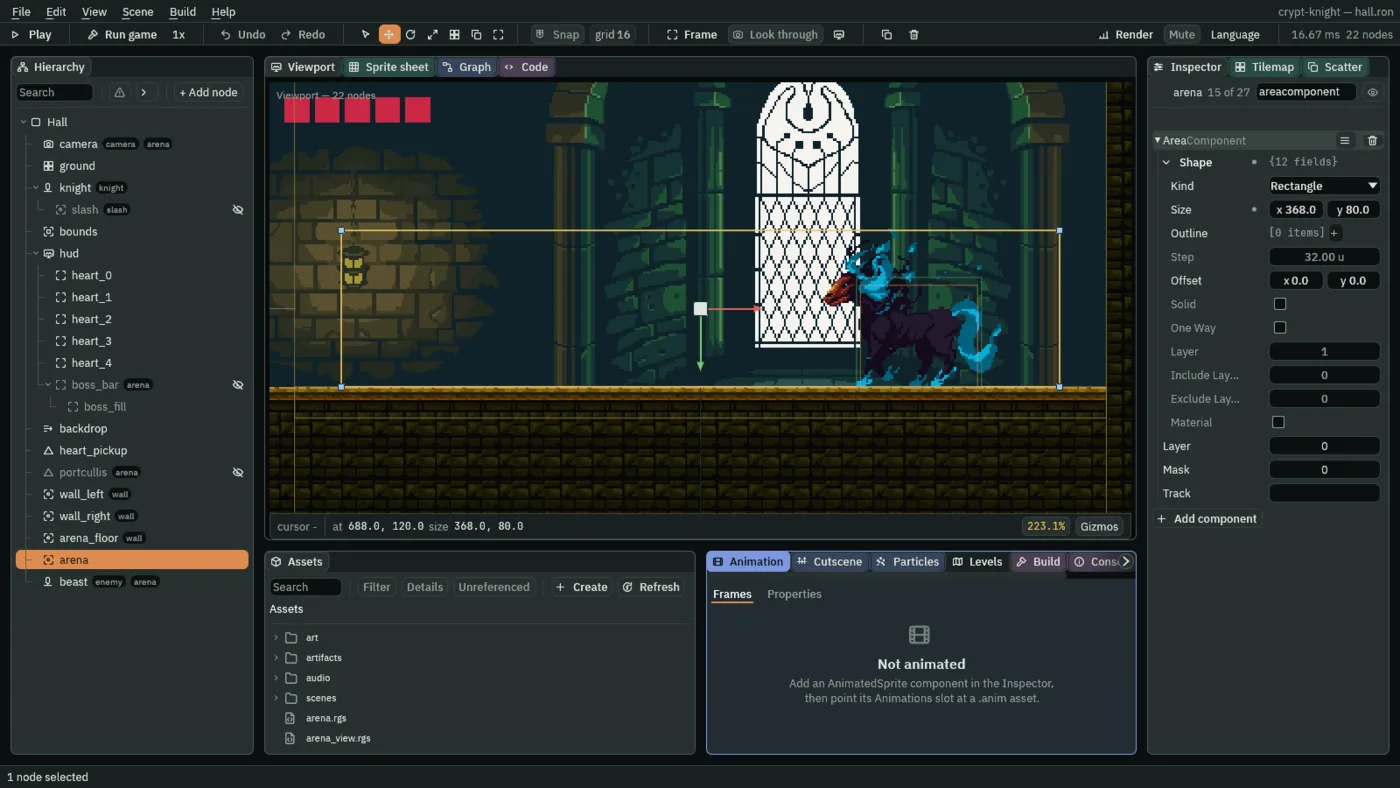
- emit_to
"arena","begin" - Sends the signal
"begin"to every node in the grouparena. Each hears it on the next step, with heard or anawait signal. The same call told the camera to"shake"in chapter 9. begun- A flag the script keeps, so the signal goes once. The knight’s Area may leave the arena and enter it again, and would otherwise begin the fight twice.
#[hidden]keeps it out of the Inspector.
The first thing to answer is the gate. A portcullis drops behind the knight so that he cannot leave: a dark bar, over the floor, 16 wide and 160 tall, with a Collider, a solid box that stops bodies. It is hidden until the signal. A hidden Collider blocks nothing, so showing it is what closes the gate. Both the portcullis and the boss bar, below, are shown by one script.
- In Assets, press Create, choose New script, type
reveal, and press Enter. In the Code tab, replace everything inreveal.rgswith the script below, and press Ctrl+S.
/// Hidden until its cue reaches the node, then shown: the portcullis, which
/// blocks once it shows, and the boss bar.
component Reveal {
    /// The signal that shows it.
    cue: String = "begin",

    fn loop() {
        if heard(cue) {
            show();
        }
    }
}
- Click the Viewport tab. Select
Hall, press + Add node, choose Shape, and rename itportcullis. Set its Position to472and160, and untick its Visible. Under Groups, typearenaand press Enter. - In its Shape, keep Kind on Rectangle, set Size to
16and160, Anchor to0.5and1, Outline to0, Color to0.16,0.15,0.18with an alpha of1, and Sort Layer to2. - Press Add component and choose ColliderComponent. In its Shape, set Size to
16and160, Offset to0and-80, and tick Solid. - Press Add component and choose Reveal. Its Cue is
beginalready. - Press Ctrl+S.
The arena has three walls, which are not for the knight: they are for the beast’s fireballs. A fireball is an Area, not a body, so the room’s tiles do not stop it: it would fly through the walls. Three Areas, one for the left wall, one for the right and one for the floor, say where a fireball ends. They are in a group wall, on a layer of their own, 3.
- Select
Hall, press + Add node, choose Area, and rename itwall_left. Set its Position to472and120, and under Groups typewall. In its Area, set the Shape’s Size to16and240, the Area’s own Layer to3, and untick0in its Mask. - Duplicate it: rename the copy
wall_right, and set its Position to904and120. - Duplicate it again: rename the copy
arena_floor, set its Position to688and168, and its Shape’s Size to416and16. - Press Ctrl+S.
The layers are now four: 0 hears the knight, 1 is what hurts him, 2 is what the sword reaches, and 3 is a wall of the arena.
The camera pulls back
For the fight the camera lets go of the knight, pulls back and holds the whole arena still. That is a second framing in the Camera Rig of chapter 6: a shot of its own, with the arena as its subject, that the rig blends to when it is switched on.
- Select
camera, and in its CameraRigComponent, next to Framings, press the +. Open the new framing[1]with its arrow. - Set Name to
arena. Click Subject, and choosearena: the Area’s node, which stands still at the room’s middle. - Untick Active: the framing is off until the fight begins. Set Priority to
1, above the follow framing’s0, Zoom to0.75, Duration to0.6and Ease to EaseInOut. - Set Dead Zone and Soft Zone to
0and0, Offset to0and0, and Damping to0.2and0.2. Leave Time at0, Smoothing at0.2and Limit at0. - Under Groups, add the group
arenabesidecamera.
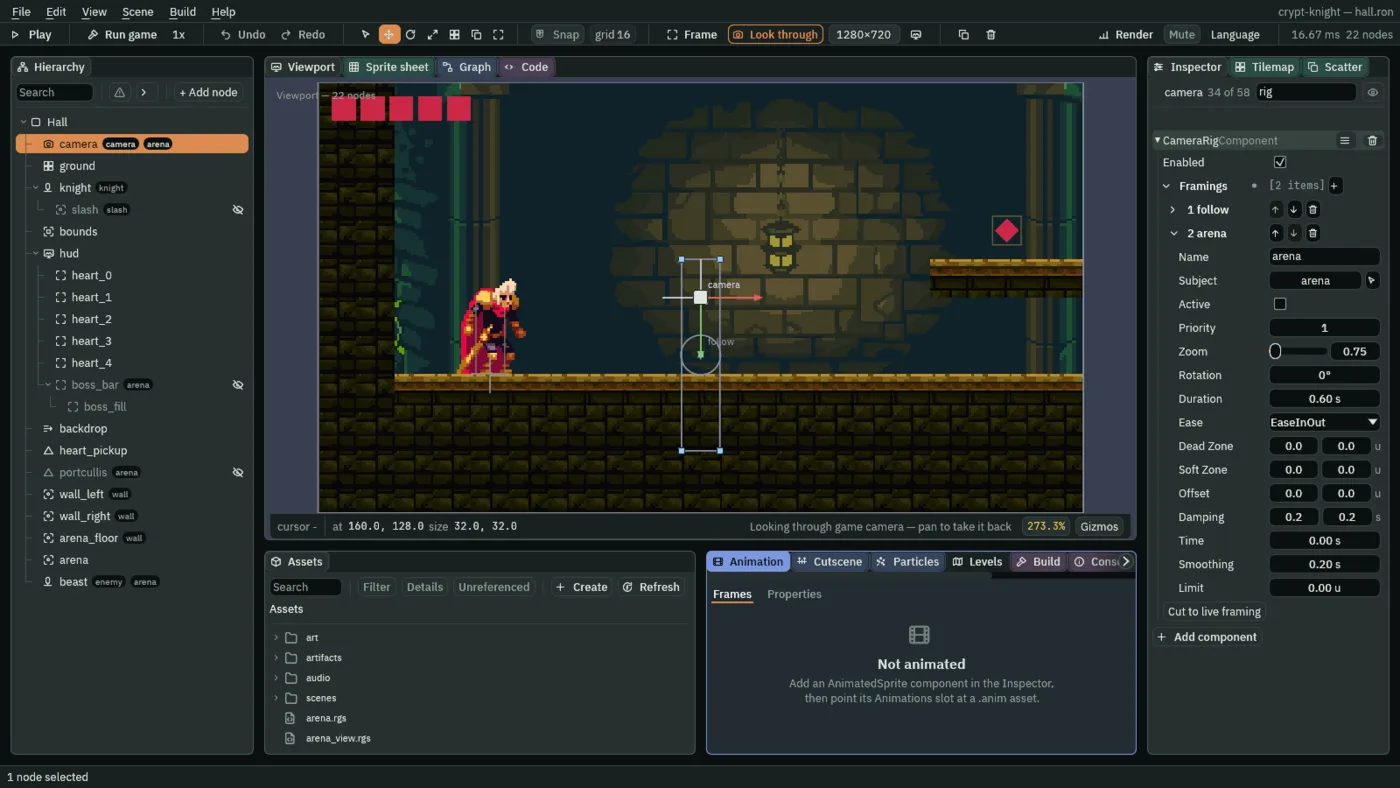
- Priority
- When two framings are on, the higher one wins. The follow framing,
0, is always on. When the arena framing is switched on, its1wins, and the camera blends to it over its Duration, 0.6 seconds, easing in and out. When it goes off again, the follow framing is the one left on. - Zoom
0.75 - The shot shows a third more of the room: 320 divided by 0.75 is about 427 units across, and 180 divided by 0.75 is 240 up, which is the room’s height exactly. Every art pixel is drawn three screen pixels wide, which is still a whole number, so the art stays crisp.
- A still subject
- The arena’s node never moves, so the framing never does: the camera is locked, with no dead zone, no look-ahead and a gentle damping for the blend to settle with.
The camera is told to switch it on by the same signal, in a script of its own. A script cannot switch another node’s framing, but the camera’s own script writes to the camera’s own rig.
- In Assets, press Create, choose New script, type
arena_view, and press Enter. In the Code tab, replace everything inarena_view.rgswith the script below, and press Ctrl+S.
/// The camera's arena shot: when "begin" reaches the group "arena" this node
/// is in, the rig's second framing, which holds the arena still and pulled
/// back, takes over from the one that follows the knight.
component ArenaView {
    fn loop() {
        if heard("begin") {
            // The rig's framings are counted from 0: 1 is the second.
            set_flag("CameraRigComponent", "framings.1.active", true);
        }
    }
}
- Click the Viewport tab, select
camera, press Add component, and choose ArenaView. - Press Ctrl+S.
set_flag("CameraRigComponent", "framings.1.active", true) writes the second framing’s Active, reached by its place in the rig’s list: the framings are counted from 0, so 1 is the second. set_flag writes a flag of one of this node’s components.
The boss bar
The bar is two Panels on the HUD: a dark slot along the bottom of the screen, hidden until the signal, and a red fill inside it, whose right edge is moved by the beast’s health. A Rect has no scale a script can reach, but it has an Offset Max, and the fill is as long as that says. The slot is shown by the same Reveal.
- In Assets, press Create, choose New script, type
boss_health, and press Enter. In the Code tab, replace everything inboss_health.rgswith the script below, and press Ctrl+S.
/// The boss bar's fill: as long as the beast has health left, which its
/// Wounds keep as `boss_hp`.
component BossHealth {
    /// The beast's health when whole.
    full: f32 = 20.0,
    /// The fill's length at full health.
    #[suffix("u")]
    width: f32 = 158.0,

    fn loop() {
        // The fill's right edge, from the bar's left edge, 1 unit in.
        set_number("RectComponent", "offset_max.x", 1.0 + width * kept_number("boss_hp", full) / full);
    }
}
- Click the Viewport tab. Select
hud, press + Add node, and choose Panel. Rename itboss_bar, untick its Visible, and under Groups typearena. - Its Rect: Anchor Min and Anchor Max
0.5and1, the bottom centre; Offset Min-80and-14; Offset Max80and-8; Pivot0.5and0.5. That is 160 units across and 6 tall, 8 above the bottom edge. Its Panel Color:0.05,0.05,0.08, alpha1. - Press Add component and choose Reveal.
- Select
boss_bar, press + Add node, and choose Panel: it lands under the slot. Rename itboss_fill. - Its Rect: Anchor Min
0and0, Anchor Max0and1, so that it is as tall as the slot; Offset Min1and1; Offset Max159and-1; Pivot0and0. Its Panel Color:0.6,0.02,0.06, alpha1, the hearts’ red. - Press Add component and choose BossHealth. Leave its Full at
20and Width at158. - Press Ctrl+S.
The fill is 158 units long when the beast is whole, one unit in from each end of the slot, and its right edge is 1 + 158 × boss_hp / 20. At 10 health it is half as long, and at none it is the one unit of a slit. kept_number("boss_hp", full) reads the beast’s health, with 20 as its answer until the beast has kept any.
The Nightmare’s art
The beast is the Nightmare of the collection, a horse of black smoke, with two strips: idle and galloping. Its fireball is a small flame from another creature’s pack, the Hell Beast’s.
The two strips play from one sheet, so they are packed as the knight’s are: Make Animation…, then the Sprite sheet. The fireball is one strip, and is cut where it lies.
- Copy the three pictures above into
art, and press Refresh in Assets. - Right-click
nightmare-galloping.png, choose Make Animation…, and ticknightmare-idle.pngtoo. Set Name tonightmareand press Create. It writesart/nightmare.png, 2048 by 128, andart/nightmare.anim. - Double-click
art/nightmare.pngin Assets. The Sprite sheet tab opens on it. The galloping strip is at x0and the idle strip at x578. - Idle. Set Cell to
128and96, Margin to578and0. Drag from cell0, 0to cell3, 0: Selected 4 x 1. Press From selection; name itidle,8 fps, Loop; Generate 1 and Clear. - Gallop. Set Cell to
144and96, Margin to0and0. Drag from cell0, 0to cell3, 0: Selected 4 x 1. From selection; name itgallop,12 fps, Loop; Generate 1 and Clear. - Press Save in the Animation panel.
- Double-click
art/fire-ball.png. Set Cell to19and16, drag from cell0, 0to cell2, 0: Selected 3 x 1. From selection; name itburn,12 fps, Loop; Generate 1. A file,art/fire-ball.anim, appears beside it.
The strips’ frames are not the same width, 128 and 144, so the beast’s Animated Sprite draws each frame at its own size, with Frame Size, as the knight’s does. The pivots stay at the middle of the bottom edge: both creatures’ feet are on the frames’ last row.
The beast
- Select
Hall, press + Add node, choose Character, and rename itbeast. Set its Position to800and160. Under Groups, typeenemy, thenarena. Remove its Shape. - In its CharacterBodyComponent, set Size to
64and56, Driven By to Script, Gravity to900, Terminal Velocity to400and Jump Speed to360. - Add a SpriteComponent: drag
art/nightmare.pngonto its Texture, set Size to128and96, Anchor to0.5and1, Sort Layer to4. - Add an AnimatedSpriteComponent: drag
art/nightmare.animonto Animations, set Clip toidle, and tick Frame Size. - Add an AreaComponent: its Shape Size
60and52, Offset0and-26, its own Layer1, and in its Mask untick0and tick2: it is an enemy that hurts the knight, and it looks for the sword’s reach. - Press Ctrl+S.
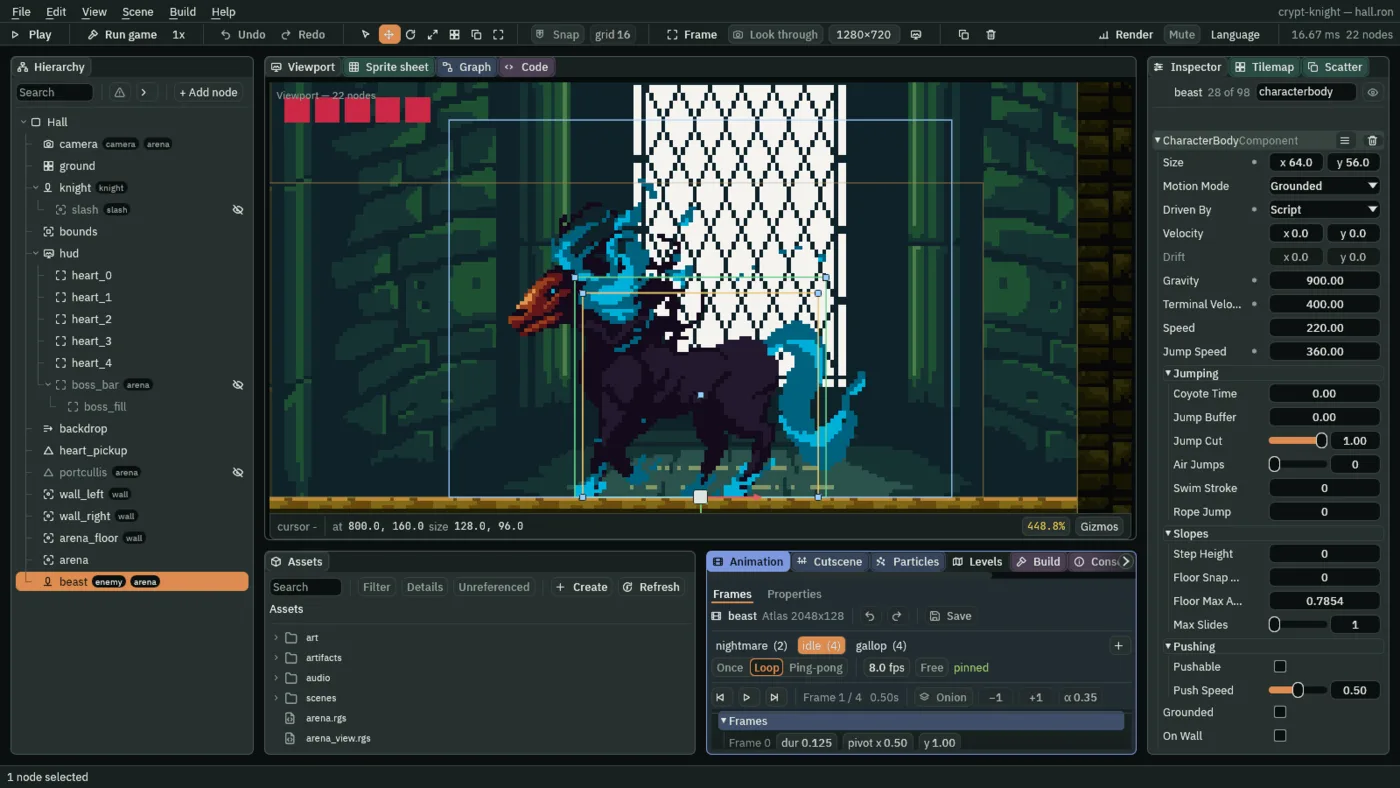
The beast is two scripts on one node: Beast, which makes the moves, and Wounds, which keeps its health. A node does not hear its own emit_to, so the two cannot signal each other on one node. They talk through a kept value, boss_hp, as the HUD talks to the knight through hearts. And the beast needs to know where the knight is: his script keeps his position every step, and a script cannot read another node’s.
In knight.rgs, two lines in the comment at the top, and one in loop, after the heard("heal") block, before the recoil:
/// With no hearts left, the level is lost. Each step it keeps where it is,
/// for the beast to aim at.
        // Where the knight is, kept for the beast to aim at a step later.
        keep_point("knight", position());
Press Ctrl+S. Now the beast’s health, which is short.
- In Assets, press Create, choose New script, type
wounds, and press Enter. In the Code tab, replace everything inwounds.rgswith the script below, and press Ctrl+S.
/// The beast's wounds: each slash of the knight's that lands takes one of its
/// health and pushes the knight back. Its health is kept as `boss_hp`, which
/// the boss bar shows and the beast's fury reads. At none it is slain: it
/// stops, hurts nothing more, and a moment later the level is won.
component Wounds : Area {
    /// How many slashes it takes to slay.
    health: f32 = 20.0,
    /// Seconds from the last slash to the level won.
    #[suffix("s")]
    dying_time: f32 = 2.0,

    fn on_create() {
        keep_number("boss_hp", health);
    }

    fn on_enter(other: NodeId) {
        if in_group(other, "slash") && health > 0.0 {
            health -= 1.0;
            keep_number("boss_hp", health);
            // The knight is in the group "knight", and is pushed back a step
            // later.
            emit_to("knight", "recoil");
            if health <= 0.0 {
                // It stops where it is, and its Area is on no layer the
                // knight's looks for.
                set_number("CharacterBodyComponent", "velocity.x", 0.0);
                set_number("AreaComponent", "layer", 0.0);
                await wait(dying_time);
                complete();
            }
        }
    }
}
on_createandboss_hp- The beast’s health, 20, is kept as
boss_hpas the Hall opens, so the bar reads it from the first step. on_enter- Each slash that lands is the reach of the knight, in the group
slash, meeting the beast’s Area. It takes one health, keeps the new number, and tells the knight, in the groupknight, to"recoil": he is pushed back, as he is by any creature. At none, the beast is slain. - The death
- It stops where it is,
velocity.xto0, and its Area goes to layer0, which the knight’s does not look for, so a body still sliding cannot hurt him. It waits two seconds, and calls complete: the level is won. Chapter 14 makes it flash and burst.
- Click the Viewport tab, select
beast, press Add component, and choose Wounds. Leave its Health at20and Dying Time at2.
Three moves, one at a time
The beast’s script is the longest in the game, and it is one idea: a loop that rests and makes a move, again and again, for as long as the beast lives. The loop is a hook that waits: it pauses in the middle, for time to pass and for things to happen, so that one pass through it is one rest and one move. It is typed in pieces, in order, one under another. Create beast.rgs and start with its top.
- In Assets, press Create, choose New script, type
beast, and press Enter. Open it in the Code tab.
/// The beast: asleep until "begin" reaches the group "arena" it is in. Then,
/// while it lives, it rests facing the knight and makes one of three moves at
/// random, never the same one three times running: a charge to the wall, a
/// leap at the knight, or fire. Below half its health it is in a fury: its
/// rests and wind-ups are 40% shorter, it charges faster, and it breathes
/// three fireballs at once. Its health is its Wounds', kept as `boss_hp`.
component Beast : Body {
    /// Its health when whole: below half of it, the beast is in a fury.
    full: f32 = 20.0,
    /// Seconds it rests between moves.
    #[suffix("s")]
    rest: f32 = 1.0,
    /// Seconds it glows red before a move: the knight's warning.
    #[suffix("s")]
    windup: f32 = 0.6,
    /// How fast it charges.
    #[suffix("u/s")]
    charge_speed: f32 = 200.0,
    /// Seconds a leap stays in the air: twice its body's Jump Speed over its
    /// Gravity, 2 x 360 / 900.
    #[suffix("s")]
    air_time: f32 = 0.8,
    /// How far each side fireball turns from the middle one, in a fury.
    #[suffix("rad")]
    spread: f32 = 0.35,
    /// Whether "begin" has woken it.
    #[hidden]
    awake: bool = false,
    /// The way it faces: -1 for left, 1 for right. Its art faces left.
    #[hidden]
    way: f32 = -1.0,
    /// The move it made last: 0 a charge, 1 a leap, 2 fire, -1 none yet.
    #[hidden]
    last: f32 = -1.0,
    /// How many times running it has made that move.
    #[hidden]
    streak: f32 = 0.0,
    /// 1 once it is in a fury.
    #[hidden]
    fury: f32 = 0.0,
    /// Whether a charge has met a wall.
    #[hidden]
    walled: bool = false,
component Beast : Body- A script with a Body base, as the patrols’: it has the body’s hooks, such as
on_hit_wall, and its own node’s body to jump and run. - The fields
- The numbers it is tuned by, each in the Inspector:
full, its health when whole,restandwindupin seconds,charge_speed,air_timeand the fireballs’spread. The hidden ones are its memory:awake,wayit faces, the move it madelastand how many times running,furyand whether a charge has met a wall.
Waking, and resting
Then loop, one pass of it a rest and a move. First the beast sleeps until it hears the signal, and wakes a second later. While it has health, it works out whether it is in its fury, rests facing the knight, and waits.
    fn loop() {
        if !awake {
            // The arena sends "begin" when the knight walks in.
            await signal("begin");
            awake = true;
            await wait(1.0);
        }
        // Its Wounds, beside this on the beast, keep its health.
        if kept_number("boss_hp", full) > 0.0 {
            // In a fury, a rest or a wind-up takes `calm` of its time, and a
            // charge or a fireball goes `haste` times as fast.
            let calm = 1.0;
            let haste = 1.0;
            if kept_number("boss_hp", full) < full * 0.5 {
                fury = 1.0;
            }
            if fury > 0.0 {
                calm = 0.6;
                haste = 1.3;
            }
            // It faces the knight, where the knight was a step ago.
            if kept_point("knight", position()).x < position().x {
                way = -1.0;
            } else {
                way = 1.0;
            }
            set_flag("SpriteComponent", "flip.x", way > 0.0);
            play_clip("idle");
            await wait(rest * calm);
await signal("begin")andawait wait- An awaitable pauses the hook where it is, and carries on from the same place later.
signal("begin")waits for that signal to reach the node.wait(1.0)waits a second. In between, the beast does nothing: it is asleep. calmandhaste- Two numbers for the fury. Whole, the beast rests and winds up for the whole of its time,
calmof 1, and moves at its own speed,hasteof 1. Below half its health,furyis set, and does not go away:calmis0.6, so its rests and wind-ups are 40% shorter, andhasteis1.3. The fury begins strictly below half: at 10 of 20 it is not in one, at 9 it is. kept_point("knight", position())- Where the knight was a step ago, kept by his script. The beast turns to face it:
wayis-1for left and1for right, and its Sprite is mirrored to match. Its art faces left.
Choosing a move
One of three, at random, and never the same one three times running. A number from 0 to 3 is rolled, and its whole part picks the move: 0 a charge, 1 a leap, 2 fire. If the move is the one made last, and it has been made twice running, it is moved on to the next.
            // One of three at random; after two of one, never a third.
            let roll = random(0.0, 3.0);
            let pick = 0.0;
            if roll >= 1.0 {
                pick = 1.0;
            }
            if roll >= 2.0 {
                pick = 2.0;
            }
            if pick == last && streak >= 2.0 {
                pick = (pick + 1.0) % 3.0;
            }
            if pick == last {
                streak += 1.0;
            } else {
                last = pick;
                streak = 1.0;
            }
random answers a number from its first argument up to, but not including, its second, new at every call and different every Play. The % is the remainder of a division, so (pick + 1.0) % 3.0 goes round from fire back to the charge.
The wind-up
            // The wind-up: it glows red.
            pulse_colour("SpriteComponent", "color", vec4(1.0, 0.4, 0.4, 1.0), 0.1, .Linear);
            await wait(windup * calm);
            // A move begins only while it lives.
            if kept_number("boss_hp", full) > 0.0 {
                set_colour("SpriteComponent", "color", vec4(1.0, 1.0, 1.0, 1.0));
The beast glows red for windup seconds, a calm share of that in a fury. The glow is the same before all three moves, so it does not say which one is coming: it says one is, and gives the knight that long to get ready. Then the glow ends and the move begins, if the beast is still alive: a slash can land during the wind-up and slay it.
The charge
                if pick == 0.0 {
                    // The charge: the way it faces, until a wall stops it.
                    play_clip("gallop");
                    walled = false;
                    set_number("CharacterBodyComponent", "velocity.x", way * charge_speed * haste);
                    await wait_until(walled);
                    set_number("CharacterBodyComponent", "velocity.x", 0.0);
It runs the way it faces, toward where the knight was, at 200 units a second, 260 in a fury, until a wall stops it. on_hit_wall, at the bottom of the script, sets walled, and await wait_until(walled) waits for it. A charge that starts against its wall ends at once.
The leap
                } else if pick == 1.0 {
                    // The leap: up, and sideways as far as the knight was.
                    let reach = kept_point("knight", position()).x - position().x;
                    play_clip("gallop");
                    set_number("CharacterBodyComponent", "velocity.x", reach / air_time);
                    jump();
                    // A jump leaves the ground a step after it is asked.
                    await wait_frames(3);
                    await wait_until(grounded());
                    set_number("CharacterBodyComponent", "velocity.x", 0.0);
                    // The camera's node is in the group "camera".
                    emit_to("camera", "shake");
It jumps: jump asks its body for one, with a Jump Speed of 360 and a Gravity of 900, so it is in the air for 2 × 360 ÷ 900, 0.8 seconds, and in that time it runs sideways as far as the knight was, reach / air_time. A jump leaves the ground a step after it is asked, so it waits three frames before it waits to land, and when it lands, the camera shakes.
The fire
                } else {
                    // Fire, from its mouth at the knight. Each fireball flies
                    // away from the kept muzzle, so where it is made is the
                    // way it goes.
                    let mouth = position() + vec2(way * 40.0, -62.0);
                    let aim = (kept_point("knight", position()) + vec2(0.0, -15.0) - mouth).normalized();
                    keep_point("muzzle", mouth);
                    keep_number("haste", haste);
                    spawn("fireball", mouth + aim * 8.0);
                    if fury > 0.0 {
                        let c = spread.cos();
                        let s = spread.sin();
                        spawn("fireball", mouth + vec2(aim.x * c - aim.y * s, aim.x * s + aim.y * c) * 8.0);
                        spawn("fireball", mouth + vec2(aim.x * c + aim.y * s, aim.y * c - aim.x * s) * 8.0);
                    }
                    await wait(0.3);
                }
            }
        }
    }
It breathes from its mouth, 40 units out and 62 up, at the knight’s chest. A script cannot tell a copy where to go, so the beast keeps its mouth as muzzle and its speed as haste, and each fireball flies away from the muzzle: where it is made is the way it goes. In a fury, two more are made, spread radians either side of the middle one, by turning the aim: cos and sin are the turn’s two halves. Then it waits a third of a second, and the loop begins again.
Last, below loop, the hook that a wall calls:
    fn on_hit_wall() {
        walled = true;
    }
}
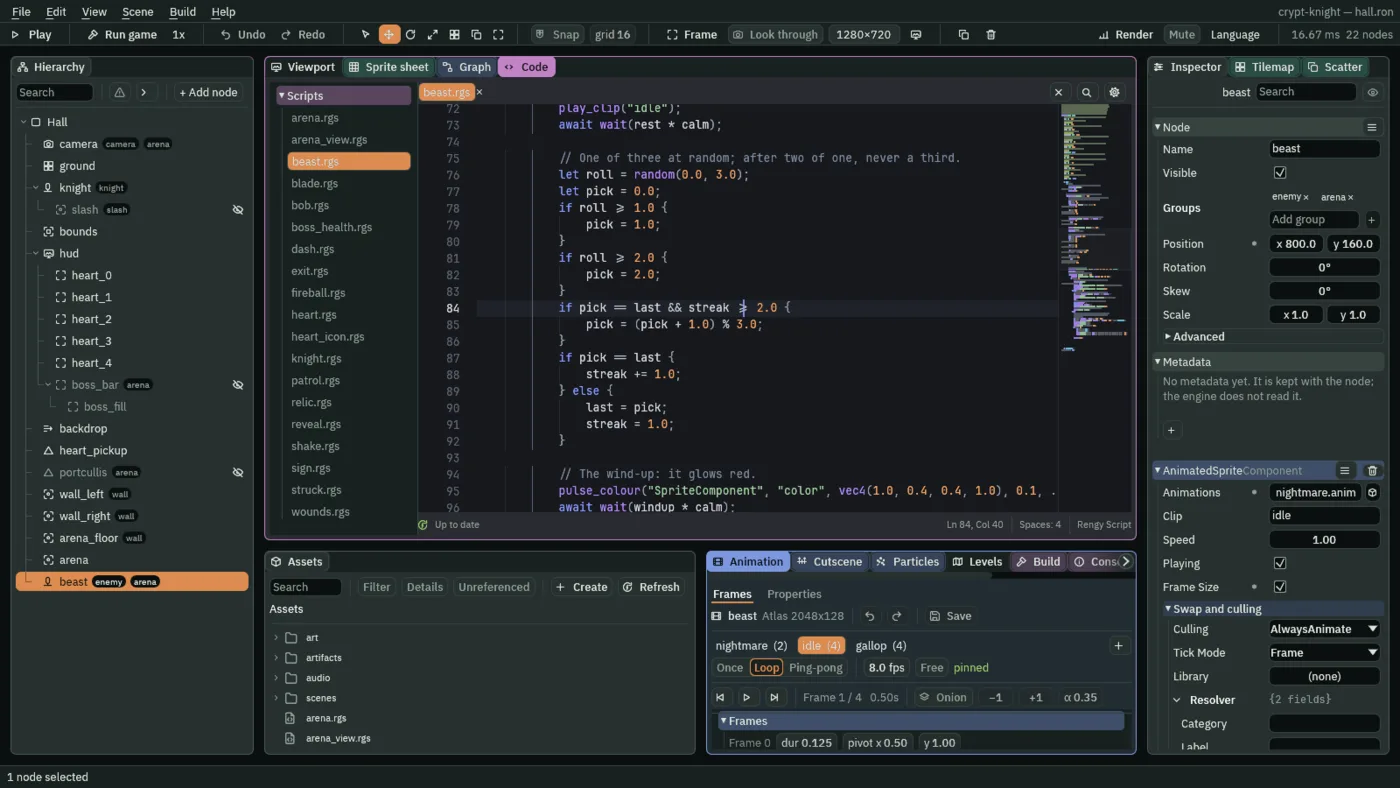
Press Ctrl+S. The panel says Up to date once it checks. The script is 143 lines, in the pieces above: the blank lines of the file sit between them. Click the Viewport tab, select beast, press Add component, and choose Beast, leaving its fields as they come.
The fireball
A fireball is an artifact, as Ship Evader’s laser is: a node the game makes copies of while it runs. It is an Area, in the group enemy, that flies away from the muzzle and ends on the knight, a wall, or after three seconds.
- In Assets, press Create, choose New script, type
fireball, and press Enter. In the Code tab, replace everything infireball.rgswith the script below, and press Ctrl+S.
/// A fireball the beast breathes: it flies away from the beast's mouth, which
/// the beast keeps as `muzzle`, the way it was breathed, and is gone when it
/// meets the knight or a wall of the arena, or after `lifetime`.
component Fireball : Area {
    /// How fast it flies, before the beast's fury quickens it.
    #[suffix("u/s")]
    speed: f32 = 150.0,
    /// Seconds before it burns out.
    #[suffix("s")]
    lifetime: f32 = 3.0,
    /// How fast it flies, and which way, worked out as it is made.
    #[hidden]
    velocity: Vec2 = vec2(0.0, 0.0),

    fn on_create() {
        // Made a little way out from the muzzle, along its way. The beast keeps
        // `haste` as 1, or more in its fury.
        let way = (position() - kept_point("muzzle", position() - vec2(1.0, 0.0))).normalized();
        velocity = way * speed * kept_number("haste", 1.0);
        // Its art faces left.
        set_flag("SpriteComponent", "flip.x", velocity.x > 0.0);
        await wait(lifetime);
        destroy_self();
    }

    fn loop(dt: f32) {
        translate(velocity * dt);
    }

    fn on_enter(other: NodeId) {
        if in_group(other, "knight") || in_group(other, "wall") {
            destroy_self();
        }
    }
}
- Click the Viewport tab. Select
Hall, press + Add node, choose Sprite, and rename itfireball. Under Groups, typeenemy. - Drag
art/fire-ball.pngonto its Sprite’s Texture, and set Size to19and16, Anchor to0.5and0.5and Sort Layer to7. - Add an AnimatedSpriteComponent: drag
art/fire-ball.animonto Animations and set Clip toburn. - Add an AreaComponent: its Shape Size
12and10, its own Layer1, and in its Mask tick0and3, and untick the rest: it looks for the knight, on layer0, and the arena’s walls, on layer3. - Add Fireball. Leave its Speed at
150and Lifetime at3. - Right-click
fireballin the Hierarchy and choose Save as artifact…. In the save dialog, make a folder calledartifacts, open it, and save the file asfireball.artifact. Delete the fireball left in the scene. - Select
beast, press Add component, and choose SpawnerComponent. Press + beside Entries, open the new [0] row, typefireballas its Name, and dragartifacts/fireball.artifactfrom Assets onto its Artifact. - Press Ctrl+S.
on_create- Works out its velocity as it is made: the way from the muzzle,
kept_point("muzzle", …), to where it is made, a little out from it along the aim, as a unit vector, times its speed and the beast’s kepthaste. Its art faces left, and is mirrored to fly right. Thenawait wait(lifetime), anddestroy_self(): a fireball that has met nothing burns out. loopand translate- Moves the node by
velocity × dteach step: a fireball is not a body, it just flies. on_enter- Meeting the knight or a wall, it removes itself. The knight’s own Area hears it first, and counts a heart: a fireball is in the group
enemy, like a hound.
Check it works
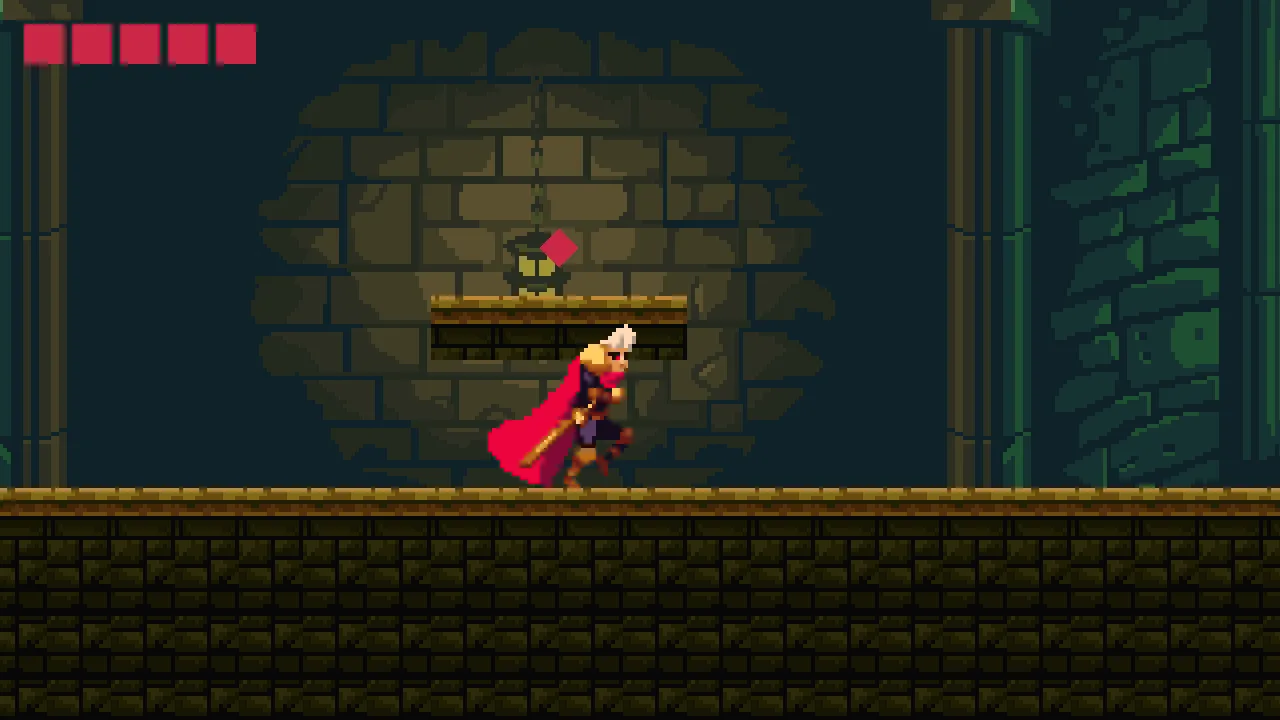
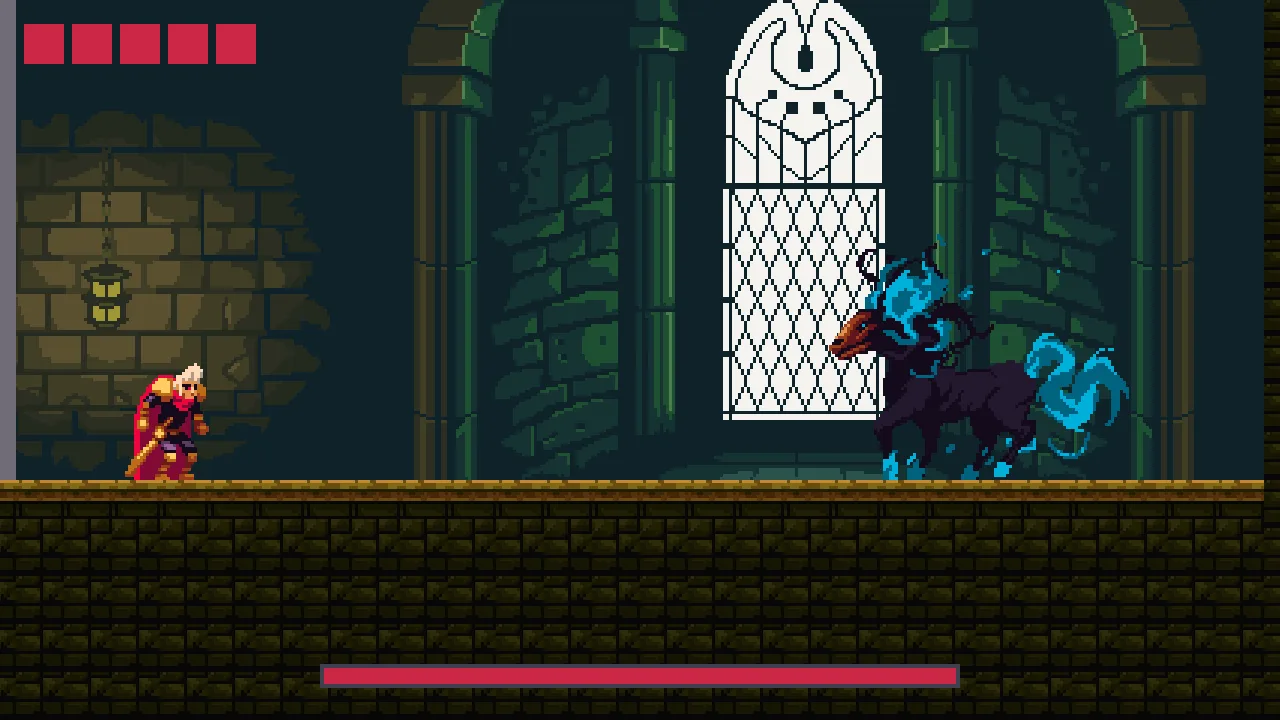
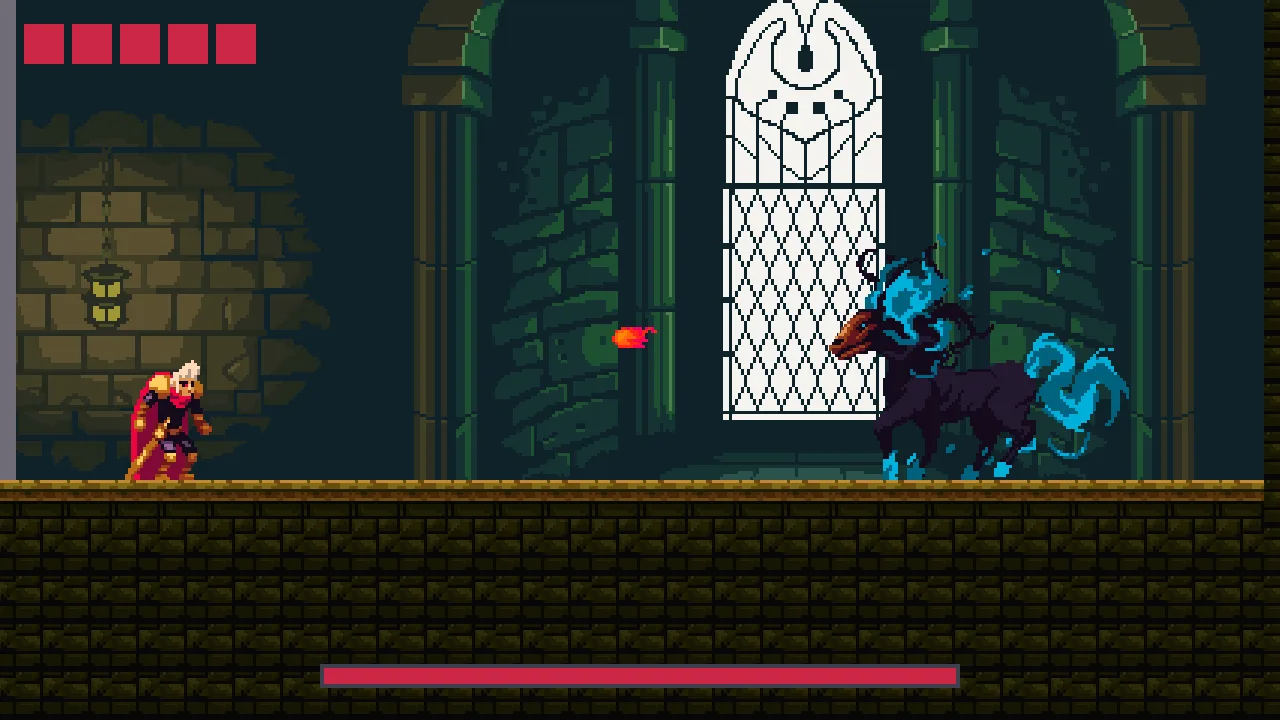
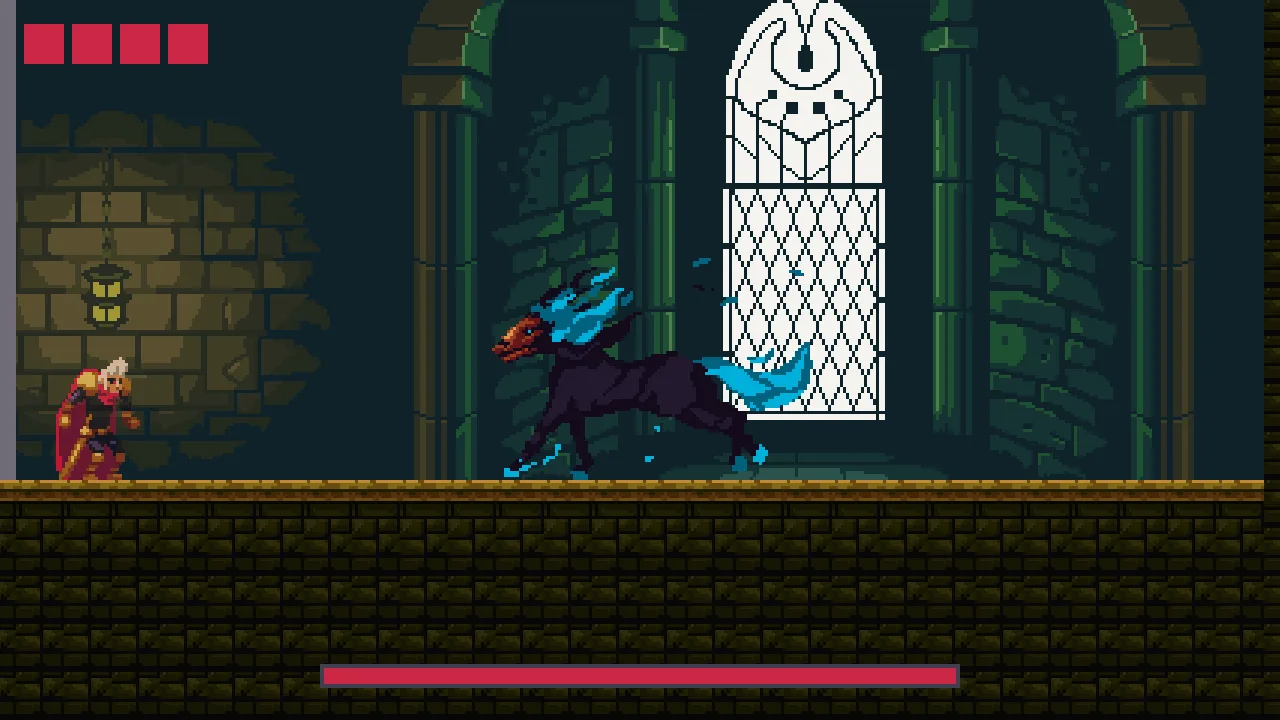
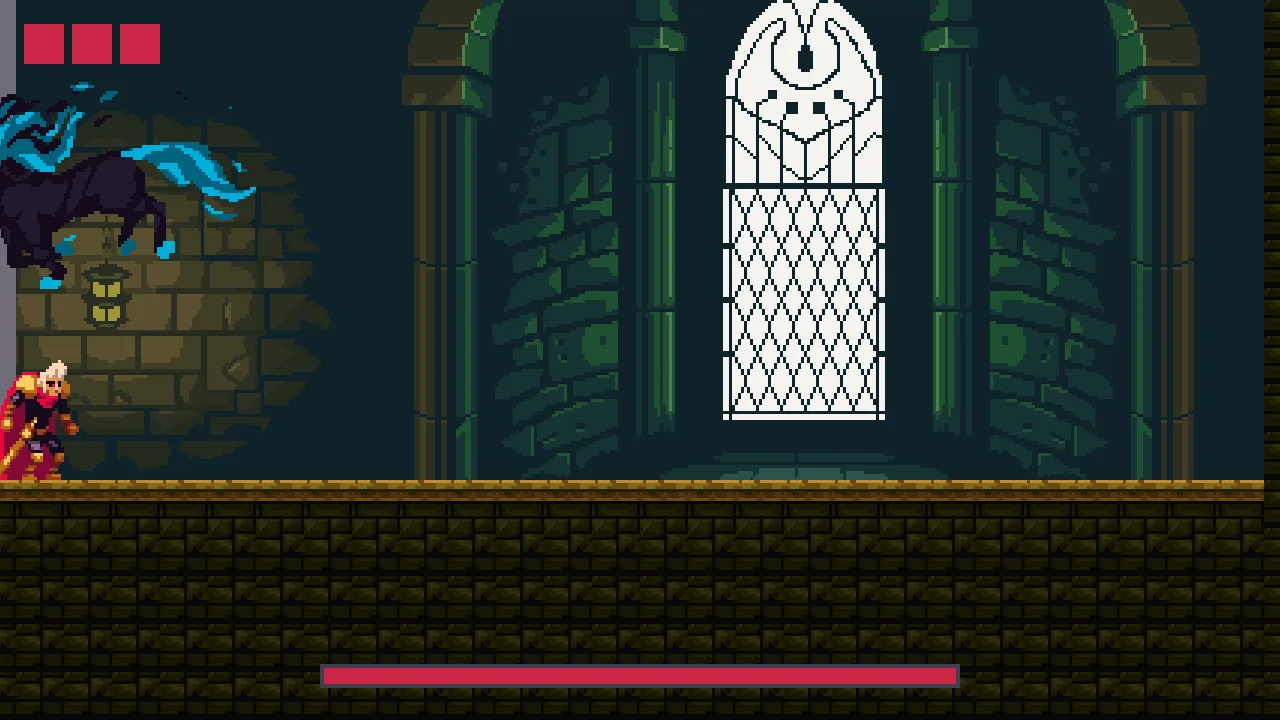
To fight the beast the knight needs the sword, which is at the far end of the Crypt, and a game opened on the Hall has none: a new game keeps no relics. Borrow it. Open scenes/crypt.ron, select sword, and press Ctrl+C. Open scenes/hall.ron, right-click Hall, choose Paste as child, and set its Position to 120 and 130: the knight takes it on his first steps. When you have tried the fight, select it and press Delete, and save.