Tutorials · Crypt Knight · Chapter 14
Effects and sound
By the end
- Three artifacts of particles,
dust,sparkleandburst, each removing itself with a short script - The knight’s sounds, the pickups’ and the beast’s, each an Audio Source’s named trigger a script plays
- The hit flash on a creature and on the beast, and the beast’s death: a flash, a burst, a roar and a fade
- The boss loop, which takes over the one music channel as the fight begins
On this page
Making it felt
The game plays now. This chapter makes it feel like something: little things that happen when the knight lands and when he takes a heart, a white flash where his sword lands, and a sound for every blow. Nothing in it changes how the game plays. The effects are the same two ideas as Ship Evader’s, which its effects chapter and its sound chapter cover in depth, so this one goes quickly through them:
- Artifacts of particles. A one-shot Particle Emitter fires once as its node arrives. A script copies the node where something happened, with spawn, and the copy removes itself.
- Named sounds. An Audio Source has a list of triggers, each a name and a clip, and a script plays one by name with play_sound.
- A flash. A Sprite’s
flashis how much of it is washed white, 0 to 1, which a script eases with an anneal. - Music. One channel, which a script hands a track on with play_music.
The sounds
Ten files: the boss loop, from MintoDog’s track, and nine sounds from two of Kenney’s packs. The packs have no creature’s voice, so the beast’s roar is a heavy bell, and a slam is a heavy punch.
- Copy the ten files above into
audio, under their own names, and press Refresh in Assets.
Three puffs of particles
Each effect is a node with a Particle Emitter and one small script, Puff, that removes it. A one-shot emitter fires its whole burst once, as it arrives, and its particles die on their own: but the node stays, so something must remove it.
- In Assets, press Create, choose New script, type
puff, and press Enter. - In the Code tab’s Scripts list, click
puff.rgs, replace everything in it with the script below, and press Ctrl+S.
/// A puff of particles: its Particle Emitter fires once as it arrives, and its
/// Audio Source plays if it has one, with nothing here to call; once its last
/// particle has died it removes itself.
component Puff {
    /// Seconds it stays: longer than its particles live.
    #[suffix("s")]
    lifetime: f32 = 1.0,

    fn on_create() {
        await wait(lifetime);
        destroy_self();
    }
}
lifetime is how long the node stays: longer than its particles live. destroy_self removes it after await wait(lifetime).
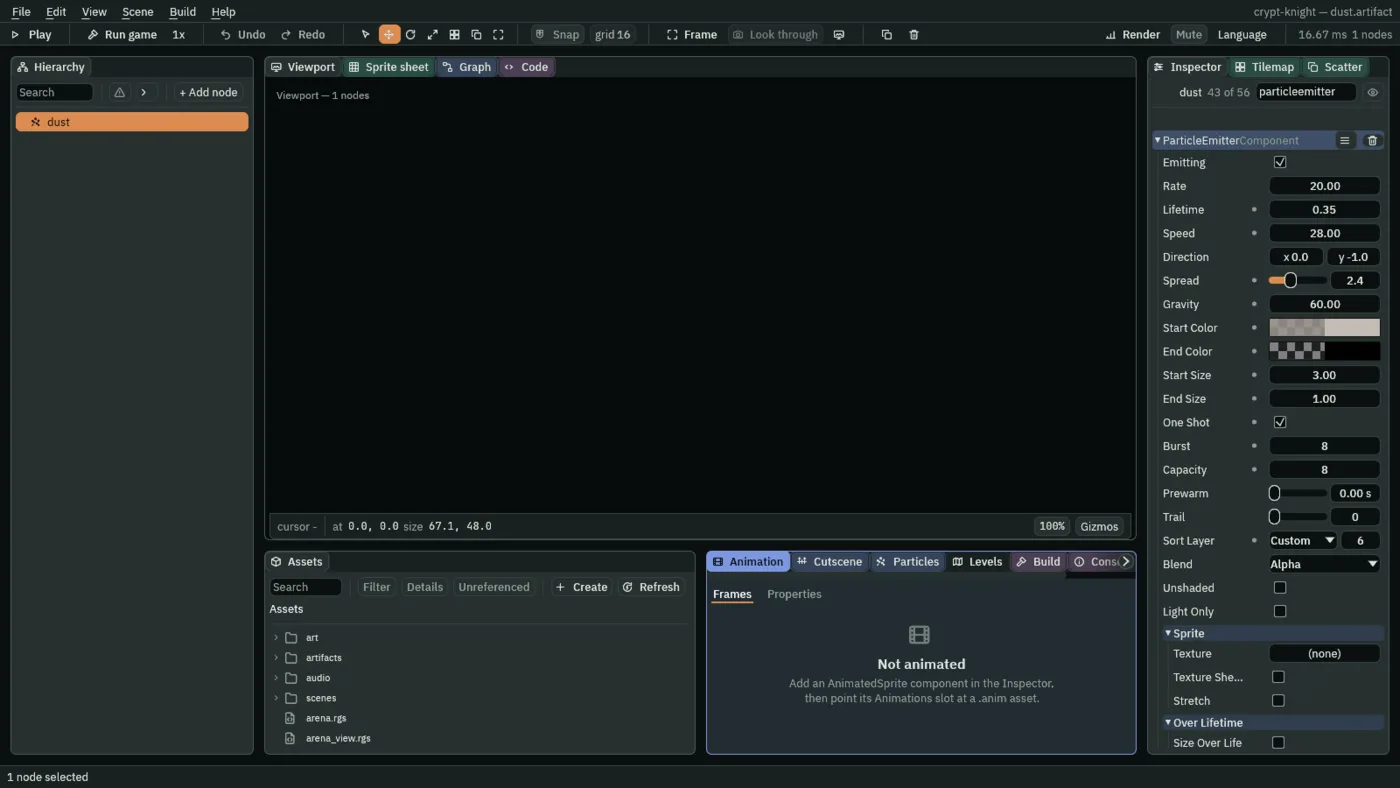
The dust is for the knight’s landing: eight grey puffs that rise a little and fall. The sparkle is for a pickup: fourteen warm lights that spread out and die, and its own Audio Source plays a chime the moment it arrives. The burst is for the beast’s death: forty-eight blue-white sparks in a ring.
- Click the Viewport tab, and open
scenes/gate.ron. SelectGate, press + Add node, and choose Particles. Rename itdust. - In its ParticleEmitterComponent, tick One Shot. Set Burst
8and Capacity8; Lifetime0.35; Speed28; Direction0and-1; Spread2.4; Gravity60; Start Color0.55,0.5,0.45with an alpha of0.7; End Color0.45,0.42,0.4with an alpha of0; Start Size3and End Size1; Sort Layer6. Leave Blend on Alpha. - Press Add component and choose Puff. Set its Lifetime to
0.6. - Right-click
dustand choose Save as artifact…. In the save dialog, openartifactsand save the file asdust.artifact. Delete thedustleft in the scene. - Add another Particles node,
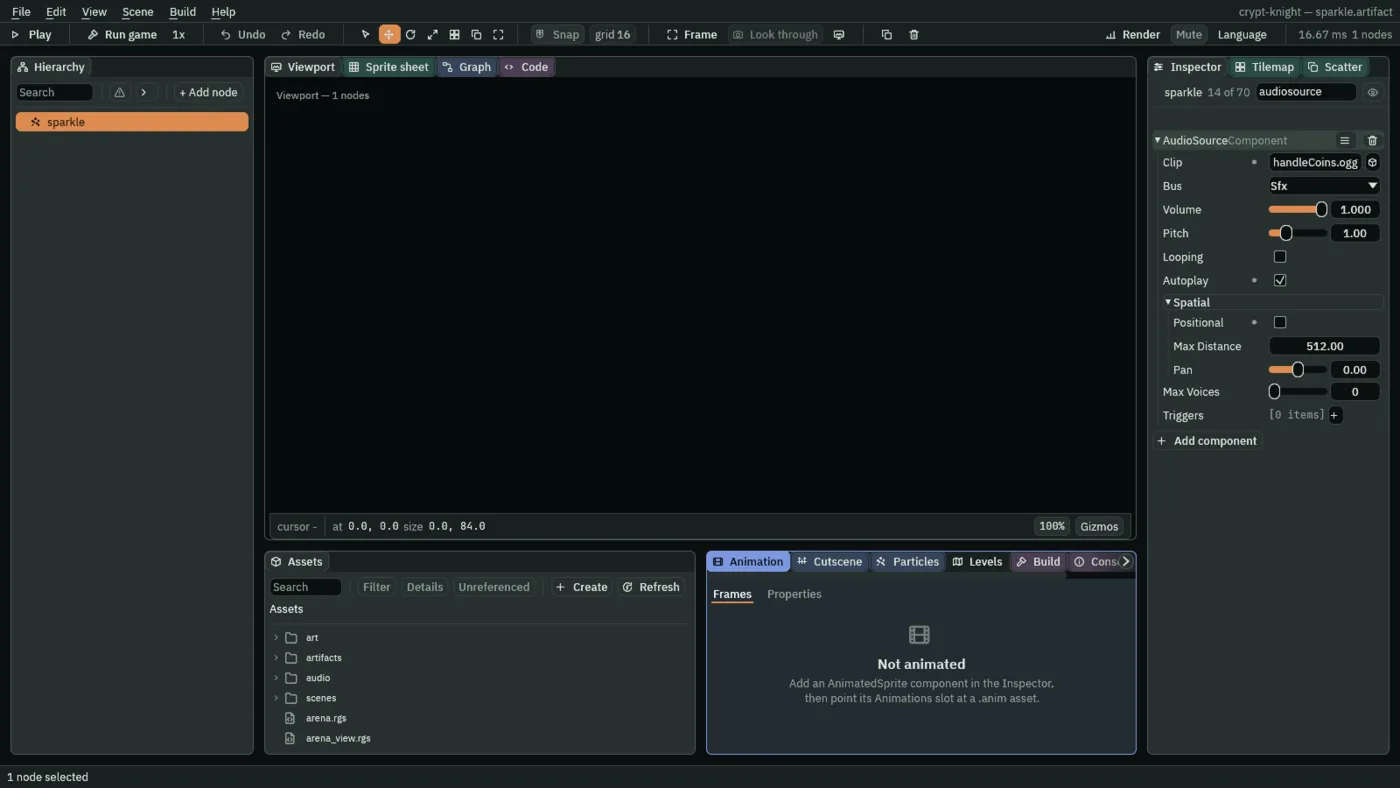
sparkle, and tick One Shot. Set Burst14and Capacity14; Lifetime0.6; Speed45; Direction0and-1; Spread6.28, a whole circle; Gravity20; Start Color1,0.9,0.55, alpha1; End Color1,0.75,0.3, alpha0; Start Size3and End Size1; Sort Layer9; Blend Add. - Add an AudioSourceComponent to it: Clip
audio/handleCoins.ogg, Bus Sfx, Volume1, Autoplay ticked, and Positional unticked in its Spatial fold. Add Puff with Lifetime0.9. Save it asartifacts/sparkle.artifact, and delete thesparkleleft in the scene. - Add a third Particles node,
burst, and tick One Shot. Set Burst48and Capacity48; Lifetime1.2; Speed90; Direction0and-1; Spread6.28; Gravity30; Start Color0.55,0.9,1, alpha1; End Color0.2,0.5,1, alpha0; Start Size5and End Size1; Sort Layer9; Blend Add. Add Puff with Lifetime1.6. Save it asartifacts/burst.artifact, and delete theburstleft in the scene. - Press Ctrl+S.
The knight’s sounds and his dust
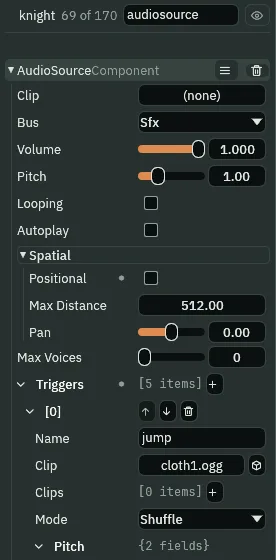
The knight makes five sounds: his jump, his landing, his slash, the blow of a slash that lands, and his hurt. They are the triggers of one Audio Source on his node. The landing is the Body’s hook, on_land, which runs as it touches the ground, so the dust and the footstep are a script of their own, Footfall.
- In Assets, press Create, choose New script, type
footfall, and press Enter. In the Code tab, replace everything infootfall.rgswith the script below, and press Ctrl+S.
/// The knight's footfall: as its body lands, dust puffs up at its feet from
/// the knight's Spawner, and its Audio Source plays the landing.
component Footfall : Body {
    fn on_land() {
        spawn("dust", position());
        play_sound("land");
    }
}
- Click the Viewport tab, and in
scenes/gate.ronselectknight. Press Add component and choose AudioSourceComponent. Keep Bus Sfx and Volume1, and untick Positional in its Spatial fold. - Press + beside Triggers five times, and open the rows. In each, set Name and Clip, and leave the rest:
jump,audio/cloth1.ogg;land,audio/footstep_concrete_000.ogg;slash,audio/knifeSlice.ogg;hit,audio/impactPunch_medium_000.ogg;hurt,audio/impactSoft_heavy_000.ogg. - Press Add component and choose SpawnerComponent. Press + beside Entries, open the new [0] row, type
dustas its Name, and dragartifacts/dust.artifactfrom Assets onto its Artifact. - Press Add component and choose Footfall.
- Press Ctrl+S.
The Crypt’s knight and the Hall’s are the Gate’s again, so they get the same three components. Copy them across rather than set them three times: each component’s ≡ menu has Copy values and Paste values, and pasting writes onto a component the other node already has.
- In
gate.ron, withknightselected, open the ≡ menu at the right of the AudioSourceComponent header and choose Copy values. - Open
scenes/crypt.ron, selectknight, press Add component, choose AudioSourceComponent, open its ≡ menu and choose Paste values. The five triggers come with it. - Do the same for the SpawnerComponent: copy its values in
gate.ron, and incrypt.ronadd a SpawnerComponent and paste. Add Footfall. - Press Ctrl+S, and do the three again in
scenes/hall.ron.
Now the knight’s script plays them. Open knight.rgs. The comment at the top says what plays:
/// With no hearts left, the level is lost. Each step it keeps where it is,
/// for the beast to aim at. Its jump, slash, hit and hurt are sounds its Audio
/// Source names; its landing is its Footfall's.
The hit, as a slash that lands pushes him back; first thing in the heard("recoil") branch:
        if heard("recoil") {
            play_sound("hit");
            set_number("CharacterBodyComponent", "velocity.x", -facing * recoil_speed);
            hopping = recoil_time;
        }
The jump, in the branch that jumps. It sounds for a jump from the ground, and for the second jump in the air, which the double jump gives; a third press in the air, which jumps nowhere, makes no sound:
            if pressed("jump") && !drop {
                jump();
                // A jump from the ground, or the second in the air, sounds.
                if grounded() || kept_number("double_jump", 0.0) > 0.0 {
                    play_sound("jump");
                }
            }
The slash, the last line of the block that starts one:
        if pressed("attack") && kept_number("sword", 0.0) > 0.0 && readying <= 0.0 && hurting <= 0.0 {
            play_clip("slash");
            shown = "slash";
            slashing = slash_time;
            readying = cooldown;
            play_sound("slash");
        }
And the hurt, in on_enter, after the line that starts the hurt clip:
                // The hurt clip plays over whatever the knight was doing.
                hurting = hurt_time;
                play_sound("hurt");
Press Ctrl+S. play_sound plays the trigger of this node’s Audio Source that has that name. A name the Audio Source does not have plays nothing, and the Console says which name, and on which node.
A sparkle where a pickup was
A heart, a relic and the sword vanish when they are taken, and a pickup that only vanishes does not feel taken. Each gets a Spawner with the sparkle, and its script spawns one before it hides.
- In
heart.rgs, replace everything in the file with the script below, and press Ctrl+S. Do the same inrelic.rgswith the one after it.
/// A heart lying in the crypt: it bobs, and the knight takes it by walking
/// into it, which heals one heart. Then it is gone in a sparkle.
component Heart : Area {
    fn on_create() {
        pulse_by(vec2(0.0, -3.0), 0.5, .InOutSine);
    }

    fn on_enter(other: NodeId) {
        if in_group(other, "knight") {
            // The knight is in the group "knight", and hears this a step
            // later.
            emit_to("knight", "heal");
            // A sparkle from this node's Spawner, which carries the pickup's
            // sound.
            spawn("sparkle", position());
            hide();
        }
    }
}
/// A relic on an altar: it glows, and the knight takes it by walking into it.
/// Taking it keeps 1 under `power` for the rest of the game, and the relic is
/// gone in a sparkle.
component Relic : Area {
    /// The kept value that taking it sets to 1.
    power: String = "double_jump",

    fn on_create() {
        pulse_colour("ShapeComponent", "color", vec4(1.0, 1.0, 1.0, 0.4), 0.6, .InOutSine);
    }

    fn on_enter(other: NodeId) {
        if in_group(other, "knight") {
            keep_number(power, 1.0);
            // A sparkle from this node's Spawner, which carries the pickup's
            // sound.
            spawn("sparkle", position());
            // A hidden Area meets nothing, so it cannot be taken twice.
            hide();
        }
    }
}
- In
scenes/gate.ron, selectrelic, press Add component, and choose SpawnerComponent. Press + beside Entries, open the new row, typesparkleas its Name, and dragartifacts/sparkle.artifactonto its Artifact. - In
scenes/crypt.ron, do the same toheart_pickup_1,heart_pickup_2andsword. Inscenes/hall.ron, toheart_pickup. - Press Ctrl+S in each scene.
spawn("sparkle", position()) makes a copy of the artifact the node’s Spawner calls sparkle, where the pickup is. The copy’s own Audio Source is set to Autoplay, so the chime plays as it arrives, and hide() hides the pickup.
A flash where a blow lands
A Sprite’s flash washes it white, 0 for none and 1 for all of it. A creature that is struck goes white in a twentieth of a second and fades back in a tenth: an anneal to 1, awaited, and one to 0. Replace everything in struck.rgs with this:
/// A creature the knight's sword can strike: a slash that lands on it flashes
/// it white and pushes the knight back.
component Struck : Area {
    fn on_enter(other: NodeId) {
        if in_group(other, "slash") {
            // The knight is in the group "knight", and is pushed back a step
            // later.
            emit_to("knight", "recoil");
            // The hit flash: white, there and gone.
            await anneal_number("SpriteComponent", "flash", 1.0, 0.04, .Linear);
            anneal_number("SpriteComponent", "flash", 0.0, 0.12, .OutQuad);
        }
    }
}
anneal_number eases a number field of one of the node’s components toward a value over a time. The first is awaited, so the fade back starts when the flash is full; the second is not, so the hook finishes. Every creature of the Crypt has this script already.
The beast’s sounds and its death
The beast makes three sounds, a roar as it wakes, a slam as it lands from its leap, and a rush of fire as it breathes, and one effect more, the burst of its death.
- In
scenes/hall.ron, selectbeast, press Add component and choose AudioSourceComponent: Bus Sfx, Volume1, Positional unticked. Add three triggers:roar,audio/impactBell_heavy_000.ogg;slam,audio/impactPunch_heavy_000.ogg;fireball,audio/drawKnife1.ogg. - In its SpawnerComponent, press + beside Entries and add a second: Name
burst, and dragartifacts/burst.artifactonto its Artifact. - Press Ctrl+S.
Then its script. The comment at the top, in beast.rgs:
/// three fireballs at once. Its health is its Wounds', kept as `boss_hp`. It
/// roars as it wakes, and its slam and its fire are sounds its Audio Source
/// names.
The roar, as it wakes, after awake = true;:
    fn loop() {
        if !awake {
            // The arena sends "begin" when the knight walks in.
            await signal("begin");
            awake = true;
            play_sound("roar");
            await wait(1.0);
        }
The wind-up changes too. A beast slain while it rests would otherwise start a wind-up pulse after it was dead, which would override the death’s fade, so the pulse now begins only while it lives:
            // The wind-up: it glows red, unless it was slain while it rested.
            if kept_number("boss_hp", full) > 0.0 {
                pulse_colour("SpriteComponent", "color", vec4(1.0, 0.4, 0.4, 1.0), 0.1, .Linear);
            }
            await wait(windup * calm);
The slam, as it lands from its leap, beside the shake; and the fire’s rush, after the fireballs are made:
                    await wait_until(grounded());
                    set_number("CharacterBodyComponent", "velocity.x", 0.0);
                    // The camera's node is in the group "camera".
                    play_sound("slam");
                    emit_to("camera", "shake");
                        spawn("fireball", mouth + vec2(aim.x * c + aim.y * s, aim.y * c - aim.x * s) * 8.0);
                    }
                    play_sound("fireball");
                    await wait(0.3);
Press Ctrl+S. Last, the beast’s Wounds, which now flashes it at each hit and gives its death its ending. Replace everything in wounds.rgs with this:
/// The beast's wounds: each slash of the knight's that lands takes one of its
/// health, flashes it white and pushes the knight back. Its health is kept as
/// `boss_hp`, which the boss bar shows and the beast's fury reads. At none it
/// is slain: it stops, hurts nothing more, flashes, bursts and roars, fades
/// away, and a moment later the level is won.
component Wounds : Area {
    /// How many slashes it takes to slay.
    health: f32 = 20.0,
    /// Seconds from the last slash to the level won.
    #[suffix("s")]
    dying_time: f32 = 2.0,

    fn on_create() {
        keep_number("boss_hp", health);
    }

    fn on_enter(other: NodeId) {
        if in_group(other, "slash") && health > 0.0 {
            health -= 1.0;
            keep_number("boss_hp", health);
            // The knight is in the group "knight", and is pushed back a step
            // later.
            emit_to("knight", "recoil");
            if health <= 0.0 {
                // It stops where it is, and its Area is on no layer the
                // knight's looks for.
                set_number("CharacterBodyComponent", "velocity.x", 0.0);
                set_number("AreaComponent", "layer", 0.0);
                // The big flash, a burst from its Spawner, and its roar.
                set_number("SpriteComponent", "flash", 1.0);
                spawn("burst", position() + vec2(0.0, -40.0));
                play_sound("roar");
                // It fades from white to nothing as the level ends.
                anneal_colour("SpriteComponent", "color", vec4(1.0, 1.0, 1.0, 0.0), dying_time, .InQuad);
                await wait(dying_time);
                complete();
            } else {
                // The hit flash: white, there and gone.
                await anneal_number("SpriteComponent", "flash", 1.0, 0.04, .Linear);
                anneal_number("SpriteComponent", "flash", 0.0, 0.12, .OutQuad);
            }
        }
    }
}
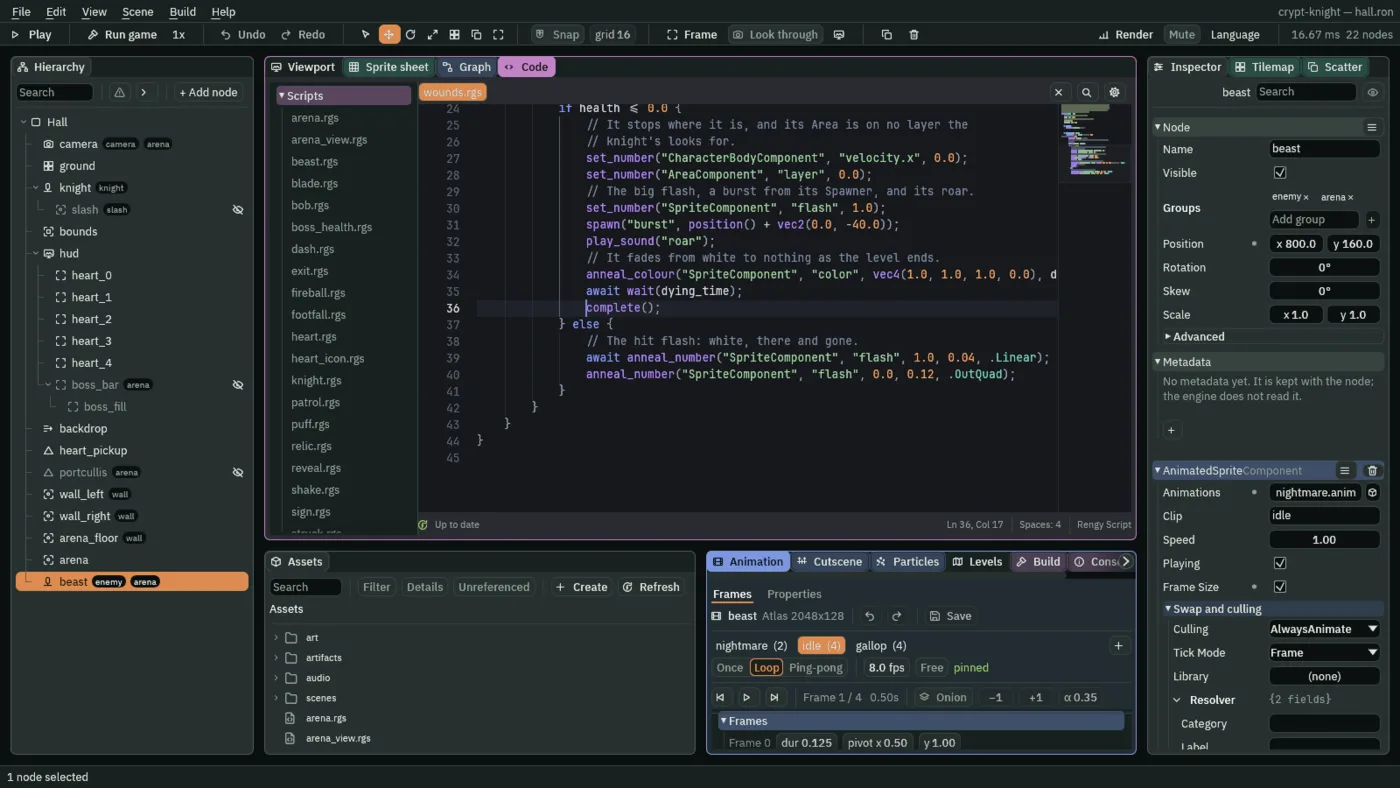
- The hit
- A slash that lands flashes the beast white, in and out, as it does a creature. It is the
elseofif health <= 0.0, so the last blow does not. - The death
- The last blow sets
flashto1at once, and keeps it, since nothing eases it back; spawns theburst40 units over the beast, at its chest; roars; and fades its Sprite’s colour to clear overdying_time,.InQuad, which starts slow and ends fast. anneal_colour is not awaited: the hook goes on towaitfor the same two seconds, and then the level is won.
The boss loop
The castle loop plays on every level, from the Levels list. In the arena it gives way to the boss loop. The game has one music channel, and a track handed to it replaces the one playing: the same track again leaves it playing, as on Ship Evader’s title.
- In
scenes/hall.ron, selectarena, press Add component, and choose AudioSourceComponent. Set Bus to Music, keep Volume1, and untick Positional. - Press + beside Triggers, open the new row, and set Name to
bossand Clip toaudio/heavy_boss_battle_1_bpm200_0.ogg. - Press Ctrl+S.
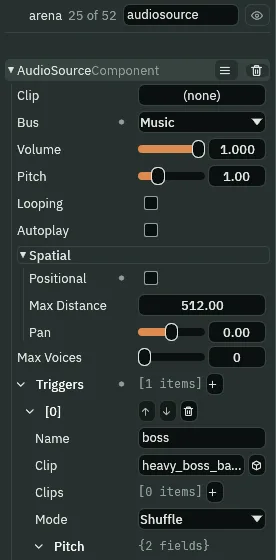
And the arena plays it, as it sends its signal. Replace everything in arena.rgs with this:
/// The arena's threshold: the first time the knight walks in, it sends
/// "begin" to the group "arena", which drops the portcullis behind the knight,
/// turns the camera onto the arena, shows the boss bar and wakes the beast;
/// and the boss loop takes over from the castle loop.
component Arena : Area {
    /// Whether the fight has begun, so it begins once.
    #[hidden]
    begun: bool = false,

    fn on_enter(other: NodeId) {
        if in_group(other, "knight") && !begun {
            begun = true;
            emit_to("arena", "begin");
            // The track this node's Audio Source names "boss", on the one
            // music channel.
            play_music("boss");
        }
    }
}
play_music plays the trigger of this node’s Audio Source that has that name, on the music channel, and the boss loop takes over from the castle loop. When the Hall opens again after a lost fight, the level’s Music, the castle loop, plays as it opens.
Check it works