Tutorials · Particle Effects · Chapter 8
Wandering
By the end
- Fireflies,
fireflies, born over the well and drifting left through the trees to the second lamp - Both chimneys’ smoke curling, the second a copy of the first with a Seed of its own
- Noise: Strength, Frequency, Scroll and Seed, each pictured on the smoke
On this page
A field that pushes
Everything so far has flown a path its numbers set: a line, an arc, a plume that fans out. Nothing in the real night goes so straight. Noise lays an invisible field of currents over the town, and every particle is pushed a little by whichever current it is in at that moment. The currents are smooth, so nearby particles are pushed alike, and they wander together.
The first thing to wander is a handful of fireflies, near the second lamp. They are born above the well, and they head off to the left, towards the lamp.
- Select
Town, press + Add node and choose Particles. Rename itfireflies, and set its Position to528and232, above the well. - Set Rate to
4, Lifetime to7, Speed to80, Direction to-1and0, Spread to1, Gravity to0and Drag to0.5. They head left, and slow as they go. - Set Start Color to
0.85,1,0.35, alpha1, and End Color to0.6,0.9,0.2, alpha0: a yellow-green that fades. - Set Start Size to
9, End Size to6, Capacity to32, Sort Layer to5and Blend to Add. Set Texture tosoft-dot.png. - Open Emission Shape, set Shape to Circle, and Radius to
28. Leave Edge Only unticked, so they are born anywhere in the circle. - Open the Noise group and tick Noise. Set Strength to
14, Frequency to0.04, Scroll to3and0, and Seed to7. - Press Ctrl+S, then F5 to see the fireflies, and F5 again to stop.
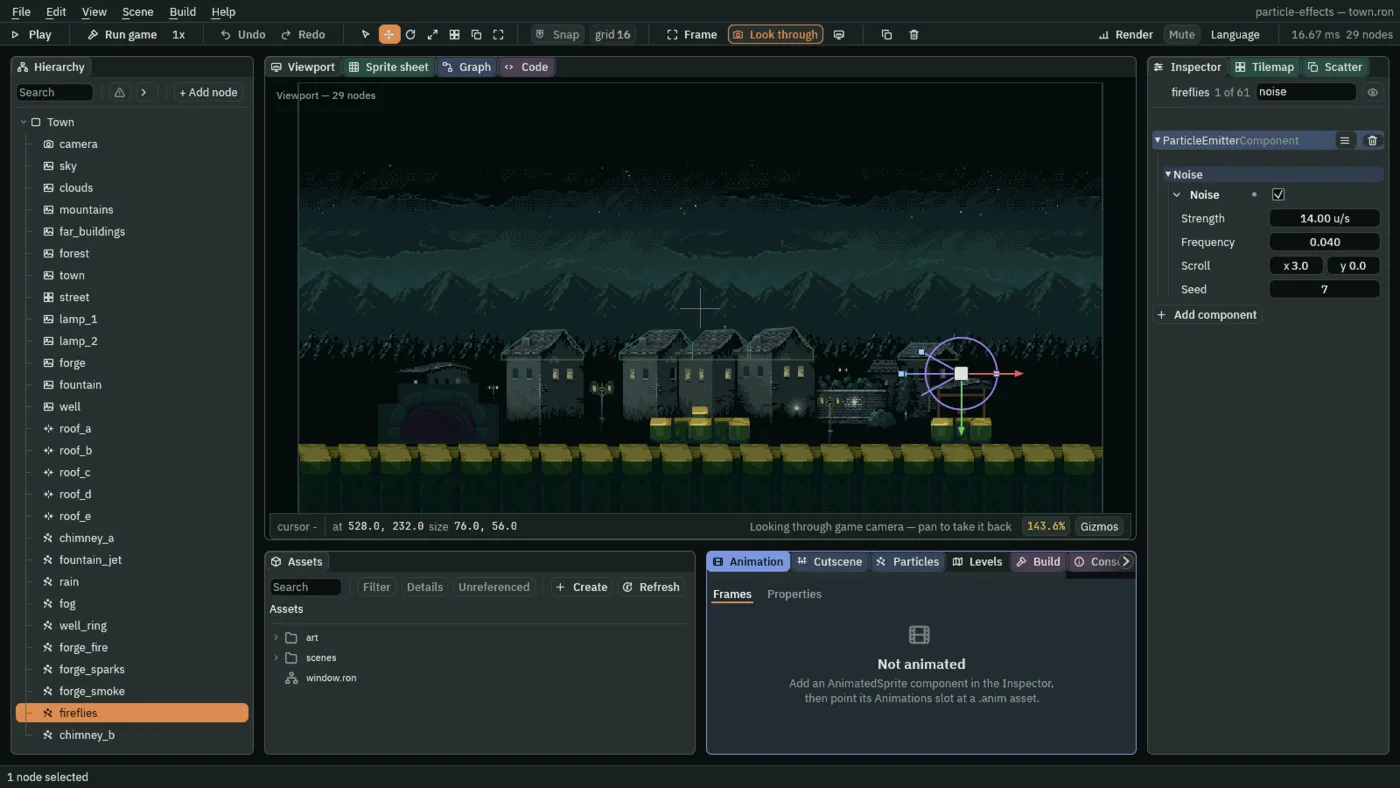
- Noise
- Switches the field of currents on. Off, particles fly only the paths their other numbers give them. The four controls under it set what the field is like.
- Strength
- How hard the field pushes, in world units a second: the most it adds to a particle’s travel along each axis. It is added to each step’s movement, not to the speed, so it bends a path without piling up into a drift that never ends. Here
14, a gentle push beside the fireflies’ speed of80.10to20suits smoke and fireflies;0switches the field off and keeps the other three. - Frequency
- How fine the currents are, in cells per world unit: the reciprocal of how wide one swirl is.
0.04is one swirl every25units, wide and slow. A low number is a wide, lazy swirl, and a high one is jitter.0.01to0.05looks like air. Here0.04for the fireflies and0.025, a swirl every40units, for the smoke. - Scroll
- How fast the field itself drifts, in world units a second, across and down. A still field pushes a particle in one place the same way for ever, which reads as a bent path, not as air. A scrolling one keeps the currents changing under a particle. Here
3and0for the fireflies, a slow drift to the right, and0and-10for the smoke, upward with it. - Seed
- Which field, of all the fields that frequency could make: a whole number, with no bigger or smaller meaning. Two emitters with the same Seed, Frequency and Scroll are pushed by the same field wherever they stand. Here
7.
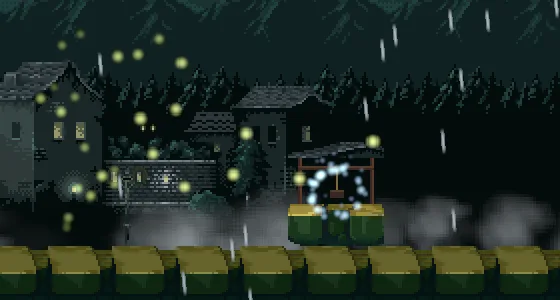
7 passed once: fireflies scattered between the well and the second lamp.Smoke that curls
Smoke leaves its path behind it, so the currents show. The same field goes on both chimneys. The second is a copy of the first, set a little to the right.
- Select
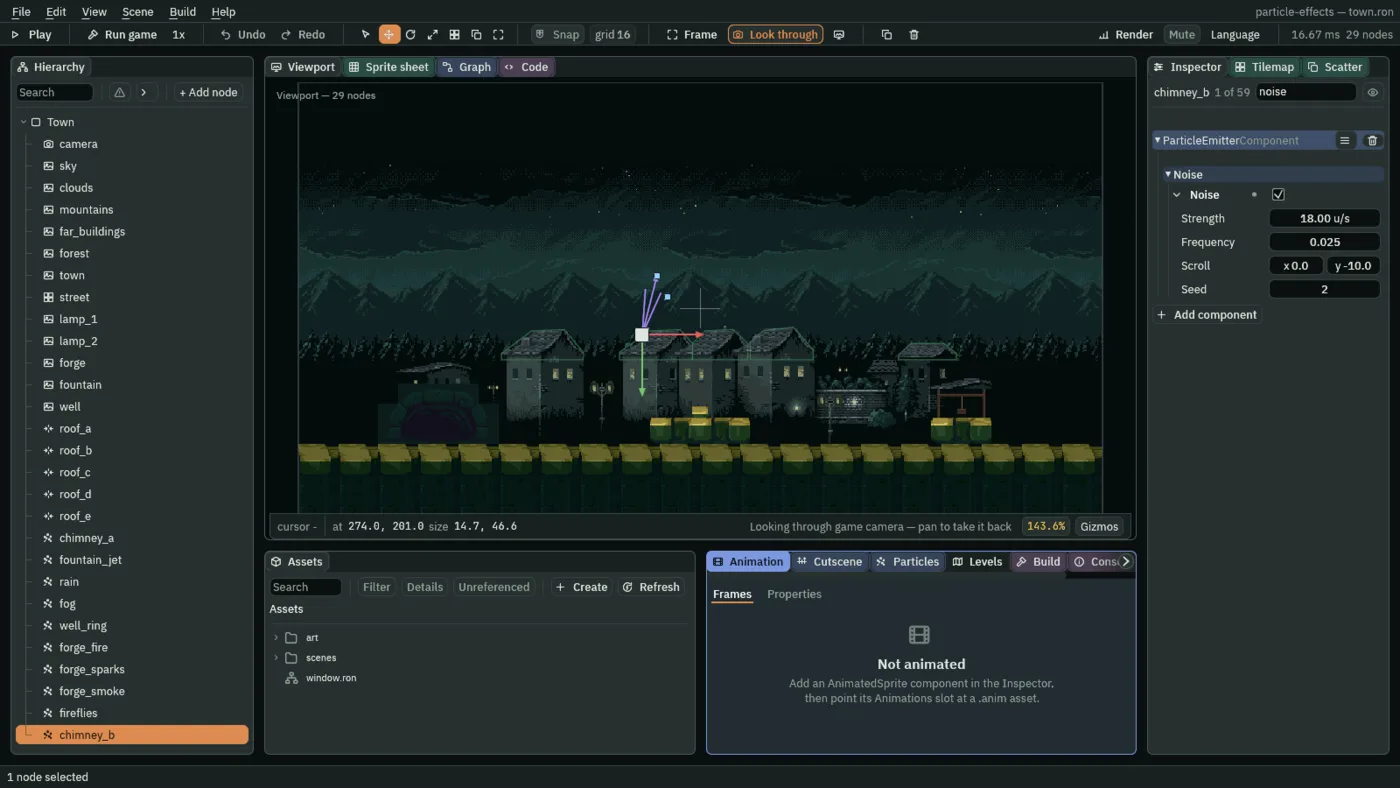
chimney_a. In the Noise group tick Noise, and set Strength to18, Frequency to0.025, Scroll to0and-10, and Seed to1. - With
chimney_astill selected, press Ctrl+D to duplicate it. Rename the copychimney_b, and set its Position to274and201, the second chimney. - On
chimney_b, set Direction to0.25and-1, and Seed to2. - Press Ctrl+S.


The next four pictures change one control at a time on both chimneys, so each can be set beside the one above.

40: the smoke flung about.
0.15: a jitter, with no wide curls.

0 and 0: the currents hold still, and each plume is one smooth, unbroken curve.What a field costs
The fireflies and the chimney smoke
The fireflies
| Field | Value |
|---|---|
| Position | 528, 232 |
| Rate | 4 |
| Lifetime | 7 |
| Speed | 80 |
| Direction | -1, 0 |
| Spread | 1 |
| Gravity | 0 |
| Start Color | 0.85, 1, 0.35, alpha 1 |
| End Color | 0.6, 0.9, 0.2, alpha 0 |
| Start Size | 9 |
| End Size | 6 |
| Capacity | 32 |
| Sort Layer | 5 |
| Blend | Add |
| Texture | soft-dot.png |
| Drag | 0.5 |
| Shape | Circle, Radius 28, Edge Only unticked |
| Noise | ticked: Strength 14, Frequency 0.04, Scroll 3, 0, Seed 7 |
The chimney smoke
| Field | chimney_a | chimney_b |
|---|---|---|
| Position | 181, 201 | 274, 201 |
| Rate | 12 | 12 |
| Lifetime | 3.5 | 3.5 |
| Speed | 18 | 18 |
| Direction | 0.2, -1 | 0.25, -1 |
| Spread | 0.35 | 0.35 |
| Gravity | -6 | -6 |
| Start Color | 0.62, 0.65, 0.68, alpha 0.7 | the same |
| End Color | 0.45, 0.48, 0.5, alpha 0 | the same |
| Start Size | 8 | 8 |
| End Size | 26 | 26 |
| Capacity | 48 | 48 |
| Texture | soft-dot.png | soft-dot.png |
| Drag | 0.3 | 0.3 |
| Noise | ticked: Strength 18, Frequency 0.025, Scroll 0, -10, Seed 1 | the same, with Seed 2 |
Every other field is as a new Particles node has it. Chapter 9 gives all of these a head start.