Tutorials · Interfaces · Chapter 10
Drag and drop
By the end
- Every slot of the hotbar and the bag both ends of a drag
- The item carried shows under the pointer; a landing moves it; a key over the hotbar, or anything over a full slot or nothing, goes back
On this page
Two ends a slot
A drag has two ends: the node you pick an item up from, and the node you let it go on. A Drag Source is the first and a Drop Target the second, and a slot of the hotbar or the bag is both. You can pick its item up, and you can drop one on it while it is empty.
What is carried
While an item is carried it shows under the pointer. That picture is a node of its own, a copy of the slot’s item, hidden everywhere else. Every slot gets one, a ghost, as a child of the slot.
- Select
bag_1, click + Add node and choose Panel. Rename itbag_1_ghost, and untick Visible. - In its Rect, set Anchor Min and Anchor Max both to
0.5,0.5, Offset Min to-24,-24and Offset Max to24,24: a square of48, centred on the slot. In its Panel, set Color to255,255,255, alpha255and Texture toitems.png. - In Assets, press Create, choose New script, type
slot_ghost, and press Enter. In the Code tab, replace everything inslot_ghost.rgswith the script below, and press Ctrl+S.
/// What a slot's item looks like while it is dragged: a copy of the slot's
/// picture, which the slot's Drag Source names as its Preview and draws under
/// the pointer while the item is carried. It stays hidden, so it is drawn
/// nowhere else.
component SlotGhost {
    /// The slot whose item it shows, which is kept by that name: hotbar_1 to
    /// hotbar_4, or bag_1 to bag_16.
    slot: String = "bag_1",

    fn loop() {
        // The satchel and the slots keep what each slot holds: 1 a potion, 2
        // the elixir, 3 a key, 0 nothing. An empty slot is never picked up,
        // so it needs no picture.
        let item = kept_number(slot, 0.0);
        if item == 1.0 {
            set_text("PanelComponent", "region_name", "potion");
        } else if item == 2.0 {
            set_text("PanelComponent", "region_name", "elixir");
        } else if item == 3.0 {
            set_text("PanelComponent", "region_name", "key");
        }
    }
}
- Select
bag_1_ghost, click Add component and choose SlotGhost. Its Slot starts asbag_1: leave it.
The ghost’s picture is items.png, the sheet of chapter 7, and the script says which region of it: the slot’s own item, as the slot’s picture does. set_text writes the region’s name, potion, elixir or key, into the Panel’s Atlas Region. An empty slot is never picked up, so it needs no picture.
The two ends
- Select
bag_1, click Add component and choose DragSourceComponent. Set Action tobag_1. Clear Kind, which starts asitem. Choosefloatin the box at the left of Payload and leave its number at0. Set Preview tobag_1_ghost, with the arrow at its right, and tick Disabled. - Click Add component and choose DropTargetComponent. Set Action to
bag_1_in. Under Accepts, press the + three times and set the entries topotion,elixirandkey. Disabled stays unticked.
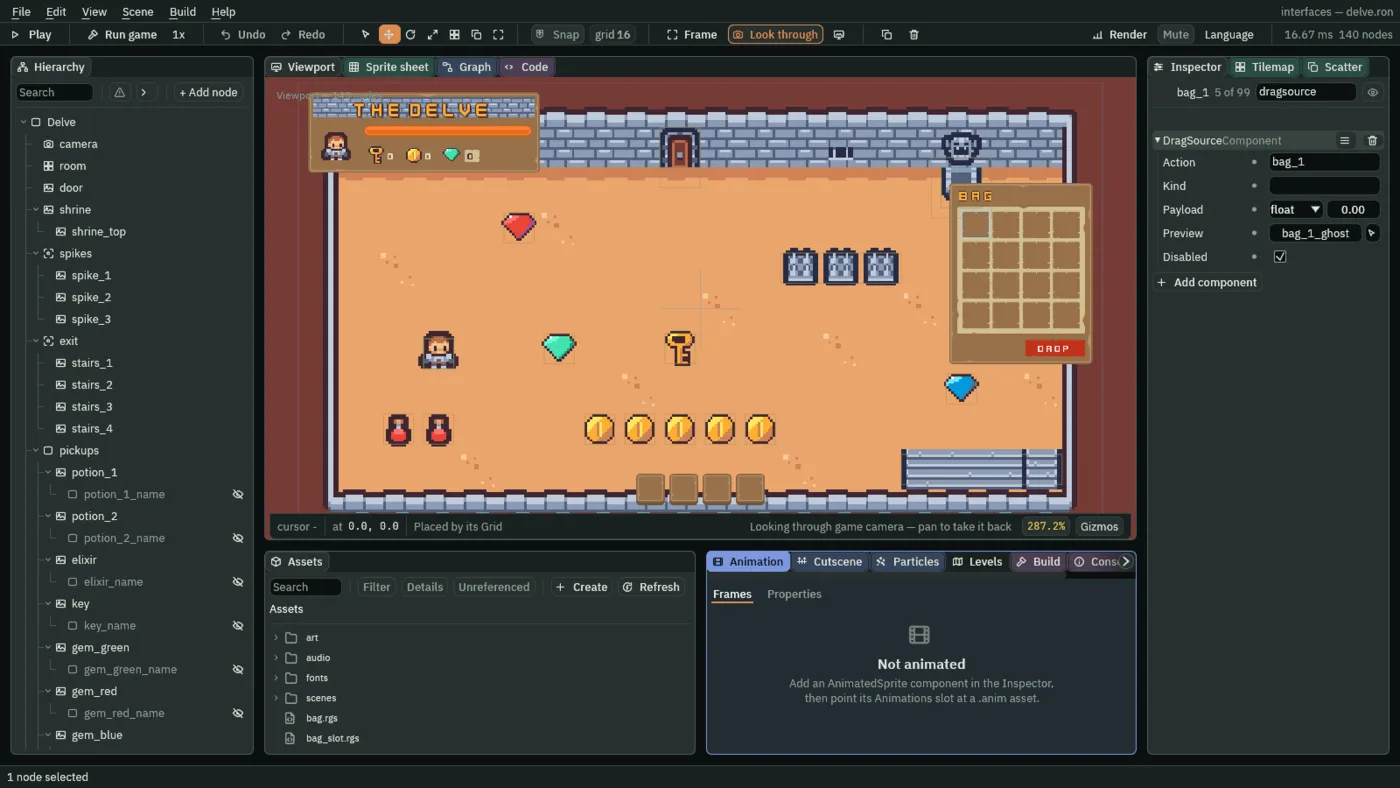
- Action
- A Drag Source’s Action: the action it presses when a drag from it ends. Its
amountis1if the item landed somewhere and0if it came back. A script hears it withpressed, andamountsays which. Here it is the slot’s own name,bag_1. - Kind
- What sort of thing the source carries, a word a Drop Target’s Accepts list is matched against. The script below writes it from what the slot holds, every step:
potion,elixirorkey. Empty here, since every slot starts empty. A new Drag Source’s isitem. - Payload
- The thing itself, whatever the game means: an item’s number, a slot’s number, some words. Its box offers a shape, and
float, a number, is the one here: the item’s number, which the satchel keeps for the slot,1for a potion,2for the elixir and3for a key. A drop hands it to the target as itsamount. The script writes it every step, so it starts at0. - Preview
- The name of the node drawn under the pointer while the item is carried, the ghost,
bag_1_ghost. It is laid out by its own Rect in the box of the slot it was picked up from, as it would be in a parent, drawn over everything, a dialog included, and never cut at the bag’s edge. - Disabled
- Both ends have a Disabled. On a Drag Source it means the slot cannot be picked up, so a press on it is only a press, and a Button on the same node still clicks. On a Drop Target it means the slot takes no drop, and an item let go over it goes back. The script switches both as the game runs. Every slot starts empty, so each source starts ticked, and the script unticks it as soon as its slot holds something. Each target starts unticked, and the script ticks it while its slot is full.
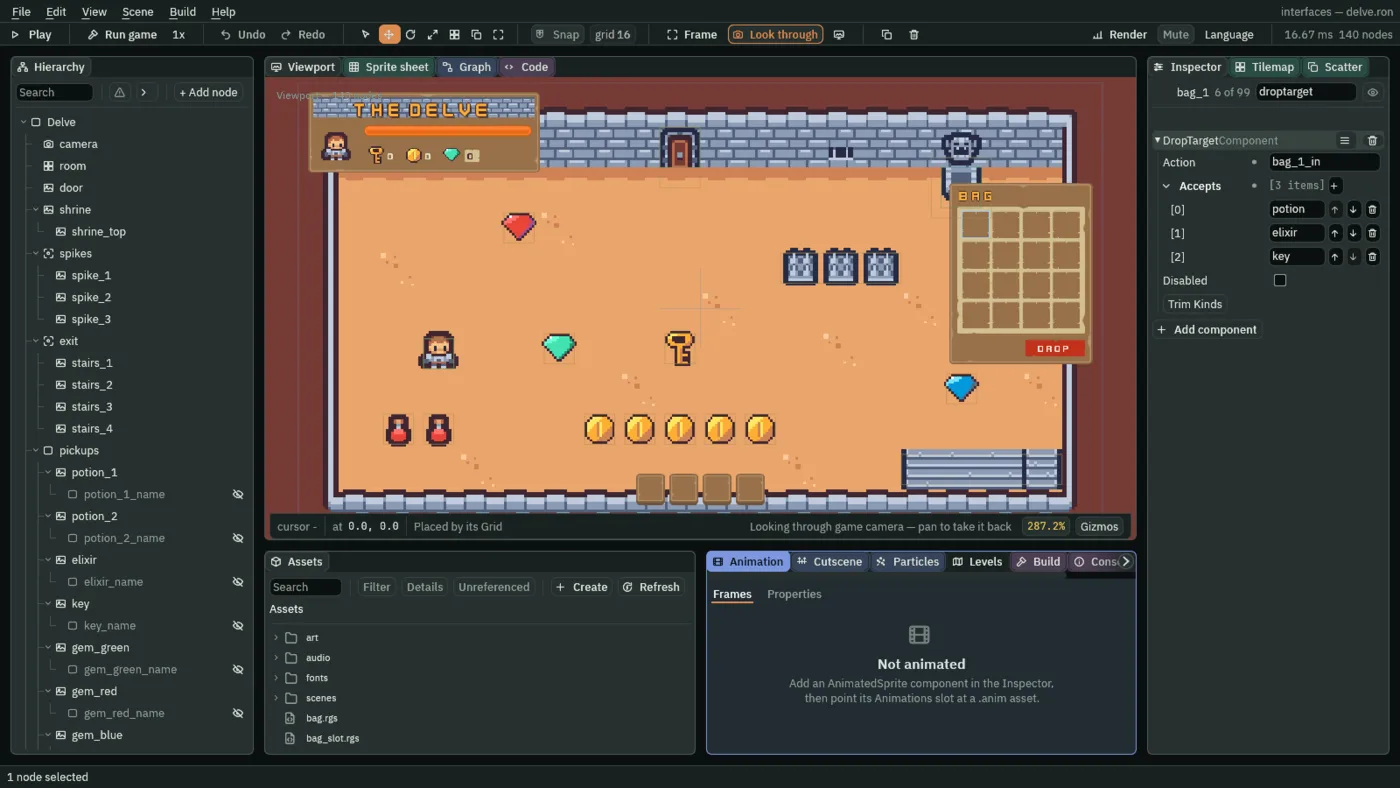
- Action
- A Drop Target’s Action: the action it presses when a drag lands on it, with the number the drag carried as its
amount. Here it is the slot’s name with_inafter it,bag_1_in. - Accepts
- The kinds the target takes, a list of words matched against a source’s Kind. Empty, it takes anything. The bag takes
potion,elixirandkey. The hotbar takes onlypotionandelixir: a key let go over it is refused. Press the + to add a kind. Trim Kinds, under the list, strips stray spaces and drops blank entries. - Disabled
- A Drop Target’s Disabled: when it is ticked, the target takes no drop, and a drag let go over it comes back. The script ticks it while the slot is full, and unticks it when it empties, as the game runs, so it is never authored ticked.
- In Assets, press Create, choose New script, type
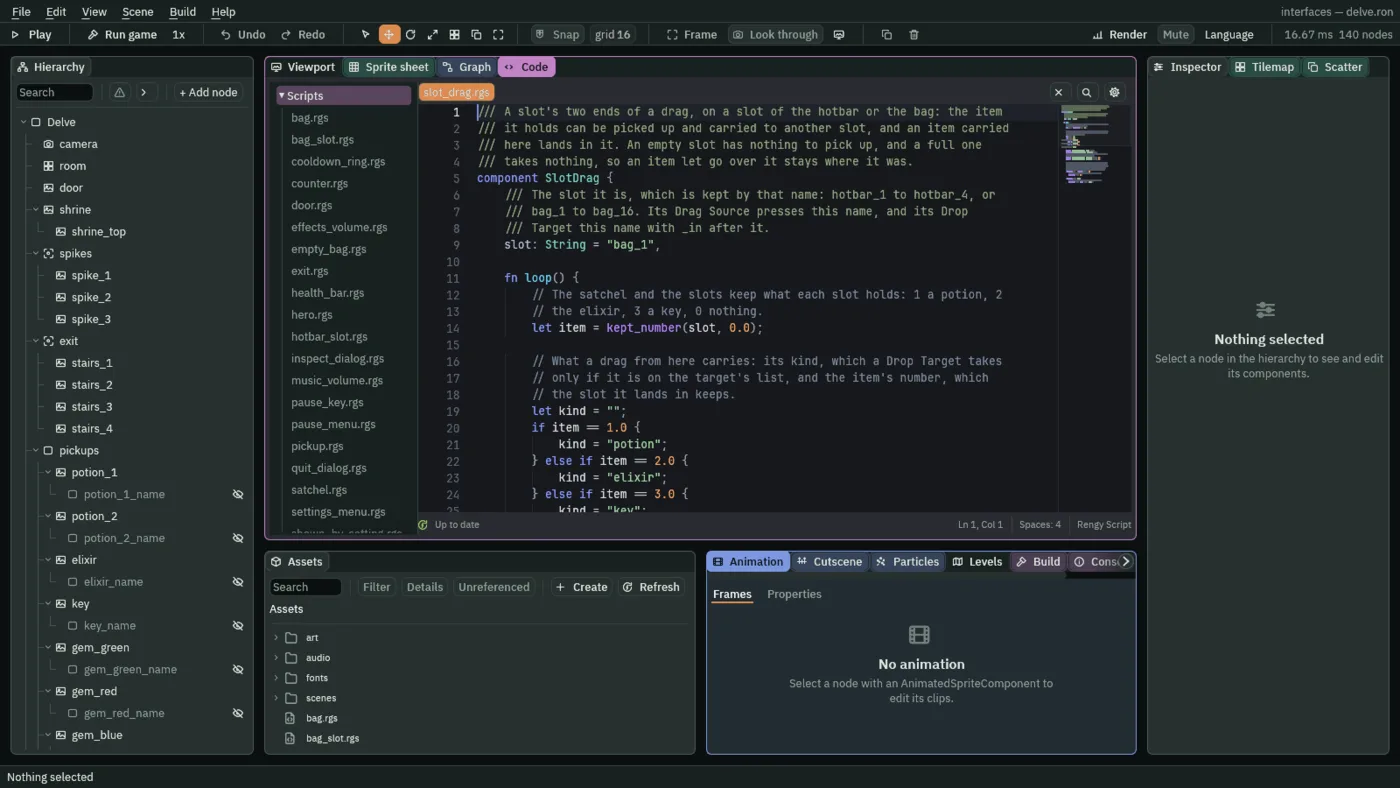
slot_drag, and press Enter. In the Code tab, replace everything inslot_drag.rgswith the script below, and press Ctrl+S.
/// A slot's two ends of a drag, on a slot of the hotbar or the bag: the item
/// it holds can be picked up and carried to another slot, and an item carried
/// here lands in it. An empty slot has nothing to pick up, and a full one
/// takes nothing, so an item let go over it stays where it was.
component SlotDrag {
    /// The slot it is, which is kept by that name: hotbar_1 to hotbar_4, or
    /// bag_1 to bag_16. Its Drag Source presses this name, and its Drop
    /// Target this name with _in after it.
    slot: String = "bag_1",

    fn loop() {
        // The satchel and the slots keep what each slot holds: 1 a potion, 2
        // the elixir, 3 a key, 0 nothing.
        let item = kept_number(slot, 0.0);

        // What a drag from here carries: its kind, which a Drop Target takes
        // only if it is on the target's list, and the item's number, which
        // the slot it lands in keeps.
        let kind = "";
        if item == 1.0 {
            kind = "potion";
        } else if item == 2.0 {
            kind = "elixir";
        } else if item == 3.0 {
            kind = "key";
        }
        set_text("DragSourceComponent", "kind", kind);
        set_number("DragSourceComponent", "payload", item);
        // Switched off, an empty slot is not picked up, so a press on it is
        // only a press, and a full one takes no drop.
        set_flag("DragSourceComponent", "disabled", item == 0.0);
        set_flag("DropTargetComponent", "disabled", item != 0.0);

        // An item let go over a slot that takes it presses that slot's _in
        // action, with the item's number as its amount, and this slot's own
        // action with 1, on the game's next step. Let go anywhere else, over
        // nothing or over a slot that refuses it, it presses this slot's
        // action with 0, and nothing needs doing: the item never left.
        if pressed(slot) && amount(slot) == 1.0 {
            // It landed, and the slot it landed in keeps it now.
            keep_number(slot, 0.0);
        }
        if pressed(slot + "_in") {
            // An item landed here, and the amount is its number.
            keep_number(slot, amount(slot + "_in"));
        }
    }
}
- Select
bag_1, click Add component and choose SlotDrag. Its Slot starts asbag_1: leave it.
The script keeps the two ends in line with what the slot holds. A drag from a slot whose number is 1 carries a potion, with 1 as its payload. A drop that lands presses two actions, both on the game’s next step. The target’s, bag_5_in, has the item’s number as its amount, and the slot keeps it: pressed(slot + "_in") is true for that step, and amount is what the slot now holds. The source’s own action, hotbar_1, has 1 as its amount, which says the item has left, and the slot empties: pressed(slot) and amount(slot) == 1.0. A drop let go anywhere else, over nothing or over a slot that refuses the item, presses the source’s action with 0, and nothing needs doing: the item never left.
Every slot
The other nineteen slots work the same, with their own names. A component’s ≡ menu has Copy values and Paste values, and an edit made with several nodes selected is made on all of them, so the shared fields are set once.
- Select
bag_1, open the ≡ menu of its DragSourceComponent and choose Copy values. Selectbag_2, then Ctrl-clickbag_3tobag_16, click Add component and choose DragSourceComponent, then open its ≡ menu and choose the paste entry, Paste values. All fifteen now holdbag_1’s source. - Select
bag_1again, copy the values of its DropTargetComponent, select the same fifteen, add a DropTargetComponent and paste. Then, with the fifteen still selected, add SlotDrag. - Select each of the fifteen in turn and give it its own names. In
bag_2, set the source’s Action tobag_2and its Preview tobag_2_ghost, the target’s Action tobag_2_inand the script’s Slot tobag_2. Do the same up tobag_16. - Select
bag_1_ghostand press Ctrl+C. Selectbag_2and press Ctrl+V: the copy lands under the slot, with its Panel and its script. Rename itbag_2_ghostand set its Slot tobag_2. Do the same for each slot up tobag_16. - The hotbar’s four slots are the same, with two differences. Set
hotbar_1up by hand as you didbag_1, with its own names,hotbar_1,hotbar_1_ghost,hotbar_1_inandhotbar_1, and give its Accepts onlypotionandelixir. A key is not for the hotbar. Then copy the values of its DragSourceComponent and of its DropTargetComponent ontohotbar_2tohotbar_4, as you did for the bag, add SlotDrag to them and give each its own names. - A hotbar ghost is a Panel under its slot, as the bag’s are, hidden, with Color
255,255,255, alpha255and Textureitems.png, but its Rect is anchored at the slot’s top left corner: Anchor Min stays0,0, and Anchor Max is0,0, Offset Min-2,-2and Offset Max46,46. Give it a SlotGhost with the slot’s name. Buildhotbar_1_ghostonce, copy it under each of the other three, and rename and set Slot as before.
The satchel has one more thing to know. A drop fills its slot on the game’s next step, and until then the slot still reads empty. A pickup the satchel is filing, one item a step, into the first empty slot, could go into the very slot an item is being dropped in, and the drop would write over it. So the satchel now skips a slot whose _in action was just pressed.
- Open
satchel.rgsand replace everything in it with the script below. What changed is a few lines of comment and one test in each of the two loops, wherefirst_hotbarandfirst_bagare chosen: both now also ask!pressed(slot + "_in"). Press Ctrl+S.
/// The hero's satchel: it files what the hero carries into the slots, the
/// hotbar's four and the bag's sixteen. What the hero owns is kept in
/// potions, elixirs and keys. Each slot is kept too, hotbar_1 to hotbar_4 and
/// bag_1 to bag_16, as the item in it: 1 a potion, 2 the elixir, 3 a key, 0
/// nothing. Only the satchel files, one item a step, so two pickups taken on
/// the same step never go in the same slot, and it files nothing into a slot
/// an item is being dropped in.
component Satchel {
    fn loop() {
        // What the slots hold as this step began: how many of each item, how
        // many slots are empty, the first empty one of the hotbar and of the
        // bag that no drop is filling, and the last one holding each item.
        let potions = 0.0;
        let elixirs = 0.0;
        let keys = 0.0;
        let empty_hotbar = 0.0;
        let empty_bag = 0.0;
        let first_hotbar = "";
        let first_bag = "";
        let last_potion = "";
        let last_elixir = "";
        let last_key = "";
        for i in 1..5 {
            let slot = "hotbar_" + text(i);
            let item = kept_number(slot, 0.0);
            if item == 0.0 {
                empty_hotbar += 1.0;
                // An item let go over an empty slot presses the slot's _in
                // action on the game's next step, and the slot takes it on
                // that step: it is filling, so nothing is filed into it.
                if first_hotbar == "" && !pressed(slot + "_in") {
                    first_hotbar = slot;
                }
            } else if item == 1.0 {
                potions += 1.0;
                last_potion = slot;
            } else if item == 2.0 {
                elixirs += 1.0;
                last_elixir = slot;
            } else if item == 3.0 {
                keys += 1.0;
                last_key = slot;
            }
        }
        for i in 1..17 {
            let slot = "bag_" + text(i);
            let item = kept_number(slot, 0.0);
            if item == 0.0 {
                empty_bag += 1.0;
                if first_bag == "" && !pressed(slot + "_in") {
                    first_bag = slot;
                }
            } else if item == 1.0 {
                potions += 1.0;
                last_potion = slot;
            } else if item == 2.0 {
                elixirs += 1.0;
                last_elixir = slot;
            } else if item == 3.0 {
                keys += 1.0;
                last_key = slot;
            }
        }

        // What the hero owns that no slot holds yet waits to be filed; less
        // than none is an item a slot holds that the hero no longer owns.
        let waiting_potions = kept_number("potions", 0.0) - potions;
        let waiting_elixirs = kept_number("elixirs", 0.0) - elixirs;
        let waiting_keys = kept_number("keys", 0.0) - keys;

        // One item a step, into the first empty slot. A potion or the elixir,
        // the two things the hero drinks, goes in the hotbar while it has
        // room, then in the bag: drink_slot is where it goes. A key goes only
        // in the bag.
        let drink_slot = first_hotbar;
        if drink_slot == "" {
            drink_slot = first_bag;
        }
        if waiting_potions > 0.0 && drink_slot != "" {
            keep_number(drink_slot, 1.0);
        } else if waiting_elixirs > 0.0 && drink_slot != "" {
            keep_number(drink_slot, 2.0);
        } else if waiting_keys > 0.0 && first_bag != "" {
            keep_number(first_bag, 3.0);
        }

        // An item the hero no longer owns, as the key the door took, leaves
        // the last slot holding it.
        if waiting_potions < 0.0 {
            keep_number(last_potion, 0.0);
        }
        if waiting_elixirs < 0.0 {
            keep_number(last_elixir, 0.0);
        }
        if waiting_keys < 0.0 {
            keep_number(last_key, 0.0);
        }

        // The room left once what waits is filed, which a pickup reads before
        // it lets the hero take it. What the hotbar has no room for waits for
        // the bag.
        let room_hotbar = empty_hotbar - max(waiting_potions, 0.0) - max(waiting_elixirs, 0.0);
        let room_bag = empty_bag - max(waiting_keys, 0.0);
        if room_hotbar < 0.0 {
            room_bag += room_hotbar;
            room_hotbar = 0.0;
        }
        keep_number("room_hotbar", room_hotbar);
        keep_number("room_bag", room_bag);
    }
}
pressed(slot + "_in") is true for one step, the first after an item was let go over that slot and accepted, and the satchel then leaves the slot to the drop.
Carrying an item
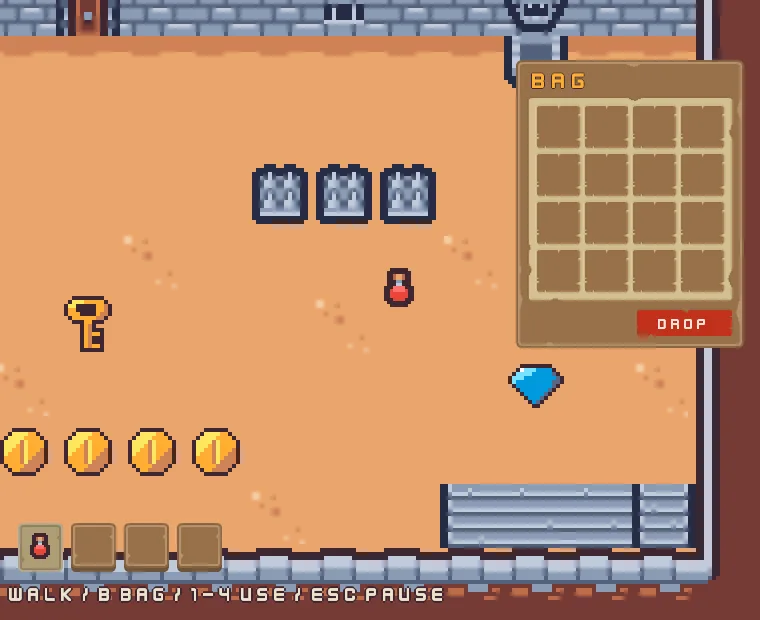
To carry an item, press on its slot and move the pointer, and let go over another slot. A press that moves less than 8 UI units is still a click, and a slot holding an item still opens its menu: a drag suppresses the click, so that one gesture never counts as both. Dragging is a pointer’s gesture. Chapter 14 adds a Move row to the bag’s menus, for a player with no mouse.
The next four pictures pick up the first potion into the hotbar, open the bag, and drag the potion from the hotbar’s first slot to the bag’s fifth. The first is in flight, and the second after it lands.
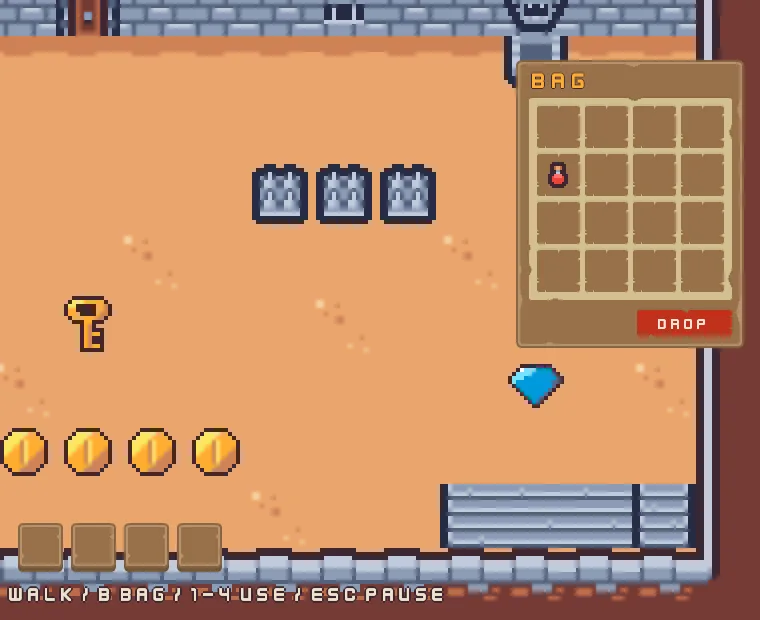
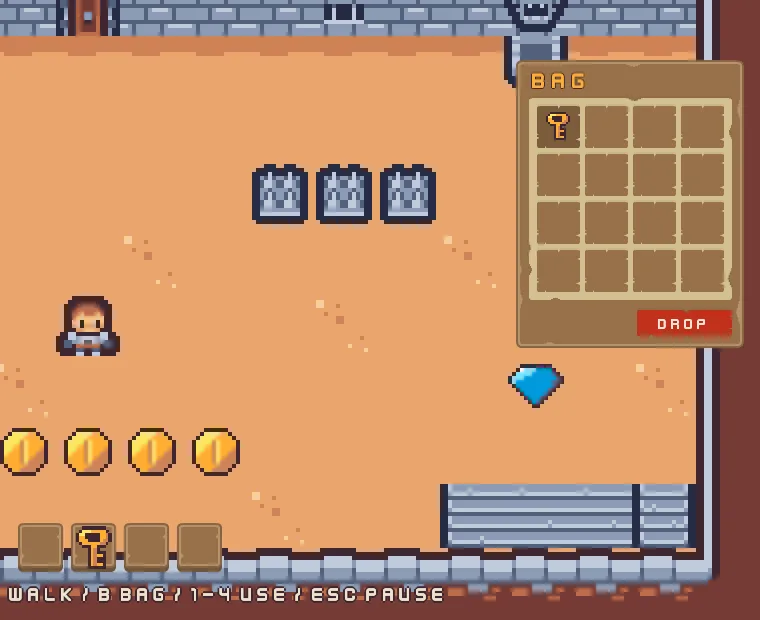
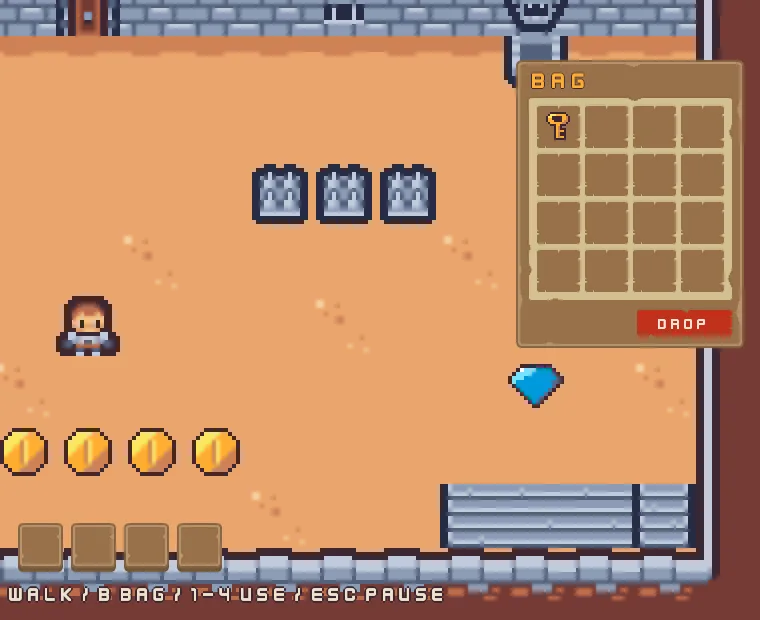
The next two pictures pick up the key into the bag instead, and drag it onto the hotbar’s second slot. The hotbar takes potions and the elixir only.
The ghosts and the drag ends
The drag ends
| Node | Component | Field | Value |
|---|---|---|---|
bag_1 to bag_16 | Drag Source | Action | bag_1 to bag_16 |
| Kind | empty | ||
| Payload | 0 | ||
| Preview | bag_1_ghost to bag_16_ghost | ||
| Disabled | ticked | ||
| Drop Target | Action | bag_1_in to bag_16_in | |
| Accepts | potion, elixir, key | ||
| SlotDrag | Slot | bag_1 to bag_16 | |
hotbar_1 to hotbar_4 | Drag Source | Action | hotbar_1 to hotbar_4 |
| Kind | empty | ||
| Payload | 0 | ||
| Preview | hotbar_1_ghost to hotbar_4_ghost | ||
| Disabled | ticked | ||
| Drop Target | Action | hotbar_1_in to hotbar_4_in | |
| Accepts | potion, elixir | ||
| SlotDrag | Slot | hotbar_1 to hotbar_4 |
The ghosts
| Node | Component | Field | Value |
|---|---|---|---|
bag_1_ghost to bag_16_ghost | Node | Visible | unticked |
| Rect | Anchor Min | 0.5, 0.5 | |
| Anchor Max | 0.5, 0.5 | ||
| Offset Min | -24, -24 | ||
| Offset Max | 24, 24 | ||
| Panel | Color | 255, 255, 255, alpha 255 | |
| Texture | items.png | ||
| SlotGhost | Slot | bag_1 to bag_16 | |
hotbar_1_ghost to hotbar_4_ghost | Node | Visible | unticked |
| Rect | Anchor Max | 0, 0 | |
| Offset Min | -2, -2 | ||
| Offset Max | 46, 46 | ||
| Panel | Color | 255, 255, 255, alpha 255 | |
| Texture | items.png | ||
| SlotGhost | Slot | hotbar_1 to hotbar_4 |
Every other field of every node is as it comes.