Tutorials · Interfaces · Chapter 13
Two languages
By the end
- Two string tables, English and French, sixty-six keys each
- A key on every word the game shows; counts filled in with
{count} - A Language list in the settings; the choice survives a relaunch
On this page
String tables
Until now every word on a screen was typed onto the node that shows it. Two languages need the words in one place, apart from the nodes. A string table is a file of keys and the words they stand for: locales/en.ron holds English, the source language, and locales/fr.ron French. A node holds a key, bag.name, never the word, and the game looks the key up in the language it is in. Change the language and every word changes at once, and no scene holds a language.
- Choose Language → Edit tables…. The Locale tables window opens. It is empty, and says No string tables.
- Type
eninto the Locale box and press New locale…. The editor writeslocales/en.ronat once, and it is the source language, because English is. Typefrand press New locale… again. - Type a key into the Key box,
title.playfor example, and press Add key or Enter. The key is added to the source column only, so the French column now owes it. The Language menu’s hover onfrcounts what is owed: it says how many keys will fall back to the source language. - Type the English into a key’s
encell and the French into itsfrcell. The recipe at the end of the chapter lists all sixty-six keys The Delve uses, by screen. Fortip.emptyandjournal.empty, leave both cells empty: an empty cell is a word that says nothing, which is not a missing key. - Press Save. It is copper while there are changes to write. It rewrites both files, sorted by key, and it is not on the undo stack: it saves files, not scene edits.
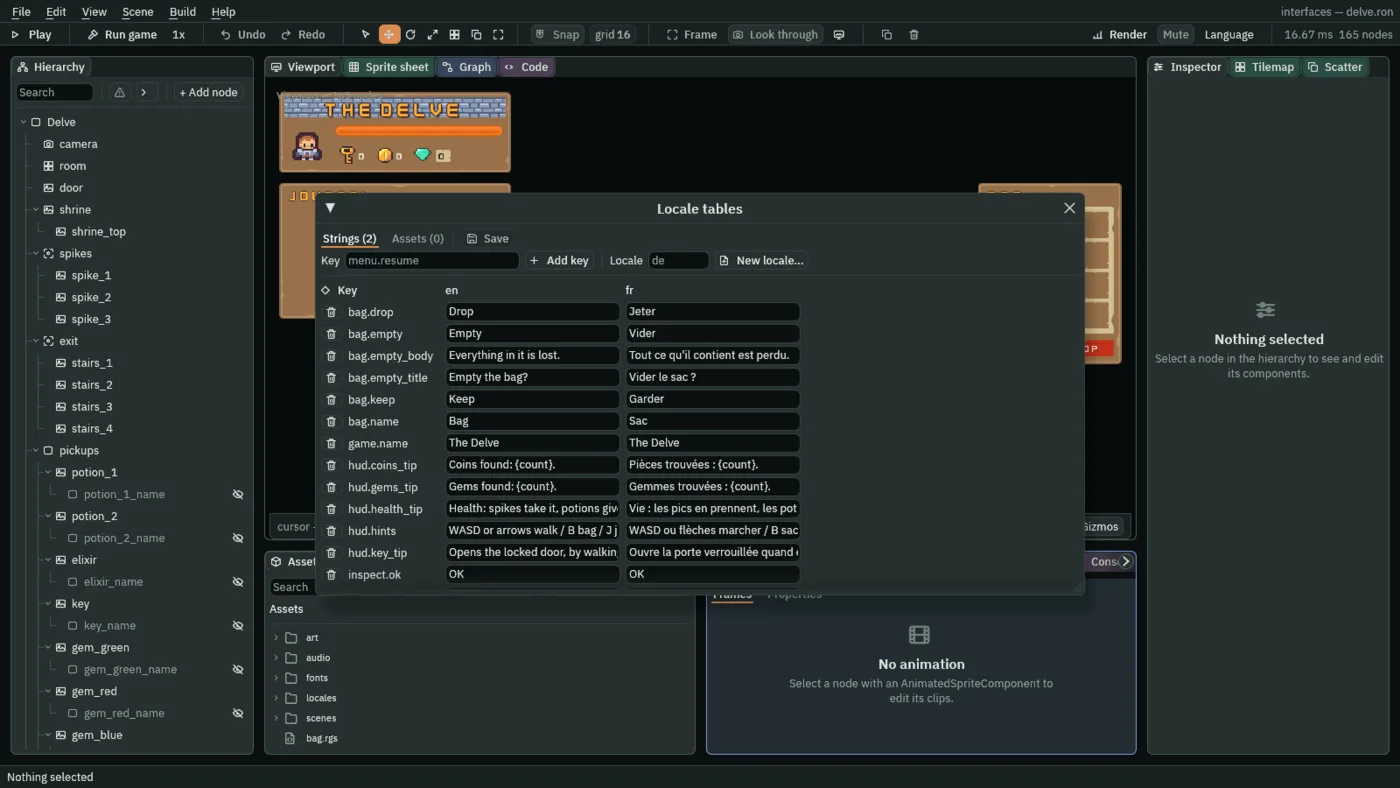
| Key | English | French |
|---|---|---|
bag.name | Bag | Sac |
bag.empty_title | Empty the bag? | Vider le sac ? |
hud.coins_tip | Coins found: {count}. | Pièces trouvées : {count}. |
item.elixir | Elixir | Élixir |
journal.hurt | The spikes hurt. | Les pics ont fait mal. |
settings.language | Language | Langue |
tip.empty | empty | empty |
A key is a name, and renaming it is dangerous: a node that holds the old name finds nothing. So a key’s name in the grid renames it in every language at once when you click it, and its bin removes it from every language at once. Neither is written until you press Save. The window’s Assets tab holds a picture or a sound for each language, which The Delve does not use.
A key on every word
A Localized Text is the component that looks a key up. It does not draw. It writes the words into the node it sits on, at the end of every step, wherever they differ from what is there: its Key into the node’s Text or its dialog’s title, its Body into a dialog’s question, its Tooltip into the node’s Tooltip, its Placeholder into a field’s hint, and its Options into a list’s rows, a dialog’s answers or a menu’s items. Localized Text lists its fields.
- Open
scenes/delve.ron. For each node in the table headed The Localized Texts: the delve, in the recipe, press Add component, choose LocalizedTextComponent and set the field the table names to the key it gives. The node’s own words stay as they are: they are what the editor shows until you preview a language. - Do the same in
scenes/settings.ron,scenes/slots.ronandscenes/title.ron, from the three tables that follow it. - On
coin_counterandgem_counter, add a row to Substitutions: Namecountand Value0.
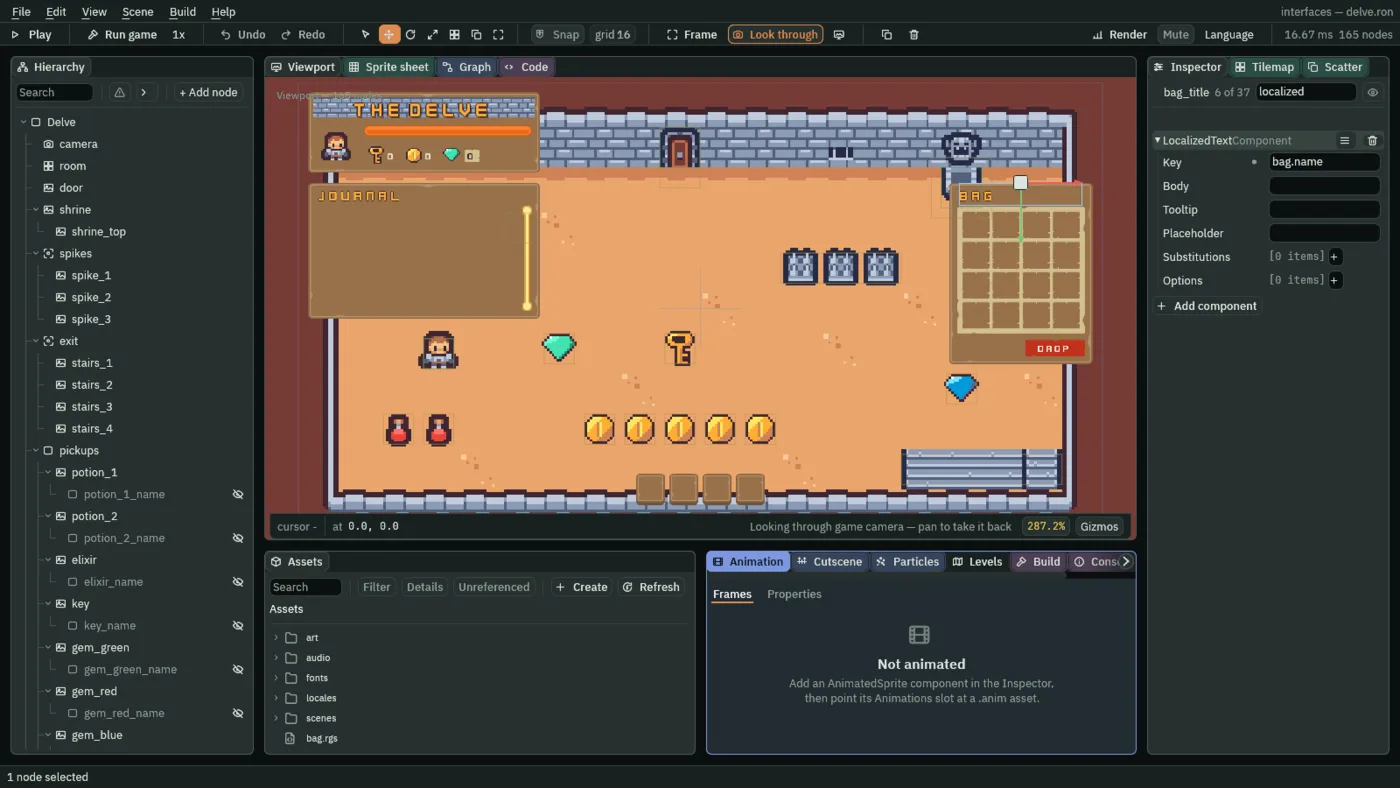
- Key
- A Localized Text’s key into the string tables, for the node’s own words: its Text, or else its World Text, or else a dialog’s title.
bag.nameon the bag’s title. A key is a dotted name,screen.thing, so the table reads by screen. Empty, the Localized Text leaves the node’s words alone. - Body
- A Localized Text’s key for the question of the dialog on its node:
bag.empty_bodyon the bag’s question. Empty leaves the question as it was written. - Tooltip
- A Localized Text’s key for its node’s Tooltip:
hud.health_tipon the health bar. Empty leaves the tooltip as written. - Placeholder
- A Localized Text’s key for the hint the Text Entry on its node shows while it is empty:
slots.emptyon each slot’s name field. - Substitutions, Name, Value
- The values a Localized Text puts into the
{name}places of the words it looks up. Each row is a Name, the word between the braces without them, and a Value, the text to put there.hud.coins_tipreadsCoins found: {count}., so the coin counter has one row, Namecountand Value0, and a script keeps the Value current. - Options
- A Localized Text’s keys for the rows of its node, in order: a list’s options, a dialog’s answers, or a menu’s items, a separator keeping its place. The bag slot’s menu takes
menu.use,menu.dropandmenu.inspect; the Empty bag question takesbag.keepandbag.empty. A row whose key is empty keeps the words it was given.
Counts in a sentence
- In Assets, press Create, choose New script, type
counter_tipand press Enter. In the Code tab, replace everything in it with the script below and press Ctrl+S. - Select
coin_counter, press Add component and choose CounterTip. Its Kind iscoins, the script’s own: leave it. Selectgem_counter, add CounterTip and set its Kind togems.
/// The tooltip on a counter in the HUD: it fills in how many the hero has
/// found of what the counter counts, where the tooltip's words say {count}.
component CounterTip {
    /// The kept number it tells: coins or gems.
    kind: String = "coins",

    fn loop() {
        // The words come from the string tables, in the game's language, by
        // the Localized Text beside this script, whose first substitution,
        // named count, fills {count}. A pickup adds to its number on the step
        // the hero walks into it, and the tooltip says so from the next step.
        let found = kept_number(kind, 0.0);
        set_text("LocalizedTextComponent", "substitutions.0.value", text(found));
    }
}
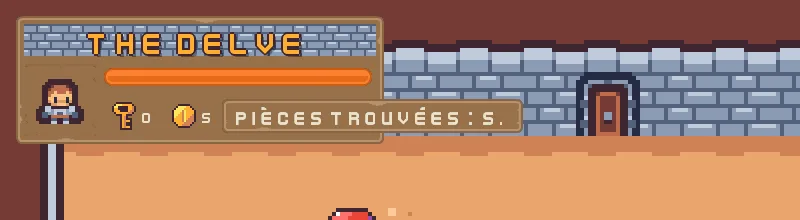
The tooltip’s words come from the tables, in the game’s language, by the Localized Text beside this script. The script only keeps the number current: it reads the kept coins or gems, and writes it as text into the first substitution’s Value, which is named substitutions.0.value. A pickup adds to its number on the step the hero walks into it, so the tooltip says so from the next step.
Scripts that chose words now choose keys
Four scripts you already have wrote words. They now write keys, and the Localized Text beside each turns the key into the words of the language. Nothing about when they run changes.
- In the Code tab’s Scripts list, click
inspect_dialog.rgs, replace everything in it with the script below and press Ctrl+S. Do the same forjournal_line.rgs,load_slot.rgsandslot_tooltip.rgs.
/// The dialog a bag slot's Inspect opens: it names the item kept under
/// inspect and says what it does, in the game's language, and OK, or Escape,
/// shuts it.
component InspectDialog {
    fn loop() {
        // A slot's Inspect keeps its item under inspect: 1 a potion, 2 the
        // elixir, 3 a key, and 0 once the dialog is shut.
        let item = kept_number("inspect", 0.0);
        // A click on OK, Enter, or Escape through the Cancel Action presses
        // inspect_ok on the game's next step.
        if pressed("inspect_ok") {
            keep_number("inspect", 0.0);
            hide();
        } else if item > 0.0 {
            // The item's name over what its tooltip says: the key of each,
            // which the Localized Text beside this script writes into the
            // dialog's title and its question in the game's language.
            if item == 1.0 {
                set_text("LocalizedTextComponent", "key", "item.potion");
                set_text("LocalizedTextComponent", "body", "tip.potion");
            } else if item == 2.0 {
                set_text("LocalizedTextComponent", "key", "item.elixir");
                set_text("LocalizedTextComponent", "body", "tip.elixir");
            } else {
                set_text("LocalizedTextComponent", "key", "item.key");
                set_text("LocalizedTextComponent", "body", "tip.key");
            }
            show();
        }
    }
}
/// A row of the journal's window: it shows one line of the journal in the
/// game's language, and hides while that line is not written yet.
component JournalLine {
    /// The line it shows, from 1 at the top to 20 at the bottom: the journal
    /// keeps it as journal_1 to journal_20.
    index: f32 = 1.0,

    fn loop() {
        // The keeper writes each line as the code of what happened, and 0
        // while the line is empty. Each code's words are a key in the string
        // tables, chosen here and only here, and the Localized Text beside
        // this script writes them into the row.
        let code = kept_number("journal_" + text(index), 0.0);
        let words = "journal.empty";
        if code == 1.0 {
            words = "journal.potion";
        } else if code == 2.0 {
            words = "journal.elixir";
        } else if code == 3.0 {
            words = "journal.key";
        } else if code == 4.0 {
            words = "journal.gem";
        } else if code == 5.0 {
            words = "journal.coin";
        } else if code == 6.0 {
            words = "journal.door";
        } else if code == 7.0 {
            words = "journal.drank";
        } else if code == 8.0 {
            words = "journal.hurt";
        } else if code == 9.0 {
            words = "journal.rest";
        }
        set_text("LocalizedTextComponent", "key", words);
        if words == "journal.empty" {
            // A hidden row takes no room in the journal's Stack, so the
            // journal is as long as the lines written.
            hide();
        } else {
            show();
        }
    }
}
/// A save slot's Start or Continue button, which opens the delve on the slot's
/// run. A slot in use carries on the run the shrine last saved in it. A free
/// slot starts a new game under the name typed in its field, by this button or
/// by Enter in the field, and starts nothing while the field is empty. The
/// game keeps each slot's saves under its own prefix: slot1. for the first,
/// slot2. and slot3. for the others.
component LoadSlot {
    /// The slot it opens: 1, 2 or 3.
    slot: f32 = 1.0,
    /// The health a new game starts with.
    start_health: f32 = 10.0,

    fn loop() {
        let saves = "slot" + text(slot) + ".";
        // Its slot's name field reports under slot_1_name, slot_2_name or
        // slot_3_name, and this button under slot_1_play and so on.
        let field = "slot_" + text(slot) + "_name";
        let name = saved_text(saves + "name", "");
        // Its word is the string tables' slots.start while the slot is free
        // and slots.continue once it is in use: this chooses the key, and the
        // Localized Text beside it writes the word in the game's language.
        if name == "" {
            set_text("LocalizedTextComponent", "key", "slots.start");
        } else {
            set_text("LocalizedTextComponent", "key", "slots.continue");
        }

        // A click on this button, or Enter while it holds the focus,
        // presses its action, and Enter in the name field presses the
        // field's, each on the game's next step. A free slot starts only once
        // a name is typed in its field.
        let typed = entered(field);
        let asked = pressed("slot_" + text(slot) + "_play") || pressed(field);
        if asked && (name != "" || typed != "") {
            if name == "" {
                // A new game: the slot is the name's from now on.
                save_text(saves + "name", typed);
            }
            // The slot's run, kept where the delve reads it. What the shrine
            // never saved reads as a new game's, and a free slot holds no
            // saves at all, since Delete forgets them: so a new game, or a
            // run that never rested at the shrine, starts at full health with
            // nothing carried, nothing in the journal, every pickup back in
            // the room and the door shut.
            keep_number("health", saved_number(saves + "health", start_health));
            keep_number("potions", saved_number(saves + "potions", 0.0));
            keep_number("elixirs", saved_number(saves + "elixirs", 0.0));
            keep_number("keys", saved_number(saves + "keys", 0.0));
            keep_number("gems", saved_number(saves + "gems", 0.0));
            keep_number("coins", saved_number(saves + "coins", 0.0));
            keep_number("haste", saved_number(saves + "haste", 0.0));
            for i in 1..5 {
                let kept = "hotbar_" + text(i);
                keep_number(kept, saved_number(saves + kept, 0.0));
            }
            for i in 1..17 {
                let kept = "bag_" + text(i);
                keep_number(kept, saved_number(saves + kept, 0.0));
            }
            for i in 1..21 {
                let kept = "journal_" + text(i);
                keep_number(kept, saved_number(saves + kept, 0.0));
            }
            keep_number("journal_count", saved_number(saves + "journal_count", 0.0));
            // And the room as the run left it: each pickup taken, which stays
            // gone, and the door, which opens itself if it was opened.
            for i in 1..13 {
                let kept = "taken_" + text(i);
                keep_number(kept, saved_number(saves + kept, 0.0));
            }
            keep_number("door_open", saved_number(saves + "door_open", 0.0));
            // No rest taken at the shrine yet, and nothing being inspected.
            keep_number("rests", 0.0);
            keep_number("inspect", 0.0);
            // The slot the run is played in, where the shrine saves it and
            // the way out marks it done.
            keep_number("slot", slot);
            // Loaded here, before the delve opens, so everything in it starts
            // on the slot's run: the hero on its health, and the journal's
            // keeper taking what the journal holds as already written.
            play_sound("click");
            change_scene("delve");
        }
    }
}
/// The tooltip on a slot of the hotbar or the bag: it names the item the slot
/// holds, and says nothing while the slot is empty. It chooses the words' key
/// in the string tables, and the Localized Text beside it writes the words,
/// in the game's language, into the slot's own Tooltip component, which shows
/// them once the pointer has rested on the slot for its delay.
component SlotTooltip {
    /// The slot it speaks for, which is kept by that name: hotbar_1 to
    /// hotbar_4, or bag_1 to bag_16.
    slot: String = "hotbar_1",

    fn loop() {
        // The satchel and the slots keep what each slot holds: 1 a potion, 2
        // the elixir, 3 a key, 0 nothing.
        let item = kept_number(slot, 0.0);
        // An empty slot's key has no words in either language, and a Tooltip
        // with no words is never shown, however long the pointer rests.
        let words = "tip.empty";
        if item == 1.0 {
            words = "tip.potion";
        } else if item == 2.0 {
            words = "tip.elixir";
        } else if item == 3.0 {
            words = "tip.key";
        }
        set_text("LocalizedTextComponent", "tooltip", words);
    }
}
The journal still keeps a code for each line and not its words. Each row now picks a key from the code, journal.potion for code 1, and writes it into its Localized Text, so the line you read is in the language the game is in now, and the old lines change with it. Where the words are an empty cell, as for an empty slot’s tooltip, the Tooltip shows nothing, however long the pointer rests.
Room for French
- Set the sizes in the table below. French is longer than English: the same screens need wider frames and menus, and the settings screen has one more row, so its frame and title move up and out. One layout fits both languages.
- In
scenes/settings.ron, set Down and Next of the Focus ontext_sizetolanguage, and Up and Previous of the Focus onbacktolanguage, so the ring reaches the new list.
| Screen | Node | Field | Was | Now |
|---|---|---|---|---|
| The delve | bag_1 to bag_16 | Pop-up Menu Width | 176 | 200 |
key_hints | Offset Min | -420, -44 | -500, -44 | |
| Offset Max | 420, -12 | 500, -12 | ||
inspect_dialog | Offset Min | -300, -100 | -400, -100 | |
| Offset Max | 300, 100 | 400, 100 | ||
pause_frame | Offset Min | -150, -45 | -170, -45 | |
| Offset Max | 150, 105 | 170, 105 | ||
quit_dialog | Offset Min | -300, -53 | -360, -53 | |
| Offset Max | 300, 147 | 360, 147 | ||
| The settings | settings_name | Offset Min | -360, -256 | -360, -286 |
| Offset Max | 360, -176 | 360, -206 | ||
settings_frame | Offset Min | -270, -160 | -330, -190 | |
| Offset Max | 270, 240 | 330, 270 | ||
settings_rows | Offset Max | -24, 312 | -24, 372 | |
music | Offset Min | 244, -8 | 324, -8 | |
| Offset Max | 484, 8 | 604, 8 | ||
music_label | Offset Min | -244, -24 | -324, -24 | |
effects | Offset Min | 244, -8 | 324, -8 | |
| Offset Max | 484, 8 | 604, 8 | ||
effects_label | Offset Min | -244, -24 | -324, -24 | |
show_hints | Offset Min | 244, -16 | 324, -16 | |
| Offset Max | 276, 16 | 356, 16 | ||
show_hints_label | Offset Min | -244, -24 | -324, -24 | |
item_names | Offset Min | 244, -16 | 324, -16 | |
| Offset Max | 276, 16 | 356, 16 | ||
item_names_label | Offset Min | -244, -24 | -324, -24 | |
text_size | Offset Min | 244, -20 | 324, -20 | |
| Offset Max | 484, 20 | 604, 20 | ||
text_size_label | Offset Min | -244, -24 | -324, -24 | |
| The slots | slot_plates | Offset Min | -312, -126 | -342, -126 |
| Offset Max | 312, 149 | 342, 149 | ||
slot_1_name to slot_3_name | Offset Max | 336, 65 | 376, 65 | |
slot_1_play to slot_3_play | Offset Min | 348, 16 | 388, 16 | |
| Offset Max | 548, 65 | 608, 65 | ||
slot_1_delete to slot_3_delete | Offset Min | 560, 16 | 620, 16 | |
| Offset Max | 608, 65 | 668, 65 | ||
delete_dialog | Offset Min | -320, -100 | -400, -100 | |
| Offset Max | 320, 100 | 400, 100 | ||
| The title | title_frame | Offset Min | -130, 320 | -140, 320 |
| Offset Max | 130, 531 | 140, 531 |
Choosing the language
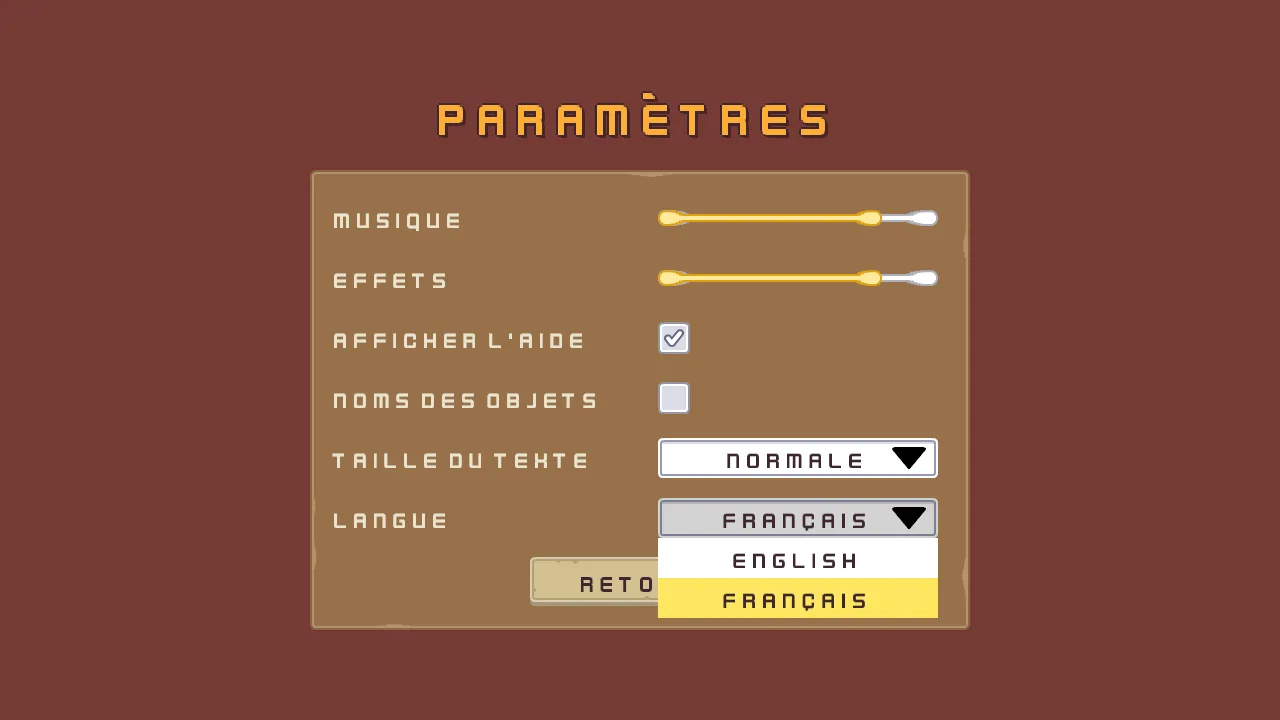
The settings screen gets a sixth row: a Language list. It is a Dropdown, built as the Text size list was, and its rows name each language in its own words, English and Français, so that a player who cannot read the language the game is in can still find their own.
- Open
scenes/settings.ron. Selectsettings_rows, click + Add node and choose Node. Rename the nodelanguage_row. It comes aftersize_row. - Select
language_row, click + Add node and choose Dropdown. Rename the nodelanguage. In its Rect, set Anchor Min to0,0.5, Anchor Max to0,0.5, Offset Min to324,-20, Offset Max to604,20and Pivot to0,0.5. In its Panel, set Texture toinput_rectangle.pngand Border to8. In its Text, set Text toLanguage, Scale to0.75and Align to Center. - In its Dropdown, set Action to
language, Options to two rows,EnglishandFrançais, and Item Height to40. Press Add component, choose FocusComponent, and set Up and Previous totext_size, and Down and Next toback. Press Add component again, choose LocalizedTextComponent and set its Key tosettings.language. - Select
language, click + Add node and choose Panel. Rename the nodelanguage_arrow. In its Rect, set Anchor Min and Anchor Max both to1,0.5, Offset Min to-46,-11, Offset Max to-12,11and Pivot to1,0.5. Set its Panel’s Texture toicon_arrow_down_dark.png. - Select
language_row, click + Add node and choose Label. Rename the nodelanguage_label. In its Rect, set Anchor Min and Anchor Max both to0,0.5, Offset Min to-324,-24, Offset Max to-24,24and Pivot to0,0.5. In its Text, set Text toLanguageand Scale to0.75. Add a LocalizedTextComponent with Keysettings.language. - Select
settings_canvasand press Apply theme. It writes the colours of the new row: the list’s face and popup,255,255,255, its lit row,254,231,97, its pressed face,211,211,211, its words,63,38,49, and the label’s,236,227,206. - In Assets, press Create, choose New script, type
language_listand press Enter. In the Code tab, replace everything in it with the script below and press Ctrl+S. Selectlanguage, press Add component and choose LanguageList.
/// The Language list on the settings screen: it opens on the language the
/// game's text is in, and each time the player picks one it shows the whole
/// game in that language and saves the choice, which the title gives back as
/// the game opens. Its rows name each language in its own words, English and
/// then Français, the order of the codes it saves: en and fr.
component LanguageList {
    fn on_create() {
        // language() answers the code of the language the game's text is in.
        // Writing the list's choice changes what it shows and presses
        // nothing.
        if language() == "fr" {
            set_number("DropdownComponent", "selected", 1.0);
        } else {
            set_number("DropdownComponent", "selected", 0.0);
        }
    }

    fn loop() {
        // A click on a row, or Enter on the row the arrows lit, chooses it and
        // presses language on that step; amount() answers the row, from 0.
        if pressed("language") {
            let code = "en";
            if amount("language") == 1.0 {
                code = "fr";
            }
            // Every word in the game changes at the end of this step, and
            // the title asks for the saved language as the game next opens.
            set_language(code);
            save_text("language", code);
        }
    }
}
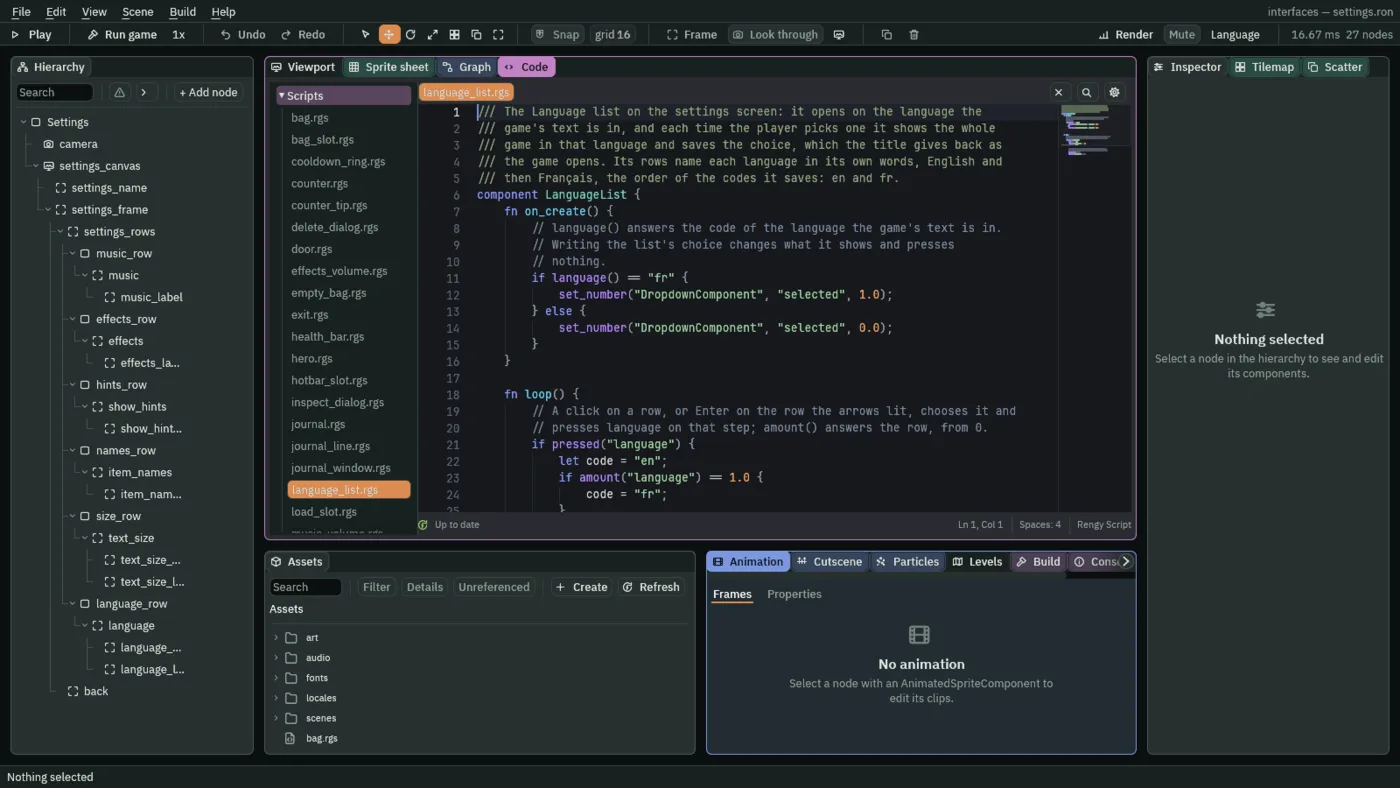
The list opens on the language the game’s text is in now: language answers its code, en or fr, and writing the list’s Selected presses nothing, since a script’s own write never does. After that the player chooses. pressed("language") is true on the step a real change is made: a click on a row, or Enter on the row the arrows lit, and amount("language") is the row’s number from 0, so 1 is French. A click on the row already chosen presses nothing.
set_language changes every word in the game at the end of that step: the last request in a step wins, and a request for the language already shown does nothing. save_text("language", code) keeps the choice in the game’s save file, so that the title can give it back.
- Open
scenes/title.ron. In the Code tab’s Scripts list, clicktitle.rgs, replace everything in it with the script below and press Ctrl+S.
/// The title, as it opens: the language and the volumes the player chose in
/// Settings, set before the game's first word and its first sound, and the
/// menu faded in. The Canvas Group on this node starts at alpha 0, where the
/// menu is not drawn and takes no key; this brings it to 1 over half a second.
component Title {
    fn on_create() {
        // The language the player chose, which lands at the end of this
        // step, before the title is first drawn. With nothing saved it asks
        // for the language the game opened in, which changes nothing.
        set_language(saved_text("language", language()));
        // 0.8 until the player has chosen a volume.
        set_music_volume(saved_number("music_volume", 0.8));
        set_sfx_volume(saved_number("effects_volume", 0.8));
        anneal_number("CanvasGroupComponent", "alpha", 1.0, 0.5, .OutQuad);
    }
}
The title is the first scene of every launch, so it asks for the saved language before a word is drawn: saved_text("language", language()) is what was saved, or, if nothing was, the language the game opened in, which changes nothing. That is why the choice survives a relaunch.
Previewing
You do not have to play the game to see French. The editor can show it in the Viewport.
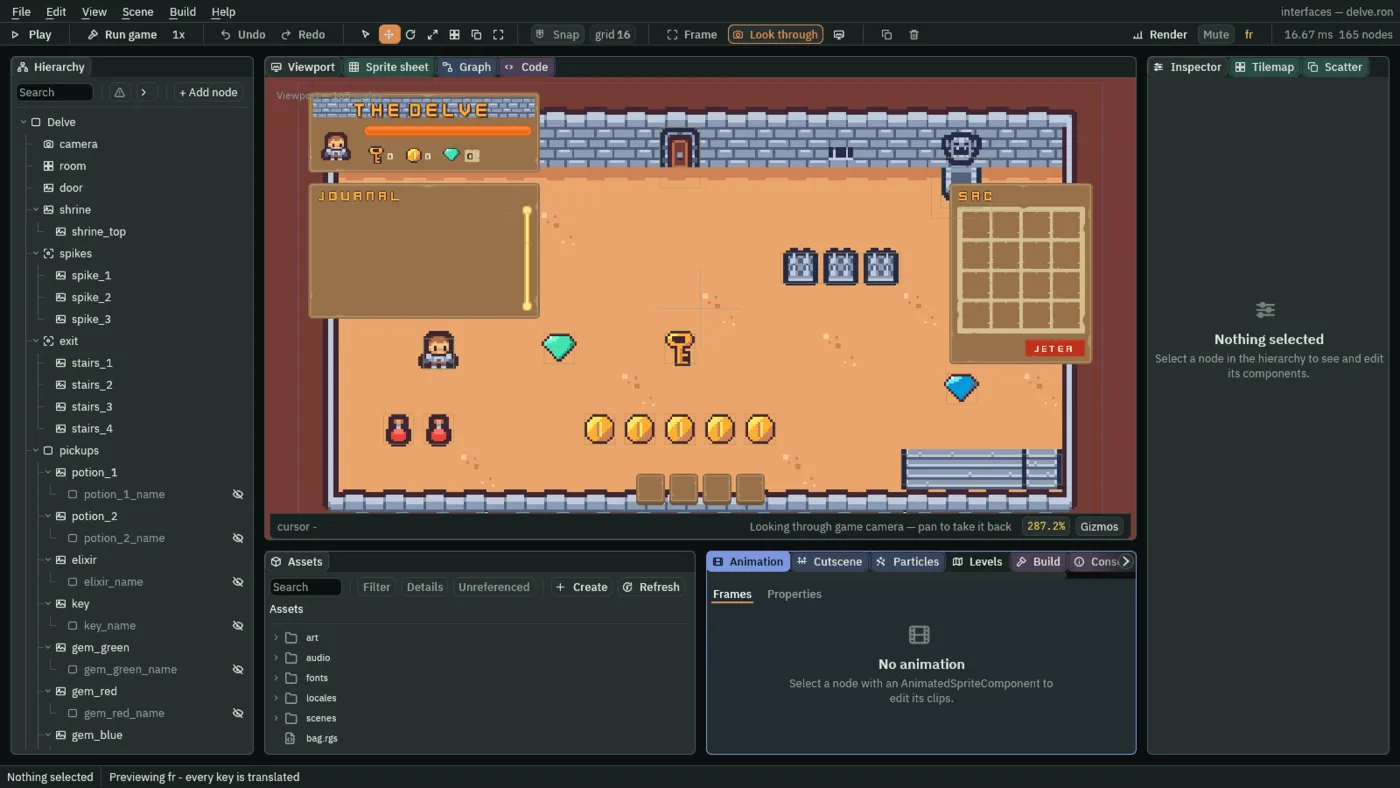
- Open
scenes/delve.ron, and click Look through. Choose Language → fr. - The Viewport’s labels read French: the bag’s title SAC, the Drop button JETER. The status line at the foot reads Previewing
fr, and says either that every key is translated or how many fall back to the source language. Nothing is written into the scene: the previewed words are a lookup the editor does when it draws. - Choose Language → Authored text to put the scene’s own words back.
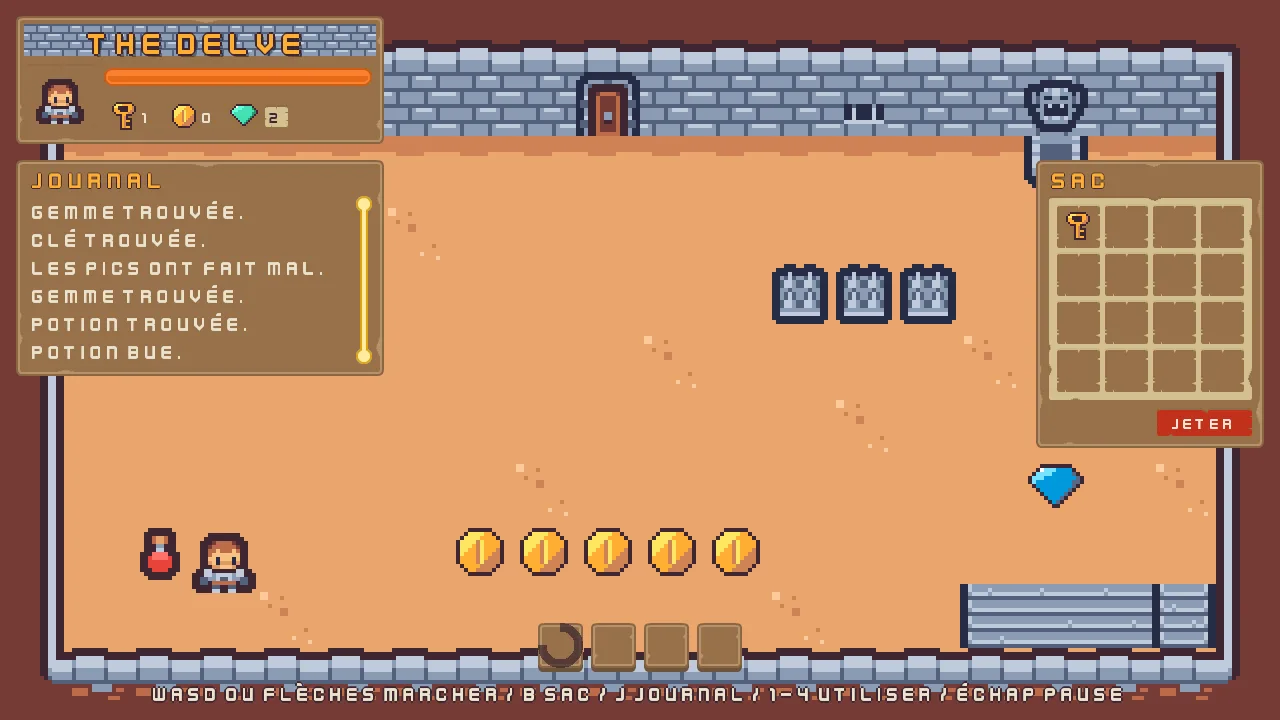
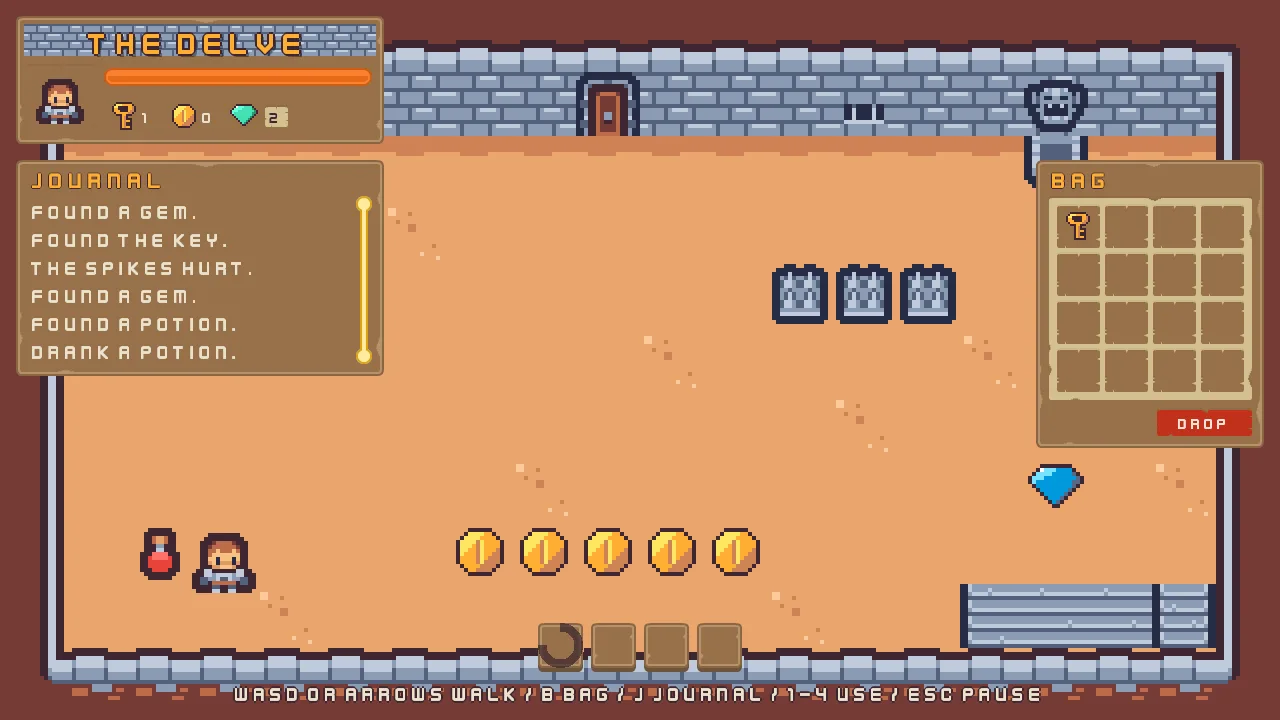
Played in French, the delve reads French throughout: the journal’s lines, the bag, the hints. Below is the same walk, in French and then, for comparison, in English.
A spreadsheet for a translator
You do not have to type another language yourself. A translator works in a spreadsheet, not in the editor: you hand them a file, they fill a column in, and they send it back. The Translator files window writes that file from the string tables, and reads it back.
- Choose Language → Translator files…. The Translator files window opens, in three bands.
- In Export to CSV, tick the languages to send,
enandfrhere, and press Export CSV…. Choose where to save, and keep the namelocales.csv. The window says how many languages it wrote, and where. Send the file to your translator. - When a file comes back, press Read CSV… in Merge a CSV and choose it. Nothing changes yet: the window shows what the file would do, one row for each language.
- Read the table. When it is what you expected, press the button that reads Merge and a number of cells; if it is not, press Discard.
- Choose Language → Edit tables… and press Save. The merge went into the tables only, and Save writes the files.
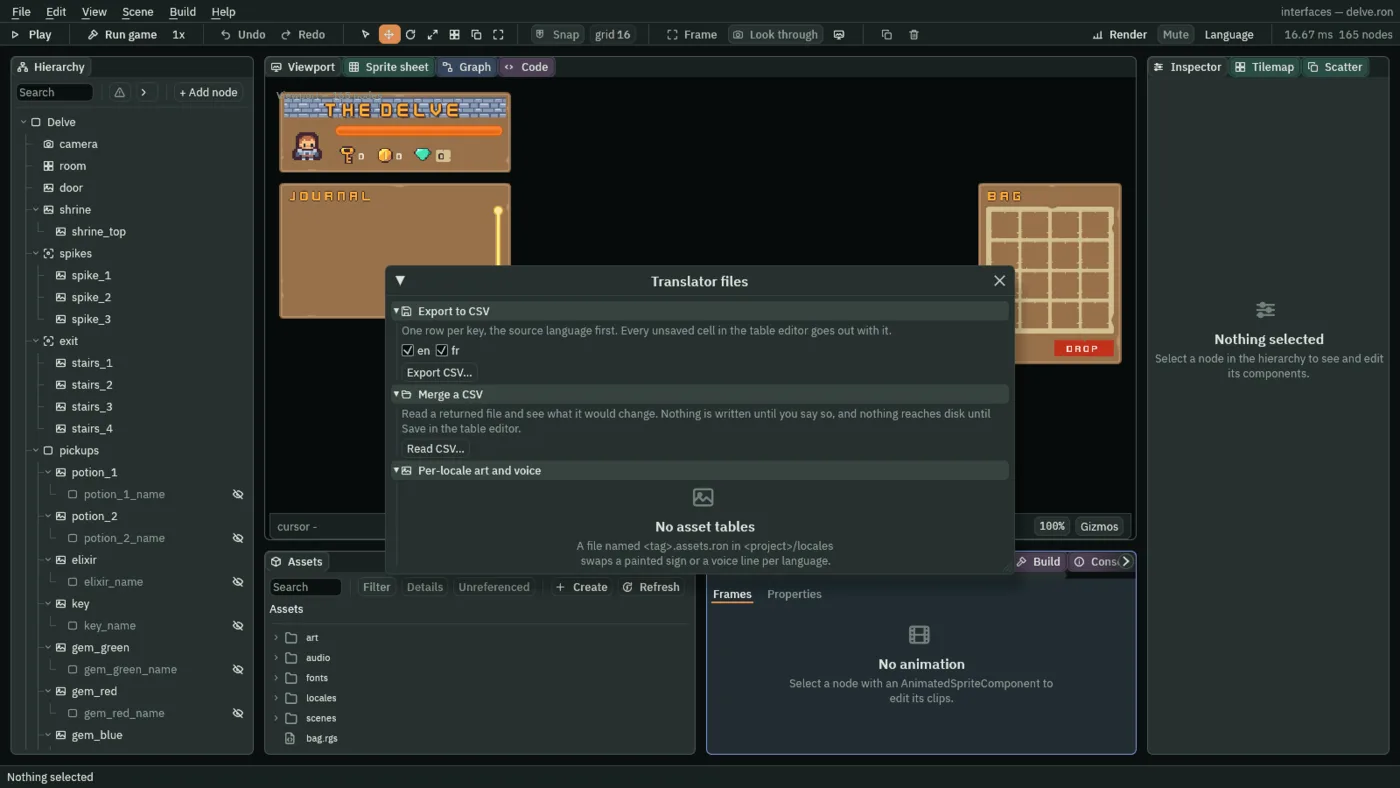
- Export to CSV
- The band that writes the file that goes out: a first row naming the columns,
keyand then a language each, and one row for each key, in order. Every unsaved cell in the Locale tables window goes out with it, so you need not press Save first. - The language boxes
- One box for each string table, named by its tag, and ticked as a language is added, since the reason to add one is to have it translated. The source language goes out first whatever you tick, so the translator has the English beside every cell to fill.
- Export CSV…
- Opens the system’s save dialog, named
locales.csv, and writes the ticked languages. It is greyed, with Tick a language beside it, while no box is ticked. - Read CSV…
- Opens the system’s file dialog for a file that came back, reads it, and counts what it would change. It writes nothing.
- Language, Added, Updated, Unchanged
- The table the window draws for a returned file, a row for each language in it. Added counts cells for keys the language had no words for, Updated cells whose words the file would change, and Unchanged cells that already hold what the file says. A language the project does not have yet is marked
(new). Updated is coloured whenever it is above0: a file that rewrites words nobody asked to revisit is an old export coming back over newer work. - The dropped keys line
- Under the table, the keys in the file that the source table does not have,
N key(s) the source language does not have, dropped, the first twelve named and the rest counted. It is usually a key renamed in English after the file went out. Send the list back to the translator, rather than adding the keys: the translation is for a word that no longer exists. - Merge … cell(s), Discard
- The merge button names how many cells it will write, and writes exactly those into the tables. It reads Nothing to merge, and is greyed, when the file changes nothing. Discard throws the file’s plan away. Either way the window says what happened, and the plan is gone: pressing the merge twice would count every added cell as an update the second time.
- Per-locale art and voice
- The third band lists each language’s own pictures and sounds, by file name, for the person who repaints a sign or records a line. It only reads. The Delve has none, so it says No asset tables.
A file that is not a table the window can read says why, in red, and names the row as the spreadsheet counts it, with the header as row 1: a first column that is not key, a column header that is not a language, or a key that two rows share.
The string tables, the Localized Texts and the Language list
The string tables
| Screen | Key | English | French |
|---|---|---|---|
| The HUD | game.name | The Delve | The Delve |
hud.coins_tip | Coins found: {count}. | Pièces trouvées : {count}. | |
hud.gems_tip | Gems found: {count}. | Gemmes trouvées : {count}. | |
hud.health_tip | Health: spikes take it, potions give it back. | Vie : les pics en prennent, les potions en rendent. | |
hud.hints | WASD or arrows walk / B bag / J journal / 1-4 use / Esc pause | WASD ou flèches marcher / B sac / J journal / 1-4 utiliser / Échap pause | |
hud.key_tip | Opens the locked door, by walking into it. | Ouvre la porte verrouillée quand on y entre. | |
| The items | item.coin | Coin | Pièce |
item.elixir | Elixir | Élixir | |
item.gem | Gem | Gemme | |
item.key | Key | Clé | |
item.potion | Potion | Potion | |
tip.elixir | Elixir: you walk faster for 5 seconds. | Élixir : vous marchez plus vite pendant 5 secondes. | |
tip.empty | empty | empty | |
tip.key | Key: opens the locked door. | Clé : ouvre la porte verrouillée. | |
tip.potion | Potion: restores 3 health. | Potion : rend 3 points de vie. | |
| The bag | bag.drop | Drop | Jeter |
bag.empty | Empty | Vider | |
bag.empty_body | Everything in it is lost. | Tout ce qu'il contient est perdu. | |
bag.empty_title | Empty the bag? | Vider le sac ? | |
bag.keep | Keep | Garder | |
bag.name | Bag | Sac | |
menu.drop | Drop | Jeter | |
menu.inspect | Inspect | Inspecter | |
menu.use | Use | Utiliser | |
inspect.ok | OK | OK | |
| The journal | journal.coin | Found a coin. | Pièce trouvée. |
journal.door | The door opened. | Porte ouverte. | |
journal.drank | Drank a potion. | Potion bue. | |
journal.elixir | Found the elixir. | Élixir trouvé. | |
journal.empty | empty | empty | |
journal.gem | Found a gem. | Gemme trouvée. | |
journal.hurt | The spikes hurt. | Les pics ont fait mal. | |
journal.key | Found the key. | Clé trouvée. | |
journal.name | Journal | Journal | |
journal.potion | Found a potion. | Potion trouvée. | |
journal.rest | Rested at the shrine. | Repos au sanctuaire. | |
| The pause menu | pause.leave | Leave | Partir |
pause.leave_body | Unsaved progress is lost. | La progression non sauvegardée est perdue. | |
pause.leave_title | Leave the delve? | Quitter le donjon ? | |
pause.name | Paused | Pause | |
pause.quit | Quit to title | Retour au titre | |
pause.resume | Resume | Reprendre | |
pause.stay | Stay | Rester | |
| The settings | settings.back | Back | Retour |
settings.effects | Effects | Effets | |
settings.hints | Show hints | Afficher l'aide | |
settings.language | Language | Langue | |
settings.large | Large | Grande | |
settings.music | Music | Musique | |
settings.name | Settings | Paramètres | |
settings.names | Item names | Noms des objets | |
settings.normal | Normal | Normale | |
settings.small | Small | Petite | |
settings.text_size | Text size | Taille du texte | |
| The slots | slots.back | Back | Retour |
slots.continue | Continue | Continuer | |
slots.delete | Delete | Supprimer | |
slots.delete_body | Its name and progress are gone for good. | Son nom et sa progression sont perdus pour de bon. | |
slots.delete_title | Delete this save? | Supprimer cette sauvegarde ? | |
slots.empty | Empty slot | Emplacement vide | |
slots.keep | Keep | Garder | |
slots.name | Save slots | Sauvegardes | |
slots.start | Start | Commencer | |
| The title | title.play | Play | Jouer |
title.quit | Quit | Quitter | |
title.settings | Settings | Paramètres |
Sixty-six keys in each table. Every key of the English table is in the French one.
The Localized Texts: the delve
| Node | Component | Field | Value |
|---|---|---|---|
potion_1_name and potion_2_name | Localized Text | Key | item.potion |
elixir_name | Localized Text | Key | item.elixir |
key_name | Localized Text | Key | item.key |
gem_green_name | Localized Text | Key | item.gem |
gem_red_name | Localized Text | Key | item.gem |
gem_blue_name | Localized Text | Key | item.gem |
coin_1_name to coin_5_name | Localized Text | Key | item.coin |
hud_title | Localized Text | Key | game.name |
health_bar | Localized Text | Tooltip | hud.health_tip |
key_counter | Localized Text | Tooltip | hud.key_tip |
coin_counter | Localized Text | Tooltip | hud.coins_tip |
| Substitutions | one row: Name count, Value 0 | ||
| CounterTip | Kind | coins | |
gem_counter | Localized Text | Tooltip | hud.gems_tip |
| Substitutions | one row: Name count, Value 0 | ||
| CounterTip | Kind | gems | |
bag_title | Localized Text | Key | bag.name |
bag_1 to bag_16 | Localized Text | Tooltip | tip.empty |
| Options | menu.use, menu.drop, menu.inspect | ||
drop_button | Localized Text | Key | bag.drop |
key_hints | Localized Text | Key | hud.hints |
hotbar_1 to hotbar_4 | Localized Text | Tooltip | tip.empty |
empty_dialog | Localized Text | Key | bag.empty_title |
| Body | bag.empty_body | ||
| Options | bag.keep, bag.empty | ||
inspect_dialog | Localized Text | Key | item.potion |
| Body | tip.potion | ||
| Options | inspect.ok | ||
journal_title | Localized Text | Key | journal.name |
journal_1 to journal_20 | Localized Text | Key | journal.empty |
pause_name | Localized Text | Key | pause.name |
resume | Localized Text | Key | pause.resume |
quit_to_title | Localized Text | Key | pause.quit |
quit_dialog | Localized Text | Key | pause.leave_title |
| Body | pause.leave_body | ||
| Options | pause.stay, pause.leave |
The Localized Texts: the settings
| Node | Component | Field | Value |
|---|---|---|---|
settings_name | Localized Text | Key | settings.name |
music_label | Localized Text | Key | settings.music |
effects_label | Localized Text | Key | settings.effects |
show_hints_label | Localized Text | Key | settings.hints |
item_names_label | Localized Text | Key | settings.names |
text_size | Localized Text | Key | settings.text_size |
| Options | settings.small, settings.normal, settings.large | ||
text_size_label | Localized Text | Key | settings.text_size |
back | Localized Text | Key | settings.back |
The Localized Texts: the slots
| Node | Component | Field | Value |
|---|---|---|---|
slots_name | Localized Text | Key | slots.name |
slot_1_name to slot_3_name | Localized Text | Placeholder | slots.empty |
slot_1_play to slot_3_play | Localized Text | Key | slots.start |
slot_1_delete_label to slot_3_delete_label | Localized Text | Key | slots.delete |
back | Localized Text | Key | slots.back |
delete_dialog | Localized Text | Key | slots.delete_title |
| Body | slots.delete_body | ||
| Options | slots.keep, slots.delete |
The Localized Texts: the title
| Node | Component | Field | Value |
|---|---|---|---|
title_name | Localized Text | Key | game.name |
play | Localized Text | Key | title.play |
settings | Localized Text | Key | title.settings |
quit | Localized Text | Key | title.quit |
The Language list
| Node | Component | Field | Value |
|---|---|---|---|
language | Rect | Anchor Min | 0, 0.5 |
| Anchor Max | 0, 0.5 | ||
| Offset Min | 324, -20 | ||
| Offset Max | 604, 20 | ||
| Pivot | 0, 0.5 | ||
| Panel | Color | 255, 255, 255, alpha 255 | |
| Texture | input_rectangle.png | ||
| Border | 8 | ||
| Text | Text | Language | |
| Scale | 0.75 | ||
| Color | 63, 38, 49, alpha 255 | ||
| Align | Center | ||
| Dropdown | Action | language | |
| Options | English, Français | ||
| Item Height | 40 | ||
| Normal | 255, 255, 255, alpha 255 | ||
| Hovered | 254, 231, 97, alpha 255 | ||
| Pressed | 211, 211, 211, alpha 255 | ||
| Popup | 255, 255, 255, alpha 255 | ||
| Focus | Up | text_size | |
| Down | back | ||
| Next | back | ||
| Previous | text_size | ||
| Localized Text | Key | settings.language | |
language_arrow | Rect | Anchor Min | 1, 0.5 |
| Anchor Max | 1, 0.5 | ||
| Offset Min | -46, -11 | ||
| Offset Max | -12, 11 | ||
| Pivot | 1, 0.5 | ||
| Panel | Color | 255, 255, 255, alpha 255 | |
| Texture | icon_arrow_down_dark.png | ||
language_label | Rect | Anchor Min | 0, 0.5 |
| Anchor Max | 0, 0.5 | ||
| Offset Min | -324, -24 | ||
| Offset Max | -24, 24 | ||
| Pivot | 0, 0.5 | ||
| Text | Text | Language | |
| Scale | 0.75 | ||
| Color | 236, 227, 206, alpha 255 | ||
| Localized Text | Key | settings.language |
language_row is a plain Node with no component of its own. The colours of the list, its arrow and its label are written by Apply theme. Every other field of every node is as it comes.