Tutorials · Interfaces · Chapter 7
The hotbar
By the end
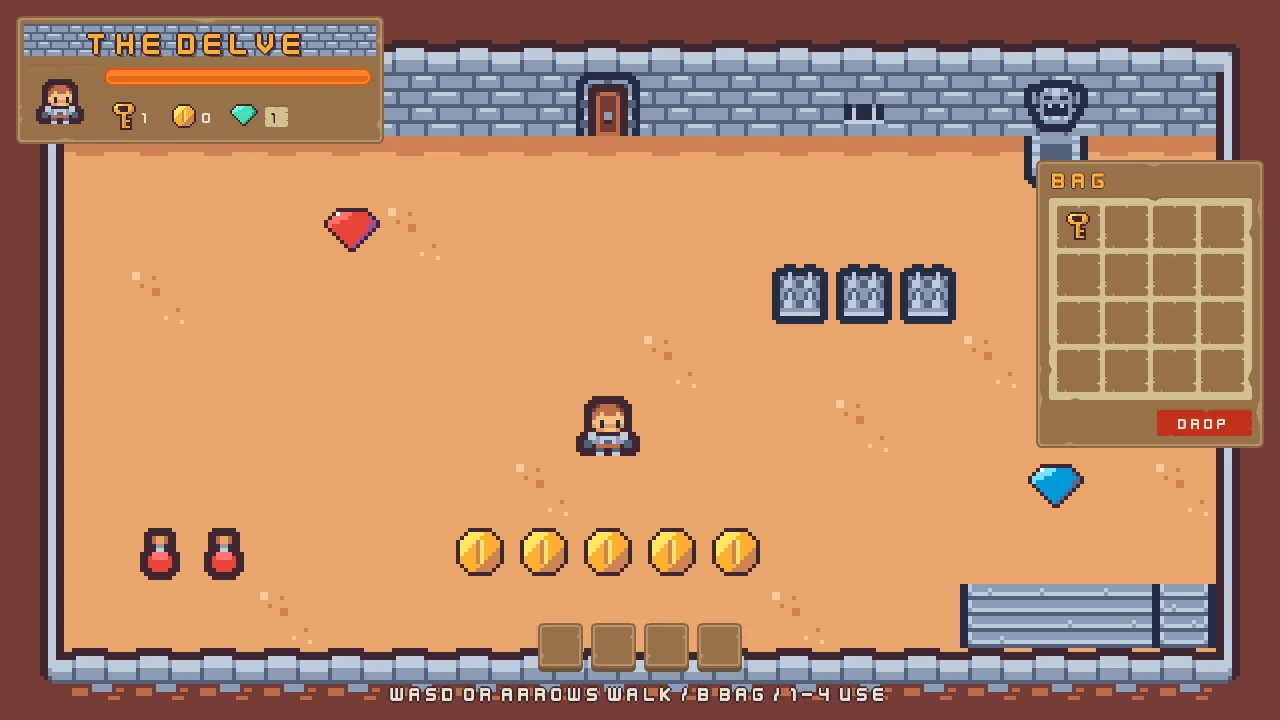
- The counters and the health bar showing what the game keeps
- A hotbar of four slots that keys
1to4use, a potion healing3, the elixir hastening the hero - A cooldown ring on a slot after a use; B opens and shuts the bag
On this page
Counters that count
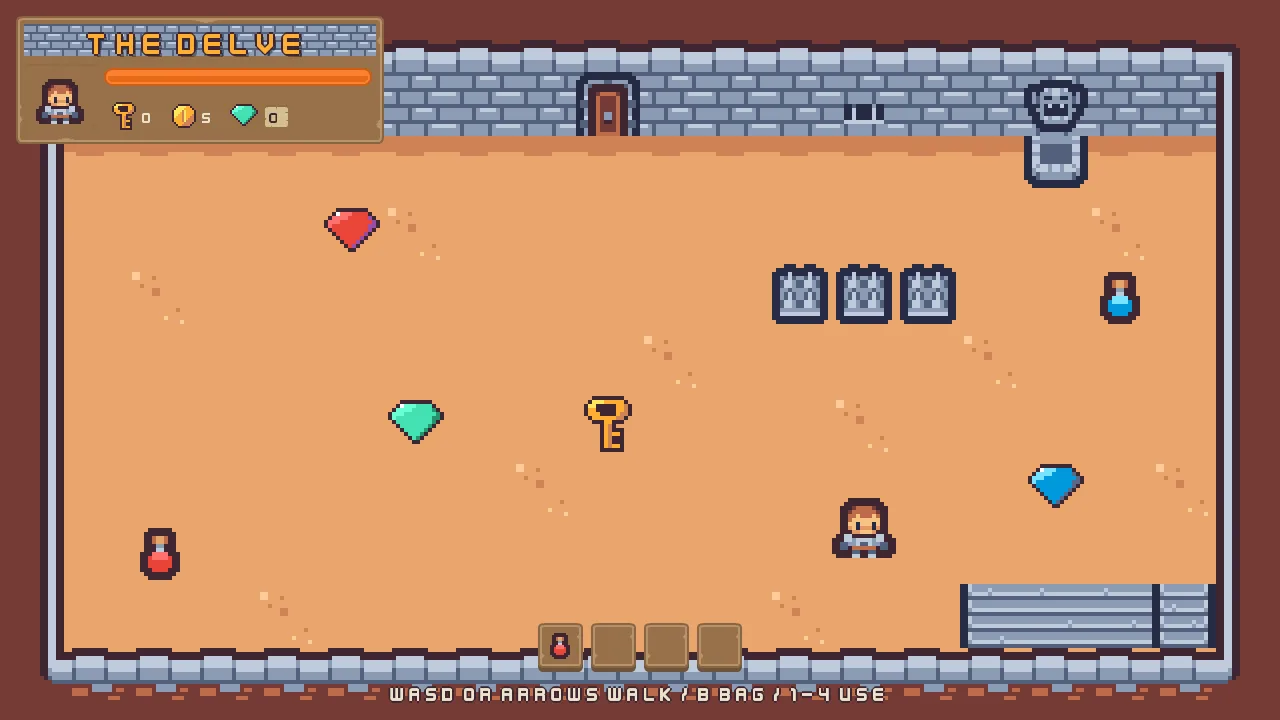
The counters read 0 and the bar is full, whatever happens. The room already keeps what the hero has: each pickup adds to a number the game keeps, keys, coins, gems, potions or elixirs, and the spikes take from health. A kept number lasts until the game closes, and any script can read it. What is missing is something to show it: a script on each counter, and one on the bar.
- In Assets, click Assets in the path bar over the tree, so the script is written at the project’s top, then press Create, choose New script, type
counter, and press Enter. - In the Code tab, replace everything in
counter.rgswith the script below, and press Ctrl+S.
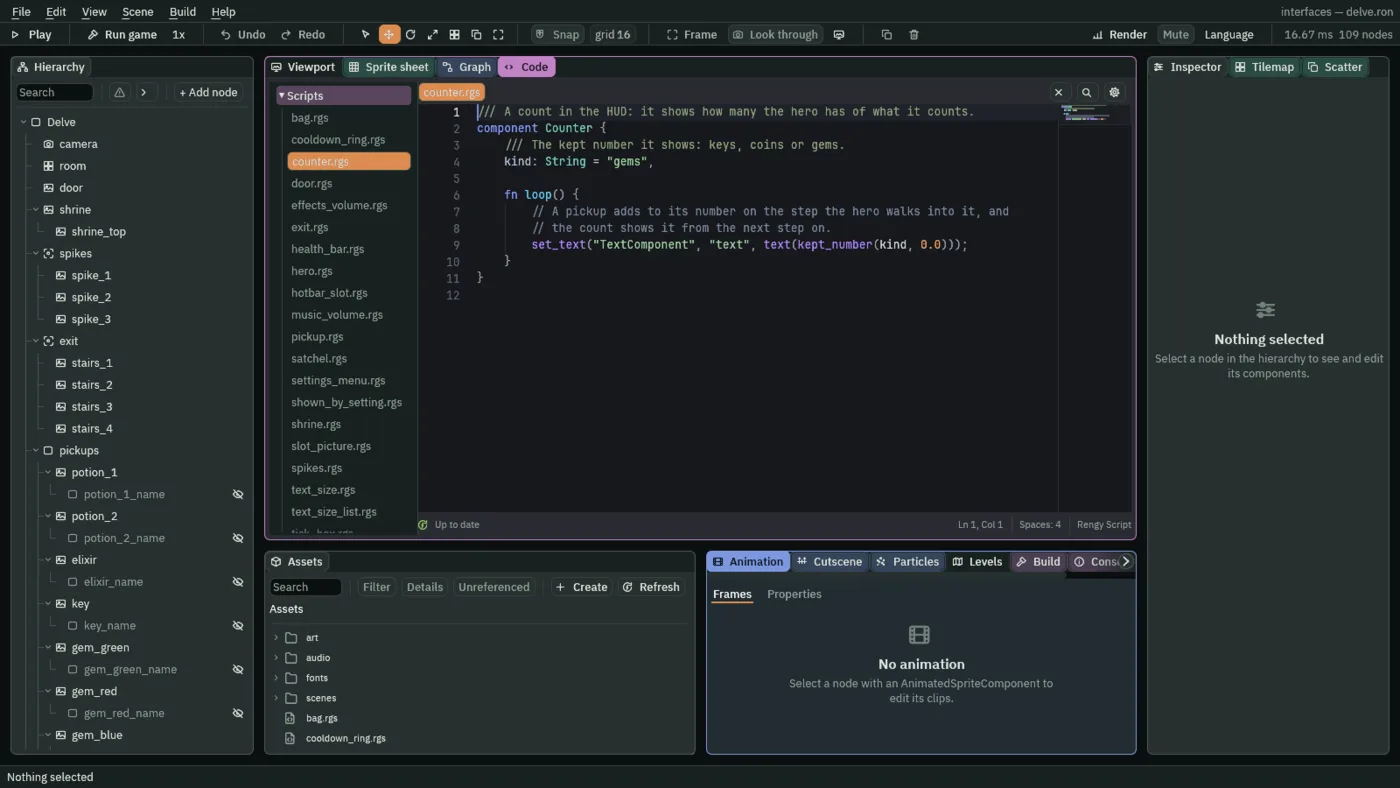
/// A count in the HUD: it shows how many the hero has of what it counts.
component Counter {
    /// The kept number it shows: keys, coins or gems.
    kind: String = "gems",

    fn loop() {
        // A pickup adds to its number on the step the hero walks into it, and
        // the count shows it from the next step on.
        set_text("TextComponent", "text", text(kept_number(kind, 0.0)));
    }
}
- Open
scenes/delve.ron. Selectkey_count, click Add component and choose Counter. Set its Kind tokeys. - Do the same for
coin_count, with Kindcoins, and forgem_plate, with Kindgems, which is the script’s own start, so it already reads it.
kept_number(kind, 0.0) reads the number kept under that name, or 0 if nothing was ever kept. text(…) turns a number into words, a whole number with no decimal point. set_text("TextComponent", "text", …) writes the words onto this node’s own Text. A pickup adds to its number on the step the hero walks into it, and the count shows it from the next step on.
- In Assets, press Create, choose New script, type
health_bar, and press Enter. - In the Code tab, replace everything in
health_bar.rgswith the script below, and press Ctrl+S.
/// The health bar in the HUD: it shows the hero's health, which the spikes
/// take and a potion gives back.
component HealthBar {
    fn loop() {
        // The hero keeps its health as it enters the room. Until then the bar
        // shows what it was made with: full.
        let health = kept_number("health", -1.0);
        if health >= 0.0 {
            set_number("SliderComponent", "value", health);
        }
    }
}
- Select
health_bar, click Add component and choose HealthBar.
The hero keeps its health as it enters the room, and the bar writes it into its Slider’s Value on every step. Until the hero has, kept_number("health", -1.0) answers the -1 it was given, which the script ignores, so the bar shows what it was made with: full.
- kept_number
- Reads a number kept under a name, as it was when the step began, or the second number if it was never kept. Pickups, the spikes and the hero all write to the same numbers, and this reads them.
- set_text and text
set_textwrites words onto another component of this node: here the Text’s Text.textturns a number into words.
The hotbar
The hotbar is four slots at the foot of the screen. A key, 1 to 4, or a click uses what a slot holds: a potion heals, and the elixir makes the hero walk faster. What the hero picks up has to get into the slots first, and a script, the satchel, does that. It files each thing the hero takes into the first empty slot, and the slots and the bag show it.
Keys for the slots
- Choose View → Input map…. Type
bagin the New action box and press Add. Do the same foruse_1,use_2,use_3anduse_4. - Select
bagand press Choose key…, and find B in its list. Do the same foruse_1touse_4, with the keys 1, 2, 3 and 4. - Press Save, and close the window.
An action is a name, and a key is bound to it. The input map keeps the names, and a script asks about them, so a player who rebinds B changes nothing in the scripts.
- Select
key_hints, the line at the foot of the screen, and set its Text toWASD or arrows walk / B bag / 1-4 use. It names only what works at each point in the tutorial, and the bag and the slots work from now on.
The satchel
The satchel keeps one number for each slot: hotbar_1 to hotbar_4 and bag_1 to bag_16, each holding which item is in that slot, 1 for a potion, 2 for the elixir, 3 for a key and 0 for nothing. Every step it files at most one item the hero owns that no slot holds yet, into the first empty slot: a potion or the elixir into the hotbar while it has room and then the bag, a key only into the bag. It also keeps how much room is left, which a pickup reads before it lets the hero take it, so a full bag leaves the thing on the floor. Gems and coins are counted, never filed.
- In Assets, press Create, choose New script, type
satchel, and press Enter. - In the Code tab, replace everything in
satchel.rgswith the script below, and press Ctrl+S.
/// The hero's satchel: it files what the hero carries into the slots, the
/// hotbar's four and the bag's sixteen. What the hero owns is kept in
/// potions, elixirs and keys. Each slot is kept too, hotbar_1 to hotbar_4 and
/// bag_1 to bag_16, as the item in it: 1 a potion, 2 the elixir, 3 a key, 0
/// nothing. Only the satchel files, one item a step, so two pickups taken on
/// the same step never go in the same slot.
component Satchel {
    fn loop() {
        // What the slots hold as this step began: how many of each item, how
        // many slots are empty, the first empty one of the hotbar and of the
        // bag, and the last one holding each item.
        let potions = 0.0;
        let elixirs = 0.0;
        let keys = 0.0;
        let empty_hotbar = 0.0;
        let empty_bag = 0.0;
        let first_hotbar = "";
        let first_bag = "";
        let last_potion = "";
        let last_elixir = "";
        let last_key = "";
        for i in 1..5 {
            let slot = "hotbar_" + text(i);
            let item = kept_number(slot, 0.0);
            if item == 0.0 {
                empty_hotbar += 1.0;
                if first_hotbar == "" {
                    first_hotbar = slot;
                }
            } else if item == 1.0 {
                potions += 1.0;
                last_potion = slot;
            } else if item == 2.0 {
                elixirs += 1.0;
                last_elixir = slot;
            } else if item == 3.0 {
                keys += 1.0;
                last_key = slot;
            }
        }
        for i in 1..17 {
            let slot = "bag_" + text(i);
            let item = kept_number(slot, 0.0);
            if item == 0.0 {
                empty_bag += 1.0;
                if first_bag == "" {
                    first_bag = slot;
                }
            } else if item == 1.0 {
                potions += 1.0;
                last_potion = slot;
            } else if item == 2.0 {
                elixirs += 1.0;
                last_elixir = slot;
            } else if item == 3.0 {
                keys += 1.0;
                last_key = slot;
            }
        }

        // What the hero owns that no slot holds yet waits to be filed; less
        // than none is an item a slot holds that the hero no longer owns.
        let waiting_potions = kept_number("potions", 0.0) - potions;
        let waiting_elixirs = kept_number("elixirs", 0.0) - elixirs;
        let waiting_keys = kept_number("keys", 0.0) - keys;

        // One item a step, into the first empty slot. A potion or the elixir,
        // the two things the hero drinks, goes in the hotbar while it has
        // room, then in the bag: drink_slot is where it goes. A key goes only
        // in the bag.
        let drink_slot = first_hotbar;
        if drink_slot == "" {
            drink_slot = first_bag;
        }
        if waiting_potions > 0.0 && drink_slot != "" {
            keep_number(drink_slot, 1.0);
        } else if waiting_elixirs > 0.0 && drink_slot != "" {
            keep_number(drink_slot, 2.0);
        } else if waiting_keys > 0.0 && first_bag != "" {
            keep_number(first_bag, 3.0);
        }

        // An item the hero no longer owns, as the key the door took, leaves
        // the last slot holding it.
        if waiting_potions < 0.0 {
            keep_number(last_potion, 0.0);
        }
        if waiting_elixirs < 0.0 {
            keep_number(last_elixir, 0.0);
        }
        if waiting_keys < 0.0 {
            keep_number(last_key, 0.0);
        }

        // The room left once what waits is filed, which a pickup reads before
        // it lets the hero take it. What the hotbar has no room for waits for
        // the bag.
        let room_hotbar = empty_hotbar - max(waiting_potions, 0.0) - max(waiting_elixirs, 0.0);
        let room_bag = empty_bag - max(waiting_keys, 0.0);
        if room_hotbar < 0.0 {
            room_bag += room_hotbar;
            room_hotbar = 0.0;
        }
        keep_number("room_hotbar", room_hotbar);
        keep_number("room_bag", room_bag);
    }
}
- Select
hud, click Add component and choose Satchel.
The first slot
The slots are buttons, in a Stack of their own. Their pictures come from the same pack as the title’s buttons, and items.png, which came with the starter, holds the five icons: it is one picture of five 16 by 16 squares, and its .meta names them potion, elixir, key, gem and coin.
- Copy the two files below into your project’s
artfolder, each from where the list says it is in the unzipped download. Then press Refresh in the Assets panel.
- Select
hud, click + Add node and choose Stack. Rename ithotbar. - In its Rect, set Anchor Min and Anchor Max both to
0.5,1, Offset Min to-102,-97, Offset Max to102,-48and Pivot to0.5,1. That is a box204wide and49high, centred, with its foot48above the bottom of the screen. - In its Stack, set Axis to Horizontal, Fit to Fixed and Item to
45. Spacing stays8: four slots and three gaps are204wide. - Select
hotbar, click + Add node and choose Button. Rename ithotbar_1. Its Rect stays as it comes: the Stack places it. - Remove its Text: press the bin at the right of its TextComponent header. A slot has no word.
- In its Panel, set Texture to
buttonSquare_brown.pngand Border to8. In its Button, set Action touse_1and Pressed Texture tobuttonSquare_beige_pressed.png. The tints come from Apply theme, below. - Select
hotbar_1, click + Add node and choose Panel. Rename ithotbar_1_item, and untick its Visible: a slot shows nothing until it holds something. - In its Rect, set Anchor Max to
0,0, Offset Min to6,6, Offset Max to38,38and Pivot to0,0. In its Panel, set Texture toitems.png. That is a square32by32,6in from the slot’s top left corner.
A slot shows what it holds
- In Assets, press Create, choose New script, type
slot_picture, and press Enter. - In the Code tab, replace everything in
slot_picture.rgswith the script below, and press Ctrl+S.
/// The picture in a slot of the hotbar or the bag: it shows the item the slot
/// holds, cut from the items picture by its region, and nothing while the slot
/// is empty.
component SlotPicture {
    /// The slot it shows, which is kept by that name: hotbar_1 to hotbar_4,
    /// or bag_1 to bag_16.
    slot: String = "hotbar_1",

    fn loop() {
        // The satchel and the slots keep what each slot holds: 1 a potion, 2
        // the elixir, 3 a key, 0 nothing.
        let item = kept_number(slot, 0.0);
        if item == 1.0 {
            set_text("PanelComponent", "region_name", "potion");
            show();
        } else if item == 2.0 {
            set_text("PanelComponent", "region_name", "elixir");
            show();
        } else if item == 3.0 {
            set_text("PanelComponent", "region_name", "key");
            show();
        } else {
            hide();
        }
    }
}
- Select
hotbar_1_item, click Add component and choose SlotPicture. Set its Slot tohotbar_1.
The script reads the number the satchel keeps for its slot. For a potion, the elixir or a key it sets the Panel’s Atlas Region, chapter 3’s way of cutting a picture out of a sheet by name, to potion, elixir or key, and shows the node. For 0 it hides it. set_text writes the region’s name, since a region is text, and show and hide make a node visible or invisible.
A slot is used
- In Assets, press Create, choose New script, type
hotbar_slot, and press Enter. - In the Code tab, replace everything in
hotbar_slot.rgswith the script below, and press Ctrl+S.
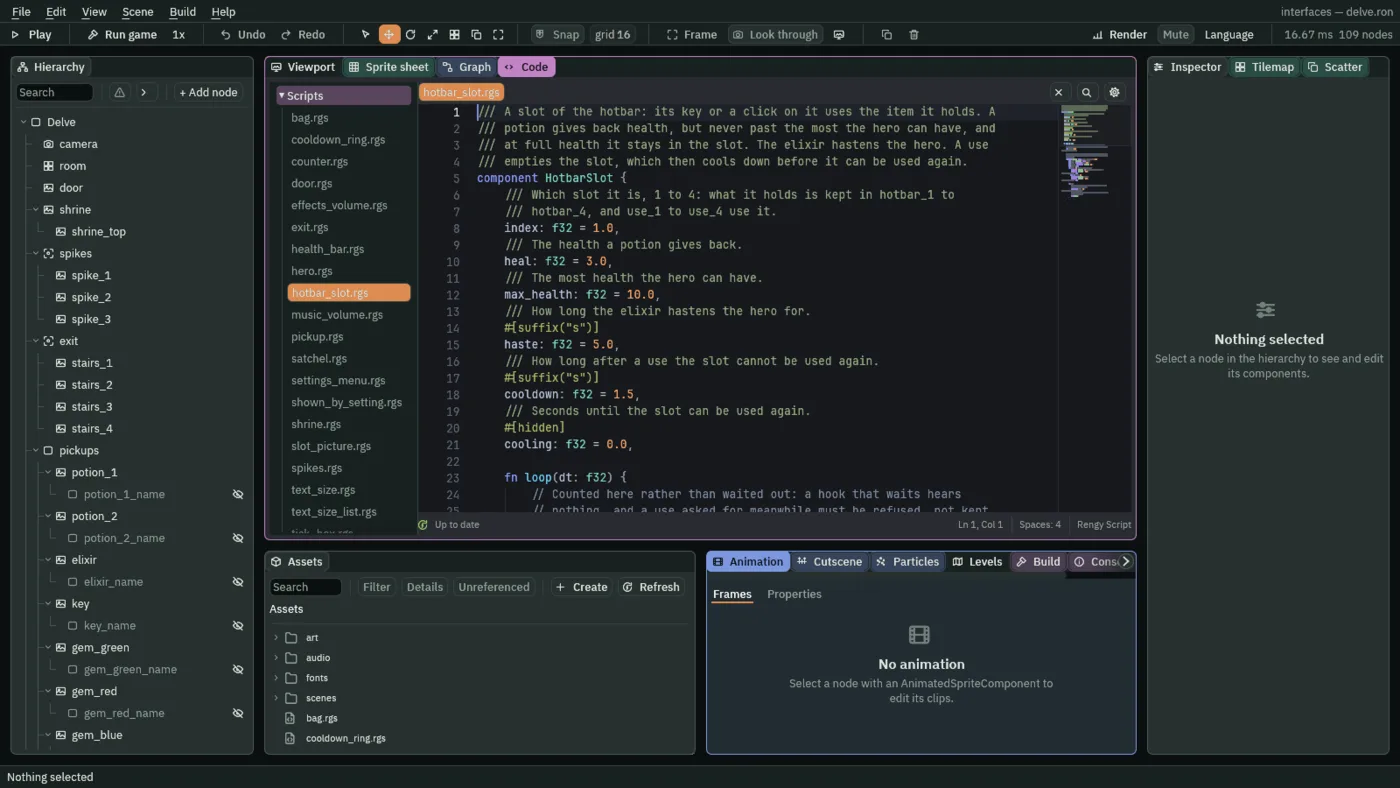
/// A slot of the hotbar: its key or a click on it uses the item it holds. A
/// potion gives back health, but never past the most the hero can have, and
/// at full health it stays in the slot. The elixir hastens the hero. A use
/// empties the slot, which then cools down before it can be used again.
component HotbarSlot {
    /// Which slot it is, 1 to 4: what it holds is kept in hotbar_1 to
    /// hotbar_4, and use_1 to use_4 use it.
    index: f32 = 1.0,
    /// The health a potion gives back.
    heal: f32 = 3.0,
    /// The most health the hero can have.
    max_health: f32 = 10.0,
    /// How long the elixir hastens the hero for.
    #[suffix("s")]
    haste: f32 = 5.0,
    /// How long after a use the slot cannot be used again.
    #[suffix("s")]
    cooldown: f32 = 1.5,
    /// Seconds until the slot can be used again.
    #[hidden]
    cooling: f32 = 0.0,

    fn loop(dt: f32) {
        // Counted here rather than waited out: a hook that waits hears
        // nothing, and a use asked for meanwhile must be refused, not kept.
        if cooling > 0.0 {
            cooling -= dt;
        }
        // Its key, 1 to 4 through the input map, presses its use_ action on
        // the step the key goes down, and a click on the slot on the game's
        // next step.
        if pressed("use_" + text(index)) && cooling <= 0.0 {
            let slot = "hotbar_" + text(index);
            let item = kept_number(slot, 0.0);
            let health = kept_number("health", 0.0);
            let used = false;
            if item == 1.0 && health < max_health {
                add_number("health", min(heal, max_health - health));
                add_number("potions", -1.0);
                used = true;
            } else if item == 2.0 {
                keep_number("haste", haste);
                add_number("elixirs", -1.0);
                used = true;
            }
            if used {
                // Emptied on the step the count goes down, so the satchel
                // finds the two agreeing.
                keep_number(slot, 0.0);
                cooling = cooldown;
                // Heard by the ring the slot's Signal component wires it to,
                // on the next step.
                emit("used");
            }
        }
    }
}
- Select
hotbar_1, click Add component and choose HotbarSlot. Set its Index to1. Its other fields start at the script’s own numbers,3,10,5and1.5: leave them.
pressed("use_1") is true on the step 1 goes down, or on the step after a click on the slot is let go. The script is one for all four slots: index says which, and it asks about use_ and that number.
- Index
- Which slot this is,
1to4. The slot’s number is kept underhotbar_and the index, and its key is the actionuse_and the index. - Heal, Max Health
- How much health a potion gives back,
3, and the most the hero can have,10. A potion never takes the hero past10, and at full health it is refused and stays in the slot. - Haste
- How long the elixir makes the hero walk faster, in seconds:
5. - Cooldown
- How long, in seconds, a slot cannot be used again after a use:
1.5. The script counts a hidden field, Cooling, down to0on every step, and refuses a use while it is above0, so a refused press is ignored, not queued.
A use spends the item: a potion adds to health and takes one from potions, the elixir keeps haste for five seconds and takes one from elixirs, and the slot is emptied and starts cooling. add_number, min and keep_number do the sums, and emit tells the ring, which the ring section below wires up.
The pickups and the hero change
Two scripts the starter holds have to learn about slots. A pickup that needs a slot, a potion, the elixir or a key, stays on the floor while the satchel has no room for it, and the elixir has to make the hero walk faster. Both files are replaced.
- In the Code tab’s Scripts list, click
pickup.rgs, replace everything in it with the script below, and press Ctrl+S.
/// Something lying in the room that the hero takes by walking into it. It adds
/// `amount` to the number kept under `kind`, and is gone. A potion, the elixir
/// and the key each need a slot to go in, so one stays on the floor while the
/// satchel has no room for it.
component Pickup : Area {
    /// The kept number it counts into: potions, elixirs, keys, gems or coins.
    kind: String = "gems",
    /// How much it adds to that number.
    amount: f32 = 1.0,
    /// The item a slot shows for it: 1 a potion, 2 the elixir, 3 a key, or 0
    /// for what is only counted, as gems and coins are.
    item: f32 = 0.0,

    fn on_enter(other: NodeId) {
        // The hero's node is in the group "hero".
        if in_group(other, "hero") {
            // The room the satchel keeps: a key goes only in the bag, a potion
            // or the elixir in the hotbar or the bag.
            let room = kept_number("room_bag", 0.0);
            if item == 1.0 || item == 2.0 {
                room += kept_number("room_hotbar", 0.0);
            }
            if item == 0.0 || room >= amount {
                add_number(kind, amount);
                destroy_self();
            }
        }
    }
}
- Click
hero.rgs, replace everything in it with the script below, and press Ctrl+S.
/// The hero, whom the keys walk through its Character Body. A new game starts
/// it with `health`, kept so that everything else can read it. While the
/// elixir hastens it, it walks faster.
component Hero {
    /// The health a new game starts with.
    health: f32 = 10.0,
    /// How fast the keys walk it.
    #[suffix("u/s")]
    walk_speed: f32 = 64.0,
    /// How many times as fast it walks while hastened.
    haste_factor: f32 = 1.5,

    fn on_create() {
        // Only when nothing is kept yet: a hero met again keeps what it has.
        if kept_number("health", -1.0) < 0.0 {
            keep_number("health", health);
        }
    }

    fn loop(dt: f32) {
        // The elixir keeps haste: the seconds left that the hero walks faster
        // for, counted down here.
        let haste = kept_number("haste", 0.0);
        if haste > 0.0 {
            keep_number("haste", max(haste - dt, 0.0));
            set_number("CharacterBodyComponent", "speed", walk_speed * haste_factor);
        } else {
            set_number("CharacterBodyComponent", "speed", walk_speed);
        }
    }
}
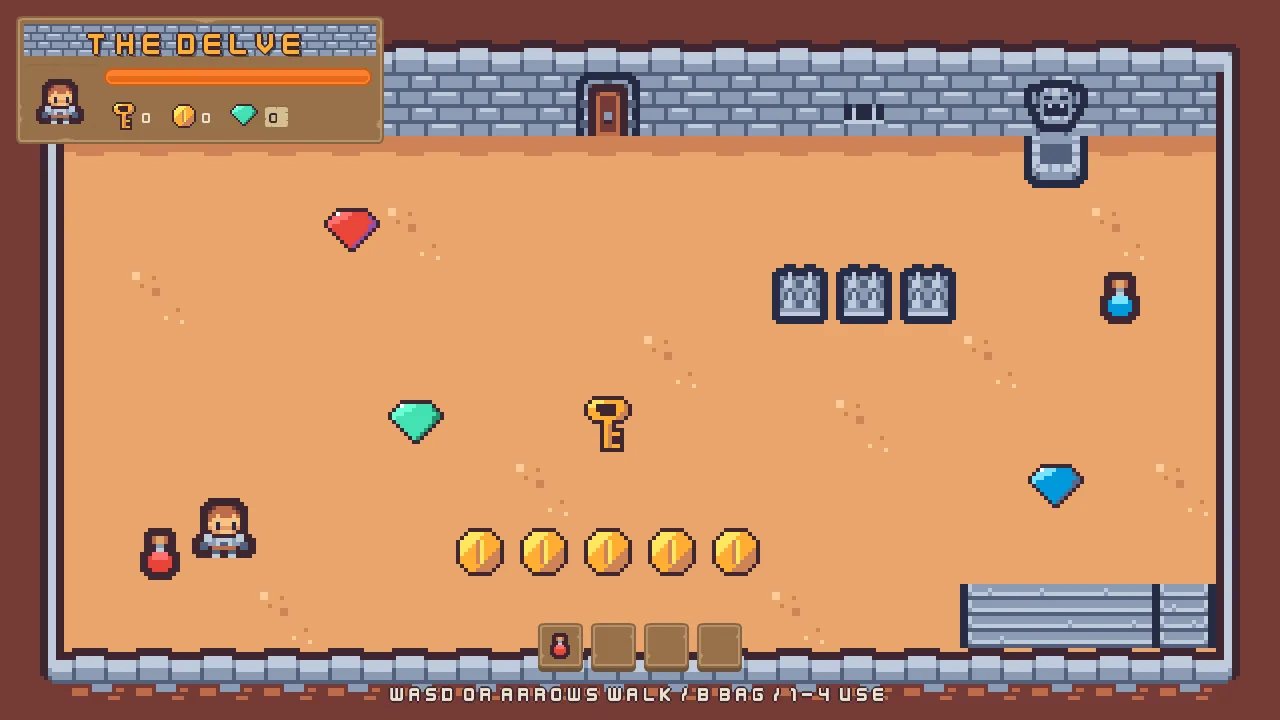
Each pickup now has an Item field, the number the satchel files it as. Set it on the pickups that go in a slot; gems and coins keep the 0 they start with, since they are only counted. The hero’s two new fields start at the script’s own 64 units a second and 1.5 times as fast: leave them.
- Select
potion_1and set its Item to1. Do the same forpotion_2. Selectelixirand set its Item to2, and selectkeyand set its Item to3. - Select
hero. Its Walk Speed is64and its Haste Factor1.5, as the script starts.
The bag opens
The bag is open all the time, as chapter 3 left it. It should be shut until the player asks, and B opens it and shuts it.
- In Assets, press Create, choose New script, type
bag, and press Enter. - In the Code tab, replace everything in
bag.rgswith the script below, and press Ctrl+S.
/// The bag's window: shut as the delve opens, and opened and shut by B.
component Bag {
    /// Whether the bag is open.
    #[hidden]
    open: bool = false,

    fn on_create() {
        hide();
    }

    fn loop() {
        // B, through the input map's bag, presses bag on the step it goes
        // down.
        if pressed("bag") {
            open = !open;
            if open {
                show();
            } else {
                hide();
            }
        }
    }
}
- Select
bag, click Add component and choose Bag.
pressed("bag") is true on the step B goes down. The script flips a hidden flag and shows or hides the bag. It also hides the bag on create, so the delve opens with it shut. The sixteen slots inside it have to show what the hero carries, as the hotbar’s do, and that comes with the next section. The picture shows the bag as it will look once they do.
Out of the ring’s way
The bag’s sixteen slots become buttons with a picture inside, as the hotbar’s are, and every control on the HUD is kept out of the focus. You build the first slot, and the other fifteen are copies of it.
- Select
item_potion, then Ctrl-clickitem_elixir,item_keyanditem_gem, and press Delete. Chapter 3’s four pictures are drawn by a script from now on. - Select
bag_2, Shift-clickbag_16, and press Delete. Onlybag_1is left, and the copies replace the others. - Select
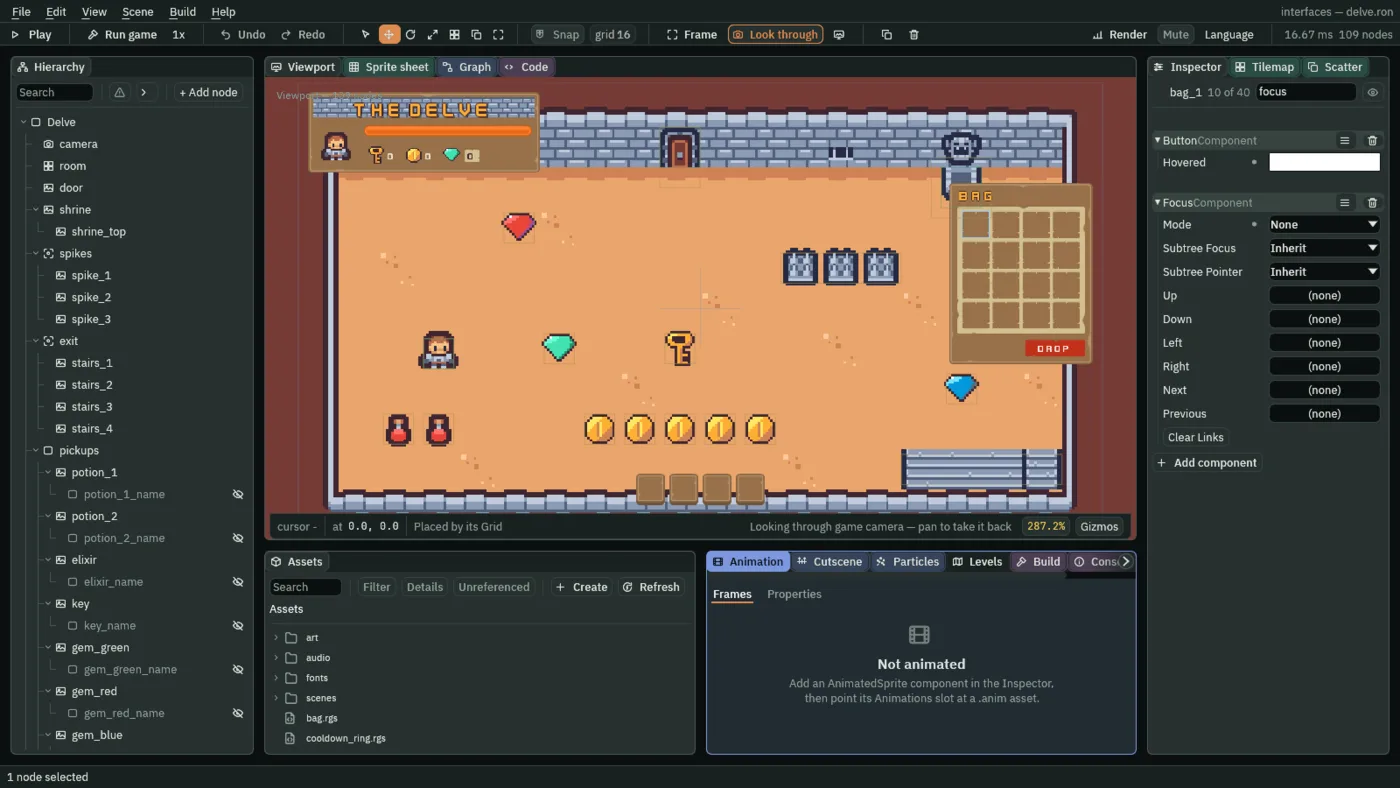
bag_1, click Add component and choose ButtonComponent. Set its Action tobag_1_menu. Nothing hears it until chapter 9. The tints come from Apply theme. - Click Add component and choose FocusComponent. Set its Mode to None.
- Select
hotbar_1and add a FocusComponent the same way, with Mode None. Do the same fordrop_button.
- Mode
- A Focus’s Mode: how a control may take the focus. All takes it by the keys and by a click, as the title’s buttons do. Click takes it only by a click, which chapter 16’s steppers use. None never takes it: here, for every slot and for Drop.
The bag’s slots show what they hold
- Select
bag_1, click + Add node and choose Panel. Rename itbag_1_item, and untick its Visible. - In its Rect, set Anchor Min and Anchor Max both to
0.5,0.5, Offset Min to-16,-16and Offset Max to16,16. In its Panel, set Texture toitems.png. - Click Add component and choose SlotPicture. Set its Slot to
bag_1. - Select
bag_1and press Ctrl+D. Rename the copybag_2and its childbag_2_item. Set the copy’s Button Action tobag_2_menuand its child’s Slot tobag_2. - Do it fourteen times more, each time on the last copy, up to
bag_16: its childbag_16_item, Actionbag_16_menuand Slotbag_16. Each is a copy ofbag_1with its number in three words. - Select
hudand press Apply theme. It writes the tints of every new button and the white of every new picture.
A cooldown ring
After a slot is used it cannot be used for 1.5 seconds, and the player should see why. A ring over the slot, a Radial Progress, does that: it draws a circle of any share from 0 to 1, and a script lets it run down from full to empty.
- Select
hotbar_1, click + Add node and choose Node. Rename ithotbar_1_ring. It sits afterhotbar_1_item, so it is drawn over it. - Click Add component and choose RectComponent. Set Anchor Max to
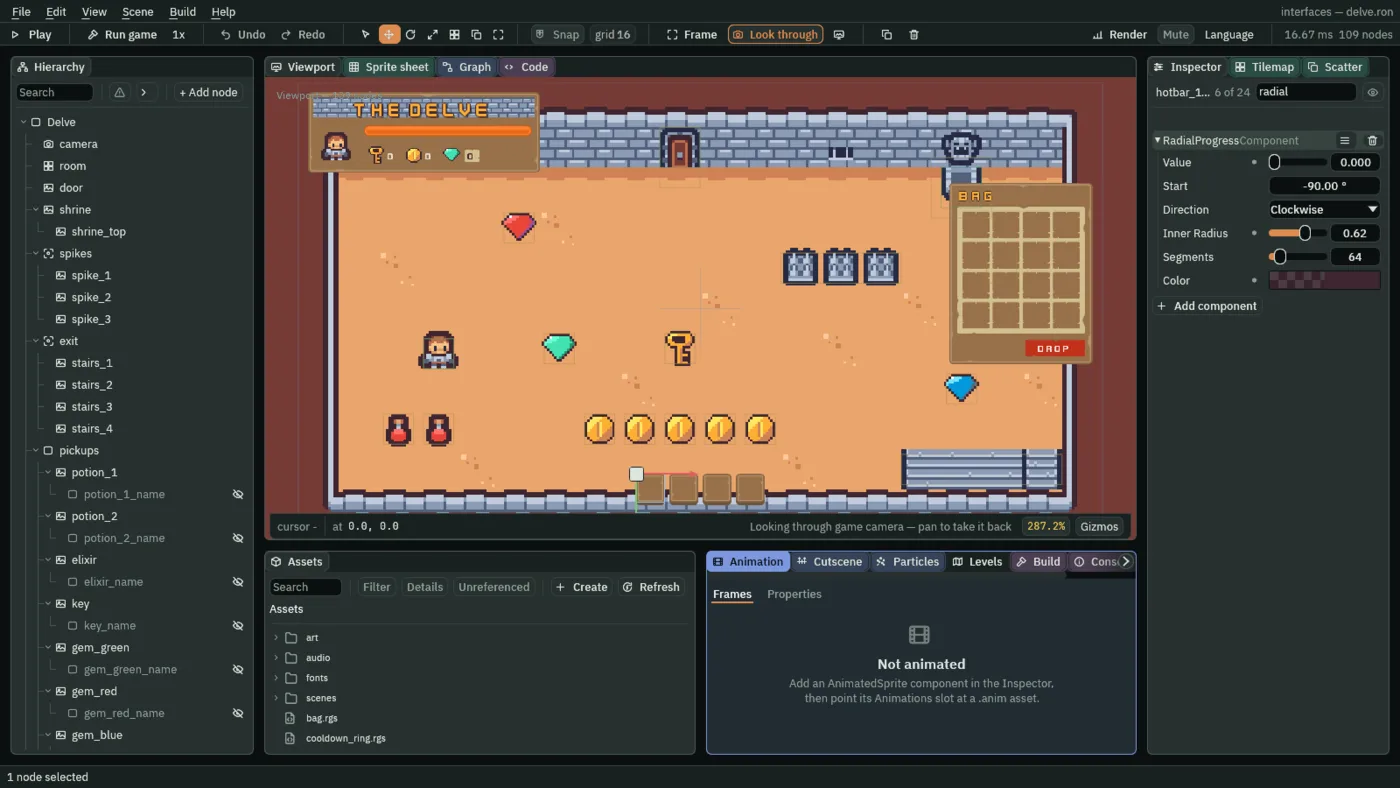
0,0, Offset Max to45,45and Pivot to0,0. That is a square45by45, the size of the slot. - Click Add component and choose RadialProgressComponent. Set Value to
0, Inner Radius to0.62and Color to63,38,49, alpha217. Start, Direction and Segments stay as they come.
- Value
- A Radial Progress’s Value: how much of the circle is drawn,
0to1.0draws none, so the ring is invisible while the slot is ready;1draws it whole; a cooldown animates it from1back to0. A new one’s is1. - Inner Radius
- The hole in the middle, as a share of the outer radius,
0to0.95.0is a pie, filled to the centre;0.62leaves a ring, thick enough to see on a slot, with the item showing through. A new one’s is0. - Color
- The colour of the ring or pie, with its transparency: the dark plum of the outlines,
63,38,49, at217of255, so the item shows through it a little.
The ring’s Start, Direction and Segments stay as they come: a circle that starts at the top and fills clockwise, from 64 segments. Chapter 16 defines them.
The slot has to tell the ring that it was used. A Signal component wires a slot’s signals to other nodes, so neither has to know the other: the slot says emit("used"), and whoever the Signal is wired to hears it on the next step.
- Select
hotbar_1, click Add component and choose SignalComponent. Under Connections, press the + beside it once. Set Signal tousedand To tohotbar_1_ring.
- In Assets, press Create, choose New script, type
cooldown_ring, and press Enter. - In the Code tab, replace everything in
cooldown_ring.rgswith the script below, and press Ctrl+S.
/// The ring over a hotbar slot: each time the slot is used, it fills and then
/// empties over the slot's cooldown, so the player sees how long it is until
/// the slot can be used again.
component CooldownRing {
    /// How long the ring takes to empty: the slot's cooldown.
    #[suffix("s")]
    seconds: f32 = 1.5,

    fn loop() {
        // The slot emits used when it uses its item, and its Signal component
        // wires that to this ring, which hears it on the next step.
        if heard("used") {
            // Full first, so the anneal starts from there.
            set_number("RadialProgressComponent", "value", 1.0);
            anneal_number("RadialProgressComponent", "value", 0.0, seconds, .Linear);
        }
    }
}
- Select
hotbar_1_ring, click Add component and choose CooldownRing. Its Seconds starts at the script’s own1.5, the slot’s cooldown: leave it.
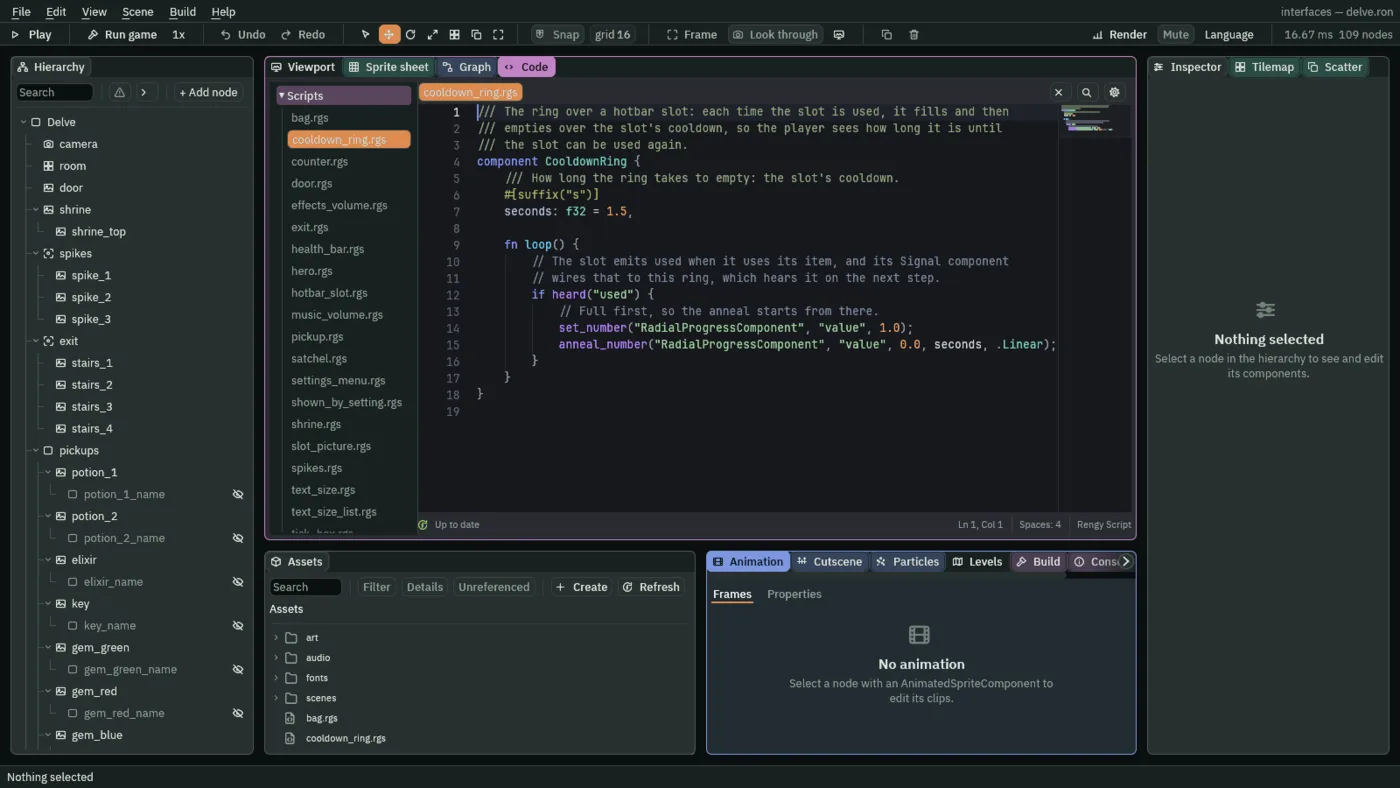
When the ring hears used, it sets its Value to 1 and anneal_number runs it to 0 in 1.5 seconds, .Linear, at an even pace. heard is true on the one step the signal arrives.
The other three slots
- Select
hotbar_1and press Ctrl+D. The copy comes with its two children. Rename ithotbar_2, and its childrenhotbar_2_itemandhotbar_2_ring. - Set the copy’s values from the table below: its Button Action, its HotbarSlot Index, its Signal’s To, and its item picture’s SlotPicture Slot.
- Press Ctrl+D on
hotbar_2and do the same forhotbar_3, and again forhotbar_4.
| Slot | Button Action | HotbarSlot Index | Signal To | SlotPicture Slot |
|---|---|---|---|---|
hotbar_1 | use_1 | 1 | hotbar_1_ring | hotbar_1 |
hotbar_2 | use_2 | 2 | hotbar_2_ring | hotbar_2 |
hotbar_3 | use_3 | 3 | hotbar_3_ring | hotbar_3 |
hotbar_4 | use_4 | 4 | hotbar_4_ring | hotbar_4 |
To see the ring, the hero has to use something, and a potion is refused at full health. So the hero has to be hurt first: the spikes take health while the hero stands on them.
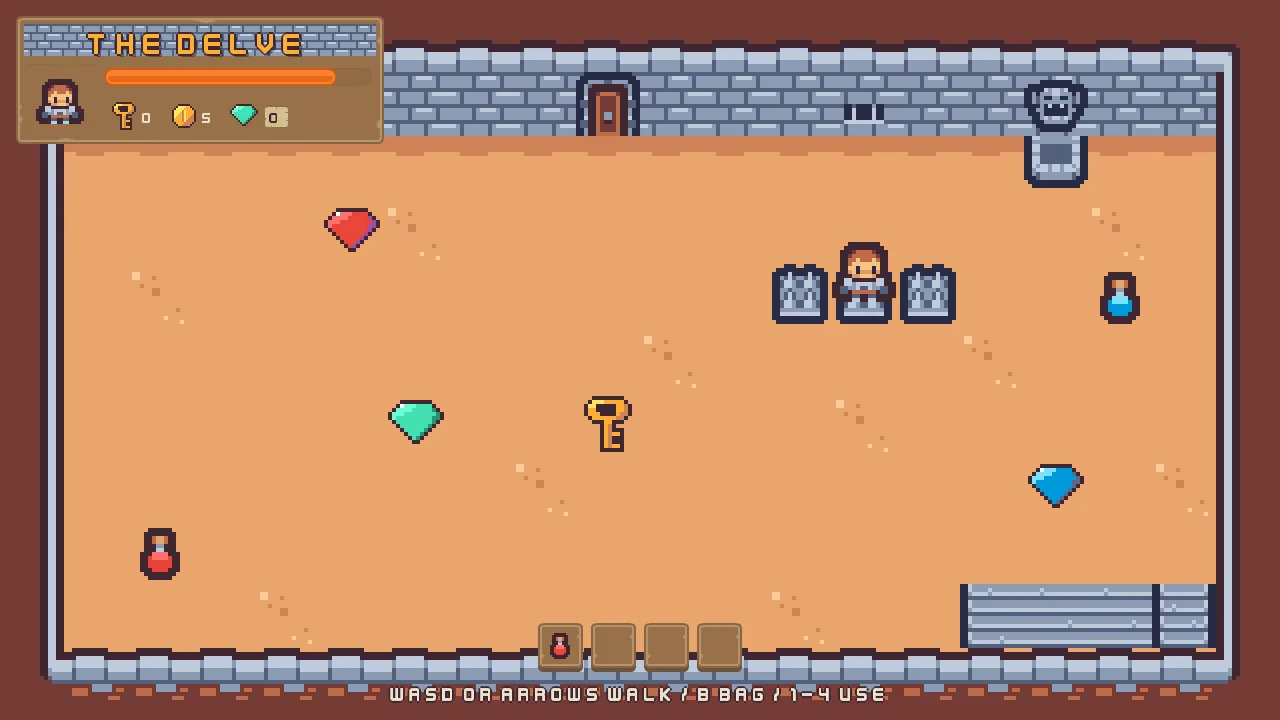
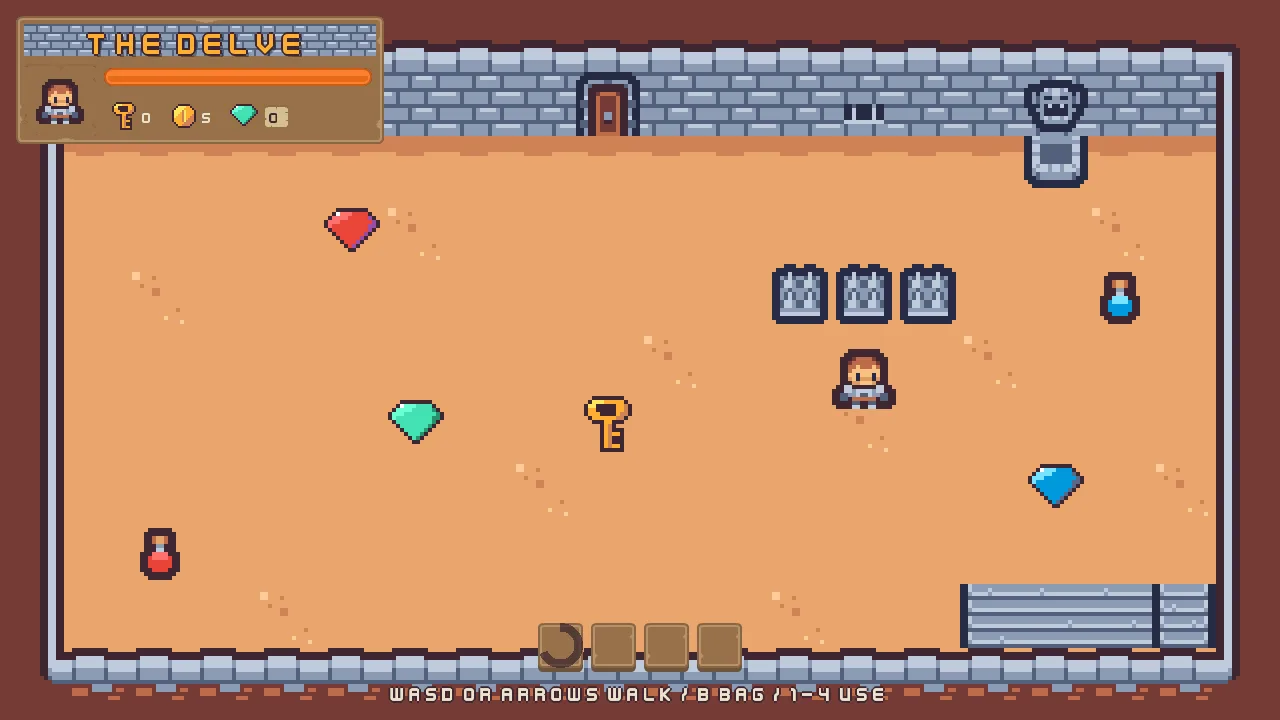
The counters, the hotbar, the rings and the bag’s slots
The pickups and the hero
| Node | Component | Field | Value |
|---|---|---|---|
potion_1, potion_2 | Pickup | Item | 1 |
elixir | Pickup | Item | 2 |
key | Pickup | Item | 3 |
gem_green, gem_red, gem_blue, coin_1 to coin_5 | Pickup | Item | 0 |
hero | Hero | Walk Speed | 64 |
| Haste Factor | 1.5 |
The counters
| Node | Component | Field | Value |
|---|---|---|---|
key_count | Counter | Kind | keys |
coin_count | Counter | Kind | coins |
gem_plate | Counter | Kind | gems |
The hotbar
| Component | Field | Value |
|---|---|---|
| Rect | Anchor Min | 0.5, 1 |
| Anchor Max | 0.5, 1 | |
| Offset Min | -102, -97 | |
| Offset Max | 102, -48 | |
| Pivot | 0.5, 1 | |
| Stack | Axis | Horizontal |
| Fit | Fixed | |
| Item | 45 |
The hotbar’s slots
| Node | Component | Field | Value |
|---|---|---|---|
hotbar_1 to hotbar_4 | Panel | Color | 255, 255, 255, alpha 255, written by Apply theme |
| Texture | buttonSquare_brown.png | ||
| Border | 8 | ||
| Button | Normal | 255, 255, 255, alpha 255, written by Apply theme | |
| Hovered | 255, 255, 255, alpha 255, written by Apply theme | ||
| Pressed | 211, 211, 211, alpha 255, written by Apply theme | ||
| Pressed Texture | buttonSquare_beige_pressed.png | ||
| Focus | Mode | None | |
| HotbarSlot | Heal | 3 | |
| Max Health | 10 | ||
| Haste | 5 | ||
| Cooldown | 1.5 | ||
| Cooling | 0 | ||
hotbar_1 | Button | Action | use_1 |
| Signal | Connections | used to hotbar_1_ring | |
| HotbarSlot | Index | 1 | |
hotbar_2 | Button | Action | use_2 |
| Signal | Connections | used to hotbar_2_ring | |
| HotbarSlot | Index | 2 | |
hotbar_3 | Button | Action | use_3 |
| Signal | Connections | used to hotbar_3_ring | |
| HotbarSlot | Index | 3 | |
hotbar_4 | Button | Action | use_4 |
| Signal | Connections | used to hotbar_4_ring | |
| HotbarSlot | Index | 4 |
The slots’ pictures and rings
| Node | Component | Field | Value |
|---|---|---|---|
hotbar_1_item to hotbar_4_item | Node | Visible | unticked |
| Rect | Anchor Max | 0, 0 | |
| Offset Min | 6, 6 | ||
| Offset Max | 38, 38 | ||
| Pivot | 0, 0 | ||
| Panel | Color | 255, 255, 255, alpha 255, written by Apply theme | |
| Texture | items.png | ||
| SlotPicture | Slot | hotbar_1 to hotbar_4 | |
hotbar_1_ring to hotbar_4_ring | Rect | Anchor Max | 0, 0 |
| Offset Max | 45, 45 | ||
| Pivot | 0, 0 | ||
| Radial Progress | Value | 0 | |
| Inner Radius | 0.62 | ||
| Color | 63, 38, 49, alpha 217 | ||
| CooldownRing | Seconds | 1.5 |
The bag’s slots
| Node | Component | Field | Value |
|---|---|---|---|
bag_1 to bag_16 | Button | Action | bag_1_menu to bag_16_menu |
| Normal | 255, 255, 255, alpha 255, written by Apply theme | ||
| Hovered | 255, 255, 255, alpha 255, written by Apply theme | ||
| Pressed | 211, 211, 211, alpha 255, written by Apply theme | ||
| Focus | Mode | None | |
bag_1_item to bag_16_item | Node | Visible | unticked |
| Rect | Anchor Min | 0.5, 0.5 | |
| Anchor Max | 0.5, 0.5 | ||
| Offset Min | -16, -16 | ||
| Offset Max | 16, 16 | ||
| Panel | Color | 255, 255, 255, alpha 255, written by Apply theme | |
| Texture | items.png | ||
| SlotPicture | Slot | bag_1 to bag_16 | |
drop_button | Focus | Mode | None |
The key line
| Component | Field | Value |
|---|---|---|
| Text | Text | WASD or arrows walk / B bag / 1-4 use |
The input map’s new actions
| Action | Key |
|---|---|
bag | B |
use_1 | 1 |
use_2 | 2 |
use_3 | 3 |
use_4 | 4 |
The bag’s Bag script and the slots’ hidden fields, Cooling and Open, are not typed. A Signal’s To is picked by the ring’s name, as the steps say; the project keeps the node’s number behind it. Every other field of every node is as it comes.