Tutorials · Interfaces · Chapter 12
Save slots
By the end
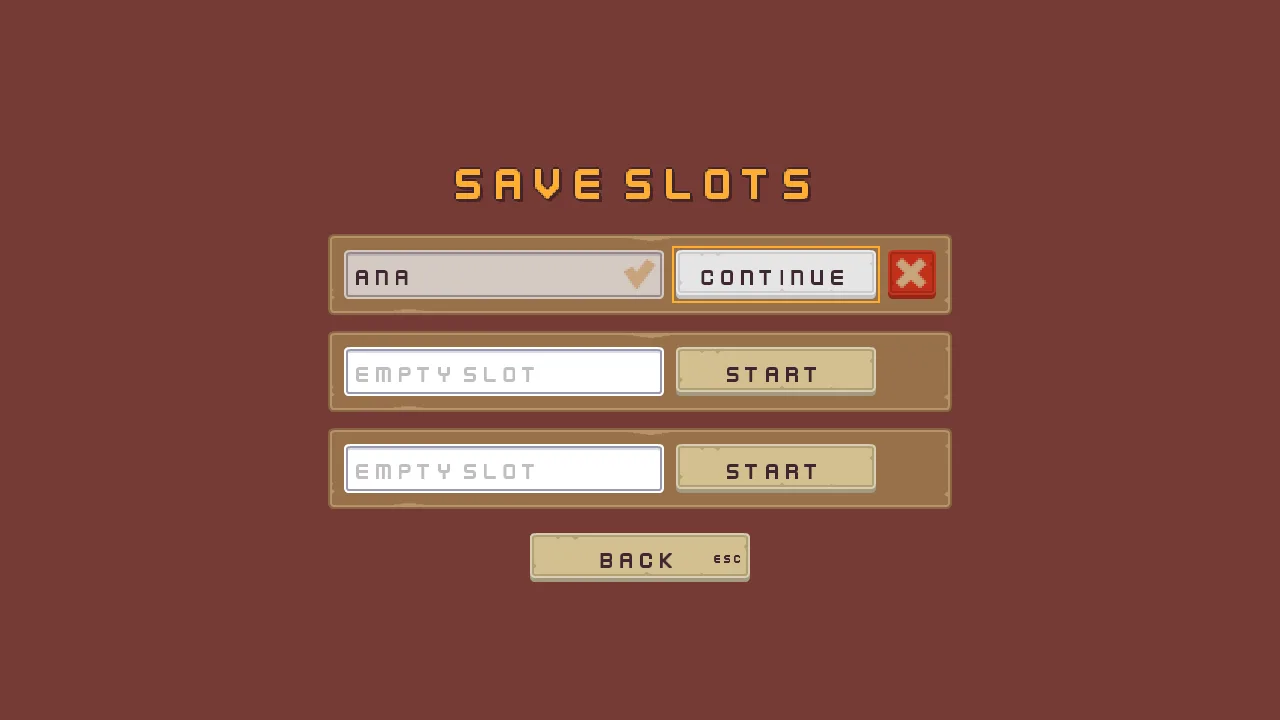
- The title’s New game is Play, which opens three save slots
- A name typed into a slot’s field and entered starts a run saved under it at the shrine, given back by Continue
- Delete asks first, then forgets the slot
On this page
Three slots
Until now the title’s button started a run at once. A game that saves has to ask which game first. This chapter builds the screen that asks: three save slots, each with a field to type a name into, a button that starts the game under that name, and once the game has a name, a button that carries it on and another that deletes it. The title’s button becomes Play, and opens this screen.
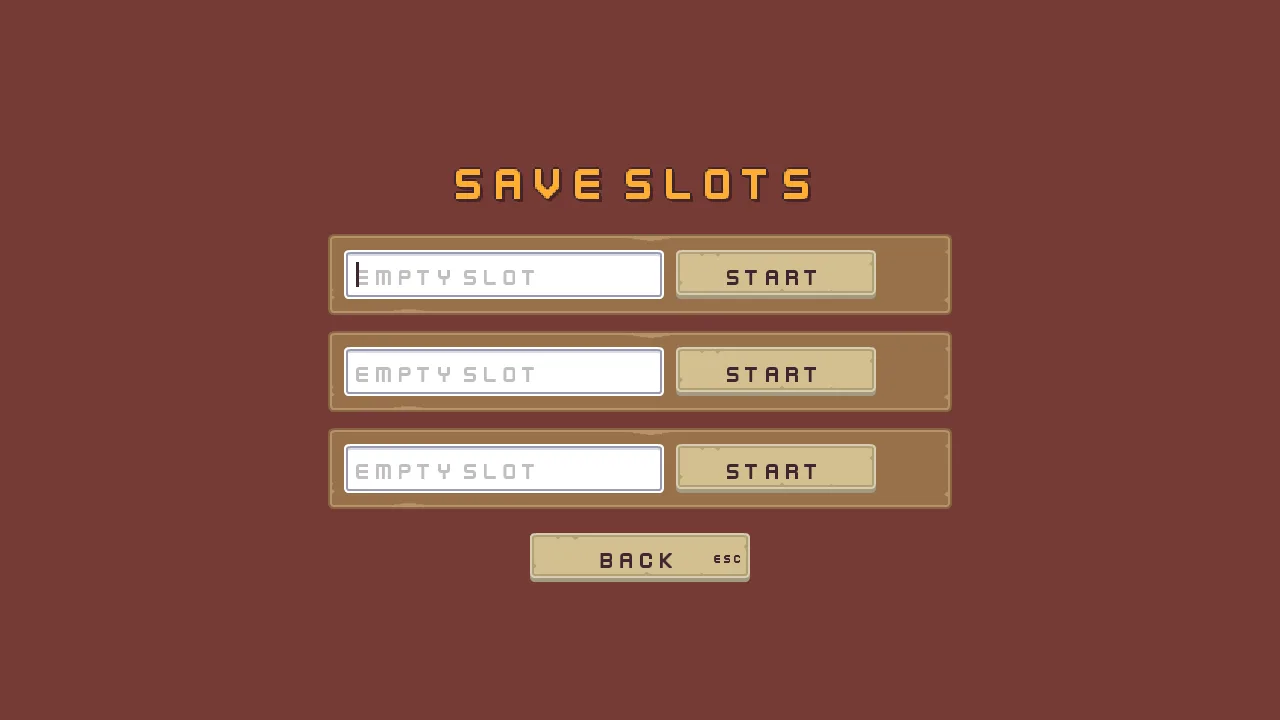
The screen is a scene of its own, scenes/slots.ron, built as the title was. A slot is a plate, and this section builds one: the plate, its name field, its check, and its Start and Delete buttons. The field’s own fields and its script come next, then the scripts that save, and then the plate is copied twice.
- Copy the two pictures below into
art, as before, and press Refresh in the bar of the Assets panel. They are a check mark and a cross, from the UI Pack: RPG Expansion.
The scene, its camera and its canvas
- Choose File → New scene. Click + Add node, choose Node and rename it
Slots. Press Ctrl+S and save the scene in thescenesfolder asslots.ron. - Select
Slots, click + Add node and choose Camera. Rename the nodecamera. Set Scaling to Letterbox, Extent to180, Width to320and Background to118,59,54, alpha255: the title’s and the settings screen’s brown. - Select
Slots, click + Add node and choose Canvas. Rename the nodeslots_canvasand set its Scale Mode to ShrinkToFit. - In its Theme, set Panel to
255,255,255, alpha255, Panel Accent to254,231,97, alpha255, Panel Danger to232,69,55, alpha255, Text to236,227,206, alpha255, Text Accent to254,174,52, alpha255, Text Danger to255,228,220, alpha255, Button to255,255,255, alpha255, Button Text to63,38,49, alpha255, Hover Lift to0.15and Press Sink to0.35: the title’s palette. - Press Add component and choose FocusRingComponent, and press Add component again and choose TextSize, chapter 6’s script. Their colours and sizes come as they are, and Apply theme writes the ring’s:
254,174,52, alpha255. The three sizes are the script’s own:1536,864, then1280,720, then1066,600.
Every colour on this screen, a Panel’s, a Text’s, a button’s and a field’s, comes from the Theme when you press Apply theme on slots_canvas once the screen is built. So you do not type them: the steps name the nodes, and the recipe at the end of the chapter lists what Apply theme writes.
The title and the plate
- Select
slots_canvas, click + Add node and choose Label. Rename the nodeslots_name. In its Rect, set Anchor Min and Anchor Max both to0.5,0.5, Offset Min to-360,-222, Offset Max to360,-142and Pivot to0.5,1. In its Text, set Text toSave slots, Scale to1.5, Align to Center, Outline to63,38,49, alpha255, Outline Width to2, Shadow to0,0,0, alpha153, Shadow Offset to3,3and Shadow Softness to0. Add ThemeRoleComponent and set its Role to Accent. - Select
slots_canvas, click + Add node and choose Stack. Rename the nodeslot_plates. In its Rect, set Anchor Min and Anchor Max both to0.5,0.5, Offset Min to-312,-126, Offset Max to312,149and Pivot to0.5,0. In its Stack, set Fit to Fixed, Spacing to16and Item to81. The three plates will be624wide and81high,16apart. - Select
slot_plates, click + Add node and choose Panel. Rename the nodeslot_1. Set its Texture topanel_brown.pngand Border to8. The Stack places it, so its Rect stays as it comes.
The plate’s parts
- Select
slot_1, click + Add node and choose Text Entry. Rename the nodeslot_1_name. In its Rect, set Anchor Min and Anchor Max both to0,0, Offset Min to16,16, Offset Max to336,65and Pivot to0,0: the preset centres its rect. In its Panel, set Texture toinput_rectangle.pngand Border to8. The preset brought a Focus too: it stays. - Select
slot_1_name, click + Add node and choose Panel. Rename the nodeslot_1_done. In its Rect, set Anchor Min and Anchor Max both to1,0, Offset Min to-40,9, Offset Max to-8,39and Pivot to1,0. Set its Panel’s Texture toiconCheck_bronze.png. It is the check, in the field’s top right corner, and it is a child of the field so that it moves with it. - Select
slot_1, click + Add node and choose Button. Rename the nodeslot_1_play. In its Rect, set Anchor Max to0,0, Offset Min to348,16, Offset Max to548,65and Pivot to0,0. In its Panel, set Texture tobuttonLong_beige.pngand Border to8. In its Text, set Text toStart, Scale to0.75and Align to Center. In its Button, set Action toslot_1_play, Hovered Texture tobuttonLong_grey.png, Pressed Texture tobuttonLong_beige_pressed.pngand Disabled Texture tobuttonLong_blue.png. - Press Add component and choose AudioSourceComponent. Untick Positional, and add one entry to Triggers: Name
click, Clipclick_001.ogg. Its Mode stays Shuffle, and its Pitch and Volume stay1to1. That is the sound a press of Start makes, as on the title. Press Add component again and choose FocusComponent: the links it holds are set later, in this chapter. - Select
slot_1, click + Add node and choose Button. Rename the nodeslot_1_delete. In its Rect, set Anchor Max to0,0, Offset Min to560,16, Offset Max to608,65and Pivot to0,0. In its Panel, set Texture tobuttonLong_beige.pngand Border to8. Press the bin beside the header of its Text to remove it: this button has a picture for a face, not a word. In its Button, set Action toslot_1_deleteand its three textures as Start’s. Press Add component, choose ThemeRoleComponent and set its Role to Danger. Press Add component again and choose FocusComponent. - Select
slot_1_delete, click + Add node and choose Panel. Rename the nodeslot_1_cross. In its Rect, set Anchor Max to0,0, Offset Min to8,8, Offset Max to40,38and Pivot to0,0. Set its Panel’s Texture toiconCross_brown.png. - Select
slot_1_deleteagain, click + Add node and choose Label. Rename the nodeslot_1_delete_label, and untick its Visible. In its Text, set Text toDelete, Scale to0.75and Align to Center.
A name field
A Text Entry is a single line of typing: a save name, a code, a search box. It shows a placeholder while it is empty, takes typing only while it has the focus, and reports its action when Enter is pressed in it. Text Entry lists its fields.
- Select
slot_1_name. In its Text Entry, set Action toslot_1_name, Placeholder toEmpty slot, Max Length to12, Padding to12, Scale to0.75and Caret Width to3. - Leave Text empty, Mode as Text and Disabled unticked: its script writes the first and the third, and chapter 16 defines all three. The six colours under Colors come from Apply theme.
- In Assets, press Create, choose New script, type
slot_nameand press Enter. In the Code tab, replace everything in it with the script below and press Ctrl+S. - Select
slot_1_name, press Add component and choose SlotName. Its Slot is1, the script’s own: leave it. Its In Use is hidden.
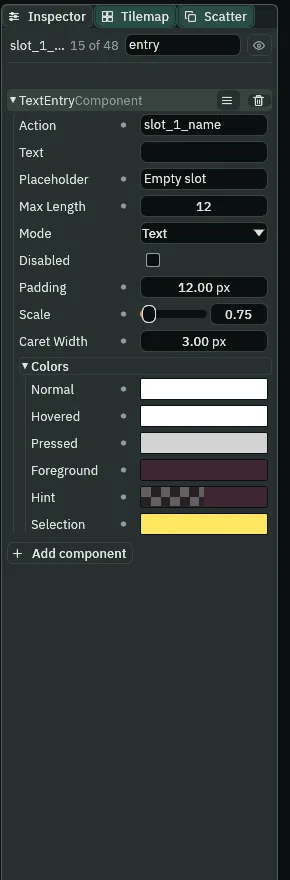
- Action
- A Text Entry’s name for a script. Enter in the field presses it, and
enteredreads the field’s text under it. A click on the field or a Shortcut presses nothing: the action means Enter. Every field has its own,slot_1_namehere, so a script can tell the three apart. - Placeholder
- What the Text Entry says while it is empty, drawn in its Hint colour and gone as soon as there is a letter.
Empty slot, a new field’sEnter textreworded. - Max Length
- How many characters the Text Entry takes;
0, as a new one has it, is no limit.12keeps a name short enough for the field’s box, which also holds the check at its right end. Typing past it does nothing. - Padding
- How far in from the Text Entry’s edges the text starts, in UI units.
12. A new field’s is6. - Scale
- How big the Text Entry’s typed text is, as a Text’s Scale is: a share of the face’s
32pixels.0.75, the size of the plate’s buttons. A new field’s is2. - Caret Width
- How wide the Text Entry’s caret bar is, in UI units:
3. It is drawn in the Foreground colour and does not blink. A new field’s is2. - Normal, Hovered, Pressed
- The Text Entry’s tints, multiplied into its picture: at rest, under the pointer or with the focus, and while held. Apply theme writes them from the Theme’s Button:
255,255,255, alpha255at rest; the same lifted Hover Lift toward white, which is white again; and sunk Press Sink toward black,211,211,211, alpha255. - Foreground
- The colour of what is typed, and of the caret. Apply theme writes the Theme’s Button Text:
63,38,49, alpha255, a dark plum that reads on the white field. - Hint
- The colour of the placeholder: the Foreground at half strength,
63,38,49, alpha128, so that it reads as a prompt, not as a name somebody has to delete. - Selection
- The colour behind selected text. Apply theme writes the Theme’s Panel Accent:
254,231,97, alpha255, a yellow that shows against the field’s white.
/// A save slot's name field. While the slot is in use it shows the name the
/// slot was started under, and takes no typing, so the name stays the slot's
/// until Delete frees it; then it empties for a new name.
component SlotName {
    /// The slot it names: 1, 2 or 3.
    slot: f32 = 1.0,
    /// Whether it showed the slot's name on the last step, so that it empties
    /// once, as the slot is freed, and not on every step a new name is typed.
    #[hidden]
    in_use: bool = false,

    fn loop() {
        let name = saved_text("slot" + text(slot) + ".name", "");
        if name != "" {
            set_text("TextEntryComponent", "text", name);
            set_flag("TextEntryComponent", "disabled", true);
            in_use = true;
        } else if in_use {
            set_text("TextEntryComponent", "text", "");
            set_flag("TextEntryComponent", "disabled", false);
            in_use = false;
        }
    }
}
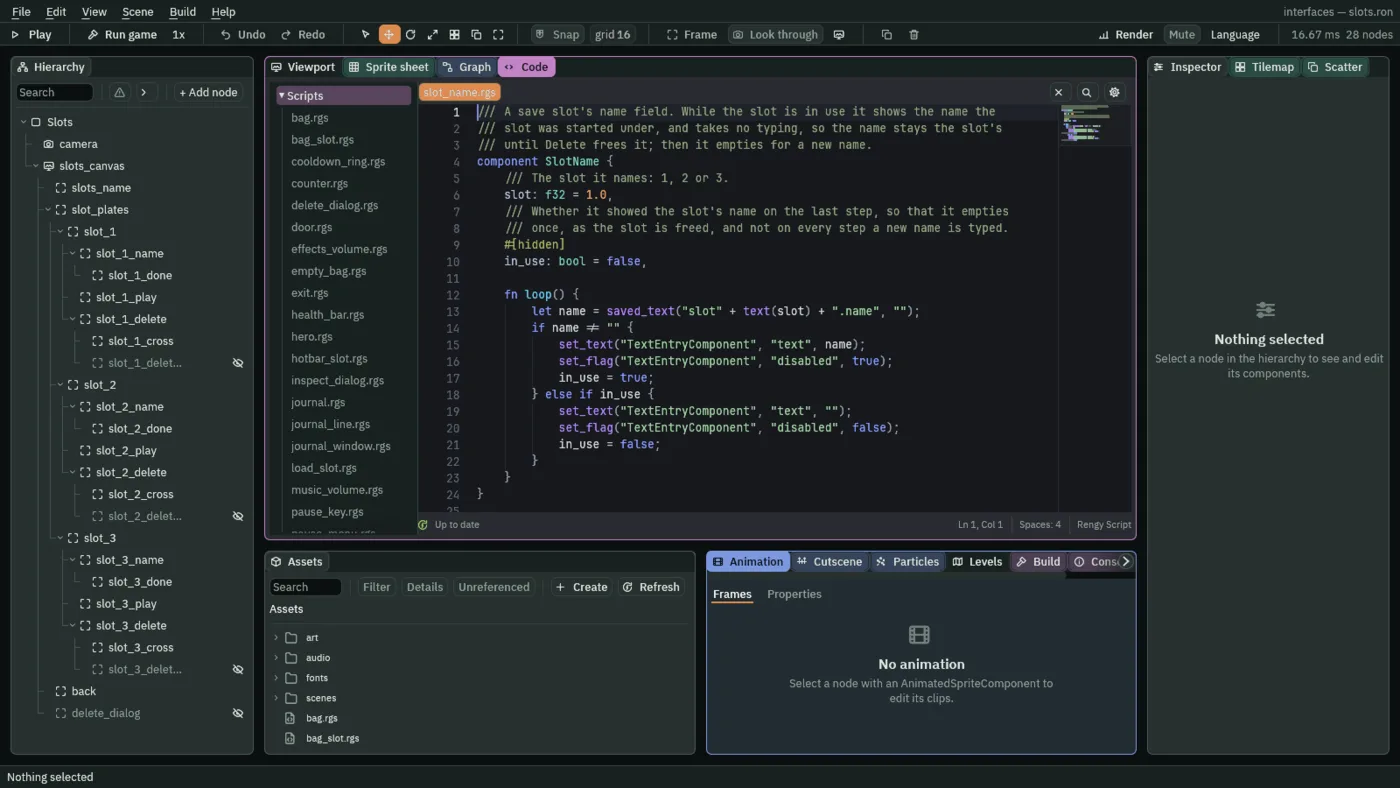
The script reads the slot’s saved name, slot1.name for the first, with saved_text, which answers a text kept in the game’s save file, or its second argument when nothing is kept. A slot with a name is in use: the script writes the name into the field’s Text and ticks its Disabled, so the name stays the slot’s until Delete frees it. A slot without one is free: the field is empty, and in_use makes it empty exactly once, as the slot is freed, so a new name being typed is never wiped.
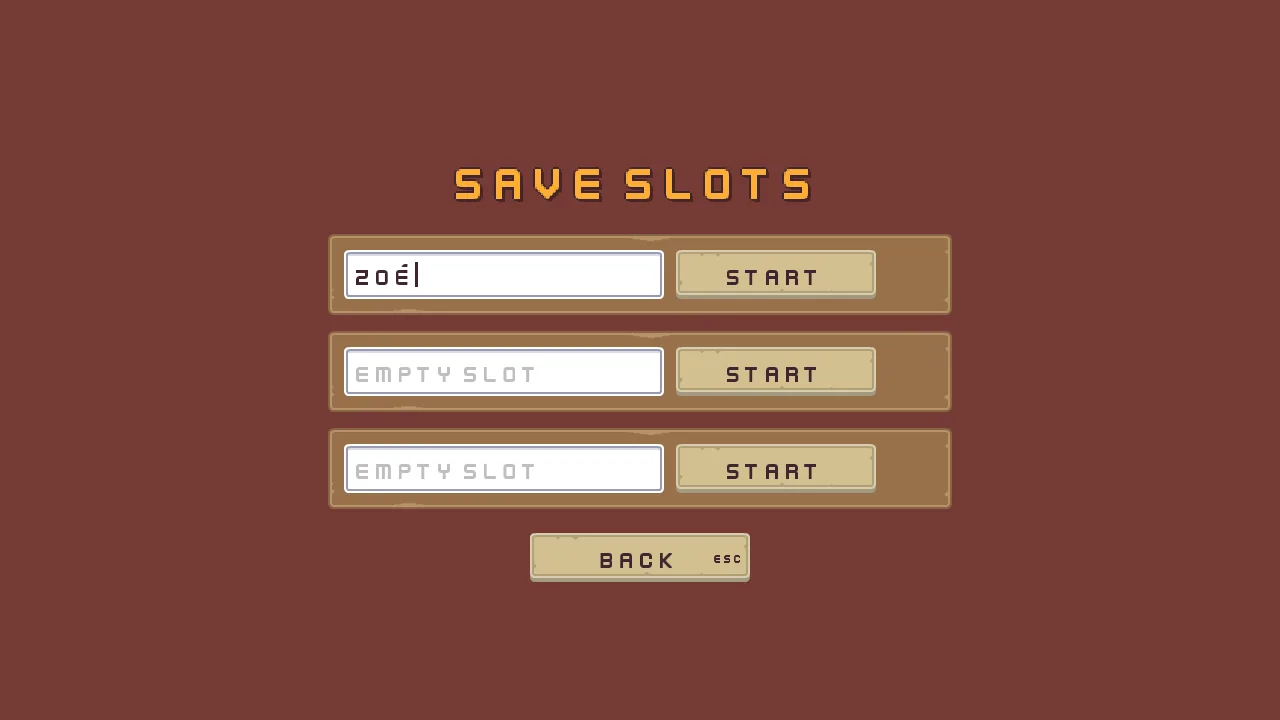
Click the field, or walk the ring to it, and type. Backspace and Delete take letters away, Left, Right, Home and End move the caret, Ctrl+A selects it all and Shift extends a selection; Ctrl moves and deletes by whole words. Up, Down and Tab still move the ring. A name typed in the editor’s Play or in the exported game is the same: both draw the caret and take the accents.
Saved under a slot
A game keeps its saves in one file, and a slot is a key prefix in it: slot1. for the first, slot2. and slot3. for the others. slot1.name is the first slot’s name; slot1.health, slot1.coins and the rest are what the shrine saves of its run. A slot with a name is in use. The scripts below read and write those keys with save_text, saved_text, forget and entered.
Start and Continue
- Make
load_slotthe same way: Create, New script,load_slot, Enter, paste the script below and press Ctrl+S. Selectslot_1_play, press Add component and choose LoadSlot. Its Slot is1, and its Start Health is the script’s own10: leave it. - Make
shown_by_slotthe same way. Selectslot_1_done, add ShownBySlot, and tick its When Done. Selectslot_1_deleteand add ShownBySlot too: its Slot is1, and When Done stays unticked.
/// A save slot's Start or Continue button, which opens the delve on the slot's
/// run. A slot in use carries on the run the shrine last saved in it. A free
/// slot starts a new game under the name typed in its field, by this button or
/// by Enter in the field, and starts nothing while the field is empty. The
/// game keeps each slot's saves under its own prefix: slot1. for the first,
/// slot2. and slot3. for the others.
component LoadSlot {
    /// The slot it opens: 1, 2 or 3.
    slot: f32 = 1.0,
    /// The health a new game starts with.
    start_health: f32 = 10.0,

    fn loop() {
        let saves = "slot" + text(slot) + ".";
        // Its slot's name field reports under slot_1_name, slot_2_name or
        // slot_3_name, and this button under slot_1_play and so on.
        let field = "slot_" + text(slot) + "_name";
        let name = saved_text(saves + "name", "");
        if name == "" {
            set_text("TextComponent", "text", "Start");
        } else {
            set_text("TextComponent", "text", "Continue");
        }

        // A click on this button, or Enter while it holds the focus,
        // presses its action, and Enter in the name field presses the
        // field's, each on the game's next step. A free slot starts only once
        // a name is typed in its field.
        let typed = entered(field);
        let asked = pressed("slot_" + text(slot) + "_play") || pressed(field);
        if asked && (name != "" || typed != "") {
            if name == "" {
                // A new game: the slot is the name's from now on.
                save_text(saves + "name", typed);
            }
            // The slot's run, kept where the delve reads it. What the shrine
            // never saved reads as a new game's, and a free slot holds no
            // saves at all, since Delete forgets them: so a new game, or a
            // run that never rested at the shrine, starts at full health with
            // nothing carried, nothing in the journal, every pickup back in
            // the room and the door shut.
            keep_number("health", saved_number(saves + "health", start_health));
            keep_number("potions", saved_number(saves + "potions", 0.0));
            keep_number("elixirs", saved_number(saves + "elixirs", 0.0));
            keep_number("keys", saved_number(saves + "keys", 0.0));
            keep_number("gems", saved_number(saves + "gems", 0.0));
            keep_number("coins", saved_number(saves + "coins", 0.0));
            keep_number("haste", saved_number(saves + "haste", 0.0));
            for i in 1..5 {
                let kept = "hotbar_" + text(i);
                keep_number(kept, saved_number(saves + kept, 0.0));
            }
            for i in 1..17 {
                let kept = "bag_" + text(i);
                keep_number(kept, saved_number(saves + kept, 0.0));
            }
            for i in 1..21 {
                let kept = "journal_" + text(i);
                keep_number(kept, saved_number(saves + kept, 0.0));
            }
            keep_number("journal_count", saved_number(saves + "journal_count", 0.0));
            // And the room as the run left it: each pickup taken, which stays
            // gone, and the door, which opens itself if it was opened.
            for i in 1..13 {
                let kept = "taken_" + text(i);
                keep_number(kept, saved_number(saves + kept, 0.0));
            }
            keep_number("door_open", saved_number(saves + "door_open", 0.0));
            // No rest taken at the shrine yet, and nothing being inspected.
            keep_number("rests", 0.0);
            keep_number("inspect", 0.0);
            // The slot the run is played in, where the shrine saves it and
            // the way out marks it done.
            keep_number("slot", slot);
            // Loaded here, before the delve opens, so everything in it starts
            // on the slot's run: the hero on its health, and the journal's
            // keeper taking what the journal holds as already written.
            play_sound("click");
            change_scene("delve");
        }
    }
}
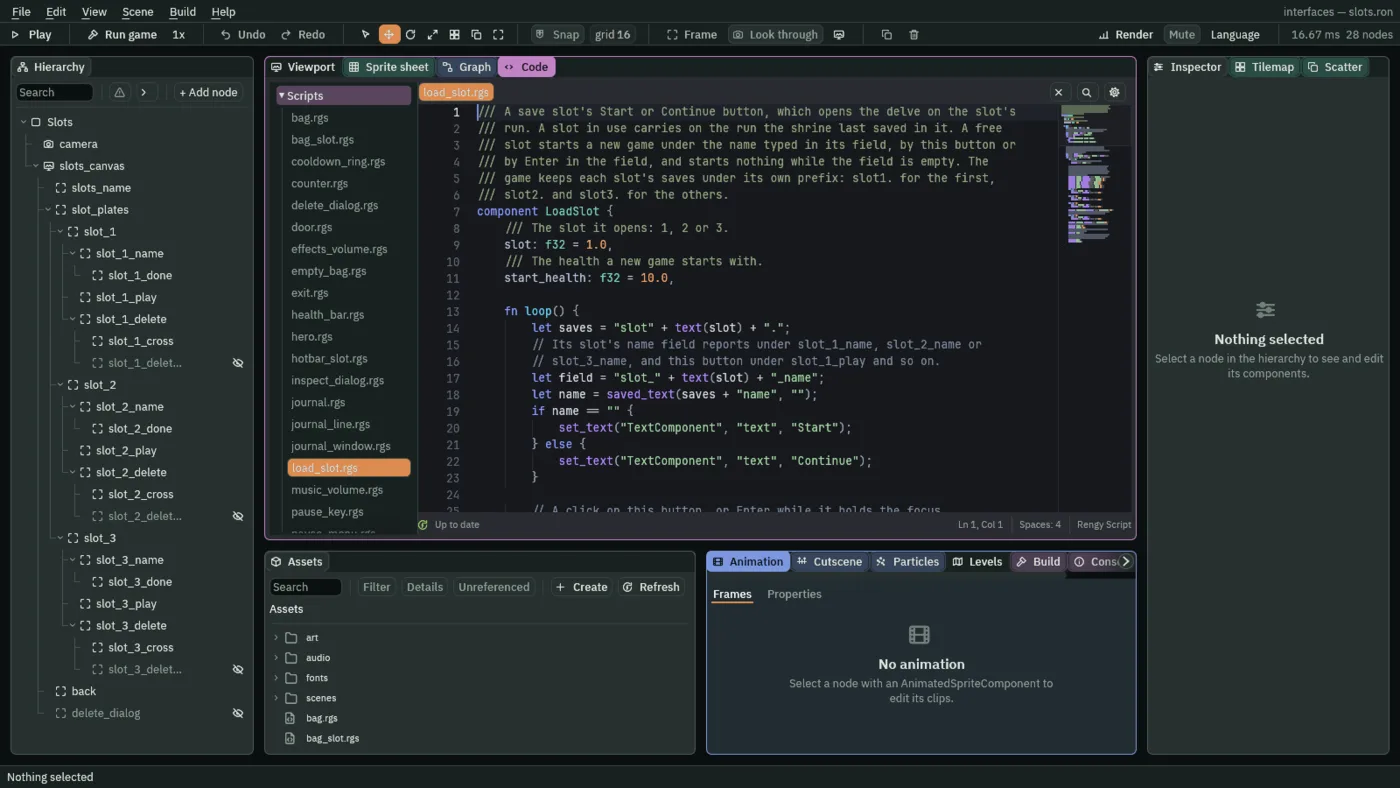
The button’s word is the slot’s state: Start while the slot has no name, Continue once it has one. A free slot starts only once a name is typed, by this button or by Enter in the field, and the button does nothing while the field is empty. A new game saves the typed name, slot1.name, and then loads the run the same way a slot in use does: every kept number from what the slot saved, or, where nothing was ever saved, what a new game starts with. That is why one path serves both, and why the slot’s health starts at 10: Start Health is the health a new game opens with.
The script uses three of the game’s answers, for the first slot. pressed("slot_1_play") is true on the step a click on Start is let go, or Enter goes down while it has the focus. pressed("slot_1_name") is true on the step Enter goes down in the field. entered("slot_1_name") is the field’s text, read every frame, whether or not anything was pressed. The delve then reads what the script kept, before it opens.
/// Shows this node only while its save slot has something to show: the Delete
/// button while the slot is in use, and the check once the slot's run has
/// reached the way out.
component ShownBySlot {
    /// The slot it belongs to: 1, 2 or 3.
    slot: f32 = 1.0,
    /// Whether it waits for the run to be done, as the check does, rather than
    /// only for the slot to be in use, as the Delete button does.
    when_done: bool = false,

    fn loop() {
        let saves = "slot" + text(slot) + ".";
        // A slot is in use while it has a name, and its run is done once the
        // way out has saved done as 1.
        let shown = saved_text(saves + "name", "") != "";
        if when_done {
            shown = saved_number(saves + "done", 0.0) == 1.0;
        }
        if shown {
            show();
        } else {
            hide();
        }
    }
}
ShownBySlot shows its node only while its slot has something to show. A slot is in use while it has a name, and its run is done once the stairs have saved slot1.done as 1. So the Delete button shows while the slot is in use, and the check shows once the run is done: When Done says which of the two waits for what.
The other two slots
- Select
slot_1and press Ctrl+D. The copy comes selected, namedslot_1 copy, with everything under it. Rename the copyslot_2, and then each node under it:slot_2_name,slot_2_done,slot_2_play,slot_2_delete,slot_2_crossandslot_2_delete_label. - Select
slot_1again, press Ctrl+D, and rename the new copy and the nodes under it forslot_3in the same way. - Set what is each slot’s own, from the table below, on the nodes of
slot_2andslot_3.
| Slot | Name field | Start | Delete |
|---|---|---|---|
slot_1 | Action slot_1_name, Slot 1 | Action slot_1_play, Slot 1 | Action slot_1_delete, Slot 1 |
slot_2 | Action slot_2_name, Slot 2 | Action slot_2_play, Slot 2 | Action slot_2_delete, Slot 2 |
slot_3 | Action slot_3_name, Slot 3 | Action slot_3_play, Slot 3 | Action slot_3_delete, Slot 3 |
Each slot’s check, slot_2_done and slot_3_done, has its own Slot too, 2 and 3, with When Done ticked. Every other field is as the first slot’s.
Back, and the question
- Select
slots_canvas, click + Add node and choose Menu Button. Rename the nodeback. In its Rect, set Anchor Min and Anchor Max both to0.5,0.5, Offset Min to-110,173, Offset Max to110,222and Pivot to0.5,0. In its Panel, set Texture tobuttonLong_beige.pngand Border to8. In its Text, set Text toBack, Scale to0.75and Align to Center. In its Button, set Action tobackand its three textures as Start’s. In its Shortcut, set Action toui_cancel: Esc presses Back, and the button draws ESC at its right edge. Press Add component and choose FocusComponent. - Add an AudioSourceComponent to
back: untick Positional and add one Triggers entry, Nameback, Clipback_001.ogg. - Make
slots_menuthe same way, with the script below, and add SlotsMenu toback.
/// The save slots' way back: Back goes to the title. Each slot starts, carries
/// on and deletes its own game.
component SlotsMenu {
    fn loop() {
        // A click on Back, Enter while it holds the focus, or Escape through
        // its Shortcut presses back on the game's next step. Escape answers
        // the open question first, and goes back on the next press.
        if pressed("back") {
            // A sound asked for on the step that changes scene plays on after
            // it.
            play_sound("back");
            change_scene("title");
        }
    }
}
pressed("back") is true on the step a click on Back is let go, Enter goes down while it has the focus, or Esc goes down through its Shortcut. A question that is open answers Esc first, as the next section shows, and Back goes on the next press.
- Select
slots_canvas, click + Add node and choose Modal. Rename the nodedelete_dialogand untick its Visible. In its Rect, set Anchor Min and Anchor Max both to0.5,0.5, Offset Min to-320,-100and Offset Max to320,100. In its Panel, set Texture topanel_beige.pngand Border to8. - In its Modal, set Title to
Delete this save?and Body toIts name and progress are gone for good.. Set Buttons to two answers: the first with LabelKeepand Actionkeep_slot, the second with LabelDeleteand Actiondelete_slot, both with Disabled unticked. Set Cancel Action tokeep_slot, Scrim to63,38,49, alpha115, Button Texture tobuttonLong_beige.png, Button Hovered Texture tobuttonLong_grey.png, Button Pressed Texture tobuttonLong_beige_pressed.png, Button Border to8, Padding to20, Scale to0.625, Title Height to36, Button Height to49and Button Gap to16. - Make
delete_dialogthe same way, with the script below, and add DeleteDialog to the dialog. Its Asking is hidden, and0while nobody asks.
/// The question a save slot's Delete asks: Delete forgets everything the slot
/// keeps, its name and its run, and Keep, or Escape, keeps it.
component DeleteDialog {
    /// The slot whose Delete asked: 1, 2 or 3, or 0 while nobody asks.
    #[hidden]
    asking: f32 = 0.0,

    fn loop() {
        // A click on a slot's Delete, or Enter while it holds the focus,
        // presses slot_1_delete, slot_2_delete or slot_3_delete on the game's
        // next step.
        for i in 1..4 {
            if pressed("slot_" + text(i) + "_delete") {
                asking = i;
                show();
            }
        }
        // A click on an answer, or Enter on the one the arrows chose, presses
        // its action; Escape presses the Cancel Action, keep_slot.
        if pressed("keep_slot") {
            asking = 0.0;
            hide();
        }
        if pressed("delete_slot") {
            // Every key the slot keeps, forgotten: the name, which frees the
            // slot, what the way out marked, and what the shrine saved of the
            // run and the room.
            let saves = "slot" + text(asking) + ".";
            forget(saves + "name");
            forget(saves + "done");
            forget(saves + "health");
            forget(saves + "potions");
            forget(saves + "elixirs");
            forget(saves + "keys");
            forget(saves + "gems");
            forget(saves + "coins");
            forget(saves + "haste");
            for i in 1..5 {
                forget(saves + "hotbar_" + text(i));
            }
            for i in 1..17 {
                forget(saves + "bag_" + text(i));
            }
            for i in 1..21 {
                forget(saves + "journal_" + text(i));
            }
            forget(saves + "journal_count");
            for i in 1..13 {
                forget(saves + "taken_" + text(i));
            }
            forget(saves + "door_open");
            asking = 0.0;
            hide();
        }
    }
}
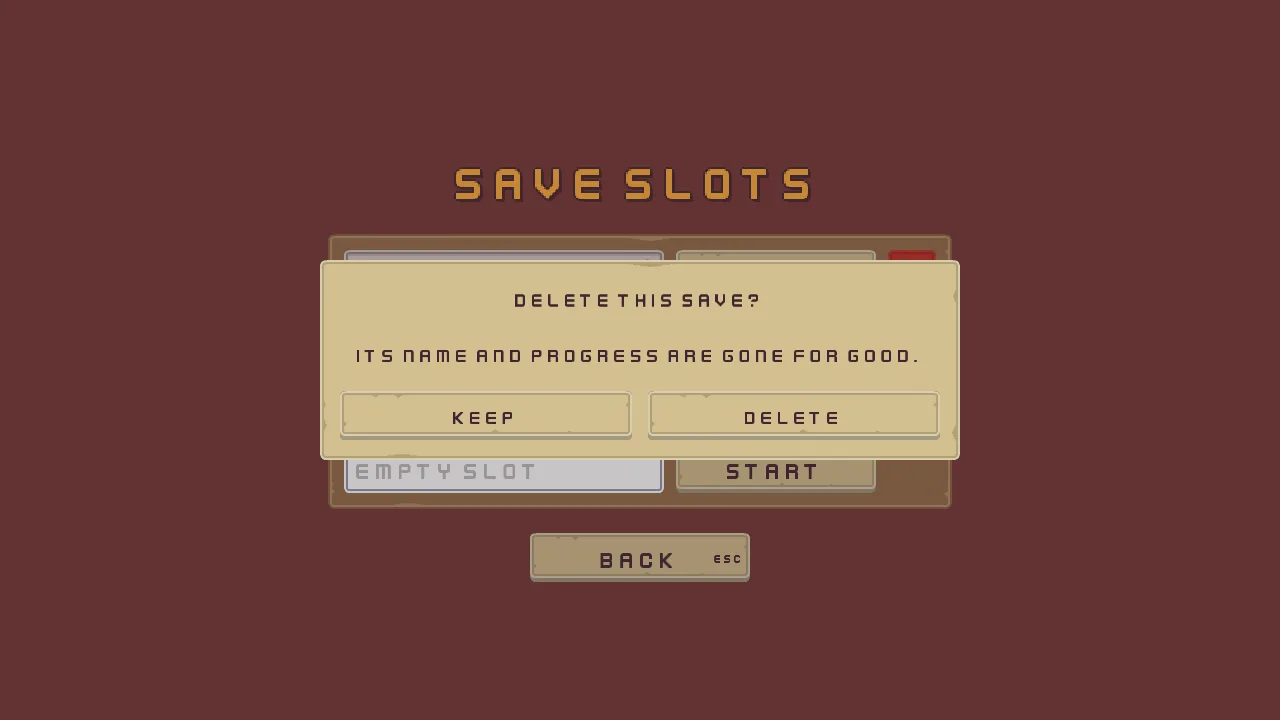
pressed("slot_1_delete") is true on the step a click on the slot’s Delete is let go, or Enter goes down while it has the focus: the script remembers which slot asked and shows the question. pressed("keep_slot") and pressed("delete_slot") are true on the step a click on an answer is let go, or Enter goes down on the one the arrows chose, and Esc presses the Cancel Action, keep_slot, so the safe answer is also the way out. Delete forgets every key the slot keeps, its name and its run, and the slot is free again.
A forget takes one key. There is no “forget everything that starts with slot1.”, so the script lists them: the name, the mark the way out left, the health and the carried numbers, and, in loops, the hotbar’s four slots, the bag’s sixteen and the journal’s twenty lines, then the twelve pickups the room has lost and the door.
Walking between the slots
- Set the Up and Down of the Focus on the three controls of each slot, and on Back, from the table below. They are names, so every node they name must exist first.
- Select
slots_canvasand press Apply theme. It writes the Theme’s colours into every control on the screen, by role: the Panels, the words, the buttons’ three tints, the fields’ six colours, the dialog’s and the ring’s.
| Node | Up | Down |
|---|---|---|
slot_1_name, slot_1_play, slot_1_delete | back | slot_2_play |
slot_2_name, slot_2_play, slot_2_delete | slot_1_play | slot_3_play |
slot_3_name, slot_3_play, slot_3_delete | slot_2_play | back |
back | slot_3_play | slot_1_play |
The ring goes from plate to plate through Start or Continue, the one control every slot always offers. A free slot has no Delete, and a slot in use has a locked field that refuses the focus, so a link to either would point at a control that is hidden or will not take it. Left and right along a plate are right by their places, and a field keeps them for its caret anyway.
The title’s Play
- Open
scenes/title.ron. Selectnew_gameand rename itplay. In its Text, set Text toPlay. In its Button, set Action toplay. - Select
settings. In its Focus, set Up and Previous toplay. Selectquitand set its Down and Next toplay.playkeeps its own links, toquitandsettings. - In the Code tab’s Scripts list, click
title_menu.rgs, replace everything in it with the script below and press Ctrl+S. Press Ctrl+S for the scene too.
/// The title's menu: Play opens the save slots, where a game is started or
/// carried on, Settings opens the settings screen, and Quit closes the game.
component TitleMenu {
    fn loop() {
        // A button pressed by a click, by Enter while it holds the focus, or
        // by its Shortcut presses its action on the game's next step.
        if pressed("play") {
            // A sound asked for on the step that changes scene plays on after
            // it.
            play_sound("click");
            change_scene("slots");
        }
        if pressed("settings") {
            play_sound("click");
            change_scene("settings");
        }
        if pressed("quit") {
            play_sound("back");
            // The game closes at the end of the step that asks, which would
            // cut the sound off, so it waits a tenth of a second first.
            await wait(0.1);
            quit();
        }
    }
}
The menu no longer starts a run. Play opens the slots, and the slot’s Start or Continue starts it, so the eight lines that emptied the journal and put the numbers back, and the field that held the starting health, have moved into load_slot.rgs. TitleMenu keeps no fields.
The room keeps what it lost
A slot saves the hero’s numbers, and a game carried on has to give the room back as it was, with each pickup the hero took still gone and the door still open. So each pickup is told which one it is, and the door, the way out, the shrine and the pickups themselves change a little.
- Open
scenes/delve.ron. Inpickups, select each pickup and set the Index of its Pickup from the table below.
| Pickup | Index |
|---|---|
potion_1 | 1 |
potion_2 | 2 |
elixir | 3 |
key | 4 |
gem_green | 5 |
gem_red | 6 |
gem_blue | 7 |
coin_1 | 8 |
coin_2 | 9 |
coin_3 | 10 |
coin_4 | 11 |
coin_5 | 12 |
- In the Scripts list, replace
pickup.rgs,door.rgs,exit.rgsandshrine.rgswith the scripts below, and the comment abovecomponent QuitDialog {inquit_dialog.rgswith the four lines after them, pressing Ctrl+S for each.
/// Something lying in the room that the hero takes by walking into it. It adds
/// `amount` to the number kept under `kind`, and is gone. A potion, the elixir
/// and the key each need a slot to go in, so one stays on the floor while the
/// satchel has no room for it. Once taken it stays gone for the rest of the
/// run, and from a slot's Continue too, once the shrine has saved it.
component Pickup : Area {
    /// The kept number it counts into: potions, elixirs, keys, gems or coins.
    kind: String = "gems",
    /// How much it adds to that number.
    amount: f32 = 1.0,
    /// The item a slot shows for it: 1 a potion, 2 the elixir, 3 a key, or 0
    /// for what is only counted, as gems and coins are.
    item: f32 = 0.0,
    /// Which of the room's pickups it is, from 1 to 12, each its own: the
    /// game keeps it taken as taken_1 to taken_12.
    index: f32 = 0.0,

    fn on_create() {
        // Taken already, earlier in this run or in the run a slot gave back:
        // it is not in the room.
        if kept_number("taken_" + text(index), 0.0) == 1.0 {
            destroy_self();
        }
    }

    fn on_enter(other: NodeId) {
        // The hero's node is in the group "hero".
        if in_group(other, "hero") {
            // The room the satchel keeps: a key goes only in the bag, a potion
            // or the elixir in the hotbar or the bag.
            let room = kept_number("room_bag", 0.0);
            if item == 1.0 || item == 2.0 {
                room += kept_number("room_hotbar", 0.0);
            }
            if item == 0.0 || room >= amount {
                add_number(kind, amount);
                // Kept as taken, 1, where the shrine saves it.
                keep_number("taken_" + text(index), 1.0);
                destroy_self();
            }
        }
    }
}
/// A locked door. The hero opens it by walking into it with a key, which the
/// door keeps: it shows itself open, no longer stands in the way, and keeps
/// door_open, so that the journal can say it opened and the shrine can save
/// it. A door opened earlier in the run, or in the run a slot gave back, is
/// open as the room opens.
component Door : Area {
    /// The piece of the sheet it shows once open.
    open_region: String = "door_open",
    /// Whether it has been opened.
    #[hidden]
    open: bool = false,

    fn on_create() {
        // Opened already: open as the key left it, and it takes no key again.
        if kept_number("door_open", 0.0) == 1.0 {
            set_text("SpriteComponent", "region_name", open_region);
            set_flag("ColliderComponent", "solid", false);
            open = true;
        }
    }

    fn on_enter(other: NodeId) {
        if in_group(other, "hero") && !open && kept_number("keys", 0.0) >= 1.0 {
            add_number("keys", -1.0);
            set_text("SpriteComponent", "region_name", open_region);
            set_flag("ColliderComponent", "solid", false);
            open = true;
            // Kept as the counts are, where the journal's keeper reads it: 1
            // once the door is open.
            keep_number("door_open", 1.0);
        }
    }
}
/// The way out, down the stairs. The hero who steps onto them leaves the delve
/// for the title, and the slot the run is played in is marked done.
component Exit : Area {
    fn on_enter(other: NodeId) {
        if in_group(other, "hero") {
            // 0 for a delve opened on its own, which no slot holds.
            let slot = kept_number("slot", 0.0);
            if slot > 0.0 {
                // The save slots show a check on a slot whose run is done.
                save_number("slot" + text(slot) + ".done", 1.0);
            }
            change_scene("title");
        }
    }
}
/// The shrine, a gargoyle over a stone basin. The hero who steps up to it
/// rests there, the journal says so, and the run is saved in the slot it is
/// played in, for the slot's Continue to give back.
component Shrine : Area {
    fn on_enter(other: NodeId) {
        if in_group(other, "hero") {
            // Counted where the journal's keeper reads it: one more rest each
            // time the hero steps up to the shrine.
            add_number("rests", 1.0);
            // The slot the run is played in, which its Start or Continue
            // keeps: 0 for a delve opened on its own, which no slot holds,
            // so nothing is saved.
            let slot = kept_number("slot", 0.0);
            if slot > 0.0 {
                // The keeper writes the rest down on a step soon after this
                // one, so the save waits a moment to hold that line too.
                await wait(0.25);
                let saves = "slot" + text(slot) + ".";
                save_number(saves + "health", kept_number("health", 0.0));
                save_number(saves + "potions", kept_number("potions", 0.0));
                save_number(saves + "elixirs", kept_number("elixirs", 0.0));
                save_number(saves + "keys", kept_number("keys", 0.0));
                save_number(saves + "gems", kept_number("gems", 0.0));
                save_number(saves + "coins", kept_number("coins", 0.0));
                save_number(saves + "haste", kept_number("haste", 0.0));
                for i in 1..5 {
                    let kept = "hotbar_" + text(i);
                    save_number(saves + kept, kept_number(kept, 0.0));
                }
                for i in 1..17 {
                    let kept = "bag_" + text(i);
                    save_number(saves + kept, kept_number(kept, 0.0));
                }
                for i in 1..21 {
                    let kept = "journal_" + text(i);
                    save_number(saves + kept, kept_number(kept, 0.0));
                }
                save_number(saves + "journal_count", kept_number("journal_count", 0.0));
                // And what the room has lost: each pickup taken, and the door
                // if it is open.
                for i in 1..13 {
                    let kept = "taken_" + text(i);
                    save_number(saves + kept, kept_number(kept, 0.0));
                }
                save_number(saves + "door_open", kept_number("door_open", 0.0));
            }
        }
    }
}
/// The question Quit to title asks before the delve is left: Leave goes back
/// to the title, and Stay, or Escape, stays in the paused game. The run is
/// saved only at the shrine, so leaving loses what happened since the hero
/// last rested there.
Each pickup keeps itself taken, as taken_ and its Index, in the numbers the game keeps, and is gone as the room opens if it was taken already. The door keeps door_open, and opens itself as the room opens if it is 1. The stairs mark the slot the run is played in as done, with slot1.done, which is what shows the check. quit_dialog.rgs changes only its comment: leaving now loses what happened since the hero last rested at the shrine, not the whole run, and its old last sentence was no longer true.
The shrine is where a run is saved. It rests the hero, as the journal says, and then saves every number the run holds under the slot’s prefix: health, the carried items, the hotbar, the bag, the journal and what the room has lost. A delve opened on its own, with no slot, saves nothing.
The slots screen, the field and the scripts’ fields
The slots screen
| Node | Component | Field | Value |
|---|---|---|---|
camera | Camera | Scaling | Letterbox |
| Extent | 180 | ||
| Width | 320 | ||
| Background | 118, 59, 54, alpha 255 | ||
slots_canvas | Canvas | Scale Mode | ShrinkToFit |
| Theme | Panel | 255, 255, 255, alpha 255 | |
| Panel Accent | 254, 231, 97, alpha 255 | ||
| Panel Danger | 232, 69, 55, alpha 255 | ||
| Text | 236, 227, 206, alpha 255 | ||
| Text Accent | 254, 174, 52, alpha 255 | ||
| Text Danger | 255, 228, 220, alpha 255 | ||
| Button | 255, 255, 255, alpha 255 | ||
| Button Text | 63, 38, 49, alpha 255 | ||
| Hover Lift | 0.15 | ||
| Press Sink | 0.35 | ||
| Focus Ring | Color | 254, 174, 52, alpha 255, written by Apply theme | |
| TextSize | Small | 1536, 864 | |
| Normal | 1280, 720 | ||
| Large | 1066, 600 | ||
slots_name | Rect | Anchor Min | 0.5, 0.5 |
| Anchor Max | 0.5, 0.5 | ||
| Offset Min | -360, -222 | ||
| Offset Max | 360, -142 | ||
| Pivot | 0.5, 1 | ||
| Text | Text | Save slots | |
| Scale | 1.5 | ||
| Color | 254, 174, 52, alpha 255, written by Apply theme | ||
| Align | Center | ||
| Outline | 63, 38, 49, alpha 255 | ||
| Outline Width | 2 | ||
| Shadow | 0, 0, 0, alpha 153 | ||
| Shadow Offset | 3, 3 | ||
| Shadow Softness | 0 | ||
| Theme Role | Role | Accent | |
slot_plates | Rect | Anchor Min | 0.5, 0.5 |
| Anchor Max | 0.5, 0.5 | ||
| Offset Min | -312, -126 | ||
| Offset Max | 312, 149 | ||
| Pivot | 0.5, 0 | ||
| Stack | Fit | Fixed | |
| Spacing | 16 | ||
| Item | 81 | ||
slot_1, slot_2 and slot_3 | Panel | Color | 255, 255, 255, alpha 255, written by Apply theme |
| Texture | panel_brown.png | ||
| Border | 8 | ||
back | Rect | Anchor Min | 0.5, 0.5 |
| Anchor Max | 0.5, 0.5 | ||
| Offset Min | -110, 173 | ||
| Offset Max | 110, 222 | ||
| Pivot | 0.5, 0 | ||
| Panel | Color | 255, 255, 255, alpha 255, written by Apply theme | |
| Texture | buttonLong_beige.png | ||
| Border | 8 | ||
| Text | Text | Back | |
| Scale | 0.75 | ||
| Color | 63, 38, 49, alpha 255, written by Apply theme | ||
| Align | Center | ||
| Button | Action | back | |
| Normal | 255, 255, 255, alpha 255, written by Apply theme | ||
| Hovered | 255, 255, 255, alpha 255, written by Apply theme | ||
| Pressed | 211, 211, 211, alpha 255, written by Apply theme | ||
| Hovered Texture | buttonLong_grey.png | ||
| Pressed Texture | buttonLong_beige_pressed.png | ||
| Disabled Texture | buttonLong_blue.png | ||
| Shortcut | Action | ui_cancel | |
| Audio Source | Positional | unticked | |
| Triggers | one entry: Name back, Clip back_001.ogg, Mode Shuffle, Pitch 1 to 1, Volume 1 to 1 | ||
| Focus | Up | slot_3_play | |
| Down | slot_1_play | ||
delete_dialog | Node | Visible | unticked |
| Rect | Anchor Min | 0.5, 0.5 | |
| Anchor Max | 0.5, 0.5 | ||
| Offset Min | -320, -100 | ||
| Offset Max | 320, 100 | ||
| Panel | Color | 255, 255, 255, alpha 255, written by Apply theme | |
| Texture | panel_beige.png | ||
| Border | 8 | ||
| Modal | Title | Delete this save? | |
| Body | Its name and progress are gone for good. | ||
| Buttons | two answers: Label Keep, Action keep_slot; Label Delete, Action delete_slot; Disabled unticked on both | ||
| Cancel Action | keep_slot | ||
| Scrim | 63, 38, 49, alpha 115 | ||
| Normal | 255, 255, 255, alpha 255, written by Apply theme | ||
| Hovered | 255, 255, 255, alpha 255, written by Apply theme | ||
| Pressed | 211, 211, 211, alpha 255, written by Apply theme | ||
| Foreground | 63, 38, 49, alpha 255, written by Apply theme | ||
| Button Texture | buttonLong_beige.png | ||
| Button Hovered Texture | buttonLong_grey.png | ||
| Button Pressed Texture | buttonLong_beige_pressed.png | ||
| Button Border | 8 | ||
| Padding | 20 | ||
| Scale | 0.625 | ||
| Title Height | 36 | ||
| Button Height | 49 | ||
| Button Gap | 16 |
A name field
| Node | Component | Field | Value |
|---|---|---|---|
slot_1_name, slot_2_name and slot_3_name | Rect | Anchor Min | 0, 0 |
| Anchor Max | 0, 0 | ||
| Offset Min | 16, 16 | ||
| Offset Max | 336, 65 | ||
| Pivot | 0, 0 | ||
| Panel | Color | 255, 255, 255, alpha 255, written by Apply theme | |
| Texture | input_rectangle.png | ||
| Border | 8 | ||
| Text Entry | Action | slot_1_name, slot_2_name and slot_3_name | |
| Placeholder | Empty slot | ||
| Max Length | 12 | ||
| Padding | 12 | ||
| Scale | 0.75 | ||
| Caret Width | 3 | ||
| Normal | 255, 255, 255, alpha 255, written by Apply theme | ||
| Hovered | 255, 255, 255, alpha 255, written by Apply theme | ||
| Pressed | 211, 211, 211, alpha 255, written by Apply theme | ||
| Foreground | 63, 38, 49, alpha 255, written by Apply theme | ||
| Hint | 63, 38, 49, alpha 128, written by Apply theme | ||
| Selection | 254, 231, 97, alpha 255, written by Apply theme | ||
slot_1_done, slot_2_done and slot_3_done | Rect | Anchor Min | 1, 0 |
| Anchor Max | 1, 0 | ||
| Offset Min | -40, 9 | ||
| Offset Max | -8, 39 | ||
| Pivot | 1, 0 | ||
| Panel | Color | 255, 255, 255, alpha 255, written by Apply theme | |
| Texture | iconCheck_bronze.png |
The Start and Delete buttons
| Node | Component | Field | Value |
|---|---|---|---|
slot_1_play, slot_2_play and slot_3_play | Rect | Anchor Max | 0, 0 |
| Offset Min | 348, 16 | ||
| Offset Max | 548, 65 | ||
| Pivot | 0, 0 | ||
| Panel | Color | 255, 255, 255, alpha 255, written by Apply theme | |
| Texture | buttonLong_beige.png | ||
| Border | 8 | ||
| Text | Text | Start | |
| Scale | 0.75 | ||
| Color | 63, 38, 49, alpha 255, written by Apply theme | ||
| Align | Center | ||
| Button | Action | slot_1_play, slot_2_play and slot_3_play | |
| Normal | 255, 255, 255, alpha 255, written by Apply theme | ||
| Hovered | 255, 255, 255, alpha 255, written by Apply theme | ||
| Pressed | 211, 211, 211, alpha 255, written by Apply theme | ||
| Hovered Texture | buttonLong_grey.png | ||
| Pressed Texture | buttonLong_beige_pressed.png | ||
| Disabled Texture | buttonLong_blue.png | ||
| Audio Source | Positional | unticked | |
| Triggers | one entry: Name click, Clip click_001.ogg, Mode Shuffle, Pitch 1 to 1, Volume 1 to 1 | ||
slot_1_delete, slot_2_delete and slot_3_delete | Rect | Anchor Max | 0, 0 |
| Offset Min | 560, 16 | ||
| Offset Max | 608, 65 | ||
| Pivot | 0, 0 | ||
| Panel | Color | 232, 69, 55, alpha 255, written by Apply theme | |
| Texture | buttonLong_beige.png | ||
| Border | 8 | ||
| Button | Action | slot_1_delete, slot_2_delete and slot_3_delete | |
| Normal | 232, 69, 55, alpha 255, written by Apply theme | ||
| Hovered | 236, 124, 118, alpha 255, written by Apply theme | ||
| Pressed | 192, 55, 44, alpha 255, written by Apply theme | ||
| Hovered Texture | buttonLong_grey.png | ||
| Pressed Texture | buttonLong_beige_pressed.png | ||
| Disabled Texture | buttonLong_blue.png | ||
| Theme Role | Role | Danger | |
| ShownBySlot | When Done | unticked | |
slot_1_cross, slot_2_cross and slot_3_cross | Rect | Anchor Max | 0, 0 |
| Offset Min | 8, 8 | ||
| Offset Max | 40, 38 | ||
| Pivot | 0, 0 | ||
| Panel | Color | 255, 255, 255, alpha 255, written by Apply theme | |
| Texture | iconCross_brown.png | ||
slot_1_delete_label, slot_2_delete_label and slot_3_delete_label | Node | Visible | unticked |
| Text | Text | Delete | |
| Scale | 0.75 | ||
| Color | 236, 227, 206, alpha 255, written by Apply theme | ||
| Align | Center |
The slots’ scripts’ fields
| Node | Component | Field | Value |
|---|---|---|---|
slot_1_name, slot_2_name and slot_3_name | SlotName | Slot | 1, 2 and 3 |
slot_1_play, slot_2_play and slot_3_play | LoadSlot | Slot | 1, 2 and 3 |
| Start Health | 10 | ||
slot_1_done, slot_2_done and slot_3_done | ShownBySlot | Slot | 1, 2 and 3 |
| When Done | ticked | ||
slot_1_delete, slot_2_delete and slot_3_delete | ShownBySlot | Slot | 1, 2 and 3 |
| When Done | unticked | ||
delete_dialog | DeleteDialog | Asking | 0, hidden |
potion_1 | Pickup | Index | 1 |
potion_2 | Pickup | Index | 2 |
elixir | Pickup | Index | 3 |
key | Pickup | Index | 4 |
gem_green | Pickup | Index | 5 |
gem_red | Pickup | Index | 6 |
gem_blue | Pickup | Index | 7 |
coin_1 | Pickup | Index | 8 |
coin_2 | Pickup | Index | 9 |
coin_3 | Pickup | Index | 10 |
coin_4 | Pickup | Index | 11 |
coin_5 | Pickup | Index | 12 |
The title’s Play
| Node | Component | Field | Value |
|---|---|---|---|
new_game | Node | Name | play |
| Text | Text | Play | |
| Button | Action | play | |
settings | Focus | Up | play |
| Previous | play | ||
quit | Focus | Down | play |
| Next | play |
The three slots’ other nodes are the first slot’s, with their own numbers. Every other field of every node is as it comes.