Tutorials · Interfaces · Chapter 11
The journal
By the end
- A journal window, J to open it, that writes a line for each find, the door, a drink, the spikes and the shrine
- Scrolled by the wheel and its bar; the newest line stays in view
On this page
A journal window
The Delve has a story to tell: a potion found, the door opened, a drink, a step on the spikes, a rest at the shrine. This chapter writes each one down in a journal, a window under the HUD’s plate that J opens and shuts, with a bar beside it. It is the tutorial’s first Scroll view: a window onto a list longer than itself, clipped to its own box.
The journal keeps twenty lines and shows six at a time. A script, the keeper, writes one line for each thing that happens. The line is not words but a number, the code of what happened, and each row of the window turns its code into words. That is why chapter 13 can read the same journal in French.
The pictures and the key
- Copy the two pictures below into
art, as in chapter 1, and press Refresh in the bar of the Assets panel. They are the bar’s track and its thumb, and come from the UI Pack you downloaded then.
- Choose View → Input map…. Type
journalinto the New action box and press Add. Withjournalselected, press Record a control, then press J. Press Save.
The window
- Select
hud, click + Add node and choose Panel. Rename the nodejournal. In its Rect, set Anchor Max to0,0, Offset Min to16,160, Offset Max to384,376and Pivot to0,0. In its Panel, set Color to255,255,255, alpha255, Texture topanel_brown.pngand Border to8. - Select
journal, click + Add node and choose Label. Rename the nodejournal_title. In its Rect, set Anchor Max to1,0, Offset Min to16,0, Offset Max to-16,36and Pivot to0.5,0. In its Text, set Text toJournal, Scale to0.75, Color to236,227,206, alpha255, Outline to63,38,49, alpha255and Outline Width to1. - Press Add component and choose ThemeRoleComponent. Set its Role to Accent. Select
hudand press Apply theme in its Theme: the title turns gold,254,174,52, and nothing else changes. - Select
key_hints. In its Text, set Text toWASD or arrows walk / B bag / J journal / 1-4 use / Esc pause. In its Rect, set Offset Min to-420,-44and Offset Max to420,-12: the line is longer now, and its box grows with it.
The window is 368 units wide, as the HUD’s plate is, and sits under it, level with the bag on the other side of the room. It is a plain Panel; everything in it is a child, so the whole journal opens and shuts as one.
The view
The lines go in a Scroll view. Scroll lists its fields.
- Select
journal, click + Add node and choose Scroll View. Rename the nodejournal_view. In its Rect, set Anchor Min and Anchor Max both to0,0: the preset centres its rect. Set Offset Min to12,36, Offset Max to332,204and Pivot to0,0. The view is 320 wide and 168 high: six rows of 28. - In its Scroll, set Wheel to
84and tick Follow End. Content stays0,0and Drag stays ticked. The Clip the preset brought stays as it is. - Press Add component and choose FocusComponent. Set its Mode to None: no key lands on the view, so the walking keys never ring it. Chapter 14 gives it the keys.
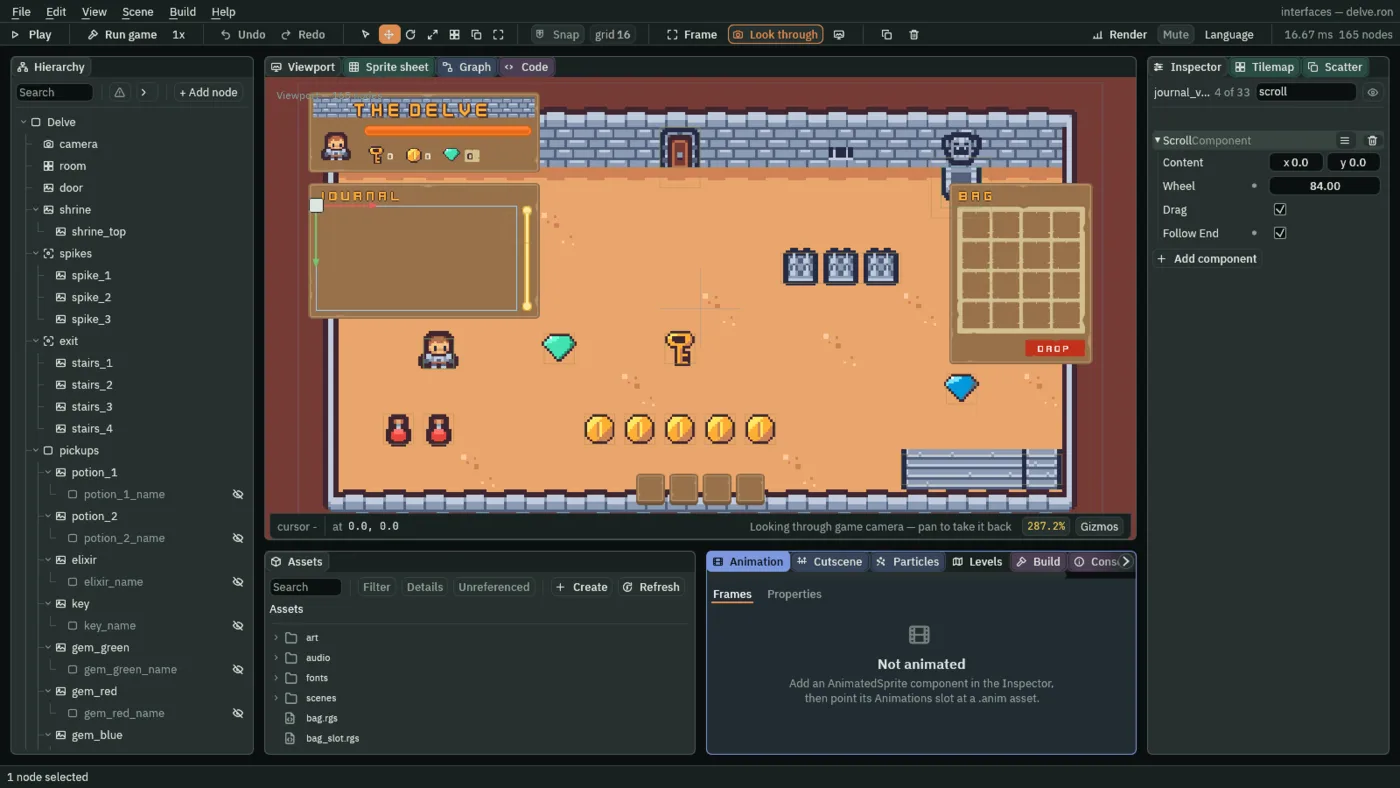
- Content
- How big the thing being looked at is, in UI units, as a width and a height.
0on an axis means measured: every frame the view takes the union of its children’s rects, so the journal grows by a row each time a line is written. A number fixes it instead, for a list that a script fills without a Stack.0,0, as a new Scroll has it; the journal measures both. - Wheel
- How far one notch of the mouse wheel scrolls, in UI units. A new Scroll’s is
48. The journal’s is84, three rows of28: a notch moves the eye by a few lines, not by one.28to112suits a list of one-line rows; a notch smaller than a row feels sticky, and one of the whole view skips lines. - Drag
- Whether dragging the view itself pans it, as a finger does on a phone. Ticked, as a new Scroll has it; the journal leaves it, so the wheel and the bar are not its only ways.
- Follow End
- While the view is scrolled to its end, content that grows keeps it there. If the player scrolls back, by the wheel, a drag, the thumb or the keys, it stays put until they scroll to the end again. Ticked here, so the newest line is always in view.
The lines
- Select
journal_view, click + Add node and choose Stack. Rename the nodejournal_lines. In its Stack, set Fit to Fixed, Spacing to0and Item to28. Its Rect stays as a new Stack has it, filling the view.
The bar
- Select
journal, click + Add node and choose Scrollbar. Rename the nodejournal_bar. In its Rect, set Anchor Min and Anchor Max both to0,0, Offset Min to340,36, Offset Max to356,204and Pivot to0,0. The bar is16wide and as high as the view, beside it. - In its Panel, which is the bar’s track, set Color to
255,255,255, alpha255, Texture toslide_vertical_grey.pngand Border to16. - In its Scrollbar, set View to
journal_view, Min Thumb to32, Thumb to255,255,255, alpha255, Thumb Texture toslide_vertical_color.pngand Border to16. Axis stays Vertical. - Press Add component and choose FocusComponent, and set its Mode to None, as for the view.
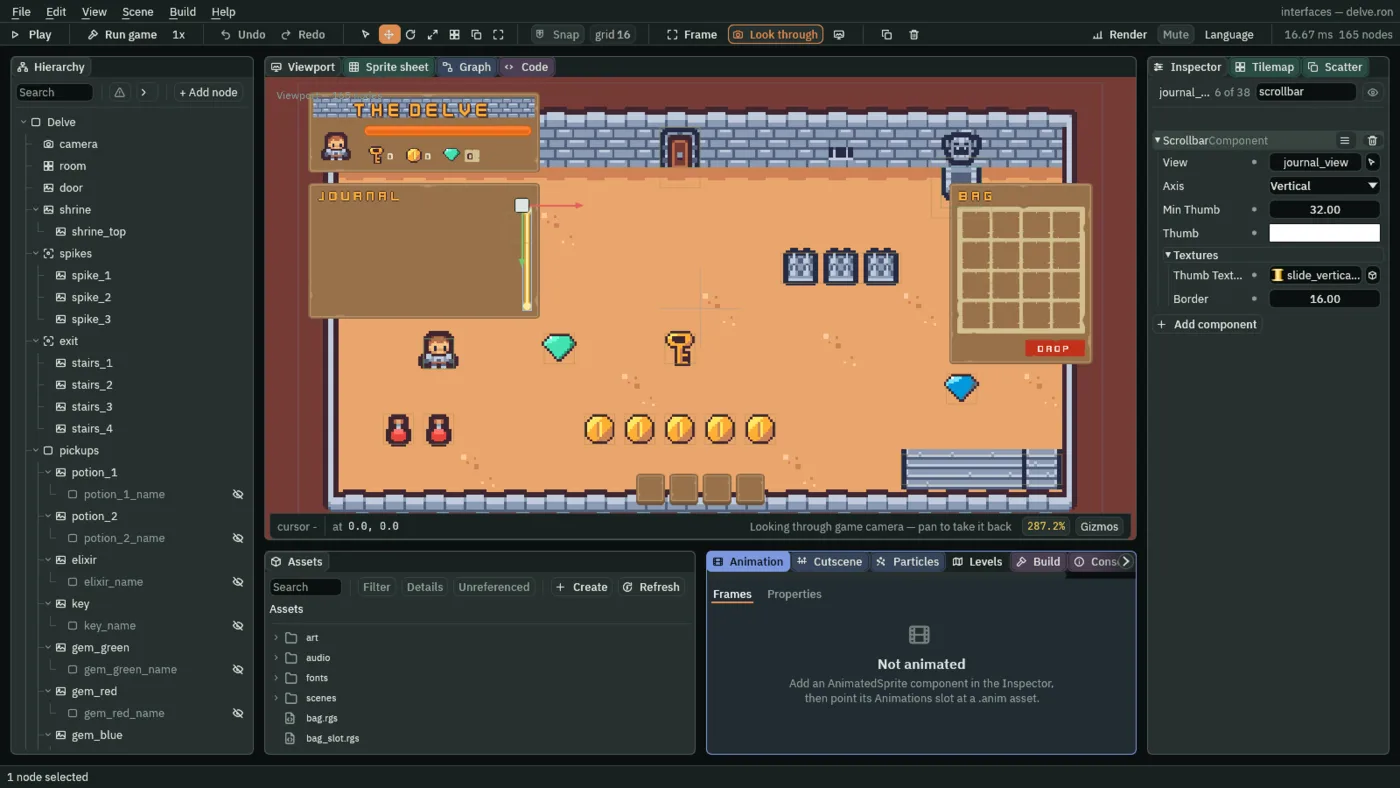
- View
- The name of the Scroll the bar drives,
journal_view. It is a name, not a link: rename the view and retype it here, or the bar draws and moves nothing. The Scrollbar preset starts with the nameScroll View, which is what the Scroll View preset calls its node, so the two work as soon as both are added; the Problems panel names a bar whose view does not exist. - Min Thumb
- The shortest the thumb may get, in UI units. The thumb is as long as the share of the content in view, so a long journal would shrink it to a speck;
32keeps it something the pointer can find and as tall as its two round ends. A new Scrollbar’s is24. - Thumb
- The thumb’s colour, multiplied into its picture. A new Scrollbar’s is white at 60% strength, which would fade a picture. White,
255,255,255, alpha255, draws it as it is. - Thumb Texture
- The picture the thumb is drawn with,
slide_vertical_color.png, the gold rail. Empty, the thumb is a plain block of its Thumb colour. - Border
- The Scrollbar’s own, for the thumb’s picture: how many pixels in from each edge of the picture keep their size while the middle stretches, as for a Panel. The rail’s round ends are
16tall, so16keeps them round at any thumb length. The track’s Panel has the same16, for its own ends.
The rows
- Select
journal_lines, click + Add node and choose Label. Rename the nodejournal_1and untick its Visible: a hidden row takes no room in the Stack, which is how the journal is only as long as the lines written. - In its Rect, set Offset Min to
4,0and Offset Max to-4,0; the Stack places and sizes the row, and the offsets only inset its words. In its Text, empty Text, set Scale to0.625and Color to236,227,206, alpha255. The row’s script writes its words.
The row’s script
A row reads one line of the journal, journal_1 to journal_20 in the numbers the game keeps, and turns its code into words. The codes are fixed, and so is where each one’s words live: here, and only here.
- In Assets, press Create, choose New script, type
journal_lineand press Enter. In the Code tab, replace everything in it with the script below and press Ctrl+S. - Select
journal_1, press Add component and choose JournalLine. Its Index is1. - With
journal_1selected, press Ctrl+D. The copy comes selected, namedjournal_1 copy, with its script. Rename itjournal_2and set its Index to2. Go on, a copy of the last each time, tojournal_20with Index20: nineteen copies in all.
/// A row of the journal's window: it shows one line of the journal in words,
/// and hides while that line is not written yet.
component JournalLine {
    /// The line it shows, from 1 at the top to 20 at the bottom: the journal
    /// keeps it as journal_1 to journal_20.
    index: f32 = 1.0,

    fn loop() {
        // The keeper writes each line as the code of what happened, and 0
        // while the line is empty. The words for each code are here, and only
        // here.
        let code = kept_number("journal_" + text(index), 0.0);
        let words = "";
        if code == 1.0 {
            words = "Found a potion.";
        } else if code == 2.0 {
            words = "Found the elixir.";
        } else if code == 3.0 {
            words = "Found the key.";
        } else if code == 4.0 {
            words = "Found a gem.";
        } else if code == 5.0 {
            words = "Found a coin.";
        } else if code == 6.0 {
            words = "The door opened.";
        } else if code == 7.0 {
            words = "Drank a potion.";
        } else if code == 8.0 {
            words = "The spikes hurt.";
        } else if code == 9.0 {
            words = "Rested at the shrine.";
        }
        if words == "" {
            // A hidden row takes no room in the journal's Stack, so the
            // journal is as long as the lines written.
            hide();
        } else {
            set_text("TextComponent", "text", words);
            show();
        }
    }
}
The keeper writes each line as a code, and 0 for a line not written yet. The row asks for its own, journal_ and its Index, with kept_number, which answers the number the game keeps under a name, or the second argument if nothing is kept. It picks the words for the code and writes them into its own Text with set_text. A row with no words calls hide, and a row with words show, so the rows past the last line written take no room in the Stack.
| Code | What happened | The row says |
|---|---|---|
1 | A potion was found | Found a potion. |
2 | The elixir was found | Found the elixir. |
3 | The key was found | Found the key. |
4 | A gem was found | Found a gem. |
5 | A coin was found | Found a coin. |
6 | The door opened | The door opened. |
7 | A potion was drunk | Drank a potion. |
8 | The spikes hurt | The spikes hurt. |
9 | The hero rested at the shrine | Rested at the shrine. |
Opening and shutting it
- Make
journal_windowthe same way: Create, New script,journal_window, Enter, paste the script below and press Ctrl+S. Selectjournal, press Add component and choose JournalWindow.
/// The journal's window: shut as the delve opens, and opened and shut by J.
component JournalWindow {
    /// Whether the journal is open.
    #[hidden]
    open: bool = false,

    fn on_create() {
        hide();
    }

    fn loop() {
        // J, through the input map's journal, presses journal on the step it
        // goes down.
        if pressed("journal") {
            open = !open;
            if open {
                show();
            } else {
                hide();
            }
        }
    }
}
The window is authored visible, so you can see it and edit it in the Viewport, and on_create hides it as the delve opens. After that J turns open over and shows or hides it. pressed is true on the step J goes down: the input map presses journal as the key goes down, so the window answers on that very step, once per press, and not again while the key is held.
The keeper
The keeper is the one script that writes the journal. It lives on the journal window, beside JournalWindow: a hidden node’s scripts keep running, so the keeper writes lines whether the journal is open or not. Each step it looks at what the game keeps (potions, elixirs, keys, gems, coins, door_open, rests and health) and compares each with what it saw last time. A count that went up is a find. Health that went up is a drink, since only a potion gives health back. Health that went down is the spikes, written once as they start, not on every step the hero stands on them. door_open and rests are new, and the door and the shrine keep them, below.
- Make
journalthe same way, with the script below, and add Journal to thejournalwindow. Lines starts at the script’s own20: leave it. Theseen_fields are hidden: they hold what the keeper last saw, from0, withseen_healthat-1until its first look.
/// The journal's keeper: it writes a line in the journal for each thing that
/// happens in the delve. The journal is kept as journal_1, the oldest line, to
/// journal_20, the newest, each the code of what happened, and journal_count,
/// how many lines are written. The codes are 1 found a potion, 2 found the
/// elixir, 3 found the key, 4 found a gem, 5 found a coin, 6 the door opened,
/// 7 drank a potion, 8 the spikes hurt and 9 rested at the shrine. It writes
/// one line a step, so two things that happen on the same step are written on
/// two steps, in the codes' order. Once every line is written, a new one
/// pushes the oldest out.
component Journal {
    /// How many lines the journal keeps: as many as the journal's window has
    /// rows.
    lines: f32 = 20.0,
    /// The potions the hero had when the keeper last looked, which it
    /// compares with the kept count to see that one more was found.
    #[hidden]
    seen_potions: f32 = 0.0,
    /// The elixirs, as the keeper last saw them.
    #[hidden]
    seen_elixirs: f32 = 0.0,
    /// The keys, as the keeper last saw them.
    #[hidden]
    seen_keys: f32 = 0.0,
    /// The gems, as the keeper last saw them.
    #[hidden]
    seen_gems: f32 = 0.0,
    /// The coins, as the keeper last saw them.
    #[hidden]
    seen_coins: f32 = 0.0,
    /// Whether the door was open when the keeper last looked: 1 open, 0 shut.
    #[hidden]
    seen_door_open: f32 = 0.0,
    /// How many times the hero had rested at the shrine when the keeper last
    /// looked.
    #[hidden]
    seen_rests: f32 = 0.0,
    /// The hero's health when the keeper last looked, or -1 before its first
    /// look.
    #[hidden]
    seen_health: f32 = -1.0,
    /// Whether the spikes were hurting the hero when the keeper last looked,
    /// so that a visit to them is written once, not on every step.
    #[hidden]
    hurting: bool = false,

    fn loop() {
        // What the delve keeps, as this step began. The hero keeps its health
        // as it enters the room, and until then it reads -1.
        let potions = kept_number("potions", 0.0);
        let elixirs = kept_number("elixirs", 0.0);
        let keys = kept_number("keys", 0.0);
        let gems = kept_number("gems", 0.0);
        let coins = kept_number("coins", 0.0);
        let door_open = kept_number("door_open", 0.0);
        let rests = kept_number("rests", 0.0);
        let health = kept_number("health", -1.0);

        if seen_health < 0.0 {
            // The first look, once the hero has kept its health: whatever the
            // run holds already is not news.
            seen_potions = potions;
            seen_elixirs = elixirs;
            seen_keys = keys;
            seen_gems = gems;
            seen_coins = coins;
            seen_door_open = door_open;
            seen_rests = rests;
            seen_health = health;
        } else {
            // A count that went down is not news either: a potion drunk or
            // dropped, or the key the door took.
            seen_potions = min(seen_potions, potions);
            seen_elixirs = min(seen_elixirs, elixirs);
            seen_keys = min(seen_keys, keys);
            // Health that holds still means the hero is off the spikes, or has
            // none left for them to take.
            if health == seen_health {
                hurting = false;
            }

            // This step's line: the first change, in the codes' order. The
            // next change waits for the next step.
            let code = 0.0;
            if potions > seen_potions {
                code = 1.0;
                seen_potions += 1.0;
            } else if elixirs > seen_elixirs {
                code = 2.0;
                seen_elixirs += 1.0;
            } else if keys > seen_keys {
                code = 3.0;
                seen_keys += 1.0;
            } else if gems > seen_gems {
                code = 4.0;
                seen_gems += 1.0;
            } else if coins > seen_coins {
                code = 5.0;
                seen_coins += 1.0;
            } else if door_open > seen_door_open {
                code = 6.0;
                seen_door_open = door_open;
            } else if health > seen_health {
                // Only a potion gives health back.
                code = 7.0;
                seen_health = health;
            } else if health < seen_health {
                // Only the spikes take it, a little on every step the hero
                // stands on them: written once, as they start.
                if !hurting {
                    code = 8.0;
                    hurting = true;
                }
                seen_health = health;
            } else if rests > seen_rests {
                code = 9.0;
                seen_rests += 1.0;
            }

            if code > 0.0 {
                let count = kept_number("journal_count", 0.0);
                if count < lines {
                    // Below the lines written so far.
                    keep_number("journal_" + text(count + 1.0), code);
                    keep_number("journal_count", count + 1.0);
                } else {
                    // Every line moves up one, so the oldest drops out, and
                    // the new one is the last.
                    for i in 1..lines {
                        let below = kept_number("journal_" + text(i + 1.0), 0.0);
                        keep_number("journal_" + text(i), below);
                    }
                    keep_number("journal_" + text(lines), code);
                }
            }
        }
    }
}
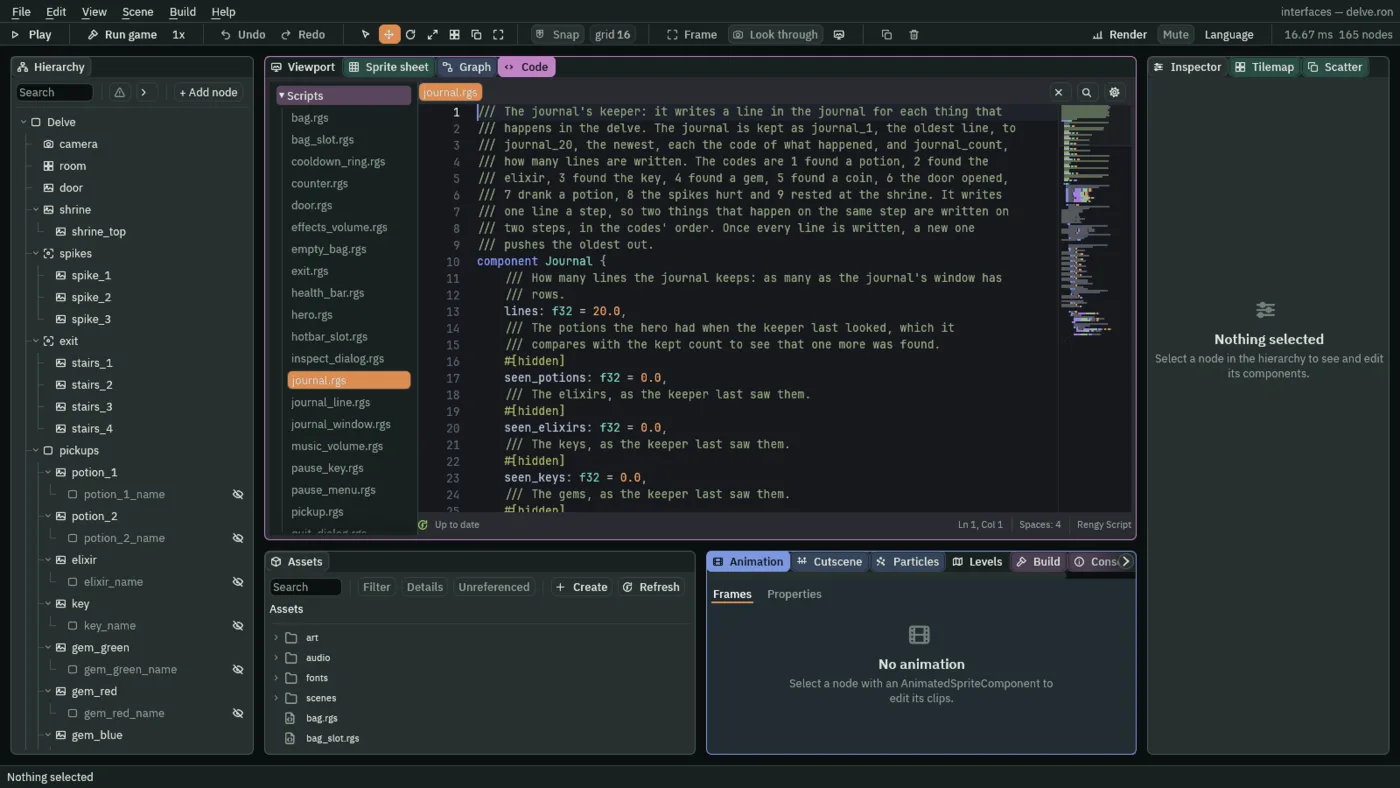
Lines is how many lines the journal keeps, as many as the window has rows. The keeper’s first look, on the first step that the hero has kept its health, takes everything the run already holds as known, so nothing is written for what was there before. After that it writes the first change it finds, in the order of the codes. The next change waits for the next step, so two things that happen on one step are two lines on two steps, in the codes’ order. kept_number reads what the step began with, and keep_number writes where the next step will read it.
Once twenty lines are written, a new one pushes the oldest out: every line moves up one and the new one is the twentieth. The journal is journal_1, the oldest, to journal_20, the newest, and journal_count says how many are written.
The door, the shrine and the title
Three scripts you already have change a little, so that there is something to write about.
- In the Code tab’s Scripts list, click
door.rgs, replace everything in it with the script below and press Ctrl+S. Its new lines keepdoor_openas1once the door is open. - Do the same for
shrine.rgs. It adds1torestseach time the hero steps up to the shrine; it does nothing else yet, and chapter 12 makes it save. - Do the same for
title_menu.rgs. Eight new lines empty the journal’s twenty lines, and setjournal_count,door_openandrestsback to0when a new game starts: a new run starts with an empty journal and a shut door.
/// A locked door. The hero opens it by walking into it with a key, which the
/// door keeps: it shows itself open, no longer stands in the way, and keeps
/// door_open, so that the journal can say it opened.
component Door : Area {
    /// The piece of the sheet it shows once open.
    open_region: String = "door_open",
    /// Whether it has been opened.
    #[hidden]
    open: bool = false,

    fn on_enter(other: NodeId) {
        if in_group(other, "hero") && !open && kept_number("keys", 0.0) >= 1.0 {
            add_number("keys", -1.0);
            set_text("SpriteComponent", "region_name", open_region);
            set_flag("ColliderComponent", "solid", false);
            open = true;
            // Kept as the counts are, where the journal's keeper reads it: 1
            // once the door is open.
            keep_number("door_open", 1.0);
        }
    }
}
/// The shrine, a gargoyle over a stone basin. The hero who steps up to it
/// rests there, and the journal says so. A later chapter makes it save the
/// game.
component Shrine : Area {
    fn on_enter(other: NodeId) {
        if in_group(other, "hero") {
            // Counted where the journal's keeper reads it: one more rest each
            // time the hero steps up to the shrine.
            add_number("rests", 1.0);
        }
    }
}
/// The title's menu: New game starts a fresh run in the delve, Settings opens
/// the settings screen, and Quit closes the game.
component TitleMenu {
    /// The health a new game starts with.
    start_health: f32 = 10.0,

    fn loop() {
        // A button pressed by a click, by Enter while it holds the focus, or
        // by its Shortcut presses its action on the game's next step.
        if pressed("new_game") {
            // What a run keeps outlasts a change of scene, so a new game puts
            // it back as a run starts: full health, and nothing picked up.
            keep_number("health", start_health);
            keep_number("potions", 0.0);
            keep_number("elixirs", 0.0);
            keep_number("keys", 0.0);
            keep_number("gems", 0.0);
            keep_number("coins", 0.0);
            // And every slot of the hotbar and the bag empty, no haste, and
            // nothing being inspected.
            for i in 1..5 {
                keep_number("hotbar_" + text(i), 0.0);
            }
            for i in 1..17 {
                keep_number("bag_" + text(i), 0.0);
            }
            keep_number("haste", 0.0);
            keep_number("inspect", 0.0);
            // And the journal's twenty lines empty, the door shut, and no rest
            // taken at the shrine.
            for i in 1..21 {
                keep_number("journal_" + text(i), 0.0);
            }
            keep_number("journal_count", 0.0);
            keep_number("door_open", 0.0);
            keep_number("rests", 0.0);
            // A sound asked for on the step that changes scene plays on after
            // it.
            play_sound("click");
            change_scene("delve");
        }
        if pressed("settings") {
            play_sound("click");
            change_scene("settings");
        }
        if pressed("quit") {
            play_sound("back");
            // The game closes at the end of the step that asks, which would
            // cut the sound off, so it waits a tenth of a second first.
            await wait(0.1);
            quit();
        }
    }
}
add_number adds to a kept number where keep_number sets it: rests is the count of visits. Without the title’s door_open reset, a second run’s door would open silently, and the journal would never say so.
The journal at work
Here is the journal after a short walk: both potions, the five coins, up through the spikes, and a potion drunk. That is nine lines, and six fit. The newest six are in view at the window’s foot, and the thumb sits at the foot of its track, as long as the share of the nine lines the window shows.
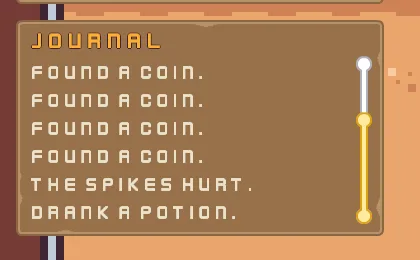
Roll the wheel over the journal and it scrolls three lines a notch, the view under the pointer. Over the bar it moves the view the bar drives. One notch back from the end is the top of nine lines, and the thumb follows it.
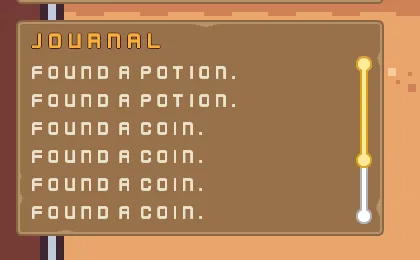
Dragging the thumb does the same with the pointer: it moves the view in step with it, from the foot of the track to its top. Dragging the view itself pans it the same way. Neither the view nor the bar takes the focus, so no walking key is ever spent on them.
The window, the view and the key
The journal window
| Node | Component | Field | Value |
|---|---|---|---|
journal | Rect | Anchor Max | 0, 0 |
| Offset Min | 16, 160 | ||
| Offset Max | 384, 376 | ||
| Pivot | 0, 0 | ||
| Panel | Color | 255, 255, 255, alpha 255 | |
| Texture | panel_brown.png | ||
| Border | 8 | ||
| Journal | Lines | 20 | |
journal_title | Rect | Anchor Max | 1, 0 |
| Offset Min | 16, 0 | ||
| Offset Max | -16, 36 | ||
| Pivot | 0.5, 0 | ||
| Text | Text | Journal | |
| Scale | 0.75 | ||
| Color | 254, 174, 52, alpha 255, written by Apply theme | ||
| Outline | 63, 38, 49, alpha 255 | ||
| Outline Width | 1 | ||
| Theme Role | Role | Accent | |
key_hints | Rect | Offset Min | -420, -44 |
| Offset Max | 420, -12 | ||
| Text | Text | WASD or arrows walk / B bag / J journal / 1-4 use / Esc pause |
The view and its bar
| Node | Component | Field | Value |
|---|---|---|---|
journal_view | Rect | Anchor Min | 0, 0 |
| Anchor Max | 0, 0 | ||
| Offset Min | 12, 36 | ||
| Offset Max | 332, 204 | ||
| Pivot | 0, 0 | ||
| Scroll | Wheel | 84 | |
| Follow End | ticked | ||
| Focus | Mode | None | |
journal_lines | Stack | Fit | Fixed |
| Spacing | 0 | ||
| Item | 28 | ||
journal_1 to journal_20 | Node | Visible | unticked |
| Rect | Offset Min | 4, 0 | |
| Offset Max | -4, 0 | ||
| Text | Text | empty | |
| Scale | 0.625 | ||
| Color | 236, 227, 206, alpha 255 | ||
| JournalLine | Index | The row’s own number: 1 for journal_1, 2, 3, 4, 5, 6, 7, 8, 9, 10, 11, 12, 13, 14, 15, 16, 17, 18, 19, and 20 for journal_20 | |
journal_bar | Rect | Anchor Min | 0, 0 |
| Anchor Max | 0, 0 | ||
| Offset Min | 340, 36 | ||
| Offset Max | 356, 204 | ||
| Pivot | 0, 0 | ||
| Panel | Color | 255, 255, 255, alpha 255 | |
| Texture | slide_vertical_grey.png | ||
| Border | 16 | ||
| Scrollbar | View | journal_view | |
| Min Thumb | 32 | ||
| Thumb | 255, 255, 255, alpha 255 | ||
| Thumb Texture | slide_vertical_color.png | ||
| Border | 16 | ||
| Focus | Mode | None |
journal_1 to journal_20 are the same Label, copied. Their Index, in the JournalLine each carries, is their number. Every other field of every node is as it comes.
The input map’s journal
| Action | Key |
|---|---|
journal | J |