Tutorials · Interfaces · Chapter 14
No mouse needed
By the end
- Every screen by the keys alone, and by a gamepad alone
- The bag and the journal take the ring when open, the HUD never while walking
- Move on an item’s menu carries it slot to slot
On this page
A pad for every action
Everything so far works by the pointer and by the keys. A gamepad reaches a game the way the keys do, through the project’s input map: a pad button that runs an action does what the action’s key does. A menu answers eight actions if the map has them, and The Delve’s has six: ui_up, ui_down, ui_left and ui_right move the focus ring, ui_accept presses the control that has it, and ui_cancel goes back. It has no ui_next or ui_previous, the two that stand in for Tab and Shift+Tab: the arrows reach every control. Input has the whole of the window.
- Plug in a gamepad. The Input window records a pad’s button only from a pad that is connected.
- Choose View → Input map…. The Input window opens on its Bindings tab, with the fourteen actions you made in earlier chapters under Actions.
- Select
ui_up. Press Record a control and press up on the D-pad. Press Record a control again and push the left stick all the way up. Do the same forui_down,ui_leftandui_right. - Select
ui_acceptand record the bottom face button, South, which the window calls A. Record the right one, East or B, forui_cancel, the top one, North or Y, forbag, and the left one, West or X, forjournal. Record the Start button forpause. - Select
use_1and record the left shoulder button. Record the right shoulder foruse_2, the left trigger foruse_3and the right trigger foruse_4. - Select
move. Press Add composite and choose D-pad. Press Add composite again and choose Left stick. Do this last, and see the note below the picture for why. - Press Save. The window writes
input.ronbesideproject.rengy, and the editor’s Play uses the new controls at once.
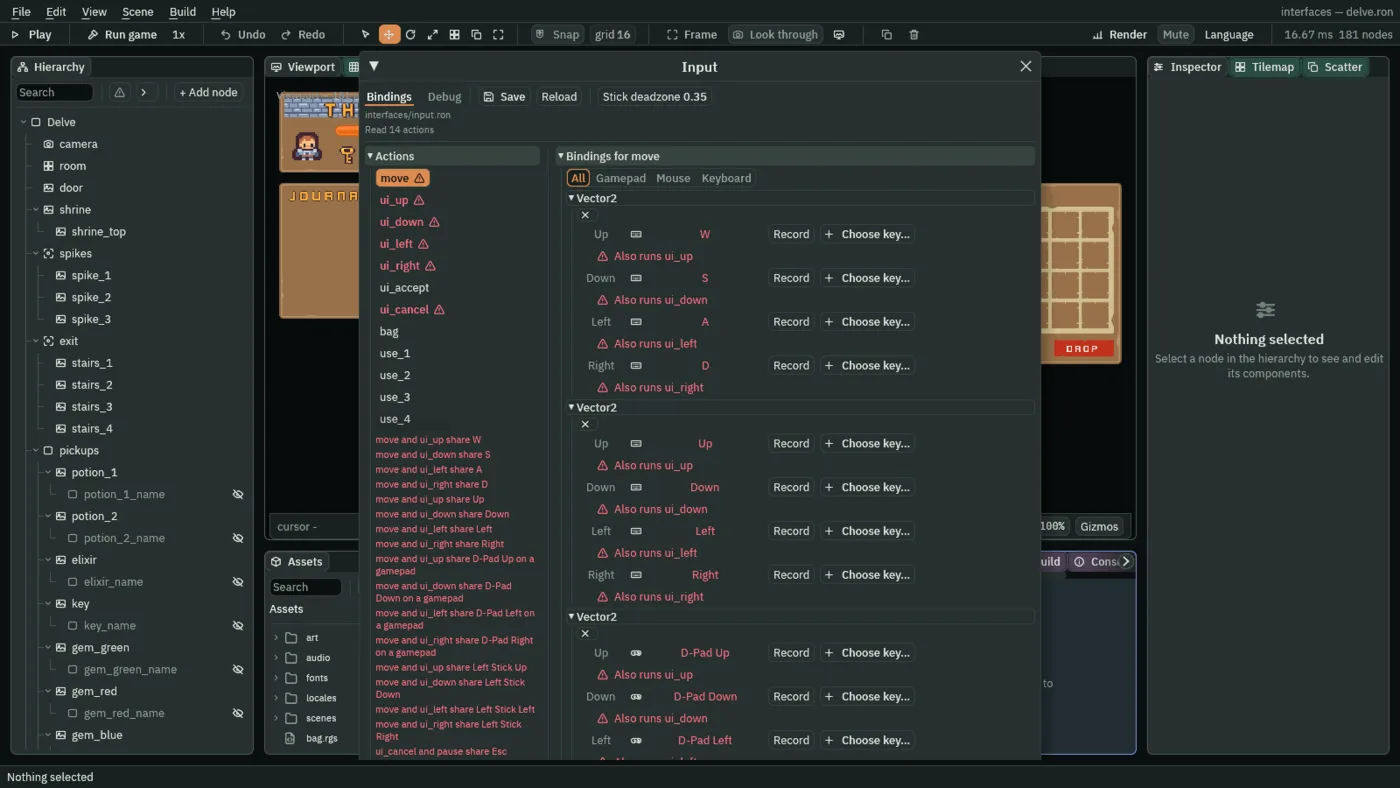
The pad now does everything the keys do. A stick pushed and held moves the ring one control, not a run of them: let it go and push again for the next. The table at the end of the chapter lists every binding.
Where the ring may go
The keys that move the ring are the keys that walk the hero. A ring that could land anywhere would land on a hotbar slot with the first step you take, and follow you about. Chapter 7 kept it off the slots one at a time, with Mode None. A better rule says it once for a whole screen: Subtree Focus.
- Select
hud. Press Add component, typefocusand choose FocusComponent. Set Mode to None and Subtree Focus to Deny. The link rows stay empty. - On
hud, press Add component and choose CanvasGroupComponent. Leave it as it comes. The pause key’s script switches it off while the game is paused. - Select
bag, add a FocusComponent, and set Mode to None and Subtree Focus to Allow. Do the same onjournal. - Select
empty_dialog, add a FocusComponent, leave Mode on All and set Subtree Focus to Allow. Do the same oninspect_dialog. - Select
hotbar_1and remove its FocusComponent with the bin icon at the right of its header. Do the same onhotbar_2,hotbar_3andhotbar_4. The HUD’s Deny keeps the ring out of them now, so the ModeNoneof chapter 7 has nothing left to do.
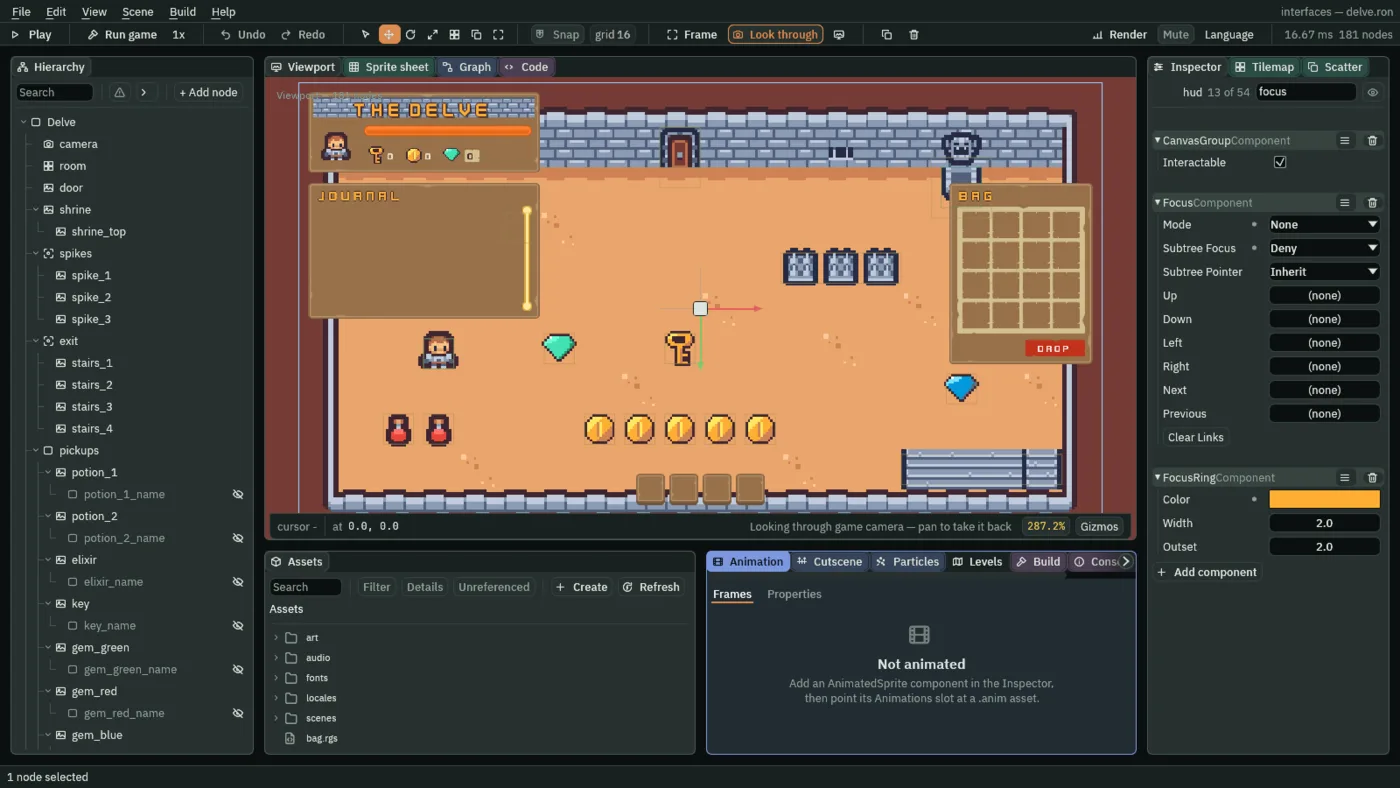
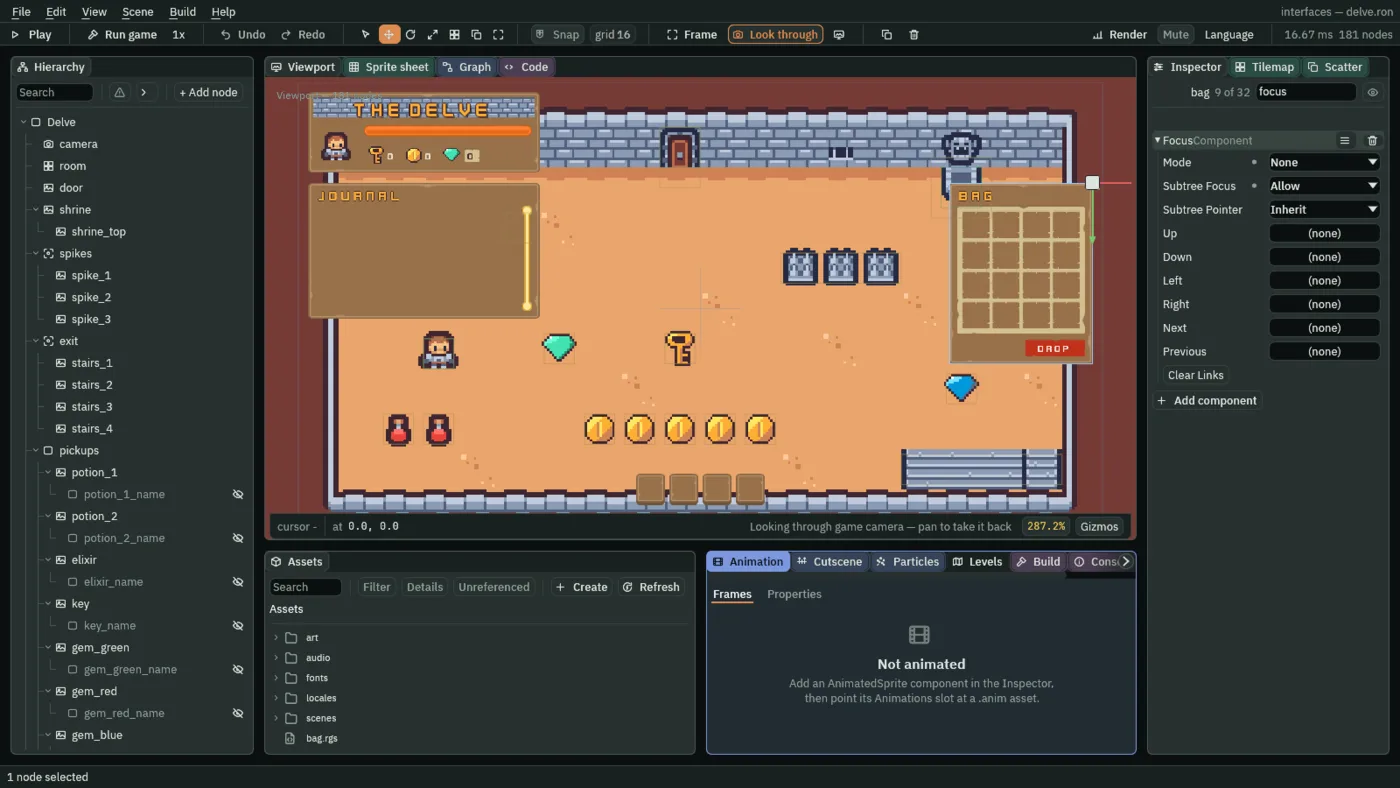
- Subtree Focus
- Whether the focus ring may enter this node and everything under it.
Inherit, as a new Focus has it, takes the answer of the nearest node above that gives one, and yes when none does.Denykeeps the ring out of the node and all its children, whatever they hold.Allowlets it back in under aDenyabove: the nearest answer wins, so abagthat allows sits inside ahudthat denies. The HUD takesDeny, and the bag, the journal and the two dialogs takeAllow. It decides where the ring may go and nothing else: a click still reaches every control under the HUD.
The bag’s slots
The bag’s window lets the ring in, but its slots still carry the Mode None that chapter 7 gave them. They need All, and once the ring stops on them, each needs words as well.
- Select
bag_1and set its Focus Mode to All. Do the same onbag_2tobag_16, and ondrop_button. - Select
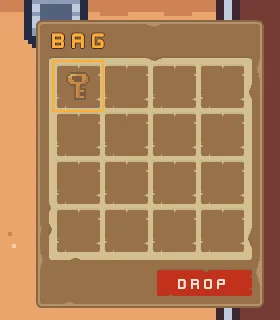
bag_13and set its Focus Down todrop_button. Do the same onbag_14. An arrow finds the nearest control in its direction, and nothing lies straight below the two left slots of the bottom row, so they name Drop. The two at the right,bag_15andbag_16, find it for themselves. - Open the Problems panel. Each of the sixteen slots is listed: the ring now stops there, and there is no text for a screen reader to read out. A slot needs a Text child, or a Localized Text key.
- Select
bag_1, click + Add node and choose Label. Rename the nodebag_1_label. Its Rect stays as it comes, so it fills the slot. - In its Text, set Text to
Bag slot 1, Scale to0.625and Align to Center. Click the eye beside it in the Hierarchy, so that it is hidden. It never draws; it is there to be read. - Press Add component and choose LocalizedTextComponent. Set Key to
bag.slot, press the plus of Substitutions, and set the entry’s Name tonand its Value to1. - Do the last three steps under
bag_2tobag_16, with the slot’s number in the node’s name, in its Text and in the Value. The slots leave the Problems list as they are done. - Open Language → Edit tables…, as in chapter 13, and add the key
bag.slot:Bag slot {n}in English andCase {n} du sacin French. Press Save. The{n}is the slot’s number, which each label’s substitution gives.
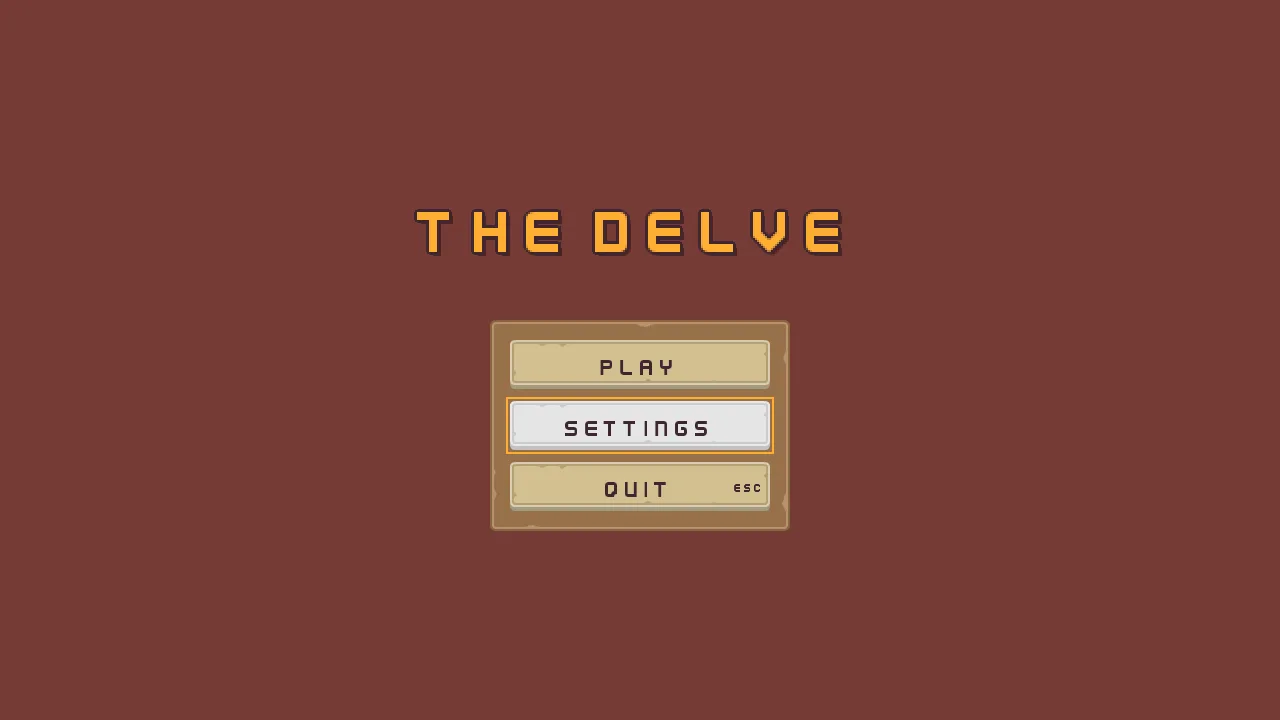
The title, the settings and the slots are canvases of their own, and the ring works on them as before. Press F5 and put the mouse aside. The title opens with its first control, Play, lit and no ring drawn yet: the ring shows once a key has moved the focus, and a pointer press hides it again. The down arrow moves it to Settings, as the pad’s D-pad does.
Windows that take the keys
The walking keys are also the arrows. With the bag open, one press must move the ring and leave the hero where it stands, and Esc must close the bag before it pauses the game. Three scripts you attached in earlier chapters change to do that. The bag keeps a number the game remembers, bag_open, which is 1 while it is open, and the journal keeps journal_open the same way, below. The hero and the pause key read both with kept_number.
- Click the Code tab above the Viewport. In its Scripts list click
bag.rgs, replace its text with the first script below, and press Ctrl+S. - Do the same for
hero.rgsandpause_key.rgs, with the scripts that follow.
/// The bag's window: shut as the delve opens, and opened and shut by B or a
/// pad's North. While it is open it keeps bag_open, so the hero stands still
/// and the walking keys and the pad's stick move the ring among its slots;
/// and Escape or the pad's East backs out of it, out of a move first.
component Bag {
    /// Whether the bag is open.
    #[hidden]
    open: bool = false,

    fn on_create() {
        hide();
        // The delve opens with the bag shut, whatever the last run kept.
        keep_number("bag_open", 0.0);
    }

    fn loop() {
        // B or a pad's North, through the input map's bag, presses bag on
        // the step it goes down.
        let toggle = pressed("bag");
        // Escape or a pad's East presses ui_cancel, which shuts an open bag,
        // unless an item is being moved: then the mover cancels the move, and
        // the bag waits for the next press. One that closed a slot's menu or
        // answered one of the bag's questions is spent on that, and presses
        // nothing here.
        if open && !toggle && pressed("ui_cancel") && kept_number("moving", 0.0) == 0.0 {
            toggle = true;
        }
        if toggle {
            open = !open;
            if open {
                show();
                keep_number("bag_open", 1.0);
            } else {
                hide();
                keep_number("bag_open", 0.0);
            }
        }
    }
}
pressed("bag") is true on the one step B or the pad’s North goes down. pressed("ui_cancel") is true on the one step Esc or the pad’s East goes down, unless that press closed a slot’s menu or answered one of the bag’s questions, which is spent on that. An open bag shuts on it unless an item is being carried: then the mover cancels the carry, and the bag waits for the next press.
/// The hero, whom the keys walk through its Character Body. A new game starts
/// it with `health`, kept so that everything else can read it. While the
/// elixir hastens it, it walks faster, and while the bag or the journal is
/// open it stands still.
component Hero {
    /// The health a new game starts with.
    health: f32 = 10.0,
    /// How fast the keys walk it.
    #[suffix("u/s")]
    walk_speed: f32 = 64.0,
    /// How many times as fast it walks while hastened.
    haste_factor: f32 = 1.5,

    fn on_create() {
        // Only when nothing is kept yet: a hero met again keeps what it has.
        if kept_number("health", -1.0) < 0.0 {
            keep_number("health", health);
        }
    }

    fn loop(dt: f32) {
        // The elixir keeps haste: the seconds left that the hero walks faster
        // for, counted down here.
        let haste = kept_number("haste", 0.0);
        let speed = walk_speed;
        if haste > 0.0 {
            keep_number("haste", max(haste - dt, 0.0));
            speed = walk_speed * haste_factor;
        }
        // The bag keeps bag_open, and the journal journal_open, while it is
        // open. The walking keys and the pad's stick then move the ring in it
        // instead, so the hero stands where it is.
        let window_open = kept_number("bag_open", 0.0) == 1.0;
        if kept_number("journal_open", 0.0) == 1.0 {
            window_open = true;
        }
        if window_open {
            speed = 0.0;
        }
        set_number("CharacterBodyComponent", "speed", speed);
    }
}
The hero reads both numbers on every step and walks at speed 0 while either is 1, writing its Character Body’s speed with set_number.
/// Esc, or a pad's Start, which the input map calls pause, pauses the game:
/// everything that runs with the game stops where it is, and the pause screen,
/// which runs only while the game is paused, takes over. It sits on the HUD,
/// which runs with the game. While the game is paused the HUD is inert: its
/// Canvas Group takes the bag and the journal out of reach of the pointer and
/// of the pause screen's ring.
component PauseKey {
    fn loop() {
        // The game runs on this step, so the HUD answers again: the step after
        // Resume lets the game go on is its first.
        set_flag("CanvasGroupComponent", "interactable", true);
        // An Escape that closed a slot's menu or answered one of the bag's
        // questions is spent on that, and reaches the game only once it is let
        // go and pressed again. Escape is ui_cancel too: with the bag or the
        // journal open, it backs out of that first. A pad's Start pauses
        // whatever is open.
        let window_open = kept_number("bag_open", 0.0) == 1.0;
        if kept_number("journal_open", 0.0) == 1.0 {
            window_open = true;
        }
        if pressed("pause") && !(window_open && pressed("ui_cancel")) {
            set_flag("CanvasGroupComponent", "interactable", false);
            pause();
        }
    }
}
pressed("pause") is true on the one step Esc or the pad’s Start goes down. Esc is ui_cancel too, so with the bag or the journal open it backs out of that first and does not pause, while Start pauses whatever is open. The script turns the HUD’s Canvas Group Interactable off as it pauses and on again on every step the game runs, so while the game is paused nothing under the HUD takes a click or the ring, and the pause screen’s ring cannot wander into the bag. Chapter 16 defines Interactable.
Moving an item by keys
In chapter 10 a drag carries an item from slot to slot. Move does it with no pointer: it is a row in a slot’s menu, it picks the item up, and the next slot you press is where it goes.
- Select
bag_1. In its Pop-up Menu, press the small plus beside Items, whose hover text is Add an entry. A row reading Item appears at the foot of the list. Press the small up arrow on the new row, whose hover text is Move up, three times, so that it sits between Use and Drop. Set its Label toMove, its Action tobag_1_moveand its Shortcut toKeyM. Leave Enabled ticked. - In its Localized Text, press the small plus beside Options, press the new entry’s Move up twice so that it sits second, and set it to
menu.move. - Do the same on
bag_2tobag_16, each with its own number in the Action:bag_2_move, and so on tobag_16_move. - Open Language → Edit tables… and add the key
menu.move:Movein English andDéplacerin French. Press Save. - In Assets, choose Create → New script, type
moverand press Create. Click the Code tab, clickmover.rgsin its Scripts list, replace its text with the first script below, and press Ctrl+S. - Select
bag, press Add component, typemoverand choose Mover. - Replace the text of
bag_slot.rgs,hotbar_slot.rgs,slot_picture.rgsandsatchel.rgswith the scripts that followmover.rgs, saving each. They are on the slots already, so nothing else needs doing.
/// Moves an item from a slot of the bag to another slot by the keys or a pad,
/// as a drag does by the pointer. A slot's menu's Move picks its item up, and
/// the game keeps the slot it came from as moving, 1 to 16, while the item is
/// carried, and 0 while nothing is. The ring walks the slots meanwhile. A
/// press on a slot of the bag or the hotbar then puts the item down there, if
/// that slot is empty and takes it. A press on a slot that refuses it, Escape
/// or a pad's East, or the bag shutting ends the move with the item where it
/// was.
component Mover {
    fn loop() {
        let moving = kept_number("moving", 0.0);
        if kept_number("bag_open", 0.0) == 0.0 {
            // The bag is shut, so nothing is carried.
            if moving > 0.0 {
                keep_number("moving", 0.0);
            }
        } else if moving == 0.0 {
            // Move, chosen in a slot's menu by a click, by M, or by Enter or a
            // pad's South on its row, presses the slot's name with _move after
            // it on the game's next step.
            for i in 1..17 {
                if pressed("bag_" + text(i) + "_move") {
                    keep_number("moving", i);
                }
            }
        } else if pressed("ui_cancel") {
            // Escape or a pad's East: the item stays where it was, and the
            // bag stays open.
            keep_number("moving", 0.0);
        } else {
            let from = "bag_" + text(moving);
            let item = kept_number(from, 0.0);
            // Where it goes. A bag slot pressed by a click, by Enter or by a
            // pad's South presses its name with _menu after it, and opens no
            // menu while an item is carried. A hotbar slot's key, 1 to 4, its
            // pad button, LB, RB, LT or RT, or a click on it presses its use_
            // action, which uses nothing while an item is carried.
            let to = "";
            let hotbar = false;
            for i in 1..17 {
                if to == "" && pressed("bag_" + text(i) + "_menu") {
                    to = "bag_" + text(i);
                }
            }
            for i in 1..5 {
                if to == "" && pressed("use_" + text(i)) {
                    to = "hotbar_" + text(i);
                    hotbar = true;
                }
            }
            if to != "" {
                // An empty slot takes it, but the hotbar takes no key. A full
                // slot refuses it, and the slot it came from keeps it. Both
                // slots change on the same step, so the satchel finds them
                // agreeing.
                let takes = kept_number(to, 0.0) == 0.0 && to != from && item != 0.0;
                if hotbar && item == 3.0 {
                    takes = false;
                }
                if takes {
                    keep_number(to, item);
                    keep_number(from, 0.0);
                }
                keep_number("moving", 0.0);
            }
        }
    }
}
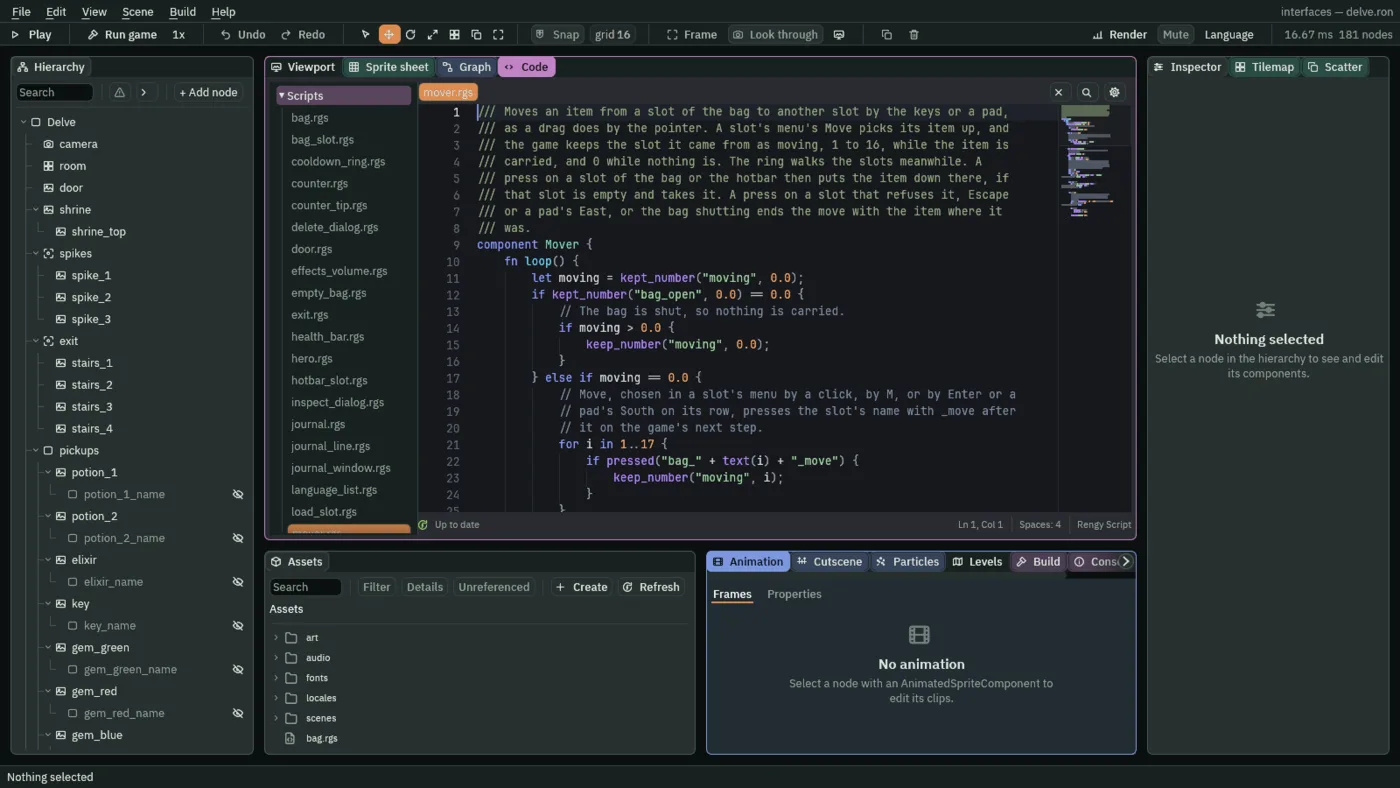
The mover keeps moving, the number of the slot the item came from, 1 to 16, and 0 while nothing is carried. It reads four actions, each true for one step. pressed("bag_1_move"), and the other fifteen like it, is true on the game’s next step after Move is chosen in a slot’s menu: by a click, by M while the menu is open, or by Enter or the pad’s South on its row. pressed("ui_cancel") is true on the step Esc or the pad’s East goes down. pressed("bag_1_menu"), and the others, is true on the game’s next step after a click on that slot, or Enter or South while it holds the ring: while an item is carried no menu opens, so that press is where the item goes. pressed("use_1") to pressed("use_4") are true on the step key 1 to 4 or a pad’s shoulder or trigger goes down, and on the next step after a click on the hotbar slot.
A move ends in one of four ways. An empty slot takes the item, from the bag or by a hotbar key. A slot that is full refuses it, and so does the hotbar when the item is the key; the item stays where it was and the move ends, with no menu opened. Esc or the pad’s East ends it too, and so does the bag shutting. Walking the ring does not end it, which is how you reach the slot you want. Both slots change on one step, so the satchel finds them agreeing.
The four scripts that follow stand aside while an item is carried, so that a press that is meant to put it down does nothing else.
/// A slot of the bag, and the menu a click on it, or Enter or a pad's South
/// while it holds the ring, opens: Use drinks a potion or the elixir as a
/// hotbar slot does, Move carries the item to another slot, Drop throws the
/// item away, and Inspect says what it is. A key cannot be used, and an empty
/// slot opens no menu.
component BagSlot {
    /// The slot it is, which is kept by that name: bag_1 to bag_16. A click
    /// on it presses this name with _menu after it, which opens its menu, and
    /// the menu's rows press it with _use, _move, _drop or _inspect after it.
    slot: String = "bag_1",
    /// The health a potion gives back.
    heal: f32 = 3.0,
    /// The most health the hero can have.
    max_health: f32 = 10.0,
    /// How long the elixir hastens the hero for.
    #[suffix("s")]
    haste: f32 = 5.0,

    fn loop() {
        // The satchel and the slots keep what each slot holds: 1 a potion, 2
        // the elixir, 3 a key, 0 nothing.
        let item = kept_number(slot, 0.0);
        // The menu opens on a click that presses the action its Opens names.
        // An empty slot has nothing to offer, so its menu names no action and
        // the click opens nothing; one holding an item names the slot's. While
        // an item is being moved, a press on a slot is where it goes, which
        // the mover on the bag answers, so no slot opens its menu.
        if item == 0.0 || kept_number("moving", 0.0) > 0.0 {
            set_text("PopupMenuComponent", "opens", "");
        } else {
            set_text("PopupMenuComponent", "opens", slot + "_menu");
        }
        // The menu's rows, from the top: Use, Move, Drop, the rule, Inspect.
        // Only a potion or the elixir can be used. A slot that empties while
        // its menu is open has nothing left to move, drop or inspect.
        set_flag("PopupMenuComponent", "items.0.enabled", item == 1.0 || item == 2.0);
        set_flag("PopupMenuComponent", "items.1.enabled", item != 0.0);
        set_flag("PopupMenuComponent", "items.2.enabled", item != 0.0);
        set_flag("PopupMenuComponent", "items.4.enabled", item != 0.0);

        // A click on a row, or its key while the menu is open, presses its
        // action on the game's next step. Each empties the slot on the step
        // the count goes down, so the satchel finds the two agreeing. Move's
        // is the mover's.
        if pressed(slot + "_use") {
            let health = kept_number("health", 0.0);
            if item == 1.0 && health < max_health {
                add_number("health", min(heal, max_health - health));
                add_number("potions", -1.0);
                keep_number(slot, 0.0);
            } else if item == 2.0 {
                keep_number("haste", haste);
                add_number("elixirs", -1.0);
                keep_number(slot, 0.0);
            }
        }
        if pressed(slot + "_drop") {
            // The count goes down only while there is one to take: the door
            // spends a key from the count, and the satchel takes it out of
            // its slot a step later, so for one step a slot can hold a key the
            // hero no longer owns.
            if item == 1.0 && kept_number("potions", 0.0) >= 1.0 {
                add_number("potions", -1.0);
            } else if item == 2.0 && kept_number("elixirs", 0.0) >= 1.0 {
                add_number("elixirs", -1.0);
            } else if item == 3.0 && kept_number("keys", 0.0) >= 1.0 {
                add_number("keys", -1.0);
            }
            keep_number(slot, 0.0);
        }
        if pressed(slot + "_inspect") {
            // The bag's Inspect dialog shows whatever is kept under inspect.
            keep_number("inspect", item);
        }
    }
}
The slot’s menu now has a Move row, items.1, enabled while the slot holds anything, and no menu opens at all while an item is carried. pressed(slot + "_use"), _drop and _inspect are true on the game’s next step after a click on that row, or on its key while the menu is open.
/// A slot of the hotbar: its key, its pad button or a click on it uses the
/// item it holds. A potion gives back health, but never past the most the hero
/// can have, and at full health it stays in the slot. The elixir hastens the
/// hero. A use empties the slot, which then cools down before it can be used
/// again. While an item is being moved from the bag, the same press puts the
/// item here instead, which the mover on the bag answers.
component HotbarSlot {
    /// Which slot it is, 1 to 4: what it holds is kept in hotbar_1 to
    /// hotbar_4, and use_1 to use_4 use it.
    index: f32 = 1.0,
    /// The health a potion gives back.
    heal: f32 = 3.0,
    /// The most health the hero can have.
    max_health: f32 = 10.0,
    /// How long the elixir hastens the hero for.
    #[suffix("s")]
    haste: f32 = 5.0,
    /// How long after a use the slot cannot be used again.
    #[suffix("s")]
    cooldown: f32 = 1.5,
    /// Seconds until the slot can be used again.
    #[hidden]
    cooling: f32 = 0.0,

    fn loop(dt: f32) {
        // Counted here rather than waited out: a hook that waits hears
        // nothing, and a use asked for meanwhile must be refused, not kept.
        if cooling > 0.0 {
            cooling -= dt;
        }
        // Its key, 1 to 4, or its pad button, LB, RB, LT or RT, through the
        // input map, presses its use_ action on the step it goes down, and a
        // click on the slot on the game's next step. While an item is being
        // moved, kept as moving, the press is where the item goes, not a use.
        let carrying = kept_number("moving", 0.0) > 0.0;
        if pressed("use_" + text(index)) && cooling <= 0.0 && !carrying {
            let slot = "hotbar_" + text(index);
            let item = kept_number(slot, 0.0);
            let health = kept_number("health", 0.0);
            let used = false;
            if item == 1.0 && health < max_health {
                add_number("health", min(heal, max_health - health));
                add_number("potions", -1.0);
                used = true;
            } else if item == 2.0 {
                keep_number("haste", haste);
                add_number("elixirs", -1.0);
                used = true;
            }
            if used {
                // Emptied on the step the count goes down, so the satchel
                // finds the two agreeing.
                keep_number(slot, 0.0);
                cooling = cooldown;
                // Heard by the ring the slot's Signal component wires it to,
                // on the next step.
                emit("used");
            }
        }
    }
}
pressed("use_" + text(index)) is true on the step its key or pad button goes down, or on the next after a click on the slot. It uses nothing while an item is carried, because then the same press is where the item goes.
/// The picture in a slot of the hotbar or the bag: it shows the item the slot
/// holds, cut from the items picture by its region, and nothing while the slot
/// is empty. The picture of an item being moved by the keys is dimmed until
/// the item is put down.
component SlotPicture {
    /// The slot it shows, which is kept by that name: hotbar_1 to hotbar_4,
    /// or bag_1 to bag_16.
    slot: String = "hotbar_1",
    /// How strongly a moved item's picture is drawn while it is carried, 0
    /// to 1.
    carried: f32 = 0.4,

    fn loop() {
        // The satchel and the slots keep what each slot holds: 1 a potion, 2
        // the elixir, 3 a key, 0 nothing.
        let item = kept_number(slot, 0.0);
        if item == 1.0 {
            set_text("PanelComponent", "region_name", "potion");
            show();
        } else if item == 2.0 {
            set_text("PanelComponent", "region_name", "elixir");
            show();
        } else if item == 3.0 {
            set_text("PanelComponent", "region_name", "key");
            show();
        } else {
            hide();
        }
        // The mover keeps the bag slot an item is carried from as moving, 1
        // to 16, and 0 while nothing is carried. White leaves the picture its
        // own colours, and its alpha dims it.
        let moving = kept_number("moving", 0.0);
        if moving > 0.0 && slot == "bag_" + text(moving) {
            set_colour("PanelComponent", "color", vec4(1.0, 1.0, 1.0, carried));
        } else {
            set_colour("PanelComponent", "color", vec4(1.0, 1.0, 1.0, 1.0));
        }
    }
}
The picture of the item being carried is drawn faint until it is put down. White leaves its own colours and the alpha dims it, which is what set_colour writes, with vec4 building the four numbers.
- Carried
- The script’s own field: how strongly an item’s picture is drawn while it is being carried,
0to1.0hides it and1leaves it as it is. Savingslot_picture.rgsgives every picture, the bag’s and the hotbar’s, a Carried row of0.4, as the script declares it, so that there is nothing to type.0.4is faint enough to read as lifted out, and still shows what it is.
/// The hero's satchel: it files what the hero carries into the slots, the
/// hotbar's four and the bag's sixteen. What the hero owns is kept in
/// potions, elixirs and keys. Each slot is kept too, hotbar_1 to hotbar_4 and
/// bag_1 to bag_16, as the item in it: 1 a potion, 2 the elixir, 3 a key, 0
/// nothing. Only the satchel files, one item a step, so two pickups taken on
/// the same step never go in the same slot, and it files nothing into a slot
/// an item is being dropped in, or put in by the keys.
component Satchel {
    fn loop() {
        // While an item is being moved by the keys, kept as moving, a press
        // on an empty slot puts it there on that step: the mover's press,
        // which is a bag slot's _menu or a hotbar slot's use_ action.
        let carrying = kept_number("moving", 0.0) > 0.0;
        // What the slots hold as this step began: how many of each item, how
        // many slots are empty, the first empty one of the hotbar and of the
        // bag that no drop is filling, and the last one holding each item.
        let potions = 0.0;
        let elixirs = 0.0;
        let keys = 0.0;
        let empty_hotbar = 0.0;
        let empty_bag = 0.0;
        let first_hotbar = "";
        let first_bag = "";
        let last_potion = "";
        let last_elixir = "";
        let last_key = "";
        for i in 1..5 {
            let slot = "hotbar_" + text(i);
            let item = kept_number(slot, 0.0);
            if item == 0.0 {
                empty_hotbar += 1.0;
                // An item let go over an empty slot presses the slot's _in
                // action on the game's next step, and the slot takes it on
                // that step: it is filling, so nothing is filed into it. So
                // is a slot the mover is putting an item in.
                let putting = carrying && pressed("use_" + text(i));
                if first_hotbar == "" && !pressed(slot + "_in") && !putting {
                    first_hotbar = slot;
                }
            } else if item == 1.0 {
                potions += 1.0;
                last_potion = slot;
            } else if item == 2.0 {
                elixirs += 1.0;
                last_elixir = slot;
            } else if item == 3.0 {
                keys += 1.0;
                last_key = slot;
            }
        }
        for i in 1..17 {
            let slot = "bag_" + text(i);
            let item = kept_number(slot, 0.0);
            if item == 0.0 {
                empty_bag += 1.0;
                let putting = carrying && pressed(slot + "_menu");
                if first_bag == "" && !pressed(slot + "_in") && !putting {
                    first_bag = slot;
                }
            } else if item == 1.0 {
                potions += 1.0;
                last_potion = slot;
            } else if item == 2.0 {
                elixirs += 1.0;
                last_elixir = slot;
            } else if item == 3.0 {
                keys += 1.0;
                last_key = slot;
            }
        }

        // What the hero owns that no slot holds yet waits to be filed; less
        // than none is an item a slot holds that the hero no longer owns.
        let waiting_potions = kept_number("potions", 0.0) - potions;
        let waiting_elixirs = kept_number("elixirs", 0.0) - elixirs;
        let waiting_keys = kept_number("keys", 0.0) - keys;

        // One item a step, into the first empty slot. A potion or the elixir,
        // the two things the hero drinks, goes in the hotbar while it has
        // room, then in the bag: drink_slot is where it goes. A key goes only
        // in the bag.
        let drink_slot = first_hotbar;
        if drink_slot == "" {
            drink_slot = first_bag;
        }
        if waiting_potions > 0.0 && drink_slot != "" {
            keep_number(drink_slot, 1.0);
        } else if waiting_elixirs > 0.0 && drink_slot != "" {
            keep_number(drink_slot, 2.0);
        } else if waiting_keys > 0.0 && first_bag != "" {
            keep_number(first_bag, 3.0);
        }

        // An item the hero no longer owns, as the key the door took, leaves
        // the last slot holding it.
        if waiting_potions < 0.0 {
            keep_number(last_potion, 0.0);
        }
        if waiting_elixirs < 0.0 {
            keep_number(last_elixir, 0.0);
        }
        if waiting_keys < 0.0 {
            keep_number(last_key, 0.0);
        }

        // The room left once what waits is filed, which a pickup reads before
        // it lets the hero take it. What the hotbar has no room for waits for
        // the bag.
        let room_hotbar = empty_hotbar - max(waiting_potions, 0.0) - max(waiting_elixirs, 0.0);
        let room_bag = empty_bag - max(waiting_keys, 0.0);
        if room_hotbar < 0.0 {
            room_bag += room_hotbar;
            room_hotbar = 0.0;
        }
        keep_number("room_hotbar", room_hotbar);
        keep_number("room_bag", room_bag);
    }
}
The satchel files one new item a step into the first empty slot. It now skips a slot that is being put into, by pressed("use_" + text(i)) for the hotbar and pressed(slot + "_menu") for the bag while an item is carried, as it already skipped a slot an item was dropped on, by pressed(slot + "_in"), which is true on the step a drag lands.
The journal by keys
The journal is a window with a Scroll view. A view that has the ring takes the arrows along its axis as scrolling: each press moves it one notch, which is its Wheel amount, 84 for the journal, three lines, while it can move that way. At the end of its range the press moves the ring on instead.
- Select
journal_viewand set its Focus Mode to All. Leave the scrollbar,journal_bar, on None: the bar is for the pointer, and the keys scroll the view. - In the Code panel, replace the text of
journal_window.rgswith the script below and press Ctrl+S.
/// The journal's window: shut as the delve opens, and opened and shut by J or
/// a pad's West. While it is open it keeps journal_open, so the hero stands
/// still, and its view takes the ring, where the walking keys and the pad's
/// stick scroll it; Escape or the pad's East shuts it once the bag is shut.
component JournalWindow {
    /// Whether the journal is open.
    #[hidden]
    open: bool = false,

    fn on_create() {
        hide();
        // The delve opens with the journal shut, whatever the last run kept.
        keep_number("journal_open", 0.0);
    }

    fn loop() {
        // J or a pad's West, through the input map's journal, presses journal
        // on the step it goes down.
        let toggle = pressed("journal");
        // Escape or a pad's East presses ui_cancel, which an open bag answers
        // first: the journal shuts on the next press.
        if open && !toggle && pressed("ui_cancel") && kept_number("bag_open", 0.0) == 0.0 {
            toggle = true;
        }
        if toggle {
            open = !open;
            if open {
                show();
                keep_number("journal_open", 1.0);
            } else {
                hide();
                keep_number("journal_open", 0.0);
            }
        }
    }
}
pressed("journal") is true on the one step J or the pad’s West goes down. pressed("ui_cancel") is true on the one step Esc or the pad’s East goes down, once the bag is shut: an open bag answers it first, and the journal shuts on the next press. While it is open the journal keeps journal_open, the hero stands still, and the view holds the ring at the end of its lines, where Follow End left it.
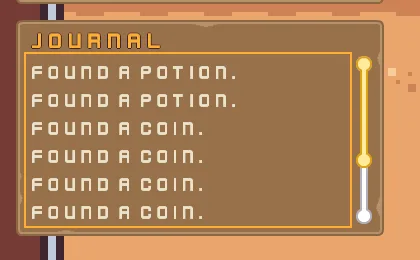
The ring is drawn round the view once a key has moved the focus, so the picture was taken after the up arrow. The arrow scrolled the view back to its first lines, and the thumb of the scrollbar followed it. A further press at the top moves the ring on, to the bag’s slots if the bag is open beside it.
A Scroll view does one more thing for the ring. When the ring walks to a control inside a view, the view scrolls the least that shows it, measured from where the view already is, and Tab does so on the same frame. The journal holds only lines, so it has no control for the ring to walk to, and the arrows scroll it as above.
A slot with no name
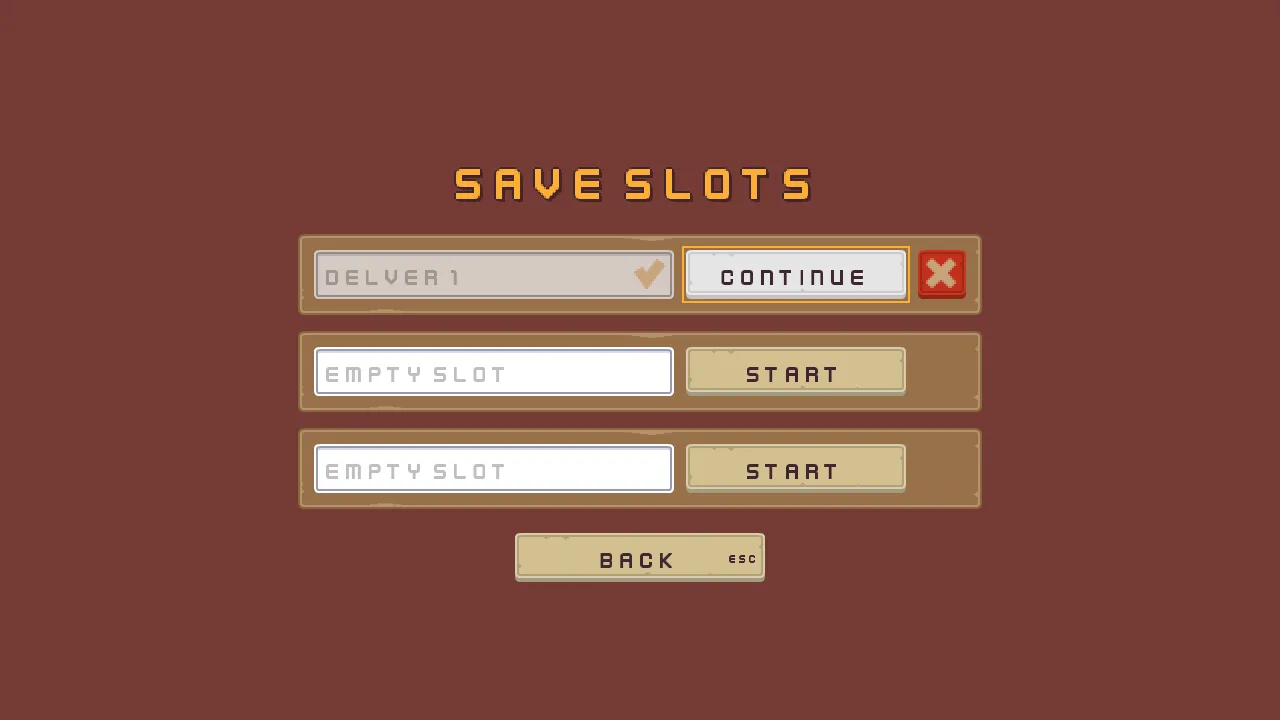
A save slot starts a new game under the name typed in its field, and a pad types nothing. Now a slot started with no name typed is started all the same: it saves a number, slot1.started, as 1, and its field shows Delver and the slot’s number, in the game’s language, as the hint the field shows while it is empty.
- In Assets, open
scenes/slots.ron. Selectslot_1_nameand set its Focus Down toslot_1_play. Setslot_2_name’s toslot_2_playandslot_3_name’s toslot_3_play. A key down from a free field now reaches its own Start, which is the button a pad presses. - On each of the three fields, open the Localized Text’s Substitutions, press the plus, and set the entry’s Name to
nand its Value to the slot’s number:1,2and3. - Open Language → Edit tables… and add the key
slots.default_name:Delver {n}in English andAventurier {n}in French. Press Save. - In the Code panel, replace the text of
slot_name.rgs,load_slot.rgs,delete_dialog.rgsandshown_by_slot.rgswith the scripts below, saving each.
/// A save slot's name field. While the slot is in use it shows the name the
/// slot was started under, and takes no typing, so the name stays the slot's
/// until Delete frees it; then it empties for a new name. A slot started with
/// no name typed shows the game's own name for it as the field's prompt,
/// Delver and the slot's number, in the game's language.
component SlotName {
    /// The slot it names: 1, 2 or 3.
    slot: f32 = 1.0,
    /// Whether it showed the slot's name on the last step, so that it empties
    /// once, as the slot is freed, and not on every step a new name is typed.
    #[hidden]
    in_use: bool = false,

    fn loop() {
        let saves = "slot" + text(slot) + ".";
        let name = saved_text(saves + "name", "");
        // Started with no name typed: in use, with nothing in the field.
        let started = saved_number(saves + "started", 0.0) == 1.0;
        if name != "" || started {
            set_text("TextEntryComponent", "text", name);
            set_flag("TextEntryComponent", "disabled", true);
            in_use = true;
        } else if in_use {
            set_text("TextEntryComponent", "text", "");
            set_flag("TextEntryComponent", "disabled", false);
            in_use = false;
        }
        // The prompt an empty field shows is a key in the string tables, which
        // the Localized Text beside this script writes in the game's language:
        // Empty slot while the slot is free, and once it is started with no
        // name typed, its default name, whose {n} the Localized Text's
        // substitution named n fills with the slot's number.
        if started && name == "" {
            set_text("LocalizedTextComponent", "placeholder", "slots.default_name");
        } else {
            set_text("LocalizedTextComponent", "placeholder", "slots.empty");
        }
    }
}
A script cannot read a string table’s words, so this one chooses a key instead. The Localized Text beside it writes the words in the game’s language into the field’s hint, and fills the {n} from the substitution named n. That is why the name is a hint, not typed text: the field stays empty and locked, and the hint is drawn in the prompt colour.
/// A save slot's Start or Continue button, which opens the delve on the slot's
/// run. A slot in use carries on the run the shrine last saved in it. A free
/// slot starts a new game, by this button or by Enter in its field, under the
/// name typed in the field; with nothing typed, as a pad player types nothing,
/// it starts under the game's own name for the slot, which its field then
/// shows. The game keeps each slot's saves under its own prefix: slot1. for
/// the first, slot2. and slot3. for the others.
component LoadSlot {
    /// The slot it opens: 1, 2 or 3.
    slot: f32 = 1.0,
    /// The health a new game starts with.
    start_health: f32 = 10.0,

    fn loop() {
        let saves = "slot" + text(slot) + ".";
        // Its slot's name field reports under slot_1_name, slot_2_name or
        // slot_3_name, and this button under slot_1_play and so on.
        let field = "slot_" + text(slot) + "_name";
        let name = saved_text(saves + "name", "");
        // A slot is in use while it has a name, or once it was started with
        // none typed, which keeps started as 1.
        let in_use = name != "" || saved_number(saves + "started", 0.0) == 1.0;
        // Its word is the string tables' slots.start while the slot is free
        // and slots.continue once it is in use: this chooses the key, and the
        // Localized Text beside it writes the word in the game's language.
        if !in_use {
            set_text("LocalizedTextComponent", "key", "slots.start");
        } else {
            set_text("LocalizedTextComponent", "key", "slots.continue");
        }

        // A click on this button, or Enter or a pad's South while it holds
        // the focus, presses its action, and Enter in the name field presses
        // the field's, each on the game's next step.
        let typed = entered(field);
        if pressed("slot_" + text(slot) + "_play") || pressed(field) {
            if !in_use && typed != "" {
                // A new game: the slot is the name's from now on.
                save_text(saves + "name", typed);
            } else if !in_use {
                // A new game with no name typed: the slot is in use from now
                // on, under the name its field shows, Delver and its number,
                // in the game's language.
                save_number(saves + "started", 1.0);
            }
            // The slot's run, kept where the delve reads it. What the shrine
            // never saved reads as a new game's, and a free slot holds no
            // saves at all, since Delete forgets them: so a new game, or a
            // run that never rested at the shrine, starts at full health with
            // nothing carried, nothing in the journal, every pickup back in
            // the room and the door shut.
            keep_number("health", saved_number(saves + "health", start_health));
            keep_number("potions", saved_number(saves + "potions", 0.0));
            keep_number("elixirs", saved_number(saves + "elixirs", 0.0));
            keep_number("keys", saved_number(saves + "keys", 0.0));
            keep_number("gems", saved_number(saves + "gems", 0.0));
            keep_number("coins", saved_number(saves + "coins", 0.0));
            keep_number("haste", saved_number(saves + "haste", 0.0));
            for i in 1..5 {
                let kept = "hotbar_" + text(i);
                keep_number(kept, saved_number(saves + kept, 0.0));
            }
            for i in 1..17 {
                let kept = "bag_" + text(i);
                keep_number(kept, saved_number(saves + kept, 0.0));
            }
            for i in 1..21 {
                let kept = "journal_" + text(i);
                keep_number(kept, saved_number(saves + kept, 0.0));
            }
            keep_number("journal_count", saved_number(saves + "journal_count", 0.0));
            // And the room as the run left it: each pickup taken, which stays
            // gone, and the door, which opens itself if it was opened.
            for i in 1..13 {
                let kept = "taken_" + text(i);
                keep_number(kept, saved_number(saves + kept, 0.0));
            }
            keep_number("door_open", saved_number(saves + "door_open", 0.0));
            // No rest taken at the shrine yet, and nothing being inspected.
            keep_number("rests", 0.0);
            keep_number("inspect", 0.0);
            // The slot the run is played in, where the shrine saves it and
            // the way out marks it done.
            keep_number("slot", slot);
            // Loaded here, before the delve opens, so everything in it starts
            // on the slot's run: the hero on its health, and the journal's
            // keeper taking what the journal holds as already written.
            play_sound("click");
            change_scene("delve");
        }
    }
}
pressed("slot_1_play") is true on the game’s next step after the button is clicked and let go, or after Enter or the pad’s South while it holds the ring. pressed("slot_1_name") is true on the game’s next step after Enter in the name field. entered("slot_1_name") reads the text typed in the field as the step began, on every step. A slot with nothing typed saves started instead of a name, and the slot is in use from then on.
/// The question a save slot's Delete asks: Delete forgets everything the slot
/// keeps, its name and its run, and Keep, or Escape, keeps it.
component DeleteDialog {
    /// The slot whose Delete asked: 1, 2 or 3, or 0 while nobody asks.
    #[hidden]
    asking: f32 = 0.0,

    fn loop() {
        // A click on a slot's Delete, or Enter while it holds the focus,
        // presses slot_1_delete, slot_2_delete or slot_3_delete on the game's
        // next step.
        for i in 1..4 {
            if pressed("slot_" + text(i) + "_delete") {
                asking = i;
                show();
            }
        }
        // A click on an answer, or Enter on the one the arrows chose, presses
        // its action; Escape presses the Cancel Action, keep_slot.
        if pressed("keep_slot") {
            asking = 0.0;
            hide();
        }
        if pressed("delete_slot") {
            // Every key the slot keeps, forgotten: the name, or the mark of a
            // slot started with none, which frees the slot, what the way out
            // marked, and what the shrine saved of the run and the room.
            let saves = "slot" + text(asking) + ".";
            forget(saves + "name");
            forget(saves + "started");
            forget(saves + "done");
            forget(saves + "health");
            forget(saves + "potions");
            forget(saves + "elixirs");
            forget(saves + "keys");
            forget(saves + "gems");
            forget(saves + "coins");
            forget(saves + "haste");
            for i in 1..5 {
                forget(saves + "hotbar_" + text(i));
            }
            for i in 1..17 {
                forget(saves + "bag_" + text(i));
            }
            for i in 1..21 {
                forget(saves + "journal_" + text(i));
            }
            forget(saves + "journal_count");
            for i in 1..13 {
                forget(saves + "taken_" + text(i));
            }
            forget(saves + "door_open");
            asking = 0.0;
            hide();
        }
    }
}
pressed("slot_1_delete") is true on the game’s next step after a click on that slot’s Delete, or Enter while it holds the focus. pressed("keep_slot") and pressed("delete_slot") are true on the next step after a click on an answer, or Enter on the one the arrows chose, and Esc presses the dialog’s Cancel Action, keep_slot. Delete forgets started too, which frees a slot that never had a name.
/// Shows this node only while its save slot has something to show: the Delete
/// button while the slot is in use, and the check once the slot's run has
/// reached the way out.
component ShownBySlot {
    /// The slot it belongs to: 1, 2 or 3.
    slot: f32 = 1.0,
    /// Whether it waits for the run to be done, as the check does, rather than
    /// only for the slot to be in use, as the Delete button does.
    when_done: bool = false,

    fn loop() {
        let saves = "slot" + text(slot) + ".";
        // A slot is in use while it has a name, or once it was started with
        // none typed, which keeps started as 1, and its run is done once the
        // way out has saved done as 1.
        let shown = saved_text(saves + "name", "") != "";
        if saved_number(saves + "started", 0.0) == 1.0 {
            shown = true;
        }
        if when_done {
            shown = saved_number(saves + "done", 0.0) == 1.0;
        }
        if shown {
            show();
        } else {
            hide();
        }
    }
}
A slot started with no name counts as in use, so its Delete button shows.
Room for Échap
A Shortcut draws its key inside its button, and looks the key’s name up in the game’s string table under key. and the key, so Escape is key.Escape. With no entry it draws the built-in label. Esc reads Esc in English. In French it reads Échap, which is longer, and it ran into the word on four buttons: Quit on the title, Back on the settings and the slots, and Resume on the pause screen.
- Open Language → Edit tables… and add the key
key.Escape:Escin English andÉchapin French. Press Save. - In
scenes/title.ron, selecttitle_frameand set its Rect Offset Min to-150,320and Offset Max to150,531. Its Stack gives each button the width less20on each side, now260. - In
scenes/settings.ron, selectbackand set Offset Min to-125,-73and Offset Max to125,-24. Inscenes/slots.ron, selectbackand set Offset Min to-125,173and Offset Max to125,222. Both are250wide. - In
scenes/delve.ron, selectpause_frameand set Offset Min to-180,-45and Offset Max to180,105. Its buttons are320wide.
The pad, the reach, Move, the default name and the wider screens
The pad bindings
| Action | Pad control, as the Input window spells it | What it does |
|---|---|---|
ui_up | D-Pad Up, Left Stick Up | Moves the ring up |
ui_down | D-Pad Down, Left Stick Down | Moves the ring down |
ui_left | D-Pad Left, Left Stick Left | Moves the ring left |
ui_right | D-Pad Right, Left Stick Right | Moves the ring right |
ui_accept | A, South | Presses the control that has the ring |
ui_cancel | B, East | Backs out one layer |
bag | Y, North | Opens and shuts the bag |
journal | X, West | Opens and shuts the journal |
pause | Start | Pauses the game |
use_1 | Left Shoulder | Uses the hotbar’s first slot |
use_2 | Right Shoulder | Uses its second |
use_3 | Left Trigger | Uses its third |
use_4 | Right Trigger | Uses its fourth |
move | the D-pad composite and the left stick composite, added last | Walks the hero |
The reach
| Node | Component | Field | Value |
|---|---|---|---|
hud | Focus | Mode | None |
| Subtree Focus | Deny | ||
| Canvas Group | every field | as it comes | |
bag, journal | Focus | Mode | None |
| Subtree Focus | Allow | ||
empty_dialog, inspect_dialog | Focus | Mode | All, as it comes |
| Subtree Focus | Allow | ||
hotbar_1 to hotbar_4 | Focus | removed | |
bag_1 to bag_16, drop_button, journal_view | Focus | Mode | All |
bag_13, bag_14 | Focus | Down | drop_button |
bag_1_label to bag_16_label | Text | Text | Bag slot 1 to Bag slot 16 |
| Scale | 0.625 | ||
| Align | Center | ||
| Localized Text | Key | bag.slot | |
| Substitutions | Name n, Value 1 to 16 | ||
| the node | the Hierarchy’s eye | hidden |
Move
| Node | Component | Field | Value |
|---|---|---|---|
bag_1 to bag_16 | Pop-up Menu | Items, second row | Label Move, Action bag_1_move to bag_16_move, Enabled ticked, Shortcut KeyM |
| Localized Text | Options, second entry | menu.move | |
bag | Mover | every field | as it comes |
bag_1_item to bag_16_item, hotbar_1_item to hotbar_4_item | SlotPicture | Carried | 0.4 |
The slot with no name
| Node | Component | Field | Value |
|---|---|---|---|
slot_1_name to slot_3_name | Focus | Down | slot_1_play to slot_3_play |
| Localized Text | Substitutions | Name n, Value 1 to 3 |
Room for Échap
| Scene | Node | Offset Min | Offset Max |
|---|---|---|---|
title.ron | title_frame | -150, 320 | 150, 531 |
settings.ron | back | -125, -73 | 125, -24 |
slots.ron | back | -125, 173 | 125, 222 |
delve.ron | pause_frame | -180, -45 | 180, 105 |
The new keys
| Key | English | French |
|---|---|---|
bag.slot | Bag slot {n} | Case {n} du sac |
key.Escape | Esc | Échap |
menu.move | Move | Déplacer |
slots.default_name | Delver {n} | Aventurier {n} |